super-token-saver
Health Gecti
- License — License: Apache-2.0
- Description — Repository has a description
- Active repo — Last push 0 days ago
- Community trust — 31 GitHub stars
Code Uyari
- fs module — File system access in hooks/statusline-version-check.sh
Permissions Gecti
- Permissions — No dangerous permissions requested
This tool is a Claude Code plugin designed to manage context windows, track token spending in real-time, and prevent expensive cache re-sends when the prompt cache expires.
Security Assessment
The tool does not request any explicitly dangerous permissions. The overall risk is Medium. The primary concern is file system access detected in a shell script (`hooks/statusline-version-check.sh`), which could be used to read local files or execute commands depending on how it is configured. The tool does not appear to make external network requests or contain hardcoded secrets. Because it operates as a local plugin managing session behavior, you should still review the shell scripts before running them to ensure you are comfortable with the automated actions being injected into your development environment.
Quality Assessment
The project appears to be actively maintained, with its most recent push occurring today. It uses the permissive and standard Apache-2.0 license. However, community trust is currently very low; it only has 10 GitHub stars, indicating it has not been widely adopted or extensively peer-reviewed by the broader developer community.
Verdict
Use with caution — the code is active and licensed properly, but the low community adoption and file system access in shell scripts warrant a manual review of the repository before installation.
Restore prior Claude Code AND Codex sessions with zero LLM calls. Cross-tool session handoff, cache-expiry prevention, real cost dashboard. One plugin, both hosts.
super-token-saver
The only Claude Code plugin that actually reads CC's source code to find where your tokens go — and fixes it automatically. Spend less, code longer.
Measured result: 45% cost reduction on a real $326/day workload → $180/day. Cache expiry prevention, automatic SubTask delegation, zero-cost context restoration, and a full analytics dashboard — in one install, zero config.
Works with Max Plan ($200/mo) and API pay-per-use. Same plugin, same features. Stronger for every user — especially when every token is real money.
What it does in 30 seconds
| Feature | What happens | Impact |
|---|---|---|
| 🛡️ Token Guardian | Detects cache expiry, blocks $9 re-sends before they happen | Prevents the #1 silent cost spike |
| 🧠 Session Architect | Auto-delegates to SubTasks (37.5% cheaper) + parallelizes tool calls to cut round-trips | Context stays small, round-trips drop, costs compound down |
| 🪶 Concise Mode | Decision-focused responses: essential context + choices, nothing else | Fewer output tokens, faster user decisions |
| 🔄 /s-continue | Replaces /compact — zero LLM calls, zero cost, zero info loss, and it restores Codex sessions too | Free context restoration across both tools |
| 🤝 /s-compact | Writes a session handoff /s-continue auto-loads — captures subagent findings & tool results the transcript loses | Next session resumes with the hidden context too |
| 📊 Status Line | Real-time cost, context size, rate limit — under 50ms | See problems before they cost you |
| 📈 /usage-view | Interactive HTML dashboard with AI-powered analysis | Full cost forensics in one click |
| ✂️ /setup-git-lite | Removes 2,200 hidden tokens CC injects every session | ~$48/mo saved on git instructions alone |
😤 The Problem
Cache expiry. You come back from lunch. Cache is gone. One prompt re-sends 900K tokens at full price. $9 in a single shot.
Invisible costs. No real-time visibility. No "your context is at 800K" warning. No "cache expired 3 minutes ago" alert. You find out after the damage is done.
Context bloat. The same prompt at 200K vs 800K context costs 4x more. Every Read, Grep, Edit re-sends the full context. One complex prompt triggers 15+ API calls, each multiplied by your context size.
All manual. Context management, cache expiry timing, SubTask delegation, session cleanup. Nobody can track all this while actually coding.
Max Plan ($200/mo)? All of the above, plus a 5-hour rate limit that kills your flow with no timer and no ETA.
API pay-per-use? All of the above, except there's no ceiling. One cache miss = $9 of real money. Ten times a week = $360/mo on accidents alone. A bad Tuesday with bloated context can cost more than a Max Plan subscriber pays in a month.
super-token-saver handles all of it automatically. Install once. Done.
🚀 Installation
/plugin marketplace add ww-w-ai/marketplace
/plugin install super-token-saver@ww-w-ai
Works automatically after install. Zero config. Requires Claude Code v2.1.71+.
For live monitoring:
/setup-statusline install
To trim 2,200 hidden tokens from CC's built-in git instructions (details):
/setup-git-lite install
🛡️ Feature 1: Token Guardian
Detects cache expiry and automatically blocks expensive re-sends.
Claude Code's prompt cache TTL is 1 hour. Step away for more than an hour and the cache expires. Your next message re-sends the entire context at full price. At 900K tokens, that's $9 in one shot.
Token Guardian tracks when the last response was received. If more than 3,590 seconds have passed (TTL minus 10-second buffer), it blocks the prompt and shows a warning.
🚨 Cache expired (68m 23s idle)

The prompt cache has expired. Continuing will resend the full context.
Cost may increase significantly.

👉 /context — Check current context usage before deciding
👉 /clear → /s-continue — Reset, then restore previous context (recommended, cheapest)
👉 Re-send — Continue as-is (full re-cache cost incurred)
Just re-send the same prompt after the warning -- it goes through. The warning only fires once per idle period, so it never nags. Warning messages display in 23 languages based on your OS locale.
Background agents are never blocked. Only what a human types gets the warning. Completion reports from background agents and tasks -- which now routinely arrive more than an hour after they were launched -- pass straight through, so a long-running agent's result is never held up or lost.
Result: Every cache expiry caught = $9 saved. At one catch per day, that's $270/mo of pure waste eliminated.
If you're on API pay-per-use, this hits harder. Max Plan subscribers lose $9 inside a $200 buffer. You lose $9 of real money — silently, repeatedly, every time you step away. Token Guardian catches it every time.
🧠 Feature 2: Smart Session Architecture
Install it and cost-optimized work patterns kick in automatically.
Most users do everything in the Main session. File reads, code generation, test runs. Every output piles into context and is re-sent with every message. The session bloats. Costs snowball.
Session Architect automatically injects two cost strategies at session start:
1. SubTask delegation — heavy work runs in SubTasks with smaller context and cheaper cache.
| Main Session | SubTask | |
|---|---|---|
| Role | Design, decisions, review | Implementation, code gen, multi-file |
| Cache tier | 1 hour (ephemeral_1h) | 5 min |
| Cache write cost | $10/MTok | $6.25/MTok |
| Context size | ~94K avg | ~33K avg |
2. Round-trip minimization — total cost = context size × round-trips. Each round-trip re-reads the entire conversation. 5 sequential tool calls on 50K context = 250K cache-read tokens. Parallelize into 2 round-trips = 100K — 60% saved, same output. The injected rules enforce parallel tool bundling, batch planning, early-exit, and SubTask absorption.
Result: Context stays under 250K instead of growing to 600K+. Round-trips cut by parallelization. Same work output, compounding cost reduction. Fully automatic.
🪶 Concise Mode
Decision-focused responses. On by default.
Verbose responses hurt user decisions — long text buries the signal, forces re-reading, and slows the loop. The SessionStart hook injects response rules in every session and every model — no flags, no setup.
- 1-3 sentences default — exceeds only when the user explicitly asks for detail
- Essential context + actionable choices only — everything the user can infer gets cut
- Bullets by default — prose only for causal reasoning
- Hard bans — restatements, meta-narration ("Let me…"), trailing summaries, hedging filler, agreement→auto-expansion, unrequested table dimensions, code before direction is confirmed
- Depth on demand — summarize first, offer to go deeper ("Want me to detail X?")
Install once, applies everywhere.
🔄 Feature 3: /s-continue — Context Restoration
Replaces /compact. Zero LLM calls. Zero token cost. Zero information loss.
/compact sends your entire context (~1M tokens) to the LLM to compress it into a 3.3% summary. If the cache has expired, that alone triggers a full re-cache. Information loss is inevitable.
/s-continue takes a completely different approach. It preprocesses the previous session transcript and loads it directly. No LLM call. No cost. The original conversation is restored as-is.
| /compact | /s-continue | |
|---|---|---|
| How it works | Sends full context to LLM for summary | Preprocesses transcript, reads directly |
| LLM calls | Required (typically 100K+ tokens) | 0 |
| Token cost | High | 0 |
| Information loss | Yes (3.3% summary) | None (original preserved) |
| Processing speed | Tens of seconds | < 1 sec (even 60MB+ files) |
| When cache is expired | Full re-cache cost on top | No impact |
| Multi-session restore | Not possible | Supported |
Usage: /clear then /s-continue. You'll see a list of previous sessions. Pick one to restore. For quick recovery: /s-continue last.
Result: Resume previous work at zero cost. No information loss. Processes 60MB+ transcripts in under 1 second.
🤝 Its pair: /s-compact — hand off the hidden layer
/s-continue restores the transcript — what you and Claude said. But a working session's most
useful knowledge often lives OUTSIDE that dialogue: what a subagent found (its transcript is a
separate file the restore never loads), a decisive number in tool output (a test count, a
benchmark), a lesson learned from the process ("couldn't reproduce headless → it was the build,
not the code").
Run /s-compact at the end of a session and it distills exactly that hidden layer into a
handoff, saved to ~/.claude/super-token-saver-data/<project>/handoff.md. On the next session,/s-continue auto-loads it on top of the restored transcript — no pasting.
/s-continue alone |
/s-compact + /s-continue (the set) |
|
|---|---|---|
| Recovers | The transcript (what was said) | The transcript plus the hidden layer |
| Subagent findings | Lost (separate files) | Distilled into the handoff |
| Tool-output numbers | Only if quoted into the chat | Extracted deliberately |
| Process lessons | — | Captured so dead ends aren't re-run |
The workflow: end a session with /s-compact → start the next with /s-continue.
🔀 Both tools, one history — Codex sessions restore here too
Codex writes its sessions to ~/.codex/sessions/; Claude Code writes to ~/.claude/projects/.
Neither tool reads the other's. So a sprint that ran out of budget in Codex used to be unreachable
from Claude Code, and the reverse.
/s-continue now lists and restores both. A Codex rollout is not handed to a second parser — it is
rewritten into the shape Claude Code writes, one output line per input line, so the same
pipeline serves both and every L{n} marker still addresses the exact line of the original Codex
file. Measured: a 12 MB, 1,540-line rollout preprocesses in 0.13 s.
| Claude Code session | Codex session | |
|---|---|---|
Listed by /s-continue |
Yes | Yes, scoped to the current project |
| Restored at zero LLM cost | Yes | Yes |
L{n} seek into the original |
Yes | Yes — line numbers are the rollout's own |
Context-loss (#0) restore |
/compact, auto-compact |
Codex compaction and thread rollback |
/s-compact handoff |
Shared per project — write it in one tool, load it in the other |
/s-continue codex                    only Codex sessions
/s-continue codex : rust migration   the turns matching a topic, restored in full
Two details that make the difference between a correct list and a plausible-looking wrong one:
Codex's session_id is the thread id, which a spawned subagent inherits, so sessions are keyed
on payload.id and subagent rollouts are filtered out the same way Claude Code's subtask
transcripts already are. And <codex_internal_context source="goal"> is machine-injected, so it is
kept in the restored context but never counted as a turn you typed.
The plugin also installs into Codex — see README-CODEX.md
(한국어 · 日本語 · 简体中文).usage-view, report-limit and setup-statusline remain Claude Code only for now.
📊 Feature 4: Live Status Line
Real-time token/cost monitoring. Under 50ms overhead.
Run /setup-statusline install once and a persistent status bar appears at the bottom of Claude Code.
Normal operation — every metric at a glance, zero context switching:

Rate limit hit — 5H turns red at 102%, countdown shows exactly when you're back, and a one-tap /report-limit action surfaces automatically:
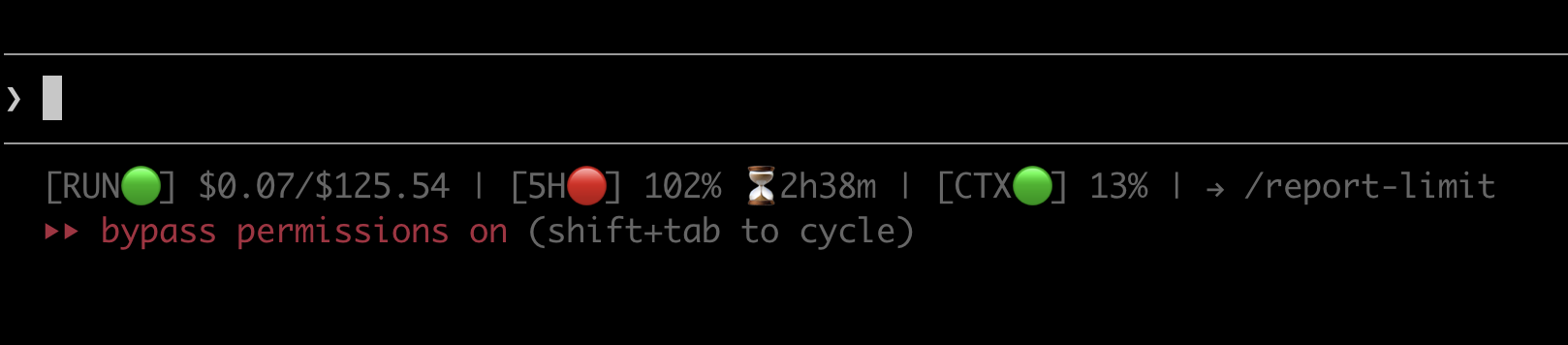
| Indicator | What it shows | 🟢 Normal | 🟡 Warning | 🔴 Critical |
|---|---|---|---|---|
| RUN (delta) | Cost of the last API call | < $0.30 | >= $0.30 | >= $1.00 |
| RUN (cumulative) | Cumulative cost for this folder | — | — | — |
| 5H | 5-hour window usage + reset countdown | < 70% | >= 70% | >= 90% |
| CTX | Context window usage | < 35% | >= 35% | >= 70% |
When any indicator hits warning or critical, a → /usage-view current hint appears automatically.
To remove: /setup-statusline uninstall (previous config auto-restored).
Result: Every cost problem visible in real time. Under 50ms overhead — no perceptible delay.
On API pay-per-use? The 5H and W indicators auto-hide — you don't have rate limit windows. What stays is what matters: RUN (real-time cost per turn) and CTX (context size). The two levers that control your bill, always visible.
📈 Usage Dashboard (/usage-view)
Finally answer: "Where did all that money go?"
Max Plan users hit the rate limit and wonder why. API users open the Anthropic invoice and wonder how. Either way, the question is the same: which session burned the most tokens? When did costs spike? What patterns exist in your usage? Until now — all invisible.
/usage-view shows everything. An interactive HTML dashboard opens in your browser, letting you analyze usage patterns and trace the root cause of cost spikes. No external dependencies. Works standalone. Shareable as a file.
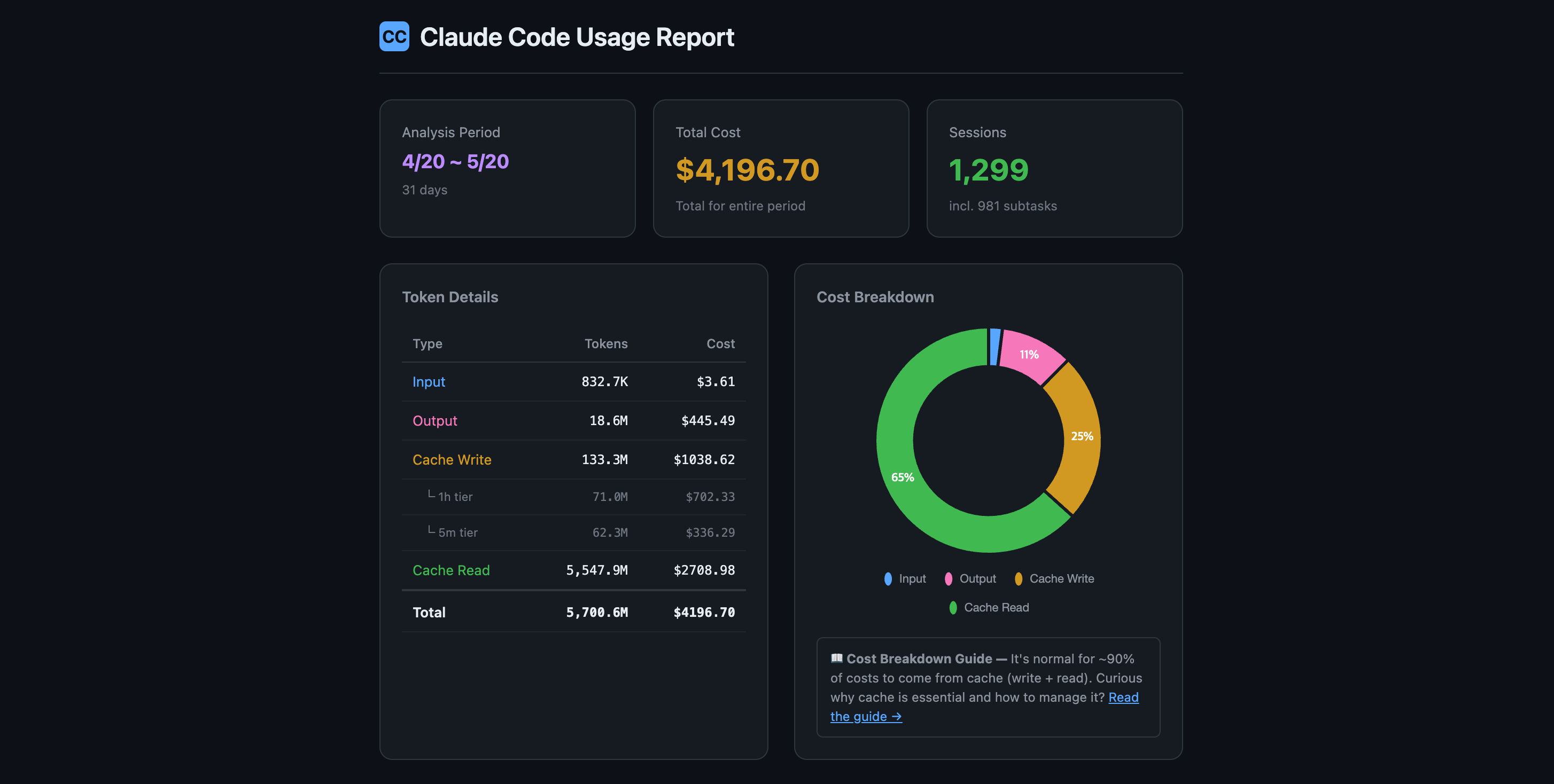
$4,196 in 31 days. Where did it all go? One glance — total cost, token breakdown by type, cache efficiency ratio, and session count. The donut chart instantly shows that 65% of your spend is cache reads (which is normal and healthy):
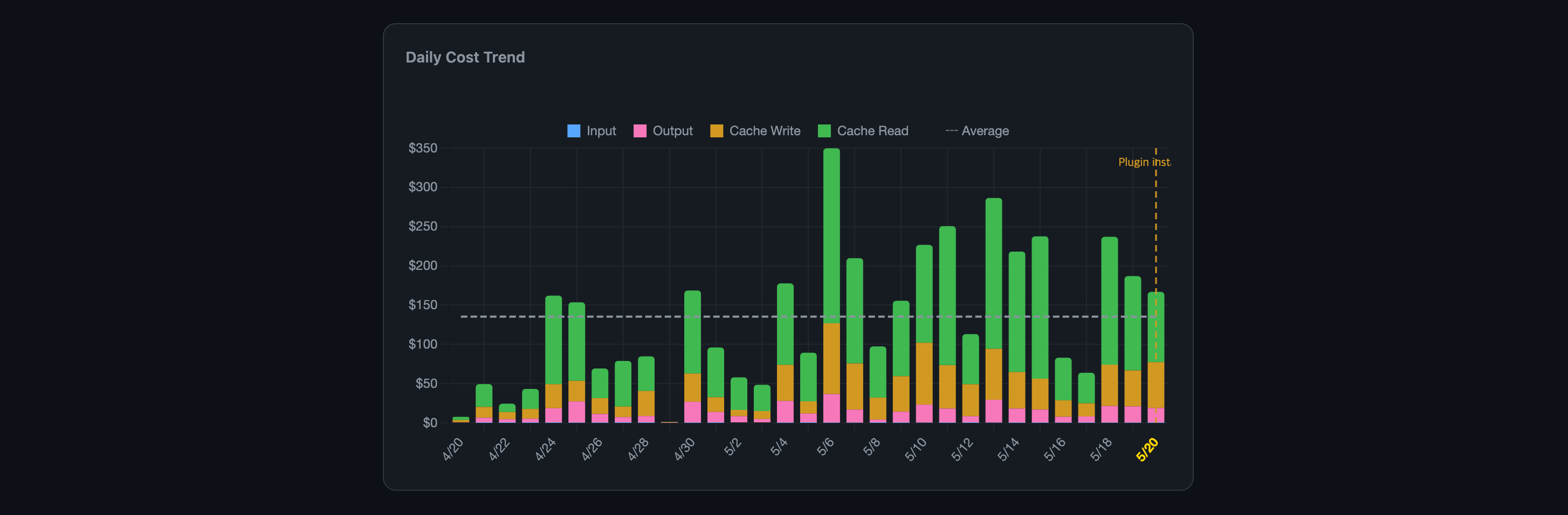
Before vs. after — measured, not guessed. The orange dashed "Plugin installed" marker splits your cost timeline in two. Daily bars are stacked by token type (Input/Output/Cache Write/Cache Read) so you can see exactly which component changed after install. The average line shows the trend:
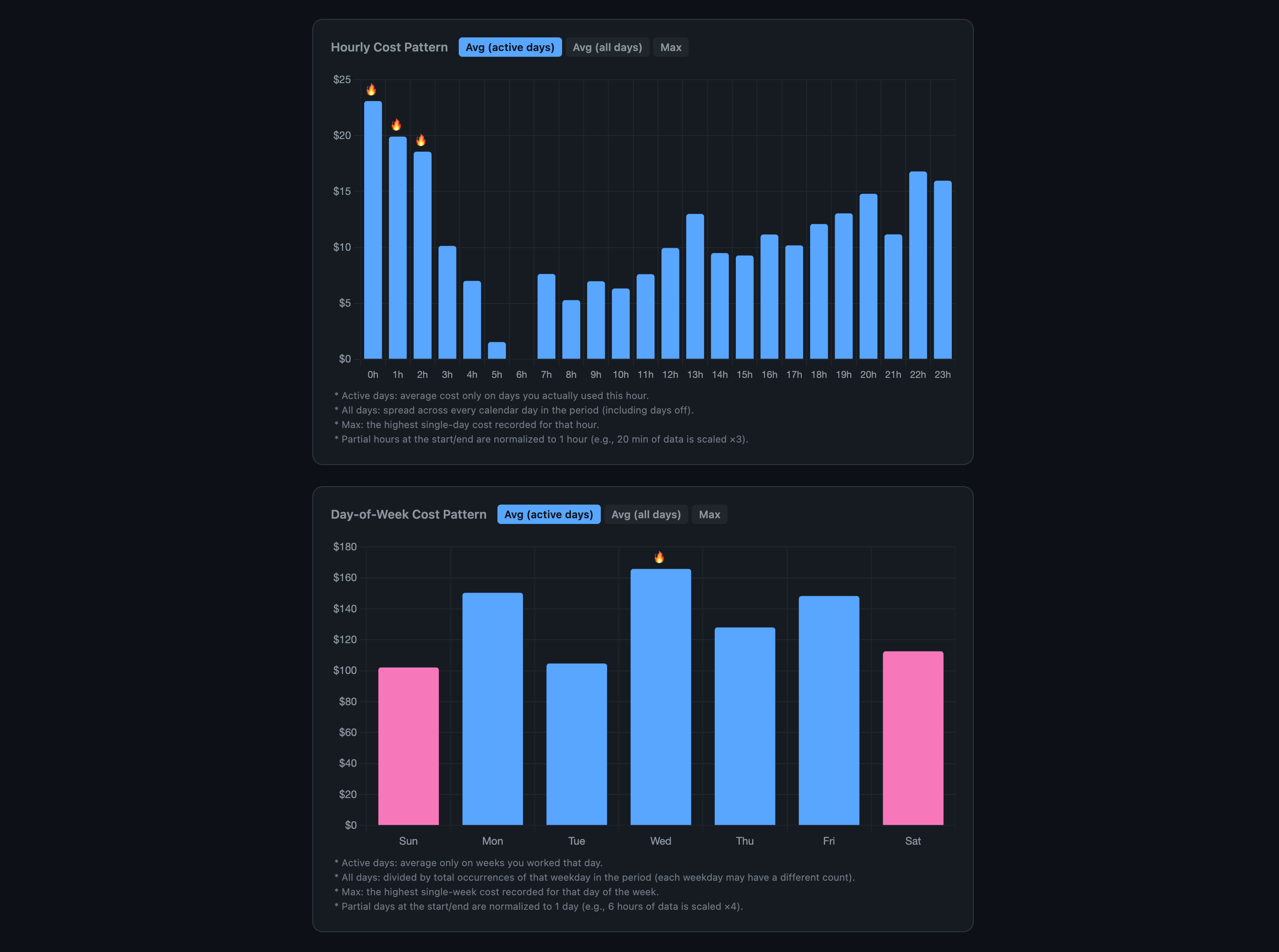
When do you burn the most? Hourly cost by time of day and day-of-week breakdown. Toggle between active-day average, all-day average, or max. Fire icons mark your most expensive hours — visible patterns (late-night binges, Wednesday spikes) jump out instantly:
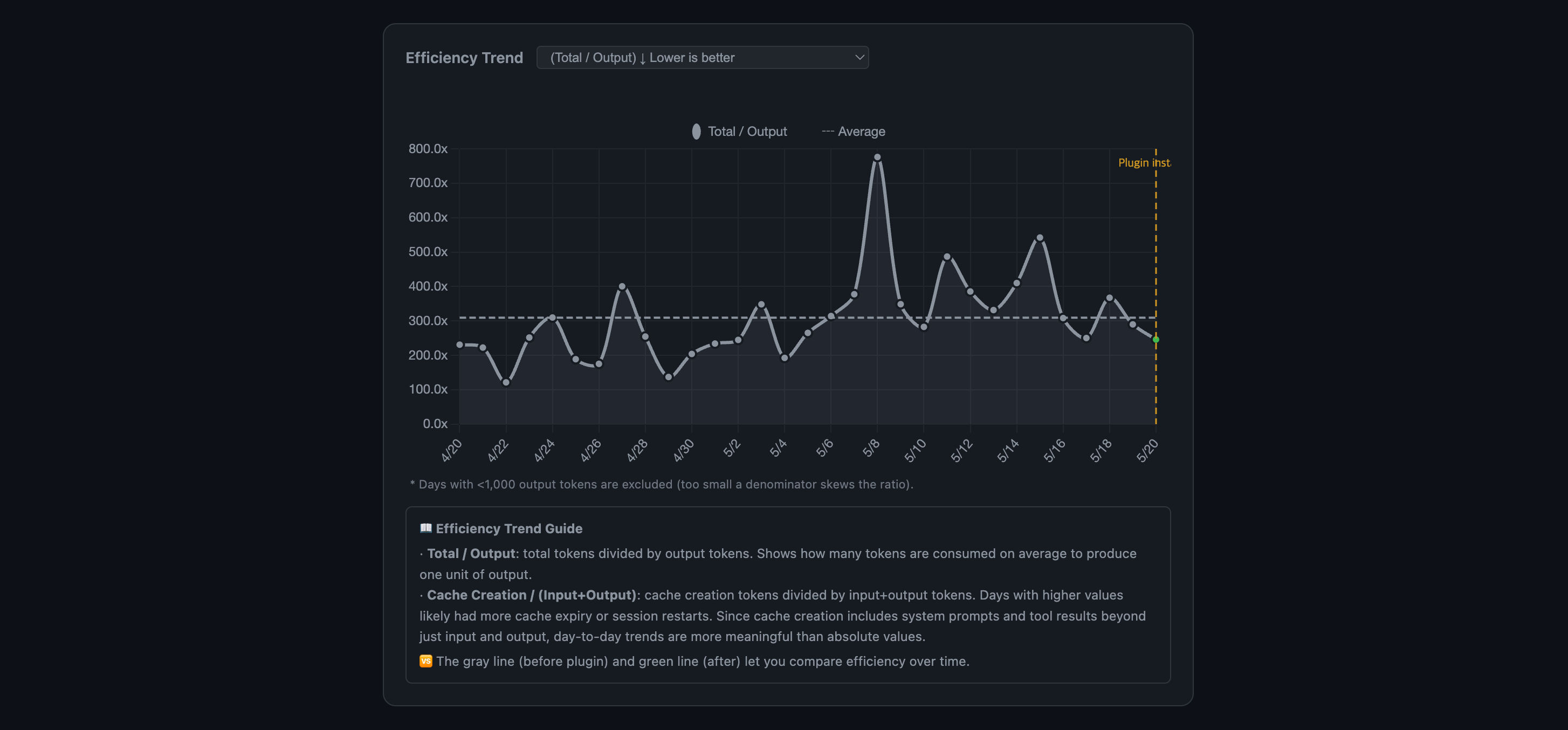
Are you getting more efficient? Total/Output ratio measures how many tokens are consumed per output token produced. Lower is better. The "Plugin installed" marker lets you compare before vs. after. Spikes = cache misses or session restarts:
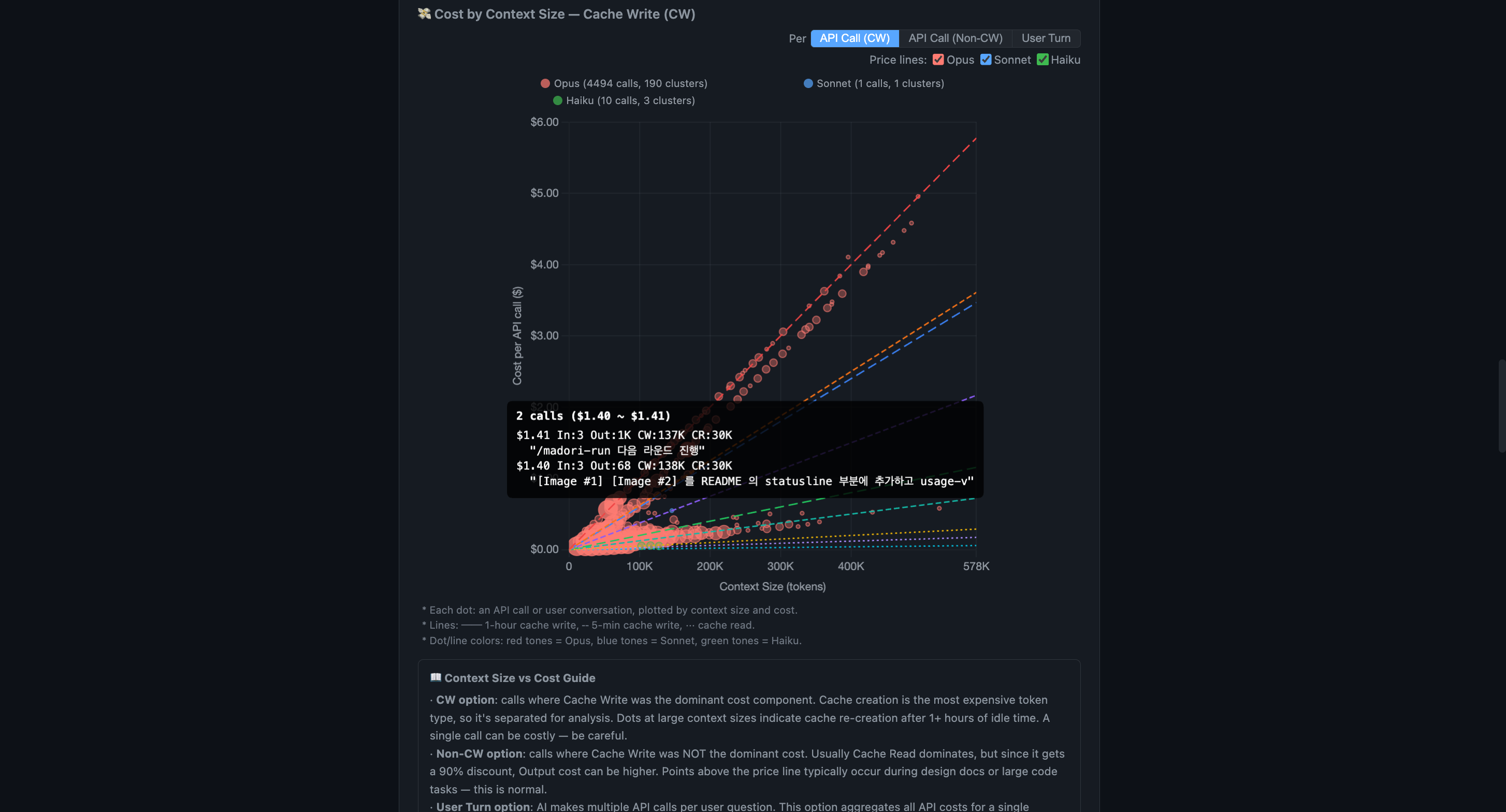
Every API call, plotted by context size and cost. This is the chart that makes cost structure click. Each dot is one API call. Red = Opus, blue = Sonnet, green = Haiku. The dashed lines are theoretical pricing — if your dots sit above the line, you're overpaying. Toggle to User Turn view to see cost per conversation turn instead of per API call.
Hover any dot to see the actual prompt text, token count, and full cost breakdown (Input/Output/Cache Write/Cache Read):
How big are your contexts? Most calls cluster under 250K. The long tail above 350K is where costs explode — this chart shows exactly how often you're in the danger zone:

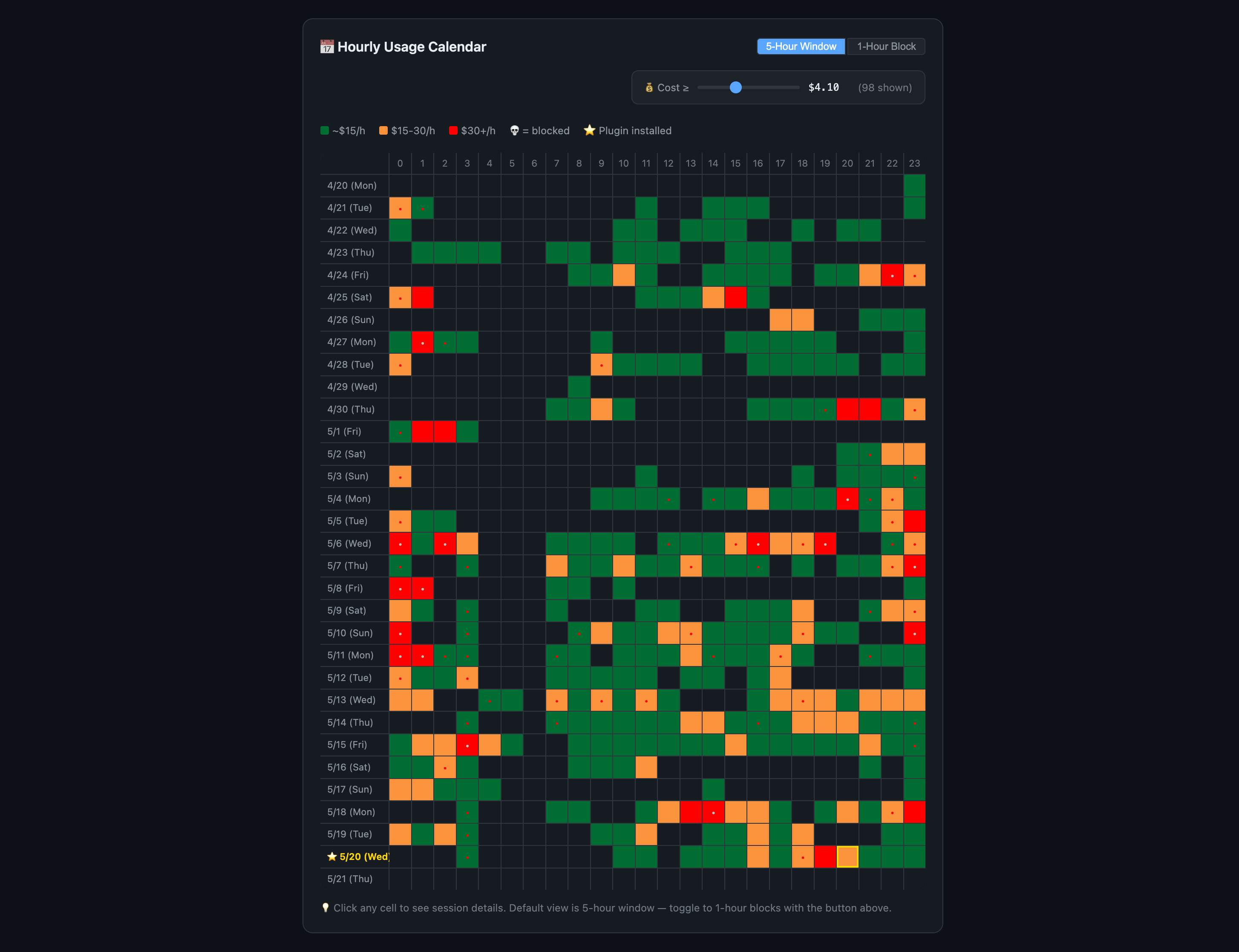
Your coding schedule, priced by the hour. A 5-hour window heatmap across 30 days. Green (<$15/h), orange ($15-30/h), red ($30+/h). The skull icon (💀) marks windows where you hit the rate limit. The cost slider at the top filters out cheap windows so expensive ones pop — drag it to find your worst days instantly. Toggle between 5-hour window and 1-hour block views:
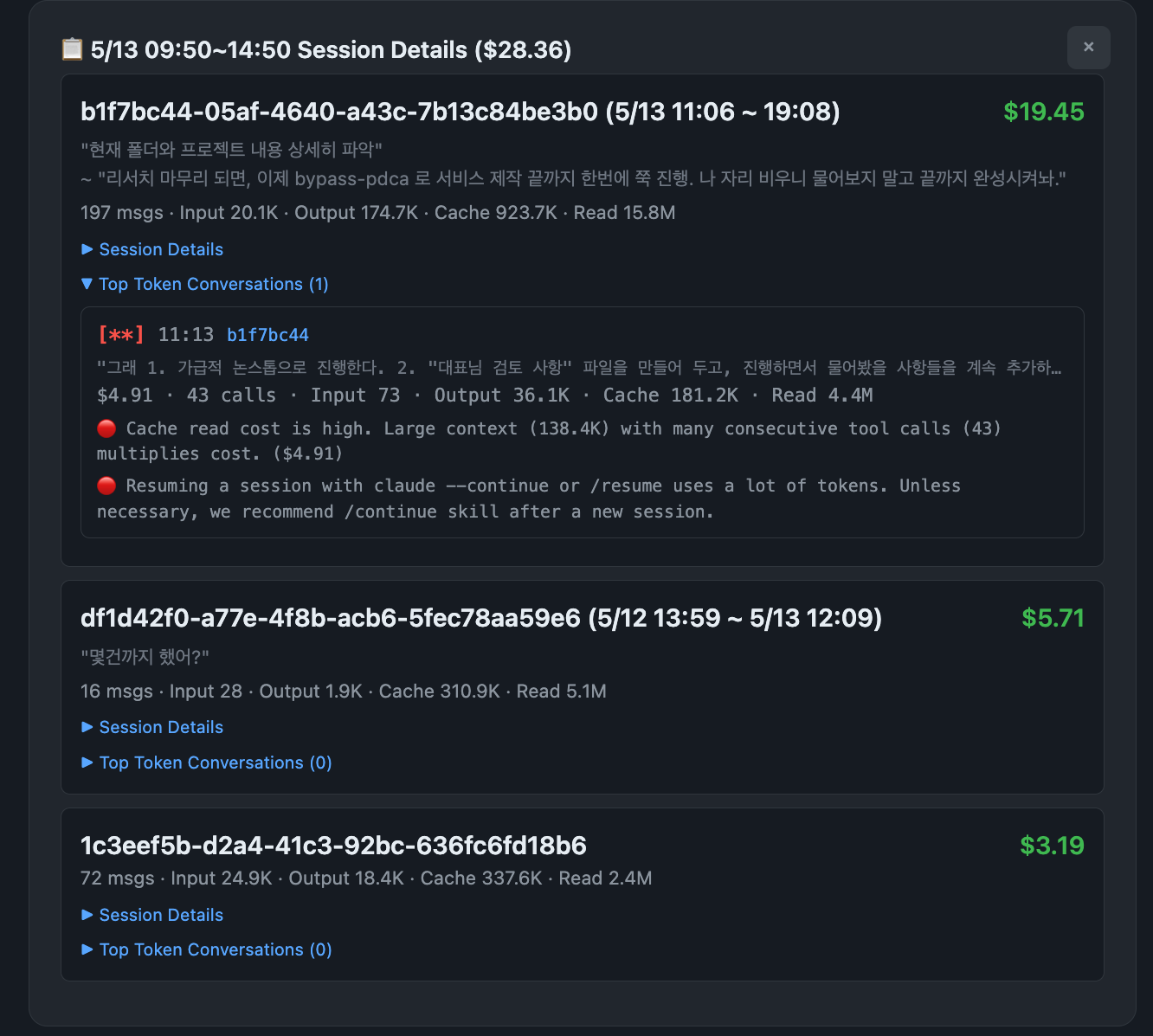
Click any cell to drill into that window's sessions. Every session in that time slot, with cost, message count, token breakdown, and the actual first/last messages from each conversation. Expand "Top Token Conversations" to see which specific exchanges burned the most — each entry shows the prompt text, cost alert tags, and optimization hints:
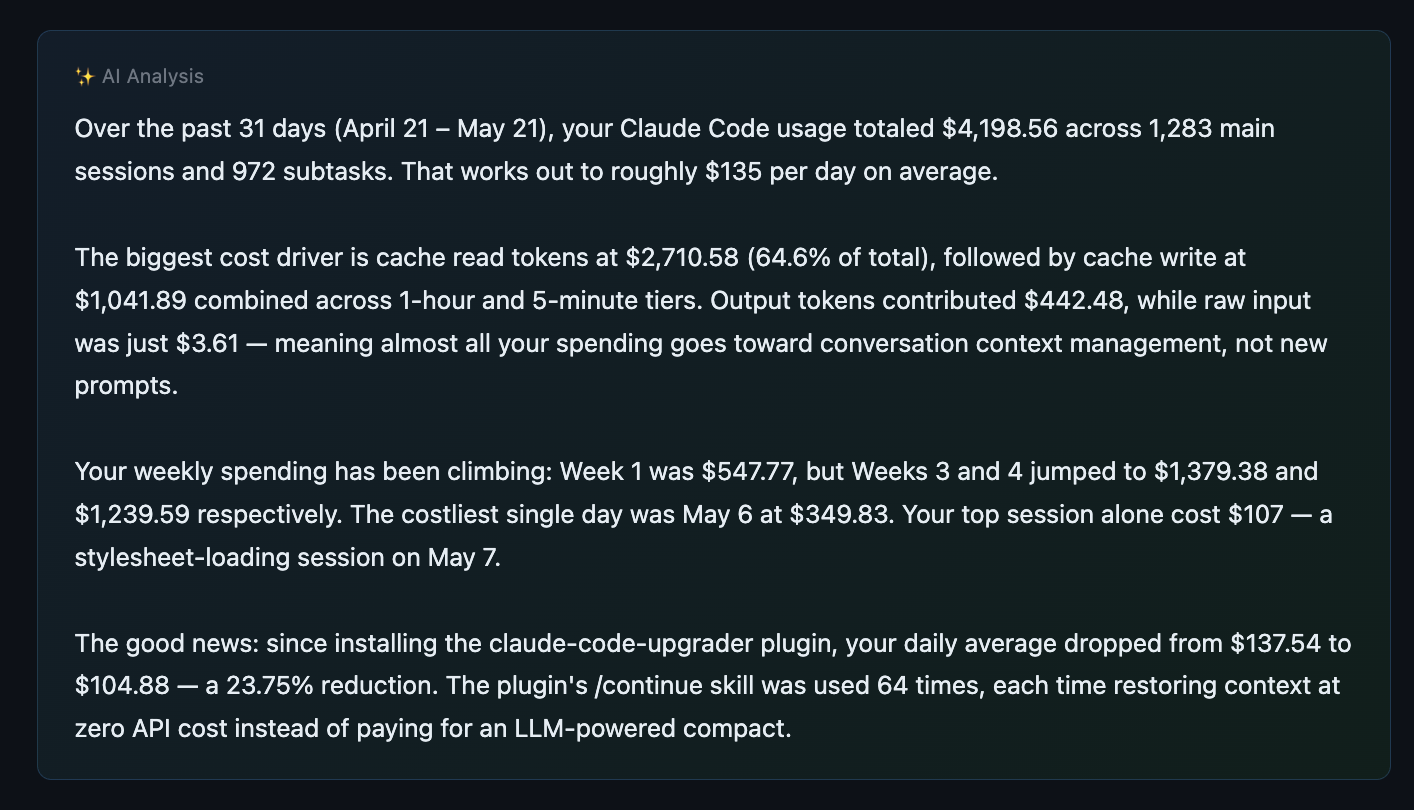
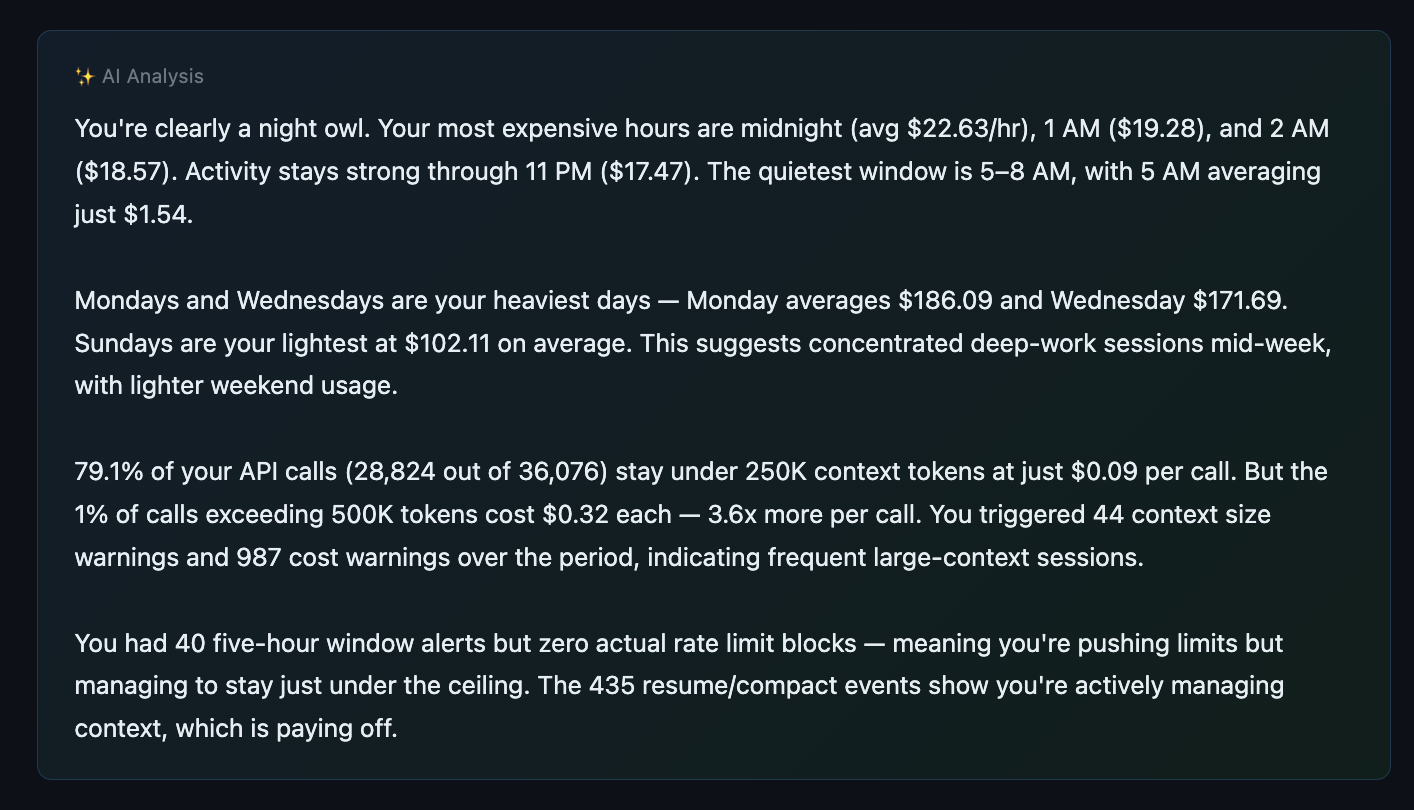
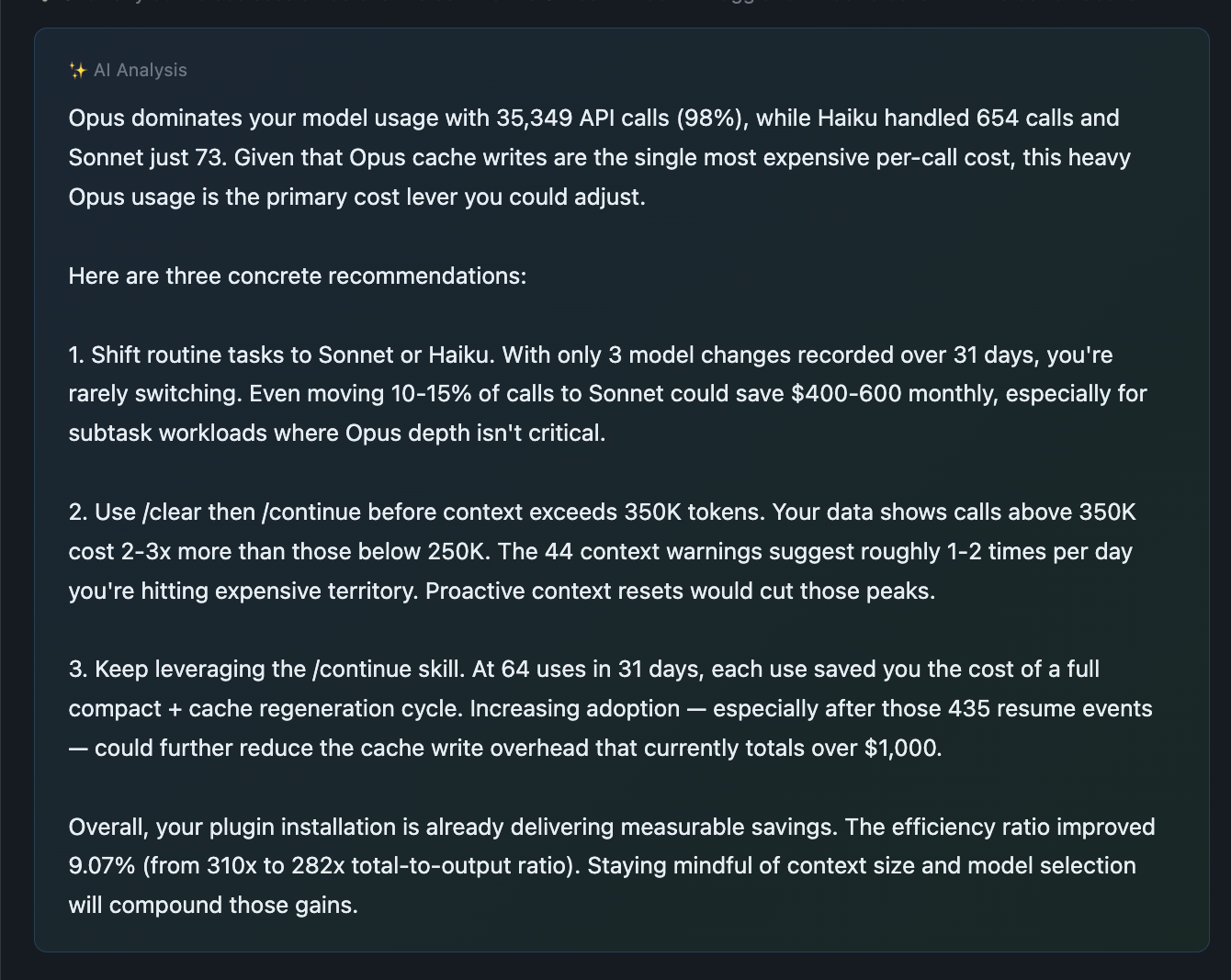
AI-powered analysis (optional). When you run /usage-view without --no-ai, an AI analyst reads your full dashboard data — with API pricing reference baked in — and produces a written report: cost drivers, anomalies, optimization recommendations. Displayed in your OS language automatically (23 languages, RTL included; charts/tables always stay LTR):
Where the money went — total spend, cost drivers by token type, weekly trend, and plugin impact measured in real numbers:
When and how you work — peak hours, busiest days, API call distribution, and rate limit patterns that reveal optimization opportunities:
What to do about it — concrete, data-backed recommendations tailored to your actual usage. Model switching, context management, session strategy:
Share it. The entire dashboard is a single self-contained HTML file — all data embedded, no server needed. Send it to your team, your manager, or your accountant. No external dependencies. Works offline. Use private mode to strip all prompt text before sharing — keeps cost analytics intact while removing conversation content.
/usage-view                  # All time, all projects
/usage-view current          # Current 5-hour window only
/usage-view last 7 days      # Last 7 days
/usage-view locale ja        # Japanese
/usage-view --no-ai          # Skip AI analysis (faster)
/usage-view private          # Strip prompt text (safe to share)
🔬 Rate Limit Research (/report-limit)
Community-driven project to reverse-engineer the rate limit formula.
Anthropic doesn't publish the exact formula for the 5-hour window. Let's figure it out together.
When you hit a rate limit, run /report-limit. Your current usage data is automatically submitted as a GitHub Discussion. The more data we collect, the clearer the formula becomes.
✂️ Feature 5: /setup-git-lite — Trim CC's Built-in Git Instructions
We read Claude Code's source code. We found 2,200 hidden tokens injected every session that you're silently paying for.
The discovery
On 2026-04-12, a GitHub issue revealed that Claude Code's built-in includeGitInstructions setting silently burns tokens every session. Independent reproduction via this gist (spilist) confirmed the numbers: +6,031 tokens in cache writes per session after each git commit, +1,690 tokens in cache reads on every API call.
CC source analysis — where the tokens go
We traced the tokens to two independent injection points in Claude Code source (v2.1.88):
1. gitStatus snapshot (~500 tok) — system prompt
context.ts:36-111getGitStatus()collects branch + main branch + user.name + full status (up to 2000 chars) + recent 5 commits- Joined and appended to system prompt via
appendSystemContext(utils/api.ts:437) - Every new commit, every new modified file, every branch switch changes the text → prefix cache invalidation
2. Commit/PR workflow instructions (~1,700 tok) — Bash tool description
tools/BashTool/prompt.ts:53appends 60+ lines of safety protocol, step-by-step commit procedure, HEREDOC examples, and PR creation templates to theBashtool's description- Cached alongside system prompt, but shipped as
tools[]parameter
Why it's expensive
The cache structure (utils/api.ts:321 splitSysPromptPrefix) has three paths based on whether you have active MCP tools:
- Path A (MCP active — most users):
gitStatussits inside acacheScope: 'org'block. Any change → whole block re-cached on next session start → 6K tokcache_createmiss. - Path B (no MCP):
gitStatusgoes to acacheScope: nulldynamic block, which means it's re-sent as freshinput_tokensevery API call — no cache miss, but no cache savings either. - Path C (3P provider / experimental betas disabled): same as Path A.
In typical interactive sessions, the commit/PR instructions (1.7K tok) accumulate on every API call via cache_read. Over a 100-call session at Opus 4.7 pricing, that's roughly $0.08 per session just for instructions Claude's training already mostly covers.
How super-token-saver handles it
/setup-git-lite disables the native path and injects a curated 280-token replacement via a SessionStart hook. We kept exactly the things that override Claude's default behavior (safety rules), and dropped everything that Claude already knows from training (step-by-step workflows, PR templates, gh usage patterns).
Retained — 11 critical override rules (the ones that flip Claude's default helpfulness into caution):
- Never commit/push/amend/PR/tag/merge without explicit user request
- Never skip hooks, force-push to main/master, run destructive ops, modify git config
- Never commit files matching
.env,credentials,*.pem,secret.* - Avoid
git add -A/git add . - HEREDOC for multi-line commit messages +
Co-Authored-By: Claudetrailer - Never use interactive flags (-i), no empty commits
- If pre-commit hook fails → create a NEW commit (not
--amend)
Dropped — step-by-step commit workflow (3 steps), step-by-step PR workflow (3 steps), PR title/body template, gh command references, -uall flag warning, --no-edit with rebase warning, NEVER use TodoWrite or Agent tools during commit constraint. These are workflow verbosity that Claude composes correctly from training alone.
Added — compact git state line: branch + HEAD short-sha + subject + current status (up to 20 modified files, else a count). No recent commits list (Claude can run git log on demand).
Expected savings (Opus 4.7 pricing, $25/MTok output, $5/MTok input, $0.50/MTok cache read)
| Item | Original | With setup-git-lite | Saved |
|---|---|---|---|
| System prompt load (per new session) | ~2,200 tok cache_create | ~280 tok cache_create | ~1,920 tok |
| Repeat calls in same session | ~1,700 tok cache_read/call | ~280 tok cache_read/call | ~1,420 tok/call |
| 100-call session (Opus 4.7) | — | — | ~$0.11 saved |
| 20 sessions/day × 22 workdays | — | — | ~$48 saved/month |
Usage
/setup-git-lite status     # Read-only diagnostic — current state + what would change
/setup-git-lite install    # Disable CC native + enable our minimal hook
/setup-git-lite revert     # Restore default (aggressive; see below)
/setup-git-lite dismiss-banner    # Silence the occasional recommendation tip
/setup-git-lite undismiss-banner  # Re-enable the tip
/setup-git-lite help       # Full usage
Install semantics
install modifies two places for robustness:
~/.claude/settings.json— adds"includeGitInstructions": false- Shell profile (
~/.zshrc,~/.bashrc, etc.) — appends a marker block exportingCLAUDE_CODE_DISABLE_GIT_INSTRUCTIONS=1
Either one alone is enough to disable CC native; we set both so an environment override doesn't accidentally re-enable the native behavior. The shell change takes effect in new shells only.
Revert semantics — aggressive
revert removes ALL CLAUDE_CODE_DISABLE_GIT_INSTRUCTIONS exports from your shell profile, including any you may have added manually before installing this skill. This is intentional — you ran revert, so we restore the clean default. We always create a timestamped backup of the shell profile first.
If you need the env var for unrelated reasons, note it down before running revert and re-add it after.
Before uninstalling super-token-saver
Run /setup-git-lite revert first, or you'll be left with includeGitInstructions: false in your settings.json but no replacement hook (Claude gets no git guidance at all). Claude Code currently has no plugin uninstall lifecycle hook, so we can't automate this.
Trade-offs
What you lose (and why it's usually fine):
- Claude no longer receives a pre-computed
git status/git log -n 5at session start. If you ask "what's changed?" in a new session, Claude will run those commands itself (one extra tool call, ~300 tok). - Claude no longer sees CC's canonical 3-step commit procedure. In our testing across hundreds of commit flows, training-level knowledge handles the critical cases (HEREDOC formatting, no
--amend, no force-push) because we keep those as explicit rules. - PR body template (
## Summary+## Test plan) is not injected. If you care about exactly that format, put it in your project's CLAUDE.md.
Recommendation banner
When CC native git instructions are still active on your machine, super-token-saver shows a one-paragraph tip at session start ~20% of the time (plus in /usage-view and /report-limit outputs). Dismiss permanently with /setup-git-lite dismiss-banner.
💡 How Cache Actually Works (And Why Most Users Waste 40%+ on It)
Claude Code sends the entire conversation history to the model on every API call. "API call" doesn't mean "one message you typed." A single prompt triggers internal tool calls — Grep, Read, Edit, Write — and each one is a separate API call. One prompt can easily cause 10+ API calls.
Prompt cache reduces this cost by 90%. But cache has a lifespan.
| Main Session | SubTask | |
|---|---|---|
| Cache TTL | 1 hour (ephemeral_1h) | 5 min |
| Cache write | $10/MTok | $6.25/MTok |
| Cache read | $0.50/MTok | $0.50/MTok |
| When cache expires | Full context re-sent at full price | Low impact (context is small) |
Even with cache alive, costs accumulate. Here's an extreme scenario to show the difference.
Scenario: Full-day coding (3h morning → 2h lunch/meeting → 3h afternoon)
Conditions: Opus 4 pricing, 1 prompt per minute, ~5 API calls per prompt (~300 calls/hour).
❌ Without super-token-saver
Most work happens in the Main session. Context grows fast.
| Phase | Situation | Context size | Cost |
|---|---|---|---|
| Morning 3h | Coding (mostly in Main) | 100K → 600K (avg 350K) | 900 calls × 350K × $0.50/M = $157.50 |
| Lunch/mtg | Away for 2 hours | — | — |
| Return | Cache expired → full re-send | 600K full price | 600K × $5/M + 600K × $10/M = $9 |
| Return | /compact (summarize) | 600K → sent to LLM | 600K × $0.50/M + summary output = ~$1.50 |
| Afternoon 3h | Coding continues (context regrows) | 100K → 600K (avg 350K) | 900 calls × 350K × $0.50/M = $157.50 |
| Total | ~$326 |
At this usage level, you'll likely hit the 5-hour window rate limit. Cost is bad, but the real problem is your work stopping completely. This is the exact moment Claude Code goes dark.
✅ With super-token-saver
Heavy work is delegated to SubTasks. Main handles design/decisions only.
| Phase | Situation | Context size | Cost |
|---|---|---|---|
| Morning 3h | Coding (Main: design, SubTask: implementation) | Main 100K → 300K (avg 200K) | 900 calls × 200K × $0.50/M = $90 |
| Lunch/mtg | Away for 2 hours | — | — |
| Return | ⚡ Token Guardian blocks → /clear + /s-continue | — | $0 (no LLM calls) |
| Afternoon 3h | Coding continues | Main 100K → 300K (avg 200K) | 900 calls × 200K × $0.50/M = $90 |
| Total | ~$180 |
💰 Result
$326 → $180. $146 saved per day. 45% cost reduction.
Max Plan: Fewer tokens = you don't hit the rate limit. Your work doesn't stop. That's the real difference.
API pay-per-use: $146/day × 22 workdays = $3,200/mo straight off your invoice. A heavy month without this plugin crosses $7,000. With it, under $4,000. Same output.
Where super-token-saver steps in
[Session Start]
    │
    ├─ Session Architect → Auto-injects SubTask delegation pattern
    │                       Keeps Main context under 250K
    │
[Working]
    │
    ├─ Status Line → Real-time cost/context/rate limit monitoring
    │                  Instant alert when entering warning zone
    │
[1+ hour idle]
    │
    ├─ Token Guardian → Detects cache expiry, blocks before re-send
    │
[Session restart]
    │
    └─ /s-continue → Restores previous context at zero cost (no LLM calls)
🔧 Source Install & Customization
git clone https://github.com/ww-w-ai/super-token-saver.git
/plugin marketplace add /path/to/super-token-saver
/plugin install super-token-saver@ww-w-ai
super-token-saver is fully open-source (Apache-2.0). Plain JavaScript + Bash — no compiled binaries, no external API calls, no telemetry. Every line is auditable. Every claim in this README maps to a specific file you can read.
- hooks/ — Change cache expiry threshold, customize warning messages, modify session architecture rules
- scripts/ — Analysis logic, report builder, status line formatting
- skills/ — How /s-continue and /usage-view work, prompt templates
- locales/ — Add/edit translations, add new languages
- skills/usage-view/ — Dashboard UI/UX design changes
Make it yours. Fork it, experiment, and send a PR if you find something better.
🌐 Supported Languages
23 languages supported. Selected by cross-referencing the top 20 countries by Claude Code usage with the top 20 languages by global speaker count. The display language is auto-detected from your OS locale. You can also specify manually: /usage-view locale ja
| 🇺🇸 English | 🇰🇷 Korean | 🇯🇵 Japanese | 🇨🇳 Chinese |
| 🇪🇸 Spanish | 🇫🇷 French | 🇩🇪 German | 🇧🇷 Portuguese |
| 🇮🇹 Italian | 🇷🇺 Russian | 🇸🇦 Arabic | 🇮🇳 Hindi |
| 🇧🇩 Bengali | 🇮🇩 Indonesian | 🇲🇾 Malay | 🇹🇭 Thai |
| 🇻🇳 Vietnamese | 🇹🇷 Turkish | 🇵🇱 Polish | 🇳🇱 Dutch |
| 🇮🇱 Hebrew | 🇸🇪 Swedish | 🇳🇴 Norwegian |
Current translations are AI-generated. Native speaker contributions are welcome — edit the JSON file for your language in locales/ and submit a PR.
⚖️ What This Plugin Costs You
The plugin injects context at session start. Here's exactly how much:
| Injection | When | Tokens | Purpose |
|---|---|---|---|
| Session Architect | SessionStart (once) | ~1,100 | SubTask delegation + round-trip minimization + concise mode rules |
| Git context (if git-lite enabled) | SessionStart (once) | ~280 | Replaces CC's native ~2,200 tok git instructions |
| Cache expiry warning | On idle > 59m (once) | ~200 | Blocks expensive re-send, shows recovery options |
| Status line | Every API call | 0 | Renders to terminal status bar, not conversation context |
Net overhead per session: ~1,400 tokens (one-time, cached after first call).
At Opus pricing ($0.50/MTok cache read), that's $0.0007 per API call — less than a tenth of a cent. Over a 100-call session: $0.07.
If git-lite is enabled, the plugin saves ~1,920 tokens per session (replaces 2,200 with 280). Net effect is negative — the plugin consumes less than it removes.
For API pay-per-use users: at $3,000/mo spend, the plugin overhead is under $2/mo. The savings from cache expiry prevention alone (one blocked $9 re-send per week) pay for a year of overhead in a single catch.
💡 Tips
Understand cache and you'll see where the money goes
- 1 prompt ≠ 1 API call. Every time Claude calls Grep, Read, or Edit, the entire context is re-sent. A single prompt easily triggers 10+ API calls. Write clear prompts to reduce unnecessary tool calls and cut costs.
- The cache timer resets from the last API call, not your last prompt. Keep working and the cache never expires. The danger is stepping away. Token Guardian auto-blocks once, so when you return you can choose: reset context or continue as-is.
- Context size = cost multiplier. The same API call at 200K vs 800K costs 4x more. When the status line [CTX] crosses 35% (🟡), that's your signal to delegate more to SubTasks.
Habits that cut costs
- Keep CLAUDE.md lean. It loads into the system prompt on every API call. Every line costs money.
- Delegate heavy work to SubTasks. Code generation, multi-file edits, test runs don't belong in Main. SubTasks have smaller context and a cheaper cache tier.
- Away for 1+ hours?
/clear→ come back →/s-continue. Context restored at $0. - [5H] above 70% (🟡)? Slow down. Switch to lightweight review tasks or increase SubTask delegation to reduce Main's API call count.
- Use
/btwfor side questions. It doesn't enter conversation history, so your context stays lean.
API pay-per-use: the habits that matter most
Everything above applies, plus these API-specific priorities:
- Watch [CTX] like a speedometer. No rate limit will stop you — but context at 500K+ means every API call costs 2-3x what it should.
/clear→/s-continueis free and resets your cost multiplier to baseline. - Run
/usage-viewweekly. Max Plan users have a natural "ouch" moment when they get rate limited. You don't — costs climb silently. The dashboard is your early warning system. - Set a mental daily budget. Without a cap, $200 days happen without noticing. The status line's RUN indicator makes per-turn cost visible. If a single turn crosses $1 (🔴), your context is too large.
📚 Documentation
- Prompt Cache Guide — Why most of your cost is cache, how caching works across providers (Anthropic, OpenAI, Gemini), and how to manage it (한국어 · 日本語 · 中文 · Español · Français · Deutsch · +16 languages)
- Opus 4.7 vs 4.6 Cost Analysis — Side-by-side cost comparison across 8,563 API calls
- Opus 4.7 vs 4.6 Cost Analysis (한국어)
License
Apache-2.0
Yorumlar (0)
Yorum birakmak icin giris yap.
Yorum birakSonuc bulunamadi