CodeIsland
Health Gecti
- License — License: MIT
- Description — Repository has a description
- Active repo — Last push 8 days ago
- Community trust — 2131 GitHub stars
Code Basarisiz
- process.env — Environment variable access in Sources/CodeIsland/Resources/codeisland-omp.ts
- process.env — Environment variable access in Sources/CodeIsland/Resources/codeisland-openclaw/index.ts
- execSync — Synchronous shell command execution in Sources/CodeIsland/Resources/codeisland-opencode-remote.js
- process.env — Environment variable access in Sources/CodeIsland/Resources/codeisland-opencode-remote.js
- network request — Outbound network request in Sources/CodeIsland/Resources/codeisland-opencode-remote.js
- child_process — Shell command execution capability in Sources/CodeIsland/Resources/codeisland-opencode.js
- execSync — Synchronous shell command execution in Sources/CodeIsland/Resources/codeisland-opencode.js
- process.env — Environment variable access in Sources/CodeIsland/Resources/codeisland-opencode.js
- fs module — File system access in Sources/CodeIsland/Resources/codeisland-opencode.js
- network request — Outbound network request in Sources/CodeIsland/Resources/codeisland-opencode.js
- rm -rf — Recursive force deletion command in Sources/CodeIsland/Resources/codeisland-pi.ts
- process.env — Environment variable access in Sources/CodeIsland/Resources/codeisland-pi.ts
Permissions Gecti
- Permissions — No dangerous permissions requested
Bu listing icin henuz AI raporu yok.
Real-time AI coding agent status panel in your MacBook notch — live status, approvals & replies for 13 AI tools, with iPhone & Apple Watch companions
 CodeIsland
Real-time AI coding agent status panel for macOS Dynamic Island (Notch)
Install •
Features •
Supported Tools •
Build
English | 简体中文
What is CodeIsland?
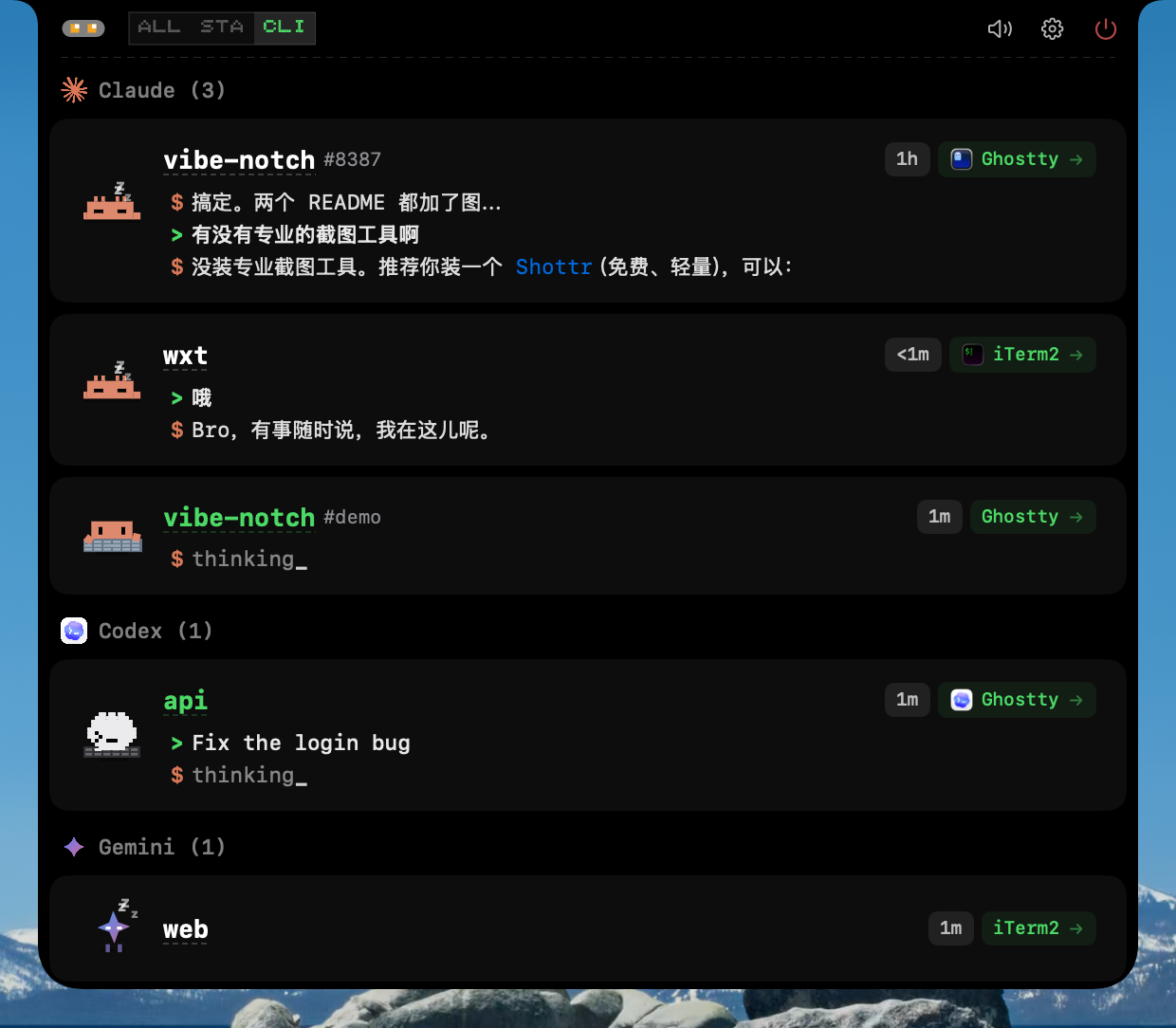
CodeIsland lives in your MacBook's notch area and shows you what your AI coding agents are doing — in real time. No more switching windows to check if Claude is waiting for approval or if Codex finished its task.
It connects to 13 AI coding tools via Unix socket IPC, displaying session status, tool calls, permission requests, and more — all in a compact, pixel-art styled panel.
Features
- Notch-native UI — Expands from the MacBook notch, collapses when idle
- 13 AI tools supported — Claude Code, Codex, Gemini CLI, Cursor, Copilot, Trae/Traecli, Qoder, Factory, CodeBuddy, OpenCode, Kimi Code CLI, Cline, Pi / Oh My Pi
- Live status tracking — See active sessions, tool calls, and AI responses in real time
- Permission management — Approve/deny tool permissions directly from the panel
- Question answering — Respond to agent questions without leaving your current app
- Pixel-art mascots — Each AI tool has its own animated character
- One-click jump — Click a session to jump to its terminal tab or IDE window
- Smart suppress — Tab-level terminal detection: only suppresses notifications when you're looking at the specific session tab, not just the terminal app
- Sound effects — Optional 8-bit sound notifications for session events
- Auto hook install — Automatically configures hooks for all detected CLI tools, with auto-repair and version tracking
- iPhone & Apple Watch Buddy — Mirror session status to Dynamic Island, Lock Screen, StandBy, and Apple Watch
- Bilingual UI — English and Chinese, auto-detects system language
- Multi-display — Works with external monitors, auto-detects notch displays
Supported Tools
| Tool | Events | Jump | Status | |
|---|---|---|---|---|
 |
 Claude Code Claude Code |
13 | Terminal tab | Full |
 |
 Codex Codex |
3 | Terminal | Basic |
 |
 Gemini CLI Gemini CLI |
6 | Terminal | Full |
 |
 Cursor Cursor |
10 | IDE | Full |
 |
 TraeCli TraeCli |
10 | Terminal | Full |
 |
 Qoder Qoder |
10 | IDE | Full |
 Copilot Copilot |
6 | Terminal | Full | |
 |
 Factory Factory |
10 | IDE | Full |
 |
 CodeBuddy CodeBuddy |
10 | APP/Terminal | Full |
 Kimi Code CLI Kimi Code CLI |
10 | Terminal | Full | |
 |
 OpenCode OpenCode |
All | APP/Terminal | Full |
 |
 Cline Cline |
5 | VSCode | Full |
 Pi / Oh My Pi Pi / Oh My Pi |
8 | Terminal | Full |
Installation
Homebrew (Recommended)
brew tap wxtsky/tap
brew install --cask codeisland
Manual Download
- Go to Releases
- Download
CodeIsland.dmg - Open the DMG and drag
CodeIsland.appto your Applications folder - Launch CodeIsland — it will automatically install hooks for all detected AI tools
Note: On first launch, macOS may show a security warning. Go to System Settings → Privacy & Security and click Open Anyway.
iPhone & Apple Watch Buddy
Code Island Buddy is available on the App Store:
The iPhone app mirrors your Mac sessions to Dynamic Island, Lock Screen, StandBy, and Apple Watch. The Mac app publishes lightweight session snapshots over your local network while the iPhone app is open, and sends compact Bluetooth summaries for background refreshes such as Live Activities and Watch updates.
Code Island Buddy is completely free and open source. It does not require an account or an external server; the companion source code lives in this repository under ios/CodeIslandCompanion and apple-companion.
Build from Source
Requires macOS 14+ and Swift 5.9+.
git clone https://github.com/wxtsky/CodeIsland.git
cd CodeIsland

# Development (debug build + launch; Buddy Bluetooth needs the .app below)
swift build && ./.build/debug/CodeIsland

# Release (universal binary: Apple Silicon + Intel)
./build.sh
open .build/release/CodeIsland.app
How It Works
AI Tool (Claude/Codex/Gemini/Cursor/...)
  → Hook event triggered
    → codeisland-bridge (native Swift binary, ~86KB)
      → Unix socket → /tmp/codeisland-<uid>.sock
        → CodeIsland app receives event
          → Updates UI in real time
          → Optional local Buddy sync to iPhone / Apple Watch
CodeIsland installs lightweight hooks into each AI tool's config. When the tool triggers an event (session start, tool call, permission request, etc.), the hook sends a JSON message through a Unix socket. CodeIsland listens on this socket and updates the notch panel instantly.
For OpenCode, a JS plugin connects directly to the socket — no bridge binary needed.
Settings
CodeIsland provides a 7-tab settings panel:
- General — Language, launch at login, display selection
- Behavior — Auto-hide, smart suppress, session cleanup
- Appearance — Panel height, font size, AI reply lines
- Mascots — Preview all pixel-art characters and their animations
- Sound — 8-bit sound effects for session events
- Hooks — View CLI installation status, reinstall or uninstall hooks
- About — Version info and links
Keyboard Shortcuts
| Shortcut | Action | Default |
|---|---|---|
| ⌘⇧I | Toggle the island panel open/closed | On |
| ⌘⇧A | Approve the current permission request | Off |
| ⌘⇧D | Deny the current permission request | Off |
All shortcuts are configurable — and more actions (always-allow, skip question, jump to terminal) can be bound — under Settings → Shortcuts. When an approve/deny shortcut is enabled, its binding shows as a badge right on the approval card.
Requirements
- macOS 14.0 (Sonoma) or later
- Works best on MacBooks with a notch, but also works on external displays
Acknowledgments
This project was inspired by claude-island by @farouqaldori. Thanks for the original idea of bringing AI agent status into the macOS notch.
Star History
License
MIT License — see LICENSE for details.
Yorumlar (0)
Yorum birakmak icin giris yap.
Yorum birakSonuc bulunamadi