brain-cli
Health Warn
- License — License: Apache-2.0
- Description — Repository has a description
- Active repo — Last push 0 days ago
- Low visibility — Only 5 GitHub stars
Code Pass
- Code scan — Scanned 12 files during light audit, no dangerous patterns found
Permissions Pass
- Permissions — No dangerous permissions requested
This tool provides a persistent, local graph database for AI coding agents, allowing them to retain memory and context across multiple sessions.
Security Assessment
The tool appears relatively safe from a security standpoint. A code scan of 12 files found no dangerous patterns, hardcoded secrets, or requests for dangerous permissions. The project explicitly claims that "nothing leaves your machine" and functions as a local database. No evidence was found of it executing unauthorized shell commands or making external network requests. Overall risk is rated as Low.
Quality Assessment
The codebase is in the very early stages of public adoption. While it carries the reputable Apache-2.0 license and is considered active (with the most recent push occurring today), it currently has extremely low community visibility with only 5 GitHub stars. Consequently, it has not yet undergone the broad peer review that comes with widespread community trust, meaning bugs or edge cases might still exist.
Verdict
Use with caution — the code is clean, safe, and properly licensed, but the project is very new and lacks established community trust.
Persistent memory for your AI coding agent. A local graph your agent maintains. Nothing leaves your machine.
Persistent memory for your AI coding agent.
A local graph your agent maintains. Nothing leaves your machine.




Your agent starts every session from zero.
Every conversation begins with no memory of the last one. The task that was in review last week. The decision that got made last month. The thing that was supposed to ship yesterday. Your agent knew about all of it at some point. Now it doesn't.
The usual workarounds have limits. Context files go stale. Pasting old conversations into the prompt burns the context budget before the agent can think. Structured rules like "always check this folder first" get forgotten by turn three.
The problem isn't the model. It's that there's no shared state between you and the agent that survives a session boundary.
Brain is that state.
What it is
A local database your agent writes to while it works. Not notes. Not a vector search. A graph.
Nodes live in three tiers:
- Structural. Long-lived entities. Default types:
project,person. Replace or extend to fit what you track. If your work revolves around services, repositories, research topics, or anything else, register those types and use them instead. - Operational. Active work. Default types:
goal,task,decision,blocker. - Temporal. Immutable records of what already happened. Default types:
event,observation,status_change.
Nodes connect with named relationships. One owns another, one blocks another, one supersedes another. The graph stores who owns what, what depends on what, and what has already been decided. Querying pulls full chains in a single call.
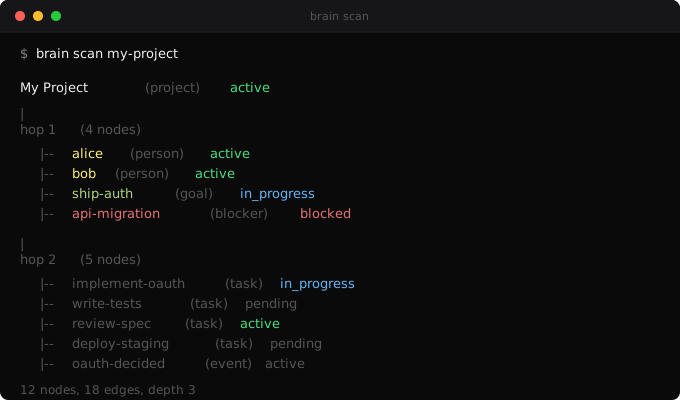
That's the engine. It's a small engine. Graph tools have existed for decades and most of them are abandoned, for the same two reasons: nobody wants to maintain the graph manually, and nobody knows what to query it for. Brain's two differences are the things that address those reasons directly.
Signals
Once you have a structured graph, you can compute over it without having to remember what to look for. Brain ships with five built-in signals:
- Stale. Nodes that haven't been updated in 7, 14, or 30+ days.
- Velocity zero. Work items stuck in a non-terminal state past their threshold.
- Dependency changed. An upstream node moved since a downstream node was last verified.
- Recently completed. Items that just finished. Useful for checking what they unblock.
- Recurring overdue. Recurring activities past their frequency.
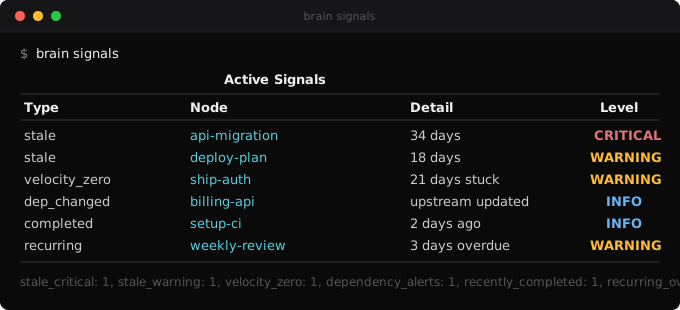
brain signals returns all five in one command. It's the query you don't have to remember to run.
Hooks
Memory systems usually fail for a reason that has nothing to do with the database: the agent forgets to use it.
Brain ships with hooks that run automatically inside Claude Code:
- Before every prompt. Reminds the agent to scan the graph for context.
- After every response. Reminds it to write back what changed.
- At session end. Blocks the session if the cognitive loop was skipped.
- Every 24 hours. Triggers
brain dream. Full maintenance: dedup, orphans, signals, replay.
Because the hooks run automatically, the agent doesn't have to remember to use brain. It can't skip it.
Install
1. Install the engine
pip install xarc-brain
Works anywhere with Python. This is the CLI and the database runtime.
2. Wire it to your AI coding tool
Claude Code (full native integration). Brain's cognitive-loop hooks, skills, and CLAUDE.md instructions are packaged as a Claude Code plugin:
claude plugin marketplace add X-Arc-ai/brain-plugin
claude plugin install brain@x-arc
cd your-project
brain init --yes
The plugin installs the hooks that make your agent scan the graph before responding and write back after, automatically, every session.
Other coding agents. The engine works as a plain CLI anywhere Python does. Run brain init in your project and drive it manually. You lose the automatic cognitive loop, but every command works the same.
cd your-project
brain init
Native integration for Cursor, Codex, Aider, and Windsurf is next on the roadmap. The graph engine is tool-agnostic. What's pending is the per-tool equivalent of the Claude Code hooks and skills.
Your Data Stays Yours
Nothing leaves your machine. No cloud services. No telemetry. Your graph lives in a local Kuzu database at .brain/db/. Back it up, move it, delete it, it's yours. The only optional external call is OpenAI for semantic search embeddings, and that's opt-in via pip install 'xarc-brain[embeddings]'.
Making it yours
After brain init, your graph has a project node and an empty database. That's a starting point, not a useful brain.
The graph is only as good as the context you give it. The first few sessions matter the most. Tell your agent what you're working on, who's involved, what's in progress, what's blocked. The hooks will capture it and write it to the graph as you talk. One focused conversation where you walk through the state of your project is worth more than twenty sessions of incidental context.
From there, it compounds. Every session adds nodes, updates statuses, connects relationships. The signals start firing once there's enough structure to compute over. You don't maintain the graph manually. You just work, and the graph grows alongside the work.
If you install xarc-memory alongside brain, you also get brain replay, which mines your past Claude Code conversations and proposes graph nodes from them. That can accelerate the bootstrap, but it's optional. The primary path is: seed the basics, then let the hooks do the rest.
After six months of daily use
This is a production graph after roughly six months of continuous operation: 320 nodes, 975 edges, five signal types, seven hygiene checks running nightly.
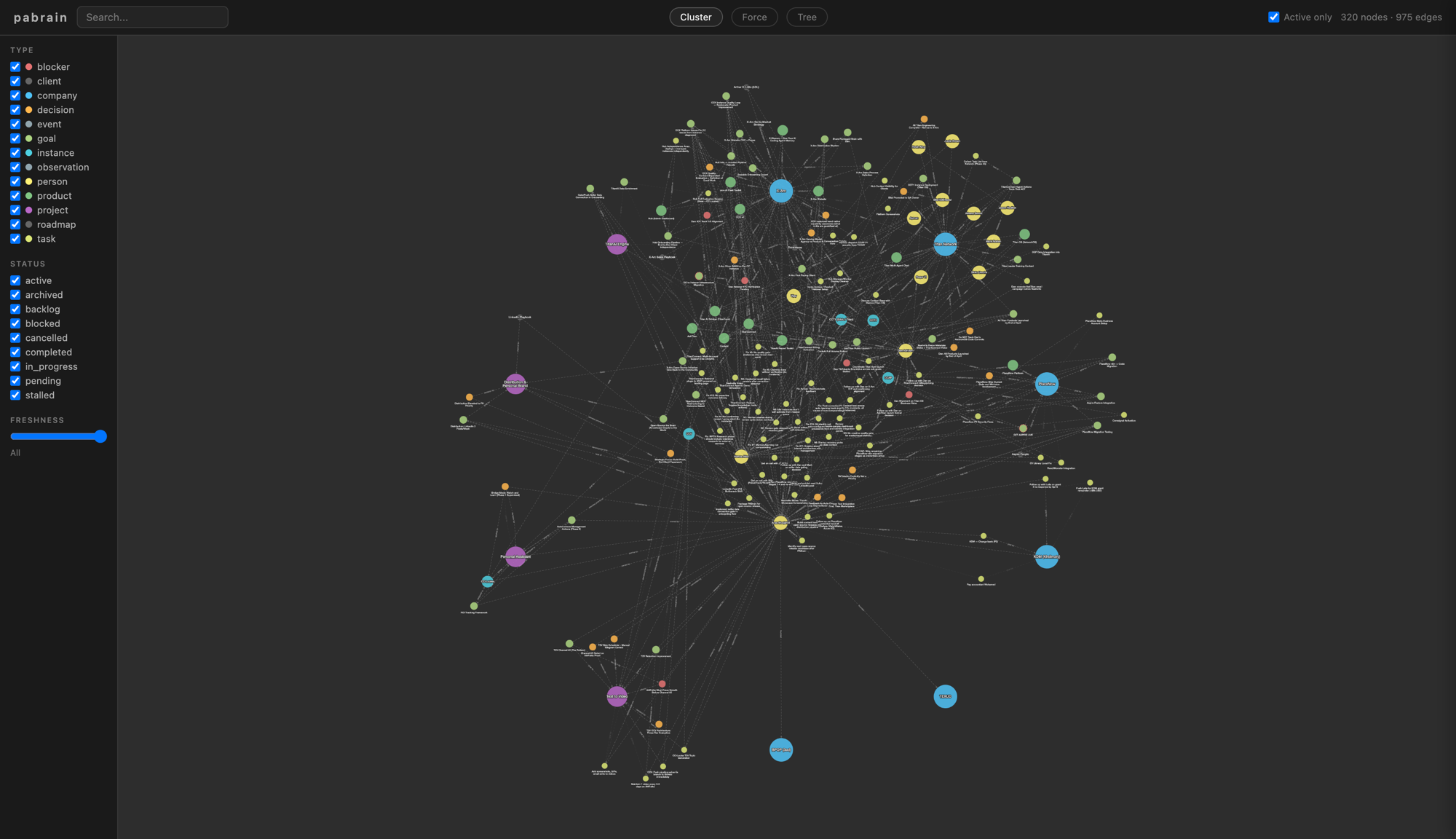
The graph gets bigger and more useful with every session, not noisier.
Type System
Three tiers keep long-lived things separate from today's work and from what already happened. Your graph stays clean as it grows.
| Tier | Purpose | Default Types |
|---|---|---|
| Structural | Long-lived entities | project, person |
| Operational | Active work items | goal, task, decision, blocker |
| Temporal | Immutable records | event, observation, status_change |
Add your own types:
brain config add-type service structural
brain config add-type feature operational
CLI Reference
The full toolkit. Every command is a verb and a target.
Top-level commands
| Command | Purpose |
|---|---|
brain init |
Bootstrap brain for a project |
brain get <id> |
Show a single node + its edges |
brain scan <id> |
3-hop topology view |
brain context <id> |
Node + neighbors with content |
brain search "<term>" |
Keyword search across title, content, id |
brain search-semantic "<term>" |
Vector search (requires [embeddings]) |
brain signals |
Compute all freshness and decay signals |
brain stats |
Counts by type |
brain verify <id> |
Mark node as verified |
brain dream |
Run full maintenance cycle |
brain viz |
Open browser visualization |
brain export --format <fmt> |
Export graph (cytoscape, json, or batch) |
Write group
brain write node --json-data '<json>'. Create or update a node.brain write edge --json-data '<json>'. Create or update an edge.brain write batch --file <path>. Bulk import operations.
Delete group
brain delete node --id <id>. Archive a node.brain delete edge --from <id> --to <id> --verb '<verb>'. End an edge.
Query group
brain query cypher "<cypher>". Raw Cypher (use--read-onlyfor safety).brain query depends-on <id>. What this node depends on.brain query blast-radius <id>. What depends on this node.brain query chain <id>. Full dependency chain.brain query changed-since <date>. Nodes modified since.brain query stale [--threshold N]. Nodes past threshold (default 14 days).brain query person <id>. Full person assessment subgraph.
Embed group
brain embed backfill. Generate embeddings for nodes missing them.brain embed status. Coverage report.
Hygiene group
brain hygiene dedup. Find potential duplicates.brain hygiene orphans. Disconnected nodes.brain hygiene verbs. Verb usage audit.brain hygiene completeness. Schema rule violations.brain hygiene file-paths. Broken or missing file_path checks.brain hygiene content-drift. Brain content vs source file drift.brain hygiene readiness. Operational readiness checks.
Config group
brain config show. Show current config.brain config add-type <type_name> <tier>. Register a custom type (tier:structural,operational, ortemporal).
JSON schemas
Node:
{
  "id": "my_node_id",
  "type": "project",
  "title": "Display name",
  "status": "active",
  "content": "Optional markdown content",
  "file_path": "optional/relative/path.md",
  "properties": {"any": "nested object"}
}
Edge (note: field names are from, to, verb, not from_id/source):
{
  "from": "source_node_id",
  "to": "target_node_id",
  "verb": "depends on",
  "since": "2026-04-07",
  "source": "human",
  "note": "optional context"
}
Global flags
--json-output is a global flag and must come before the subcommand:
brain --json-output stats(correct)brain stats --json-output(errors withNo such option)
Optional Features
Semantic Search
pip install 'xarc-brain[embeddings]'
# Set OPENAI_API_KEY in your environment
brain embed backfill
brain search-semantic "authentication flow"
Conversation History Replay
pip install xarc-memory
# brain init and brain dream will index past Claude Code conversations
Architecture
Everything lives on your disk. Here's where.
your-project/
  .brain/              Brain data (add to .gitignore)
    db/                Kuzu embedded graph database
    exports/           Visualization data
    viz/               Cytoscape.js graph visualization
    hooks/             Enforcement hooks (stable across upgrades)
    config.json        Type tiers, custom settings
  .claude/
    settings.local.json   Hooks (auto-installed by brain init)
  CLAUDE.md            Brain instructions (auto-installed)
How It's Built
No black box. Four dependencies. ~3,500 lines of Python. Read it all.
- Kuzu. Embedded graph database, no server.
- Rich. Terminal formatting.
- Click. CLI framework.
- Cytoscape.js. Graph visualization (bundled offline).
Contributing
This is an open-source project. Contributions that make the tool better are welcome. See CONTRIBUTING.md for how to get started.
Where this came from
Brain is built by X-Arc. X-Arc is an AI lab that trains and deploys AI agents for businesses. Brain is the memory layer we use internally on every agent we run. This open-source release is the exact tool, not a downstream fork.
It was co-built by CCL (one of our agents) and the humans who work with her. CCL needed memory first, so she wrote it first. Six months of continuous usage in production went into it before the tool was worth packaging.
Reviews (0)
Sign in to leave a review.
Leave a reviewNo results found