tg-claude-bot
Health Uyari
- License — License: MIT
- Description — Repository has a description
- Active repo — Last push 0 days ago
- Low visibility — Only 9 GitHub stars
Code Gecti
- Code scan — Scanned 1 files during light audit, no dangerous patterns found
Permissions Gecti
- Permissions — No dangerous permissions requested
Bu listing icin henuz AI raporu yok.
Telegram bridge for Claude Code: resume any CLI session, per-topic chats, local whisper voice, inline-button approvals, live status
tg-claude-bot
Your local Claude Code, in your pocket.
A single-file Telegram bridge to the Claude Code CLI: pick up your sessions
from your phone, vibe-code by voice, keep every tool and skill, answer
prompts with buttons.






Messaging the bot is like typing claude in a shell: fresh session, same
tools, skills, and config — it is your local CLI. /resume picks up any
session you left in the terminal. The bot is a thin stateless router; the CLI
owns everything.
✨ Highlights
| 🔁 Resume any real session | Inline picker over your actual session store (~/.claude/projects), with the CLI's own AI titles; cross-project, cwd auto-detected. |
| 🧵 Per-topic sessions | Every forum topic is an independent session — one conversation per (chat, topic). |
| ⏩ Zero command remapping | Unknown /commands go verbatim to the CLI: /compact, skills, anything headless. /context-style output is relayed. |
| 🔘 Buttons instead of a TUI | Permissions — including the CLI's native don't-ask-again option — plan approval, clarifying questions: all inline buttons. Answered prompts clean up after themselves. |
| 💬 Chat-native ergonomics | Reply to any message to quote it into context. Mid-turn messages queue with a 👀 reaction and switch to 👨💻 while processing — never dropped, never noisy. Multi-forwards and 4096-split long texts arrive as one coherent message. |
| 🎤 Voice messages | Local faster-whisper, bilingual zh/en, editable 🎤 transcript. No audio leaves your machine. |
| 🖼 Native media | Images ride inside the message as base64 blocks, lifecycle owned by the CLI transcript; other files get a TTL-cleaned media dir. |
| 📟 Live status | One ⏳ Working… message edited in place, morphing into the reply; elapsed ticker for long commands. |
| 🎛 CLI parity | /model, /effort, /mode (the shift+tab cycle), /usage, /esc — options sourced from official APIs and the CLI itself, no hardcoded lists. |
| 🟠 Context warnings | 🟠 at 80% / 🔴 at 90% of the real context window, same source as /context. |
| ♻️ Restart-proof | Topics stay bound to their sessions across restarts — even hard crashes: interrupted turns auto-resume from the transcript, queued messages are replayed. |
| 🔒 Owner/guest profiles | Allowlisted chats only; owner full access, guests scoped with Allow/Deny escalation to the owner. |
🚀 Quick start
Claude Code is the prerequisite — so let it install its own bridge. Send it
this on the machine that should host the bot:
setup https://github.com/xhyumiracle/tg-claude-bot
This README is the runbook; it will only ask you for the @BotFather token and
your user id.
Manual setup
1. Prerequisites — Claude Code CLI
installed and logged in, plus uv.
2. Create your bot — @BotFather → /newbot →
copy the token. For groups: disable privacy mode (/setprivacy) or make the
bot admin.
3. Find your user id — message @userinfobot.
4. Install & configure
git clone https://github.com/xhyumiracle/tg-claude-bot && cd tg-claude-bot
uv sync                 # add --extra voice for local voice transcription
cp .env.example .env && chmod 600 .env   # fill in TG_BOT_TOKEN and OWNER_USER_ID
5. Run it
uv run python bot.py
DM your bot /status — you're live.
Run as a service (recommended)
The whole point is being reachable when you're away from the machine, so once
the foreground run works, put it under systemd:
# edit the YOUR_USER paths in tg-claude-bot.service first
sudo cp tg-claude-bot.service /etc/systemd/system/
sudo systemctl enable --now tg-claude-bot
journalctl -u tg-claude-bot -f          # watch the logs
To deploy an update gracefully: touch ~/.tgclaude/restart-requested — the bot
restarts as soon as every conversation is idle, so no reply is ever cut off.
Even on a hard crash nothing is lost: topics rebind to their sessions, and
interrupted turns resume with continue (the CLI transcript has everything).
Configuration
All in .env (see .env.example):
| Variable | Purpose |
|---|---|
TG_BOT_TOKEN |
Bot token from @BotFather (required) |
OWNER_USER_ID |
Your numeric Telegram id — full access (required) |
GUEST_USER_IDS |
Extra user ids, served with the restricted guest profile |
TARGET_GROUP_ID |
A group to serve (guest profile; topics = separate sessions) |
OWNER_DEFAULT_CWD |
Default working directory for new owner sessions |
RESUME_SESSION_ID |
Session to bind the owner's DM to on first contact |
GUEST_READ_DIRS / GUEST_WRITE_DIRS |
Colon-separated dirs guests may read / write |
GUEST_SYSTEM_PROMPT_FILE |
Custom system prompt for the guest profile |
WHISPER_MODEL |
faster-whisper model (default large-v3-turbo) |
TGCLAUDE_MEDIA_TTL_DAYS |
Retention for received files (default 14) |
⚖️ How it compares
| tg-claude-bot | tmux-scraping bridges | direct-API bots | |
|---|---|---|---|
| Backend | Claude Agent SDK — structured events | live TUI + ANSI scraping | raw Anthropic API |
| Sessions | ✅ resume any session in the CLI store, AI titles | ⚠️ only the live pane you attach to | ❌ its own separate history |
| Tools, skills, MCP | ✅ everything the CLI has | ✅ | ❌ reimplemented, if at all |
| Interactive prompts | ✅ native inline buttons — permissions, plan approval, clarifying questions | ⚠️ relayed TUI screen + simulated keypresses | n/a |
| Voice messages | ✅ local whisper, bilingual | ❌ | cloud STT, if any |
| Forum topics = sessions | ✅ one session per topic | ❌ | ❌ |
| Survives bot restarts | ✅ sessions rebind, interrupted turns auto-resume | ⚠️ bridge dies with tmux | ⚠️ needs a database |
| Moving parts | one Python file | tmux + parser + bot | bot + DB + API glue |
Deliberate trade-off: no attaching to a live terminal (what tmux bridges
like ccbot do) — in exchange, structured
events and statelessness.
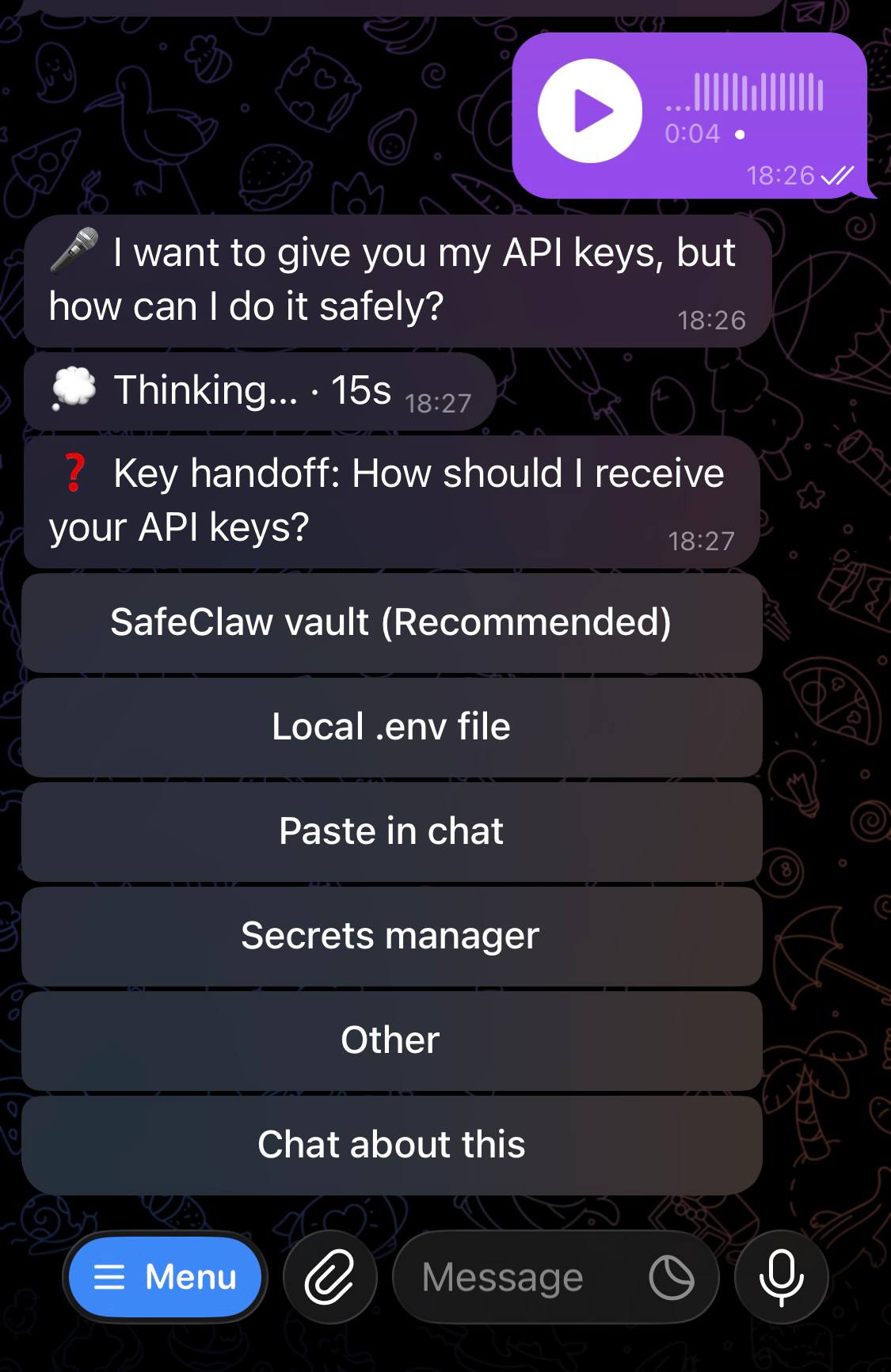
One turn, end to end: voice → local transcript → live status → clarifying question as buttons.
⌨️ Commands
| Command | What it does |
|---|---|
/resume |
Inline session picker (titles, project, age); /resume <id> binds directly |
/clear (/new) |
Start a fresh session in this chat/topic |
/status |
Current binding: session, project, model, effort |
/model |
Live model picker — real names and context windows from /v1/models |
/effort |
Reasoning-effort picker — levels discovered from the CLI itself |
/mode |
Native permission modes: default · acceptEdits · plan · bypassPermissions |
/usage |
Subscription limits (5h / weekly / per-model / credits) |
/whisper |
Pick the voice-transcription model |
/esc (/stop) |
Interrupt the current turn — the CLI's ESC |
| anything else | Forwarded verbatim to the CLI: /compact, /context, /cost, your skills… |
/ autocompletes in Telegram — the menu is registered via setMyCommands.
🏗 Architecture
Telegram ── python-telegram-bot ── bot.py (stateless router)
                                     │  claude-agent-sdk (one client per chat/topic)
                                     └─ Claude Code CLI ── ~/.claude/projects/*.jsonl
Conversation state lives in the CLI's own files; the bot keeps only a tiny
pointer file (~/.tgclaude/) — which topic resumes which session, plus what
was mid-flight. Kill the bot — or the power — and topics rebind, interrupted
turns continue automatically.
🔒 Security model
- Allowlisted chats only; everything else is ignored.
- All secrets live in
.env(chmod 600) — never in the systemd unit, which is
world-readable. - Owner: full permissions. Guests: scoped read/write and a custom prompt;
out-of-scope tool calls escalate to the owner as Allow/Deny buttons. - Session management commands are owner-gated everywhere; so is
/mode—
permission modes change the guardrails themselves, andbypass permissions
disables the guest sandbox for that conversation. - Voice notes are transcribed locally and deleted; images follow the CLI's
transcript retention. - Full threat model, verified controls, and accepted risks:
SECURITY_AUDIT.md — a line-by-line self-audit by the
model this bot bridges.
🙅 Non-goals
- Attaching to a live terminal — see the comparison above.
- Replicating TUI-only dialogs (
/configetc.); what matters is rebuilt as
bot commands (/model,/effort,/usage). - Being a framework. It's one file — read it, fork it, make it yours.
Yorumlar (0)
Yorum birakmak icin giris yap.
Yorum birakSonuc bulunamadi