cc-best
Health Gecti
- License — License: MIT
- Description — Repository has a description
- Active repo — Last push 0 days ago
- Community trust — 39 GitHub stars
Code Basarisiz
- rm -rf — Recursive force deletion command in .claude/settings.json
- fs module — File system access in .github/workflows/claude-scheduled-tasks.yml
Permissions Gecti
- Permissions — No dangerous permissions requested
This tool is a workflow plugin for Claude Code that transforms the AI into a multi-agent development team, simulating roles like Product Manager, Developer, and QA to handle projects from requirements to code review autonomously.
Security Assessment
Overall risk is rated as Medium. The scan flagged a recursive force deletion command (`rm -rf`) inside the tool's configuration file (`.claude/settings.json`). While this might be used for routine cleanup of temporary directories, recursive force deletions are inherently dangerous and could lead to accidental data loss if misconfigured. The tool also utilizes file system access within its automated GitHub workflows. It does not request overtly dangerous permissions, and no hardcoded secrets were detected. However, because it orchestrates autonomous development agents that read and write code, you should carefully review what file paths those deletion commands target before running it.
Quality Assessment
The project is actively maintained, with its most recent push occurring today. It uses the permissive MIT license, making it suitable for most projects. Community trust is currently low but growing, reflected by 39 GitHub stars. The repository is well-documented, providing clear instructions, multiple installation options, and visual demonstrations of the workflow.
Verdict
Use with caution — the plugin offers a compelling workflow but contains dangerous file deletion commands that require manual review before execution.
🎭 cc-best: Turn Claude Code into a full dev team — PM→Lead→Dev→QA autonomous workflow. 40 commands · 17 skills · 8 agents · 33 rules · 21 hooks · auto-learning pipeline. | 一个插件,完整开发团队。
CC-Best
Role-Driven Development Workflow for Claude Code



English | 中文 | 🌐 Homepage
Transform Claude into a complete development team.
From product requirements to code review — one plugin, full workflow.
44 commands · 19 skills · 8 agents · 43 rules · 30 hooks
Quick Start • Features • Workflow • Commands • FAQ
Why CC-Best?
🎯 The Problem: Claude Code is powerful, but configuring workflows, coding standards, and safety rules from scratch takes hours.
✨ The Solution: Pre-configured roles (PM → Lead → Designer → Dev → QA) that mirror real team collaboration, with safety guardrails built-in.
⚡ Quick Start
# Add marketplace and install
/plugin marketplace add xiaobei930/cc-best
/plugin install cc-best@xiaobei930

# Verify installation (30 seconds)
/cc-best:status

# Start using
/cc-best:iterate "implement user authentication"
💡 Enable Hooks: After installation, run
/cc-best:setup --hooksto activate safety guards and automation hooks.
See Hooks Configuration for details.
Plugin vs Clone: Command Format
| Installation | Command format | Example |
|---|---|---|
| Plugin ⭐ | /cc-best:command |
/cc-best:iterate "add feature" |
| Clone | /command |
/iterate "add feature" |
💡 Recommended: Install via plugin for automatic updates and easier management.
All documentation uses plugin format (/cc-best:xxx). Clone users: runconvert-to-local.js.
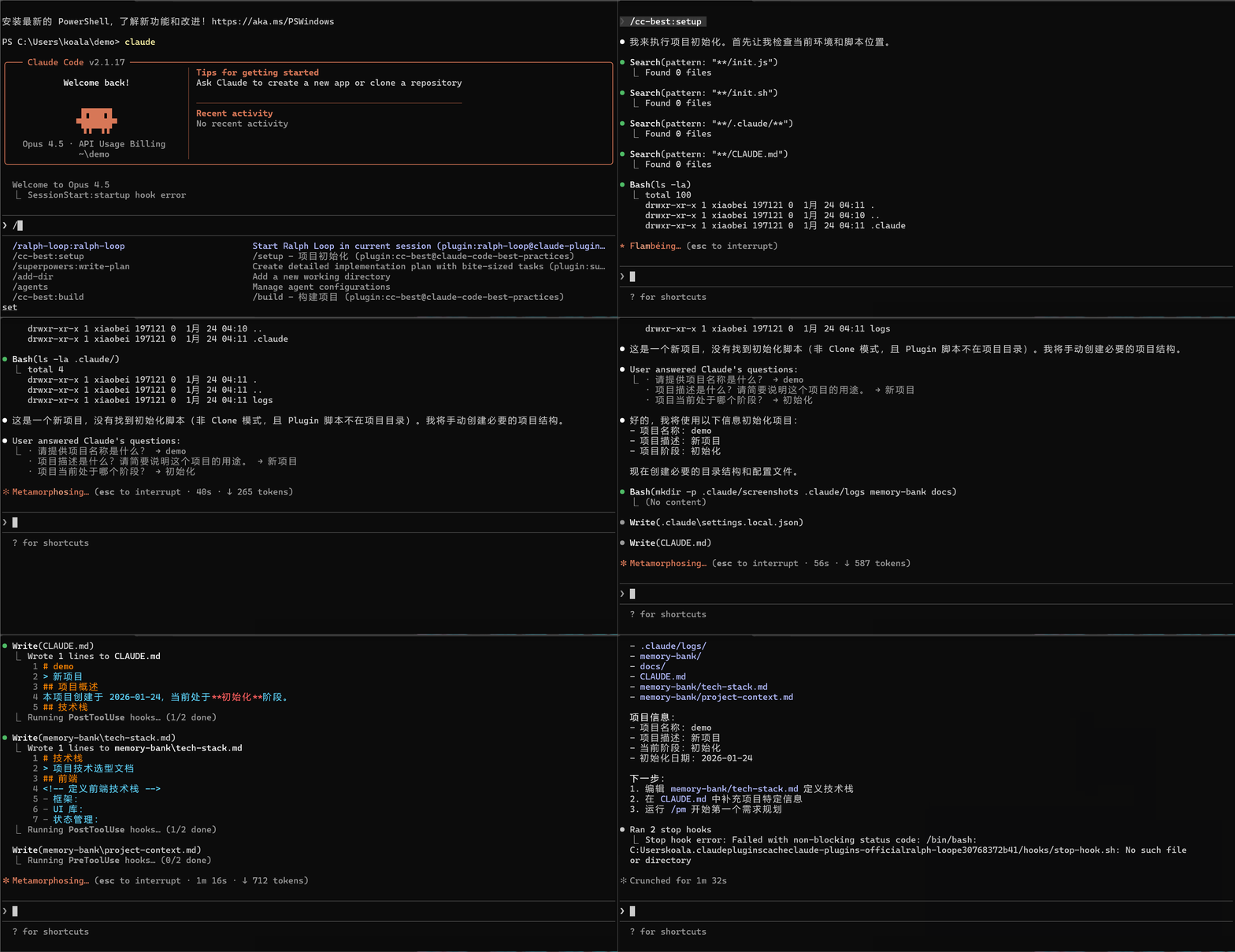
git clone https://github.com/xiaobei930/cc-best.git .claude
cd .claude && bash scripts/shell/init.sh

# Convert command format from /cc-best:xxx to /xxx
node scripts/node/convert-to-local.js
Use clone when you need to customize all files in your repo.
🗑️ Uninstall⚠️ Important: All documentation uses plugin format (
/cc-best:xxx).
Run the conversion script to update to local format (/xxx).
# Remove the plugin
/plugin uninstall cc-best@xiaobei930

# Remove marketplace (optional)
/plugin marketplace remove xiaobei930/cc-best
No files are left behind.
What Happens Next?
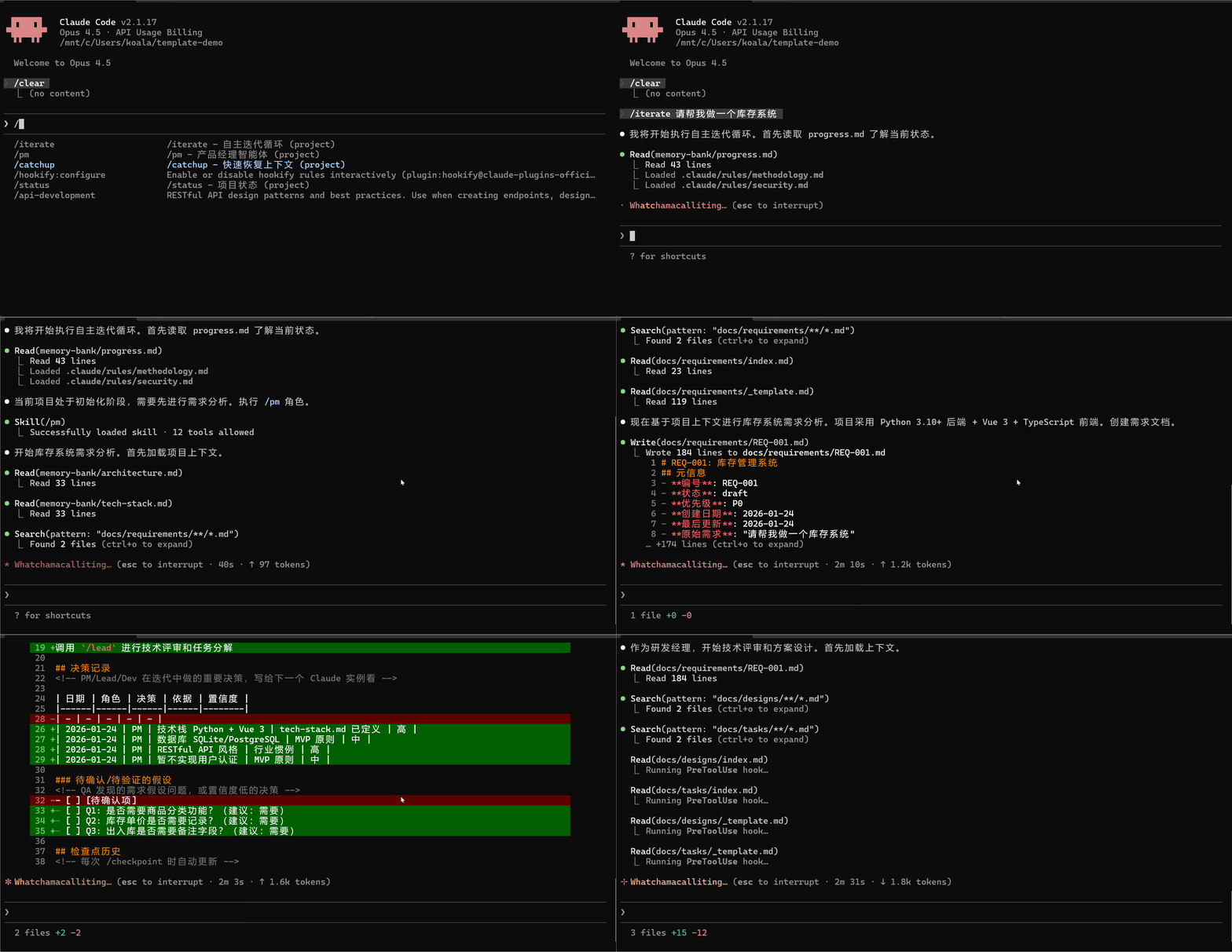
After running /cc-best:iterate "implement user authentication", Claude will:
1. 📋 /cc-best:pm     → Analyze requirements, create task breakdown
2. 🏗️ /cc-best:lead   → Design technical solution
3. 💻 /cc-best:dev    → Write code, create tests
4. 🧪 /cc-best:qa     → Run tests, verify quality
5. ✅ /cc-best:commit → Commit changes with proper message
You just watch. Intervene only when needed.
Common Workflows
| I want to... | Command | What Claude does |
|---|---|---|
| Build a feature | /cc-best:iterate "add dark mode toggle" |
Full cycle: plan → code → test → commit |
| Fix a bug | /cc-best:iterate "fix login timeout issue" |
Investigate → fix → verify → commit |
| Review code | /cc-best:pm "review recent changes" |
Analyze code, suggest improvements |
| Learn the codebase | /cc-best:pair |
Step-by-step exploration with explanations |
Who Is This For?
| You are... | Recommended mode | Why |
|---|---|---|
| Team with multiple roles | Full workflow | PM → Lead → Dev → QA mirrors your process |
| Solo developer | /cc-best:iterate |
Let Claude handle the boring parts |
| Learning Claude Code | /cc-best:pair |
Understand each step before proceeding |
| Need quick fixes | Direct commands | /cc-best:dev "fix the typo" for simple tasks |
✨ Core Features
| Feature | What it does |
|---|---|
| 🎭 Role-Based Workflow | PM → Lead → Designer → Dev → QA — complete development cycle |
| 🔄 Autonomous Mode | /cc-best:iterate runs tasks without intervention until completion |
| 🛡️ Safety Hooks | Blocks rm -rf /, git push --force, and other risky commands |
| 📐 Multi-Language Standards | 8-dir layered structure: common + Python/frontend/Java/C#/C++/embedded/UI rules |
| 🧠 Memory Bank | Persists progress and decisions across sessions |
| 👥 Pair Programming | /cc-best:pair — step-by-step collaboration with 5 confirmation checkpoints |
| 🔗 Knowledge Pipeline | observe → analyze → learn → evolve — self-improving knowledge loop |
| 🌐 Cross-Platform | Windows, macOS, Linux — auto-detects package manager |
While CC-Best is built for Claude Code, the methodology (Dao-Fa-Shu-Qi) and role-driven patterns are framework-agnostic and can be adapted for other AI coding assistants.
What Makes CC-Best Different
🎭 Role-Driven Development PipelineNot just a prompt template collection — CC-Best simulates real team collaboration:
- 7 roles with clear boundaries: PM → Lead → Designer → Dev → QA → Verify → Commit
- Each role has explicit MUST/SHOULD/NEVER rules, output templates, and handoff protocols
- Automatic flow: PM creates REQ → Lead reviews & creates DES/TSK → Dev implements → QA validates
- Downstream correction (A3): Lead can adjust PM decisions; QA distinguishes implementation bugs from requirement assumption errors
- Document traceability: REQ-XXX → DES-XXX → TSK-XXX numbered chain
/cc-best:iterate enables fully autonomous development:
Read progress.md → Select role → Execute → Verify → Commit → Next task (no waiting)
- Smart role selection: 8 state conditions determine which role activates
- A1-A5 decision principles: Context inference (A1), decision recording (A2), downstream correction (A3), MVP fallback (A4), issue classification (A5)
- 4 strict stop conditions: All tasks done, user interrupt, fatal error, external dependency
- Cross-session continuity: memory-bank + progress.md rolling window
CC-Best learns from your development patterns:
observe → analyze → learn → evolve
- observe:
observe-patterns.jshook automatically tracks tool usage patterns - analyze:
/cc-best:analyzemines git history and usage data - learn:
/cc-best:learnextracts reusable knowledge - evolve:
/cc-best:evolvegenerates new commands, skills, or agents from learned patterns
📁 Directory Structure
your-project/
├── CLAUDE.md          # Project constitution
├── commands/          # 44 slash commands
├── skills/            # 19 development skills
├── agents/            # 8 specialized agents
├── rules/             # 43 coding standards (10 dirs)
├── hooks/             # Safety hooks
├── scripts/           # Automation (node/python/shell)
├── memory-bank/       # Progress & architecture docs
└── .claude/           # Claude Code config
| Directory | Contents |
|---|---|
commands/ |
Role commands (pm, lead, dev, qa), Mode commands (iterate, pair), Tool commands (build, test, commit) |
skills/ |
Backend, Frontend, Testing, Security, DevOps, Architecture, Git |
agents/ |
architect, build-error-resolver, code-reviewer, code-simplifier, planner, requirement-validator, security-reviewer, tdd-guide |
rules/ |
43 rules in 10 dirs: common/ + python/, frontend/, java/, csharp/, cpp/, embedded/, ui/, rust/, go/ |
scripts/ |
Cross-platform hooks in Node.js (default), with Python/Bash alternatives |
memory-bank/ |
progress.md (rolling window), architecture.md, tech-stack.md |
🔄 Workflow
Standard Development Cycle
flowchart LR
    PM["/pm<br/>Requirements"] --> Clarify["/clarify<br/>Clarify"]
    Clarify --> Lead["/lead<br/>Design"]
    Lead --> Designer["/designer<br/>UI Design"]
    Designer --> Dev["/dev<br/>Implement"]
    Dev --> QA["/qa<br/>Test"]
    QA --> Verify["/verify<br/>Verify"]
    Verify --> Commit["/commit<br/>Commit"]
    Commit --> Clear["/clear<br/>Clear Context"]
    Clear -.->|Loop| PM
Three Development Modes
| Mode | Command | Use Case | Characteristics |
|---|---|---|---|
| Autonomous Iteration | /cc-best:iterate |
Clear task list | Fully autonomous, no intervention needed |
| Pair Programming | /cc-best:pair |
Learning, sensitive operations | Confirm each step, human-machine collaboration |
| Long-Running Loop | /cc-best:cc-ralph |
Hour-level batch tasks | Requires ralph-loop plugin (/plugin install ralph-loop@claude-plugins-official) |
| Current State | Role Selected | Action |
|---|---|---|
| No requirements doc | /cc-best:pm |
Requirement analysis |
| REQ has low-confidence items | /cc-best:clarify |
Requirement clarification |
| Has REQ, no design | /cc-best:lead |
Technical design |
| Has design, frontend tasks | /cc-best:designer |
UI design guidance |
| Has tasks to implement | /cc-best:dev |
Coding implementation |
| Code ready for verification | /cc-best:verify |
Build + type + lint + test + security |
| Verification passed | /cc-best:qa |
Functional acceptance |
Core behavior: Task complete → Update progress.md → Read next task → Execute immediately (no waiting).
Stop conditions: All tasks done | User interrupt (Ctrl+C) | Fatal error | External dependency needed.
How /cc-best:pair collaboration works5 mandatory confirmation checkpoints:
| Checkpoint | Example |
|---|---|
| Understanding | "I understand you need X. Correct?" |
| Design choice | "Option A or B? I recommend A because..." |
| Destructive action | "About to delete X. Confirm?" |
| External call | "Will call production API. Proceed?" |
| Commit | "Commit message: '...'. OK?" |
Learning mode: /cc-best:pair --learn "teach me unit testing" — Claude explains every step in detail.
Safe autonomy: Even in pair mode, Claude can freely read files, search code, run tests, and format code.
📖 Detailed usage guide: See MODES.md for comprehensive documentation on each mode, including when to use, how to control, and best practices.
📋 Command Reference
44 commands organized into categories:
| Category | Commands | Purpose |
|---|---|---|
| Role | /cc-best:pm, /cc-best:lead, /cc-best:dev, /cc-best:qa, /cc-best:designer, /cc-best:clarify, /cc-best:verify |
Development workflow roles |
| Mode | /cc-best:iterate, /cc-best:pair, /cc-best:cc-ralph, /cc-best:mode, /cc-best:model |
Autonomous/pair modes & model strategy |
| Build | /cc-best:build, /cc-best:test, /cc-best:run, /cc-best:fix |
Build and test automation |
| Git | /cc-best:commit, /cc-best:pr, /cc-best:git-guide |
Version control |
| Context | /cc-best:compact-context, /cc-best:checkpoint, /cc-best:catchup, /cc-best:context, /cc-best:memory |
Session management |
| Quality | /cc-best:cleanup, /cc-best:docs, /cc-best:learn, /cc-best:analyze, /cc-best:evolve |
Code quality & knowledge |
| Ops | /cc-best:fix-issue, /cc-best:release, /cc-best:service, /cc-best:hotfix |
Issue fix, release, hotfix, services |
| Setup | /cc-best:setup, /cc-best:setup-pm, /cc-best:status, /cc-best:self-check, /cc-best:confidence-check, /cc-best:security-audit |
Configuration & diagnostics |
📖 Full reference: See COMMANDS.md for all parameters and usage examples.
🛠️ Skills
19 development skills organized by domain:
| Domain | Skills | Coverage |
|---|---|---|
| Backend | backend, api, database |
Python, TS, Java, Go, C# |
| Frontend | frontend, native |
Web + iOS/macOS/Tauri |
| Quality | quality, testing, security, debug |
TDD, OWASP, profiling |
| Architecture | architecture, devops, git |
ADR, CI/CD, branching |
| Routing | model |
Task→model recommendation |
| Session | session, learning, compact, exploration |
Lifecycle + knowledge management |
| Research | search-first, second-opinion |
Search strategy, cross-validation |
📖 Full reference: See skills/README for detailed skill documentation.
🏗️ Architecture Overview
CC-Best uses a four-tier architecture:
flowchart TB
    subgraph User["👤 You"]
        CMD["/cc-best:iterate 'add feature'"]
    end

    subgraph Commands["📋 Commands (44)"]
        PM["/pm"] --> Lead["/lead"] --> Dev["/dev"] --> QA["/qa"]
    end

    subgraph Skills["🛠️ Skills (19)"]
        S1["backend · frontend · testing · security"]
        S2["architecture · devops · git"]
        S3["learning · compact · exploration"]
    end

    subgraph Agents["🤖 Agents (8)"]
        A1["architect · planner · code-reviewer"]
        A2["code-simplifier · security-reviewer"]
        A3["tdd-guide · build-error-resolver · requirement-validator"]
    end

    subgraph Safety["🛡️ Safety Hooks (18)"]
        H1["PreToolUse: validate, secrets, protect"]
        H2["PostToolUse: format, typecheck, observe"]
    end

    CMD --> Commands
    Commands -.->|"auto-inject"| Skills
    Commands -.->|"delegate"| Agents
    Commands -.->|"guard"| Safety
| Layer | Trigger | Purpose |
|---|---|---|
| Commands | User types /xxx |
Role workflow, user-initiated actions |
| Skills | Auto-injected | Best practices, coding standards |
| Agents | Task tool delegation | Specialized sub-tasks (review, planning) |
| Hooks | Lifecycle events | Safety guards, auto-format, pattern learning |
8 specialized agents: architect, build-error-resolver, code-reviewer, code-simplifier, planner, requirement-validator, security-reviewer, tdd-guide
📐 Full documentation: See ARCHITECTURE.md for component relationships and call chains.
🤖 Agent details: See agents/README for agent capabilities and invocation.
🔌 Plugin Compatibility
CC-Best is designed to work seamlessly with official Claude Code plugins. Our built-in agents and skills complement (not replace) official plugins.
Relationship with Official Plugins
| CC-Best Content | Official Plugin | Relationship |
|---|---|---|
code-reviewer agent |
code-review plugin |
Built-in: lightweight local version; Official: more powerful with auto-trigger |
security-reviewer agent |
security-guidance |
Built-in: OWASP checklist; Official: automatic security analysis |
code-simplifier agent |
code-simplifier |
Similar function; official plugin has more context |
/cc-best:cc-ralph command |
ralph-loop plugin |
CC-Best wrapper; requires plugin for cross-session persistence |
hookify examples |
hookify plugin |
Built-in: examples; Official: full hook management |
Recommended Plugin Configuration
{
  "enabledPlugins": {
    "code-review@claude-plugins-official": true,
    "hookify@claude-plugins-official": true,
    "security-guidance@claude-plugins-official": true
  }
}
When to Use Which
- No plugins installed: Built-in agents/skills work standalone
- With plugins: Use official plugins for advanced features, CC-Best for quick local checks
- Best practice: Install official plugins, use built-in agents for immediate feedback, official plugins for deep analysis
⚙️ Customization Guide
Adding New Rules
Create a file in rules/:
---
paths:
  - "**/*.your-ext"
---

# Rule Title

## Rule Content

...
Adding New Commands
Create a file in commands/:
---
allowed_tools:
  - Read
  - Edit
  - Write
  - Bash
---

# /your-command - Command Name

## Responsibilities

...

## Execution Steps

1. ...
2. ...
Configuring Hooks
Edit .claude/settings.local.json:
{
  "hooks": {
    "PreToolUse": [
      {
        "matcher": "Bash",
        "hooks": [
          {
            "type": "command",
            "command": "python scripts/your-script.py",
            "timeout": 5
          }
        ]
      }
    ]
  }
}
Pre-configured Hooks
⚠️ Important: Hooks Require Manual Setup
Due to a known Claude Code issue, plugin hooks are disabled by default. To enable the safety guards and automation hooks, run:
/cc-best:setup --hooksThis command configures hooks with absolute paths. See the FAQ for more details.
All hooks default to Node.js for cross-platform compatibility. Python/Bash alternatives available in scripts/.
| Trigger | Function | Script (Node.js) |
|---|---|---|
| PreToolUse | Validate dangerous commands | validate-command.js |
| PreToolUse | Confirm before git push | pause-before-push.js |
| PreToolUse | Protect sensitive files | protect-files.js |
| PreToolUse | Block random .md creation | block-random-md.js |
| PreToolUse | Long-running task warning | long-running-warning.js |
| PostToolUse | Auto-format code | format-file.js |
| PostToolUse | Check console.log | check-console-log.js |
| PostToolUse | TypeScript type check | typescript-check.js |
| SessionStart | Session health check | session-check.js |
| PreCompact | Save state before compact | pre-compact.js |
💡 Best Practices
1. Keep CLAUDE.md Concise
- Keep it under 100 lines
- Put detailed specifications in
rules/
2. Use the Memory Bank
- Update
progress.mdafter each task completion - Record important decisions in
architecture.md
3. Context Management
- Normal mode: Use
/clearfrequently to avoid context overflow /cc-best:iteratemode: Don't clear manually, maintain loop continuity
4. Don't Overload MCP
- Enable no more than 10 MCP servers per project
- Use
disabledMcpServersto disable unused ones
5. Regular Cleanup
- Delete unused language rules
- Remove unused commands
6. MCP Temporary Directory Management
MCP tools auto-create temporary directories in your project:
| Directory | Source | Purpose |
|---|---|---|
.playwright-mcp/ |
MCP auto-created | Playwright MCP temporary files |
.claude/mcp-data/ |
MCP auto-created | MCP shared data |
*-mcp/ |
MCP auto-created | Other MCP tool directories |
.claude/screenshots/ |
Template-defined | Manually saved screenshots (meaningful) |
Cleanup Script: Use cleanup.sh for regular maintenance:
# Preview files to delete (dry run)
bash scripts/shell/cleanup.sh --dry-run

# Clean files older than 7 days (default)
bash scripts/shell/cleanup.sh

# Clean files older than 3 days
bash scripts/shell/cleanup.sh --days 3

# Clean all MCP temporary files
bash scripts/shell/cleanup.sh --all
❓ FAQ
📖 Full FAQ: See FAQ.md for comprehensive troubleshooting guides.
Quick Answers
Hooks not working?Run /cc-best:setup --verify to diagnose. Common fixes:
- Clone users:
cp .claude/settings.local.json.example .claude/settings.local.json - Plugin users: Run
/cc-best:setup --hooksto configure absolute paths - Windows: See FAQ.md for
${CLAUDE_PLUGIN_ROOT}workarounds
| Mode | Control | Use Case |
|---|---|---|
/cc-best:iterate |
Fully autonomous | Clear task list |
/cc-best:pair |
Confirm each step | Learning, sensitive ops |
- Interrupt: Press
Ctrl+C(orEscin some terminals) - Pause: Type anything — Claude will wait for your input
- Resume: Just continue the conversation
Claude saves progress to memory-bank/progress.md, so you can always resume later.
Claude will:
- Analyze the failure
- Return to
/cc-best:devto fix the issue - Re-run
/cc-best:qato verify
If stuck after 3 attempts, Claude will ask for your input. You can:
- Provide hints: "Try checking the database connection"
- Skip the test: "Skip this test for now"
- Take over: "I'll fix this manually"
Edit .claude/settings.local.json:
{ "enabledMcpjsonServers": ["memory", "sequential-thinking"] }
Best practice: Enable ≤10 MCP servers per project.
CC-Best vs Superpowers?Both are excellent. Choose based on your needs:
| Scenario | Recommended | Why |
|---|---|---|
| Team collaboration | CC-Best | Role workflow (PM→Lead→Dev→QA) |
| Multi-language stack | CC-Best | 7 language coding standard dirs |
| Chinese team | CC-Best | Bilingual docs |
| Solo developer | Superpowers | Lighter, git worktree automation |
| Need git worktree | Superpowers | Auto-creates isolated branches |
💡 They can coexist! Use CC-Best for workflows, Superpowers for git automation.
🔧 Requirements
| Dependency | Version | Notes |
|---|---|---|
| Claude Code | Latest recommended | Hooks require recent versions |
| Node.js | 16+ | For cross-platform hooks (default) |
| Python | 3.8+ | For some hook scripts |
| Bash/Git Bash | Any version | Optional for bash hooks |
Optional MCP Servers
Some commands use MCP (Model Context Protocol) tools for enhanced functionality:
| MCP Server | Used By | Purpose |
|---|---|---|
| Playwright | /cc-best:designer, /cc-best:dev, /cc-best:pm |
Browser automation for UI testing and screenshots |
| Firecrawl | /cc-best:pm, /cc-best:lead |
Web scraping for requirement research |
Note: These are optional. Commands work without MCP servers but with reduced functionality.
Install via Claude Code settings:Settings > MCP Servers
Supported Languages
| Language | Rule File | Formatter | Test Framework |
|---|---|---|---|
| Python | python-style.md |
Black + isort | pytest |
| Vue/TS/JS | frontend-style.md |
Prettier | Vitest |
| C++ | cpp-style.md |
clang-format | Google Test |
| Java | java-style.md |
google-java-format | JUnit |
| C# | csharp-style.md |
dotnet format | xUnit/NUnit |
| Go | backend/go.md |
gofmt | testing |
| Swift | native/ios.md |
swift-format | XCTest |
📚 References
Official Resources
Plugin Documentation
- Quick Start Guide - Get started in 5 minutes
- Advanced Guide - Deep dive into methodology and architecture
🌐 Note on Internal Files
CC-Best's internal files (commands/, rules/, skills/) are written in Chinese. This is intentional:
- Claude understands Chinese - All Claude models can read and follow Chinese instructions perfectly
- No translation burden - Maintaining dual-language internal files would be impractical
- Focus on users - The README (this file) is fully English for international users
If you prefer English internal files, community contributions for English translations are welcome!
🤝 Contributing
Contributions are welcome! See CONTRIBUTING.md for details.
| Contribution Type | Description |
|---|---|
| ⭐ Star | Show your support |
| 🐛 Bug Report | Report issues |
| 💡 Feature Request | Suggest features |
| 📝 Documentation | Improve docs |
| 🔧 Code | Add commands, rules, skills |
📄 License
MIT License - Free to use and modify
🌐 Visit Homepage · ⭐ Star on GitHub
If CC-Best helps you, please give it a ⭐ Star!
Star History
Yorumlar (0)
Yorum birakmak icin giris yap.
Yorum birakSonuc bulunamadi