openchatx-mcp
Health Uyari
- License — License: MIT
- Description — Repository has a description
- Active repo — Last push 0 days ago
- Low visibility — Only 5 GitHub stars
Code Basarisiz
- fs module — File system access in .github/workflows/ci.yml
- fs module — File system access in package.json
- fs module — File system access in scripts/ngrok-config.cjs
- spawnSync — Synchronous process spawning in scripts/pm2.ts
- process.env — Environment variable access in scripts/pm2.ts
- spawnSync — Synchronous process spawning in scripts/preflight.ts
Permissions Gecti
- Permissions — No dangerous permissions requested
Bu listing icin henuz AI raporu yok.
Turn ChatGPT into a local agent runtime. Operate your computer, use local tools, discover MCP servers, and delegate work to your own models through one MCP connection.

openchatx-mcp
English · 繁體中文
Turn ChatGPT into a local agent runtime.
Operate your computer, use local tools, discover MCP servers, and delegate work to your own models through one MCP connection.


[!NOTE]
OpenChatX runs inside a normal ChatGPT conversation and does not use Codex as its execution backend. OpenChatX itself therefore does not consume Codex task usage; your ChatGPT plan, message limits, and other usage policies still apply and may change over time.
[!CAUTION]
openchatx-mcp runs with the permissions of your local operating-system user. An authorized ChatGPT caller can run commands, edit files, fetch webpages, and control connected tools and applications.
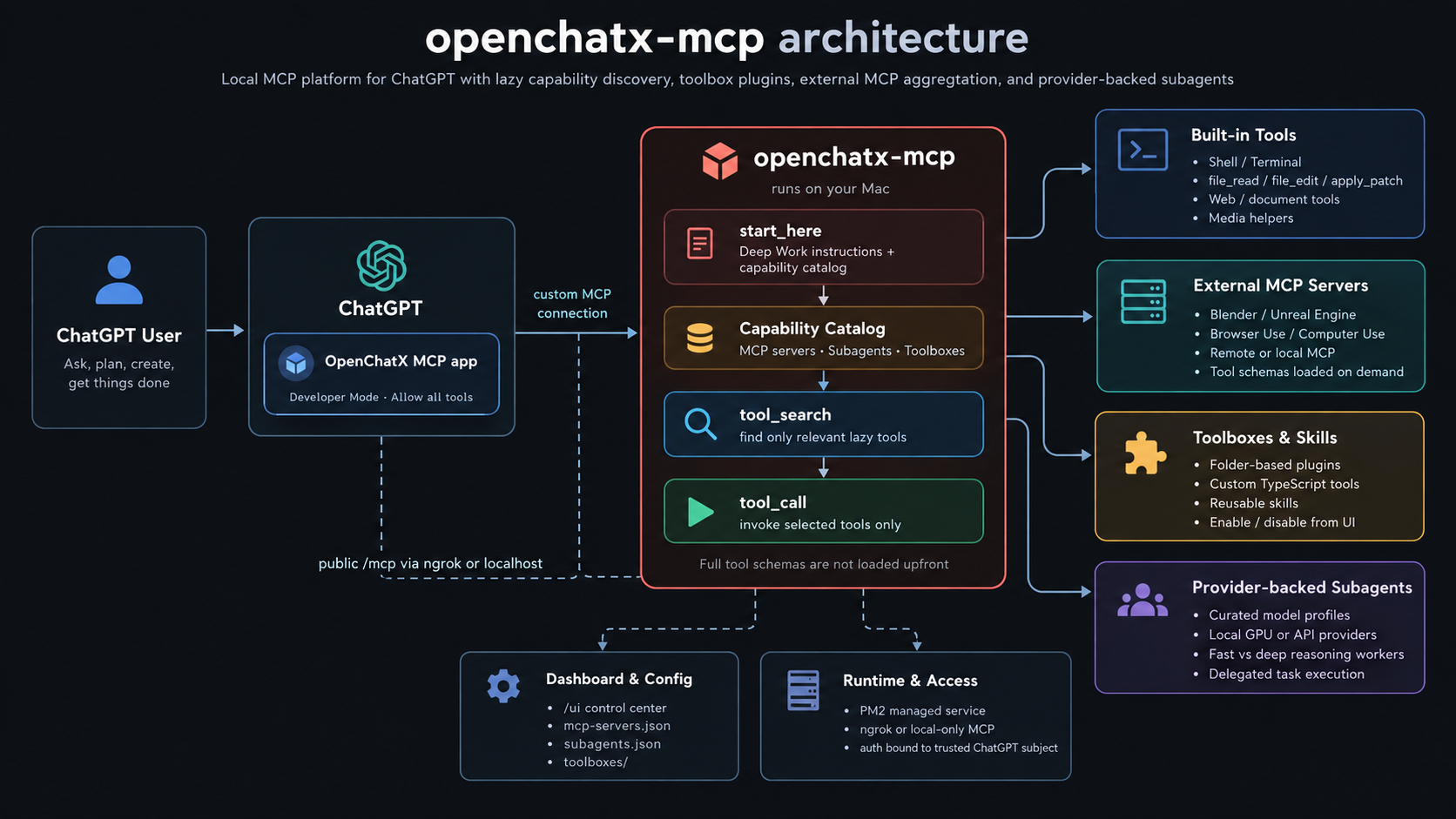
Why OpenChatX
ChatGPT is the planner. OpenChatX gives it hands.
I use AI agents heavily for real development work, and I once burned through 100% of my Pro 20x Codex Weekly Usage in about half a day. I did not want my entire workflow tied to the usage limits of a single agent runtime, so I built OpenChatX: ChatGPT can work directly with my local machine, tools, MCP servers, and models from a normal conversation instead of requiring Codex as the execution backend.
- Local execution — run shell commands, edit files, inspect images, and use an interactive terminal on macOS or native Windows.
- MCP aggregation — connect local stdio and remote HTTP MCP servers behind one ChatGPT connection.
- Capability discovery — ChatGPT knows Blender, Unreal, browser automation, and other capabilities exist without loading every tool schema into context.
- Toolboxes — add your own TypeScript tools and reusable skills as folder-backed plugins.
- Provider-backed subagents — delegate bounded work to local GPU models, self-hosted inference, or external APIs while ChatGPT stays the primary planner.
- Dashboard — manage MCP servers, toolboxes, and subagents from a local UI.
External MCP tools and custom toolbox tools stay lazy. start_here exposes a lightweight capability catalog; ChatGPT uses tool_search only when it needs the underlying tools.
Requirements
- macOS on Apple Silicon or Intel, or native Windows 10/11
- Node.js 22.18.0 or newer
- npm
- ripgrep (
rg) - ngrok account and CLI
- ChatGPT with Developer Mode / custom MCP support available for your account or workspace
Windows runs natively; WSL is not required. OpenChatX prefers PowerShell 7 (pwsh.exe) and falls back to Windows PowerShell (powershell.exe) when pwsh is unavailable. The vendored apply_patch binary is currently macOS-only; on Windows the normal file_read / file_edit / file_write workflow remains available.
Computer Use is intentionally kept outside the core runtime and can be connected as an external MCP.
Quick start
Install with a coding agent
Use the bundled install skill:
skills/install-openchatx-mcp/SKILL.md
Manual install
macOS:
brew install --cask ngrok
brew install ripgrep
git clone https://github.com/XiaoPuOuO/openchatx-mcp.git
cd openchatx-mcp
npm ci

ngrok config add-authtoken <your-token>

npm run setup -- --config-only
npm run setup
npm start
Windows PowerShell:
winget install Ngrok.Ngrok
winget install BurntSushi.ripgrep.MSVC
git clone https://github.com/XiaoPuOuO/openchatx-mcp.git
Set-Location openchatx-mcp
npm ci

ngrok config add-authtoken <your-token>

npm run setup -- --config-only
npm run setup
npm start
Run the first setup from a normal external terminal (Terminal.app on macOS or PowerShell/Windows Terminal on Windows) so the managed runtime inherits the expected host permissions and environment.
Add OpenChatX to ChatGPT
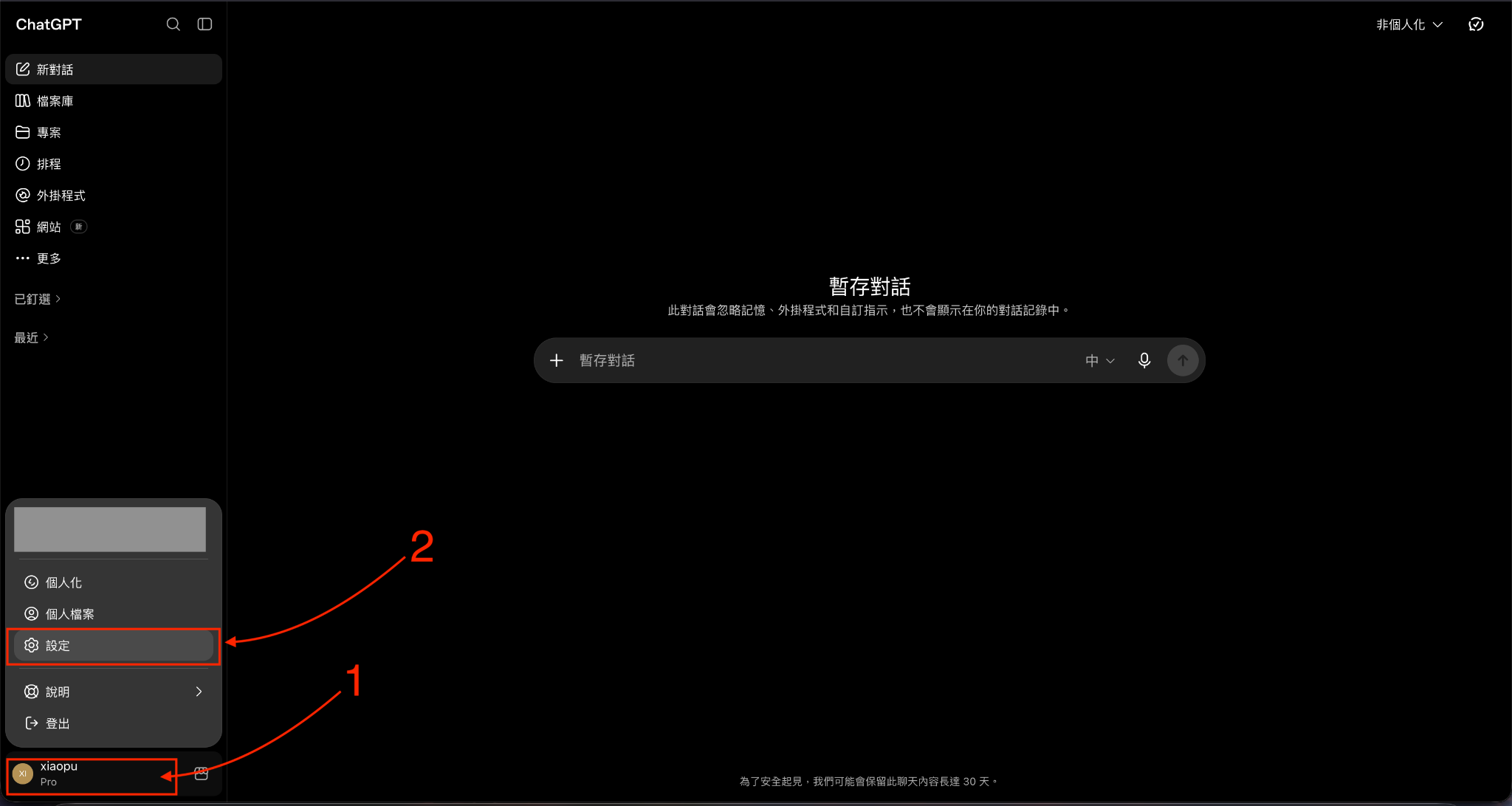
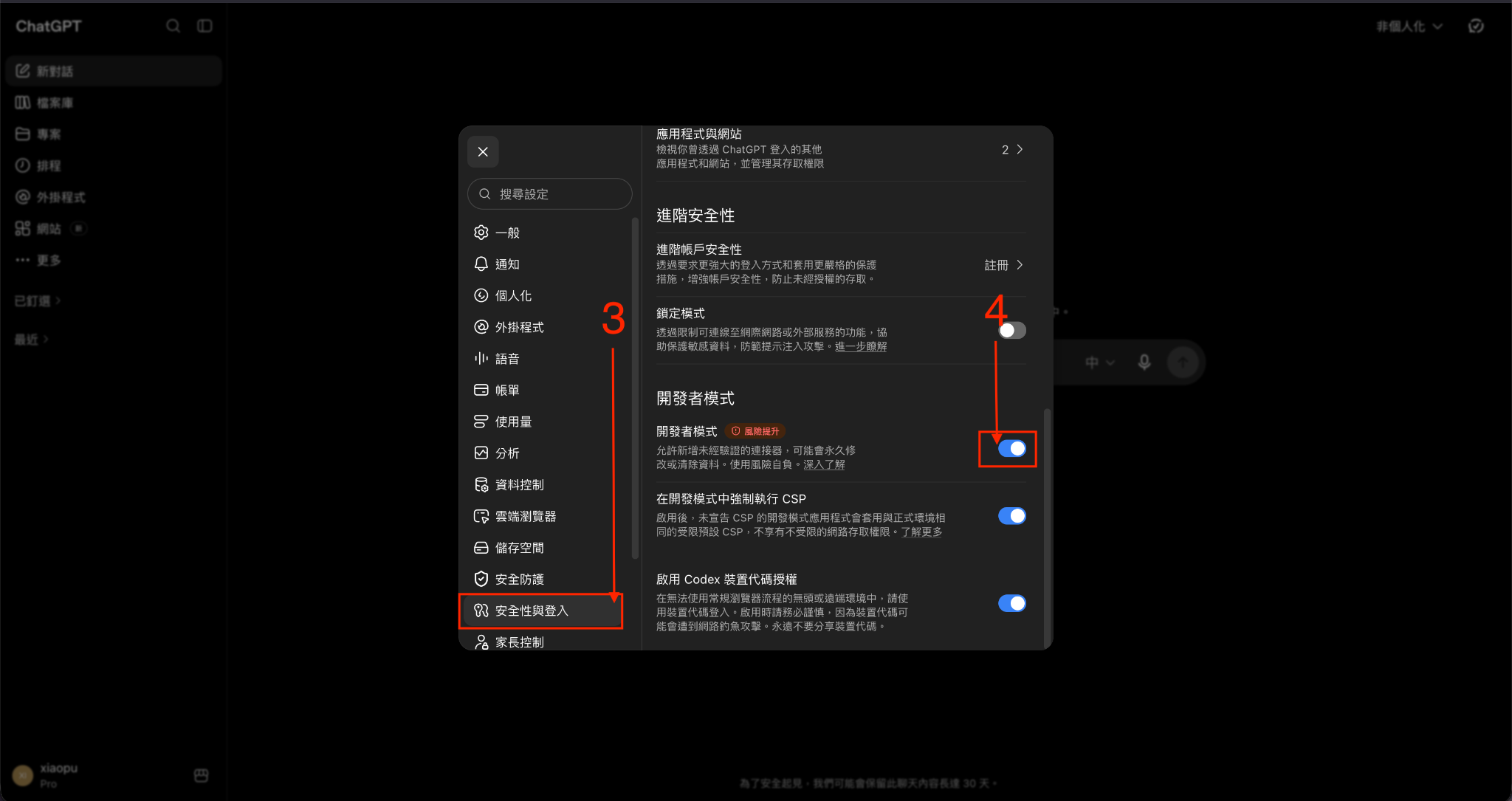
Open Settings and enable Developer Mode.
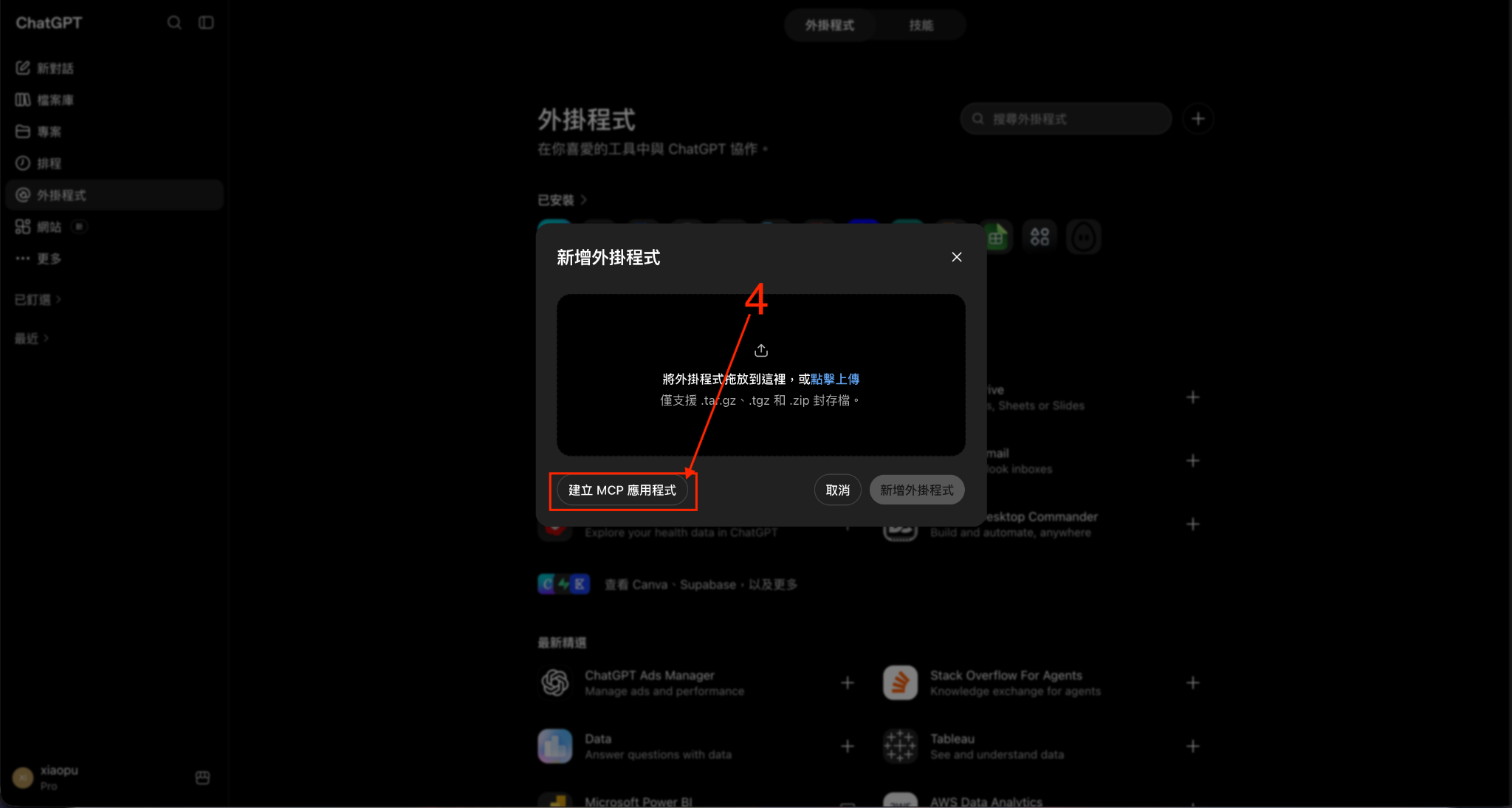
Open Plugins, click +, and choose Create app.
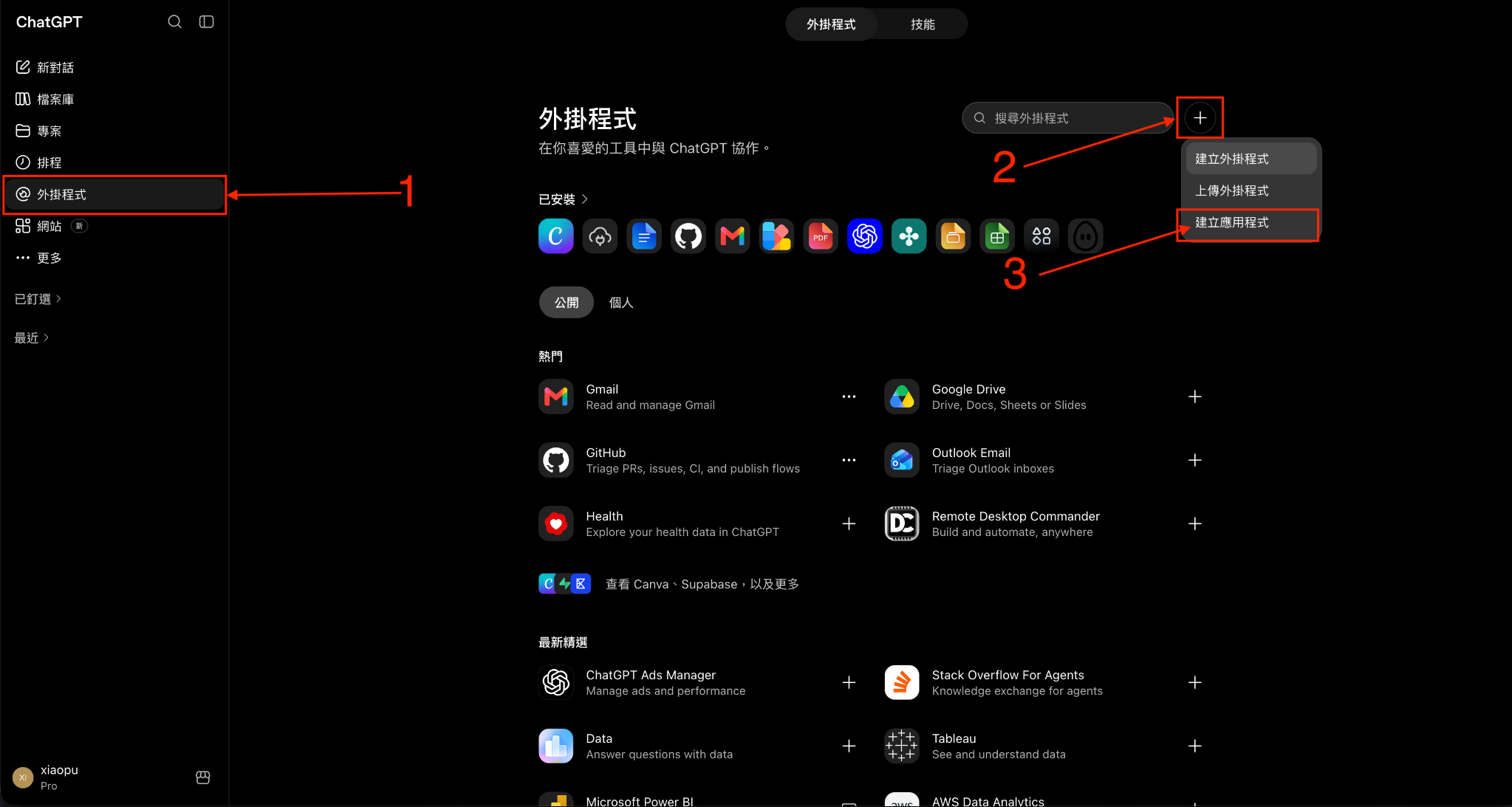
Choose Create MCP app.
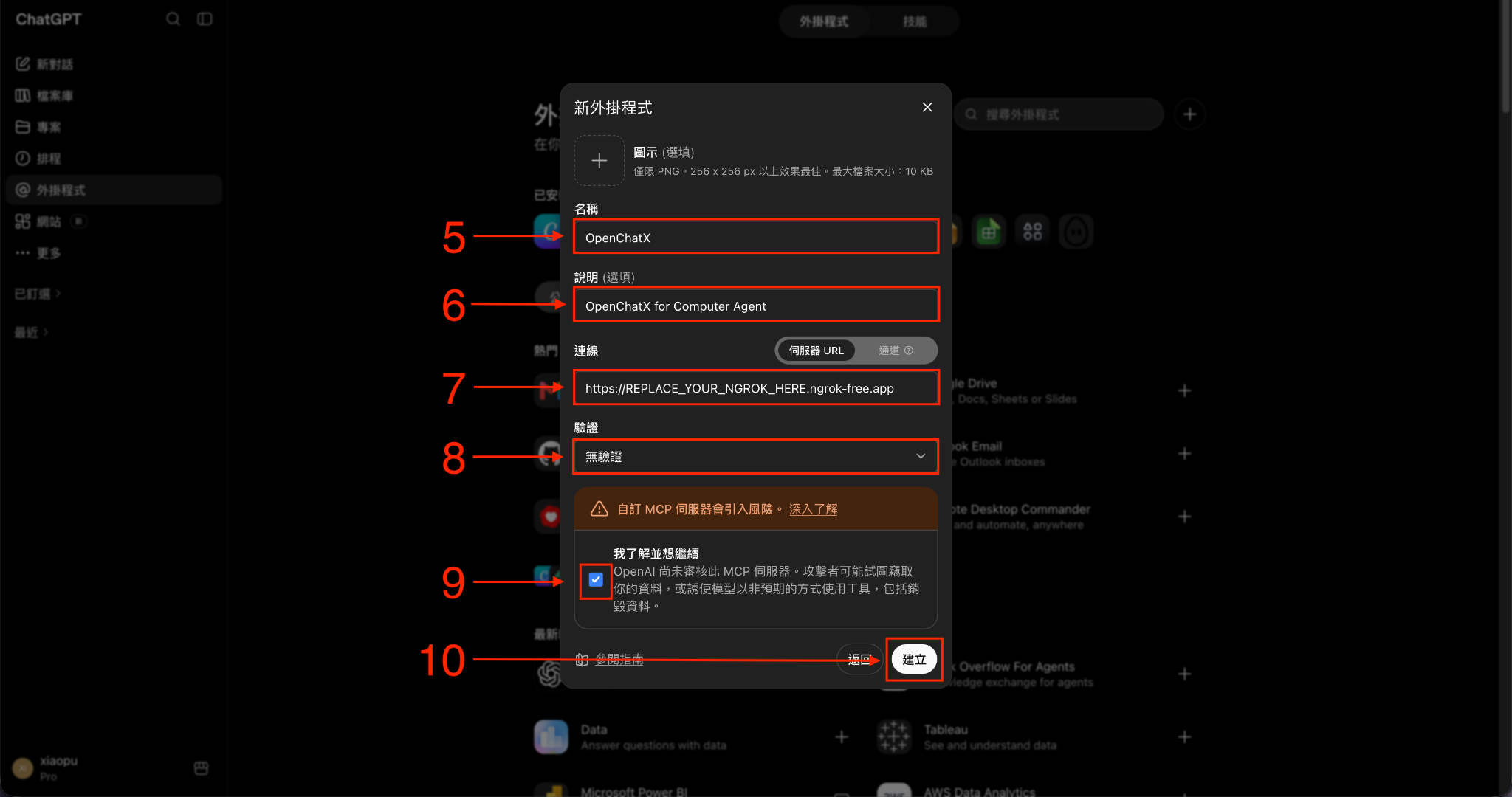
Configure:
- Name:
OpenChatX - Server URL: the
https://.../mcpURL printed bynpm run print-url - Authentication: No Auth
- Name:
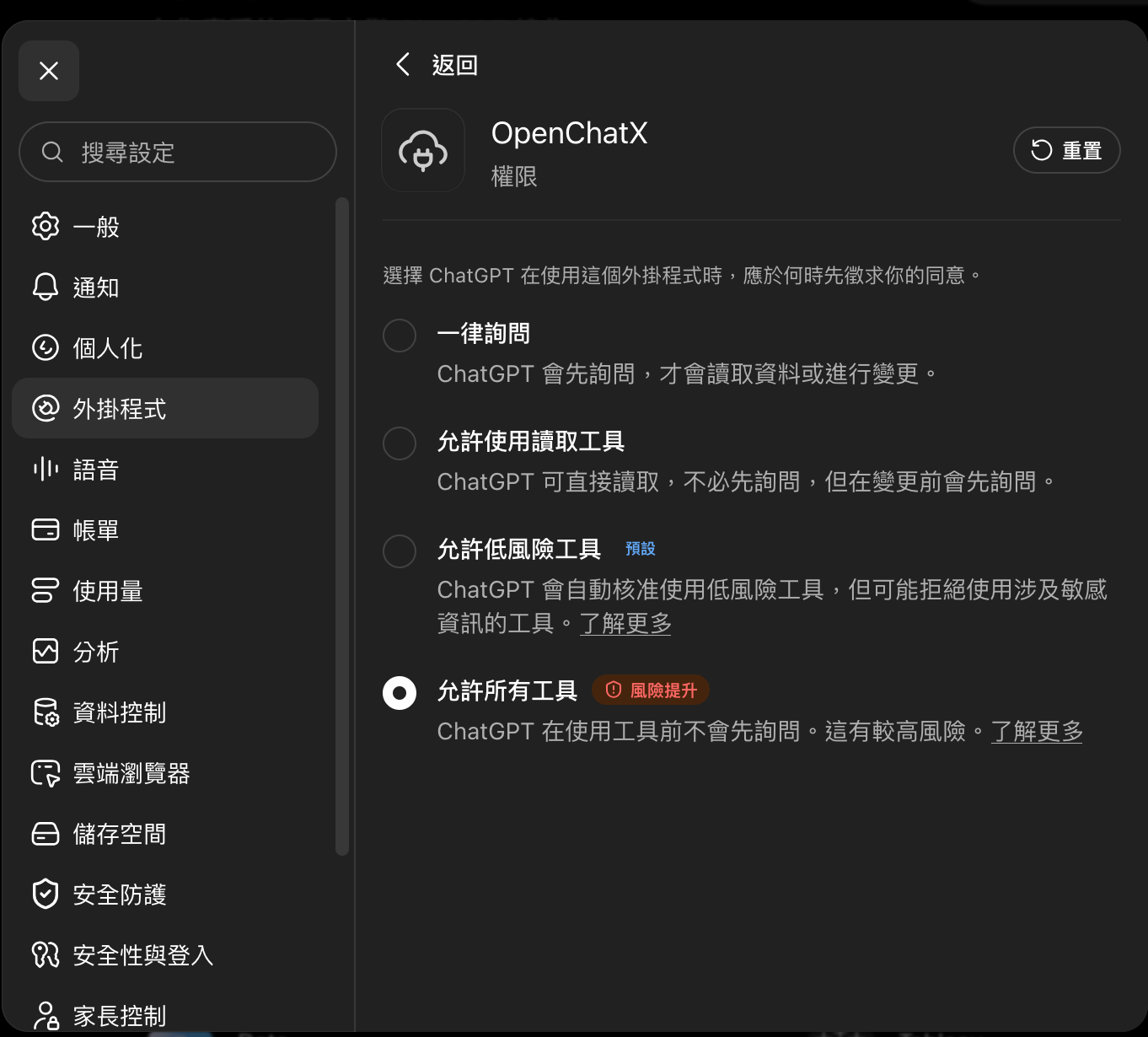
If desired, set the OpenChatX plugin permission to Allow all tools.
[!IMPORTANT]
The first trusted remote tool call binds this installation to that ChatGPT subject. Runnpm run auth:resetonly when you intentionally want to clear that binding.
Verify
npm run status
curl -fsS http://127.0.0.1:3333/healthz
npm run print-url
MCP: http://127.0.0.1:3333/mcp
UI:  http://127.0.0.1:3333/ui
Capability discovery
OpenChatX does not publish every external MCP or custom-tool schema directly to ChatGPT.
start_here returns a compact catalog:
External MCP capabilities:
- blender (Blender): available, 32 tools — 3D modeling and scene control
- unreal-engine (Unreal Engine): available, 3 tools — Unreal Editor automation
When a task needs one of those capabilities:
tool_search(
  query="create and modify a 3D model",
  source="mcp",
  server="blender"
)
ChatGPT then calls only the discovered tool through tool_call. This keeps the main schema surface small while preserving discoverability.
External MCP servers
Want to connect Blender, browser automation, another local app, or a remote MCP server? Just ask ChatGPT to connect it for you.
For example:
Add this MCP server to OpenChatX and verify that it works.
ChatGPT can inspect the server's setup instructions, configure it through OpenChatX, and verify the connection. You can also manage MCP servers manually from the Dashboard if you prefer.
Unavailable servers do not prevent OpenChatX from starting; they stay visible in the capability catalog as configured but unavailable.
Provider-backed subagents
OpenChatX can delegate work to models you explicitly configure. Providers do not automatically expose their entire model catalog; you create curated model profiles instead.
Fresh installs start empty:
{
  "providers": {},
  "models": {}
}
Configure profiles from the Dashboard or in the gitignored subagents.json.
subagent_list— list curated profiles and their intended use.subagent_run— delegate one task to one selected profile.
Custom tools
Need a tool that OpenChatX does not have yet? Ask ChatGPT to build it for you.
For example:
Create an OpenChatX tool that starts my game server and returns its status.
or:
Make a tool that talks to my local API and lets you query projects.
ChatGPT can create the toolbox, write the TypeScript tool, test it, and make it available to future conversations. You do not need to hand-write plugin files or schemas yourself.
Custom tools stay lazily discoverable through OpenChatX, so adding your own tools does not bloat the normal ChatGPT tool context. The Dashboard is still available when you want to enable, disable, or inspect them manually.
File workflow
read → edit/write → patch only when appropriate
file_read— inspect text files or directories with line-numbered pagination.file_edit— exact replacement for localized edits to existing text files; returns a diff.file_write— create or completely overwrite a text file; returns a diff.apply_patch— structured multi-file patches, moves/deletes, or user-supplied patches.
Configuration
.openchatx/config.toml   # runtime, workspace, shell, ngrok, MCP output
mcp-servers.json        # external MCP servers
subagents.json          # providers and curated model profiles
toolboxes/              # built-in and custom toolboxes
To keep the ChatGPT connector URL stable across restarts:
[ngrok]
url = "https://your-static-domain.ngrok-free.dev"
The Dashboard is always available at /ui.
Operations
| Command | Purpose |
|---|---|
npm start |
Build and start/reload OpenChatX and ngrok |
npm run restart |
Rebuild and reload services |
npm run restart -- --hard |
Rebuild and recreate the dedicated PM2 daemon from an external terminal |
npm run status |
Show service status |
npm run logs |
Show service logs |
npm run print-url |
Print the public MCP URL and local UI URL |
npm run stop |
Stop OpenChatX and ngrok |
npm run auth:reset |
Clear the bound ChatGPT subject after confirmation |
See Configuration and Startup for recovery details.
Security
- Only connect MCP servers you trust.
- The localhost MCP endpoint has no extra authentication; do not expose it through an untrusted proxy.
- Trusted remote calls are bound to the first ChatGPT subject stored in
<state_dir>/auth.json. agent-commands.yamlmay contain sensitive tool inputs and is intentionally gitignored.
See SECURITY.md.
Development
npm run lint
npm run typecheck
npm test
npm run build
npm run ui:lint
npm run ui:build
npm run inspect— open MCP Inspector.npm run schemas— print the currently published MCP tool schemas.
More implementation details live in the Maintainer Wiki.
License
MIT.
The vendored apply_patch binary retains its upstream OpenAI Codex license and notices under vendor/apply-patch/.
Attribution
Parts of this project are derived from Shellby MCP, originally created by Serbyte Development under the MIT License. The original notice is preserved in THIRD_PARTY_NOTICES.md.
Yorumlar (0)
Yorum birakmak icin giris yap.
Yorum birakSonuc bulunamadi