noobot
Health Gecti
- License — License: MIT
- Description — Repository has a description
- Active repo — Last push 0 days ago
- Community trust — 11 GitHub stars
Code Gecti
- Code scan — Scanned 12 files during light audit, no dangerous patterns found
Permissions Gecti
- Permissions — No dangerous permissions requested
Bu listing icin henuz AI raporu yok.
Self-hosted AI agent workspace with tool calling, MCP, multi-model routing, sandboxed execution, and multi-agent workflows. Web and desktop.
Noobot
Self-hosted AI agent workspace for tool calling, multi-model routing, MCP, and multi-agent workflows.
中文 | English



Windows installer (choose Noobot.Setup.<version>.exe) · macOS package (choose Noobot-<version>-mac.zip) · Configuration · Discussions
Noobot is an open-source Web and desktop AI agent application built with Node.js, Vue 3, and Electron. It provides isolated user workspaces, durable sessions, extensible tools, semantic workflows, and OpenAI-compatible or DashScope model access from one self-hosted deployment.
Co-creators: Hyler · Epicur · gonglei · Z · Y · C
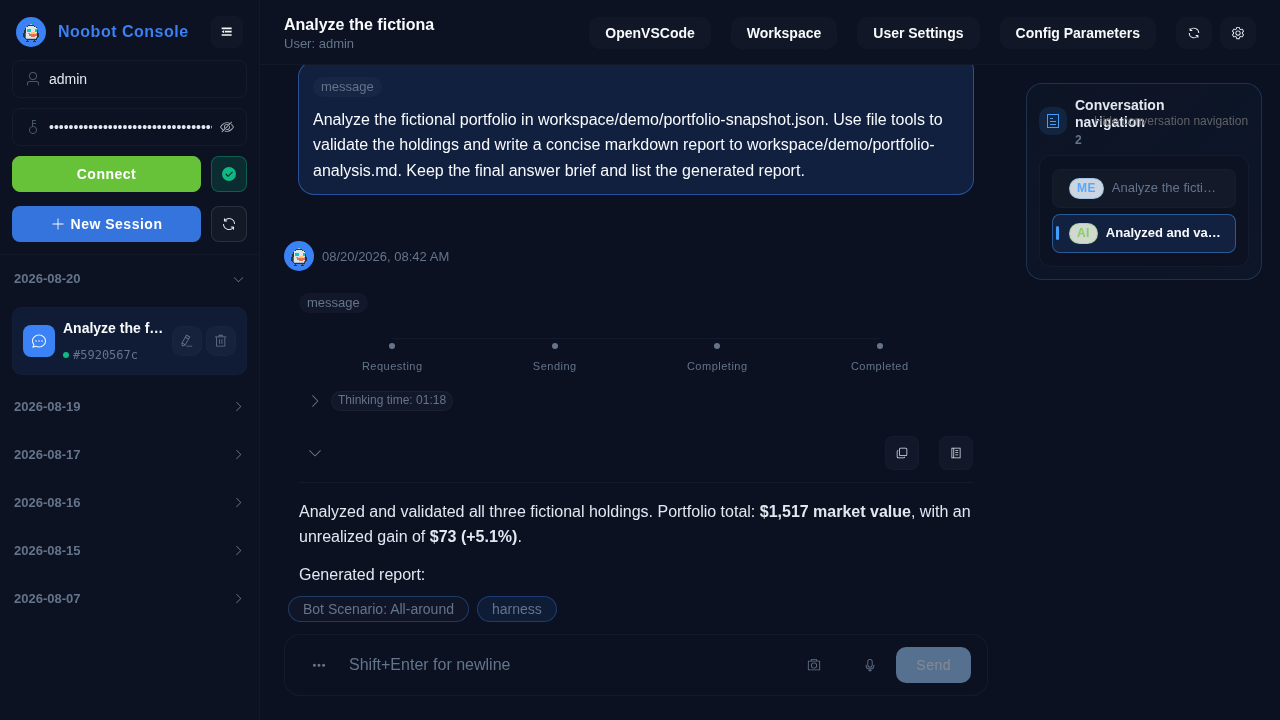
See Noobot in Action
An English demo of a fictional portfolio analysis: Noobot verifies source data, chains four file tools, surfaces the live analysis flow, and publishes reusable report attachments.

Why Noobot
- Agent workspace: multi-user workspace and session isolation with persistent attachments and execution history.
- Tools and skills: file operations, native/script execution, browser automation, LibreOffice, FFmpeg, multimodal parsing/generation, services, and reusable skills.
- Model interoperability: OpenAI-compatible and DashScope interfaces, provider/model-family routing, tool calling, streaming, and multimodal capability configuration.
- Multi-agent orchestration: task delegation, semantic workflows, workflow plugins, and harness-based planning/guidance/review.
- MCP and connectors: MCP servers plus database, terminal, email, and custom service connectors.
- Web and desktop: Vue 3 Web client and packaged Electron clients for Windows and macOS.
- Self-hosted operations: one-command PM2 + Caddy deployment, runtime audit events, replay, sanitization, and bilingual UI/configuration.
Get Noobot
| Option | Download or command | Notes |
|---|---|---|
| Windows installer | Latest release, then choose Noobot.Setup.<version>.exe |
Recommended for Windows |
| Windows packaged archive | Latest release, then choose Noobot-<version>-win.zip |
ZIP distribution without the setup wizard |
| macOS packaged archive | Latest release, then choose Noobot-<version>-mac.zip |
Packaged macOS desktop client |
| Self-hosted Web | ./start.sh |
Linux or macOS server deployment |
Quick Start
git clone https://github.com/xiayu1987/noobot.git
cd noobot

chmod +x start.sh
./start.sh
Notes:
start.shruns the project launcher first (scripts/project-launcher.mjs).- If
service/config/global.config.jsondoes not exist, an interactive setup wizard will create it. - For non-interactive environments, initialize with env vars (example):
NOOBOT_MODEL_FORMAT=openai_compatible \
NOOBOT_MODEL_NAME=gemini-3-flash \
NOOBOT_MODEL_API_KEY=xxx \
NOOBOT_MODEL_BASE_URL=https://example.com/v1 \
./start.sh
Optional: NOOBOT_SETUP_LANG=zh|en (controls setup wizard language and synchronizes preferences.language plus built-in config copy text localization).
Default endpoints:
- Frontend:
http://127.0.0.1:10060 - Backend:
http://127.0.0.1:10061 - Agent Proxy:
http://127.0.0.1:10062 - Model proxy endpoints are generated from your configured providers.
Stop all services:
chmod +x stop-services.sh
./stop-services.sh
Requirements
- Node.js 22.22.2+
- npm 9+
- Linux/macOS
Workspace Dependency Management
This repo uses npm workspaces at root (noobot/package.json).
cd noobot
npm install --workspaces
Useful commands:
# run all test scripts that exist
npm run test

# development servers
npm run dev:service
npm run dev:agent-proxy
npm run dev:client

# build the startup UI and web client
npm run build
The root package.json is the source of truth for the current workspace list and
repository-wide scripts. Package-specific scripts can also be run withnpm run -w <workspace> <script>.
Optional system deps:
libreoffice(Office document conversion)ffmpeg(audio/video processing)docker(programmable workspace compute sandbox)
Desktop Packaging
Install dependencies first from the repository root:
npm install --workspaces
Then choose one of the following equivalent approaches.
From the repository root (the root scripts already select the workspace with-w):
# Build the Windows desktop package
npm run build:windows

# Build the macOS desktop package
npm run build:mac
Or run the workspace script from the corresponding desktop client directory:
# Windows (run from client/windows)
cd client/windows
npm run build:win

# macOS (run from client/mac)
cd ../mac
npm run build:mac
The commands prepare the frontend, Electron client, and backend before invokingelectron-builder. The generated artifacts are written to the corresponding
desktop client's dist/ directory.
Config
- Main config doc:
CONFIGURATION.md - Session log WebSocket, retention, and debug switches are documented in
CONFIGURATION.md. - Contributing guide:
CONTRIBUTING.md - Coding standard:
CODING-STANDARD.md - Backend docs: English | 中文
Environment variables for start.sh:
CADDY_ADDR(default:10060)AGENT_PROXY_UPSTREAM(default127.0.0.1:10062)PORT(service port, default10061)
Example:
CADDY_ADDR=:8080 PORT=3001 AGENT_PROXY_UPSTREAM=127.0.0.1:3002 \
AGENT_PROXY_PORT=3002 ./start.sh
PM2 (local)
The PM2 scripts below manage one package at a time and do not run the project
initialization launcher. For first-time deployment, dependency installation,
frontend build, or config auto-sync, use./start.sh.
cd service && npm run pm2:list
cd service && npm run pm2:logs
cd service && npm run pm2:stop
cd service && npm run pm2:delete

cd agent-proxy && npm run pm2:list
cd agent-proxy && npm run pm2:logs
cd agent-proxy && npm run pm2:stop
cd agent-proxy && npm run pm2:delete

cd model-proxy && npm run pm2:list
cd model-proxy && npm run pm2:logs
cd model-proxy && npm run pm2:stop
cd model-proxy && npm run pm2:delete
License
Yorumlar (0)
Yorum birakmak icin giris yap.
Yorum birakSonuc bulunamadi