cairn
Health Uyari
- License — License: Apache-2.0
- Description — Repository has a description
- Active repo — Last push 0 days ago
- Low visibility — Only 5 GitHub stars
Code Basarisiz
- child_process — Shell command execution capability in .claude/epics/E1.0a.json
- fs module — File system access in .claude/epics/E1.0a.json
- process.env — Environment variable access in .claude/skills/verify-cairn/archive/1009/drive-1009-a0-live.mjs
- network request — Outbound network request in .claude/skills/verify-cairn/archive/1009/drive-1009-a0-live.mjs
- process.env — Environment variable access in .claude/skills/verify-cairn/archive/1025/drive-1025-plan-first-round.mjs
- network request — Outbound network request in .claude/skills/verify-cairn/archive/1025/drive-1025-plan-first-round.mjs
- process.env — Environment variable access in .claude/skills/verify-cairn/archive/1031/drive-1031-account-controls.mjs
- network request — Outbound network request in .claude/skills/verify-cairn/archive/1031/drive-1031-account-controls.mjs
Permissions Gecti
- Permissions — No dangerous permissions requested
Bu listing icin henuz AI raporu yok.
Self-hosted, open-source multi-agent workspace. You write the tickets, agents build them on your machines, you gate what merges.

Cairn
A self-hosted personal assistant for people who write code.
Website · Docs · Discussions · English | Simplified Chinese




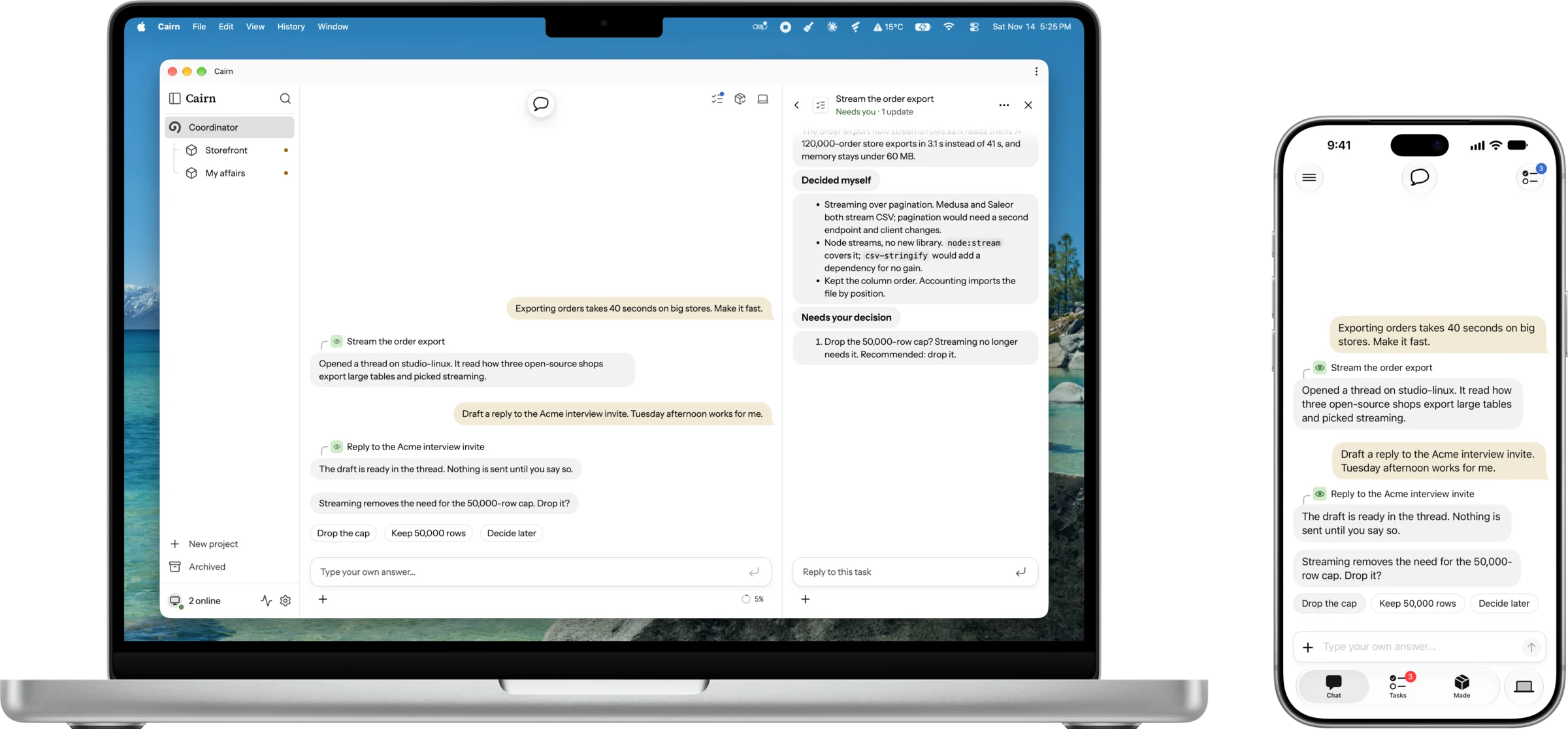
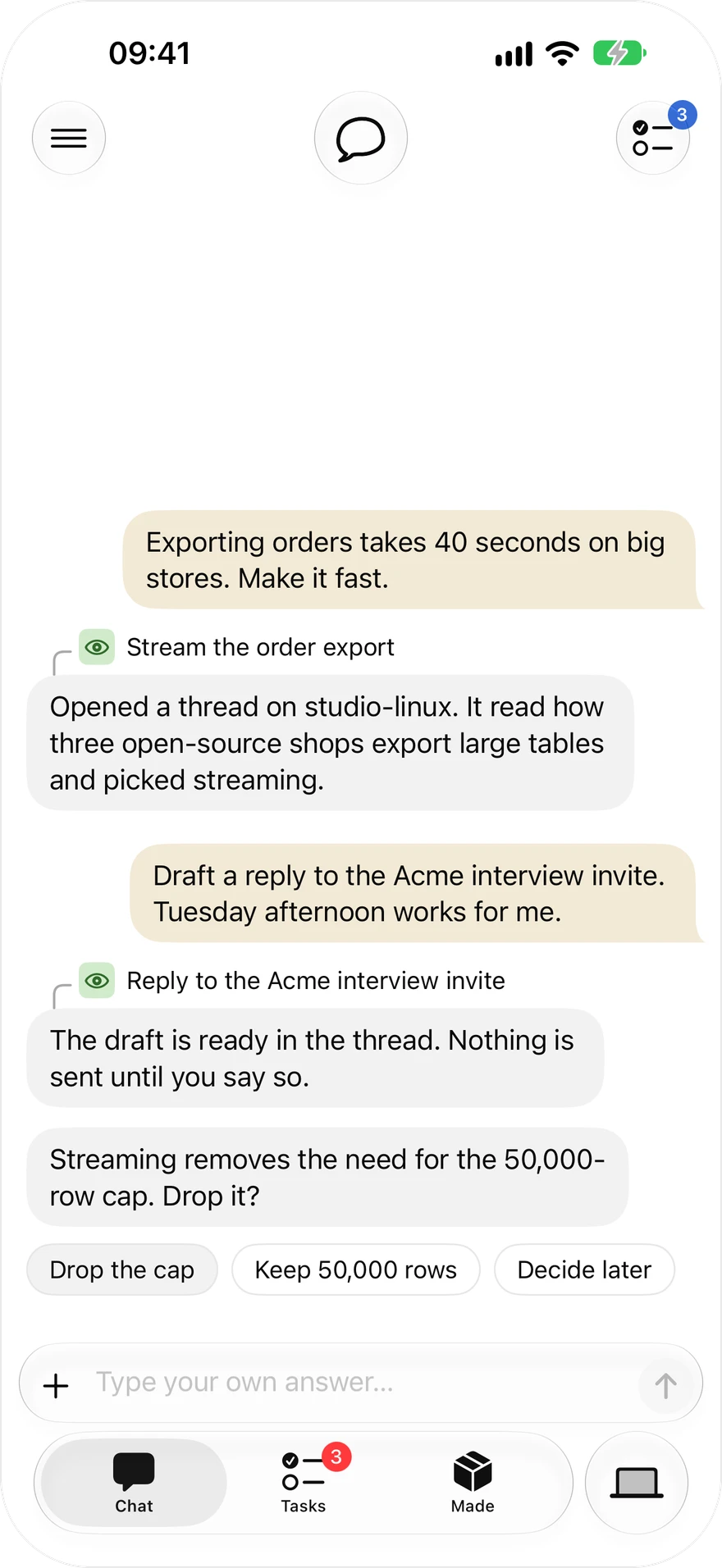
Tell one Coordinator what you want, from code to your own affairs. It opens a thread for each piece of work on your own machines, and comes to you only when a decision is yours. Start at your desk; make the call from your phone.
What you get
- Your own subscriptions. Claude Code, Codex, or an API key from any provider, Google's Gemini included. Cairn never resells compute.
- Research, then build. A thread reads how strong open-source projects solved the problem before it changes anything, and decides the details itself.
- Only what needs you. The home page pins the decisions waiting on you, and a push goes out only when you must act.
- Results you can trust. Before an agent merges, the gate counts only review verdicts bound to the current patch. Anything that cannot be undone waits for your yes.
- Your machines, your data. A daemon on each machine runs threads in their own git worktree, or in a throwaway container where the host supports it. Code and credentials stay with you.
- Your own affairs (planned). Mail, calendar and job search as a project with no repository: agents read, sort and draft; sending and submitting wait for you.
|
|
 |
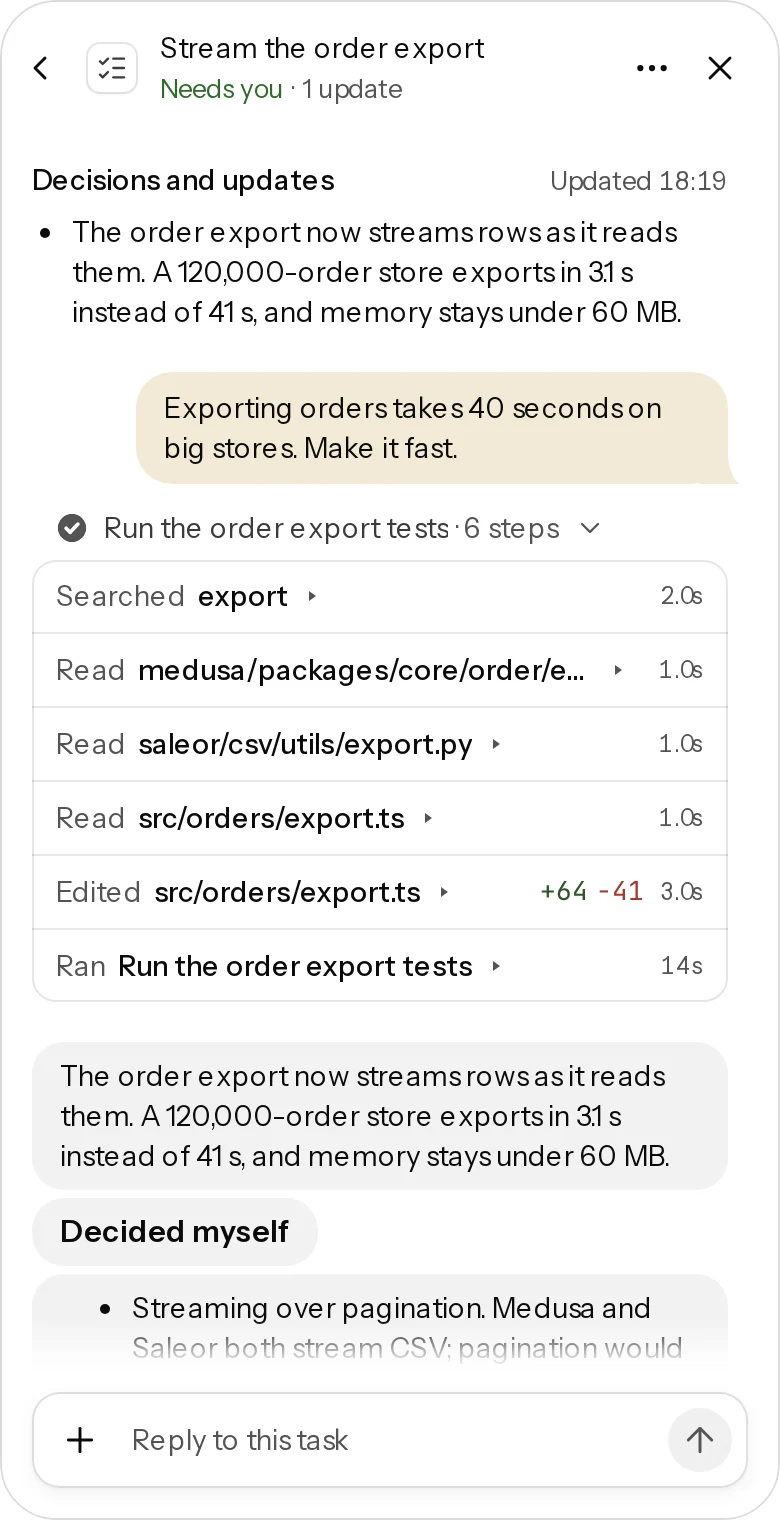
| Say it, decide from your phone | Watch or steer the thread | The gate decides the merge |
It researches and decides on its own
You decide what you want and the architecture. The thread does the rest:
- Reads the prior art. It finds two or three strong open-source implementations, reads their source rather than their README, and compares them.
- Decides the details. Libraries, file layout, naming and tests are its call, unless your rules say to ask.
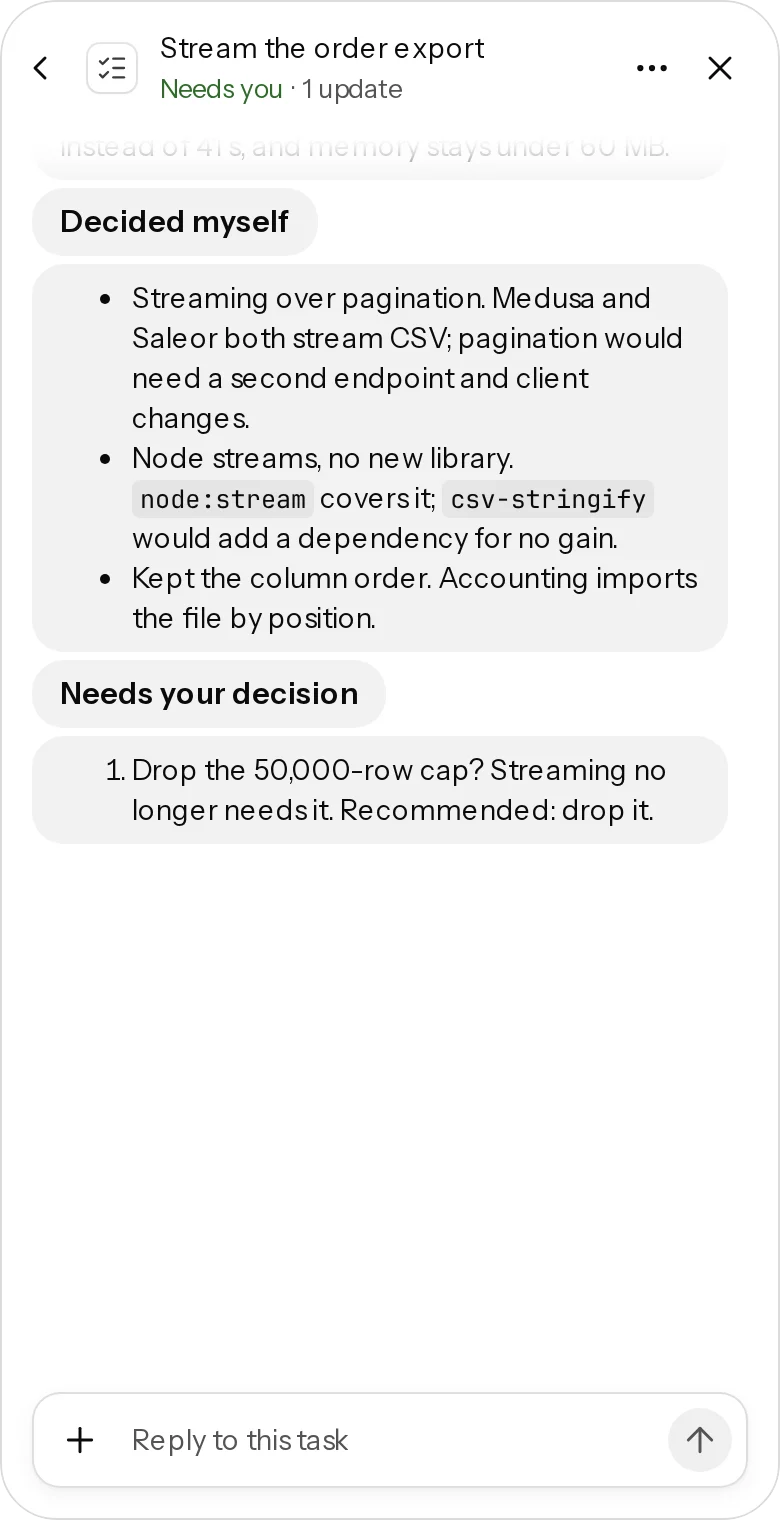
- Reports both lists. Every report ends with Decided myself, each choice with its reason, and Needs your decision: at most three items, each with options, evidence and a recommendation.
See it work

Install
On a Mac, download Cairn for Mac from the latest release: -arm64.dmg for Apple silicon, -x64.dmg for Intel. Drag Cairn to Applications and open it. The app is not notarized yet, so macOS blocks the first launch: open System Settings, then Privacy & Security, and click Open Anyway next to Cairn (on macOS 14 and earlier, right-click Cairn in Applications and choose Open). The app runs Cairn and a Runner on this Mac and signs you in.
Tasks run with Claude Code. Install it, run claude once in Terminal to sign in, and the app finds it on your PATH or in its usual install folders.
On Linux or Windows, or to add a Runner on another machine, use npm with Node.js 22 or 24:
npx @xiechimon/cairn
This serves Cairn at http://127.0.0.1:8787/app and creates the database under ~/.cairn. Then, on each machine where agents should work:
npm i -g @xiechimon/cairn-cli
cairn start --server http://127.0.0.1:8787
It prints a link; open it in the browser where Cairn is open and approve the machine. Use your server's address instead when the Runner is on another machine. A Linux Runner also needs bubblewrap for its task sandbox; see getting started. On macOS and Windows, the npm server's browser cannot yet approve that machine or add providers; those need the owner token, as getting started shows.
Then connect a model: sign in to Claude Code or the Codex CLI on a machine that runs the daemon, or add a provider in the web UI with a Claude token from claude setup-token, an API key, or a custom endpoint. Not available yet: OpenAI Codex sign-in in the provider list (it is marked as such) and Gemini CLI. GitHub Copilot sign-in needs your own GitHub OAuth App (CAIRN_GITHUB_OAUTH_CLIENT_ID, CAIRN_GITHUB_OAUTH_CLIENT_SECRET). To follow along from your phone, see private access over Tailscale. Docker and building from source are in getting started.
"Wait, what are you selling?"
Nothing. All code is Apache-2.0 with no feature gating; only a private, rotating holdout subset of the eval task set stays unpublished. There is no hosted control plane and no resold compute: Cairn runs on your machines with your subscriptions.
Who it's for
Cairn is for one person, not a team: you run your own copy, and someone else who wants it runs theirs.
It fits you if you:
- write code, or work alongside code, and want agents to do the work in the background while you only make the calls;
- have a machine that can stay on (a desktop, a home server or a VPS), and ideally a laptop or a phone to follow along from;
- already pay for Claude Code or Codex, or have an API key, and want to keep using them rather than buy compute again;
- want your code, mail and credentials to stay on your own machines.
It is not the right fit if you want:
- a tool for a team to share, with shared channels, roles and billing (Amp Spaces or Multica);
- only a better interface for driving Claude Code or Codex yourself (T3 Code);
- an assistant that lives in your chat apps, such as Telegram or WhatsApp (OpenClaw or Hermes Agent);
- a hosted service with nothing to install or keep running.
Documentation
| Document | Contents |
|---|---|
| docs/getting-started.md | Run the server, enroll a machine, Docker, deploy publicly, build from source |
| docs/configuration.md | Every server and daemon environment variable |
| docs/deploy/tailscale-mobile.md | Private access from your phone over Tailscale |
| CONTEXT.md | Domain model and glossary |
| docs/spec/ | Implementation canon |
| Path | Contents |
|---|---|
CONTEXT.md |
Domain model & glossary — canonical terminology (Chinese interface terms ↔ English ↔ internal names) |
apps/web |
Web UI, React + vite (@cairn/web) |
apps/server |
Server: Hono REST + SSE + SQLite (package @xiechimon/cairn — directory name differs from package name) |
apps/daemon |
Executor daemon (package @xiechimon/cairn-cli — directory name differs from package name) |
packages/shared |
Protocol vocabulary, record shapes, brand-slot single source (@cairn/shared) |
docs/spec/ |
Implementation canon, volumes 00–30 |
docs/research/ |
r1–r15 site inventories and later product research (historical archive) |
scripts/ |
Build, CI and ops tooling |
Community
Questions, setup help and "how do I do X with cairn" go to GitHub Discussions: the Q&A category for questions and Show and tell for what you built. Bugs and feature work go to the issue tracker, where a maintainer labels them before an agent picks them up. Security reports go to neither place; see SECURITY.md. Cairn is built with Cairn: agents inside it take its own tickets and open the pull requests.
After your first pull request merges, Cairn can show a dismissible card linking to a prefilled discussion post. The card is off by default, Cairn opens nothing on its own, and nothing is sent anywhere: you choose whether to submit the post. docs/privacy.md lists the exact fields the prefilled text carries.
Acknowledgments
Cairn learned from products we read the source or docs of and used ourselves. No code is copied from them; bundled code and assets are listed under Third-party credits.
- Amp: threads, Spaces, runners across machines, and reading prior art before deciding.
- T3 Code: following work from any device and reconnecting cleanly.
- Multica: the runtime model of one machine running one agent CLI.
- todos.dev: plans and reviews as stopping points in a task's life.
- Claude Code, Codex and pi: the engines threads run on.
Third-party credits
- Avatar font Lorelei — © Lisa Wischofsky, CC0 1.0
- Fonts Instrument Sans / Source Serif 4 / JetBrains Mono — SIL Open Font License 1.1
- Icons lucide — ISC License
- Emoji curation data gitmoji — MIT License
- Execution engine pi SDK — MIT License
License
Apache-2.0 — see LICENSE. Contributions use DCO sign-off, not a CLA: see CONTRIBUTING.md.
Yorumlar (0)
Yorum birakmak icin giris yap.
Yorum birakSonuc bulunamadi