rab
Health Uyari
- No license — Repository has no license file
- Description — Repository has a description
- Active repo — Last push 0 days ago
- Community trust — 11 GitHub stars
Code Basarisiz
- child_process — Shell command execution capability in .github/workflows/dependabot-auto-merge.yml
- execSync — Synchronous shell command execution in .github/workflows/dependabot-auto-merge.yml
- process.env — Environment variable access in .github/workflows/dependabot-auto-merge.yml
- fs module — File system access in .github/workflows/dependabot-auto-merge.yml
Permissions Gecti
- Permissions — No dangerous permissions requested
Bu listing icin henuz AI raporu yok.
AI-first reactive state architecture for React and TypeScript — shared observable state for humans, agents, DevTools, and Web MCP.
RAB — AI-First Reactive State Architecture
A reactive state architecture where humans and AI agents operate on the same observable state surface.
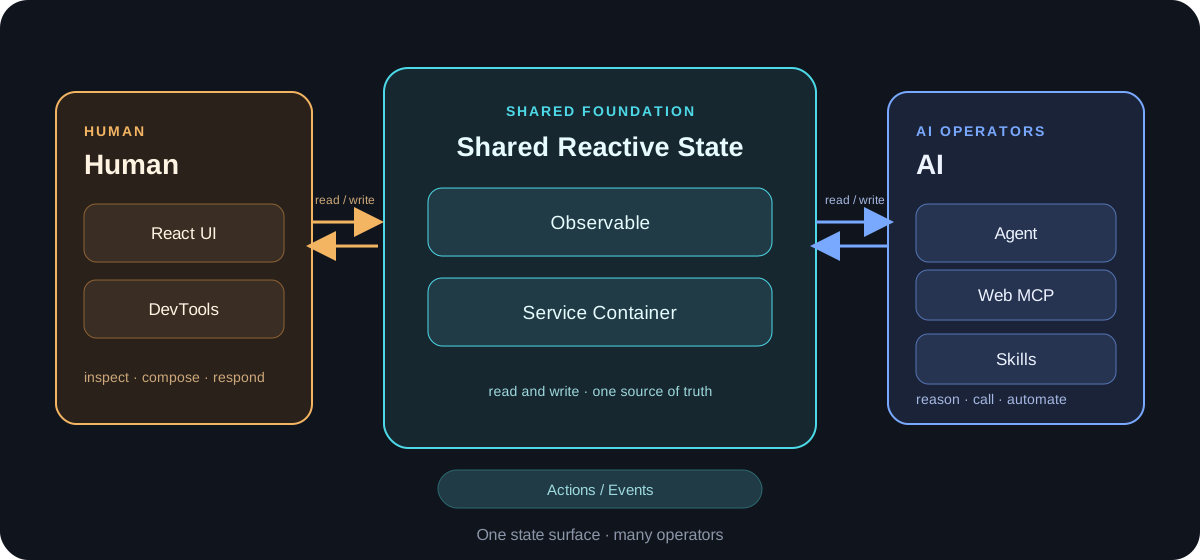
Why RAB
Most state-management approaches give the UI, tests, developer tools, and automation separate ways to understand an application. RAB makes the reactive Service state the shared contract instead. A person clicking a button, a test making an assertion, and an agent calling a tool all work against the same named Service instances and their observable state.
This reduces duplicated client, server, and UI mirrors; makes operations inspectable; and gives coding agents stable names and boundaries to reason about. AI First is therefore a state contract, not an AI-specific UI feature.
Architecture
RAB is composed of small layers with one shared state surface:
@rabjs/observertracks property dependencies and runs reactions when those dependencies change.@rabjs/serviceprovides observableServiceinstances, containers, lifecycle management, Actions, and method models such as loading and error state.@rabjs/reactconnects Services to React throughobserver,useService, and scoped service containers.- DevTools and Web MCP expose that same container and state surface to inspection, assertions, and agent operations.
The result is one reactive system rather than a UI state model beside an automation state model.
Quick Start
Use RAB in a React application:
pnpm add @rabjs/react @rabjs/service
@rabjs/react re-exports the observer and service APIs, so applications can generally import from that single package. For a guided walkthrough, see the Quick Start documentation.
To work on this repository:
git clone https://github.com/ximing/rab.git
cd rab
pnpm install
Core Packages
| Package | Responsibility |
|---|---|
@rabjs/observer |
Fine-grained observable dependency tracking and reactions. |
@rabjs/service |
Observable Services, dependency containers, lifecycle, actions, and method models. |
@rabjs/react |
React bindings for reactive rendering and Service resolution. |
@rabjs/devtools |
Inspection and assertion access to the live container tree. |
@rabjs/web-mcp |
A WebMCP bridge that exposes active Services as tools for browser agents. |
The AI-First Workflow
Human and agent operations enter through the same state contract. The UI is one observer of the update, not a separate source of truth:
Human click / Agent tool call
        ↓
Service action or explicit state mutation
        ↓
Observable dependency tracking
        ↓
React UI, DevTools, and assertions observe the same update
For example, an agent can discover an active Service, call one of its methods, read its resulting state, and assert the outcome. React observes the very same mutation and rerenders only the components whose dependencies changed. This keeps automation inspectable and avoids synchronizing an additional agent-facing state representation.
Service Example
This is the minimal React Service pattern:
import { Service, bindServices, observer, useService } from "@rabjs/react";

class CounterService extends Service {
  count = 0;

  increment() {
    this.count += 1;
  }
}

const Counter = observer(() => {
  const counter = useService(CounterService);
  return <button onClick={() => counter.increment()}>{counter.count}</button>;
});

export default bindServices(Counter, [CounterService]);
Service properties are observable by default, and Service methods are Actions by default. No registration decorator is required for this pattern. observer records what the component reads, while useService resolves the instance for the current scope. bindServices creates a scoped container with lazy singleton resolution, so each bound component tree owns the Services it registers and nested trees can resolve parent Services when needed.
Observer Example
Use @rabjs/observer directly when reactive state is not tied to React:
import { observable, observe, unobserve } from "@rabjs/observer";

const state = observable({ count: 0 });

const reaction = observe(() => {
  console.log(`count: ${state.count}`);
});

state.count += 1; // Runs the reaction because it read state.count.
unobserve(reaction);
Reactions track the properties they read. Changes to those properties rerun the reaction; unrelated changes do not. Read the Observer guide for the standalone API and scheduling options.
Web MCP and DevTools
@rabjs/devtools exposes the live container tree for browser-console inspection and state assertions. It is useful for developers, E2E checks, and CDP-based agent debugging without replacing the runtime state with a snapshot.
@rabjs/web-mcp bridges active Service instances to WebMCP tools. A browser agent can discover Services, read state, invoke methods, make permitted state updates, and run assertions; those operations flow through the same observable layer that React renders. See the DevTools guide, AI overview, and Web MCP guide.
Coding Agent Skills
RAB ships Agent Skills in skills/ that teach coding agents the correct RAB patterns and let them debug live applications:
| Skill | Purpose |
|---|---|
rab-react |
Write @rabjs/react code with the right conventions (observer, useService, bindServices, Service lifecycle). |
rab-cdp-debug |
Inspect, call, and assert Service instances of a running rab app via Chrome DevTools MCP. |
rab-rn-debug |
Debug a React Native app on a device through the @rabjs/rn-debug-server bridge. |
The skills are plain SKILL.md documents with no runtime dependency, so the same files work across coding tools. Installation differs by tool — if you use more than one, install separately for each.
Claude Code
/plugin marketplace add ximing/rab
/plugin install rab@rab
Or manually: cp -r skills/rab-react skills/rab-cdp-debug skills/rab-rn-debug ~/.claude/skills/
Codex App / Codex CLI
This repository doubles as a Codex plugin marketplace (see .agents/plugins/marketplace.json), so no official listing is needed:
codex plugin marketplace add ximing/rab
codex plugin add rab@rab
In the Codex app or TUI you can also open /plugins and search for rab after adding the marketplace.
Cursor
The plugin manifest lives at .cursor-plugin/plugin.json. In Cursor Agent chat run /add-plugin rab, or search for rab in the plugin marketplace. Manually, copy the skill directories into .cursor/skills/ of your project.
Grok Build CLI
Install from xAI's official plugin marketplace (listing in review at xai-org/plugin-marketplace#265):
grok plugin install rab@xai-official --trust
Kimi Code
/plugins install https://github.com/ximing/rab
Then start a fresh session (/new) so the plugin loads.
OpenCode
Add the plugin to opencode.json (global or project-level); it registers skills/ through OpenCode's plugin system:
{
  "plugin": ["rab@git+https://github.com/ximing/rab.git"]
}
Pi
pi install git:github.com/ximing/rab
The package manifest in package.json declares the skills/ directory for Pi's native skill discovery.
Repository Structure
rab/
├── packages/
│   ├── observer/       # @rabjs/observer
│   ├── service/        # @rabjs/service
│   ├── react/          # @rabjs/react
│   ├── devtools/       # @rabjs/devtools
│   └── web-mcp/        # @rabjs/web-mcp
├── examples/           # Runnable examples
├── skills/             # Coding agent skills (rab-react, rab-cdp-debug, rab-rn-debug)
├── website/            # Documentation site
├── docs/               # Project documentation and assets
└── configs/            # Shared TypeScript and ESLint configuration
Development
RAB is a pnpm workspace powered by Turborepo. Use these repository commands:
pnpm install
pnpm build
pnpm test:turbo
pnpm --filter @rabjs/website build
The last command builds the documentation site independently. During development, pnpm dev starts workspace development tasks.
Production Bundle Size
The documentation site's production JavaScript bundle is minified by Vite. A production build (pnpm --filter @rabjs/website build) currently produces:
| Asset | Minified size | Gzip size |
|---|---|---|
website/dist/assets/index-*.js |
448,651 bytes (448.65 kB) | 140,928 bytes (140.93 kB) |
The reported gzip size uses Vite's production build output.
Documentation
The published documentation is available at ximing.github.io/rab.
Contributing
Please open an issue or discussion before proposing a large API or architecture change. For a code contribution, create a focused branch, keep Services and their public methods clearly named, add or update tests for behavior changes, and run the relevant build and test commands before opening a pull request. Use Conventional Commits for commit messages and update the documentation when public behavior changes.
License
RAB is released under the MIT License.
Yorumlar (0)
Yorum birakmak icin giris yap.
Yorum birakSonuc bulunamadi