home-assistant-claude-code
Health Warn
- License — License: NOASSERTION
- Description — Repository has a description
- Active repo — Last push 0 days ago
- Low visibility — Only 5 GitHub stars
Code Pass
- Code scan — Scanned 12 files during light audit, no dangerous patterns found
Permissions Pass
- Permissions — No dangerous permissions requested
No AI report is available for this listing yet.
A Home Assistant app: chat with Claude to read your config and live state, and edit automations, scripts, and dashboards. Mobile-friendly, prebuilt image.

Claude Code UI for Home Assistant
A Home Assistant app that runs Claude Code as a mobile-friendly chat in your
browser, with direct access to your Home Assistant configuration and live state.
It's a self-contained chat UI backed by the Claude Agent SDK,
running inside HA, providing more user friendly access to the features of Claude Code than terminal based apps.
Ask it to build an automation, explain why the heating fired at 3am, or tidy up a
dashboard — it can read your config and entity states, and supports auto or manual approvals.

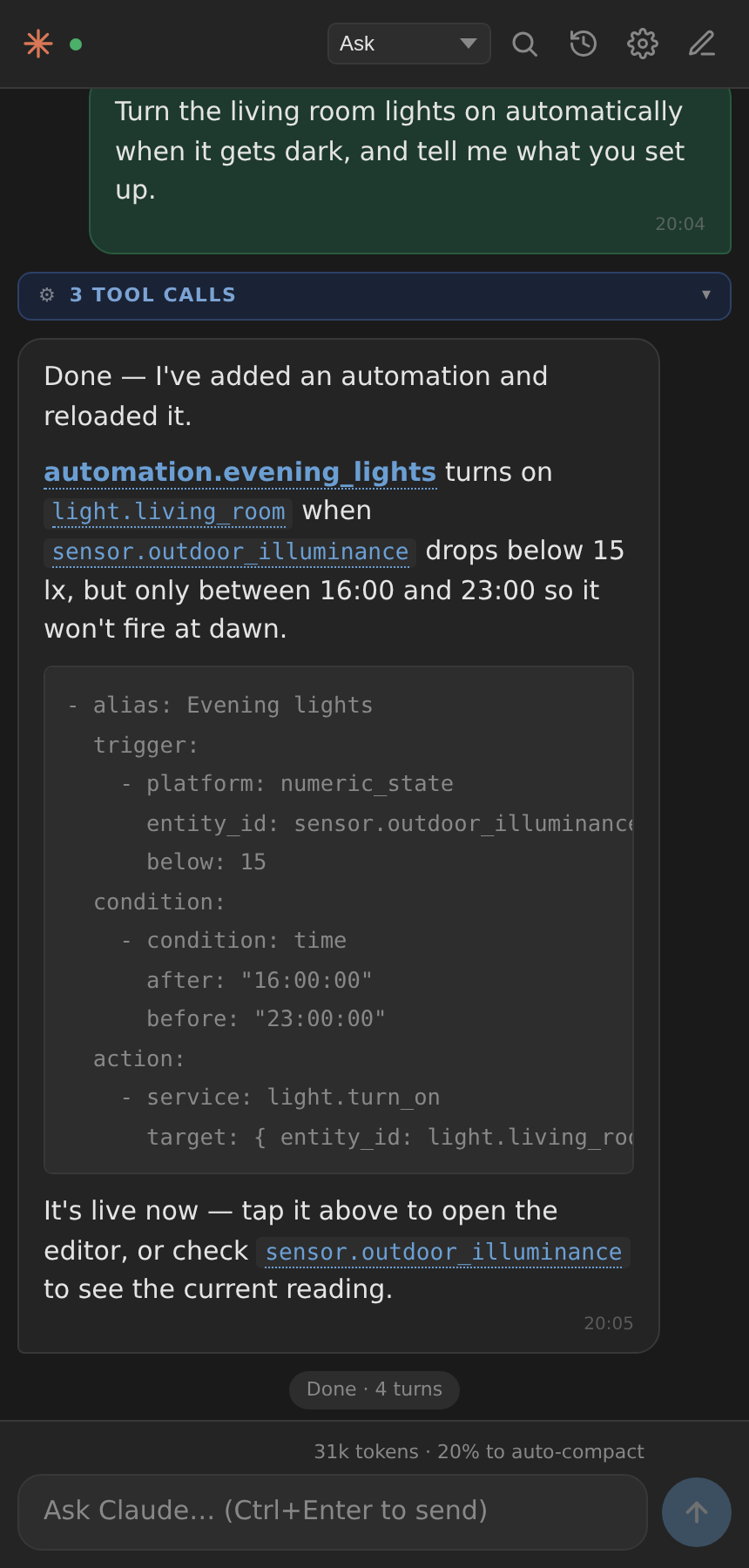
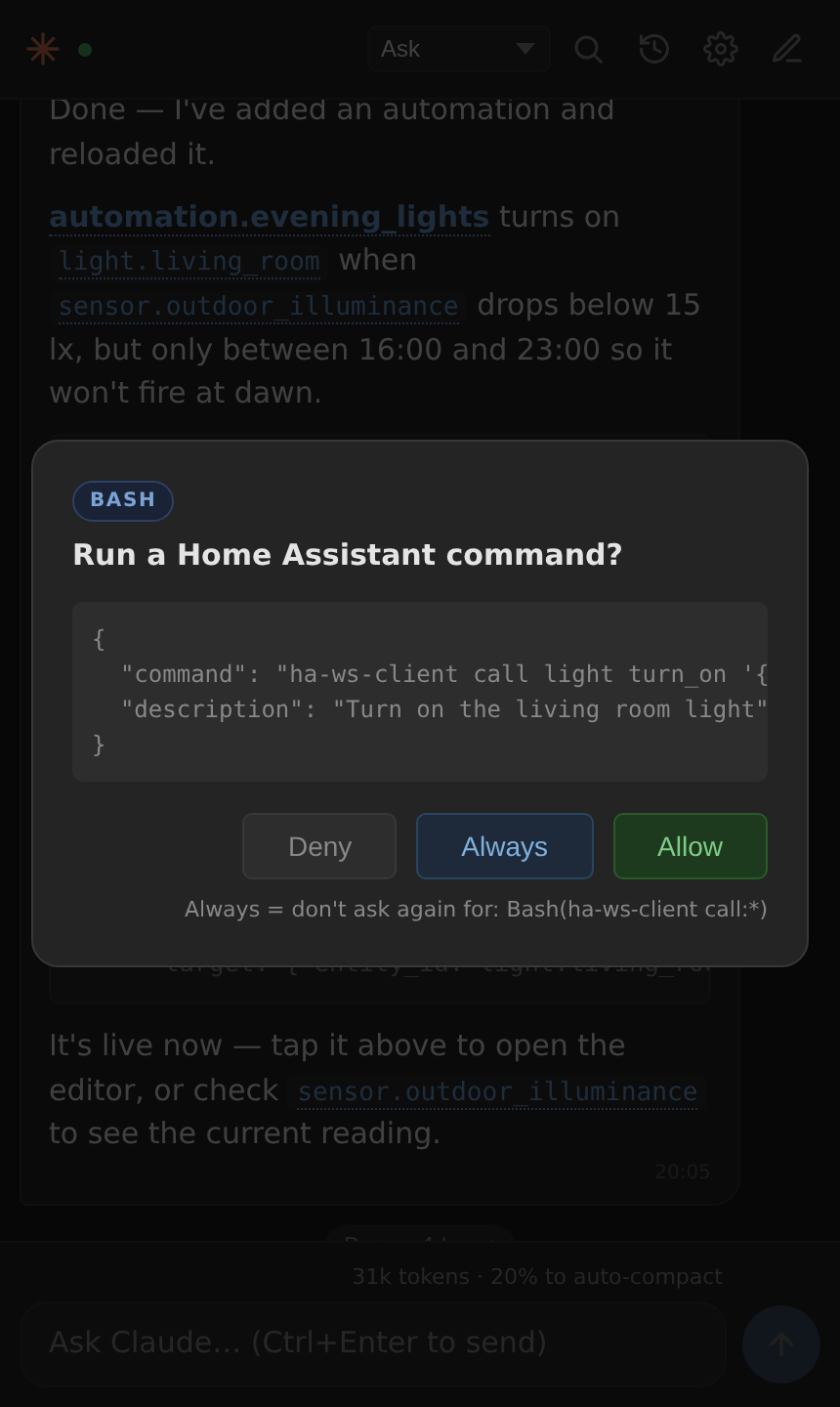
| Chat | Permissions | Settings |
|---|---|---|
 |
 |
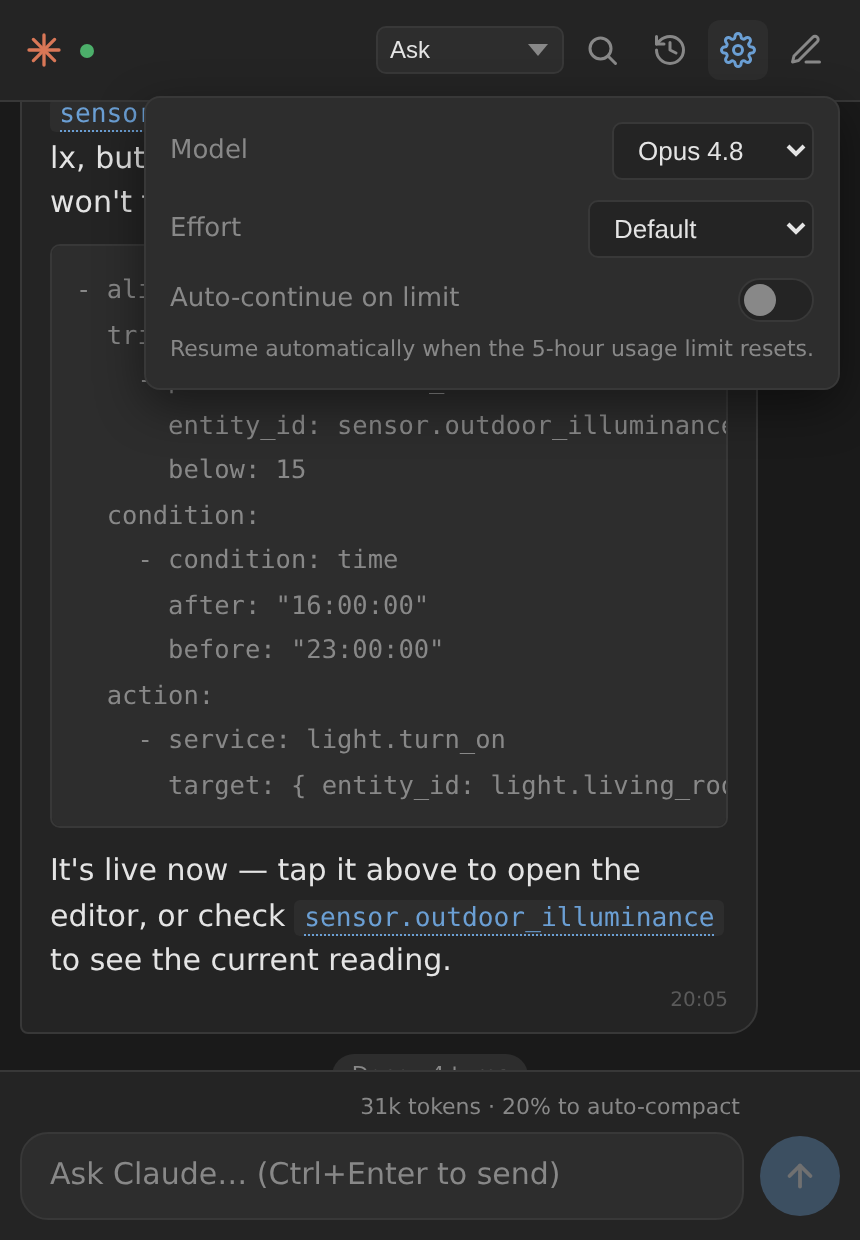 |
| Entity names link into HA | Approve once, or always | Model, effort, auto-continue |
Screenshots use invented demo entities, not a real home.
Features
- 📱 Mobile-first chat UI — clean vanilla-JS interface (no build step), works well in the Home Assistant companion app on Android/iOS
- 🔗 Links into Home Assistant — entity names in replies are clickable: tap one to open its normal more-info dialog (a switch gets its toggle, a thermostat its controls, a sensor its history); automations open their editor. Opens in-place, without leaving Home Assistant
- 💬 Multi-session — browse, resume, and delete past conversations. Built directly on Claude Code's own on-disk session store (
~/.claude/projects), so sessions are interchangeable with the Claude CLI - 🔐 Permission modes — Ask / Plan / Auto (model classifier) / Accept edits / Bypass, switchable mid-response. On a prompt, Always stops it asking again for that kind of call
- 🧠 HA-aware context — auto-loads your HA version, entities, apps, and recent errors into Claude's context each session
- 🔌 ESPHome support (optional) — turn on
enable_esphomeand Claude can validate, compile, OTA-flash, and stream logs for your ESPHome devices. It uses its own bundled ESPHome toolchain (installed inside this app), not the ESPHome app's, while working on the same device configs in/config/esphome - 🔧 Live HA tools —
ha-ws-client(states, service calls, templates, registry),ha-history/ha-stats(date-range history & statistics), andha-lovelace(create / list / get / save / delete dashboards), all authenticated automatically with$SUPERVISOR_TOKEN— no token setup required - 🤖 Model & effort — switch between Fable / Opus / Sonnet / Haiku and trade speed for depth (Low → Max). The list comes from Claude Code itself, so it shows the models your account can actually run
- ⏳ Live feedback — a working indicator with elapsed seconds, a stop button, message timestamps, and a real context-usage meter showing progress toward auto-compaction
- ♻️ Auto-continue on usage limit (optional) — if a subscription 5-hour limit interrupts a response, resume automatically when it resets. Survives an app/HA restart
- 🔎 Find in chat — header search,
/find, or Ctrl/Cmd+F, with match count and highlighting - ⌨️ Slash commands with autocomplete —
/new,/clear,/usage,/resume,/find,/help, plus Claude's own (e.g./compact) and any plugin commands - 🔒 HA ingress auth — protected by Home Assistant; no separate login. Claude credentials (subscription or API key) persist across restarts
- 🏗️ Multi-arch — aarch64 and amd64, installed from a prebuilt image (no building on your Pi)
Installation
Requires Home Assistant OS (or Supervised) — apps aren't available on Core or
Container installs — with Supervisor 2026.07 or newer.
Click the badge above to add the repository to your Home Assistant in one step, then
install Claude Code UI from the App store — or do it manually:
- In Home Assistant, go to Settings → Apps, and select Install app
- In the top-right corner, select the three-dots menu → Repositories
- Add
https://github.com/xionic/home-assistant-claude-codeand select Add, then close the dialog - Find Claude Code UI in the App store and install it (it pulls a prebuilt image, so there's no long local build)
- Start it, open the UI, and sign in with your Anthropic account (or set an API key in the options)
Configuration
| Option | Default | Description |
|---|---|---|
anthropic_api_key |
"" |
Optional. Use an API key instead of signing in with a Claude subscription |
default_permission_mode |
ask |
Permission mode for new chats — ask, auto, acceptEdits, or bypass. You can still change it per-chat |
ha_smart_context |
true |
Generate a context file each session (HA version, entity summary, apps, recent errors, tool reference) so Claude understands your setup |
allow_addon_configs |
false |
Let Claude read/edit other apps' config folders under /addon_configs. While off, any tool call touching that path is blocked |
enable_esphome |
false |
Bundle this app's own ESPHome CLI so Claude can validate / compile / OTA-flash / stream logs, working on your device configs in /config/esphome. Separate install from the ESPHome app (see note below). First enable installs the toolchain in the background (a few minutes) |
verbose_logging |
false |
Per-event logs (each text chunk, tool call, result, context usage) in the app log, for diagnosing a chat that seems to hang. Milestone logs — query start/end, compaction, stalls, errors — are always recorded |
debug |
false |
Exposes /diag troubleshooting endpoints on the app network, including one that runs arbitrary prompts with tools auto-approved. They require a Home Assistant long-lived access token belonging to an admin user (Authorization: Bearer <token>). Leave off unless you're debugging |
Note on ESPHome:
enable_esphomeinstalls a separate, self-contained ESPHome toolchain inside this app (in/data) — it does not use, drive, or depend on the official ESPHome app's installation. Both simply read and write the same device YAML in/config/esphome, so you can keep editing in the ESPHome dashboard while Claude compiles/flashes with its own copy. Because it's a separate install, it has its own compile cache (the first build is slow) and its own version, which can drift from the ESPHome app's over time.
How Claude talks to Home Assistant
Claude uses pre-installed CLI tools (via Bash) plus the Supervisor REST API, all
authenticated automatically with $SUPERVISOR_TOKEN:
ha-ws-client— entity states, service calls, Jinja templates, and registry search over the HA WebSocket API.ha-tools— this app's own helpers, under one command (each is also available under its own name):ha-tools timeline(ha-timeline) — several entities' state changes merged onto one clock (--between 22:00-07:00), which is how most automation timing bugs get found.ha-tools history/ha-tools stats(ha-history,ha-stats) — history and long-term statistics over a date range (--days,--from,--to).ha-tools automation— what HA currently has loaded, and the matching block inautomations.yamlwith line numbers.ha-tools config-check/ha-tools reload— validate config before reloading, then reload without restarting HA.ha-tools trace-watch— wait for an automation to actually fire and report what happened, including runs its conditions blocked.ha-tools lovelace(ha-lovelace) — Lovelace dashboards:create,list,get,save,deleteover the WebSocket API (the REST/api/lovelace/*endpoints don't exist on modern HA).ha-tools logs(ha-logs) — the Core, Supervisor, host, or any app's log, straight from the journal.
- YAML editing — Claude can read and edit your
/configfiles directly.
These run as ordinary Bash calls, so they authenticate cleanly and respect
your chosen permission mode. There is no MCP server: an earlier ha-mcp
experiment was removed because its WebSocket auth was unreliable with the app
token and MCP tool calls bypassed the permission UI.
Safety: Claude is instructed never to edit /config/.storage/* or the
recorder database without asking first — those bypass HA's validation and corrupt
easily.
Architecture
browser  ⇄  WebSocket  ⇄  server/index.js  (Node + @anthropic-ai/claude-agent-sdk)
                                 ├── ha-ws-client                  (HA WebSocket API)
                                 ├── ha-tools timeline             (multi-entity event timeline)
                                 ├── ha-tools history / stats      (date-range history & stats)
                                 ├── ha-tools automation           (loaded config, YAML, traces)
                                 ├── ha-tools lovelace             (dashboards)
                                 ├── ha-tools logs                 (journald, via Supervisor)
                                 ├── plugins/homeassistant-config  (skill + YAML validation hook)
                                 └── Claude Code session store     (~/.claude/projects/*.jsonl)

HA Supervisor → Ingress proxy → port 7681 → chat UI
Credits
- heytcass/home-assistant-addons — the original Claude Terminal app and HA integration patterns the context generation is adapted from (MIT)
- schoolboyqueue — the
ha-ws-clientGo binary - Anthropic — Claude and the Claude Agent SDK
License
See LICENSE. HA integration scripts in claude-code-ui/scripts/ are
adapted from heytcass/home-assistant-addons
under the MIT license; original copyright remains with that project.
Reviews (0)
Sign in to leave a review.
Leave a reviewNo results found