claude-statuspane
Health Uyari
- License — License: MIT
- Description — Repository has a description
- Active repo — Last push 0 days ago
- Low visibility — Only 8 GitHub stars
Code Basarisiz
- exec() — Shell command execution in hooks/register.tsx
Permissions Gecti
- Permissions — No dangerous permissions requested
Bu listing icin henuz AI raporu yok.
A floating status card for Claude Code — model, context, rate limits, cost, branch — plus a progress API any script or mod can feed.
statuspane
A floating status card for Claude Code.
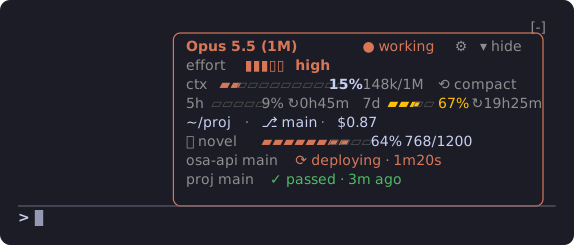
Model, context, rate limits, cost and branch at a glance, your GitHub CI and deploys, plus progress bars any script can feed.




English · 中文
Why
Claude Code's statusLine is one line of text from a shell script. statuspane is a
mod: a small card that lives just above the
prompt, reads Claude Code's own session figures, and can be clicked — no script to write.
Features
| Model · effort | The model in use, whether Claude is working, and its reasoning effort on a gauge (▮▮▮▯▯ high) |
| Context | A gauge with tokens used / window (▰▰▰▱▱▱ 42% 222k/1M), and ⟲ compact: press, then confirm, to run /compact (after the turn, if Claude is working) |
| Rate limits | 5-hour and 7-day use, each on a small gauge, with reset countdowns (↻2h41m) |
| Where you are | Directory and git branch, shortened so the card stays narrow |
| Session cost | What this session has cost so far |
| GitHub CI | The branch's latest Actions run and the runs a push sets off, deploys included (GitHub CI) |
| Progress rows | Bars any script or mod can feed, refreshed every second (Progress API) |
| Clickable | Hide, show and settings are buttons; everything works with the mouse |
| Settings | Pick the lines you want and the bar width; one set for every session, a change shows in the others within 2 seconds |
It is drawn in Claude Code's own theme colors, so it follows dark, light and colorblind themes: gauges in Claude's
accent, turning to the theme's warning color from 60 % and its error color from 85 % (context: 50 % / 80 %).
Install
Needs Claude Code 2.1.287 or later, the release that brought mods (function hooks); tested on 2.1.300. Mods are
early access: their API may change between releases, and a release that breaks the card gets a fix here.
/plugin marketplace add xuanji86/claude-statuspane
/plugin install statuspane@claude-statuspane
claude plugin marketplace add xuanji86/claude-statuspane
claude plugin install statuspane@claude-statuspane
The card appears in terminals at least 70 columns wide; the desktop app shows none, since it has its own, and a session only the desktop app draws, or none, polls nothing (no git, no gh). It adds to your setup and replaces nothing:
a configured statusLine keeps showing; delete it from ~/.claude/settings.json if you want the
card alone.
Use
|
Settings — click 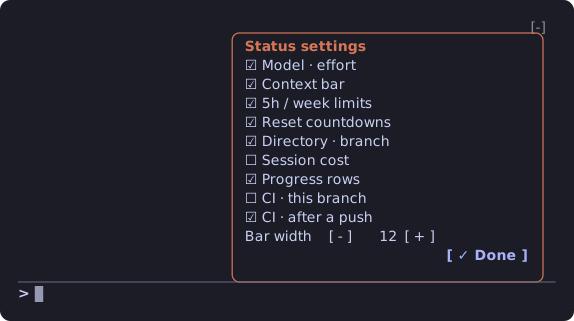
Click a line to switch it, |
Hidden — click 
One button stays at the right edge; click |
- at the panel's corner, and a one-key shortcut
The - at the top right of the panel is Claude Code's own "hide plugin panel". It hides the whole
panel, and only its keybinding brings it back (default ctrl+x ctrl+a). If your terminal doesn't
pass ctrl+x chords through, bind it to one key in ~/.claude/keybindings.json:
{
  "bindings": [
    { "context": "Chat", "bindings": { "ctrl+s": "abovePrompt:toggle", "ctrl+q": "chat:stash" } }
  ]
}
ctrl+s is "stash" by default, so the example moves stash to ctrl+q.
GitHub CI
Two switches on the settings page, both off until you turn them on. They need the
GitHub CLI signed in (gh auth login).
| Switch | Shows |
|---|---|
| CI · this branch | The latest Actions run of the branch the session is on: checked every minute, every 10 seconds while it runs |
| CI · after a push | When Claude runs git push or gh pr merge, the runs that set off (for a merge, on the base branch) until they finish; the result stays for 10 minutes |
Each row reads <repo> <branch> and then:
⟳ test · 1m20s |
accent: under way, with the jobs running now and the time so far (ticks every second between checks) |
⟳ deploying · 1m20s |
a job whose name has deploy in it is running |
✓ deployed · 3m ago |
green: done, and a deploy job succeeded (✓ passed when none ran) |
✗ test failed · 3m ago |
red: the job (or workflow) that failed |
⊘ cancelled · 3m ago |
every run was cancelled or skipped |
All of one commit's workflows make one row; scheduled runs are left out.
Progress API
Show your own progress on the card, from any language or from another mod. Rows are sorted by id,
at most five show, and each one goes away by itself once its source stops reporting. The card reads
the 20 most recently written files, so old files left behind never crowd out a new one.
From any script: a JSON file
Write ~/.claude/statuspane/progress/<id>.json (the folder can be moved withSTATUSPANE_PROGRESS_DIR, an absolute path or one starting with ~/):
{ "label": "build", "percent": 42.5, "text": "3/7 · 1.2/min", "ttl": 300, "state": "running" }
| Field | Type | |
|---|---|---|
label |
string | Shown before the bar, up to 24 characters (defaults to the id) |
percent |
number, optional | 0–100. Leave it out for a text-only row |
text |
string, optional | Shown after the bar, up to 60 characters |
ttl |
seconds, optional | How long the row stays after the file was last written (default 300) |
state |
string, optional | running (accent), ok (green) or error (red): colors the gauge and the text |
<id> uses letters, digits, ., _ and -. Write to a temporary file and rename it over the
target so the card never reads half a file; delete the file to remove the row at once.
Ready-made helpers in examples/ (they check the id, cut fields to length and
write atomically; the shell one needs python3):
examples/report-progress.sh build "build" 42.5 "3/7" # id label [percent] [text] [ttl] [state]
from report_progress import report, clear
report("my-job", "my job", 40, "4/10", state="running")
clear("my-job")
From another mod: $.statuspane
List statuspane under dependencies in your mod's plugin.json (its types are then laid into
your .claude-plugin/types/statuspane/), and call:
await $.statuspane.progress({ id: 'my-job', label: 'my job', percent: 40, text: '4/10', ttl: 120, state: 'running' })
await $.statuspane.clear('my-job')
Same fields as the file. Rows from a mod live in memory, so report again after statuspane reloads.
Already reporting
- ainiee-translate v1.14+ —
progress --watch/--lineshow translation progress.
Privacy and safety
Its footprint, as the awesome-claude-code-mods scan reads it from claude plugin validate:

Everything stays on your machine. statuspane reads Claude Code's own session figures, runsgit branch --show-current in the session's directory, and lists the progress folder. Only with a
CI switch on does it reach out: it reads the origin remote and runs gh run list / gh run view
(and gh pr view after a merge) for that repository, through gh and your own sign-in. From that
folder it reads only *.json files of at most 64 KB, strips control, bidi and zero-width characters
from their text, cuts every field to length, and never runs anything they contain.
Develop
git clone https://github.com/xuanji86/claude-statuspane
cd claude-statuspane
claude plugin validate .
claude plugin test .
claude --plugin-dir .        # or add the folder to CLAUDE_CODE_PLUGIN_DIRS
A session that loaded the mod from its folder reloads it each time you save a file. Issues and pull
requests are welcome.
License
MIT © Anji Xu
Yorumlar (0)
Yorum birakmak icin giris yap.
Yorum birakSonuc bulunamadi