wiff
Health Uyari
- License — License: MIT
- Description — Repository has a description
- Active repo — Last push 0 days ago
- Low visibility — Only 5 GitHub stars
Code Basarisiz
- process.env — Environment variable access in .github/workflows/release.yml
- process.env — Environment variable access in plugins/wiff/scripts/smoke.mjs
- exec() — Shell command execution in plugins/wiff/scripts/viewer.mjs
- os.homedir — User home directory access in plugins/wiff/scripts/viewer.mjs
- process.env — Environment variable access in plugins/wiff/scripts/viewer.mjs
Permissions Gecti
- Permissions — No dangerous permissions requested
Bu listing icin henuz AI raporu yok.
Harness-agnostic, deterministic, resumable multi-agent workflows — plain-JavaScript orchestration for fleets of coding agents, driveable from any MCP client (Codex, Claude Code, Cursor), with key-based resume, worktree isolation, personas, and a live viewer
wiff
Harness-agnostic, deterministic, resumable multi-agent workflows — written as plain JavaScript. Like wf, but wiff.




Fan a task out to a fleet of agents with a small script instead of a prayer. You write ordinary JavaScript with agent(), parallel(), and pipeline(); the runtime executes it in the background, journals every step, and — when a run dies halfway through — resumes it without re-paying for a single completed agent. The engine is a plain MCP server with durable on-disk state, so the same run can be started, watched, resumed, or cancelled from any MCP client — Codex, Claude Code, Cursor, or a cron job. (Today the workers run on Codex; model-agnostic backends are on the roadmap.)
export const meta = {
  name: "audit",
  description: "Audit files in parallel, fix confirmed issues in isolation",
  phases: [{ title: "Audit" }, { title: "Fix" }],
};

phase("Audit");
const findings = await parallel(
  args.files.map((file) => () =>
    agent(`Audit ${file} for auth bugs`, {
      key: `audit:${file}`,          // stable key → free replay on resume
      sandbox: "read-only",
      schema: findingSchema,          // structured JSON output
    }),
  ),
);

phase("Fix");
return await parallel(
  findings.filter((f) => f.real).map((f) => () =>
    agent(`Fix: ${f.summary}`, {
      key: `fix:${f.file}`,
      agentType: "surgeon",           // persona from .codex/agents/surgeon.md
      isolation: "worktree",          // own git worktree — parallel writes can't collide
      sandbox: "workspace-write",
    }),
  ),
);
Why
There is no harness-agnostic workflow orchestration system. Every coding harness has some
multi-agent story — Claude Code has its Workflow tool, Codex has subagents, Cursor has its own
agents — but each one is welded to its harness: its runs live and die with that app, its state is
invisible to everything else, and none of them can be driven from anywhere but their own chat
window. wiff pulls orchestration out of the harness: the engine is a plain MCP server with durable
on-disk state, so any MCP client — Codex, Claude Code, Cursor, a cron job — can start, watch,
resume, or cancel the same runs, and the orchestration itself is a script rather than a
conversation.
Ad-hoc multi-agent orchestration ("spawn some subagents for this") is also great until the run is
40 agents deep and something dies. Workflows-as-code give you:
Determinism — the orchestration is a script, not vibes. No time, randomness, filesystem, or network inside workflow code; agents do the external work.
Resume, not retry — every agent call is journaled with a stable key and an input hash. Kill the host, edit the script, resume the run: unchanged completed agents replay from cache instantly and for free. Agents that were interrupted mid-turn re-run with a digest of their previous attempt's transcript injected ("here's what you already did — continue"), and worktree agents inherit their partial checkout instead of starting over.
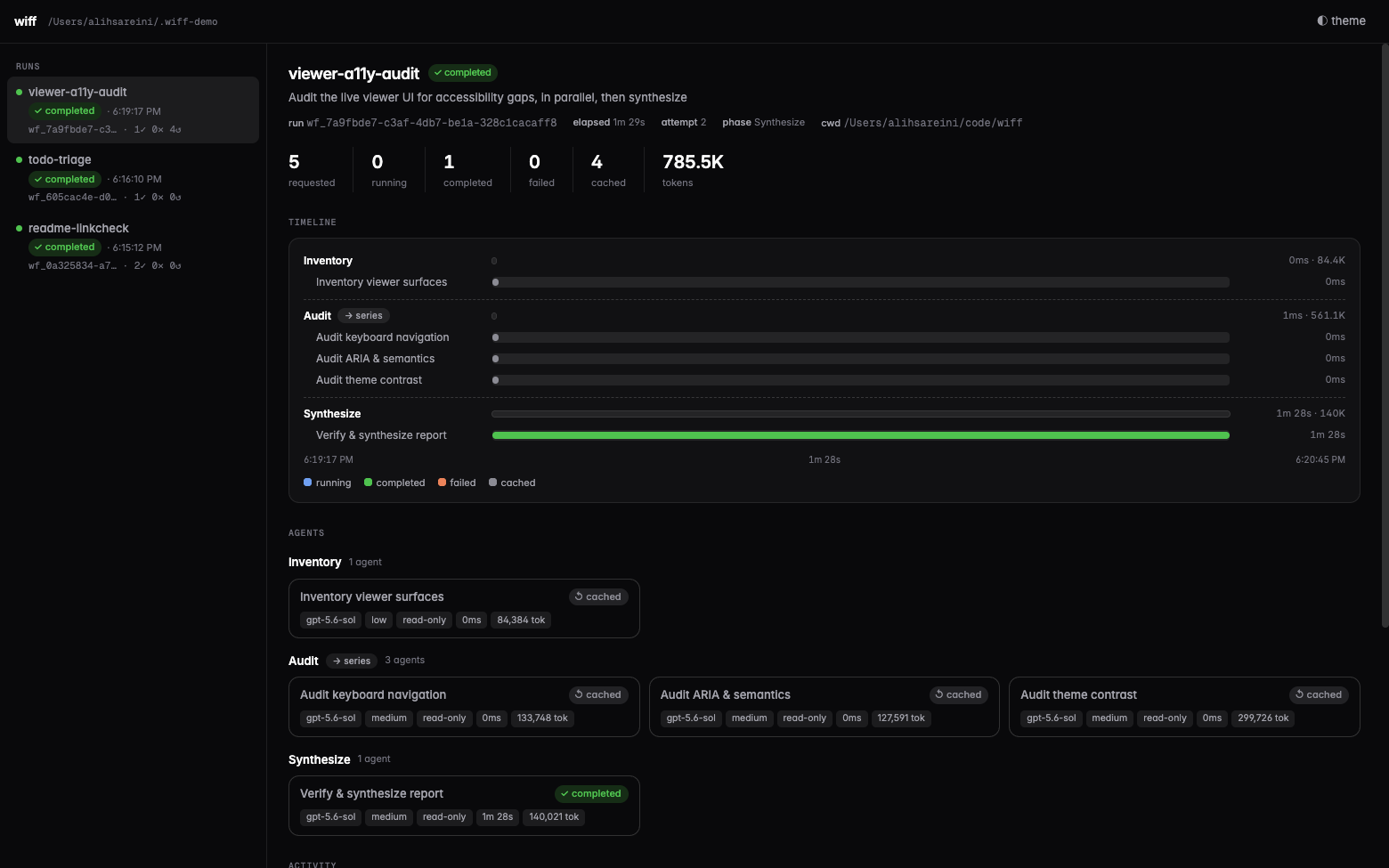
That screenshot is the feature: the host was killed mid-synthesis, and on resume the four finished agents came back from the journal in 0ms — only the interrupted one re-ran.
Fail-hard semantics — a rejected agent fails the workflow loudly (
parallelSettled()is the explicit opt-out). No silentnulls masquerading as success.Isolation where it matters —
isolation: "worktree"gives each writing agent a fresh detached git worktree. Clean ones vanish; dirty ones are kept and listed on the run for you to inspect or merge.Personas —
agentType: "reviewer"injects a markdown persona as the child's developer instructions, with frontmatter defaults for model/effort/sandbox.
Install
Codex (plugin: MCP tools + the $workflow authoring skill):
codex plugin marketplace add https://github.com/xxxoooxoxo/wiff.git
codex plugin add wiff@wiff
Claude Code (plugin: MCP tools + skill):
claude plugin marketplace add xxxoooxoxo/wiff
claude plugin install wiff@wiff
Anything else — the server is on npm (@xxxoooxoxo/wiff) and the official MCP Registry (io.github.xxxoooxoxo/wiff), so registry-aware clients can install it by name, and everything else runs it with npx:
npx -y @xxxoooxoxo/wiff # stdio MCP server
Or from a local checkout:
git clone https://github.com/xxxoooxoxo/wiff.git
codex plugin marketplace add ./wiff
codex plugin add wiff@wiff
Then start a new Codex session and either invoke the bundled skill with $workflow or just ask: "run this as a resumable workflow."
Installing the plugin auto-approves its four workflow-controller tools so headless and desktop runs don't stop at an MCP approval prompt. Agent filesystem access is still governed per-call by sandbox.
Using from other harnesses (Claude Code, Cursor, any MCP client)
The Codex plugin is just packaging. The engine underneath is a plain stdio MCP server, so any
MCP-speaking harness can orchestrate wiff workflows. The mental model: both the orchestrator
and the workers are pluggable — whoever drives, each agent() child runs on a backend chosen
from its model name: gpt-*/o* models run as native Codex threads via a localcodex app-server, claude-*/opus/sonnet/haiku/fable models run as headless claude
agents, composer-* models run through the official Cursor SDK (@cursor/sdk) in-process, and
a workflow can mix them freely (provider: "codex" | "claude" | "cursor" overrides the
inference, WIFF_BACKEND sets the fallback for unrecognized models). On the Claude and Cursor
backends, sandbox is enforced by permission policy instead of the OS, so workspace-write
requires isolation: "worktree".
Requirements on the machine, regardless of harness: Node >= 22, git if you useisolation: "worktree", and the runtime of whichever backend your agents use — the codex
and/or claude CLI installed and authenticated, or CURSOR_API_KEY for Cursor agents.
Claude Code — the plugin install above is the easy path. To wire just the server manually:
claude mcp add wiff -- npx -y @xxxoooxoxo/wiff
Tool calls go through Claude Code's own permission system; to skip per-call prompts, allow the
four tools in .claude/settings.json:
{ "permissions": { "allow": [
  "mcp__wiff__workflow_start", "mcp__wiff__workflow_status",
  "mcp__wiff__workflow_wait", "mcp__wiff__workflow_cancel"
] } }
Cursor / Windsurf / Claude Desktop — add the server to the client's mcp.json:
{
  "mcpServers": {
    "wiff": { "command": "npx", "args": ["-y", "@xxxoooxoxo/wiff"] }
  }
}
Notes for non-Codex hosts:
- State is shared. Every harness reads and writes the same
~/.wiff/runs/, so a run started
from Codex can be watched, cancelled, or resumed from Claude Code (and vice versa), and the
live viewer sees everything. - Bring the script contract into context. The
$workflowskill only auto-loads inside Codex.
From other harnesses, point the model atplugins/wiff/skills/workflow/references/api.md
(or copy the skill into your harness's skill/rules directory, e.g..claude/skills/or Cursor
rules) so it authors valid scripts. - Personas resolve from
<cwd>/.codex/agents/then~/.codex/agents/on every harness; setCODEX_WORKFLOW_AGENTS_DIRin the server's env to point somewhere else (e.g. a shared~/.claude/agents). workflow_startrequires an explicit absolutecwd, so the server's own working directory
doesn't matter to results.
For agents
If you are a coding agent — driving wiff over MCP or hacking on this repo — read AGENTS.md. It covers the four workflow tools, the script-authoring rules that actually catch agents out (stable keys, thunks not promises, no I/O in workflow code, worktree isolation for concurrent writers), where run state lives on disk, and how to verify changes to the runtime. The full script contract is in the API reference.
How it works
The plugin is an MCP server exposing four tools: workflow_start, workflow_status, workflow_wait, workflow_cancel. A started workflow runs its script inside a locked-down Node vm (no imports, filesystem, shell, network, time, or randomness — those all throw). Each agent() call is dispatched to a shared local codex app-server, which runs the child thread with your model/effort/sandbox settings; recursive orchestration is disabled inside children.
Everything about a run persists under ~/.wiff/runs/<runId>/:
run.json         status, phase, counters, failures, kept worktrees
script.js        the exact source (reread on resume)
journal.jsonl    every phase/log/agent event, with input hashes and token usage
agents/*.jsonl   full per-child transcripts
worktrees/       isolated checkouts for agents that asked for them
Status, waits, cancellation, and resume all work across host restarts — a second Codex session can observe, cancel, or resume a run it didn't start.
See the API reference for the full script contract and examples/verify-and-fix.js for a staged example.
Live viewer
Watch every run — and every agent inside it — in a local web UI:
npx -p @xxxoooxoxo/wiff wiff-viewer    # http://127.0.0.1:4979  (--port / --root to override)
# or from a checkout: cd plugins/wiff && npm run viewer
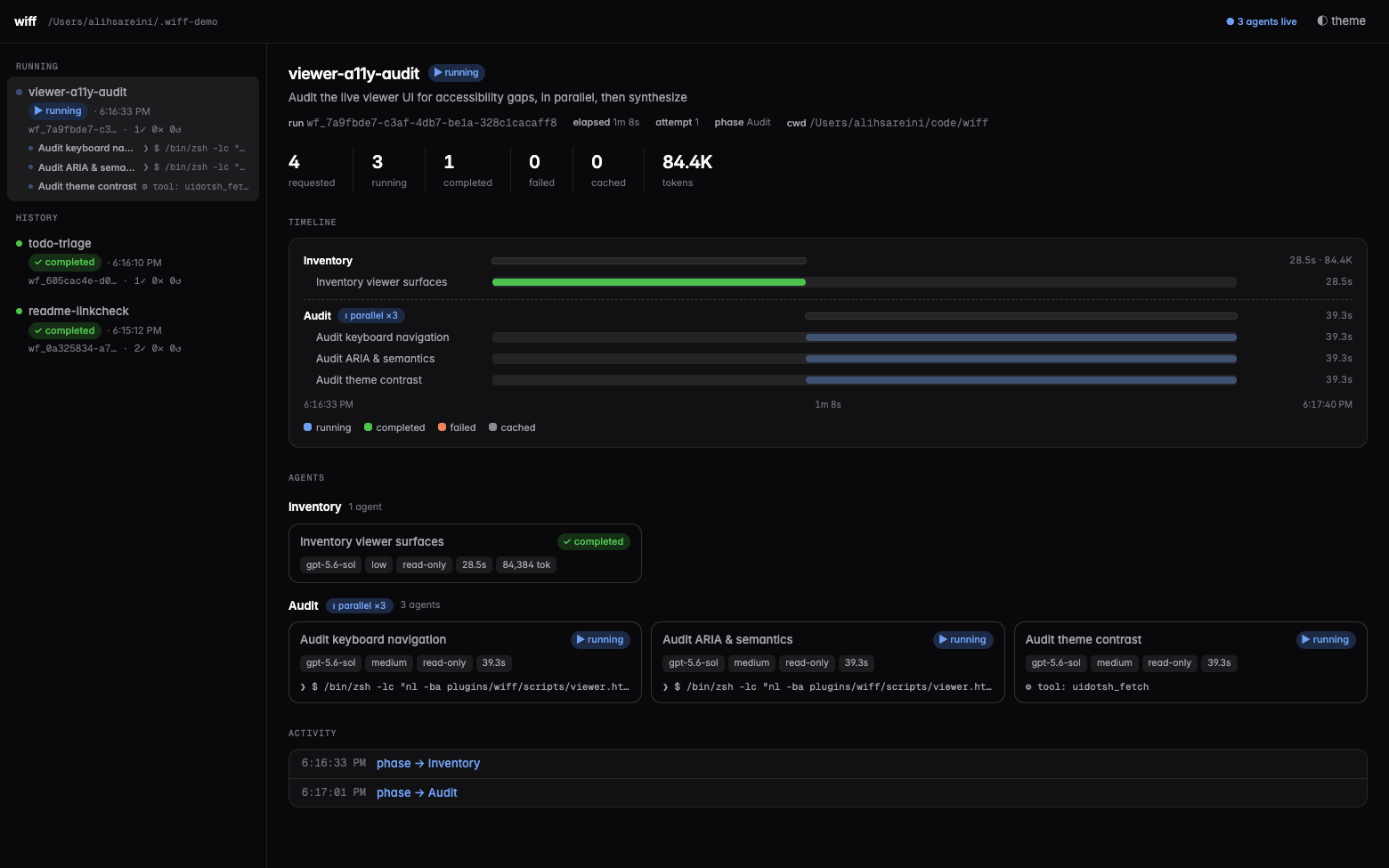
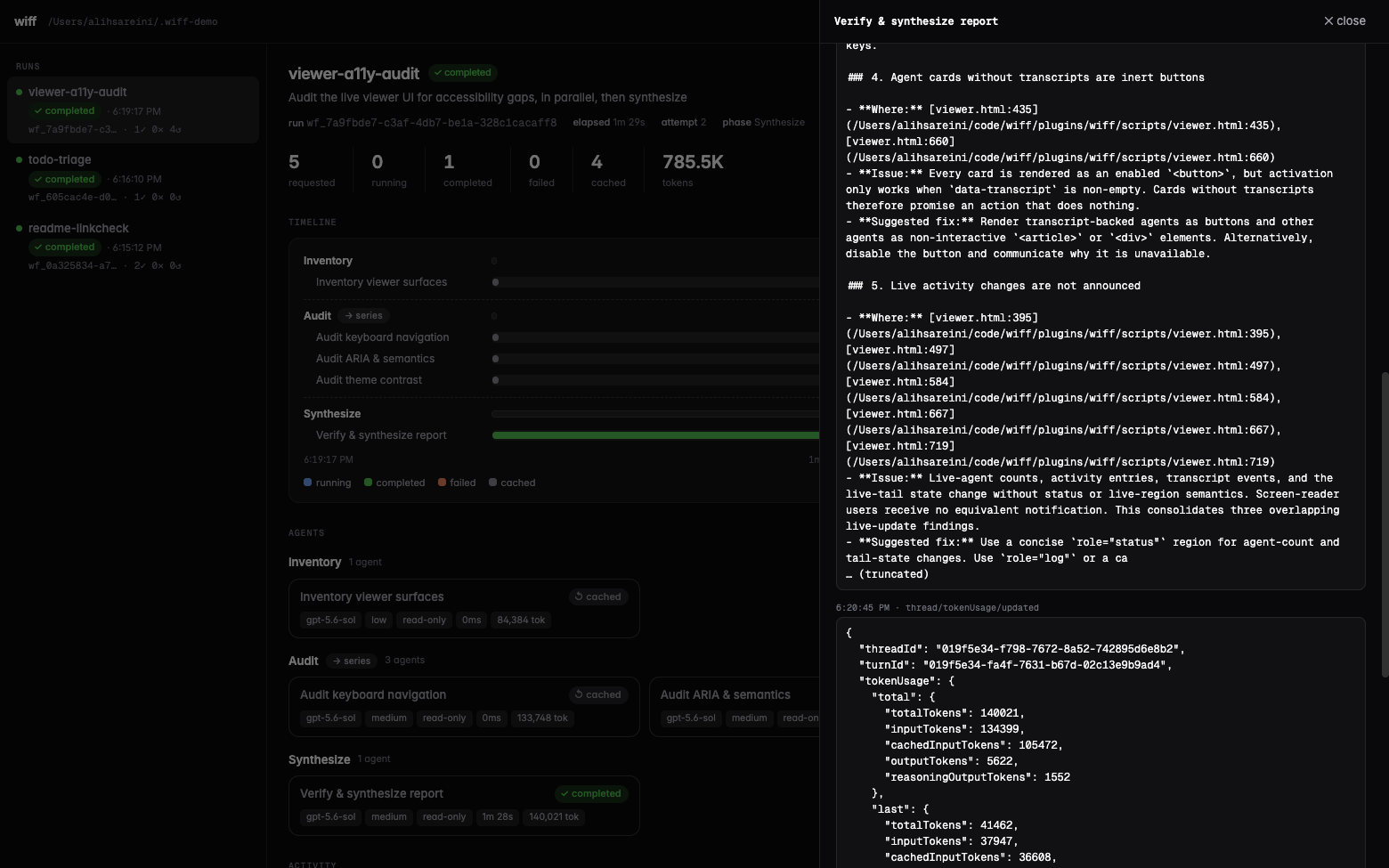
Zero dependencies, read-only over the run files, so it can watch runs owned by any process. A live strip across the top shows every running agent in every run with what it's doing right now (its latest command, file edit, or thought, tailed from the transcript). Below that: per-phase agent cards with live status lines, a gantt timeline, token counts, kept worktrees, and a click-through live-tailing transcript drawer. Light and dark themes.
Roadmap
- Model-agnostic backends — run individual agents on Claude or Gemini alongside Codex, routed by model name.
Related projects
- robzilla1738/Codex-Workflows — workflow-as-code runtime for Codex focused on review fan-out. Convergent design, independent implementation.
- scasella/claude-dynamic-workflows-codex — Claude Code's dynamic-workflows DSL re-hosted on GPT agents, with sessionful workers and a browser run viewer.
- Codex's native subagents — great for interactive, human-supervised fan-out; this plugin is for the automated, resumable, journaled kind.
Development
cd plugins/wiff
npm test        # unit tests (fake backend, no tokens spent)
npm run check   # syntax check
npm run smoke   # one real Codex child, end to end
Pass a completed smoke run id to verify cross-process resume without another model call:
npm run smoke -- wf_<run-id>
Codex runs installed plugins from a versioned cache — after editing source, bump the version in .codex-plugin/plugin.json and re-run codex plugin add wiff@wiff to pick up changes.
Releasing
Merging a version bump to main automatically publishes the package to npm and then registers the same version with the MCP Registry. Keep the version aligned in:
plugins/wiff/package.jsonplugins/wiff/.codex-plugin/plugin.jsonplugins/wiff/.claude-plugin/plugin.jsonserver.jsonand its npm package entry
The release workflow fails before publishing if those values or the npm/MCP package names disagree. It is safe to re-run: versions that already exist in either registry are skipped.
npm publishing uses a trusted GitHub Actions publisher rather than a long-lived token. The one-time npm configuration for @xxxoooxoxo/wiff is repository xxxoooxoxo/wiff, workflow release.yml, with npm publish allowed. The MCP Registry also authenticates with GitHub OIDC and needs no repository secret.
License
Yorumlar (0)
Yorum birakmak icin giris yap.
Yorum birakSonuc bulunamadi