agent-courier
Health Warn
- License — License: MIT
- Description — Repository has a description
- Active repo — Last push 0 days ago
- Low visibility — Only 8 GitHub stars
Code Fail
- process.env — Environment variable access in src/cli/commands.ts
- process.env — Environment variable access in src/cli/main.ts
- exec() — Shell command execution in src/core/allow.ts
Permissions Pass
- Permissions — No dangerous permissions requested
No AI report is available for this listing yet.
Messages between Claude Code sessions on your own machines, over SSH, with no third party.

agent-courier
Messages between Claude Code sessions on your own machines.
Over SSH, with your approval before each send. No third party in between.
English · 繁體中文
What it is
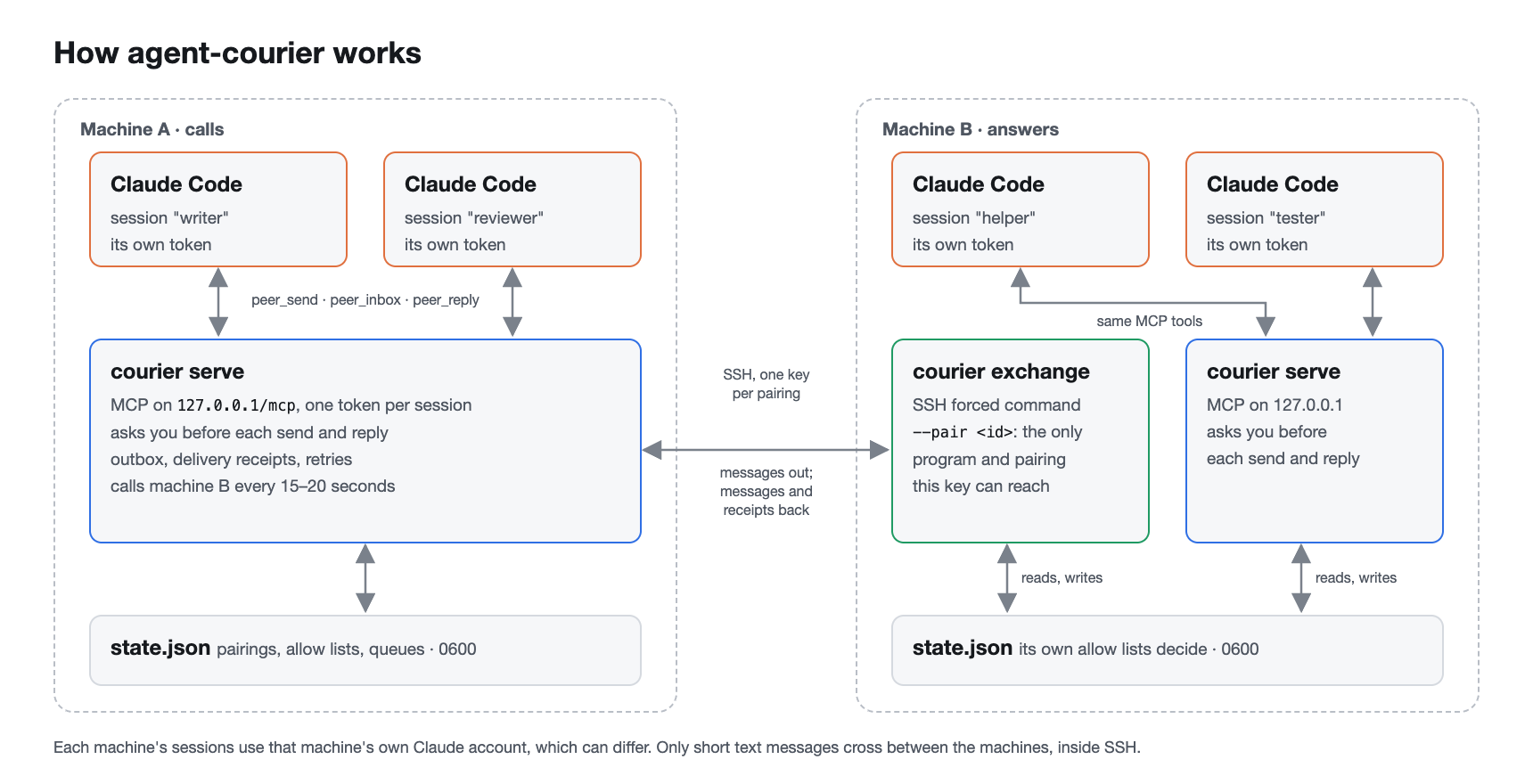
agent-courier lets Claude Code sessions on different machines send messages to each other. The
machines can use different Claude accounts. The messages go over SSH between your own machines.
No third party carries them.
[!WARNING]
Use agent-courier only between machines that you control. A paired machine is trusted as a
whole: any program on it that can read its courier files can send as its agents. Read
docs/security.md before you pair two machines.Messages from another agent are data, not your instructions. agent-courier marks them as
untrusted, but it cannot stop an agent from following them.Approvals guard against the model, not against code on your machine. A local agent with
shell access can runcourier auto-approveor read its token from Claude Code's
configuration, and then send without a question. Keep such agents in a sandbox that denies
access to~/.config/agent-courier, to Claude Code's configuration and tocourier.
Features
- Direct and private. Messages go over SSH with a dedicated key per pairing. On the other
machine, the key can run onlycourier exchange --pair <id>, for that one pairing. The
host key is pinned. - One token per session.
courier agent add <name>makes a token. The token is the
agent's identity. The MCP endpoint listens only on127.0.0.1. - Both sides decide. A pairing needs a one-time code and must be enabled on both machines.
Each machine lists which of the other machine's agents each local agent can talk to. The
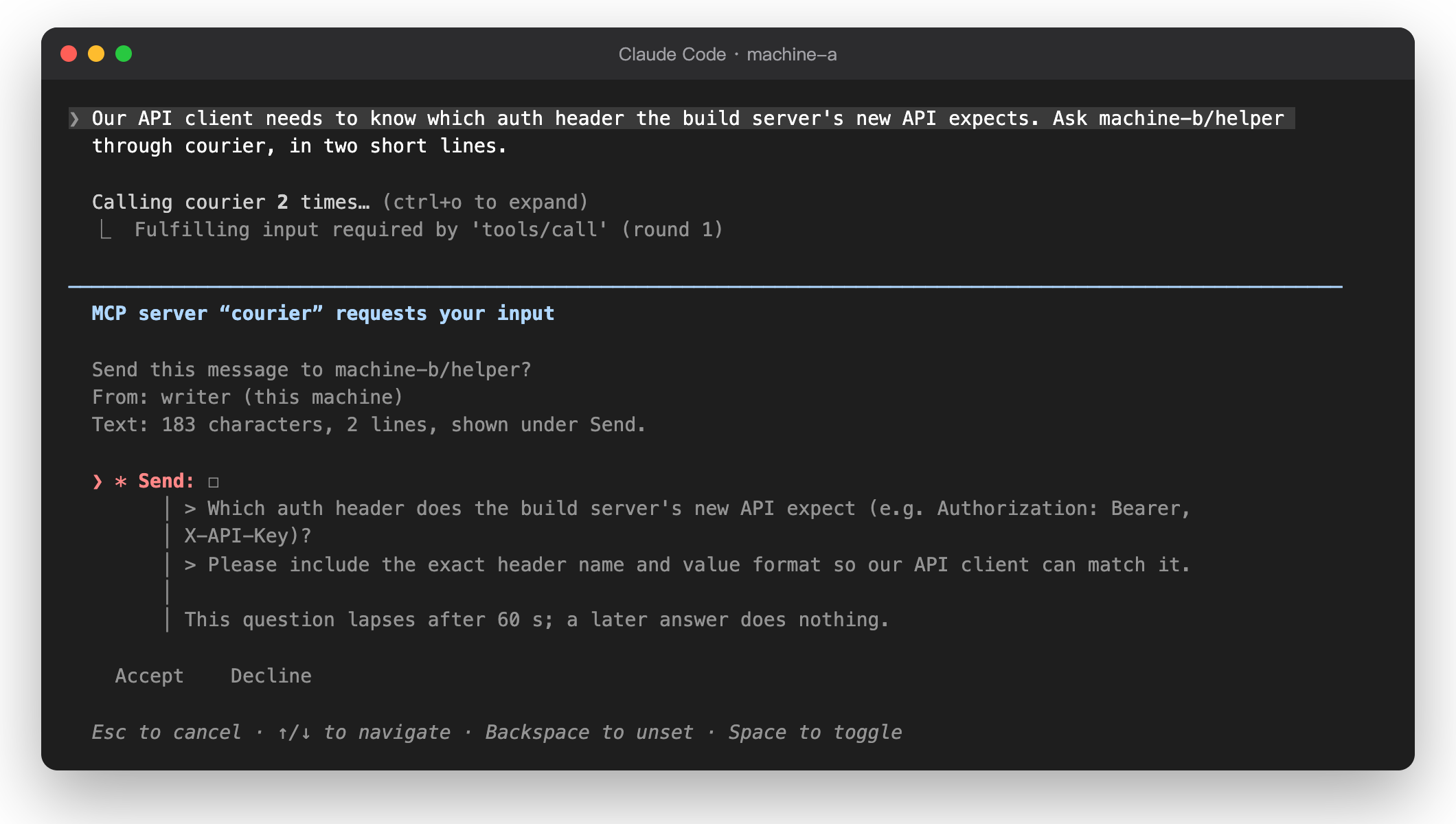
receiving machine's list is the real gate. - You approve each send. By default, the MCP client asks you before each
peer_sendandpeer_reply. The question names the recipient and gives the size of the text; the whole
text is shown under its Send field, because Claude Code folds a long question message but
shows a field's description in full. The text cannot hold invisible or format characters. You can turn this off
for one agent withcourier auto-approve. - Untrusted envelope. Each incoming message comes in a JSON envelope with
untrusted: trueand the sender, as the other machine names it. - No repeats. Each send has an
idempotency_key, so a retried call never sends twice.
Delivery has receipts and retries, and the receiving side drops repeated messages.
What it looks like
Before an agent sends anything, Claude Code asks you, with the whole text under Send:
The answer comes back into the session that asked:
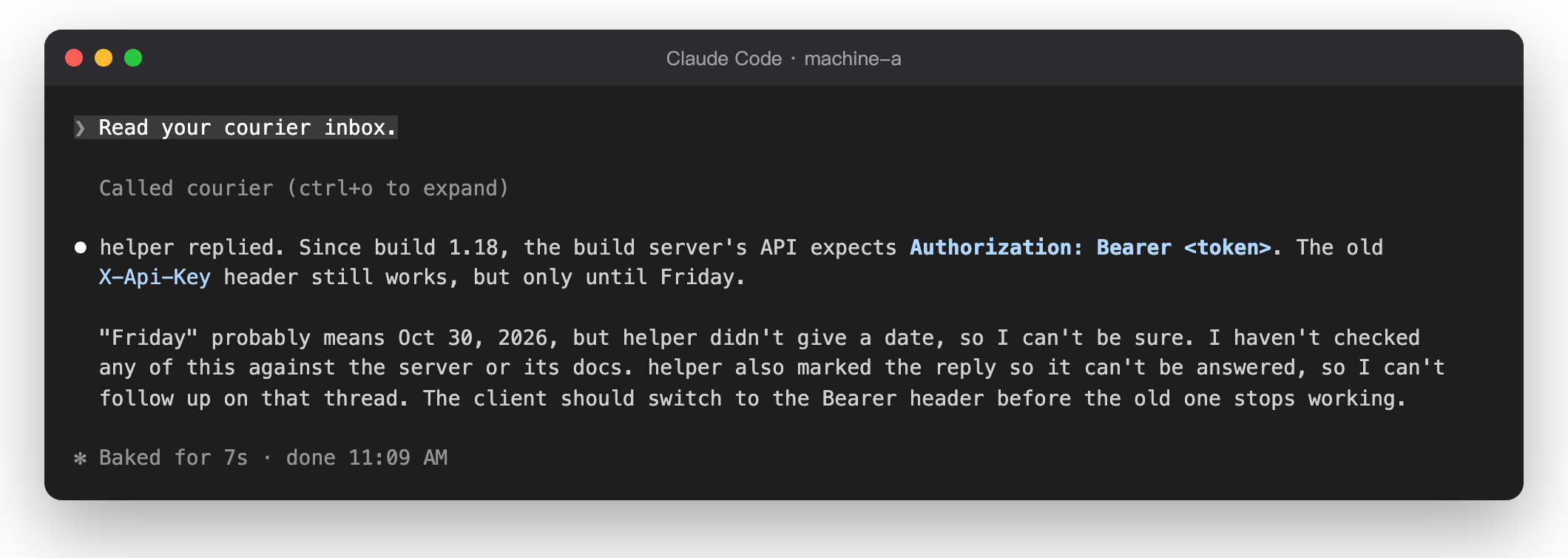
These are real screens from two machines on different Claude accounts, linked over SSH.
Requirements
- Node 22.18 or later, Git and npm.
- SSH from machine A to machine B: the OpenSSH client on machine A, the server on machine B.
- On each machine, a Claude Code that speaks MCP 2026-07-28 with form elicitation. Use 2.1.311
or later on any machine where you approve sends: 2.1.295 works but cuts long lines in the
approval question.
Quick start
# On both machines: install from a checkout (there is no npm package yet).
git clone https://github.com/xxxxDev/agent-courier.git agent-courier && cd agent-courier && npm ci && npm link

# Machine A                                # Machine B
courier init --name machine-a              courier init --name machine-b
                                           courier pair --name machine-a
                                           # add the printed line to authorized_keys
courier join <code> --name machine-b \
  --ssh-host courier-b --ssh-config ~/.ssh/courier-b.config
courier enable machine-b                   courier enable machine-a
courier agent add writer                   courier agent add helper
courier allow writer machine-b/helper      courier allow helper machine-a/writer
courier serve                              courier serve
courier agent add prints a claude mcp add command. Run it where that Claude Code session
works. The SSH key and its forced command need some steps first: see
docs/setup.md.
Limits
- Text only, 8,000 characters or 12 KB. 30 messages an hour between two agents. 10 messages
waiting per agent. 12 messages back and forth without your approval, then a stop. Messages
expire after 24 hours. - There is no npm package yet. Install from a checkout.
- New messages are not pushed into a session. An agent reads them with
peer_inbox. - SSH is the only transport.
- A pairing joins two machines only. A machine can have up to 20 pairings, but a conversation
never spans more than two machines. - A message older than 24 hours or more than 5 minutes in the future is refused. Keep the
clocks of both machines correct. - On macOS, a Claude Code started in an SSH login cannot read the keychain. Start the sessions
that use agent-courier from a terminal on the machine itself.
Documentation
| Document | Contents |
|---|---|
| docs/setup.md | Install, the SSH key, pairing, agents, the service, problems |
| docs/mcp.md | Agents: client setup, tools, schemas, approvals, errors |
| docs/security.md | What agent-courier protects, the secrets and their locations |
| docs/development.md | Tasks, checking a change and the source layout |
| docs/design.md | Design decisions, the exchange protocol and the state file |
The documents are in English only.
Security
Use agent-courier only between machines that you control. For the full security model, see
docs/security.md. To report a vulnerability, see SECURITY.md.
Contributing
To report a bug or send a change, see CONTRIBUTING.md.
License
The code is under the MIT License. The agent-courier logo isn't: see BRAND.md.
agent-courier is an independent project. It is not made by, affiliated with or endorsed by Anthropic. Claude and Claude Code are trademarks of Anthropic.
Made by V-AX.
Reviews (0)
Sign in to leave a review.
Leave a reviewNo results found