doc77
Health Uyari
- No license — Repository has no license file
- Description — Repository has a description
- Active repo — Last push 0 days ago
- Low visibility — Only 5 GitHub stars
Code Basarisiz
- fs module — File system access in .github/workflows/release-electron.yml
- fs.rmSync — Destructive file system operation in packages/ai/__tests__/ai-features-e2e.test.ts
Permissions Gecti
- Permissions — No dangerous permissions requested
Bu listing icin henuz AI raporu yok.
Doc77 — Local document preview, management & AI agent. Markdown/PDF/Office preview, lightweight editing, MCP server with approval workflow, offline translation en↔zh, multilingual UI (English/中文). Open-source, cross-platform, zero-config.



Doc77 — Local Document Preview & Management · Markdown · PDF · MCP Server · LAN Sharing
Document viewer | Document manager | Markdown reader | PDF viewer | Code viewer | Knowledge base | Local document server
Open-source · Free · Cross-platform · Mobile-ready · Zero-config · 📦 Desktop app
Doc77 is a lightweight local document previewer, MCP file-operation bridge, and AI conversation-driven document management agent. Your browser is the workbench — supports Windows / macOS / Linux / WSL. Also available as an Electron desktop app for non-technical users, double-click to use. Can be safely exposed to the internet with password protection.
In read-only mode it's a multi-project showcase; in write mode it's an intelligent steward that asks for your approval — every file operation is confirmed by you before execution, backed by built-in security review, atomic transaction rollback, and cross-drive fault tolerance.
Preview
| Dashboard | Document Preview |
|---|---|
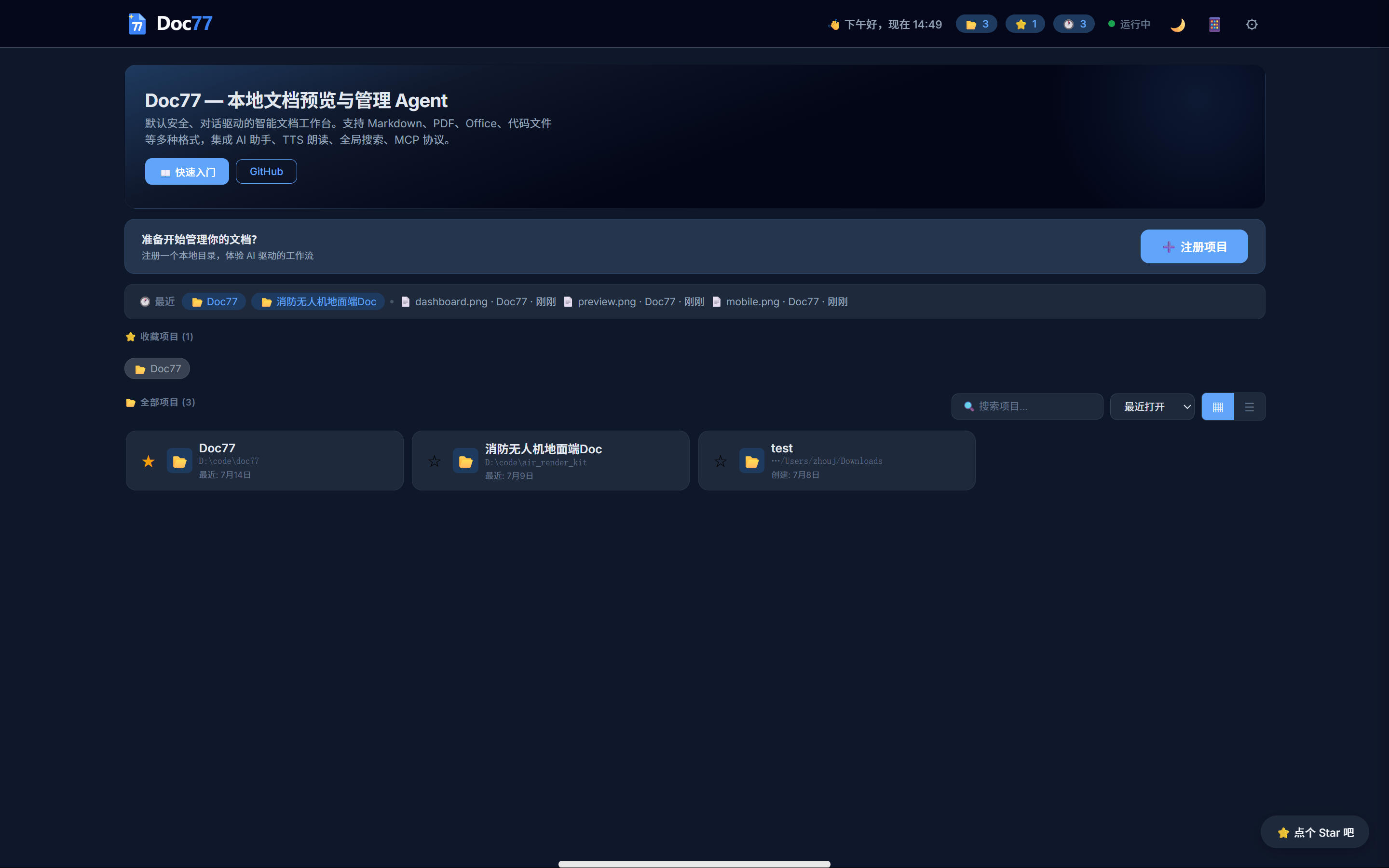 |
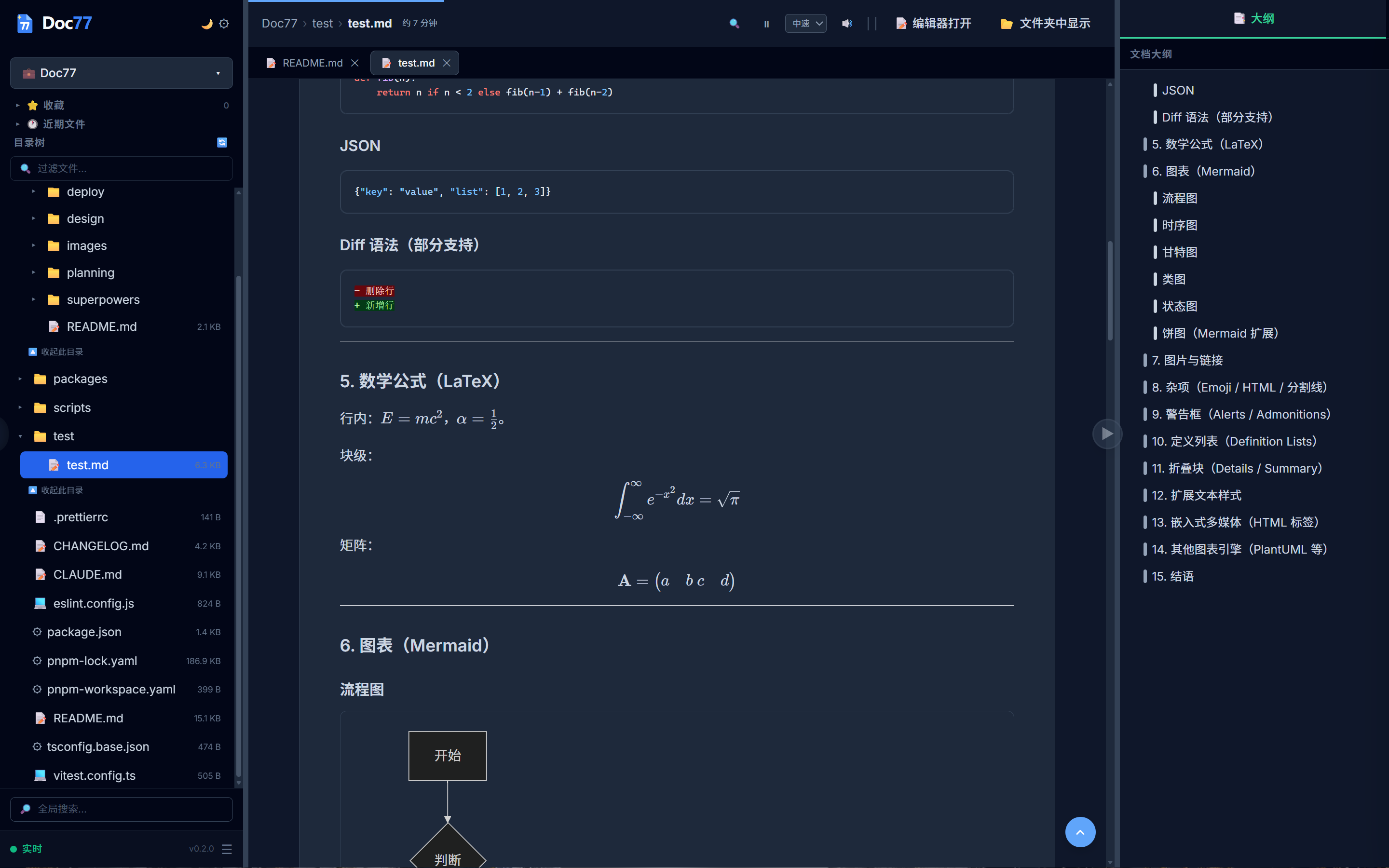 |
| Login | Mobile |
|---|---|
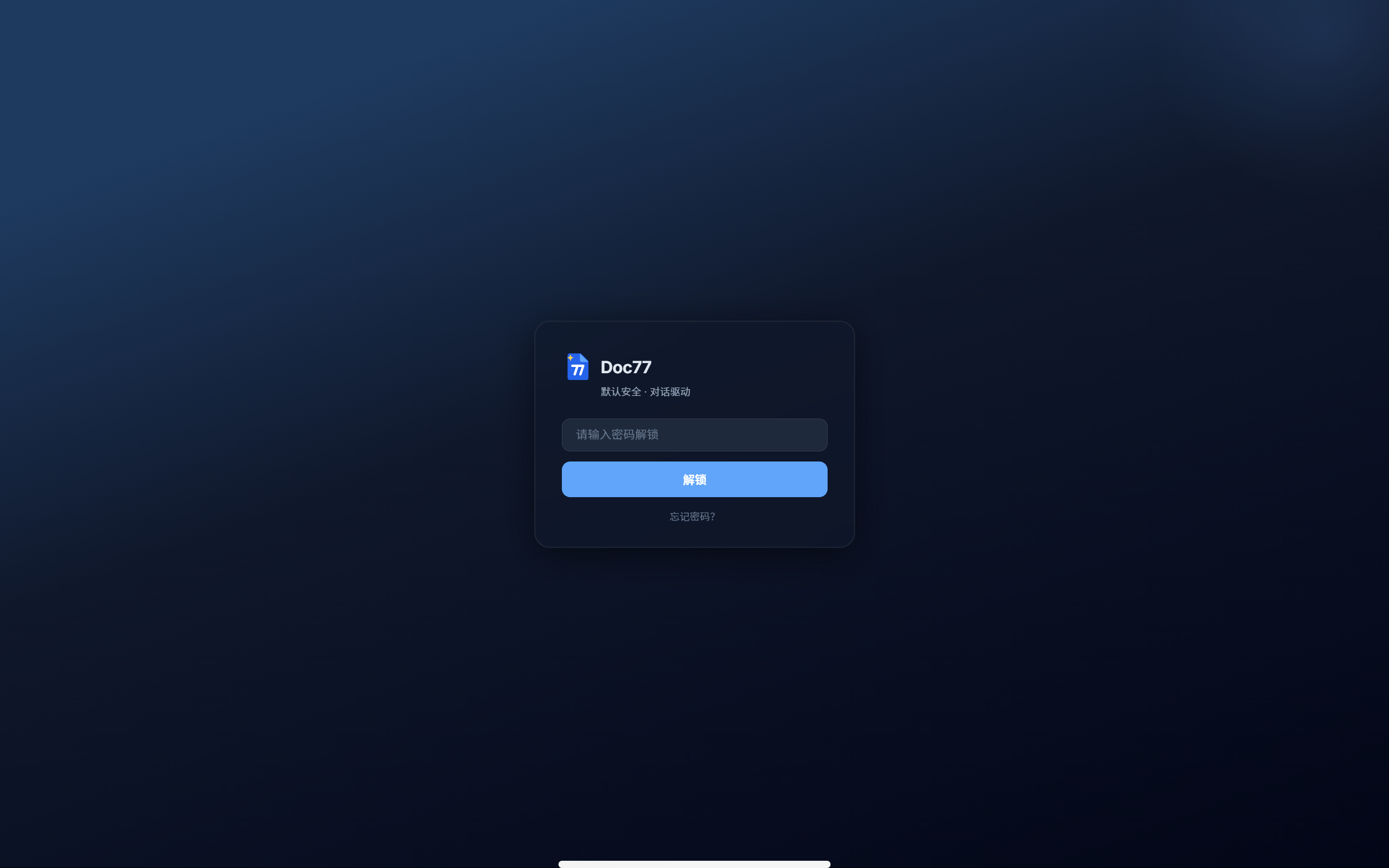 |
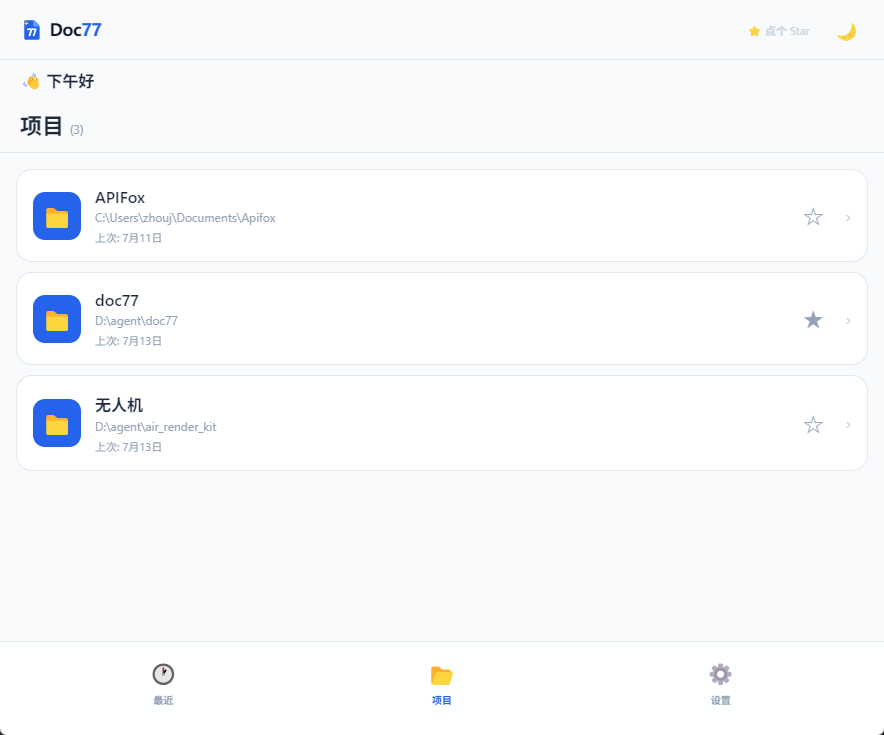 |
Use Cases
| Scenario | Description |
|---|---|
| 📚 Personal Knowledge Base | Point to a local folder and browse it like a knowledge base. A lightweight alternative to Obsidian / Notion, with your files always under your control |
| 📝 Technical Writing | Write Markdown with instant preview. TTS read-back for proofing. MDX and Mermaid diagram support — a documentation engineer's tool |
| 🎓 Academic Research | Manage papers (PDF) + notes (MD) + experimental code in one project directory. AI summarization for quick literature scanning |
| 🏠 NAS / Home Server | Run doc77 on your NAS, access your document library from any device in the house. Password-protected. Unified entry for photos, docs, e-books |
| 💼 Remote Work | VPN into your office computer and browse documents from a browser — no remote desktop needed. Bandwidth-efficient, memory-light |
| 🔧 Ops Troubleshooting | View logs and config files on a server. With MCP, let AI assist in diagnostics. The approval mechanism ensures no accidental damage |
| 🎤 Technical Interviews | Share a code or design doc link with candidates in one click. Their browser renders it directly — no screen sharing required |
| 🐳 Docker Deployment | Mount a document volume and start the container. CI/CD artifact docs become instantly previewable |
| 📡 LAN Meeting Sharing | One person runs doc77 start --bind 0.0.0.0, everyone on the LAN opens it in their browser. Review requirements docs or design proposals on your own device |
| 📱 Mobile Access | Phone/tablet adaptive UI — browse project docs during commutes or at client sites. Responsive design, consistent experience across desktop and mobile |
| 🔄 Win+WSL Hybrid | Write code in WSL, work in Windows. Skip SSH or terminal less — doc77 start --bind 0.0.0.0 and preview from your Windows browser or phone |
| 🤖 Agent / MCP Development | Built-in MCP Server (stdio + HTTP) with 8 tools exposing filesystem capabilities. Debug agents while watching file changes and approving write operations from the Web UI |
| 🪟 Windows Productivity | Completely free document preview tool. Markdown, PDF, Office, code highlighting all in one place |
| 🗄️ Multi-project Management | Register once, remember forever. Dashboard for unified switching. Favorites, recent files, global search, directory tree — browse local docs like an IDE |
| 🔒 Secure Team Sharing | One-click LAN sharing + password protection. Documents stay on your device, never land on anyone else's. Approval workflow keeps write operations under control |
| ⚡ Zero-config Document Portal | npm install -g → doc77 register → open browser. No nginx, no Apache, three minutes to your own private document portal |
Current Focus
Doc77 prioritizes preview experience, complemented by lightweight editing. Text files can be quickly edited and saved in-page (with external change conflict detection); heavy editing launches VS Code or your system editor with one click. Current focus:
- 🚀 Performance — Instant startup, smooth with large files
- 🐛 Stability — Multi-platform compatibility, eliminate experience bugs
- ✨ Preview Quality — Format support, reading tools, AI assistance pushed to the limit
Capabilities
| Module | Details |
|---|---|
| Multi-format Preview | Markdown (GFM/KaTeX/Mermaid/PlantUML/Footnotes/Admonitions), PDF, Word/Excel, 44+ code languages with syntax highlighting, image Lightbox, JS/Python sandbox execution |
| Reading Tools | TTS read-aloud, auto-scroll, reading progress, in-doc search (Ctrl+F), global search, outline panel, bookmarks, recent files |
| Multi-tab & Editing | Multiple document tabs (LRU render cache), drag-and-drop temp file preview, lightweight text editing (external change conflict detection), one-click VS Code launch |
| AI Assistant | Natural language conversation (SSE streaming), doc summarization, smart categorization, batch operation planning. Supports DeepSeek/OpenAI/Qwen/Kimi/Doubao/GLM and custom endpoints |
| MCP & Approval | MCP Server (stdio + HTTP) with 8 tools exposing filesystem; all write operations queued for approval, CLI and Web dual-channel |
| Transaction Rollback | Pre-flight check + Shadow backup + reverse-order rollback. Failed batch operations auto-recover, orphaned shadow GC |
| Export & Share | Self-contained HTML export (inline styles and images, preserves light/dark theme), LAN read-only sharing links (with TTL, QR code, one-click revoke) |
| Offline Translation | Opus-MT ONNX models fully local (en↔zh), auto-language detection, translate-on-select + long-doc segment translation, no data leaves your machine |
| Multilingual UI | English / 简体中文 built-in, auto-detects browser and system language, extensible via ~/.doc77/locales/<lang>.json — add any language |
| Project Import | Obsidian vault ([[wikilink]] resolution), Git project batch scan, VS Code workspace import, tech-stack tag recognition |
| Mobile Companion | Scan QR code from Dashboard to open mobile view, mDNS LAN discovery, adaptive mobile UI |
| Electron Desktop | Windows / macOS / Linux one-click install, native file dialogs, system tray, vendor resources built-in (default port 28888) |
| Modular Plugins | AI / MCP / Translation optional installation (doc77 i ai / doc77 i translate), lightweight by default, expand on demand |
| Security | Path sandboxing, sensitive file filtering, envelope encryption (DEK), 10 one-time recovery codes, brute-force protection, session management, audit logging, password-protected external exposure |
| Offline-ready | doc77 vendor-install caches all CDN dependencies locally, fully functional without internet |
Installation
Desktop (Recommended for non-technical users)
| Platform | Download |
|---|---|
| Windows | 📦 Doc77-Setup.exe |
| macOS | 📦 Doc77.dmg |
| Linux | 📦 Doc77.AppImage |
Double-click to install, desktop shortcut launches the app. Native file dialog to select folders, ready out of the box.
CLI (Recommended for developers)
npm install -g idoc77                # Install
doc77 register ./my-docs --name "My Docs"   # Register a project
doc77 start                          # Start (127.0.0.1:27777)
doc77 start --bind 0.0.0.0           # Or allow LAN access
Command Reference
Core Commands
| Command | Description |
|---|---|
doc77 start [--port <n>] [--bind <addr>] |
Start Web Dashboard (default port 27777; desktop 28888) |
doc77 register <path> [--name <n>] |
Register a project directory |
doc77 list [--json] |
List all registered projects |
doc77 remove <id> |
Remove a project by ID (does not delete source files) |
doc77 update <id> [--name <n>] [--path <p>] |
Update project name or path |
doc77 status |
Check service status |
Configuration
| Command | Description |
|---|---|
doc77 config set <key> <value> |
Set a config value |
doc77 config get <key> |
Get a config value |
doc77 config list |
List all config |
doc77 config set-password |
Set an access password (first time) |
doc77 config change-password |
Change access password |
doc77 config reset-password |
Reset password using recovery code |
doc77 config reset-password --force |
Force reset (clears encrypted config) |
doc77 config recovery-codes |
Regenerate recovery codes |
Common config keys:
| Key | Description | Default |
|---|---|---|
ai.enabled |
Enable AI assistant | false |
ai.token |
AI API token | — |
ai.base_url |
AI API base URL | https://api.deepseek.com |
ai.model |
Model name | deepseek-v4-pro |
editor.default |
Default editor | vscode |
locale.language |
UI/AI/CLI global language (empty = auto-detect) | — |
translate.enabled |
Enable offline translation | true |
translate.mirror |
Mirror download for models (hf-mirror.com) | false |
export.share.ttl_hours |
Share link TTL (hours) | 24 |
MCP Service
| Command | Description |
|---|---|
doc77 mcp serve [--http] [--port <n>] |
Start MCP service (stdio or HTTP transport) |
Task Approval
| Command | Description |
|---|---|
doc77 approve --list |
List pending approval tasks |
doc77 approve --accept <task_id> |
Approve a task |
doc77 approve --reject <task_id> |
Reject a task |
doc77 approve --accept --all |
Batch approve all |
doc77 approve --reject --all |
Batch reject all |
Lock Management
| Command | Description |
|---|---|
doc77 lock status |
View active project locks |
doc77 lock release <project_id> |
Manually release a project lock |
Offline Support
# Download all CDN resources locally (~16MB)
doc77 vendor-install

# Skip Pyodide (Python runtime), save ~12MB
doc77 vendor-install --no-pyodide

# Download offline translation models (en↔zh, ~80MB each)
doc77 vendor-install --translate en-zh
doc77 vendor-install --translate zh-en
Resources are cached in ~/.doc77/vendor/ and auto-detected on restart. Re-running skips already-downloaded files.
Supported Formats
| Format | Extensions | Read Mode |
|---|---|---|
| Markdown | .md .mdx .markdown |
✅ TTS/Search/Outline/Progress |
| Mermaid | .mermaid .mmd |
✅ |
| Code (~44 langs) | .ts .js .py .go .rs .java .c .cpp .html .css .json … |
✅ Syntax highlighting |
.pdf |
✅ Browser-native + fullscreen | |
| Images (9 types) | .png .jpg .gif .svg .webp .avif .bmp .ico |
✅ Lightbox zoom/nav |
| Word | .docx |
✅ mammoth.js rendering |
| Excel | .xlsx .xls |
✅ SheetJS + tab switching |
| JavaScript | .js |
✅ Sandbox execution |
| Python | .py |
✅ Pyodide WASM execution |
| Unsupported | .mp4 .zip .exe .shp .psd … |
❌ File info card + show in folder |
Markdown Features
| Feature | Example | Status |
|---|---|---|
| Headers / Bold / Italic / Strikethrough | # H1, **b**, *i*, ~~del~~ |
✅ GFM |
| Lists (nested / ordered / unordered) | 1., - , indent |
✅ GFM |
| Task lists | - [x] - [ ] |
✅ GFM |
| Tables (with alignment) | ` | :--- |
| Blockquotes / Horizontal rules | > quote, --- |
✅ GFM |
| Images / Links / Image links | , [text](url) |
✅ Local paths auto-rewrite to API |
| Code blocks + syntax highlighting | ```python |
✅ highlight.js (44+ languages) |
| Copy-to-clipboard button | hover top-right | ✅ |
| Math (inline / block) | $E=mc^2$, $$\int$$ |
✅ KaTeX |
| Mermaid diagrams | ```mermaid |
✅ Flow / Sequence / Gantt / Class / State / Pie |
| PlantUML diagrams | ```plantuml |
✅ kroki.io (offline falls back to source) |
| Emoji shortcuts | :smile: :rocket: :heart: |
✅ |
| Highlight marks | ==highlight== |
✅ <mark> |
| Footnotes | [^1] [^2] |
✅ |
| GitHub admonitions | > [!NOTE] > [!WARNING] |
✅ |
| Collapsible sections | <details><summary> |
✅ Native HTML |
| Heading anchors | ## My Heading → #my-heading |
✅ |
| Raw HTML | <kbd>, <sup>, <audio>, <video> |
✅ Browser-native |
| Definition lists | Term : definition |
❌ |
| Auto TOC | [TOC] |
⚠️ Outline panel replaces this |
Offline Availability
Doc77 uses a vendor system for CDN → local fallback. doc77 vendor-install downloads resources to ~/.doc77/vendor/. The Electron desktop build bundles vendor resources at build time (extraResources).
| Feature | Library | CLI vendor-install |
Electron Built-in | Offline Fallback |
|---|---|---|---|---|
| Tailwind CSS | tailwind.js |
✅ | ✅ | 3s timeout → unstyled |
| highlight.js | highlight.min.js |
✅ | ✅ | Code blocks lose highlighting |
| Mermaid | mermaid.min.js |
✅ | ✅ | Shows source |
| KaTeX | katex.min.js |
✅ | ✅ | Shows LaTeX source |
| XLSX | xlsx.mini.min.js |
✅ | ✅ | .xlsx not previewable |
| DOCX | mammoth.browser.min.js |
✅ | ✅ | .docx not previewable |
| Python | pyodide.js + wasm |
⚠️ ~12MB extra | ❌ Not bundled | .py not executable |
| PlantUML | kroki.io | ❌ Needs internet | ❌ Needs internet | Shows source |
One-Command Restart
./scripts/restart.sh              # Default port 27777
./scripts/restart.sh --port 8080  # Custom port
To bind
0.0.0.0for external access, usedoc77 start --bind 0.0.0.0(a password will be required).
Design Philosophy
- Documents stay where they are — never copy or upload user files, read-only access to local paths
- Preview ≠ Edit — let professional tools (VS Code / Typora) handle editing, let Doc77 handle preview
- Register once, manage forever — register a project directory once, it's remembered permanently
- Lightweight first — single process, SQLite, zero-config, out of the box
- Conversation-driven — natural language interaction, AI-assisted planning, human final decision
Documentation
| Document | Description |
|---|---|
| System Architecture | Complete design document |
| Architecture Review | Tech stack verification & architecture review |
| Implementation Plan | 40 tasks, 9 phases detailed plan |
| Implementation Status | Real-time development progress |
| Changelog | Version history |
Tech Stack
| Component | Choice |
|---|---|
| Runtime | Node.js >= 22.x |
| Language | TypeScript ^5.8 |
| Web Framework | Express 5.x |
| Database | SQLite (sql.js) |
| MCP Protocol | @modelcontextprotocol/sdk |
| Frontend | Vanilla HTML + CSS + JS (marked, Mermaid, highlight.js) + browser-native PDF / HTML preview |
| Build | tsup + pnpm workspaces |
| Test | Vitest |
Project Structure
doc77/
├── packages/
│   ├── core/          # @doc77/core  Preview engine + FS abstraction + Express Server
│   ├── mcp/           # @doc77/mcp   MCP service layer + security guard + transaction system
│   ├── ai/            # @doc77/ai    AI provider + Agent core + Chat API
│   ├── cli/           # doc77 CLI    Command-line entry
│   ├── electron/      # Desktop shell (tray / native dialogs / port 28888)
│   └── doc77/         # idoc77 meta-package for npm publishing
├── docs/
│   ├── design/        # Design docs
│   ├── analysis/      # Analysis reports
│   └── planning/      # Implementation planning
├── scripts/           # Tool scripts
├── CLAUDE.md          # Project conventions
└── README.md          # This file
Contributing
Contributions are welcome! Here is the full local setup and submission flow.
Prerequisites
| Tool | Version |
|---|---|
| Node.js | >= 22.x |
| pnpm | >= 9.x (install with npm i -g pnpm) |
| Git | any recent version |
Local Setup
git clone https://github.com/xyy277/doc77.git
cd doc77
pnpm install            # install dependencies (builds each package's dist on first run)
pnpm build              # build all packages
Common Scripts
| Command | Description |
|---|---|
pnpm dev |
Start the @doc77/core dev server (hot reload, port 27777) |
pnpm dev:start |
Build the CLI and its deps, then start the full app (--bind 0.0.0.0, port 27777) |
pnpm dev:restart |
Same as dev:start, used to restart the app |
pnpm dev-electron |
Start Electron desktop dev mode |
pnpm build |
Build all packages and sync version numbers |
pnpm test |
Run the Vitest test suite |
pnpm lint |
ESLint check |
pnpm format:check |
Prettier format check |
pnpm check:i18n |
Verify zh-CN / en-US i18n key consistency |
Branching & Submission Flow
The main branch is protected by GitHub Rulesets:
- ❌ Direct push to
mainis forbidden - ❌ Force push / deletion of
mainis forbidden - ✅ Changes must be merged via Pull Request
- ✅ Before merge, the following CI checks must all pass:
Lint & Format Check,Build,Test (Node 22 on ubuntu/macos/windows-latest) - ✅ Squash merge is recommended to keep history linear
Recommended workflow:
- Branch off
main:git checkout -b feat/your-feature - Self-test locally:
pnpm lint && pnpm format:check && pnpm test - Commit (Conventional Commits recommended, e.g.
fix(web): ...,feat(core): ...) - Push the branch:
git push -u origin feat/your-feature - Open a PR into
mainon GitHub, wait for CI to go green, then merge
Code Conventions
- See CLAUDE.md for detailed conventions
- TypeScript strict mode; ensure
pnpm buildpasses before committing - i18n strings must be updated in both
zh-CN.jsonanden-US.json; runpnpm check:i18nbefore committing
Privacy & Security
- All data stored locally in
~/.doc77/ - AI tokens encrypted in SQLite
- No file content sent to external servers (unless you manually enable AI features)
- Password-protected access supported
License
Yorumlar (0)
Yorum birakmak icin giris yap.
Yorum birakSonuc bulunamadi