prismatic-claude-statusline
Health Uyari
- License — License: MIT
- Description — Repository has a description
- Active repo — Last push 0 days ago
- Low visibility — Only 9 GitHub stars
Code Basarisiz
- os.homedir — User home directory access in statusline.js
- fs module — File system access in statusline.js
- fs module — File system access in tools/render-svg.js
Permissions Gecti
- Permissions — No dangerous permissions requested
Bu listing icin henuz AI raporu yok.
Prismatic — a highly customizable, zero-dependency status line for Claude Code. Truecolor gradient model pills, a color-coded context bar, and a live visual config editor.
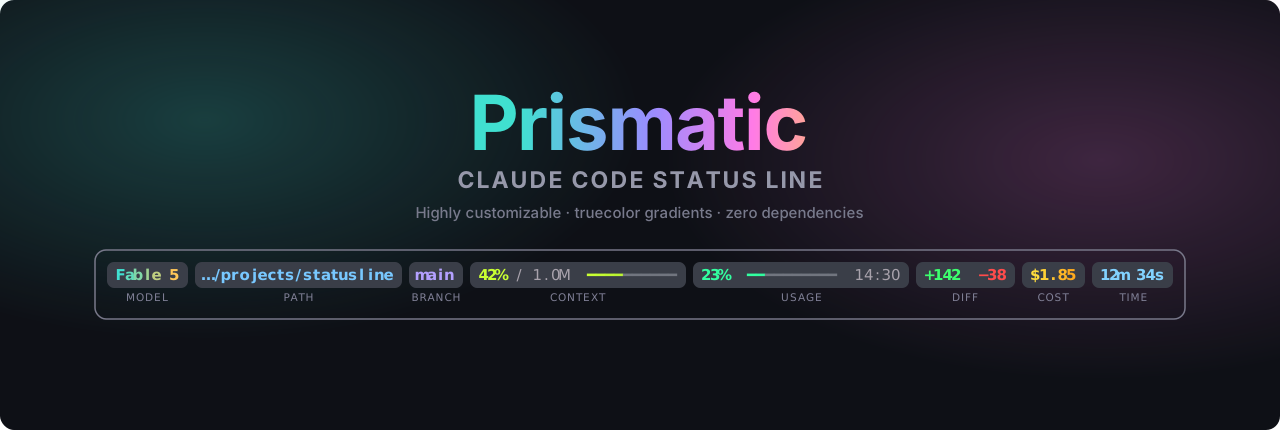
Prismatic — Claude Code Status Line
A prismatic, highly customizable, zero-dependency status line for Claude Code — truecolor gradient model pills, a color-coded context bar, and a live visual config editor.







What is this?
Claude Code lets you replace the bar at the bottom of the screen with the output of any script. This is a single, self-contained Node.js script (statusline.js) that turns that bar into a row of gradient "pills" showing your model, working directory, Git branch, context-window usage, subscription usage, session diff, cost, and elapsed time — wrapped in a rounded frame.

Pills for model, path, branch, context, usage, diff, cost and time — in a rounded frame.
- No dependencies. One
.jsfile. Nonpm install, no packages, nothing to keep updated. - No API tokens used. The status line runs locally; it never calls the API.
- Reliable by design. Every pill is driven by data Claude Code actually provides. (See Why there is no monthly-budget pill.)
- Configure it visually. A live editor in your browser — drag the segments around, pick colors, copy the generated config. Nothing to download.
Quick start
You need Claude Code and Node.js (which you almost certainly already have). ~ below means your home folder — see the installation guide if you're unsure where that is.
1. Put statusline.js in your ~/.claude/ folder. Pick the line for your shell:
# macOS / Linux / Git Bash
curl -fsSL https://raw.githubusercontent.com/XyzElias/prismatic-claude-statusline/main/statusline.js -o ~/.claude/statusline.js
# Windows PowerShell  (in PowerShell, "curl" is an alias for Invoke-WebRequest,
# so use curl.exe — or the Invoke-WebRequest form below)
curl.exe -fsSL https://raw.githubusercontent.com/XyzElias/prismatic-claude-statusline/main/statusline.js -o "$HOME\.claude\statusline.js"

# …or the native PowerShell command:
Invoke-WebRequest -Uri "https://raw.githubusercontent.com/XyzElias/prismatic-claude-statusline/main/statusline.js" -OutFile "$HOME\.claude\statusline.js"
:: Windows CMD
curl -fsSL https://raw.githubusercontent.com/XyzElias/prismatic-claude-statusline/main/statusline.js -o "%USERPROFILE%\.claude\statusline.js"
(Or just download statusline.js from this repo and drop it in ~/.claude/ — no terminal needed.)
2. Point Claude Code at it. Add this to ~/.claude/settings.json:
{
  "statusLine": {
    "type": "command",
    "command": "node ~/.claude/statusline.js"
  }
}
3. Restart Claude Code. That's it. ✨
On first run the script creates ~/.claude/statusline_config.yml with sensible defaults, so a single command is all you need. Want to tweak it? Use the visual editor in your browser (nothing to install) and save the result to that file. Want the rounded Powerline pill caps from the banner? See the Nerd Font guide — or stay on the default unicode style, which needs no special font.
Windows: the command above works as-is if you have Git Bash installed (the default for most Claude Code users on Windows). If you only have PowerShell, see the installation guide for the one-line alternative.
Features
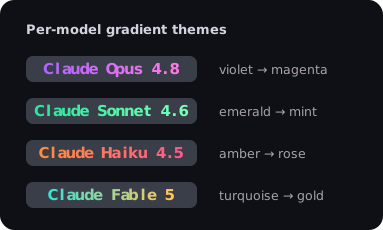
- 🎨 Per-model gradient themes — the model name is tinted with a two-color gradient, so you can tell Opus from Sonnet from Haiku from Fable at a glance.
- 🌿 Live Git branch — the branch of your working directory, right in the status line. Auto-hides when you're not inside a repository; reads
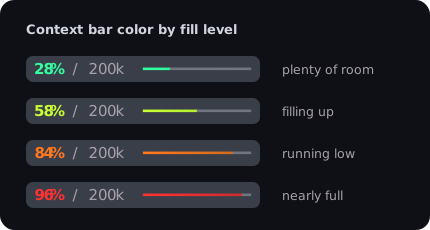
.gitdirectly, so it adds no latency and needs nogiton your PATH. - 📊 Color-coded context bar — green when you have room, shading through yellow and orange to red as the context window fills.
- 📈 Subscription usage — shows your Claude Pro/Max 5-hour rate-limit percentage and reset time. Automatically hidden on API / pay-per-use plans.
- ✏️ Session diff & cost — lines added/removed and the estimated cost of the current session.
- 🧩 Fully configurable — reorder, rename, enable/disable any segment; tweak every color; pick a frame style. By hand in YAML, or with the visual editor.
- 🔤 Three rendering styles —
nerd(Powerline glyphs),unicode(works everywhere), orascii(maximum compatibility).
Anatomy
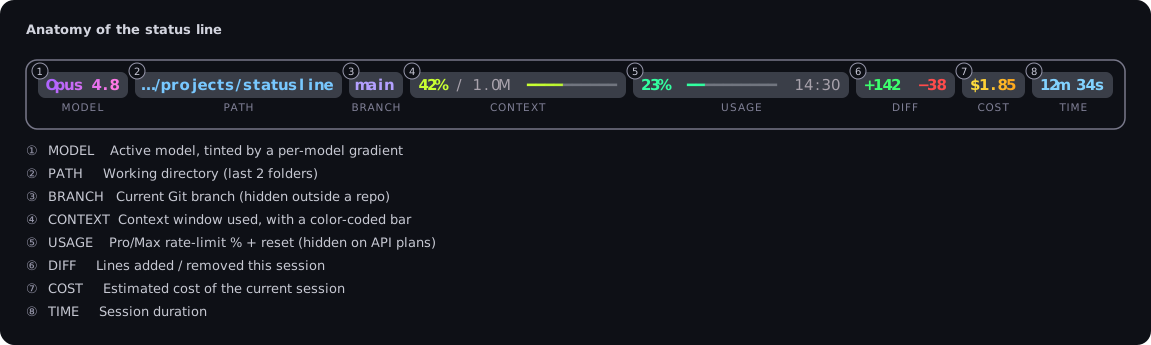
| # | Segment | What it shows | Source |
|---|---|---|---|
| 1 | MODEL | Active model name, tinted by a per-model gradient | model.display_name |
| 2 | PATH | Working directory (last N folders) | workspace.current_dir |
| 3 | BRANCH | Current Git branch (hidden outside a repo) | .git/HEAD |
| 4 | CONTEXT | Context window used, with a color-coded bar | context_window.used_percentage |
| 5 | USAGE | Pro/Max rate-limit % + reset time (hidden on API plans) | rate_limits.five_hour |
| 6 | DIFF | Lines added / removed this session | cost.total_lines_* |
| 7 | COST | Estimated cost of the current session | cost.total_cost_usd |
| 8 | TIME | Session duration | cost.total_duration_ms |
Every segment can be reordered, renamed, or turned off. See Configuration.
Gallery

Configuration
Two ways to configure:
- Visual editor (recommended): design your status line in the browser — open it live → (no install, nothing to download). Drag to reorder segments, toggle them on/off, pick colors and per-model gradients, and watch a live preview update as you go. Click Copy YAML and save it to
~/.claude/statusline_config.yml. (The editor also lives in this repo asconfig-editor.htmlif you'd rather run it offline.) - By hand: edit
~/.claude/statusline_config.ymldirectly. Every option is documented indocs/configuration.mdand in the comments of the file itself.
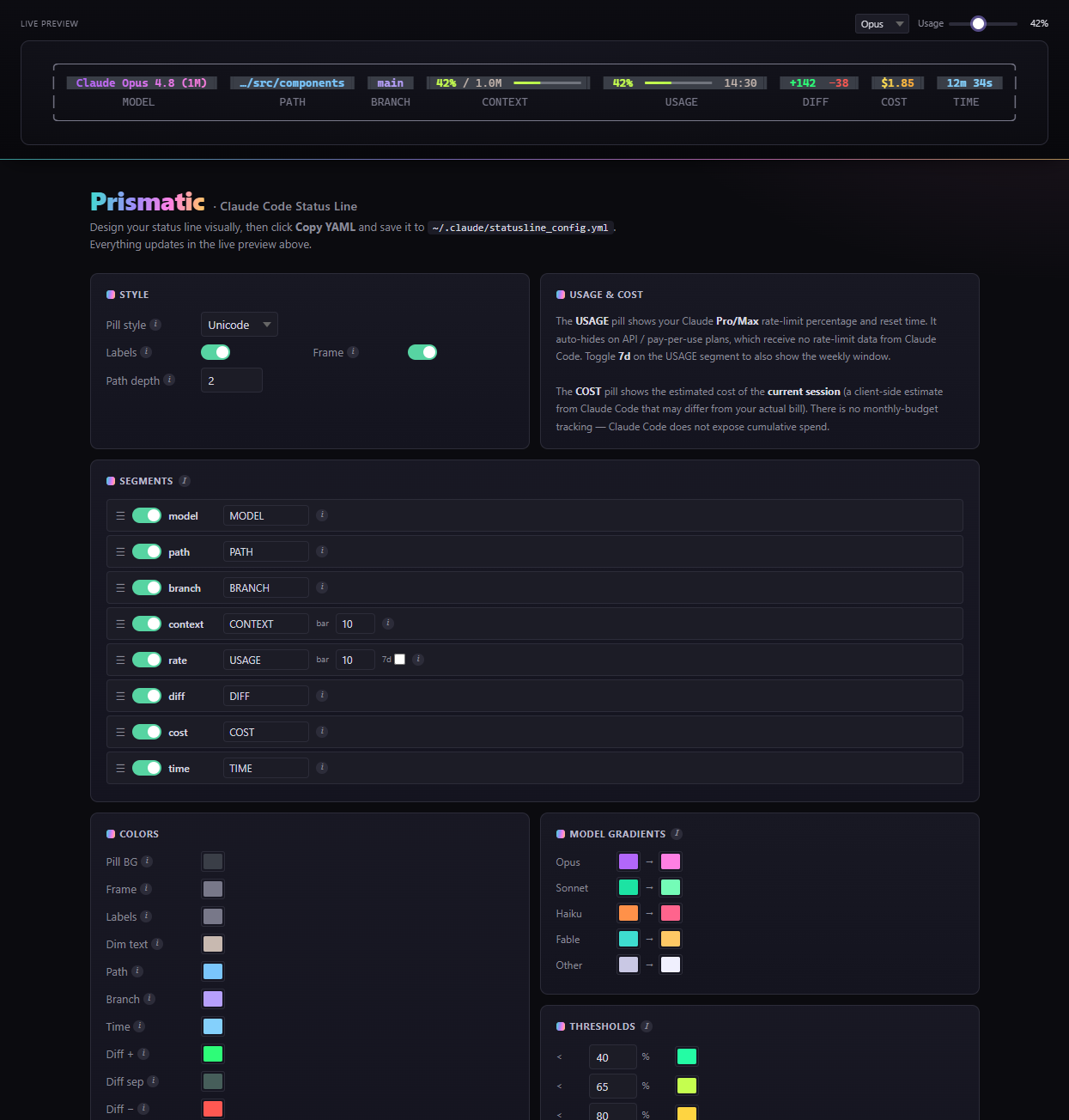
The visual editor — live preview on top, drag-to-reorder segments, color pickers and model gradients below.
Changes take effect on your next interaction with Claude Code.
Updating
Updating is the same one-liner you used to install — it overwrites only statusline.js:
# macOS / Linux / Git Bash
curl -fsSL https://raw.githubusercontent.com/XyzElias/prismatic-claude-statusline/main/statusline.js -o ~/.claude/statusline.js
# Windows PowerShell
curl.exe -fsSL https://raw.githubusercontent.com/XyzElias/prismatic-claude-statusline/main/statusline.js -o "$HOME\.claude\statusline.js"
Your statusline_config.yml is never overwritten, so every customization survives. When a new release adds a segment or color (like the BRANCH pill in v1.1), the script migrates your config automatically: on the next run it inserts only the new keys — with their default values and comments — and leaves every existing line, comment and custom value exactly as it was. The migration is idempotent, so running it again changes nothing.
That means upgrading is a single command: download the new statusline.js, and your config grows to match it on the next message — nothing to merge by hand, nothing to reset. (See the new keys for any release.)
Documentation
| Guide | What's inside |
|---|---|
| Installation | Step-by-step setup for macOS, Linux and Windows; where ~/.claude is; how to verify it works |
| Configuration | Every option explained — styles, segments, colors, model gradients, thresholds, frame |
| Nerd Fonts | What a Nerd Font is, how to install one per OS, how to set your terminal font — or skip it entirely |
| Troubleshooting | Blank status line, garbled symbols, ~ on Windows, colors not showing, and more |
How it works
Claude Code pipes a JSON blob describing the current session to your status line command on stdin after each message. statusline.js reads that JSON, builds the colored pills using ANSI truecolor escape codes, and prints them. Claude Code displays whatever the script prints.
This means the status line:
- uses no API tokens and adds no latency to your requests — it's pure local rendering;
- needs no dependencies — only Node.js, which Claude Code already relies on;
- shows only data Claude Code actually sends, so nothing is faked or estimated beyond what the editor itself estimates.
The exact JSON schema is documented by Anthropic in the official status line docs.
Why no monthly-budget pill?
Earlier versions of this status line tried to track a monthly API budget. That has been removed on purpose. Claude Code only reports the cost of the current session (cost.total_cost_usd), and even that is a client-side estimate that "may differ from your actual bill." There is no field for cumulative or monthly spend, so any "monthly budget" number had to be stitched together from per-session estimates in a local file — which drifted and was frequently wrong.
Instead, this status line shows two things it can report accurately:
- USAGE — your real Pro/Max rate-limit percentage and reset time, straight from Claude Code (for subscribers).
- COST — the honest, clearly-labeled estimated cost of the current session.
If you want to watch your spend over time, use the Anthropic Console usage dashboard — it's the source of truth.
Compatibility
- Claude Code with status line support (any recent version).
- Node.js 14+ (any version Claude Code runs with is fine).
- Terminal with truecolor (24-bit) support — virtually all modern terminals: Windows Terminal, iTerm2, Kitty, WezTerm, Alacritty, VS Code's terminal, GNOME Terminal, and more.
Contributing
Issues and pull requests are welcome — color themes, extra segments, and platform fixes especially. The status line is one readable file (statusline.js); the visual editor is config-editor.html (served live via GitHub Pages). The README images are generated by tools/render-svg.js (node tools/render-svg.js), so they stay in sync with the real output — CI checks this on every push.
License
MIT © Elias Felder
Yorumlar (0)
Yorum birakmak icin giris yap.
Yorum birakSonuc bulunamadi