open-dynamic-workflows
Health Warn
- License — License: MIT
- Description — Repository has a description
- Active repo — Last push 0 days ago
- Low visibility — Only 5 GitHub stars
Code Pass
- Code scan — Scanned 12 files during light audit, no dangerous patterns found
Permissions Pass
- Permissions — No dangerous permissions requested
No AI report is available for this listing yet.
Open Dynamic Workflows: TypeScript CLI runtime for Claude Code-style dynamic workflows across Codex, Claude Code, Gemini, Qwen, Kimi, and custom coding-agent CLIs.

Open Dynamic Workflows
An open dynamic workflow runtime for Claude Code-style agent orchestration on any coding agent.





Open Dynamic Workflows (ODW) is a TypeScript / Node CLI runtime for
portable dynamic workflows: JavaScript scripts that fan out coding agents withagent(), parallel(), and pipeline() outside the host agent's context. If
you are looking for an open dynamic workflow engine for Codex, Claude Code,
Gemini, Qwen, Kimi, or a custom CLI, this is the project.
A dynamic workflow is a small JavaScript script that holds an orchestration
plan in ordinary code and dispatches coding-agent CLIs at scale — outside the
host agent's own context. You write the script (or hand it one), a runtime runs
it in the background, and only the final result comes back. Claude Code can
already do this inside its own private runtime; ODW makes the same scripts
portable to any agent, so the workflows the Claude Code ecosystem is already
producing become artifacts you can run anywhere.
Highlights
- Portable — run the same workflow script on Codex, Claude Code, Gemini,
Qwen, Kimi, or your own CLI. Switch the underlying agent by switching adapters. - Claude Code's dialect, unchanged —
export const meta+ injectedagent/parallel/pipeline/phase/log/args/budget
globals, with top-levelawaitandreturn. A script written for Claude Code
runs here as-is, and vice versa. - Out of context, at scale — the plan lives in code, so intermediate work
never pollutes the host's context and you can fan out dozens of subagents. - Reliable hand-offs — JSON-Schema structured outputs, validated and retried,
so multi-stage pipelines compose instead of guessing on free text. - Background & observable — every run is a detached worker backed by a run
directory:status,logs --follow,result,pause/stop. - No threads, zero runtime dependencies — the engine is async TypeScript
(parallelisPromise.all); workflow scripts stay plain.jsand ship with.d.tsauthoring types for editor autocomplete.
Install
The whole install is a binary + a skill — no Node, no npm, no PATH
gymnastics, no global-module conflicts. Pick whichever path fits.
1. Let your AI agent install it
ODW is built for coding agents, so the easiest path is to let yours do it. Paste
this to your agent (Claude Code, Codex, Gemini, …):
Install Open Dynamic Workflows for me: run
curl -fsSL https://raw.githubusercontent.com/xz1220/open-dynamic-workflows/main/scripts/install.sh | sh
to put theodwbinary on my PATH and the workflow skill in your skills
directory, then runodw --versionto confirm. From now on, when a task is big
enough to fan out, write an ODW workflow and run it withodw run.
It runs the script, picks up the skill, and can author and run
workflows immediately.
2. One-command script
curl -fsSL https://raw.githubusercontent.com/xz1220/open-dynamic-workflows/main/scripts/install.sh | sh
Downloads the prebuilt binary for your platform (gzipped, ~35 MB) to~/.local/bin/odw and installs the skill into ~/.claude/skills/ (falling back
to ~/.codex/skills/). No Node required. Override with ODW_BIN_DIR /ODW_VERSION.
3. Manual
Prefer not to pipe curl into sh? Grab the asset for your OS/arch from
Releases, then:
# a) the binary — onto your PATH
gunzip odw-darwin-arm64.gz && chmod +x odw-darwin-arm64
mv odw-darwin-arm64 ~/.local/bin/odw

# b) the skill — copy skill/ into your agent's skills dir
git clone https://github.com/xz1220/open-dynamic-workflows.git
cp -r open-dynamic-workflows/skill ~/.claude/skills/open-dynamic-workflows
Or, if you already have Node ≥20, skip the binary: npm i -g open-dynamic-workflows puts odw on your PATH (then still do step b for the
skill).
The on-disk binary is ~110 MB — almost entirely the embedded Node runtime, like
any Node→binary tool — but the download is gzipped to ~35 MB. The agents ODW
drives (claude,codex, …) remain their own CLIs you install separately.
Quick start
ODW is mostly driven by your coding agent, not by hand. With the skill and
binary installed, just ask your agent for something big — it writes a workflow and
runs it for you, out of its own context:
You → your agent: "Use Open Dynamic Workflows to deep-research X vs Y and
write me a cited report."Your agent (it picked up the ODW skill) writes a workflow script and runs
odw run research.js --wait, then hands back the report — dozens of searches
and a fact-check pass ran in the background, never touching its context.
That's the whole point: the agent keeps a clean context and fans the heavy work
out to ODW.
Running odw yourself — or authoring a custom workflow — is the same one
command. A workflow is plain JavaScript in Claude Code's dialect, e.g.fan-out-reduce.js:
export const meta = {
  name: 'fan-out-reduce',
  description: 'Draft in parallel, then synthesize the best answer.',
}

const drafts = await parallel(
  [1, 2, 3, 4].map((i) => () => agent(`Draft #${i}: ${args.question}`)),
)

return await agent(
  'Synthesize the single best answer from these drafts:\n\n' +
    drafts.filter(Boolean).join('\n\n---\n\n'),
)
odw run fan-out-reduce.js --wait --args '{"question": "Design a rate limiter."}'
The flagship examples/deep-research.js (fan-out web
research → adversarial fact-check → cited report) is exactly such a script.
The primitives
A workflow is export const meta = {…} followed by a script body that runs in an
async context. The body composes these injected globals with ordinary JS
control flow (loops, if, dedup) — no imports:
| Primitive | Role |
|---|---|
agent(prompt, opts?) |
Run one coding agent on a subtask. The only verb that does work. Returns its text, or a validated object when opts.schema is set. |
parallel(thunks) |
Run a batch concurrently and wait for all of it (barrier). A failed thunk becomes null. |
pipeline(items, ...stages) |
Stream each item through the stages independently (no barrier). Each stage gets (prev, item, index). |
phase(title) / log(msg) |
Group progress under a phase / emit a progress line. |
schema (JSON Schema) |
A typed output contract for agent; the reply is validated and retried until it conforms. |
args |
The workflow's input, injected verbatim. |
budget |
{ total, spent(), remaining() } — scale depth to a token target. |
workflow(ref, args?) |
Run another workflow inline (one level of nesting; v1.5+). |
Use parallel when the next step needs the whole batch at once (dedup,
tally, synthesis); pipeline for multi-stage work (the default). Keep
reductions order-independent — branching on which agent finished first breaks
reproducibility. Full reference: skill/references/primitives.md.
Run and observe
The odw CLI starts a script in a background worker (fire-and-poll) and lets you
watch it. --wait blocks and prints the result.
odw run wf.js [--args JSON|@file] [--wait]   # start (background); --wait blocks & prints result
odw status <id>          # state + agent count
odw logs <id> --follow   # stream progress events
odw result <id>          # final value
odw pause|resume|stop <id>
odw list
A run executes in a detached worker process and persists everything to a run
directory, so it outlives the command that started it and can be observed from
anywhere.
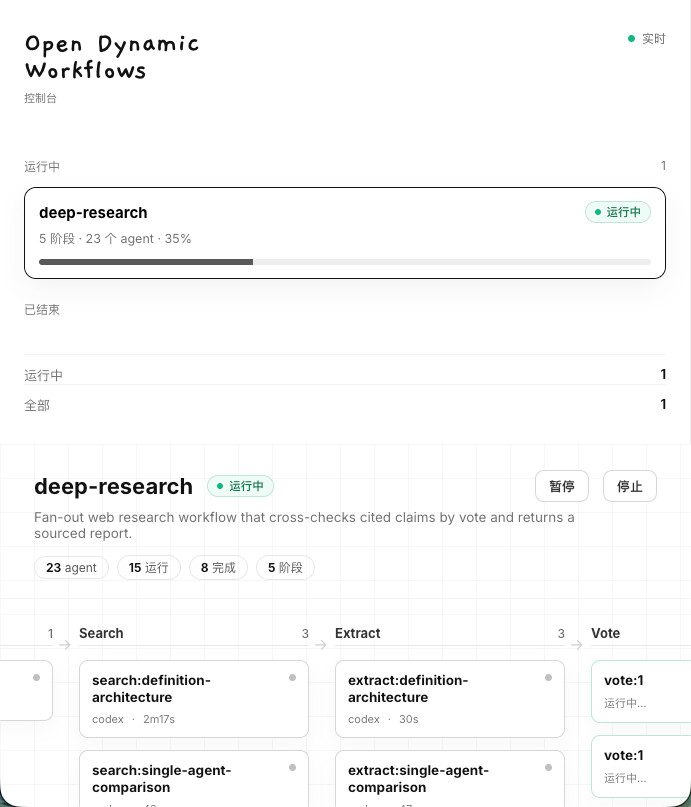
Prefer a browser? odw serve opens a zero-dependency live dashboard onto the same
run directory — phase columns, per-agent cards (adapter + elapsed time), and run status
stream in real time over SSE. No build step, no extra deps.
odw serve [--open]                      # live dashboard at http://127.0.0.1:4317
odw serve --port 8080 --host 0.0.0.0    # custom port / bind address
Configure adapters
Codex, Claude Code, Gemini, Qwen, and Kimi work out of the box. To change the
default, tune flags, or add your own CLI, drop an odw.config.json (seeodw.config.example.json) in the project root,~/.config/odw/config.json, or pass --config. ODW only shells out to local
commands — it never calls model APIs directly.
{
  "defaultAdapter": "claude",
  "concurrency": 8,
  "adapters": {
    "my_wrapper": {
      "label": "My custom CLI",
      "command": ["my-agent", "--cwd", "{workspace}", "--prompt-file", "{prompt_file}"]
    }
  }
}
How it works
odw (CLI) ─▶ runtime (background worker + run directory)
               └─ loads & transforms ─▶ workflow script (.js, Claude dialect)
                                         └─ injected primitives ─▶ scheduler (async cap + agent backstop)
                                             agent() ─▶ bridge ─▶ adapters ─▶ real CLI subprocess
                                                         ├─ workspace (isolation + diff)
                                                         └─ schema (validate / retry)
Two design points are worth calling out:
- The loader is the crux. Claude's dialect is neither a normal ES module nor
a plain script:export const metasits up top, and the body uses top-levelawaitand top-levelreturnwhile referencing injected globals. The loader
extractsmeta(with a string/comment/regex-aware scan), strips theexport,
and wraps the body in an async function whose parameters are the primitives —
so the body'sreturnbecomes the workflow's result. - No threads. The engine is async to the core.
agent()is just an async
subprocess call, soparallelisPromise.all,pipelineis per-item async
chains, and the concurrency cap is a small async semaphore —min(16, cpus-2)
by default, with a hard backstop on total dispatches per run.
| Path | Layer |
|---|---|
src/adapters/ |
L1 — uniform CLI invocation (config, placeholders, runner, built-ins) |
src/bridge.ts |
L2 — one agent call → one CLI run, with schema handling |
src/scheduler.ts |
L3 — bounded async concurrency + total-agent backstop |
src/primitives.ts, src/schema.ts |
L4 — the injected primitives + the data contract |
src/loader.ts |
the transform that turns a workflow script into a runnable form |
src/runtime/ |
L5 — background worker, run directory, control |
src/cli.ts |
L6 — the odw command |
src/workspace.ts |
cross-cutting — workspace isolation and diff |
Workflow scripts stay plain .js and are never compiled; the engine is
written in TypeScript (compiled to ESM, zero runtime dependencies) and
ships .d.ts authoring types so script authors get editor autocomplete on the
injected globals.
Examples
Runnable, plain-JS workflows in examples/:
| Workflow | Pattern |
|---|---|
deep-research.js |
fan-out research → adversarial fact-check → cited report |
fan-out-reduce.js |
draft N in parallel → synthesize the best |
adversarial-verify.js |
surface findings → keep only those that survive refutation |
loop-until-dry.js |
loop fanning out finders until K dry rounds |
Develop
npm run build         # tsc → dist/
npm test              # node:test suite, driven by a mock adapter (no real accounts)
npm run typecheck     # tsc --noEmit
npm run build:binary  # bundle + Node SEA + postject → a single self-contained ./build/odw
build:binary follows the standard single-executable recipe: esbuild
bundles dist/ (zero-dep ESM) into one CommonJS file, node --experimental-sea-config
turns it into a SEA
blob, and postject grafts that blob into a
copy of the node binary (ad-hoc code-signed on macOS). esbuild and postject are
build-only devDependencies — the binary and the npm package stay zero
runtime dependencies. Cross-platform binaries are built per-OS in CI
(.github/workflows/release.yml); SEA injects
into the host's node, so each target is built on its own runner.
Once published,
npm i -g odw(ornpx odw …) puts theodwcommand on your PATH.
Status
v1 is shipped. The full runtime is on main — the adapter layer, execution
bridge, workspace isolation, the async scheduler, the injected primitives, the
loader/transform, the JSON-Schema engine, the background runtime, and the odw
CLI. 94 tests pass, and the flagship examples/deep-research.js
runs end-to-end (plan → gather → verify → synthesize → critique).
Roadmap (v1.5+)
model / agentType rich routing · git-worktree isolation · nestedworkflow() · real token-budget accounting · resume / journaling · aDate.now/Math.random sandbox for replay-determinism. Full plan:docs/dynamic-workflows-tech-plan.md.
Background on the Claude Code dialect ODW aligns with:docs/dynamic-workflows-research.md.
Use as a skill
skill/SKILL.md teaches a host agent to author and run
workflows from documentation alone — install it into your agent's skills
directory (Codex CLI → ~/.codex/skills/, Claude Code → its skills dir).
License
Reviews (0)
Sign in to leave a review.
Leave a reviewNo results found