threaddeck-for-codex
Health Warn
- License — License: MIT
- Description — Repository has a description
- Active repo — Last push 0 days ago
- Low visibility — Only 5 GitHub stars
Code Pass
- Code scan — Scanned 12 files during light audit, no dangerous patterns found
Permissions Pass
- Permissions — No dangerous permissions requested
No AI report is available for this listing yet.
Open-source physical dashboard for Codex on Stream Deck: monitor tasks, switch threads, control Effort/Fast mode, and dictate on macOS.
ThreadDeck for Codex
An open-source physical dashboard for Codex on Stream Deck.
Monitor live Codex Desktop tasks, switch local or remote work, control Effort and Fast mode,
and hold a task key to dictate and submit a follow-up — all from one local-first macOS dashboard.



English (default) · Korean · Website · Install · Neo profile · Gestures · Download
Try ThreadDeck before installing: open the interactive web demo →
ThreadDeck turns a Stream Deck into a physical Codex task monitor and controller. It is inspired by the compact hardware-agent workflow explored by Codex Micro and now uses Codex's own Micro renderer events when they are available. Its independent eight-task monitor, renderer, and verified macOS adapter remain in place, so an unavailable Micro bridge falls back safely instead of disabling the deck. If you searched for a Codex Stream Deck, Codex StreamDeck, or a larger open-source Codex Micro-style controller, this is the project.
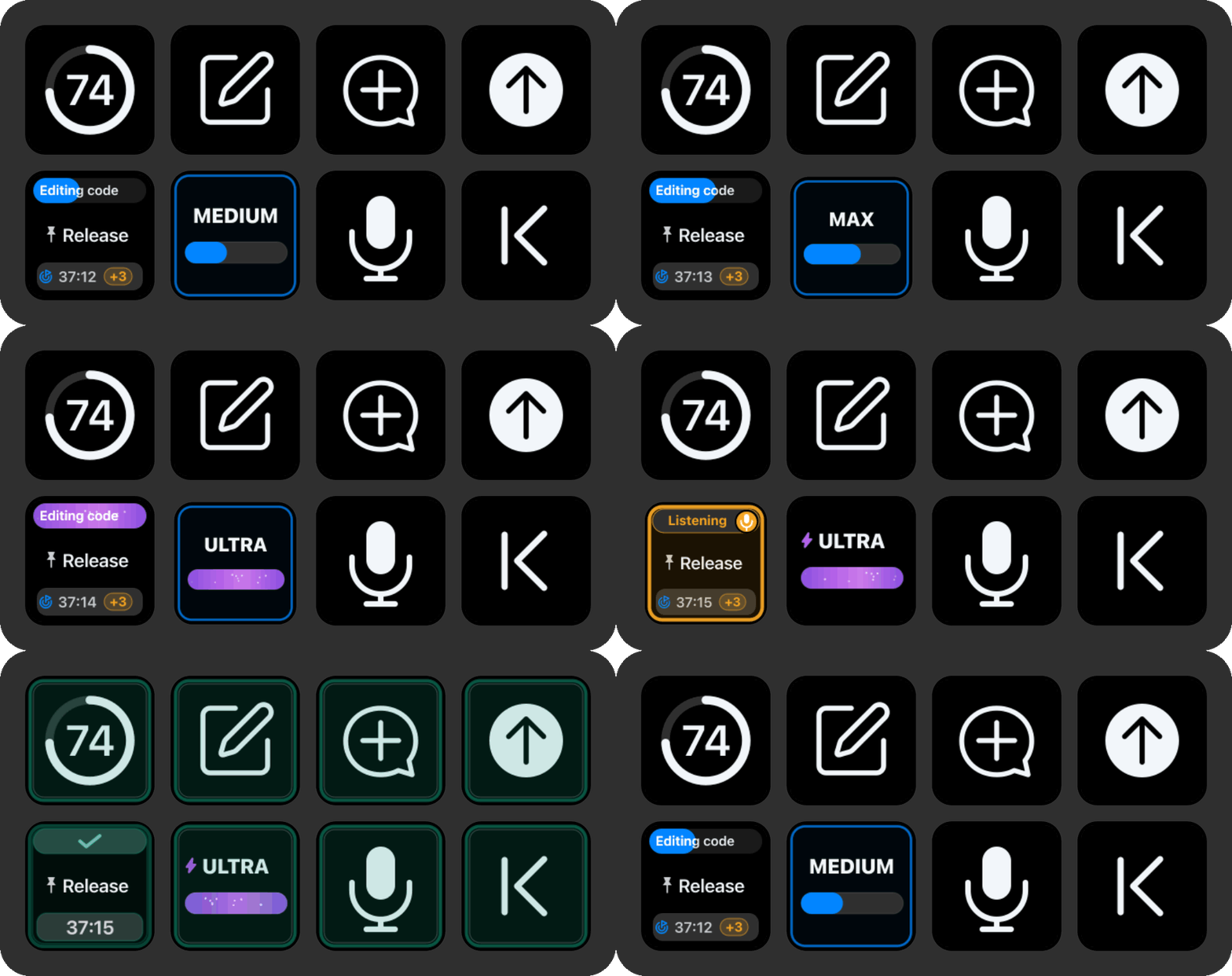
The overview and gesture demos are generated from the plugin's real SVG key renderer with sanitized example tasks. English is the default documentation and release language; the same plugin automatically switches its action names and key UI to Korean when Stream Deck uses Korean. No separate language build is required.
[!IMPORTANT]
ThreadDeck is an independent integration that reads undocumented local Codex metadata and an undocumented local renderer API. A Codex update can temporarily break either path. It never writes to Codex database or session files.
What it puts on your desk
- Live task cards — activity, title, pin, queue count, goal badge and goal-wide elapsed time, reasoning intensity, and fast/standard service cues.
- Reliable switching — open local tasks directly and activate the correct computer for an explicitly pinned remote task without moving or clicking the mouse pointer.
- Hardware dictation — hold a task key to speak and auto-submit a follow-up, or use the dedicated microphone to leave a draft for review.
- Completion feedback — after a fresh final-turn end is confirmed with no queued continuation, every visible ThreadDeck-owned key acknowledges the first completion frame. The matching task then keeps a slower green pulse until that exact task is successfully opened or viewed frontmost in Codex. Queue edits and dequeue-to-execution transitions never count as completion.
- Workflow controls — change the current model's reasoning effort, toggle Codex Fast mode, create a task or Side Chat, send, switch apps, change pages, control media, and optionally show a weekly quota ring.
- Micro-first reliability — Effort, Fast, Side Chat, push-to-talk, Send, New Task, and the six native Micro task slots use Codex's own internal commands first. Accessibility and shortcuts remain a verified fallback for the eight-task dashboard and unsupported builds.
Install in 60 seconds
Requirements
| Component | Supported |
|---|---|
| macOS | 13 or later |
| Stream Deck | 7.4 or later |
| Device | Stream Deck Neo |
| Mac architecture | Apple silicon and Intel |
| Codex | Codex Desktop installed as com.openai.codex |
| Optional quota key | CodexBar; currently requires macOS 14 or later |
Install
Download
com.yechan.threaddeck.streamDeckPluginfrom Releases and double-click it.Select the installed ThreadDeck for Codex profile, allow Stream Deck in System Settings → Privacy & Security → Accessibility, then reopen Stream Deck.
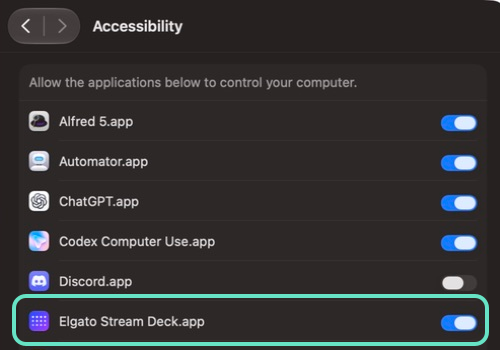
On current macOS versions the switch is named Elgato Stream Deck.app. No Screen Recording, Input Monitoring, or Full Disk Access permission is required.
Quit and reopen Codex once. ThreadDeck preserves the Codex session that was already open during installation; after your next normal launch it may relaunch Codex one time to attach a random
127.0.0.1renderer bridge.Confirm the four Codex shortcuts below so the legacy fallback remains available, then test the microphone key.
The package contains an editable ready-to-use profile, one universal Apple silicon/Intel helper, and both English and Korean localization. For screenshots of every setup step, updates, removal, and the read-only doctor command, see Install ThreadDeck on another Mac.
| Codex function | Legacy fallback shortcut | Used by |
|---|---|---|
| Start dictation | ⌃⇧D |
Dedicated microphone and task-key hold |
| Open a new task in the current project | ⇧⌘O |
New task key when Current Task belongs to a project |
| Open a new standalone task | ⌥⌘O |
New task key when Current Task is outside projects |
| Open Side Chat | ⌥⌘S |
Side Chat key |
With the Micro bridge connected, these actions use Codex's native internal commands and the shortcuts are not sent. On the fallback path ThreadDeck sends an explicit Latin D, so dictation also starts while Korean or another non-Latin input source is active. On release it activates Codex's visible stop-dictation control because the current app shortcut does not act like a physical push-to-talk key.
How to press each key
Hold and push-to-talk are deliberately different:
- A task key or Send key waits for a threshold before arming its alternate action.
- The microphone key starts recording immediately and must stay pressed while you speak.
- Every other ThreadDeck-owned supplied key has one action only. The four Elgato-owned app launchers in the Media page are the exception: tap to open or focus the app, and long-press to quit it.
| Key | Press behavior | Hold or release behavior |
|---|---|---|
| Current task | Opens the task selected in Codex's active window | Hold at least 0.55 s to start dictation in that task; release to transcribe, auto-submit, and verify the draft cleared |
| Top Task 1–8 | Starts opening that position in the sorted local, pinned-remote, and Side Chat list | Hold at least 0.55 s to start dictation in that task; release to transcribe, auto-submit, and verify the draft cleared |
| Microphone | Starts dictation in the verified current composer and pauses supported audio-producing media apps | For a brand-new Side Chat, can use its verified right-side composer before a task UUID exists; keep held while speaking, then release to leave a draft without submitting and resume media |
| Send | Verifies the current composer; release before 0.6 s to send Return | Waits for an in-progress task or Side Chat switch; at 0.6 s the key turns blue, then release to send Command+Return |
| App launcher | Tap to open or bring the configured app forward | Long-press to quit that app; the threshold and native artwork are managed by Stream Deck |
| Weekly quota | — | Release to refresh CodexBar immediately |
| New task / Side Chat | — | New Task mirrors Current Task's scope: project tasks create inside that project, standalone tasks stay outside projects. Until Codex assigns an ID, Current Task points to a provisional New task composer. ThreadDeck uses native NEW when context-aware creation is available, with ⇧⌘O / ⌥⌘O fallbacks; Side Chat uses native PARTY or ⌥⌘S and keeps the same protected provisional-composer behavior |
| Reasoning + Fast | Release before 0.6 s to move the next-run level (LIGHT–ULTRA); the track begins a smooth 320 ms transition immediately from the first tap |
Rapid taps are folded into the last ping-pong position. Ordinary visible levels settle for only 90 ms and use the same internal composer command as the Micro encoder. Max, Ultra, or a level skipped by the encoder waits for the 1.1-second input pause, opens the exact Advanced action, scans the live account/model list, and selects only the requested level. Direct Codex changes are mirrored with the same animation. An exact Ultra warning selects only Use Full access, never Continue. At 0.6 s, the key toggles next-run Fast mode immediately through Codex's native command. When Fast is verified, the level name remains exactly centered and its bolt sits immediately to the left so a pressing finger does not cover it |
| Dedicated Fast mode | Release to toggle Fast mode in the verified current composer | Uses Codex's native FAST command first. A filled green bolt means Fast and an outlined neutral bolt means standard; a pending task or Side Chat switch is resolved first |
| App switcher / media | Runs immediately on press | No alternate hold action |
| Previous / next page | — | Release to cycle through the three ThreadDeck pages |
The Dashboard's Current Task key follows the task selected in Codex's active window, including a task you select directly in the app. The read-only Micro snapshot is the first source for active task, next-run Effort, Fast state, theme, and six native slot identities; renderer keys such as local:<UUID> are normalized to the exact ThreadDeck task while the raw key is retained for native switching. The existing local state and Accessibility observer extend this to eight task cards, remote tasks, queues, goals, and Side Chats. Send, microphone, Effort, Fast, and Side Chat re-confirm that same current task immediately before acting. A newly opened New Task or Side Chat retains a navigation lease only until Codex exposes its real identity or the renderer reports that the user selected another task manually; an exact manual selection immediately wins. A transient or ambiguous read keeps the last verified identity instead of guessing. Top Task 1 remains independent from Current Task for custom profiles.
Reasoning and speed have two deliberate timelines. A working task card keeps the exact Effort and Fast/standard setting captured when that turn started; changing the Codex composer or ThreadDeck's combined control does not rewrite an answer already in progress. The combined control instead shows the live setting for the next run, including a setting changed directly in Codex. Both tracks animate smoothly when their own trustworthy value changes: the control follows the next-run composer immediately, while a task header moves only when new turn metadata reaches that card. Codex's current queue stores the follow-up content and starts it later through the live composer, so a queued follow-up uses the setting present when it actually begins. Once dequeued, its new turn metadata becomes the task-card header. The amber +N remains a queue count rather than pretending every queued item has its own frozen setting.
Keys with hold gestures
Task key: open or dictate and submit
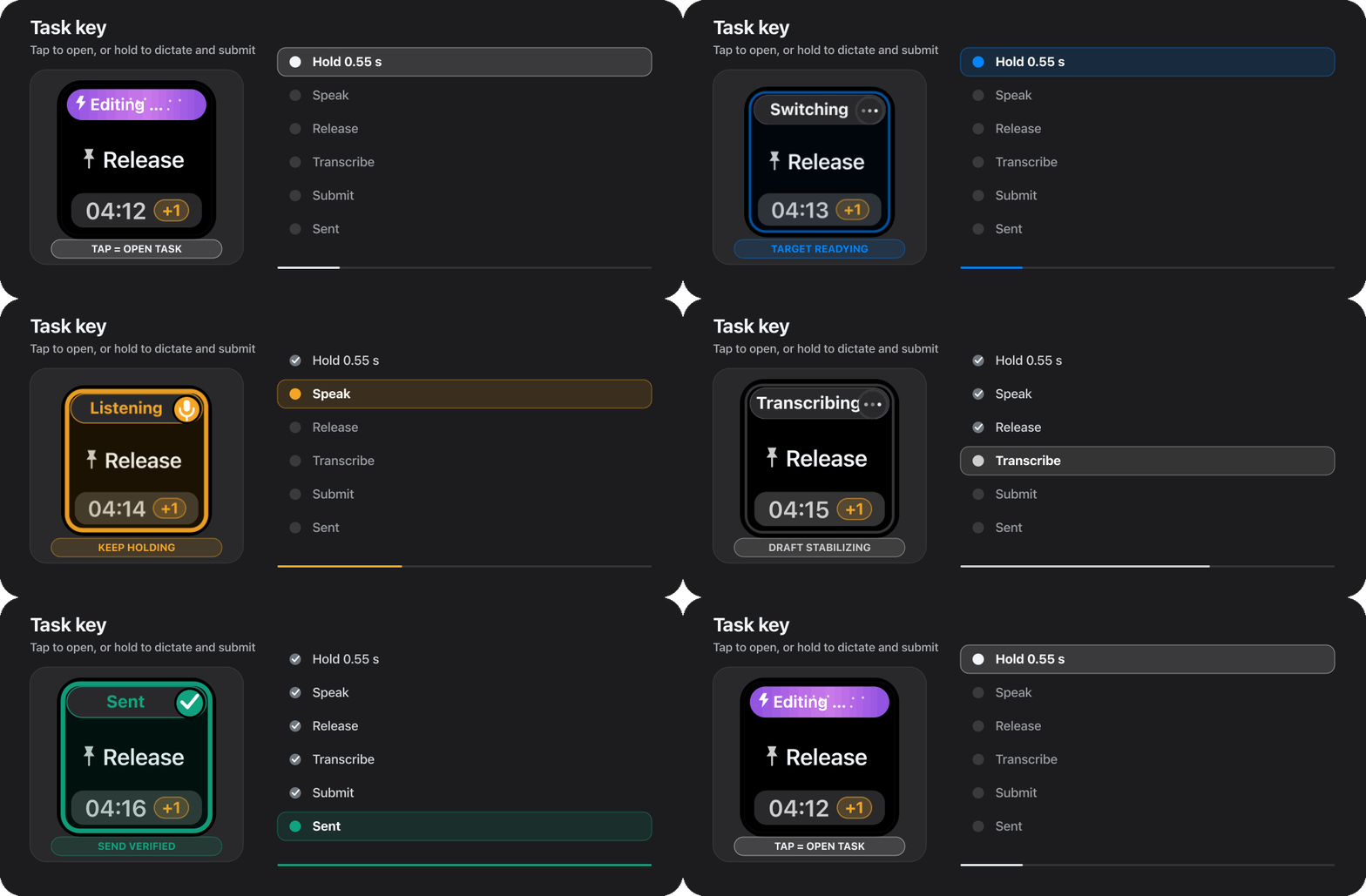
Tap a task key to open it. Hold for at least 0.55 seconds and wait for Listening before talking; a slow remote switch first shows Switching while the exact task and composer are verified. Releasing stops dictation; ThreadDeck waits for a stable transcript, activates Codex's visible Send control, and only shows Sent after the composer reset is confirmed. ThreadDeck discovers the GUI owner of active Core Audio output, activates only a semantic pause control it can verify, and falls back to the normal macOS media command when needed. The selected task card shows every stage. A task switch and composer activation use accessibility focus plus keyboard activation, so the pointer does not move.
Dedicated microphone: dictate a draft, do not send it
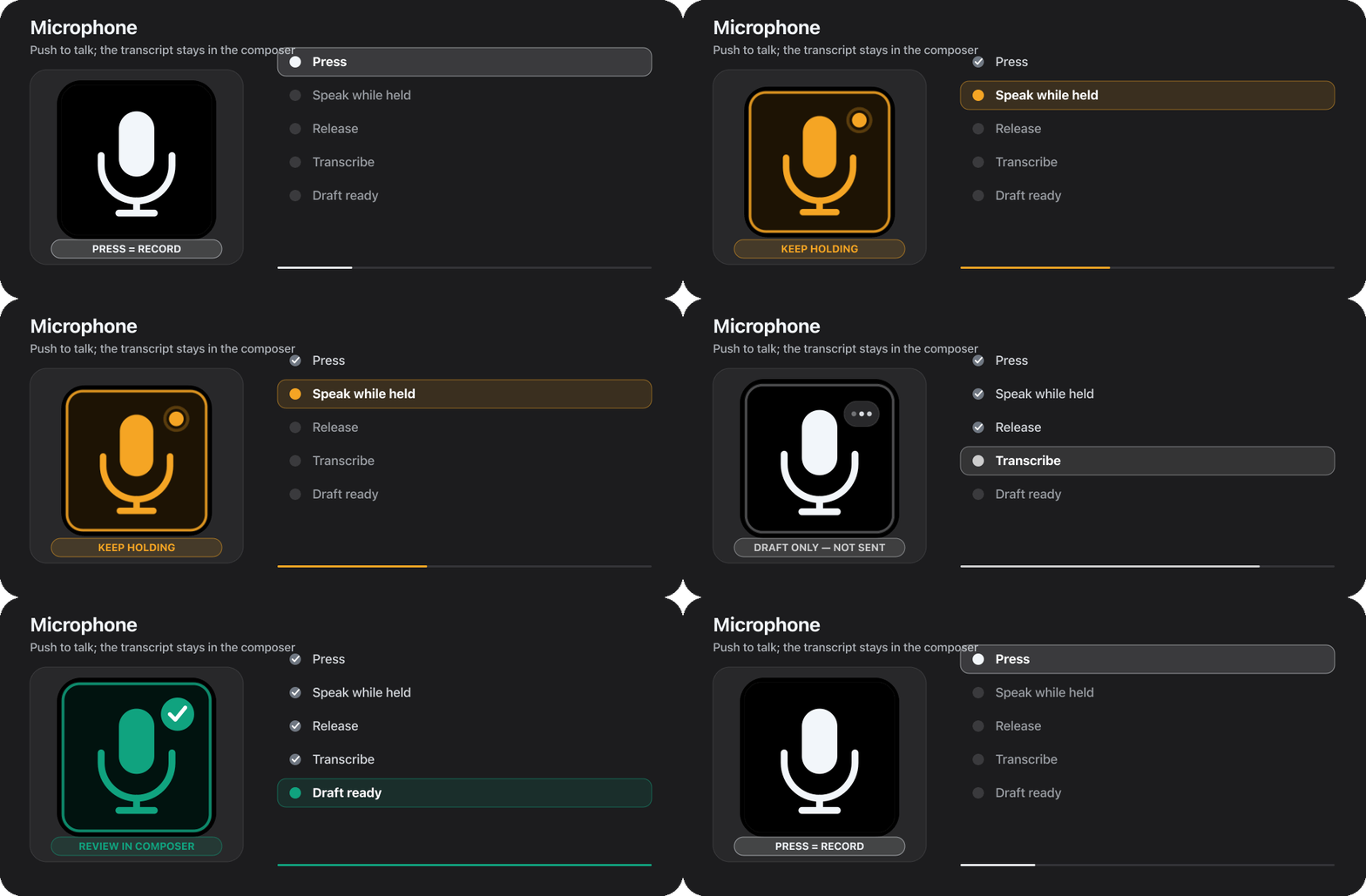
The microphone starts recording as soon as it is pressed. Keep holding while you speak, then release. ThreadDeck stops dictation, resumes supported media only when it issued the pause, and leaves the transcript in the Codex composer for review. It does not submit the message. If a visible target task is known, that task card can mirror the recording state.
Send key: Return or Command+Return
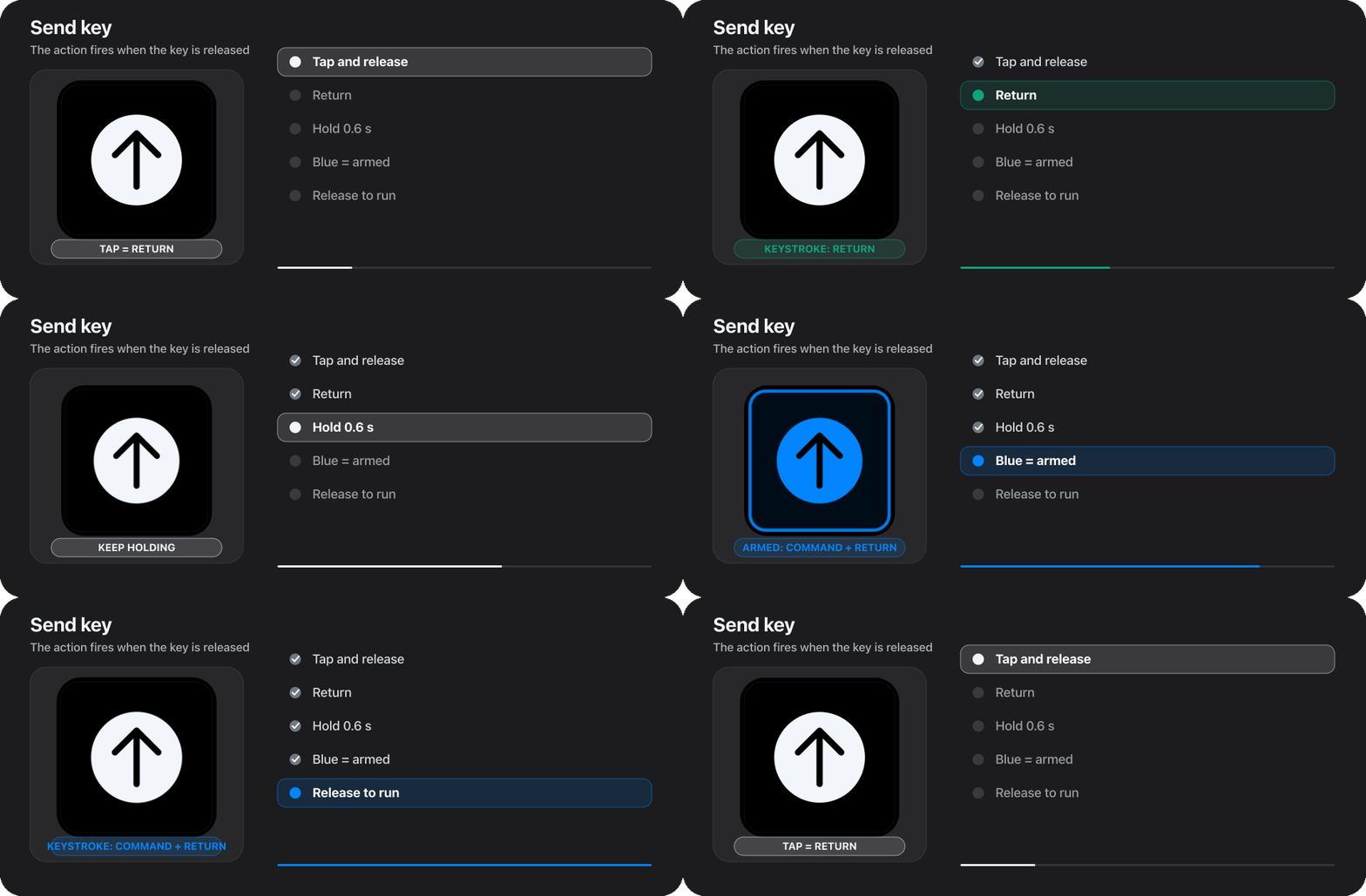
Both Send actions fire on release. A tap sends Return. The elapsed-time threshold is 0.6 seconds; the blue border confirms that the long action has been armed. For an unambiguous Command+Return, wait for blue and then release.
Read a task card
| Example | Meaning |
|---|---|
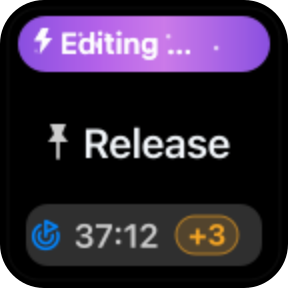 |
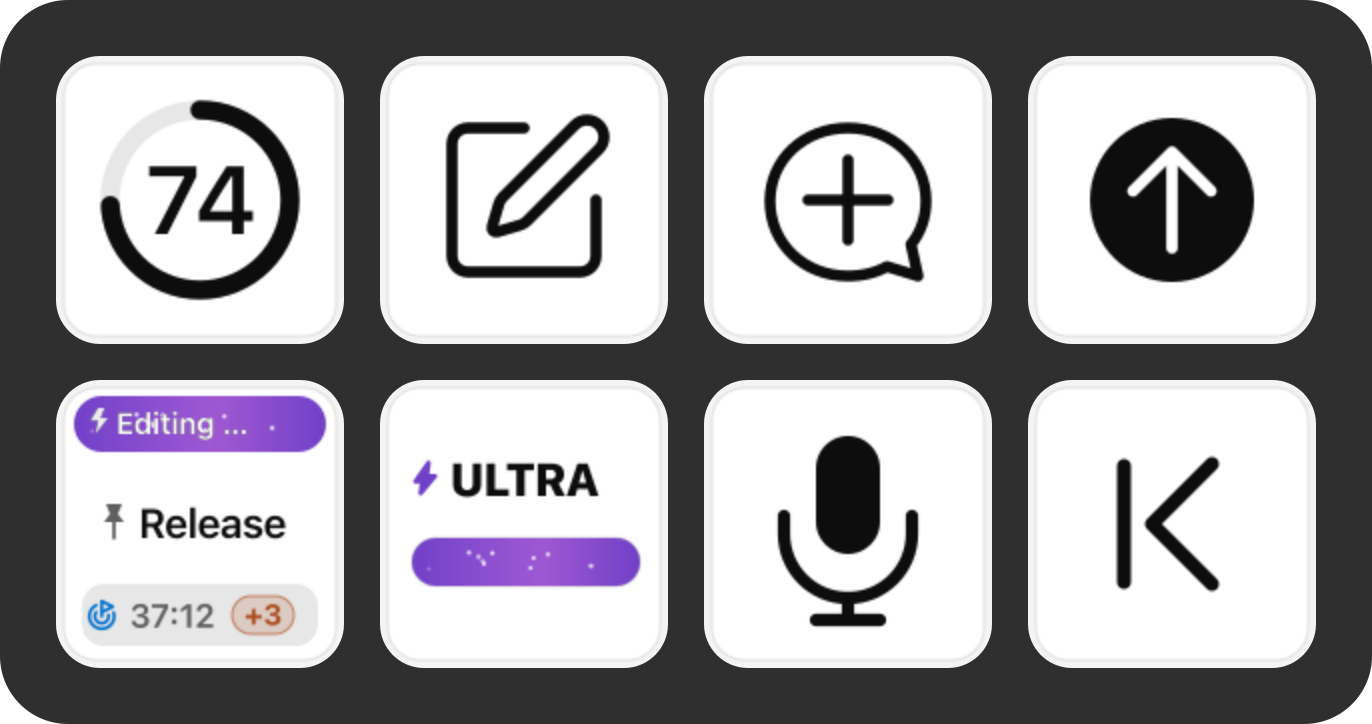
The header shows the current phase. The pin precedes the title, the timer updates every second, and the track plus lightning cue preserve the Effort and Fast/standard setting of the turn already running. A target at the timer's left marks an unfinished goal; while it is present, the timer is the whole goal's accumulated time rather than only the latest turn. An amber +N is the observed queued-follow-up count. |
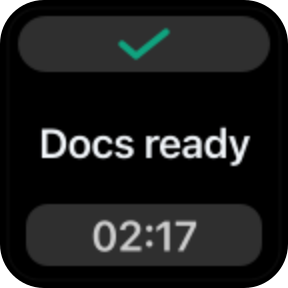 |
The check and frozen timer mean the latest observed turn completed. Completed cards hide the fast-service lightning cue so the check remains the single status signal. The final duration is never rewritten by a later resume observation. |
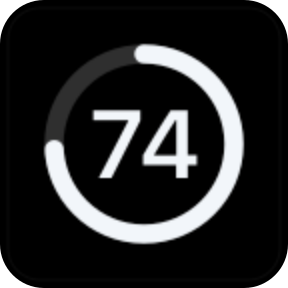 |
Optional remaining weekly capacity from CodexBar. The last good value appears immediately during page changes and survives a transient refresh failure. |
 |
A workflow action using the same light/dark visual system as task cards. |
Task status uses a small, consistent vocabulary: active blue/purple, current phase, pin, live or frozen time, amber queue count, completion check, error/stopped state, and the green completion pulse. An unviewed completion keeps breathing green across plugin restarts and clears only after the exact task is opened. Light appearance preserves the same hierarchy.
Which tasks appear
ThreadDeck fills up to eight slots with user-facing tasks only:
- pinned and recent local tasks;
- remote tasks only when you explicitly pin them in Codex, apart from the current-task exception below;
- temporary Side Chats while their Codex session remains open.
Unpinned remote history does not consume ordinary Top Task slots. The separate Current Task action is the single exception: when the task selected in Codex's active window is remote, that exact task may remain on the key without a pin. Internal helper and review tasks are excluded by structural provenance before titles reach the renderer. Archived persistent task IDs cannot re-enter through prompt history as fake Side Chats.
To put a remote task on the deck, open its computer in Codex once so its summary is cached, then pin only the task you want. Pressing the key prefers the exact task UUID exposed by Codex, then activates the verified sidebar or single unified-search result from the keyboard, which switches both the computer and task. Known duplicate titles require strict UUID identity; if Codex does not expose enough identity, ThreadDeck reports a duplicate instead of guessing.
How remote status, timing, and reasoning stay conservativeRemote summary timestamps are used for ordering, never as invented completion times. ThreadDeck reconstructs a turn start from its UUIDv7 ID and freezes duration only at an explicit terminal marker or a confirmed live active-to-not-loaded transition. Goal time follows Codex's own accumulated counter: only active advances, while paused, blocked, limited, completed, stopped, error, and confirmed remote-idle states freeze at one fixed value. A newly active continuation releases a provisional between-turn cutoff. Focused remote goal detection exact-matches only Codex's fixed status labels plus its compact duration or token-progress field, never the goal objective or conversation text. The last observed remote state and time are kept locally for up to seven days so a plugin restart does not erase the badge; a remote goal that has never been focused cannot be inferred from Codex's summary metadata. When a token-budget row does not expose elapsed time, the badge remains and the timer shows --:-- instead of inventing a value or advancing after a block. If no trustworthy end exists after a cold start, it shows an unknown duration. Intermediate reasoning summaries are reduced to privacy-safe phases such as Planning, Analyzing, Implementing, Verifying, Running, and Summarizing without rendering or storing the source summary text. Reasoning intensity and Fast/standard speed are accepted only from explicit metadata tied to the exact remote task or an exact focused-task composer match. The live observation is cached only for that exact turn, so it cannot bleed into another task or a later turn; ambiguous summary mode fields are deliberately ignored. The task-card lightning cue and Fast mode action therefore agree when a trustworthy value exists and remain unknown instead of guessing otherwise. State refresh after a task switch never opens the model picker. Codex renders the closed picker's bolt as a separate SVG hidden from Accessibility text, so ThreadDeck reads reasoning from the closed button while preserving speed from exact task metadata or the last verified value. The model menu opens only for an explicit Fast mode or reasoning-effort key press.
Included profile
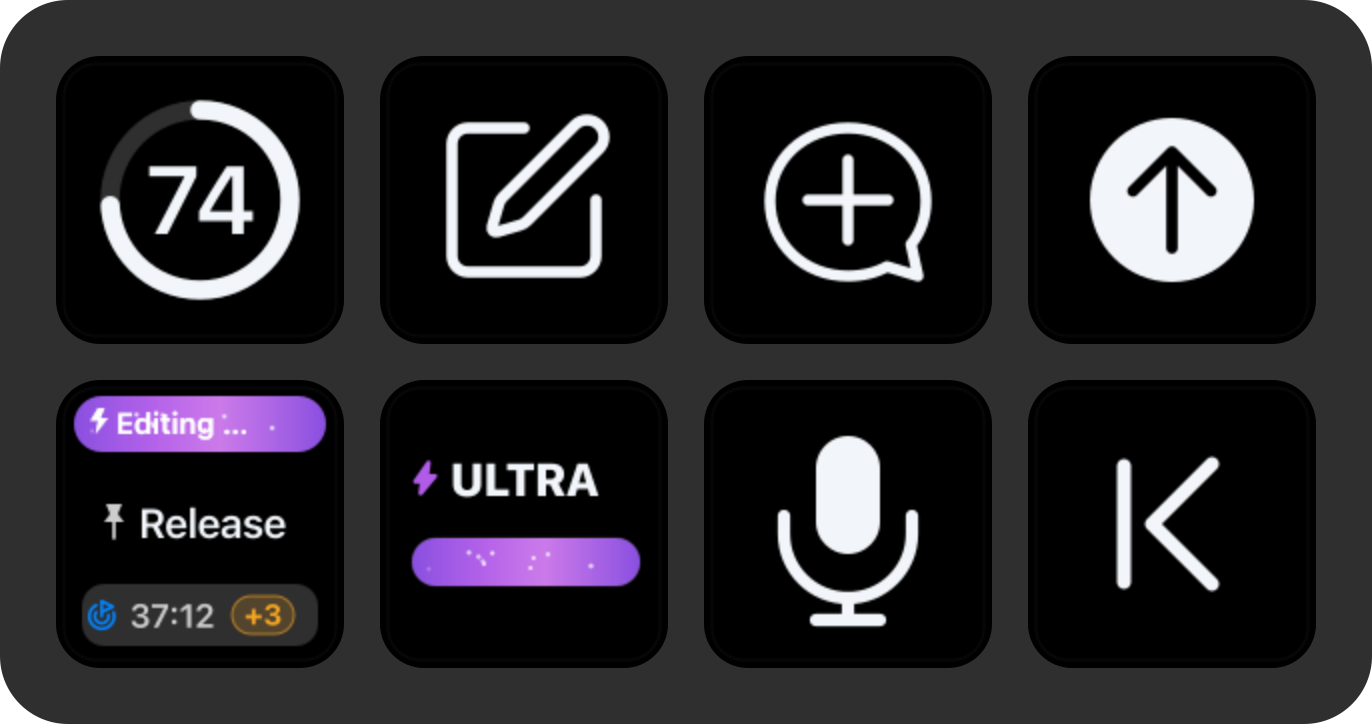
The bundled recommended Stream Deck Neo profile has three pages and can be rearranged in Stream Deck. Release builds also export a standalone recovery or manual-import copy; see the visual layout and import guidance.
- Dashboard — quota, New Task, Side Chat, and Send on the top row; Current Task, combined reasoning/Fast, microphone, and back navigation on the bottom row. The combined control occupies
1,1, and Current Task remains at0,1. The dedicated Fast action remains available for custom layouts. - Tasks — Top Task 1–7 and back navigation. Top Task 8 and the independent Current Task action are available in the action list for custom layouts.
- Media — previous track, rewind, play/pause, four app launchers, and back navigation. Forward page, next track, seek, mute, and volume actions are also available.
Elgato-owned app-launch keys keep their native artwork, support their configured long-press-to-quit behavior, and do not receive ThreadDeck's completion overlay. ThreadDeck page-navigation keys do.
Optional weekly quota ring
Every feature except the quota key works without CodexBar.
brew install --cask codexbar
codexbar usage --format json
Open CodexBar once, enable Codex in its provider settings, and confirm the command returns JSON. Common Homebrew paths are detected automatically; set CODEXBAR_PATH only for a custom install. ThreadDeck prefetches and caches the last successful value while any of its pages is visible.
Local-first and privacy boundaries
ThreadDeck has no account, telemetry, analytics, update server, or cloud backend. It does not contact a remote Mac directly; remote cards come from metadata already cached locally by Codex Desktop.
| Source | Access | Purpose |
|---|---|---|
~/.codex, config.toml, models_cache.json, and Codex Desktop logs |
Read-only | User task titles, pins, cached remote summaries, lifecycle, goal status and accumulated time, activity, timing, service metadata, temporary Side Chat lifecycle, and the globally visible/model-supported Effort catalog |
~/Library/Application Support/ThreadDeck/remote-goals-v1.json |
Local read/write | Last observed remote goal status and numeric time for at most seven days; no objective, title, or conversation text |
~/Library/Application Support/ThreadDeck/unread-completions-v1.json |
Local read/write | Task UUID and numeric completion/notice timestamps for unviewed completion cues; no title or conversation text |
~/Library/Application Support/ThreadDeck/media-pause-lease-v1.plist |
Temporary local read/write | Bundle identifiers of media apps paused by the current voice hold; expires after ten minutes and contains no title, URL, PID, or media text |
~/Library/Application Support/ThreadDeck/bin/keybridge-<sha256> |
Local executable cache | Content-addressed copy of the packaged native helper, used so Marketplace DRM can keep the distributed plugin immutable; contains executable code only and no user data |
Codex renderer bridge on random 127.0.0.1 port |
Local read/control | Reads active task, next-run Effort/Fast, theme, and up to six Micro slots; dispatches a Codex Micro event only after a physical ThreadDeck action |
codex-micro-bootstrap-v1.json and codex-micro-bridge.json |
Local read/write | Process generation, loopback port, health, cooldown, and numeric timestamps only; no title, prompt, transcript, or credential |
| CodexBar CLI | Optional child process | Weekly remaining quota only; CodexBar has its own provider behavior |
| Stream Deck plugin socket | Localhost | Receive key events and send rendered key images |
| macOS Accessibility and Core Audio | Local system APIs | Keyboard/media actions, focused-composer checks, fixed goal status/time labels, queue counts, remote selection, and push-to-talk audio handling |
ThreadDeck never writes to Codex database or session files, but a physical key press can intentionally open Codex UI or submit the message you dictated. Remote titles are passed to the native helper through stdin rather than command-line arguments. Queued message text and arbitrary accessibility text are never returned, logged, or stored. Anyone who can see the physical device can see the task titles displayed on it; review Security and privacy before sharing logs or screenshots.
Quick troubleshooting
| Symptom | First check |
|---|---|
| No key actions work | Follow the key warning: Allow access means Accessibility, Input access means event posting, Check Codex means confirmed Codex-operation failures, and Check media means active playback could not be safely controlled. ThreadDeck rechecks permissions every 30 seconds and clears operation warnings after a verified recovery. |
Effort/Fast shows Restart Codex |
Quit and reopen Codex once. ThreadDeck will preserve the current installation-time session, then attach the loopback Micro bridge after a later normal launch. Legacy controls remain available meanwhile. |
| Music or browser audio keeps playing during dictation | Update to the latest build. ThreadDeck now resolves any active Core Audio process to its GUI owner and uses verified semantic controls; Apple Music plus Chrome and Safari YouTube were physically tested. |
| Korean input source blocks dictation | Confirm Codex Start dictation is ⌃⇧D; ThreadDeck sends a Latin D independently of the active layout |
| Microphone release does not send | This is expected for the dedicated microphone; it leaves a draft. Use a task-key hold for auto-submit or press Send afterward |
| Task-key hold does not record | Hold past 0.55 s until the speaking state appears; keep Codex available, grant microphone permission, and check ⌃⇧D |
| Send hold takes the short path | Keep holding until the key turns blue before releasing |
| An app closes from the Media page | The bundled Elgato app launchers use long-press to quit; tap briefly when you only want to open or focus |
| Remote task is missing | Open that computer once in Codex, then explicitly pin the task |
| Remote task reports a duplicate | Give the tasks distinct titles or leave only one pinned |
State unavailable appears |
Update to the latest release and restart Codex and Stream Deck; transient reads keep the last good list and retry automatically |
| Weekly quota is unavailable | Run codexbar usage --format json and enable Codex in CodexBar |
See the full Troubleshooting guide if the first check does not solve it.
Build and reproduce the media
Requires Node.js 20+, pnpm, Xcode Command Line Tools, and Stream Deck.
pnpm install --frozen-lockfile
pnpm run build
pnpm run audit
pnpm run check
pnpm run pack
The universal native helper is built for Apple silicon and Intel. The release artifact is written to release/. Documentation images and all five GIFs are reproducible from the checked-in renderer and documentation pipeline:
pnpm run render-docs
pnpm run render-animation
The GIF pipeline uses Node.js and the development-only Sharp dependency for SVG rasterization, then the repository's Swift/ImageIO helper for encoding. Sharp is not bundled in the runtime plugin, and no copied product UI is included.
Current limits
- The bundled profile and physical QA target macOS and Stream Deck Neo; English and Korean are selected automatically from Stream Deck. Actions placed manually on another model use its official device type and key geometry for an independent conservative frame budget, but those layouts are not yet published as supported profiles.
- Task and Side Chat detection depend on private Codex file and log formats and can lag behind a Codex release.
- Native controls depend on an undocumented Codex Micro renderer API. The bridge is bound only to a random loopback port, and ThreadDeck falls back only when it can prove no Micro action was delivered.
- Codex exposes six native Micro task slots; ThreadDeck keeps its separate eight-card monitor and uses the legacy verified switch path for the remaining two or for tasks not assigned to a Micro slot.
- Queue counts are observed from the currently open task; Korean and English accessibility labels are recognized.
- Shortcut actions currently assume the Codex bindings listed above.
- Active media is discovered from Core Audio rather than an app allowlist. ThreadDeck uses a verified semantic pause/play control when available, falls back to the normal macOS media command conservatively, and resumes only apps it paused after the final voice key is released. A browser session can still represent more than one tab.
- Configurable shortcuts and ready-made profiles for additional Stream Deck models are planned for future releases.
Project documents
- Troubleshooting · Korean
- Install on another Mac · Korean
- Security and privacy · Korean
- Architecture · Korean
- Platform porting · Korean
- Open-source inventory · Korean
- Brand guide · Korean
- Related projects · Korean
- Contributing · Korean
- Support · Korean
- Recommended Neo profile · Korean
- Changelog · Korean
License and trademarks
ThreadDeck is MIT-licensed, independent, and unofficial. It is not affiliated with, endorsed by, or sponsored by OpenAI or Elgato. See NOTICE.md for trademark and asset notices.
Contact: [email protected]
Reviews (0)
Sign in to leave a review.
Leave a reviewNo results found