multisoul
Health Uyari
- No license — Repository has no license file
- Description — Repository has a description
- Active repo — Last push 0 days ago
- Low visibility — Only 5 GitHub stars
Code Basarisiz
- spawnSync — Synchronous process spawning in cli/npm/bin/msctl.js
- fs module — File system access in cli/npm/bin/msctl.js
Permissions Gecti
- Permissions — No dangerous permissions requested
Bu listing icin henuz AI raporu yok.
MultiSoul lets you control AI agents running on your own computer from your phone. You can watch messages and tool calls in real time, answer approval questions, and receive task completion notifications.
MultiSoul
A mobile console for local AI agents.
Architecture · Product Specs · CLI Release

English | 中文
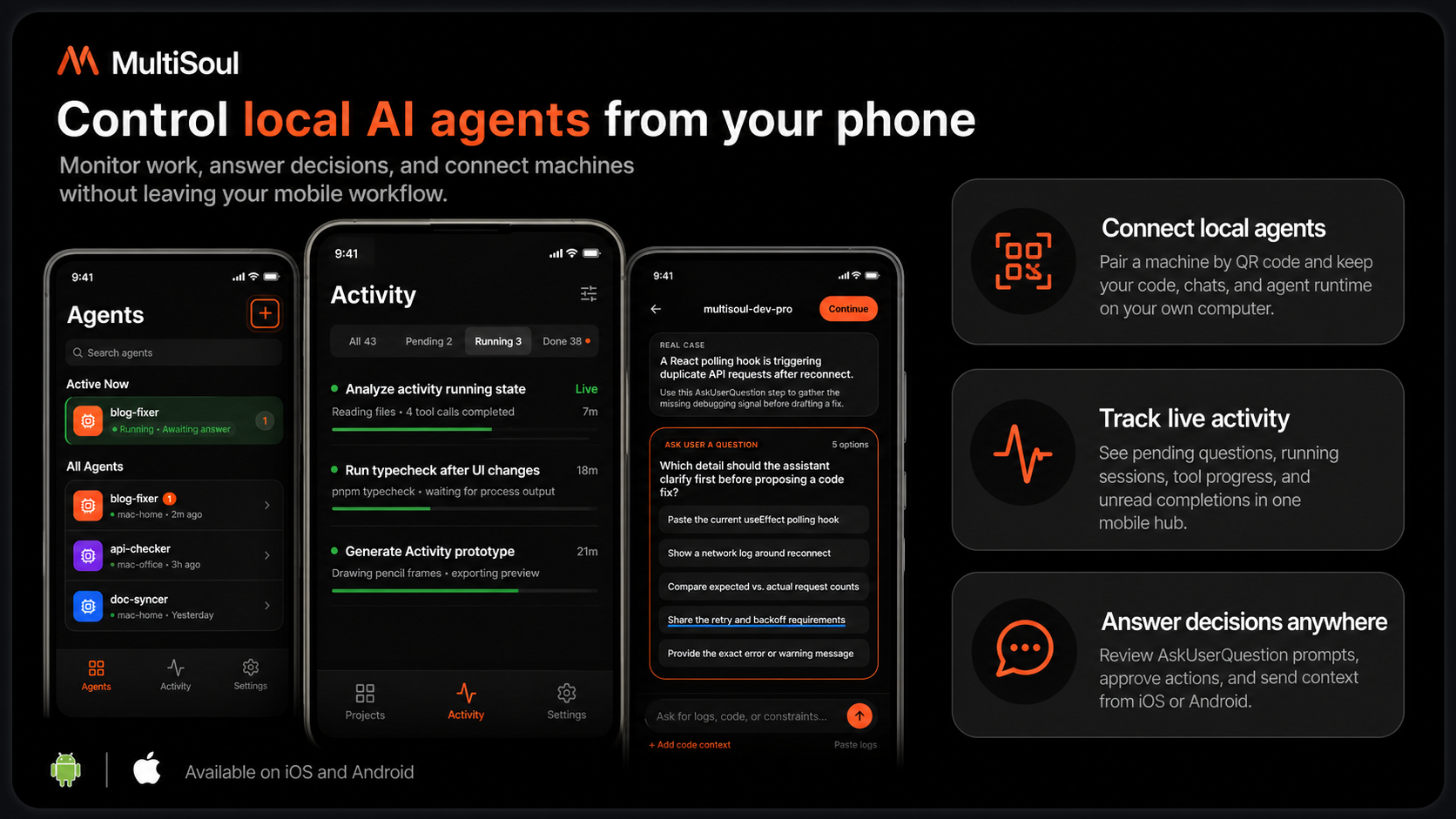
MultiSoul lets you control AI agents running on your own computer from your phone. You can watch messages and tool calls in real time, answer approval questions, and receive task completion notifications.
There is no central MultiSoul backend. msctl runs locally, stores data locally, and exposes an endpoint that your phone connects to through Tailscale.
What You Can Do
- Control Claude Code, Codex, or Cursor Agent CLI from a phone
- Watch agent messages, tool calls, tool results, and task status
- Answer
AskUserQuestionprompts in the mobile app - Keep an Inbox for pending questions and completed/failed tasks
- Connect one phone to multiple computers through Tailscale
- Run the service in the foreground or as a background daemon
How It Works
Mobile App (React Native + Expo)
        │ Tailscale / HTTPS / WSS + Bearer token
        ▼
msctl serve (Rust, local machine)
        ├── Runtime adapters: Claude Code / Codex / Cursor Agent CLI
        ├── REST + WebSocket
        └── SQLite: ~/.config/msctl/serve.db
Requirements
- Node.js 18+
- Tailscale on both your computer and phone
- One agent runtime installed on your computer:
- Claude Code:
claude - Codex CLI:
codex - Cursor Agent CLI:
agent
- Claude Code:
- Rust toolchain, only if you run
msctlfrom source
Install Tailscale
Install Tailscale on your computer and phone, then sign in to the same Tailnet.
Official guide: tailscale.com/docs/install
Common setup:
# macOS
# Install from https://tailscale.com/download/mac

# Linux
curl -fsSL https://tailscale.com/install.sh | sh
sudo tailscale up

# Verify
tailscale status
tailscale ip
On iOS or Android, install Tailscale from the app store and sign in with the same account.
Tailnet access is the default and recommended private setup. If you need a public HTTPS URL, enable Tailscale Funnel and start the service with msctl serve --funnel.
For the first public HTTPS/Funnel setup, grant Tailscale permission to serve HTTPS on port 443 and point it at the default MultiSoul port:
tailscale funnel --https=443 8765
If Tailscale opens a browser approval flow, approve it once, then stop the command with Ctrl-C and start MultiSoul with msctl serve --funnel. See Tailscale Funnel docs.
Quick Start
1. Install msctl
npm install -g @yakami129/msctl
Or run it from source:
cd cli
cargo run -- --help
2. Start the Agent service
Fastest installed CLI flow:
msctl daemon quickstart --token test --port 8765 --tailnet true
From source:
cd cli
cargo run -- daemon quickstart --token test --port 8765 --tailnet true
This command saves the token, installs and starts the background service, binds it for Tailnet access, and prints a QR code plus a connection string.
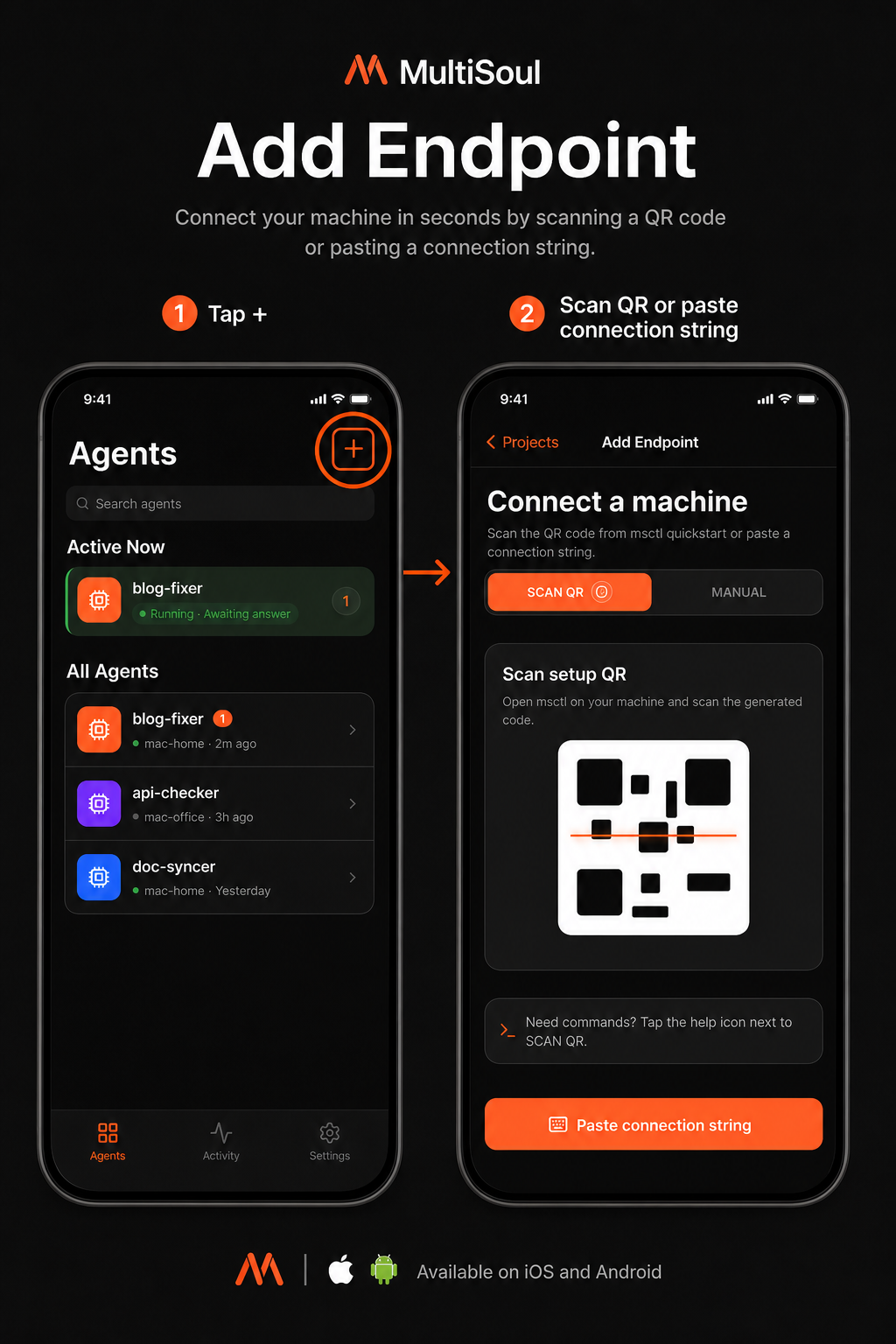
On iOS or Android, open the mobile app and add the machine:
Agents -> Tap + -> Scan QR
Scan the QR code printed by msctl daemon quickstart to register this computer as a MultiSoul endpoint on your phone. If camera access is unavailable, tap Paste connection string and paste the connection string printed next to the QR code.
For real personal use, replace test with your own long token.
Useful daemon commands:
msctl daemon status
msctl logs --source service -f
msctl daemon restart
msctl daemon stop
Foreground mode:
msctl serve --tailnet --port 8765 --token test
3. Register an Agent
Codex:
msctl agent register \
  --name work-codex \
  --project /path/to/project \
  --runtime codex \
  --mode full-auto
Claude Code:
msctl agent register \
  --name work-claude \
  --project /path/to/project \
  --runtime claude-code
Cursor Agent CLI:
msctl agent register \
  --name work-cursor \
  --project /path/to/project \
  --runtime cursor-cli \
  --mode ask
Check registered agents:
msctl agent list
4. Run the mobile app locally
cd mobile
pnpm install
pnpm start
Native simulators:
pnpm ios
pnpm android
Development
CLI:
cd cli
cargo build
cargo test
cargo run -- serve
Mobile:
cd mobile
pnpm install
pnpm typecheck
pnpm test -- --watchAll=false
pnpm start
Local Data
| Path | Purpose |
|---|---|
~/.config/msctl/serve.db |
Agents, conversations, messages, tasks, push tokens |
~/.config/msctl/config.toml |
Local msctl config |
~/.config/msctl/uploads/ |
Uploaded images |
| Mobile local storage | Endpoints, tokens, Inbox cache |
Documentation
- ARCHITECTURE.md: system architecture
- docs/product-specs/: product specs
- docs/design-docs/: design notes
- docs/runbooks/cli-release.md: CLI release
- mobile/docs/ios-publish.md: iOS release
Yorumlar (0)
Yorum birakmak icin giris yap.
Yorum birakSonuc bulunamadi