claude-code-configuration
Health Uyari
- License — License: MIT
- Description — Repository has a description
- Active repo — Last push 0 days ago
- Low visibility — Only 5 GitHub stars
Code Gecti
- Code scan — Scanned 6 files during light audit, no dangerous patterns found
Permissions Gecti
- Permissions — No dangerous permissions requested
Bu listing icin henuz AI raporu yok.
My personal Claude Code configuration.
About
My personal Claude Code configuration.
Approach
Manual invocation only. Every skill explicitly opts out of auto-loading. The default Claude Code behavior is to auto-select skills whose descriptions look relevant to the conversation, and I'd rather control which mode I'm in.
Workflow-driven. Each skill is a workflow for one mode of work: shipping changes, reviewing code, writing tests, writing tickets, discussing product...
Global hard limits. Universal guardrails applied across all skills, found in
CLAUDE.md, which Claude Code auto-loads for every session.Bypass permissions by default.
settings.jsonsetspermissions.defaultMode: bypassPermissionsso Claude Code runs without prompting before each tool call. Work happens in version-controlled repositories, sogit diffshows me exactly what changed, I found that approvals were more annoying than safe, so I turn them off.
Skills
/database— database design, querying, indexing, transactions; relational by default, scope-tagged for non-relational/devops— DevOps and infrastructure mentorship/draft-logo— drafting a logo mark for a project via an iterative HTML gallery of SVG concepts/handoff— handing off a session's context to the next agent. Name inspired from Matt Pockock/linux— Linux internals and operations/meta— authoring Claude Code configuration (skills, CLAUDE.md, settings, hooks, agents, plugins)/product— product and UX decisions/review-code— structured code/PR feedback/ship— extending and fixing production code/test— testing against requirements/write-task— turning work into a well-scoped development ticket
Invoke any of them by typing /<name> in Claude Code. They never run unless you ask.
Install
git clone [email protected]:yamanidev/claude-code-configuration.git
cd claude-code-configuration
./install.sh
install.sh symlinks three things into a Claude Code config directory:
skills/→<config>/skillsCLAUDE.md→<config>/CLAUDE.mdsettings.json→<config>/settings.json
With no arguments, it targets the default ~/.claude. Pass one or more paths to target a different config dir(s):
./install.sh ~/.claude-work ~/.claude-personal
That's the form to use if you run multiple Claude Code accounts side-by-side via CLAUDE_CONFIG_DIR, the setup I describe in How to Use Multiple Claude Code Accounts (Work & Personal).
To stay up-to-date with this configuration, just run git pull, updates propagate through the symlinks automatically.
Run ./install.sh --help for usage details.
Status line
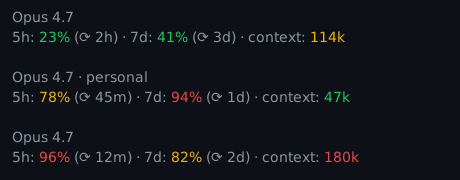
The script also offers a statusline customization, requires jq. Off by default, pass --statusline to install.sh to enable it.
- Line 1: Active model and version, with the configuration directory name appended for multi-account setups
- Line 2: Usage for both the 5 hour and 7 days windows (color-coded by threshold), and current-session context as an absolute token count (green < 80k, yellow 80–160k, red ≥ 160k) as a heuristic tracking for quality degradation, independent of whether the model advertises a 200k or 1M window
License
Yorumlar (0)
Yorum birakmak icin giris yap.
Yorum birakSonuc bulunamadi