agentic-fraud-analysis
mcp
Warn
Health Warn
- No license — Repository has no license file
- Description — Repository has a description
- Active repo — Last push 0 days ago
- Low visibility — Only 6 GitHub stars
Code Pass
- Code scan — Scanned 12 files during light audit, no dangerous patterns found
Permissions Pass
- Permissions — No dangerous permissions requested
No AI report is available for this listing yet.
An intelligent, multi-agent fraud management system using MCP
README.md
Agentic Fraud Analysis
An intelligent multi-agent system for automated fraud detection, investigation, and mitigation using the Model Context Protocol (MCP).
Architecture
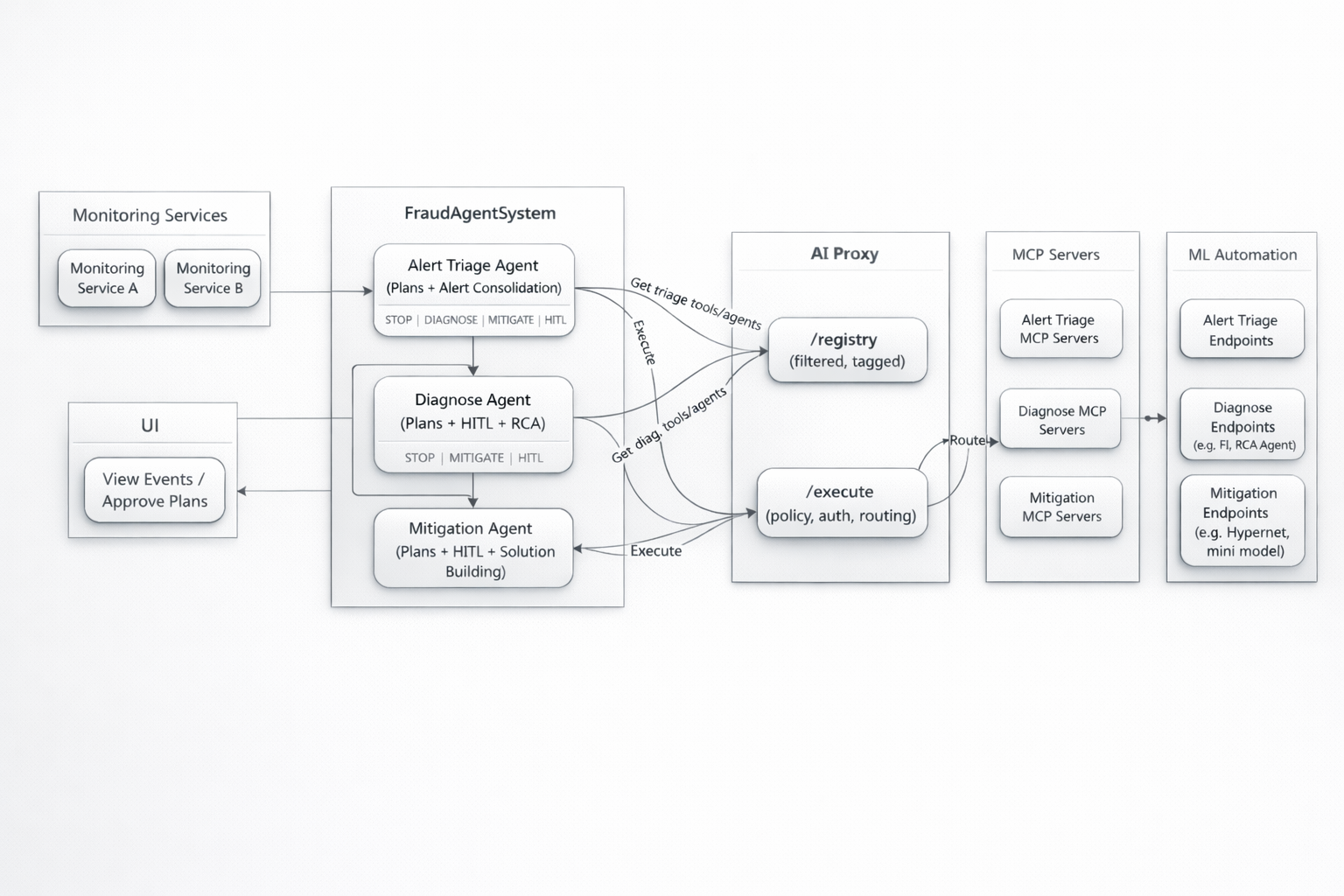
Overview
This system uses a three-agent architecture to handle fraud incidents end-to-end:
| Agent | Role | What it does |
|---|---|---|
| Alert Triage Agent | First responder | Consolidates alerts, correlates patterns, creates/merges incidents |
| Diagnose Agent | Investigator | Performs root cause analysis (RCA), identifies attack patterns |
| Mitigation Agent | Problem solver | Develops and deploys automated solutions |
How It Works
- Monitoring Services detect anomalies and send alerts
- Alert Triage Agent processes incoming alerts and creates incidents
- Diagnose Agent investigates the root cause using available MCP tools
- Mitigation Agent proposes and executes fixes
- Human-in-the-loop reviews and approves plans via the UI
Key Components
- AI Proxy: Routes requests through registry, handles authentication
- MCP Servers: Modular tool servers for specific capabilities (data analysis, ML models, etc.)
- UI: Dashboard for viewing events and approving agent plans
Getting Started
Prerequisites
- Python 3.8+
- uv package manager
Installation
# Clone the repository
git clone https://github.com/yanfeid/agentic-fraud-analysis.git
cd agentic-fraud-analysis

# Install uv if needed
pip install uv

# Set up environment
cp .env.example .env
# Edit .env with your credentials (Azure API keys, etc.)
Running the System
# 1. Start MCP servers (demo mode)
uv run run_toy_mcp.py

# 2. Start the API server
uv run run_api.py

# 3. Start the UI
uv run run_ui.py
The UI will be available at http://localhost:8501
Configuration
Edit .env to configure:
| Variable | Description |
|---|---|
MODEL_NAME |
LLM model to use (default: gpt-4o) |
AZURE_CLIENT_ID |
Azure credentials for LLM API |
GITHUB_TOKEN |
GitHub access token |
License
This project is patent-pending. Commercial use is prohibited.
Reviews (0)
Sign in to leave a review.
Leave a reviewNo results found