dsh-mcp-mgr
Health Uyari
- No license — Repository has no license file
- Description — Repository has a description
- Active repo — Last push 0 days ago
- Low visibility — Only 6 GitHub stars
Code Uyari
- process.env — Environment variable access in e2e/apply-remove-settle.mjs
- process.env — Environment variable access in e2e/e2e.mjs
- process.env — Environment variable access in e2e/repro-dup.mjs
- process.env — Environment variable access in e2e/repro-realtools.mjs
- process.env — Environment variable access in e2e/repro-scope.mjs
- process.env — Environment variable access in e2e/repro-scope2.mjs
- process.env — Environment variable access in e2e/repro-unity.mjs
Permissions Gecti
- Permissions — No dangerous permissions requested
Bu listing icin henuz AI raporu yok.
MCP server manager for DeepSeek Harness — workspace mcp.json discovery, hot sync, and a web settings UI.
dsh-mcp-mgr
English | 中文
A workspace-level MCP manager for DeepSeek Harness: it reads MCP servers from each workspace's .dsh/dshmm/mcp.json, registers their tools dynamically, and provides a management tab in the Web settings UI.
Choose your workflow
| User | Entry point | Source checkouts required |
|---|---|---|
| Regular user | npm package + npx @deepseek-ai/dsh |
Neither deepseek-harness nor this repository |
| Source developer | deepseek-harness source + this repository source | Both, at arbitrary locations |
Regular users: npm package
Install and start
npx @deepseek-ai/dsh plugin --profile web add dsh-mcp-mgr@latest
npx @deepseek-ai/dsh web
Run the install command again to update:
npx @deepseek-ai/dsh plugin --profile web add dsh-mcp-mgr@latest
Uninstall:
npx @deepseek-ai/dsh plugin --profile web remove dsh-mcp-mgr
Workspace configuration
Create .dsh/dshmm/mcp.json at the workspace root:
{
  "mcpServers": {
    "my-http-server": {
      "type": "http",
      "url": "http://127.0.0.1:8090/mcp"
    },
    "my-stdio-server": {
      "type": "stdio",
      "command": "npx",
      "args": ["-y", "<mcp-server-package>"]
    }
  }
}
Rules:
- A missing
typeis treated as Streamable HTTP;${VAR}environment expansion is supported. - A stdio server without
cwduses the workspace root. serverNameis globally unique; duplicates are shown as conflicts.- Set
"enabled": falseto disable an entry without removing it; absent means enabled.
Behavior and limits
- Workspace tools use the
mcp__<serverName>__<tool>naming convention. - Settings strict mode is used to mount only the selected workspace's servers.
Source developers: two source checkouts
Use this workflow when modifying both deepseek-harness and this plugin. The two repositories may be anywhere; they do not need to be siblings or use fixed paths.
1. Configure the harness source once
Replace the placeholder with the absolute path of the deepseek-harness source checkout and run this once:
[Environment]::SetEnvironmentVariable('DSH_HARNESS_ROOT', '<deepseek-harness-source-root>', 'User')
Open a new terminal afterwards. This variable is used only by local profile install/uninstall; it is not used by this repository's build or regression commands.
2. Build this plugin
Set-Location '<dsh-mcp-mgr-source-root>'
pnpm install
pnpm run check
check includes the host/client builds, Typert generation, and verify regression.
3. Build the harness, install the local plugin, and start the source Web
Install dependencies and build deepseek-harness first:
Set-Location $env:DSH_HARNESS_ROOT
pnpm install
pnpm run build
Then return to the plugin source root and run:
Set-Location '<dsh-mcp-mgr-source-root>'
pnpm run profile:add
The command invokes the official source CLI through DSH_HARNESS_ROOT and dynamically passes the host/UI package directories from the current checkout. It does not depend on a fixed path.
Finally, start the source Web profile:
Set-Location $env:DSH_HARNESS_ROOT
pnpm dsh web
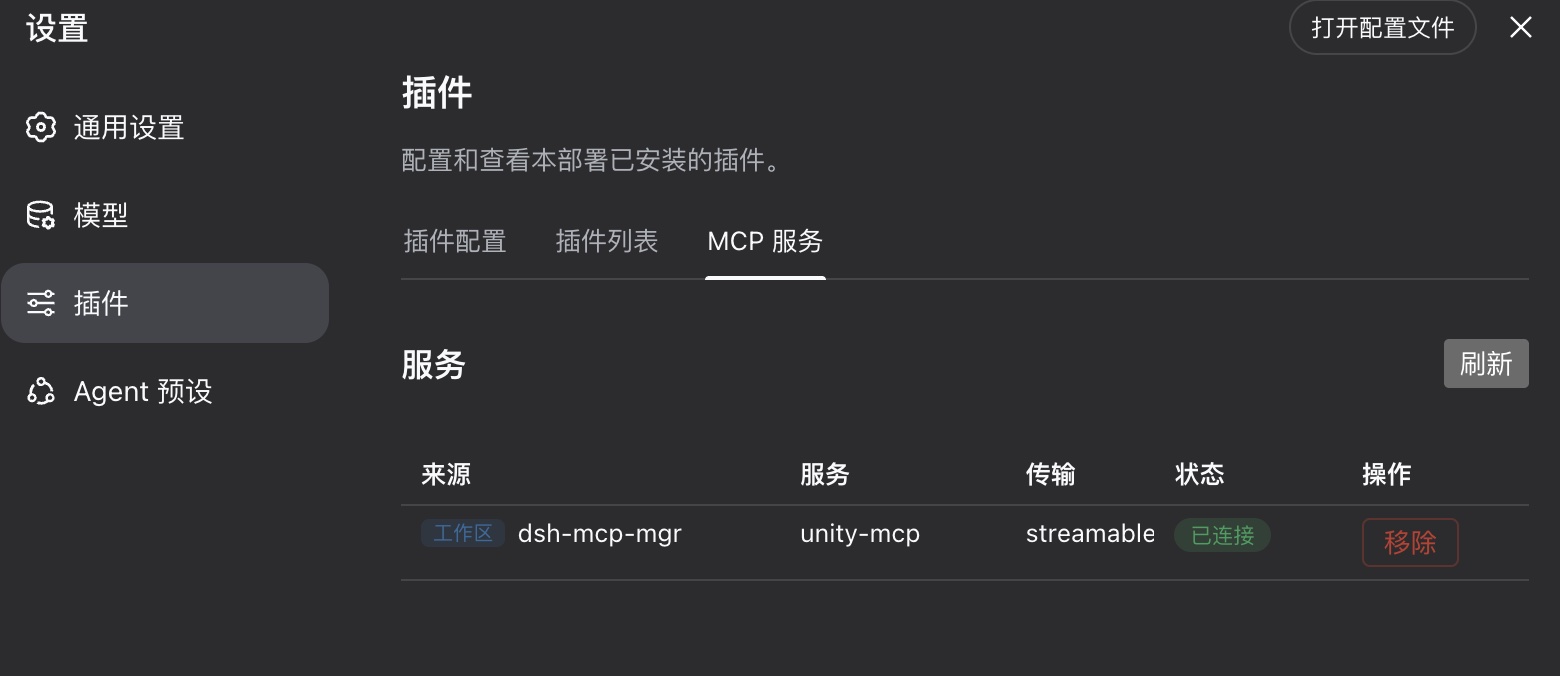
Go to Setting > Plugins, Check MCP Server tab.
4. Local regression
This repository's build and regression commands do not require the harness source checkout:
Set-Location '<dsh-mcp-mgr-source-root>'
pnpm run check
pnpm exec node e2e/e2e.mjs
pnpm exec node e2e/apply-remove-settle.mjs
Expected markers: ALL PASS, E2E PASS, and SETTLE PASS.
5. Remove the local profile entries
Stop the Web process first, then run from the plugin source root:
pnpm run profile:remove
Build commands
Run all commands from this repository root:
pnpm install
pnpm run build
pnpm run verify
build, gen.mjs, and verify.mjs use the published npm dependencies and do not require DSH_HARNESS_ROOT or a deepseek-harness source checkout. Only profile:add and profile:remove use that variable to invoke the official source CLI.
After changing wire types in src/types.ts, rerun pnpm run build so the generated Typert artifacts and client codec stay synchronized.
Design notes live in Doc/requirements.md.
Yorumlar (0)
Yorum birakmak icin giris yap.
Yorum birakSonuc bulunamadi