boss-view-skill
Health Uyari
- No license — Repository has no license file
- Description — Repository has a description
- Active repo — Last push 0 days ago
- Community trust — 10 GitHub stars
Code Uyari
- Code scan incomplete — No supported source files were scanned during light audit
Permissions Gecti
- Permissions — No dangerous permissions requested
Bu listing icin henuz AI raporu yok.
Turn messy work notes into executive-ready HTML updates with nine leadership lenses.
中文 · English
👔 Boss View
Turn messy work notes into executive-ready updates that make progress, impact, risk, and asks clear.






An agent skill for weekly updates, manager syncs, 1:1s, and project reporting. Drop in rough notes in any order. Boss View reorganizes them around what leaders actually need to know, then generates a polished, single-file HTML report with built-in PDF and Markdown export.
It does not inflate activity into impact or invent missing metrics. When evidence is missing, it says so.
Raw notes                          Boss View
──────────────────────────────     ──────────────────────────────
"5 meetings, 3 design rounds"  →  Progress and outcome
"conversion is still low"      →  Business risk
"tutorial next week"           →  Next step
"need leadership alignment"    →  Executive ask
Try it in 30 seconds
Once installed, paste rough notes into your Claude Code or VS Code chat:
Turn this into an executive update: This week I worked with engineering on the onboarding flow, tested three versions, and found that many new users do not understand how to use Skills. We plan to add a tutorial next week.
You can also trigger it naturally:
- "Help me write my weekly update."
- "Rewrite this from my manager's perspective."
- "Turn these notes into a concise 1:1 update."
- "把这些零散记录整理成给老板看的周报。"
Name the audience to change what gets emphasized:
Rewrite this update for the CPO.
Choose the audience
Boss View supports nine decision lenses. The selected lens changes priority, likely follow-up questions, risk framing, and the ask — never the underlying facts.
| Audience | What the update prioritizes |
|---|---|
| CEO | Strategy, growth, resource allocation, opportunity cost |
| CFO | Investment return, cost efficiency, payback, capital allocation |
| CMO | Target customer, market signal, positioning, go-to-market, growth |
| COO | Execution health, timeline, dependencies, operating efficiency |
| CPO | User value, product judgment, learning velocity, adoption |
| CTO | Technical risk, dependencies, reliability, scalability |
| VP Design | User insight, experience quality, design rationale, cross-functional progress |
| VP Product | Product direction, prioritization, roadmap impact, market signal |
| Direct Manager | Execution progress, delivery risk, ownership, support needed |
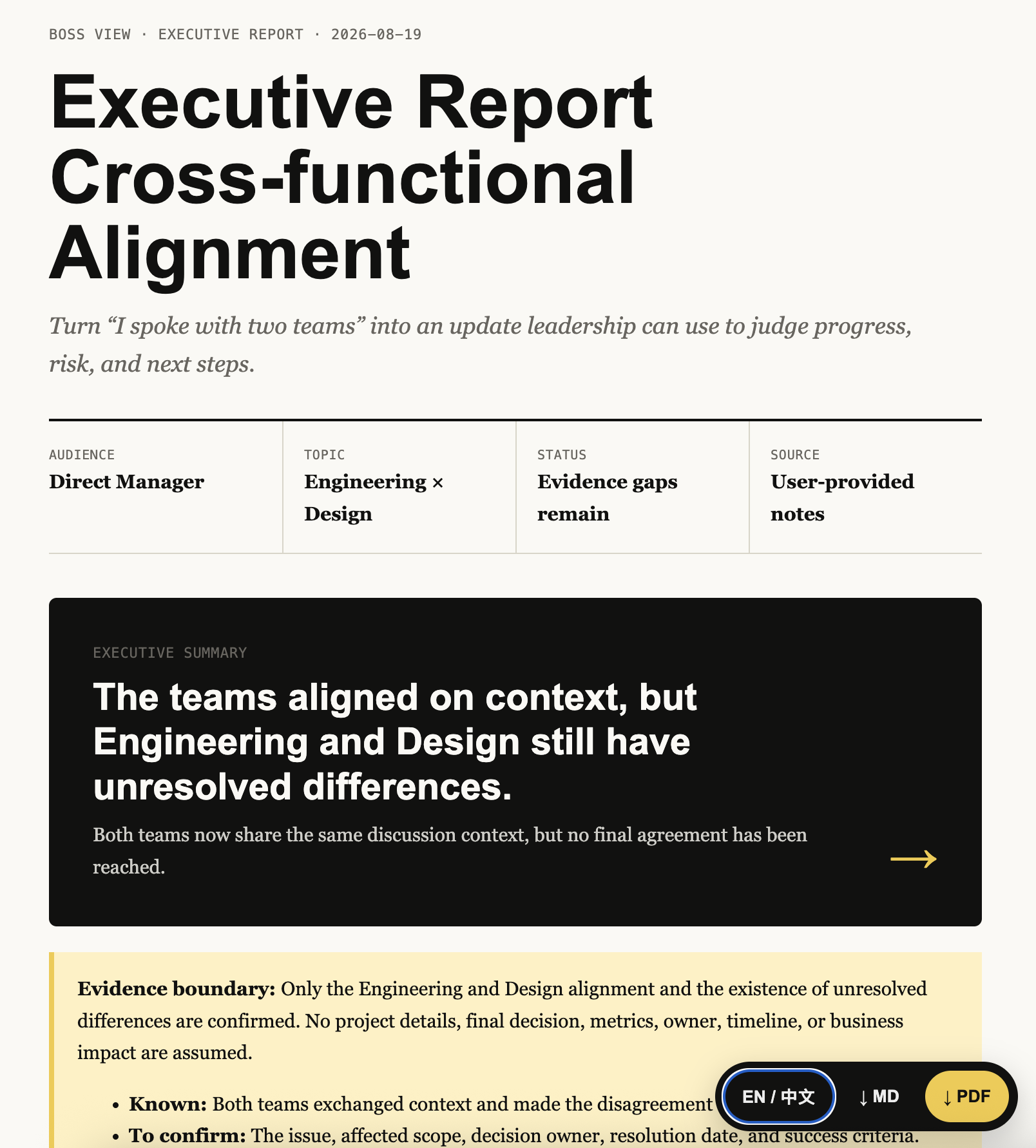
If the audience is not specified, Boss View first asks the user to select one of the nine roles. It defaults to Direct Manager only when the user skips the choice. It never blends all nine lenses into one generic report.
What you get
Every update is organized around a consistent executive narrative:
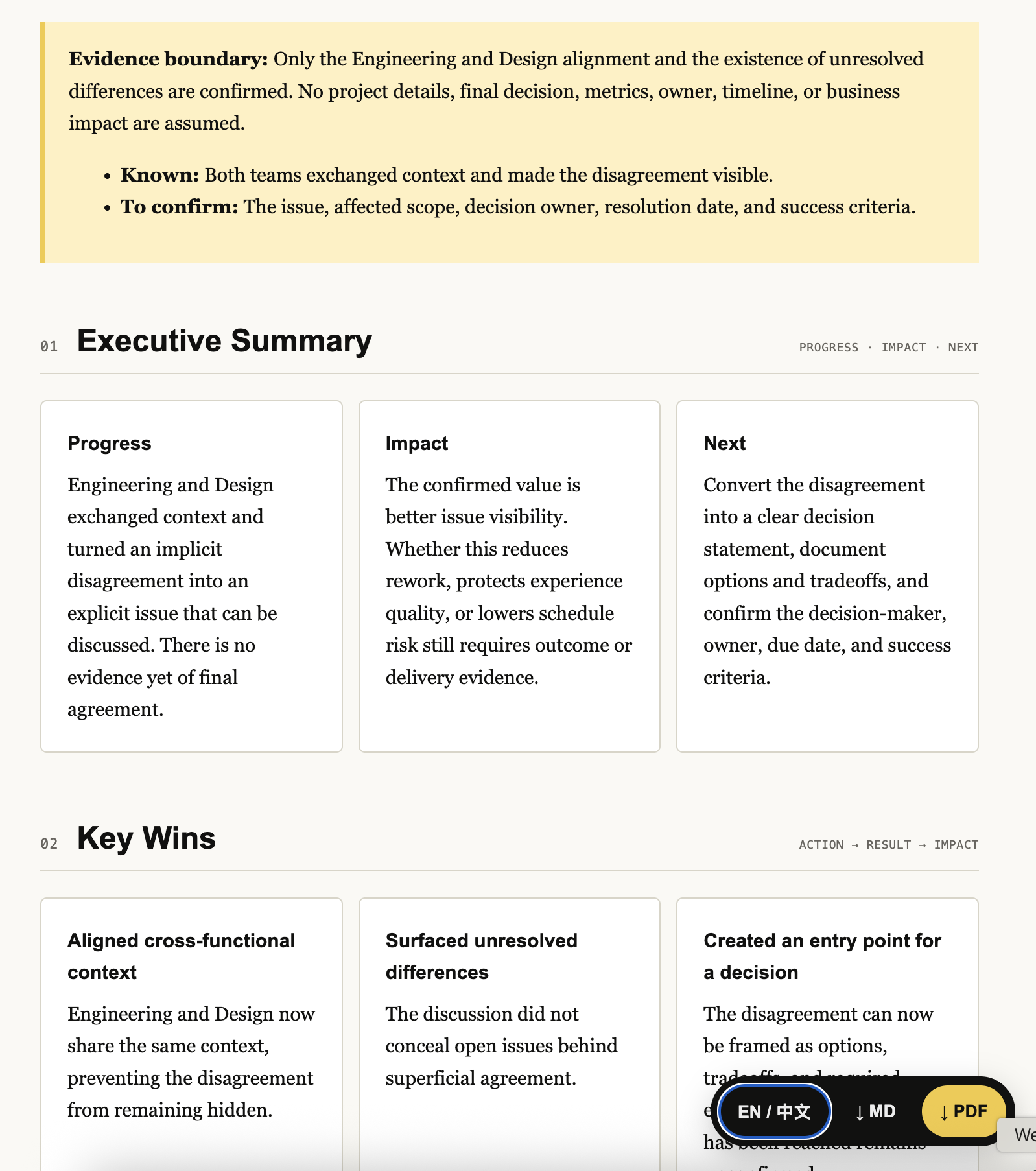
- Executive Summary — progress, impact, and what comes next in 2–3 sentences
- Key Wins — the few outcomes worth leadership attention
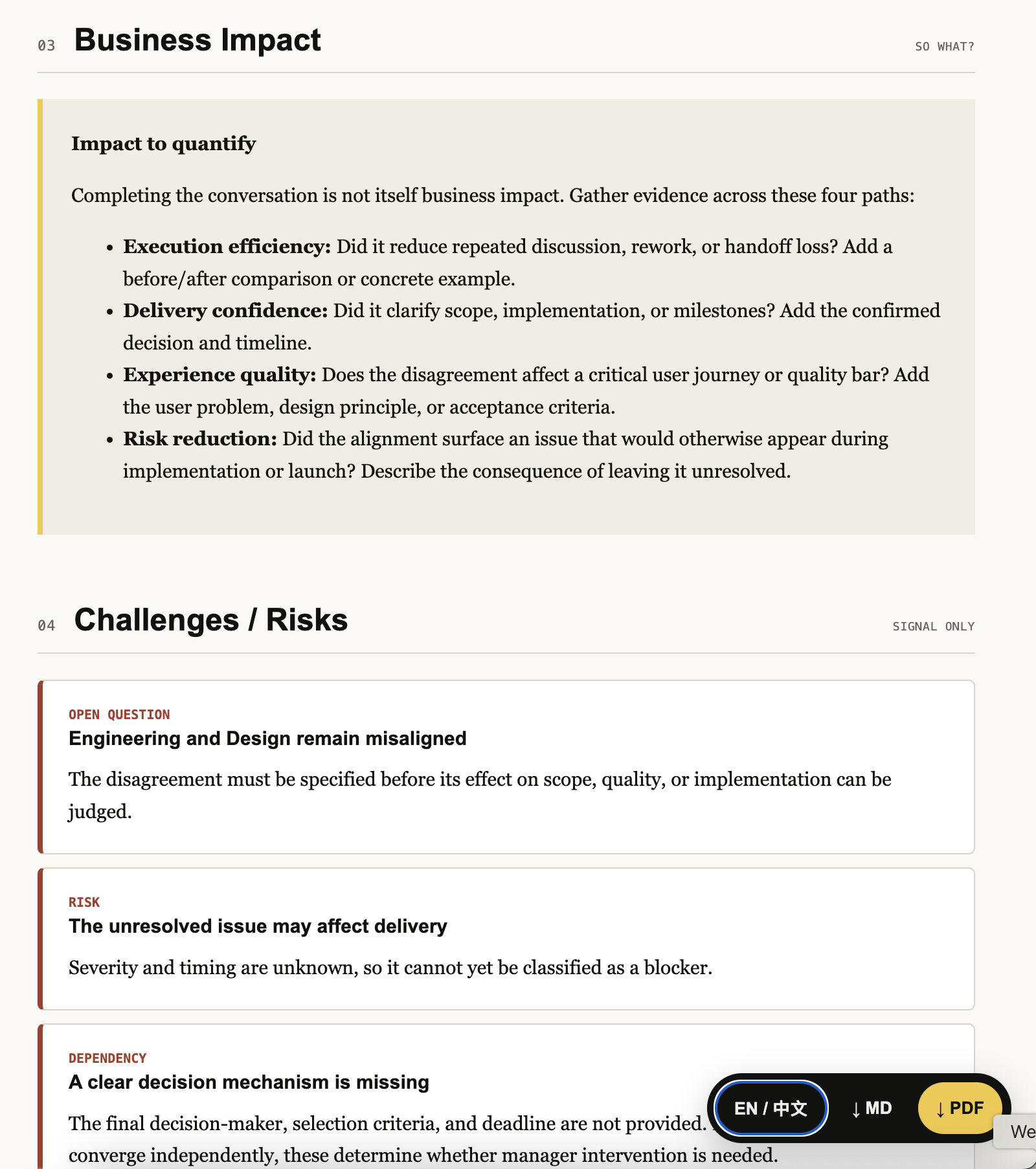
- Business Impact — revenue, growth, adoption, efficiency, customer experience, or risk reduction when supported by evidence
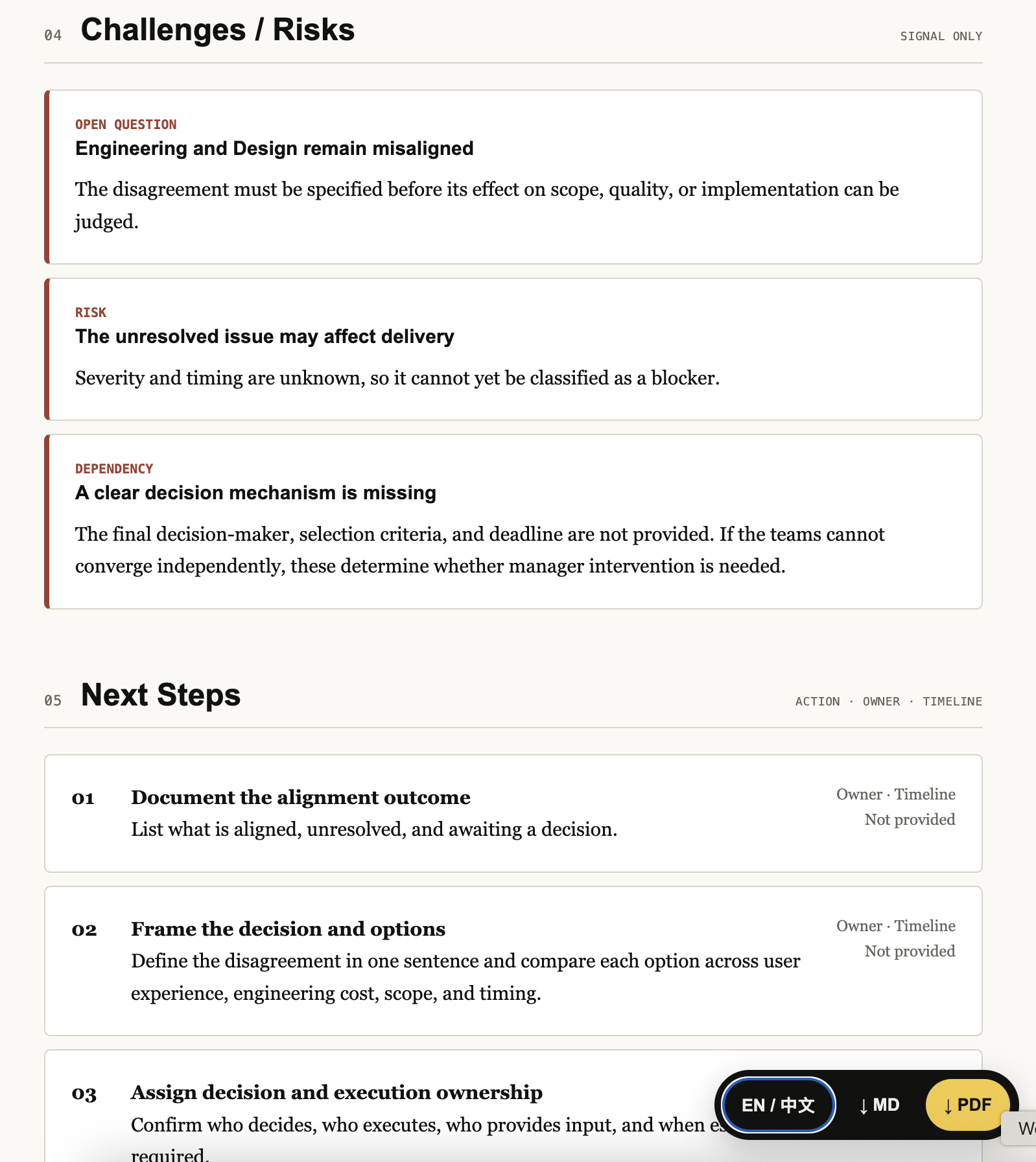
- Challenges / Risks — only meaningful blockers, risks, dependencies, and open questions
- Next Steps — prioritized actions, owners, and timing when provided
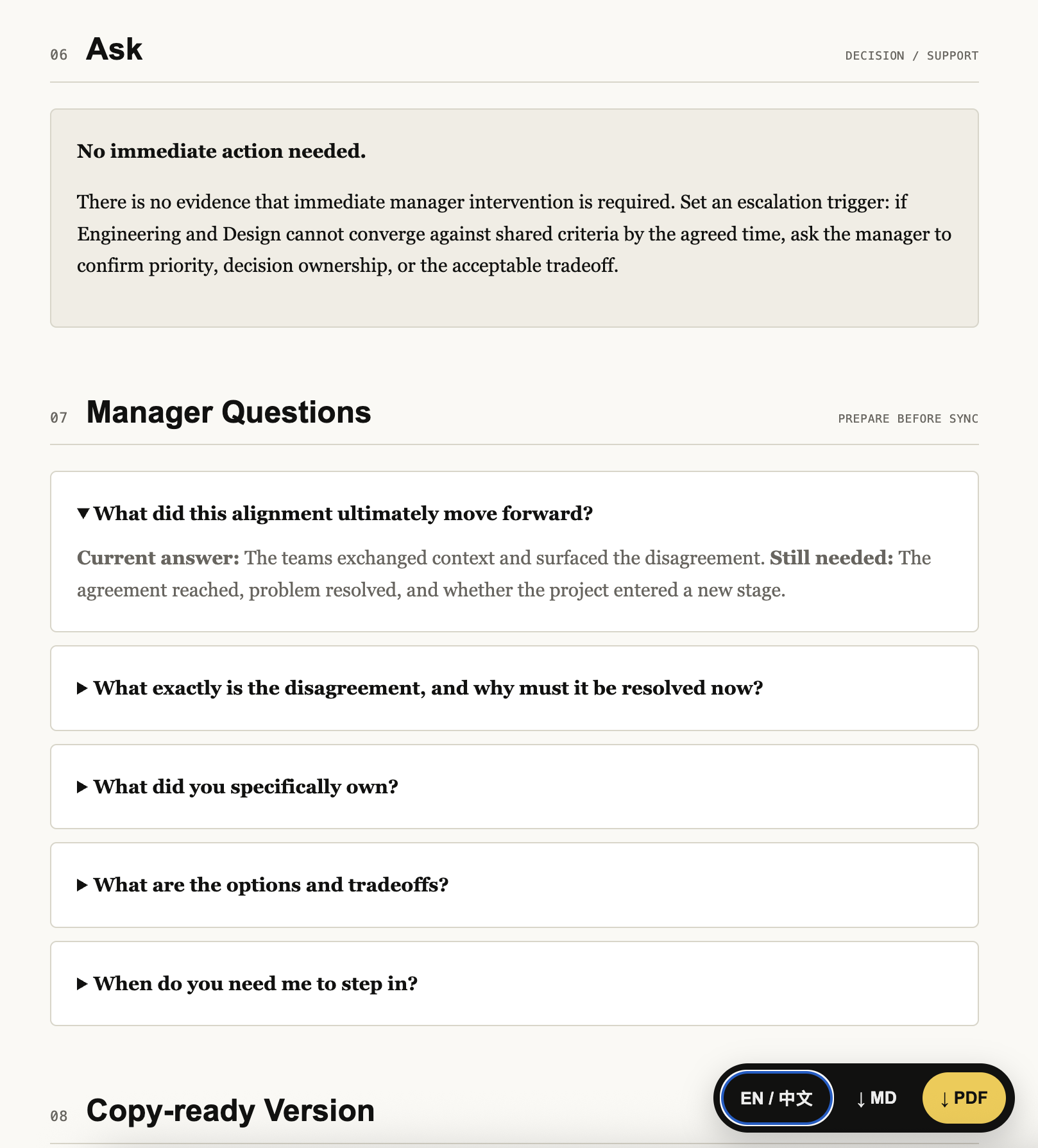
- Ask — the decision, resource, alignment, or unblock needed from leadership
- Manager Questions — likely follow-up questions with answer guidance
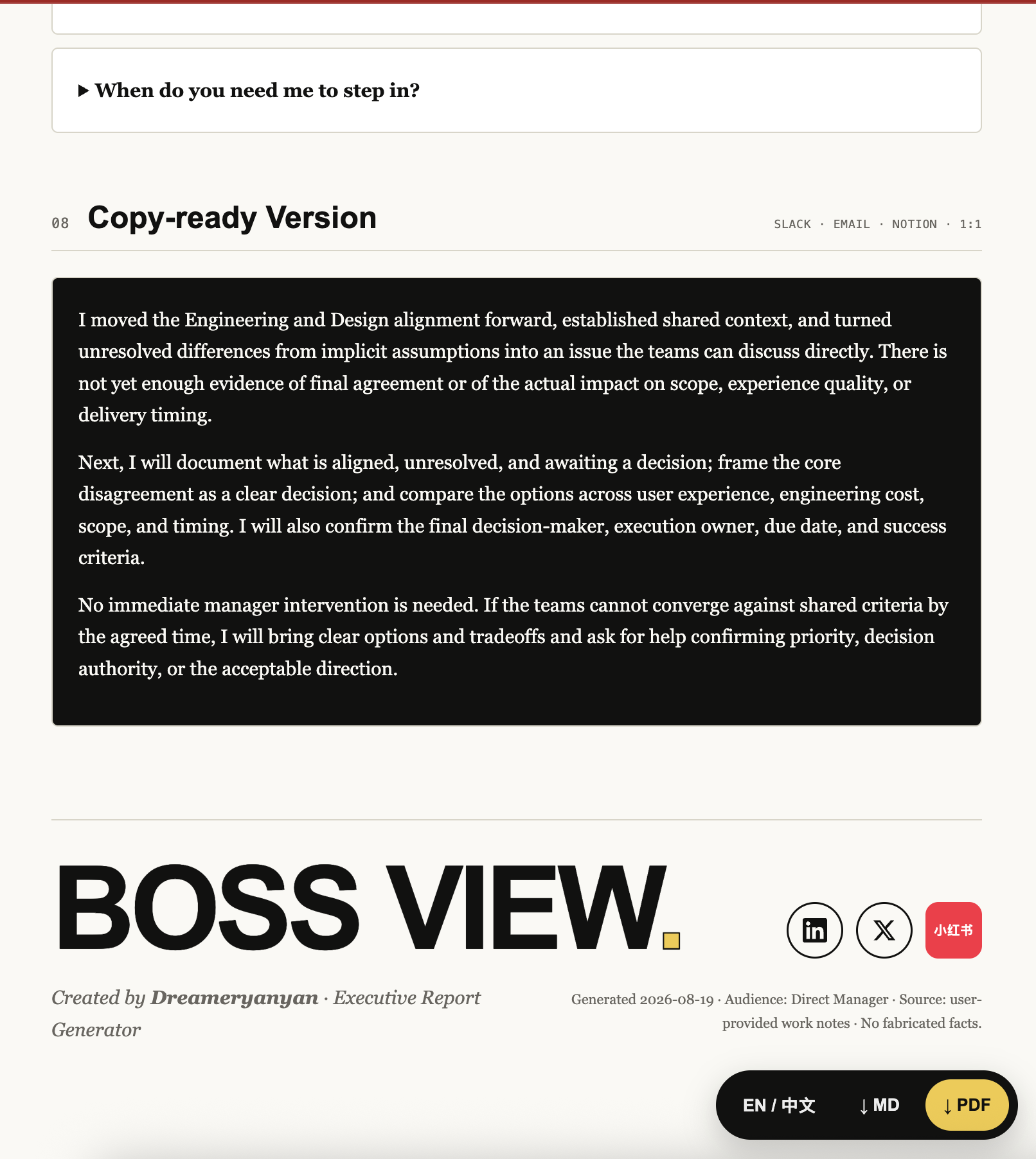
- Copy-ready Version — a concise final update for Slack, email, Notion, a weekly review, or a 1:1
The same content is assembled into an editorial HTML report using the Offer Toolkit visual system: cream paper, strong hierarchy, decision-first summary, print-safe cards, bilingual content, and a fixed export toolbar. All eight sections always appear. Unsupported sections show an explicit Evidence gap or Impact to quantify; they are never omitted or padded with invented content. If there is no ask, the skill says No immediate action needed.
Report example
How it works
1  Input        Accept raw notes and extract What · Result · Impact · Risk · Next · Ask
2  Audience     Select one of nine executive and manager lenses
3  Report       Generate a single-file HTML with all eight sections and open it in Chrome
4  Complete     Ask one missing-evidence question at a time, up to three, then update the same HTML
The central transformation is simple:
"What did I do?" → "What moved, why does it matter, and what happens next?"
Before and after
Raw input
This week I had five meetings, revised the design three times, and discussed many implementation details with engineering.
Activity-only rewrite — not enough
Completed five meetings and three design iterations this week.
Boss View
Aligned Design and Engineering on the new onboarding flow and moved the project toward implementation.
The number of meetings is not the story. The decision, movement, or business outcome is.
Four principles
- Never fabricate — numbers, results, customer feedback, and business impact must come from the user's input.
- Outcomes over activity — meetings, documents, and iterations matter only when they explain what moved.
- Generate the full HTML first — even sparse or disorganized notes produce all eight sections; the skill then asks at most three follow-up questions and updates the same file.
- Keep the user's voice — an ordinary team update should not sound like a CEO keynote. Clear > Concise > Impactful > Authentic.
Language behavior
The copy-ready update defaults to English for international workplace contexts. If the input is clearly Chinese or the user asks for Chinese, the full update is generated in Chinese. Explanations and follow-up questions follow the user's language.
Install
Copy this repository into your agent's skills directory:
git clone https://github.com/yanliudesign/boss-view-skill.git
For Claude Code:
mkdir -p ~/.claude/skills
cp -R boss-view-skill ~/.claude/skills/boss-view
For VS Code, place the folder in your prompts/skills location and invoke it from Copilot Chat. The exact skills directory can vary by setup.
File structure
boss-view-skill/
├── SKILL.md                         # Workflow and output contract
├── examples/
│   └── executive-update-template.html # Single-file report template
├── references/
│   ├── executive-lenses.md          # Nine-role routing and emphasis rules
│   ├── executive-knowledge-base.md  # Deep decision models distilled from source documents
│   └── executive-report-spec.md     # HTML generation and validation rules
├── README.md                        # English documentation
└── README.zh.md                     # 中文文档
Good inputs
You do not need to pre-format anything. Useful raw material includes:
- weekly notes or a stream-of-consciousness project update
- launches, decisions, experiments, and customer feedback
- metrics with enough context to interpret them
- blockers, dependencies, open questions, and tradeoffs
- next steps, owners, timing, and requests for leadership
Missing information is marked for follow-up, never filled with invented facts.
Related links
- SKILL.md — the complete workflow and output rules
- Executive audience lenses — priorities, questions, and asks by role
- Executive report template — the self-contained HTML shell
- Executive knowledge base — evidence, diagnostics, and red flags by role
- Executive report specification — HTML generation and validation rules
- yanliudesign on GitHub — more agent skills and design tools
Created by Dreameryanyan · LinkedIn · X · Xiaohongshu
Yorumlar (0)
Yorum birakmak icin giris yap.
Yorum birakSonuc bulunamadi