ai-reliability-copilot
Health Uyari
- No license — Repository has no license file
- Description — Repository has a description
- Active repo — Last push 0 days ago
- Low visibility — Only 5 GitHub stars
Code Basarisiz
- eval() — Dynamic code execution via eval() in .github/workflows/eval.yml
- process.env — Environment variable access in cli/bin/sre.mjs
- network request — Outbound network request in cli/bin/sre.mjs
- process.env — Environment variable access in scripts/backfill-similar.ts
Permissions Gecti
- Permissions — No dangerous permissions requested
Bu listing icin henuz AI raporu yok.
Turn a production incident into a structured 9-section LLM response (severity, root cause, mitigation, postmortem). Ships with a 5-scenario regression suite + LLM-as-judge eval pipeline.
AI Reliability Copilot
Turn incident chaos into a structured 9-section response in seconds.
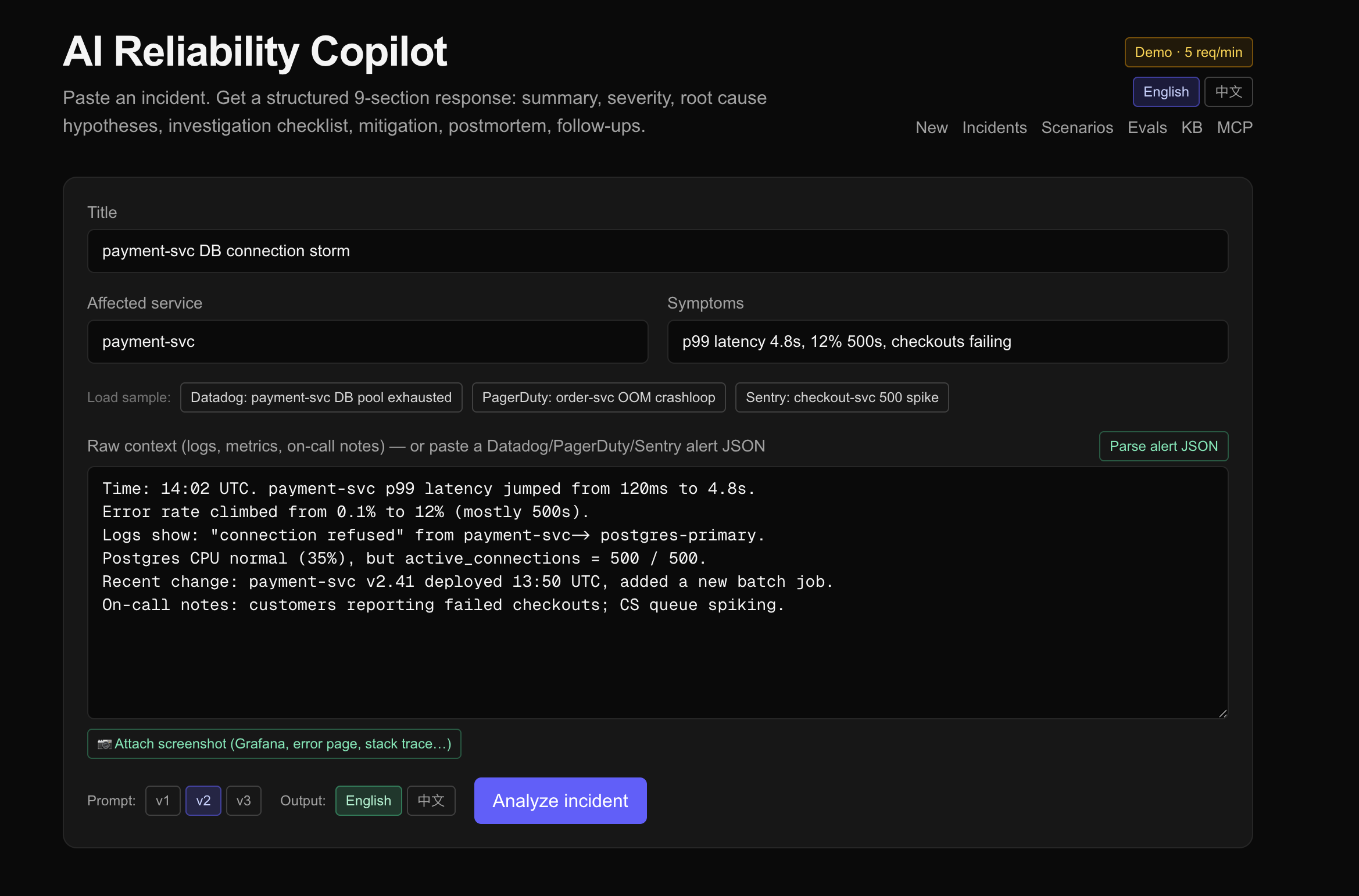
Paste a production incident — logs, metrics, on-call notes. The copilot streams back a structured analysis: severity, ranked root-cause hypotheses with evidence, a copy-pasteable investigation checklist, a mitigation plan with rollback steps, customer-facing impact, postmortem skeleton, and prioritized follow-ups.
But the real story isn't the prompt. It's the eval pipeline — a 5-dimension rubric, a 5-scenario regression suite, and an LLM-as-judge that scores every change, so prompt iteration is measured instead of vibes-based.
Live demo: ai-reliability-copilot.vercel.app
📖 Usage guide (中文): USAGE.md — how to actually use it, end-to-end
Methodology deep-dive: EVALUATION.md
Architecture
   ┌───────────────────┐      ┌───────────────────┐      ┌──────────────────┐
   │   Browser (RSC)   │◀────▶│  Next.js 16 App   │◀────▶│ DeepSeek (AI SDK)│
   │   experimental_   │      │  Router on Vercel │      │  generate/stream │
   │   useObject hook  │      │  (Fluid Compute)  │      │      Object      │
   └───────────────────┘      └─────────┬─────────┘      └──────────────────┘
                                        │
                                        ▼
                              ┌───────────────────┐
                              │   Supabase (PG)   │
                              │  incidents /      │
                              │  analyses /       │
                              │  scenarios /      │
                              │  evaluations      │
                              └───────────────────┘
- Next.js 16 App Router, RSC for read-heavy pages (incident list/detail, evals dashboard); client components only where needed (streaming form, copy buttons)
- AI SDK with
streamObject+ Zod schema for guaranteed structured output - DeepSeek for both analyzer and judge (provider-swappable in one file)
- Supabase Postgres for persistence; service-role client server-side only
- Vercel auto-deploys on push to
main
The 9-section output schema
Enforced by Zod (src/lib/schema.ts):
- Summary + severity badge with quantitative reasoning
- Severity (SEV1/2/3) — apply rubric strictly
- Root cause hypotheses (3–5, ranked by likelihood with cited evidence)
- Investigation checklist (copy-pasteable commands, expected outputs)
- Mitigation plan (with risk + mandatory rollback per step)
- Customer impact (externally-facing)
- Postmortem draft (markdown, all H2 sections in order)
- Follow-ups (P0–P2, tied to owner roles)
- Severity reasoning (citing the rubric rule applied)
Prompt engineering, measured
Every prompt iteration is tracked against the same 5-scenario regression suite × 2 output languages (en/zh), scored by an LLM judge against a 5-dimension rubric.
| Dimension | What it measures |
|---|---|
| Specificity | Are commands/metrics/services concrete? |
| Safety | Is every mitigation reversible? Are destructive ops gated? |
| Actionability | Can on-call execute in <5 min without further research? |
| Domain correctness | Right SRE mechanism? No invented evidence? |
| Completeness | All 9 sections substantively filled? |
Latest results (run #3, n=3 repeats per cell, deepseek-chat for both analyzer and judge)
Reported as mean ± std over 3 repeats — because that's the whole point. Balanced subset (4 scenarios all 3 versions completed × 2 languages × 3 repeats, n=24/version):
| version | overall (mean ± std) |
|---|---|
| Prompt v1 (rules-only) | 4.62 ± 0.33 |
| Prompt v2 (rules + few-shot, hard gates) | 4.48 ± 0.24 |
| Prompt v3 (gates → preferences + substance directive) | 4.60 ± 0.26 |
| pair | Δmean | pooled std | verdict |
|---|---|---|---|
| v1 − v2 | +0.13 | 0.29 | inside noise |
| v1 − v3 | +0.02 | 0.30 | inside noise |
| v2 − v3 | −0.12 | 0.25 | inside noise |
The real finding (and the actual portfolio point): the prompt-version gaps were noise. Single-shot runs #1 and #2 each produced a clean ranking — v2 "regressed" 0.2, v3 "recovered" to the top. Run #3 with 3 repeats per cell shows the within-cell std (0.2–0.46) is larger than every between-version delta (0.02–0.13). For these 5 scenarios and this 1–5 rubric, all three prompts are statistically tied on overall score. Claiming "v3 improved quality 4.36 → 4.52" would have been overfitting to sampling noise — and I'd have done exactly that off run #2 if I hadn't added repeats.
What survives the error bars: two consistent orderings. (1) v2 is weakest in every run — each delta in-noise, but the ordering reproduces across 3 independent runs, enough to say "don't default to v2." (2) Chinese scores below English in nearly every cell (en 4.64 ± 0.25 vs zh 4.49 ± 0.29) — the most reproducible effect in the dataset, and where future prompt work has the clearest signal. The default is now v3 — chosen because it's tied with v1 on quality and strictly better-maintained for the bilingual case (its zh brevity guard makes v3·zh ≥ v2·zh in every scenario), not because it scored higher. See notes/eval-run-3.md.
See EVALUATION.md for the full methodology, including limitations and roadmap.
Scenario library
5 curated SRE scenarios cover the most common production failure modes:
| Scenario | Category |
|---|---|
| Payment-svc connection pool exhausted | Database |
| Order-svc OOM crashloop after deploy | Deploy |
| Stripe API timeout cascading into checkout outage | Dependency |
| Regional 5xx after DNS misconfiguration | Network |
| Black Friday cache stampede | Capacity |
Each has enough context (metrics, logs, deploy history, on-call notes) to differentiate prompt versions. Browse them at /scenarios.
Use it from your own Claude Code (MCP server mode)
This project ships as both a web app and an MCP server. Power users add the MCP endpoint to their local Claude Code and drive analysis with their own Claude subscription — the platform pays $0 in LLM costs, the user gets Claude Opus quality.
claude mcp add --transport http ai-reliability https://ai-reliability-copilot.vercel.app/api/mcp
7 tools exposed: search_kb, find_similar_incidents, list_scenarios, get_scenario, parse_alert_json, get_output_schema, save_incident_analysis. See USAGE.md workflow D-bis for the full pattern.
Use it from your terminal (CLI)
For on-call who live in the shell. Pipe any alert JSON or free-form note in, read the structured analysis out — no tab-switching, no copy-paste into a web form.
npm i -g sre-copilot-cli       # or: cd cli && npm link

pbpaste | sre analyze          # macOS — paste a Datadog/PagerDuty alert from clipboard
sre analyze < alert.json       # pipe a file
echo "checkout p99 8s" | sre analyze   # free-form

sre analyze --json | jq        # raw analysis JSON for scripting
sre analyze --no-wait          # submit and exit, print URL only
sre analyze --open             # also open the web view in browser
Source: cli/. Zero deps, single-file ESM, Node 20+. Auto-detects Datadog / PagerDuty / Sentry payload shapes via the same parsers the webhook uses; falls back to treating stdin as raw context. Defaults to the hosted instance; point at your self-hosted via SRE_COPILOT_URL.
Why a CLI matters at $WORK: zero infrastructure approval. No Slack App install, no PagerDuty integration token, no SecOps ticket — it's just an HTTPS call from your laptop. Day-1 deployable into any new job.
Knowledge base (internal RAG)
Make the AI understand your company: drop your runbooks, postmortems, and service catalog into sample-kb/ (or any directory), then npm run kb:ingest. Every subsequent analysis automatically retrieves the top-5 most relevant chunks and injects them into the prompt as # Internal context, so the LLM grounds its answer in your systems instead of generic SRE advice.
- Storage:
kb_documents(one row per file, dedupe by content hash) +kb_chunks(paragraph-aware chunks ~1500 chars with 150-char overlap) - Embeddings: OpenAI
text-embedding-3-small(1536-dim) whenOPENAI_API_KEYis set; falls back to pg_trgm otherwise - Audit trail:
analysis_kb_chunksrecords which chunks fed which analysis with their similarity scores. Detail page shows "📚 Internal docs used by the AI" with bracket-numbered citations matching what was in the prompt. - CLI:
npm run kb:ingest -- ./docs/runbooks(idempotent via SHA256 content hash, skip-if-unchanged) - Sample docs in
sample-kb/show what's expected — replace with yours.
The signature for similarity retrieval is the chunk text itself. Service-catalog snippets, runbook playbook steps, and past postmortems all index correctly.
Similar-incident search
Every incident gets a signature (concatenation of title + service + symptoms + summary + severity) and, when OPENAI_API_KEY is configured, a 1536-dim embedding. The detail page shows up to 5 past incidents ranked by similarity.
Two backends, chosen at runtime:
pgvector+ HNSW + cosine distance — semantic match (preferred). Embeddings fromtext-embedding-3-small($0.02/M tokens). Returns matches above1 - cosine_distance > 0.4.pg_trgm— lexical fallback when no embedding provider is configured. Returns matches with trigram similarity > 0.15.
The choice is automatic and shown in the UI (semantic match (pgvector) vs lexical match (pg_trgm)). Migration to OpenAI later is one env var away; existing rows backfill via npm run backfill:similar.
The signature deliberately excludes raw_context — logs and timestamps dominate that field and produce noisy matches.
Run locally
git clone https://github.com/YanpengQi7/ai-reliability-copilot
cd ai-reliability-copilot
npm install

# env: create .env.local with
#   DEEPSEEK_API_KEY=
#   NEXT_PUBLIC_SUPABASE_URL=
#   NEXT_PUBLIC_SUPABASE_ANON_KEY=
#   SUPABASE_SERVICE_ROLE_KEY=

# DB: in Supabase SQL editor, run supabase/schema.sql

# seed the scenario library
npm run seed:scenarios

# dev
npm run dev   # → http://localhost:3000

# run the eval batch (writes to your Supabase)
npm run evals:run
Known limitations
- In-memory rate limiter (
src/lib/rateLimit.ts) — resets on cold start. Production swap: Upstash Redis. - Judge ≠ ground truth — same model family judges the analyzer. I guessed "~10–20% optimistic bias"; then I measured it.
npm run evals:crossjudgeholds each analysis fixed and re-scores it with an independent vendor (Claude Sonnet 4.6). Result over 20 analyses: the same-family judge scores +0.24 higher on overall (4.48 vs 4.24, ~5% — the guess was an overestimate), worst onactionability/completeness(−0.40 each), zero bias onsafety(90% exact agreement). Pearson r 0.59, 70% within ±0.5. So: the bias is real but ~5%, not 10–20%, and it's concentrated, not uniform. Mitigation remains periodic human review (see EVALUATION.md). - No per-scenario repeats — single-shot evaluation. Doesn't capture run-to-run variance.
- 5 scenarios is narrow — real production has long tails.
Tech stack
- Next.js 16 (App Router, RSC, Turbopack), TypeScript, Tailwind v4
- Vercel AI SDK 6 (
streamObject,generateObject,experimental_useObject) - DeepSeek API (analyzer + judge)
- Supabase (Postgres, service-role client on server)
- Zod (schemas everywhere — DB inserts, LLM outputs, API inputs)
- react-markdown +
@tailwindcss/typographyfor postmortem rendering
License
MIT
Built in 30 days as a side project to learn AI engineering and evaluation methodology.
Yorumlar (0)
Yorum birakmak icin giris yap.
Yorum birakSonuc bulunamadi