RepoTunnel
Health Warn
- License — License: MIT
- Description — Repository has a description
- Active repo — Last push 0 days ago
- Low visibility — Only 5 GitHub stars
Code Fail
- rm -rf — Recursive force deletion command in .github/workflows/platform-build.yml
- fs module — File system access in .github/workflows/platform-build.yml
- fs module — File system access in scripts/check-release.sh
- fs module — File system access in src-tauri/resources/browser_bridge.cjs
- network request — Outbound network request in src-tauri/resources/browser_bridge.cjs
Permissions Pass
- Permissions — No dangerous permissions requested
No AI report is available for this listing yet.
RepoTunnel is a secure local AI workspace bridge that connects ChatGPT Web and MCP-compatible AI clients to approved local projects, files, terminals, Git, GitHub, browsers, editors, and desktop applications—so AI can inspect, edit, test, run, and manage real development work without constant copy-pasting.
RepoTunnel
RepoTunnel is a local-first bridge that lets MCP-compatible AI clients work directly with the projects you explicitly approve on your computer.
Instead of copying code between chat, your editor, terminal, Git, and browser, RepoTunnel connects those tools through one controlled workspace. The AI can inspect, edit, test, debug, and help complete real project work while RepoTunnel keeps access limited to the project and permissions you choose.
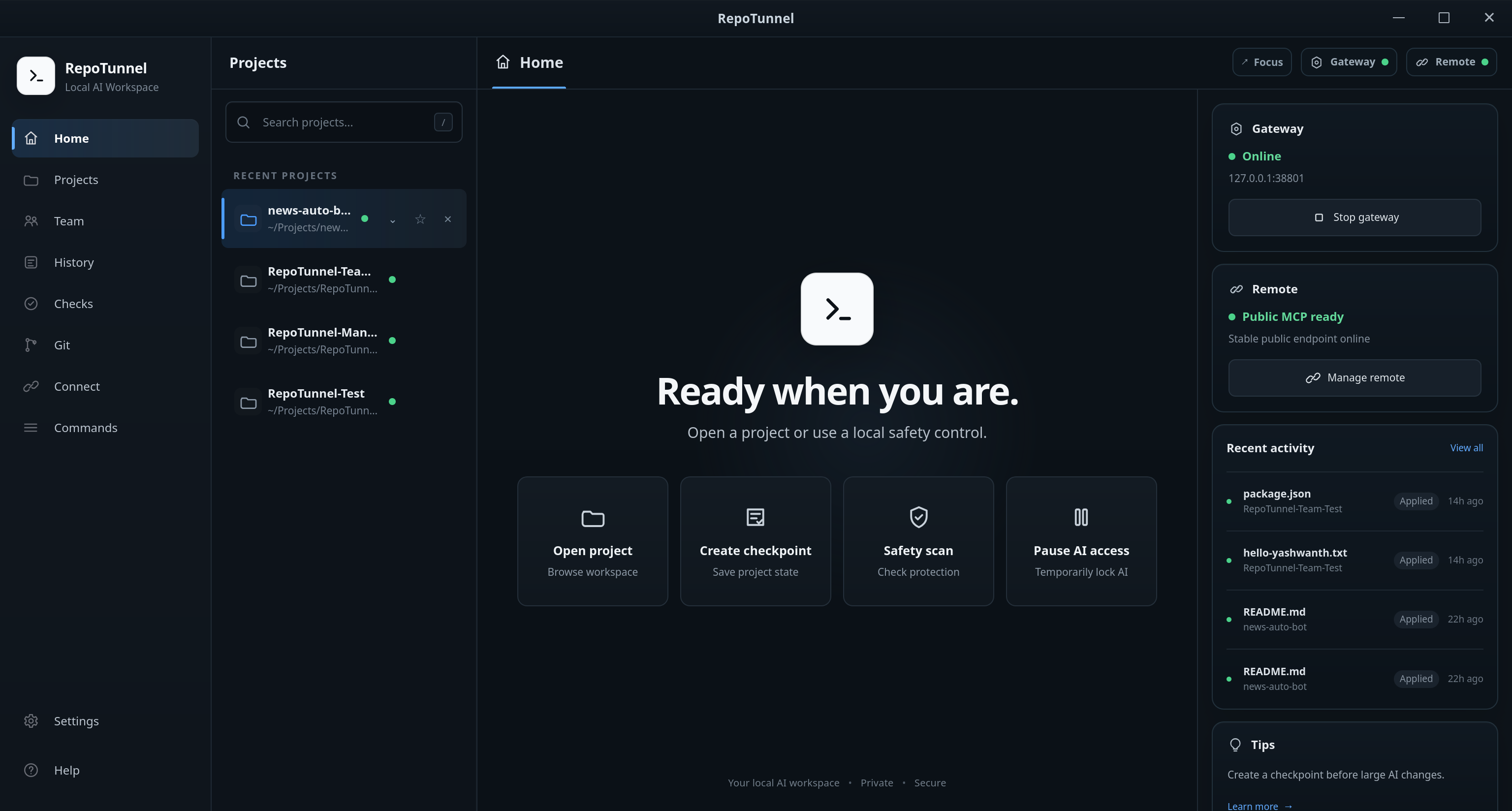
Why RepoTunnel
AI coding is most useful when it can work with the actual project instead of isolated snippets. RepoTunnel gives the AI that access without giving it unrestricted access to your computer.
With RepoTunnel, an AI can:
- Work only inside projects you explicitly approve.
- Read, create, edit, rename, move, and delete project files.
- Search and understand project structure.
- Run builds, tests, package commands, development servers, and managed processes.
- Inspect Git status, branches, diffs, and recent commits.
- Stage and commit validated changes.
- Push to Git only when you explicitly ask for a push.
- Launch supported applications and project URLs.
- Use a managed browser to test web applications.
- Navigate pages, click, type, scroll, reload, capture screenshots, and inspect browser errors.
- Use an isolated AI Workspace for supported desktop applications without taking over your normal desktop session.
- Keep project monitoring, change history, and recovery information available during longer AI work.
- Use Team Mode when two AI engineers should collaborate on the same project.
- Use the Video section for both media understanding and durable AI-operated video production.
- Connect an Android phone through Phone Access for live screen/control, apps, files, diagnostics, and guarded semantic automation.
- Continue interrupted work with factual activity history, Project Memory, and RepoTunnel continuity/resume state.
Work modes
AI Auto
AI Auto allows compatible project work to continue without repeated RepoTunnel approval prompts.
Security boundaries still remain active. AI Auto does not grant unrestricted filesystem access, disable sandboxing, or give standing permission to push Git changes.
AI Review
AI Review keeps supported changes and actions waiting for local approval before they are applied.
Use it when you want to inspect changes more closely while still allowing the AI to work directly with the project.
AI Workspace
AI Workspace provides an isolated virtual desktop for supported applications.
It allows the AI to work inside an approved desktop application without stealing focus from your normal desktop. This is useful for editors, development tools, productivity applications, and other supported GUI workflows.
The normal RepoTunnel file, terminal, process, browser, and project methods remain available as fallback paths where appropriate.
Team Mode
Team Mode connects two persistent AI engineers to the same approved project.
The engineers divide meaningful implementation work into non-overlapping tasks, work in parallel, cross-review each other's changes, test the result, and verify the requested work before completing the current task.
The Team stays attached to the project so later requests can continue without recreating the collaboration session each time.
Video
The Video section includes both Video Intelligence and Video Production.
Video Intelligence analyzes supported public/local media with bounded transcript, visual, tutorial, or full evidence.
Video Production keeps durable Video Projects with script/storyboard/timeline state, recordings, generated scenes, narration/subtitles, rendering, preview, QA, cleanup, and license provenance. Tutorial visuals can use RepoTunnel's deterministic HTML/CSS/GSAP workflow, while story projects can route suitable shots through supported installed creative engines.
Phone Access
Phone Access connects a selected Android device through Wireless Debugging, with authorized USB fallback for the same device.
The user controls Off / Limited / Full access and Pause AI. Depending on the granted capabilities, RepoTunnel can provide a persistent live screen/control path, app and file operations, APK installation, settings reads, shell/log/network diagnostics, and semantic interaction through the bundled Phone Helper.
Android/device policy remains authoritative. Payment-sensitive foreground apps intentionally block AI Phone observation/control while keeping RepoTunnel Accessibility enabled; leaving the app restores normal guarded access.
Install
Download RepoTunnel from the official GitHub Releases page:
https://github.com/Yashwanth034/RepoTunnel/releases/latest
| Platform | Package |
|---|---|
| Windows x64 | .exe or .msi |
| macOS Apple Silicon | aarch64.dmg |
| macOS Intel | x64.dmg |
| Debian / Ubuntu / Linux Mint | .deb |
| Fedora / RHEL compatible | .rpm |
| Other supported x86_64 Linux systems | AppImage |
Each release includes RepoTunnel-SHA256SUMS.txt so downloaded installers can be verified before use. Release notes and older versions are available on the GitHub Releases page.
Setup
1. Add a project
Open RepoTunnel and either:
- select an existing local project folder, or
- clone a GitHub repository directly.
RepoTunnel limits AI access to the projects you explicitly approve.
2. Choose a work mode
Choose the mode you want for that project:
- AI Auto — compatible project work can proceed without repeated approval prompts.
- AI Review — supported changes and actions wait for your local approval.
The same project security boundaries remain active in both modes.
3. Configure the public connection
RepoTunnel supports several remote MCP connection paths:
- ngrok — simplest managed setup; RepoTunnel uses the ngrok Rust SDK, so the ngrok CLI is not required.
- Cloudflare Tunnel — uses your Cloudflare tunnel/token/hostname and an installed
cloudflaredclient. - Direct HTTPS — advanced self-routed HTTPS path with RepoTunnel TLS/ACME handling.
- OpenAI Secure MCP Tunnel — optional
tunnel-clientpath for environments that use it.
For the simplest normal setup, choose ngrok in RepoTunnel's Connect page, supply your own ngrok authtoken, and wait until the connection shows Ready.
RepoTunnel will display an MCP URL similar to:
https://your-public-host/mcp
Use the exact MCP URL shown by RepoTunnel. Provider configuration can be reused across later launches where the selected provider supports a stable endpoint.
The raw RepoTunnel MCP gateway remains local; the public provider is a separate authenticated transport layer.
4. Connect ChatGPT
ChatGPT's custom-app/Developer Mode UI and availability can change by plan/workspace, so follow the current ChatGPT Apps guidance for custom MCP apps.
At a high level:
- Open ChatGPT Settings → Apps.
- Enable Developer Mode if it is available and required for your account/workspace.
- Create a custom app.
- Enter the RepoTunnel MCP HTTPS endpoint shown on the Connect page.
- Choose OAuth for RepoTunnel's public OAuth connection path.
- Scan/refresh tools and complete Sign in with RepoTunnel.
- Review the RepoTunnel authorization request and allow it.
- Test the app in a fresh chat with a real RepoTunnel tool call.
Normal RepoTunnel restarts should not require recreating the ChatGPT app when its public MCP URL remains unchanged. If RepoTunnel's MCP schema changes, refresh/re-scan the app's actions before concluding that a new tool is missing.
5. Verify the connection
Open a fresh ChatGPT conversation and make a real RepoTunnel tool call, such as asking it to list the approved workspaces.
A successful tool call confirms the complete path is working:
ChatGPT → HTTPS → OAuth → MCP → RepoTunnel → approved project
For another MCP-compatible AI client, use the same MCP URL shown by RepoTunnel and complete the client's OAuth connection flow.
Direct HTTPS
Direct HTTPS is an advanced alternative to the normal ngrok setup. It is useful for users who want a stable HTTPS MCP endpoint through their own network path, including connections behind CGNAT.
The verified setup uses Route64 + WireGuard for the public IPv6 path, DuckDNS for a stable hostname, and Let's Encrypt for trusted TLS. The documented free-service path has no mandatory monthly infrastructure cost, although third-party free services are best-effort.
The raw RepoTunnel MCP gateway remains loopback-only and is never exposed directly to the Internet. Only the required HTTPS, OAuth, MCP, health, and certificate routes are exposed by the Direct HTTPS frontend.
Full setup guide: RepoTunnel Direct HTTPS Setup
Security
RepoTunnel is designed around explicit project access instead of unrestricted computer access.
- AI access is limited to projects you explicitly approve.
- Absolute-path access,
../traversal, and symlink escapes outside approved projects are blocked. - Sensitive files such as
.env, private keys, credential files, and common secret formats are protected. - Public MCP access is protected with RepoTunnel OAuth.
- Revoke MCP access invalidates current remote authorization.
- Git push is allowed only when you explicitly ask the AI to push.
- Pause AI provides an emergency stop for RepoTunnel-managed AI activity.
- AI command execution uses the platform-specific isolation available to RepoTunnel.
- On Linux, AI terminal and process execution uses Bubblewrap and is blocked if the required sandbox is unavailable.
- Managed browser/Desktop/AI Workspace actions retain their own isolation, semantic-ref, and sensitive-field checks.
- Phone Access cannot be escalated through MCP; the user controls Off/Limited/Full and Pause AI locally.
- Payment-sensitive foreground apps block AI Phone observation/control while active.
- Direct HTTPS keeps the raw MCP gateway on loopback and preserves Host/authentication validation rather than weakening it.
For the complete security model, see docs/security.md.
Troubleshooting
ChatGPT says “Reconnect RepoTunnel”
Choose Reconnect in ChatGPT and approve the authorization request shown by RepoTunnel.
You normally do not need to recreate the ChatGPT app.
Public connection is not Ready
Check your internet connection and connection-provider configuration, then use Restart connection in RepoTunnel.
ngrok shows a warning page
Open the RepoTunnel public URL in your browser, complete the ngrok first-visit step if shown, and then retry the AI-client connection.
Disconnect remote AI access
Use Revoke MCP access in RepoTunnel.
Your approved projects and local project configuration remain unchanged.
Linux AI terminal commands are unavailable
Install Bubblewrap using your Linux distribution's package manager and restart RepoTunnel.
RepoTunnel intentionally blocks AI terminal execution when the required Linux sandbox is unavailable.
Windows or macOS shows a security warning
Download RepoTunnel only from the official GitHub Releases page and verify the package using RepoTunnel-SHA256SUMS.txt.
Platform signing and trust behavior may vary by release and operating-system policy.
Documentation
- Product definition
- Architecture
- Security model
- Remote connections
- MCP contract
- Commands and managed processes
- Git integration
- Team Mode
- Phone Access
- Video
- Release / Auto Update
- Release acceptance
- GitHub Releases
Contributing
Bug reports, feature requests, improvements, and pull requests are welcome.
https://github.com/Yashwanth034/RepoTunnel/issues
License
RepoTunnel is licensed under the MIT License. See LICENSE.
Copyright
Copyright © 2026 Yashwanth.
Reviews (0)
Sign in to leave a review.
Leave a reviewNo results found