UniPet
Health Gecti
- License — License: MIT
- Description — Repository has a description
- Active repo — Last push 0 days ago
- Community trust — 14 GitHub stars
Code Basarisiz
- child_process — Shell command execution capability in connectors/claude-code/hook.js
- spawnSync — Synchronous process spawning in connectors/claude-code/hook.js
- process.env — Environment variable access in connectors/claude-code/hook.js
- fs module — File system access in connectors/claude-code/hook.js
- network request — Outbound network request in connectors/claude-code/hook.js
- child_process — Shell command execution capability in connectors/claude-code/install.js
- spawnSync — Synchronous process spawning in connectors/claude-code/install.js
- os.homedir — User home directory access in connectors/claude-code/install.js
- process.env — Environment variable access in connectors/claude-code/install.js
- fs module — File system access in connectors/claude-code/install.js
- child_process — Shell command execution capability in connectors/codex/hook.js
- spawnSync — Synchronous process spawning in connectors/codex/hook.js
- process.env — Environment variable access in connectors/codex/hook.js
- fs module — File system access in connectors/codex/hook.js
- network request — Outbound network request in connectors/codex/hook.js
- child_process — Shell command execution capability in connectors/codex/install.js
- spawnSync — Synchronous process spawning in connectors/codex/install.js
- os.homedir — User home directory access in connectors/codex/install.js
- process.env — Environment variable access in connectors/codex/install.js
- fs module — File system access in connectors/codex/install.js
Permissions Gecti
- Permissions — No dangerous permissions requested
Bu listing icin henuz AI raporu yok.
Universal Desktop Pet for AI coding agents. Local visual status layer for Codex, Claude Code, Hermes, OpenClaw, DeepSeek-TUI, and custom agents.
UniPet



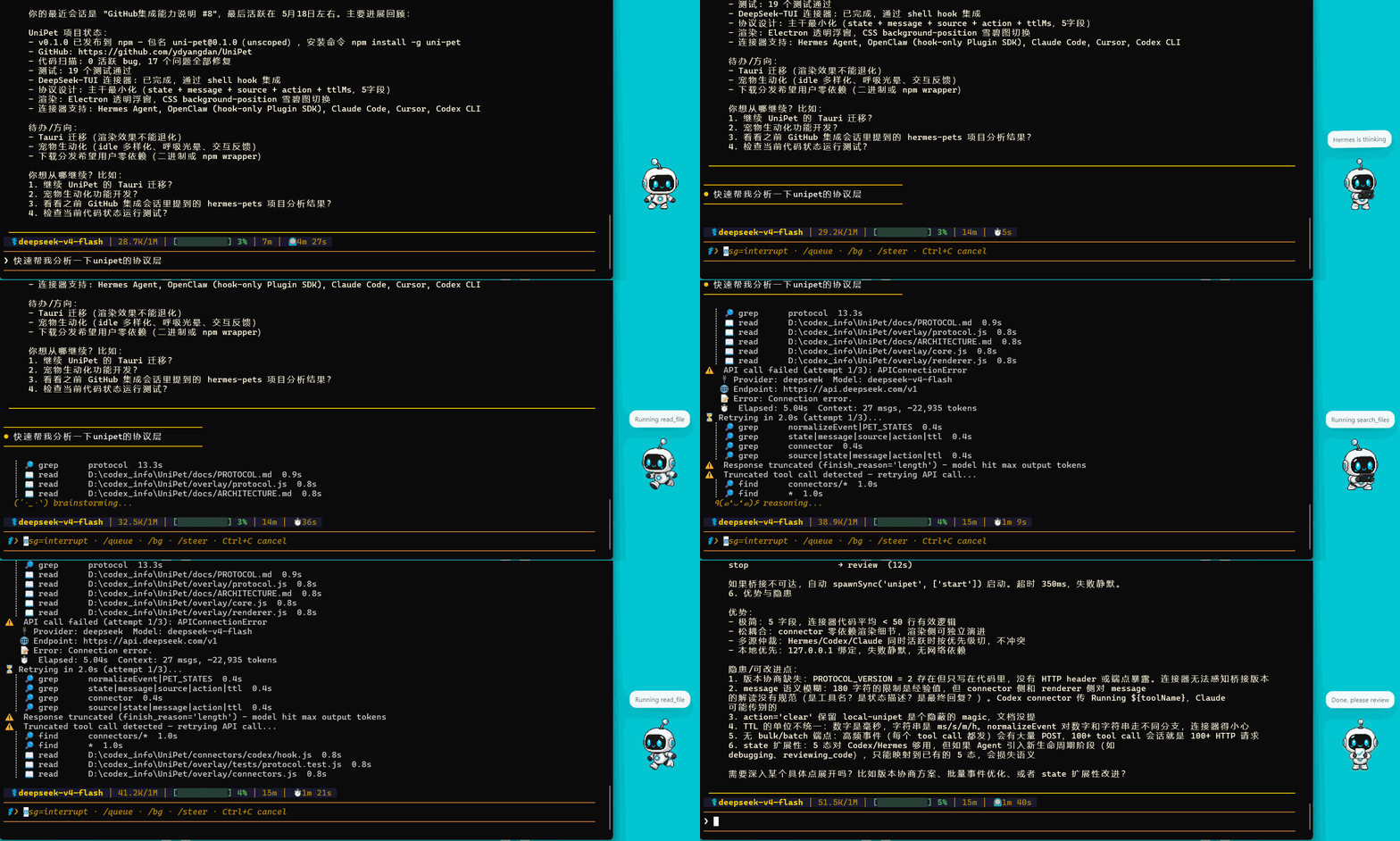
UniPet is a Universal Desktop Pet for AI coding agents.
Think Codex Pet, but for every agent. UniPet is a local visual status layer that
turns invisible agent work into a small animated desktop companion, so you can
see when your agent is thinking, running tools, waiting for input, failing, or
ready for review. It runs through a lightweight localhost protocol, so agents,
hooks, scripts, and plugins can drive the pet without patching their core code.
npm install -g uni-pet
unipet start
unipet demo
unipet agent add codex
Why UniPet
- Universal agent status layer for Codex, Claude Code, Hermes, OpenClaw, DeepSeek-TUI, and custom agents.
- Visual feedback for real work: idle, running, waiting, failed, and review states.
- Simple local protocol: drive UniPet from hooks, plugins, config blocks, CLI, HTTP, or WebSocket.
- Zero-intrusion: integrate with agents without modifying their source code.
- Local-first: listens on localhost and keeps events on your machine.
- Lightweight: Node.js + Electron; UniPet itself does not require Python.
- Codex-compatible pets: install, switch, and remove skins from the CLI.
- Built for standards: connectors send facts, while UniPet owns behavior, bubbles, and rendering.
What UniPet Focuses On
- One stable event protocol for many agents instead of one-off integrations.
- A visible desktop companion for real coding-agent work, not a heavy virtual pet game.
- Developer-friendly extension points: hooks, plugins, CLI, HTTP, WebSocket, and local pet skins.
- Small local runtime that is easy to inspect, modify, and remove.
Quick Start
For most users:
npm install -g uni-pet
unipet start
unipet demo
Connect only the agents you use:
unipet agent add codex
unipet agent add claude-code
unipet agent add hermes
unipet agent add openclaw
unipet agent add deepseek-tui
Check the local runtime and connector setup:
unipet doctor
unipet agent status
Update later with:
npm update -g uni-pet
Remove UniPet cleanly:
unipet agent remove all
unipet stop
npm uninstall -g uni-pet
User config and installed pets live under ~/.unipet.
Supported Agents
| Agent | Setup | Integration |
|---|---|---|
| Codex | unipet agent add codex |
Codex hooks |
| Claude Code | unipet agent add claude-code |
Claude Code hooks |
| Hermes | unipet agent add hermes |
Hermes plugin |
| OpenClaw | unipet agent add openclaw |
OpenClaw plugin |
| DeepSeek-TUI | unipet agent add deepseek-tui |
lifecycle hooks |
| Custom agents | unipet state ... or HTTP |
UniPet local protocol |
Daily Use
Start, inspect, and stop UniPet:
unipet start
unipet status
unipet doctor
unipet stop
Send a manual test event:
unipet demo
unipet state running "Running tests"
unipet state review "Ready for review"
unipet clear
The local bridge listens on:
HTTP  http://127.0.0.1:8768
WS    ws://127.0.0.1:8769/ws
Universal Protocol
Any tool can update the pet through the same event shape:
unipet state running "Running tests" --source my-agent
unipet state waiting "Waiting for approval" --source my-agent --ttl 2m
unipet state review "Ready for review" --source my-agent
For direct integrations, send local HTTP or WebSocket events with source,state, message, action, and ttl. See Protocol.
For custom scripts and agents, see Custom Agent Integration.
Pets
Browse and install online pets:
unipet pet search
unipet pet search cat
unipet pet info anby
unipet pet install anby --use
Manage local pets:
unipet pet list
unipet pet current
unipet pet validate ./my-pet
unipet pet import ./my-pet --use
unipet pet use anby
unipet pet remove anby
Installed pets and user config live under ~/.unipet.
Agent Management
Use agent to add, inspect, disable, or remove UniPet integrations:
unipet agent list
unipet agent status
unipet agent add codex
unipet agent disable codex
unipet agent remove codex
You can replace codex with claude-code, hermes, openclaw,deepseek-tui, or all.
How It Works
Agent hook/plugin
      -> UniPet localhost bridge
      -> state/event engine
      -> desktop pet renderer
Connectors translate agent lifecycle events into a small local event payload:source, state, message, action, and ttl. The renderer then maps
those events into Codex Pet-style states, bubbles, and small companion motions.
Platforms
- Node.js 18+
- npm
- Windows, macOS, Linux, Unix, or WSL
UniPet can run on Windows, macOS, Linux, Unix, or WSL. Agent integrations are
optional; connect only the agents you actually use.
Known Limitations
- UniPet currently uses Electron for the desktop overlay; a lighter native shell
is future work. - WSL needs a working Linux GUI display environment.
- Agent connectors depend on each agent's hook or plugin support.
- The Hermes connector runs inside Hermes' Python plugin environment, but
UniPet itself does not require Python.
For Developers
npm install
npm run check
npm run smoke:install
npm start
npm run check runs the overlay tests and connector tests for OpenClaw,
DeepSeek-TUI, Codex, and Claude Code.
Useful project files:
- Architecture
- Protocol
- Connectors
- Custom Agent Integration
- Pet Format
- Release Notes
- Roadmap
- Contributing
UniPet/
|-- overlay/                         Node.js/Electron desktop runtime
|   |-- main.js                      Electron app + local HTTP/WS bridge
|   |-- core.js                      event normalization + state store
|   |-- cli.js                       global unipet command
|   |-- market.js                    Codex pet market client
|   |-- pets.js                      local pet library
|   |-- renderer.js                  spritesheet animation renderer
|   |-- life/                        companion behavior layer
|   |-- renderers/                   renderer adapters
|   |-- tests/                       Node test suite
|   `-- assets/default/              bundled default pet
|-- connectors/codex/                Codex hook connector
|-- connectors/claude-code/          Claude Code hook connector
|-- connectors/hermes/               Hermes plugin connector
|-- connectors/openclaw/             OpenClaw hook plugin
|-- connectors/deepseek-tui/         DeepSeek-TUI hook connector
|-- docs/                            design notes
|-- install.ps1                      Windows installer
`-- install.sh                       Unix installer
Troubleshooting
- Run
unipet doctorfirst. It checks the local bridge, runtime file, current
pet, command setup, and prints anext:line with the recommended action. - Run
unipet agent statusafter installing connectors. Each connector prints
its config path, managed hook/plugin state, and anext:line. - If
127.0.0.1:8768is already in use, rununipet stop, thenunipet start. - After installing a connector, restart the related agent session, gateway, or TUI.
Docs
- Architecture
- Protocol
- Connectors
- Custom Agent Integration
- Pet Format
- Release Notes
- Changelog
- Roadmap
License
MIT
Yorumlar (0)
Yorum birakmak icin giris yap.
Yorum birakSonuc bulunamadi