rui
Health Uyari
- License — License: MIT
- Description — Repository has a description
- Active repo — Last push 0 days ago
- Low visibility — Only 5 GitHub stars
Code Gecti
- Code scan — Scanned 12 files during light audit, no dangerous patterns found
Permissions Gecti
- Permissions — No dangerous permissions requested
Bu listing icin henuz AI raporu yok.
小瑞 / Rui — self-hosted, local-first voice assistant for smart speakers (Xiaomi LX06 via open-xiaoai). FastAPI control plane + local AEC/KWS/VAD audio plane + Vue 3 console; one-command Docker deploy on a NAS. 自托管家庭语音助手:本地音频面、可插拔设备/插件、网页控制台。
小瑞 · rui
把家里的音箱变成只属于你的语音助手。
Turn the speakers you already own into a voice assistant that answers to you.


中文
15 秒了解
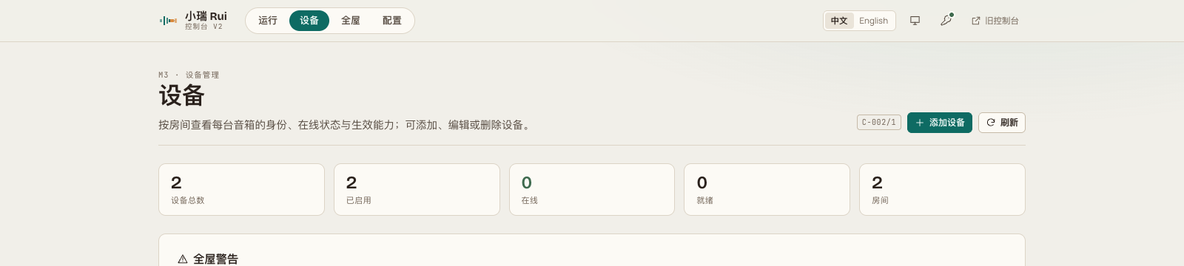
家里已有的音箱继续用它们自己的麦克风和喇叭,但唤醒词、对话、记忆、音乐都走你自己的服务:一台机器上的 rui 服务 + 每种音箱一个桥接插件。控制台 /v2 可以加设备、改配置、看日志和轨迹,不用再手改 YAML。
说「你好小瑞」→ 它答「在呢」→ 说「放首歌」→ 播放中再说「下一首」→ 说「退下吧」→ 结束这一轮
架构
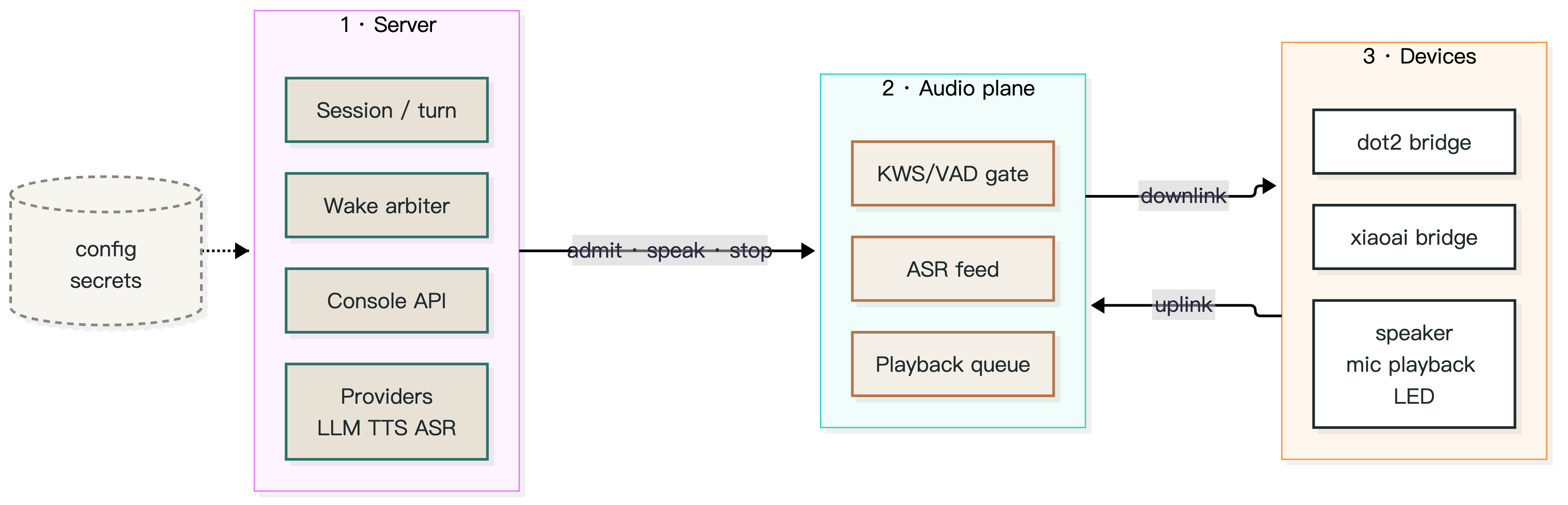
架构图源文件:docs/assets/architecture.mmd;导出物 architecture.svg / architecture.png(Mermaid;改配色后重新导出即可)。
| 层 | 职责 | 关键点 |
|---|---|---|
| 服务端(控制面) | 会话与回合、工具调用、LLM/TTS/ASR 供应商、唤醒仲裁、v2 控制台 API、配置与密钥 | 一轮对话只由一台设备承担;播放态与回合按房间隔离,一屋放歌不会让另一屋变聋 |
| 音频平面 | 每台设备一个独立进程:拾音、KWS/VAD 门限、预录缓冲、回声切除、送 ASR、播放队列 | 门限在本地做,服务端只做决策;播放与唤醒的自回声有专门的剔除路径 |
| 设备(插件) | 每种音箱一个 rui-device/v1 桥接插件:设备长连接、上下行音频、指示灯与按键 |
核心不含设备实现(0.8.0 起 adapter 必填、无机型默认值;旧拼写 adapter: xiaoai 读入即报错并给出改成 lx06 的修复句,不做静默迁移);加一种音箱 = 加一个插件仓库 |
三个仓库是什么关系
| 仓库 | 角色 | 版本与发布 |
|---|---|---|
| rui(本仓) | 服务端 + 控制台:会话/回合、供应商、唤醒仲裁、音频门限、/v2 控制台 |
独立发布 |
| rui-dot2-bridge | Dot2(RS03QR)的 rui-device/v1 插件 |
独立版本、独立发布 |
| rui-xiaoai-bridge | LX06 的 rui-device/v1 插件 |
独立版本、独立发布 |
约束有两条,缺一不可:设备清单里的 compatibility.rui_min(这台设备至少要哪个 rui)与插件清单里的 rui_compat(这个插件支持哪一段 rui)。两者不满足时,加载器会拒绝这个插件,而不是带着半截功能跑。
| rui 核心 | rui-dot2-bridge | rui-xiaoai-bridge |
|---|---|---|
0.8.0(当前代码,破坏性;未打 tag、未发布):删 /legacy 与 15 条老链接(一律 404)、旧 adapter: xiaoai 读入即拒绝(须改 lx06)、插件 runtime.listen_port 必填、契约窗口改为 >=0.7.0 <0.9.0;另含 P0/P1 修复(ack 回声、短回复、LED 收敛、掉线丢弃排队语音)与物理按键支持(静音、音量回写) |
1.3.2:rui_compat >=0.7.0 <0.9.0(双窗口)、设备清单 compatibility.rui_min=0.3.0 |
0.2.3:rui_compat >=0.7.0 <0.9.0(双窗口)、设备清单 compatibility.rui_min=0.6.0 |
| 0.7.9(历史,patch):意图层两处行为变更 + 唤醒应答提前 | 1.3.1(>=0.6.0 <0.8.0) |
0.2.2(>=0.6.0 <0.8.0) |
| 0.7.8(历史):控制台默认 v2、TLS 安装、插件外置 | 1.3.1 | 0.2.2 |
| 0.7.4(历史) | 1.3.1 | 0.2.2 |
LX06 的插件必须外置:把
rui-xiaoai-bridge挂到/opt/rui-plugins,并设RUI_ADAPTER_PLUGINS+PYTHONPATH=/opt/rui-plugins;挂上后日志为adapter plugins: registered dot2, lx06。核心不再有兼容别名、也不回退内置实现;不挂插件时设备错误会明确提示去 mount 桥。0.8.0 起旧配置里的adapter: xiaoai不再被迁移:读入即失败,报错含devices[i] (room): adapter 'xiaoai' is no longer accepted in 0.8.0; change devices[].adapter to 'lx06',把该行改成lx06即可。
让 AI 帮你装
把下面这段直接贴给任意 AI 助手(Claude / ChatGPT / DeepSeek 都行):
目标:用 Docker 跑起 rui 0.7.9,接一台 Dot2 和一台 LX06。
前置:docker compose version 通过;8080 空闲;5 GB 磁盘。
1) git clone --branch main https://github.com/yes999zc/rui.git && cd rui/examples/two-speakers   # main 才有本示例;镜像仍 pin 在 0.7.9
2) git clone --branch v1.3.2 https://github.com/yes999zc/rui-dot2-bridge.git && git clone --branch v0.2.2 https://github.com/yes999zc/rui-xiaoai-bridge.git
3) mkdir -p plugins && cp -r rui-dot2-bridge/src/rui_dot2_bridge rui-xiaoai-bridge/src/rui_xiaoai_bridge plugins/
4) 写 ./config/config.yaml:web.auth_token、devices[](id/adapter/room/host/listen_port;lx06 的 host 必填)
5) TLS(dot2 的 tls_port 开启时必需):把原 controller 证书放到 ./secrets/(server.pem + server.key);没有就运行 `bash ../../scripts/make_dev_tls.sh` 自签。自签只保证音频平面能起,真机是否接受取决于设备信任的 CA(详见 `docs/audit/tls-required-2026-10.md`)。**默认只起第一台设备的平面;两台都起需在 config 设 `multi_device: {enabled: true, max_planes: 2}`**
6) export RUI_DEVICE_TOKEN=<设备令牌>; docker compose up -d
7) 验收:/health 里 devices=2、device_errors=0、adapter_plugins.registered=["dot2","lx06"];audio_plane=false 时看日志的 RUI_DEVICE_TOKEN / missing TLS material
失败看:docker compose logs --tail=80 rui 的 config error / adapter / TLS;回滚:down 后把 image 换回上一版 tag;TLS 失败可先移走 ./secrets/ 确认是否 TLS 引起
不需要自己编译 ffmpeg(镜像已内置)
特性
- 多设备、按房间隔离:设备按房间分组,唤醒与播放的互斥只在本房间生效,跨房间的播放与回合仲裁互不影响。
- 播放中打断(barge-in):播放时唤醒立即停播并进入对话,服务端停播延迟以毫秒计。
- 自回声抑制:唤醒提示音(「在呢」)实测 0/10 泄漏;普通唤醒撞上进行中的告别语时,会丢弃已排队的我方语音。冷启动/重叠 <110 ms 的边界仍可能漏(见已知限制)。
- 可插拔设备:
dot2/xiaoai两个桥接插件遵循同一份rui-device/v1契约,桥与核心可独立升级。 - 控制台 v2:设备、房间、配置分组、日志、轨迹、音乐、凭据、体检;中英双语,字段说明来自服务端目录。
- 控制台入口:只有 v2——
/302 到/v2/(保留 query)。0.8.0 删除了旧面板与 15 条旧链接(/panel/*11 个面板 +/setup、/secrets、/diagnostics、/channels)的 302:/legacy与这些路径现在都是 404;web.console键仅为配置兼容保留,值被忽略。 - 本地优先:模型与密钥都在你自己的机器上;配置文件是唯一事实来源,控制台只提交你改过的字段。
三行启动
git clone --branch v0.7.9 https://github.com/yes999zc/rui.git && cd rui
RUI_IMAGE=ghcr.io/yes999zc/rui@sha256:5aa362f6b4f7d7fd24a7f01d41c31e1523ce2401296ac3b203b9f684a314b9f7 bash deploy/install.sh   # 0.7.9 amd64 摘要(默认 :latest)
cat console-token.txt                       # 控制台 token(也可用 rui token 重新读取)
装完打开 http://127.0.0.1:8080/v2/,用上面的 token 登录,在「设备」页添加第一台音箱。
外置设备插件(0.7.6 起)
核心镜像不再内置任何设备实现:一个核心镜像 + 一个插件目录即可,不需要造下游镜像。
- 宿主目录:
/vol1/rui/plugins/rui_dot2_bridge/、/vol1/rui/plugins/rui_xiaoai_bridge/(即两个桥仓的src/<包名>)。 - Compose 挂载 + 导入路径:
-v ./plugins:/opt/rui-plugins:ro、PYTHONPATH=/opt/rui-plugins。 - 显式注册:
RUI_ADAPTER_PLUGINS=dot2=rui_dot2_bridge.adapter:build,lx06=rui_xiaoai_bridge.adapter:build。
直接可用的一份参考:examples/two-speakers/compose.yaml(两个桥 + TLS + 两段注册一次到位);只想先跑单台核心可以走上面的「三行启动」(deploy/install.sh)。
挂载后日志出现 adapter plugins: registered dot2, lx06;/health.planes 逐台显示 running/error/not_started。
不挂插件时设备错误会直接提示去 mount 对应桥;旧配置的 adapter: xiaoai 在 0.8.0 读入即报错(给出改成 lx06 的修复句),不再有读入迁移与弃用告警。
兼容性与前置条件
- Python 3.11+;Docker 与 Docker Compose。推荐镜像(amd64 平台摘要,老版 docker 不认 OCI index):
ghcr.io/yes999zc/rui@sha256:5aa362f6b4f7d7fd24a7f01d41c31e1523ce2401296ac3b203b9f684a314b9f7(tag0.7.9指向同一构建)。 - 需要自备 LLM / TTS / ASR 供应商(在配置文件里填,或使用本地模型)。没有凭据时服务能起,但对话链路不会工作。
- 设备前置条件(第三方设备,与厂商无官方关联):
- EchoMuse Dot2(RS03QR):固件需已具备设备本地接口,并与本服务在同一局域网;设备侧音频参数由桥接插件下发。
- 小米 LX06 一类设备:仅支持已开放本地接口的固件版本;本项目不提供、也不建议任何刷机或越权步骤。
- 播放音乐需要自备音乐源(如 Navidrome);未配置时「放首歌」会明确报错,不会静默失败。
已知限制:未声明 wake_words_residual 的第三方清单不做 vendor 短语兜底(vendor 广播/回声可能进入回合);两音箱默认只起第一台设备的平面,需 multi_device: {enabled: true, max_planes: 2};自签证书只保证音频平面能启动,真机是否接受取决于设备信任的 CA。(完整清单见下文「已知限制」一节与 docs/known-limitations.md。)
支持矩阵
| 能力 | Dot2(EchoMuse RS03QR) | LX06(第三方设备) |
|---|---|---|
| 唤醒 | 30/30 admitted(2026-10-26,6 句 × 5 轮,校准后 TTS 音源) | 19/20(2026-10-24,n=20) |
| 语音指令 | 26/30(同上,含音乐占据扬声器的场景) | 未测 |
| 播放中打断 | 8/8(2026-10-26,真机人声;stop-push 判据:server 停播 → 设备丢队列,非声学端到端) | 停播 205.2 ms(2026-10-24 三轮 24.2/64.5/205.2,max n=3;stop-push,非声学端到端) |
| 音量控制 | 设置生效但回复滞后一步(调 40 回「30%」、调 70 回「40%」,2026-10-27) | ✅ 生效(2026-10-27) |
音量刻度:控制台与语音用的是百分比;LX06 的设备刻度是 0–255,30% 对应 76(≈30×2.55),属正常映射,不是故障。dot2 的设备刻度是 0–127(0.5 dB/step),
DOT2_VOLUME_CAP是百分比上限(adapter 默认 100)。
| 指示灯 | ✅ 实测配色(2026-10-27 人眼):唤醒=绿、思考=蓝、说话=青、放歌=紫;事件链listening → thinking → speaking → off与日志一致 | ✅ 同配色(2026-10-27 人眼):唤醒=绿、思考=蓝、说话=青、放歌=紫 |
| 多设备并发 | 两台平面可同时running;同时发起第二个对话会被 409 拒绝(a turn is already running,单会话 runner,2026-10-27) | 同左(同一 runner) |
| 音乐中短指令(下一首 / 停止播放) | 10/10(2026-10-26,人声,1 m) | 未测 |
安装路径实测(2026-10-26)
在 examples/two-speakers/ 下按本文件的步骤起容器(镜像 ghcr.io/yes999zc/rui@sha256:5aa362f6b4f7d7fd24a7f01d41c31e1523ce2401296ac3b203b9f684a314b9f7,两个插件目录 bind mount):
$ curl -s localhost:8080/health | python3 -c 'import json,sys;d=json.load(sys.stdin);print({k:d[k] for k in ("status","version","devices","enabled_devices","device_errors","audio_plane","adapter_plugins")})'
{'status': 'ok', 'version': '0.7.9', 'devices': 2, 'enabled_devices': 2, 'device_errors': 0, 'audio_plane': False, 'adapter_plugins': {'registered': ['dot2', 'lx06'], 'warnings': 0}}
如实说明:adapter_plugins.registered、devices、device_errors 在任何情况下都成立。audio_plane 取决于「哪台设备的平面被启动」(实测见 docs/audit/tls-required-2026-10.md):
- 默认
multi_device.enabled=false:单平面,只启动配置里的第一台设备。第一台是 dot2(listen_port即tls_port)且secrets/server.pem|key缺失 →audio_plane=false,日志missing TLS material;有证书(原证书或自签)→true,wss listening。第一台是 xiaoai 且RUI_DEVICE_TOKEN为空 →false,日志RUI_DEVICE_TOKEN is empty。 - 两台都起:需
multi_device.enabled=true且max_planes >= 2,按台起平面、单台失败不拖垮其他;最小示例见config.example.yaml的multi_device注释,/health的planes逐台显示状态。本卡实测的是默认单平面。 - 两个 token + 证书齐备、dot2 在前时实测
audio_plane=true。
自签只解决「平面能起」,真机是否接受取决于设备信任的 CA;原 controller 证书丢失时设备需重新配网。
故障排查
| 现象 | 原因 | 处置 |
|---|---|---|
| 喊了唤醒词没反应 | 设备未连接,或被同房间的另一轮对话占住 | 看「运行」页的告警项;确认该房间没有未结束的回合 |
| 唤醒后它自问自答 | 唤醒提示音被当成用户输入 | 真机 A/B 已 0/10 泄漏;若仍出现(尤以冷启动/紧接说话),附 cue_gate 日志行提 issue |
| 播放中说什么都不理 | 音乐占着扬声器时部分回答会被设计性跳过 | 属预期行为:换歌 / 停播仍会执行,只是不回话 |
| 放歌后要靠近才听得清 | 早期是测试音源电平太低造成的假象 | 先按 docs/analysis/wake-vs-command-range.md §7 校准音源,再判断是否设备问题 |
| 加第二台 Dot2 后第一台失效 | DOT2_CONTROL_PORT 是全局环境变量 |
加设备前清掉该变量,按设备分配 listen_port |
| 控制台打不开 | 端口 / 防火墙,或 token 过期 | docker compose ps 看容器;rui token 重新取 token |
| 升级后设备掉线 | 新镜像未包含对应桥接插件版本 | 核心镜像 + 外置插件目录(核对该桥的版本与 rui_compat,必要时换桥的 tag);不需要造下游组合镜像 |
已知限制
完整清单(编号 L1–L16)在
docs/known-limitations.md;本节只列对外必须说的。
- HE-02 回声切除仍有缺口:唤醒提示音的回声在「冷启动 + 不削波 + 设备播放延迟 > 800 ms」或「用户与提示音重叠 < 110 ms」时仍可能漏进 ASR;更细的门限实测是设备延迟 900–1200 ms 时不削波、1200 ms 削尾部、1200 ms 重叠时漏切(
docs/known-limitations.mdL1)。 - 0.7.9 的意图层修复:N1/N3 已在真机验过,N2 仍待按新口径复验:2026-10-28 08:54–09:33(本地;UTC 00:54–01:33)在生产真机上确认了 C1(结束词 + 有歌 = 停歌且关会话)、暂停/结束词语义与唤醒应答改序,
docs/acceptance-pending.md已勾 N1/N3/ACK-1/ACK-2。但仍不要把 0.7.9 描述成「意图层已修好」:N2 的判据被 d.6(b91599a)有意反转为「停止你好命中结束词」,旧口径的真机记录作废,需按新口径复验 2 min;L17 唤醒回声修复(82d45d9,11:47)发生在那次真机之后,仍只经 headless 验证。 - 对话运行器目前是单会话:一台设备唤醒时会中止另一台正在合成的回复(按房间隔离目前只覆盖播放与回合仲裁);第二台同时发起对话会被 409 拒绝(2026-10-27 实测,见支持矩阵)。
- 已播出的告别语尾音无法追回,只能阻止后续语音块。
- 唤醒词暂不按房间隔离。两台同型号 dot2 从未验证(现网与全部真机记录都是 dot2 + lx06 异型号),同屋双设备的行为见
docs/backlog-0.8.md§c。
致谢
致谢
这个项目站在很多人的工作上。按它们在这套系统里的实际位置分两类;许可证与分发细节见 THIRD_PARTY.md。
跑在链路里的
- @coderzc/open-xiaoai(MIT)—— LX06 的设备端客户端与 WebSocket 协议;设备靠它拨进来,核心只讲协议、不内置它的代码。
- k2-fsa/sherpa-onnx(Apache-2.0)—— 本地 ASR 与关键词唤醒运行时,镜像里的唤醒模型与 VAD 也经由它的 release 分发。
- snakers4/silero-vad(MIT)—— 语音活动检测模型。
- FunAudioLLM/SenseVoice / modelscope/FunASR —— 本地中文 ASR 模型;权重按 FunASR Model License 使用,
rui fetch-models下载,不随镜像分发。 - FFmpeg(LGPL-2.1-or-later,构建时禁用 GPL/nonfree)—— 音乐转码与渠道语音编码;镜像里随附 libopus、libmp3lame 的许可证。
- xiph/speexdsp(BSD-3-Clause)—— 回声消除,播放中打断靠它。
- openWakeWord(Apache-2.0)—— 设备端 OWW 模型(如
hey_jarvis)来自这套方案;目前设备端唤醒是关闭的,走服务端 KWS。
设计上参考了公开做法
- Rhasspy 的分域式服务拆分、rhasspy/wyoming 的协议层抽象。
- wilbowes/EchoMuse —— 设备管理控制台的状态机与「可解释向导」思路(未复制代码)。
- openWakeWord 对「未测 / 限制」照实标注的习惯,我们也沿用了。
音乐播放对接 Navidrome / OpenSubsonic;控制台用 Vue + Vite,服务端 FastAPI。实现代码除上述依赖外均为本仓库原创。
License
MIT。
English
In 15 seconds
Your existing speakers keep their own microphones and speakers, but wake words, dialogue, memory and music run on your own machine: one rui service plus one bridge plug per speaker model. The /v2 console adds devices, edits configuration and shows logs and traces — no YAML editing required.
"Hey Rui" → "I'm here" → "play some music" → "next" (while playing) → "stand down" → turn ends
Architecture
Source: docs/assets/architecture.mmd; exports architecture.svg / architecture.png (Mermaid; re-export after changing colours).
| Layer | Responsibility | Why it matters |
|---|---|---|
| Server (control plane) | Sessions and turns, tool calls, LLM/TTS/ASR providers, wake arbitration, the v2 console API, configuration and secrets | Exactly one device owns a turn; playing state and turns are scoped per room, so music in one room never deafens another |
| Audio plane | One process per device: capture, KWS/VAD gate, preroll buffer, echo excision, ASR feed, playback queue | Gating stays local, decisions stay on the server; self-echo has a dedicated excision path |
| Devices (plugs) | One rui-device/v1 bridge per speaker model: device link, uplink/downlink audio, LED and buttons |
The core carries no device implementation (since 0.8.0 adapter is required with no model default; a legacy adapter: xiaoai fails on load with a fix sentence naming lx06, never a silent rewrite); a new speaker is a new plug repository |
How the three repositories fit together
| Repo | Role | Versioning |
|---|---|---|
| rui (this repo) | Server + console: sessions/turns, providers, wake arbitration, audio gate, /v2 console |
released on its own |
| rui-dot2-bridge | rui-device/v1 plug for Dot2 (RS03QR) |
own version, own release |
| rui-xiaoai-bridge | rui-device/v1 plug for LX06 |
own version, own release |
Two constraints must both hold: compatibility.rui_min in the device manifest (the minimum core this device needs) and rui_compat in the plug manifest (the core range the plug supports). If either fails, the loader refuses the plug instead of running it half-working.
| rui core | rui-dot2-bridge | rui-xiaoai-bridge |
|---|---|---|
0.8.0 (current code, breaking; not tagged, not released): /legacy and the 15 old links are gone (plain 404), a legacy adapter: xiaoai is rejected on load (change it to lx06), the plug manifest's runtime.listen_port is required, the compat window is now >=0.7.0 <0.9.0; also carries the P0/P1 fixes (ack echo, short replies, LED convergence, queued speech on link loss) and physical-key support (mute, volume write-back) |
1.3.2: rui_compat >=0.7.0 <0.9.0 (dual window), manifest compatibility.rui_min=0.3.0 |
0.2.3: rui_compat >=0.7.0 <0.9.0 (dual window), manifest compatibility.rui_min=0.6.0 |
| 0.7.9 (historical, patch): intent-layer behaviour + wake acknowledgement moved up | 1.3.1 (>=0.6.0 <0.8.0) |
0.2.2 (>=0.6.0 <0.8.0) |
| 0.7.8 (historical): v2 console default, TLS install, external plugs | 1.3.1 | 0.2.2 |
| 0.7.4 (historical) | 1.3.1 | 0.2.2 |
The LX06 plug is external only: mount
rui-xiaoai-bridgeunder/opt/rui-pluginsand setRUI_ADAPTER_PLUGINS+PYTHONPATH=/opt/rui-plugins; with it mounted the log readsadapter plugins: registered dot2, lx06. There is no compatibility alias and no built-in fallback, and without the plug the device error tells you to mount the bridge. Since 0.8.0 a legacyadapter: xiaoaiis no longer migrated: it fails on load withdevices[i] (room): adapter 'xiaoai' is no longer accepted in 0.8.0; change devices[].adapter to 'lx06'. Change that line tolx06; do not wait for a fallback.
Let an AI install it
Paste this into any assistant (Claude / ChatGPT / DeepSeek):
Goal: run rui 0.7.9 with Docker, one Dot2 and one LX06.
Preflight: docker compose version; port 8080 free; 5 GB disk.
1) git clone --branch main https://github.com/yes999zc/rui.git && cd rui/examples/two-speakers   # main 才有本示例;镜像仍 pin 在 0.7.9
2) git clone --branch v1.3.2 https://github.com/yes999zc/rui-dot2-bridge.git && git clone --branch v0.2.2 https://github.com/yes999zc/rui-xiaoai-bridge.git
3) mkdir -p plugins && cp -r rui-dot2-bridge/src/rui_dot2_bridge rui-xiaoai-bridge/src/rui_xiaoai_bridge plugins/
4) write ./config/config.yaml: web.auth_token and devices[] (id/adapter/room/host/listen_port; host required for lx06)
5) TLS (required when dot2's tls_port is on): put the original controller cert into ./secrets/ (server.pem + server.key); if you do not have it, run `bash ../../scripts/make_dev_tls.sh`. Self-signed only proves the audio plane starts; whether the device accepts it depends on its trusted CA (see `docs/audit/tls-required-2026-10.md`). **By default only the first configured device gets a plane; to run both, set `multi_device: {enabled: true, max_planes: 2}` in the config**
6) export RUI_DEVICE_TOKEN=<device token>; docker compose up -d
7) verify: /health shows devices=2, device_errors=0, adapter_plugins.registered=["dot2","lx06"]; if audio_plane=false read the log for RUI_DEVICE_TOKEN / missing TLS material
On failure: docker compose logs --tail=80 rui (config error / adapter / TLS); rollback: down, switch image back; for TLS failures move ./secrets/ away first to isolate
No ffmpeg build needed (the image ships it)
Features
- Per-room isolation: devices are grouped by room; wake, playback and turn arbitration are scoped to a room (the dialogue runner itself is still single-session).
- Barge-in: a wake during playback stops the audio immediately and starts a turn, with millisecond-scale stop latency on the server side.
- Self-echo suppression: the acknowledgement cue leaked 0/10 on the device; a stale goodbye still queued is dropped when a wake arrives. Cold-start or <110 ms overlap can still leak (see Known limitations).
- Pluggable devices: the
dot2andxiaoaibridges share onerui-device/v1contract and version independently. - Console v2: devices, rooms, grouped configuration, logs, traces, music, credentials and health checks; bilingual UI fed by a server-side catalog.
- Console entry: v2 only —
/answers a 302 to/v2/(query preserved). 0.8.0 removed the legacy panel shell and the 15 old links (the 11/panel/*panels plus/setup,/secrets,/diagnostics,/channels):/legacyand those paths are 404 now.web.consolestays for config compatibility only; its value is ignored. - Local first: models and keys stay on your machine; the config file is the source of truth and the console submits only changed fields.
Three-line quickstart
git clone --branch v0.7.9 https://github.com/yes999zc/rui.git && cd rui
RUI_IMAGE=ghcr.io/yes999zc/rui@sha256:5aa362f6b4f7d7fd24a7f01d41c31e1523ce2401296ac3b203b9f684a314b9f7 bash deploy/install.sh   # 0.7.9 amd64 digest (default: :latest)
cat console-token.txt                       # console token (or: rui token)
Open http://127.0.0.1:8080/v2/, log in with that token, and add your first speaker on the Devices page.
External device plugs (since 0.7.6)
The core image ships no device implementation: one core image plus a plug directory is enough, and no downstream image is needed.
- Host directory:
/vol1/rui/plugins/rui_dot2_bridge/,/vol1/rui/plugins/rui_xiaoai_bridge/(thesrc/<package>of each bridge repo). - Compose mount + import path:
-v ./plugins:/opt/rui-plugins:ro,PYTHONPATH=/opt/rui-plugins. - Explicit registration:
RUI_ADAPTER_PLUGINS=dot2=rui_dot2_bridge.adapter:build,lx06=rui_xiaoai_bridge.adapter:build.
One ready-to-copy reference: examples/two-speakers/compose.yaml (both plugs, TLS and registration in one file). For a core-only first run use the three-line install above (deploy/install.sh).
After mounting, the log says adapter plugins: registered dot2, lx06; /health.planes shows each device as running/error/not_started.
Without a plug the device error tells you which bridge to mount; since 0.8.0 a legacy adapter: xiaoai fails on load with the fix sentence naming lx06 (no read-time migration, no warning-only path).
Compatibility and prerequisites
- Python 3.11+, Docker and Docker Compose. Recommended image (amd64 platform digest; old docker cannot resolve the OCI index):
ghcr.io/yes999zc/rui@sha256:5aa362f6b4f7d7fd24a7f01d41c31e1523ce2401296ac3b203b9f684a314b9f7(tag0.7.9points at the same build). - Your own LLM / TTS / ASR providers (configured in the config file, or local models). The service starts without credentials, but the dialogue path stays idle.
- Device prerequisites (third-party hardware, not affiliated with any vendor):
- EchoMuse Dot2 (RS03QR): firmware must already expose the device's local interface and be on the same LAN; audio parameters are pushed by the bridge.
- Xiaomi LX06-class devices: only firmware that already exposes a local interface is supported. No flashing, rooting or privilege-escalation steps are provided or endorsed.
- Music needs your own source (e.g. Navidrome); without one, "play some music" fails loudly instead of silently.
Known limitations: a third-party manifest that does not declare wake_words_residual gets no vendor-phrase backstop (vendor broadcasts/echoes may enter a turn); two speakers only start one plane by default unless multi_device: {enabled: true, max_planes: 2}; a self-signed certificate only lets the audio plane start — real-device acceptance depends on the CA the device trusts. (The full list is the Known limitations section below and docs/known-limitations.md.)
Support matrix
| Capability | Dot2 (EchoMuse RS03QR) | LX06 (third-party) |
|---|---|---|
| Wake | 30/30 admitted (2026-10-26, 6 phrases × 5 rounds, calibrated TTS source) | 19/20 (2026-10-24, n=20) |
| Voice commands | 26/30 (same run, including music-owns-speaker cases) | untested |
| Barge-in during playback | 8/8 (2026-10-26, real voice; stop-push criterion: server stop → device queue drop, not acoustical end-to-end) | 205.2 ms stop (2026-10-24, three runs 24.2/64.5/205.2, max n=3; stop-push, not acoustical end-to-end) |
| Volume control | applied but the reply lags one step (40 answered as 30, 70 as 40; 2026-10-27) | ✅ applied (2026-10-27) |
Volume scale: console and voice use percent; the LX06 device scale is 0–255, so 30% is 76 (≈30×2.55) — expected, not a fault. dot2's device scale is 0–127 (0.5 dB/step);
DOT2_VOLUME_CAPis a percent ceiling (adapter default 100).
| LED | ✅ observed (2026-10-27, human eye): wake=green, thinking=blue, speaking=cyan, music=purple; matches thelistening → thinking → speaking → offlog chain | ✅ same colours (2026-10-27, human eye): wake=green, thinking=blue, speaking=cyan, music=purple |
| Concurrent multi-device | both planes run at once, but a second simultaneous turn is refused with 409 (a turn is already running, single-session runner; 2026-10-27) | same (one runner) |
| Short commands during music (next / stop) | 10/10 (2026-10-26, human voice, 1 m) | untested |
Install-path proof (2026-10-26)
Started from examples/two-speakers/ following the steps in this file (image ghcr.io/yes999zc/rui@sha256:5aa362f6b4f7d7fd24a7f01d41c31e1523ce2401296ac3b203b9f684a314b9f7, both plug dirs bind-mounted):
$ curl -s localhost:8080/health | python3 -c 'import json,sys;d=json.load(sys.stdin);print({k:d[k] for k in ("status","version","devices","enabled_devices","device_errors","audio_plane","adapter_plugins")})'
{'status': 'ok', 'version': '0.7.9', 'devices': 2, 'enabled_devices': 2, 'device_errors': 0, 'audio_plane': False, 'adapter_plugins': {'registered': ['dot2', 'lx06'], 'warnings': 0}}
To be precise: adapter_plugins.registered, devices and device_errors always hold. audio_plane depends on which device's plane is started (measured; see docs/audit/tls-required-2026-10.md):
- Default
multi_device.enabled=false: one plane, only the first configured device. dot2 first (listen_portistls_port) withoutsecrets/server.pem|key→audio_plane=false, logmissing TLS material; with a certificate (original or self-signed) →true,wss listening. xiaoai first with an emptyRUI_DEVICE_TOKEN→false, logRUI_DEVICE_TOKEN is empty. - Both devices: set
multi_device.enabled=trueandmax_planes >= 2; each device gets a plane and one failure does not take down the others. See the commentedmulti_deviceblock inconfig.example.yaml;/health.planesshows each device's state. This card measured the default single-plane path. - With both tokens and the certificate, dot2 first, the measured value is
audio_plane=true.
Self-signed only makes the plane start; real-device acceptance depends on the device's trusted CA, and a lost original controller certificate means the device must be re-provisioned.
Troubleshooting
| Symptom | Cause | Fix |
|---|---|---|
| Wake word does nothing | Device offline, or another turn owns the room | Check the alerts on the Run page; make sure no turn is left open in that room |
| It answers itself | The acknowledgement cue was transcribed as user speech | Device A/B is now 0/10 leaks; if it still happens (cold start or immediate speech), attach the cue_gate log lines |
| No response while music plays | When music owns the speaker, some replies are skipped by design | Expected: track changes and stop still execute, they just do not speak |
| Commands only work up close | Earlier runs used a test source that was too quiet | Calibrate the source first (docs/analysis/wake-vs-command-range.md §7) before blaming the device |
| A second Dot2 breaks the first | DOT2_CONTROL_PORT is a global environment variable |
Unset it, then assign a listen_port per device |
| Console does not load | Port/firewall, or an expired token | docker compose ps, then rui token for a fresh token |
| Devices drop after an upgrade | The new image lacks the matching bridge version | Core image plus the external plug directory (check that bridge's version and rui_compat, switch the bridge tag if needed); no combined downstream image is required |
Known limitations
The full list (entries L1–L16) lives in
docs/known-limitations.md; this section only carries what users must know.
- The HE-02 echo-excision gap is still open: the acknowledgement cue can still slip into ASR on a cold start with no clipping and >800 ms device latency, or when the user overlaps the cue by less than 110 ms; the finer thresholds are: no excision at 900–1200 ms device lag, tail clipped at 1200 ms, missed when overlapped at 1200 ms (
docs/known-limitations.mdL1). - The 0.7.9 intent-layer fix: N1/N3 are verified on a real device, but N2 still needs a re-check: production hardware on 2026-10-28 (08:54–09:33 local, 00:54–01:33 UTC) confirmed C1 (an end word with music playing stops the song and closes the session), the pause/end-word semantics and the reordered wake acknowledgement, and
docs/acceptance-pending.mdticks N1/N3/ACK-1/ACK-2. Do not describe 0.7.9 as "the intent layer is fixed" yet:b91599a(d.6) deliberately inverted N2 to "停止你好matches the end word", which voids the old-criterion hardware record, so N2 needs a 2 min re-check under the new wording; the L17 ack-echo fix (82d45d9, 11:47) landed after that run and is still headless-only. - The dialogue runner is single-session: a wake on one device aborts a reply being synthesised for another (per-room isolation currently covers playback and turn arbitration only); a second simultaneous turn is refused with 409 (measured 2026-10-27, see the support matrix).
- A goodbye that has already been spoken cannot be recalled; only queued chunks are dropped.
- Wake words are not yet isolated per room. Two same-model Dot2 units have never been verified (production and every real-device record use the mixed dot2 + lx06 pair); see
docs/backlog-0.8.md§c for the two-in-one-room behaviour we still have to measure.
Credits
Acknowledgements
This project stands on other people's work. Grouped by where each one actually sits; licenses and distribution details live in THIRD_PARTY.md.
In the pipeline
- @coderzc/open-xiaoai (MIT) — the LX06 device client and WebSocket protocol. The speaker dials in through it; we speak the protocol and ship none of its code.
- k2-fsa/sherpa-onnx (Apache-2.0) — local ASR and keyword-spotting runtime; the wake-word and VAD models in the image come through its releases.
- snakers4/silero-vad (MIT) — voice-activity detection model.
- FunAudioLLM/SenseVoice / modelscope/FunASR — the local Chinese ASR model; weights are used under the FunASR Model License and fetched at runtime, not shipped.
- FFmpeg (LGPL-2.1-or-later, built without GPL/nonfree) — music transcoding and channel voice encoding; libopus and libmp3lame notices ship with the image.
- xiph/speexdsp (BSD-3-Clause) — echo cancellation, which is what makes barge-in work.
- openWakeWord (Apache-2.0) — the device-side OWW models (e.g.
hey_jarvis); on-device wake is off today and the server-side KWS does the work.
Borrowed in design
- Rhasspy's domain split and rhasspy/wyoming's protocol layering.
- wilbowes/EchoMuse — state machine and explainable-wizard ideas for the device console (no code copied).
- openWakeWord's habit of labelling untested areas plainly.
Music talks to Navidrome / OpenSubsonic; the console is Vue + Vite on top of FastAPI. Everything else here is original to this repository.
License
MIT.
Yorumlar (0)
Yorum birakmak icin giris yap.
Yorum birakSonuc bulunamadi