argus
Health Uyari
- No license — Repository has no license file
- Description — Repository has a description
- Active repo — Last push 0 days ago
- Community trust — 71 GitHub stars
Code Basarisiz
- os.homedir — User home directory access in src/services/discoveryService.ts
- os.homedir — User home directory access in src/services/parserService.ts
Permissions Gecti
- Permissions — No dangerous permissions requested
This is a VS Code extension that analyzes Claude Code sessions to debug performance issues, track token costs, and visualize AI-assisted workflows.
Security Assessment
The extension reads the user's home directory in two service files (discoveryService.ts and parserService.ts) to automatically discover and parse local session logs. This is expected behavior for a debugging tool that needs to find Claude's local configuration and conversation history. No hardcoded secrets were found. No dangerous permissions are requested. However, the automated rule-based scan missed the license file mentioned in the README badge (MIT), flagging it as missing. The home directory access is a legitimate function for this specific tool type but does mean it reads local file paths and session contents. Overall risk: Low.
Quality Assessment
The project is written in TypeScript and actively maintained, with the last push occurring today. It has 71 GitHub stars, indicating a small but present community interest. The README is detailed and professional, featuring clear installation instructions, architecture descriptions, and screenshots. While the automated scan did not locate a license file, the README explicitly claims MIT licensing via a badge linking to a LICENSE file, which suggests the license simply uses a format the scanner didn't recognize.
Verdict
Safe to use — the file access is appropriate for a local debugging tool, permissions are minimal, and maintenance activity is high.
Claude Code Session Debugger & Performance Analyzer

ARGUS
Claude Code Session Debugger & Performance Analyzer
👁️ SEE EVERYTHING |
🎯 OPTIMIZE EVERYTHING |
⚡ SAVE TIME |





✨ Features •
📸 Screenshots •
📦 Installation •
🚀 Usage •
🏗️ Architecture •
📊 Stats
🔮 Named after the all-seeing giant of Greek mythology — Argus watches over your Claude Code sessions, detecting inefficiencies, tracking costs, and optimizing your AI development experience.
🎯 What is Argus?
Argus is a powerful VS Code extension that provides deep insights into Claude Code sessions, helping developers optimize their AI-assisted workflows through intelligent analysis and beautiful visualizations.
🌟 Why Choose Argus?
|
💸 Save Money Identify wasted API calls and optimize token usage |
⚡ Speed Up Development Detect retry loops and duplicate operations |
🔬 Deep Analysis Understand how Claude Code works under the hood |
📊 Visual Insights Beautiful dashboards with real-time monitoring |
🎓 Learn & Improve Understand patterns and optimize your prompts |
✨ Features
🔍 Intelligent Session Discovery
Click to expand| Feature | Description |
|---|---|
| 🔎 Automatic Scanning | Discovers all Claude Code sessions from ~/.claude/projects/ |
| 🎛️ Smart Filtering | Configurable depth scanning with performance optimizations |
| 📡 Real-time Monitoring | Watch sessions update as they progress |
| 📂 Multi-project Support | Manages sessions across multiple projects simultaneously |
📊 Comprehensive Analysis Dashboard
8 Powerful Analysis Tabs| Tab | Features |
|---|---|
| 📋 Overview | Session statistics • Cost analysis • Timeline visualization • Quick summary |
| 🔍 Analysis | 6 intelligent rules: Duplicate Reads • Unused Operations • Retry Loops • Failed Tools • Context Pressure • Compaction Events |
| 💰 Cost | Step-by-step breakdown • Token visualization • Cache hit ratio • Model attribution • Spending graphs |
| ⚡ Performance | Efficiency score • Wasted cost calculations • Timing analysis • Bottleneck identification |
| 🌊 Flow | Interactive dependency graph • File operation flow • Read/Write/Edit tracking • Step relationships |
| 🧠 Context | Token usage tracking • Cache performance • Window utilization • I/O distribution |
| 📝 Steps | Detailed execution log • Tool call inspection • Input/output viewing • Per-step timing & costs |
| 💡 Insights | AI-powered recommendations • Pattern recognition • Optimization suggestions • Best practices |
🎨 Modern UI/UX
- React-powered Webviews: Smooth, responsive interface built with React 19
- Interactive Visualizations: Charts powered by Chart.js and Recharts
- D3.js Graphs: Beautiful dependency flow diagrams
- Dark Mode Native: Seamlessly integrates with VS Code themes
- Lucide Icons: Modern, consistent iconography
🔧 Developer Experience
- Tree View Integration: Sessions appear in VS Code sidebar
- Command Palette: Quick access to all features
- Status Bar Item: One-click dashboard access
- Hot Reload: Vite-powered development for instant updates
- TypeScript: Fully typed for better DX and reliability
📸 Screenshots
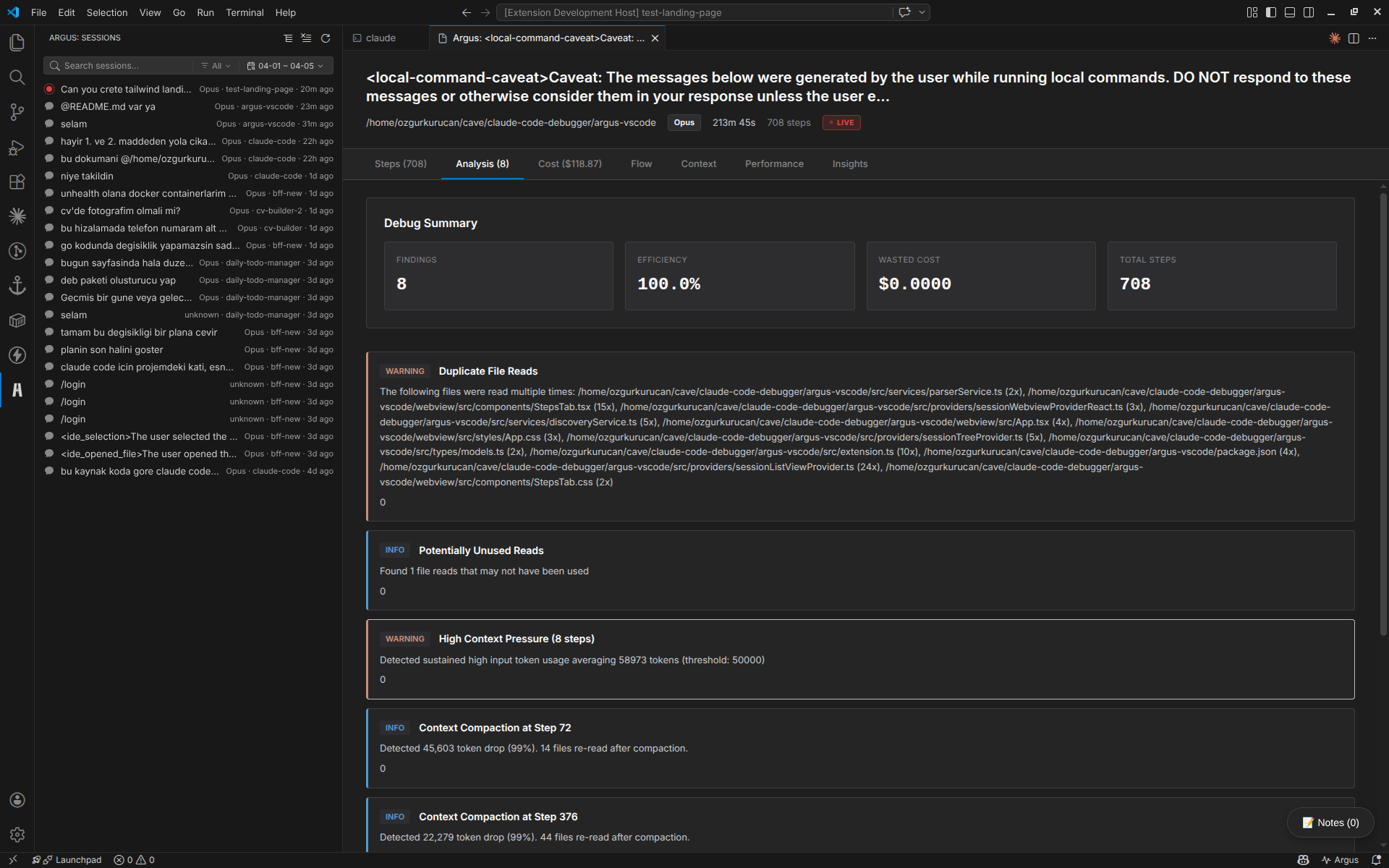
Analysis Tab
Intelligent detection of duplicate reads, retry loops, and optimization opportunities
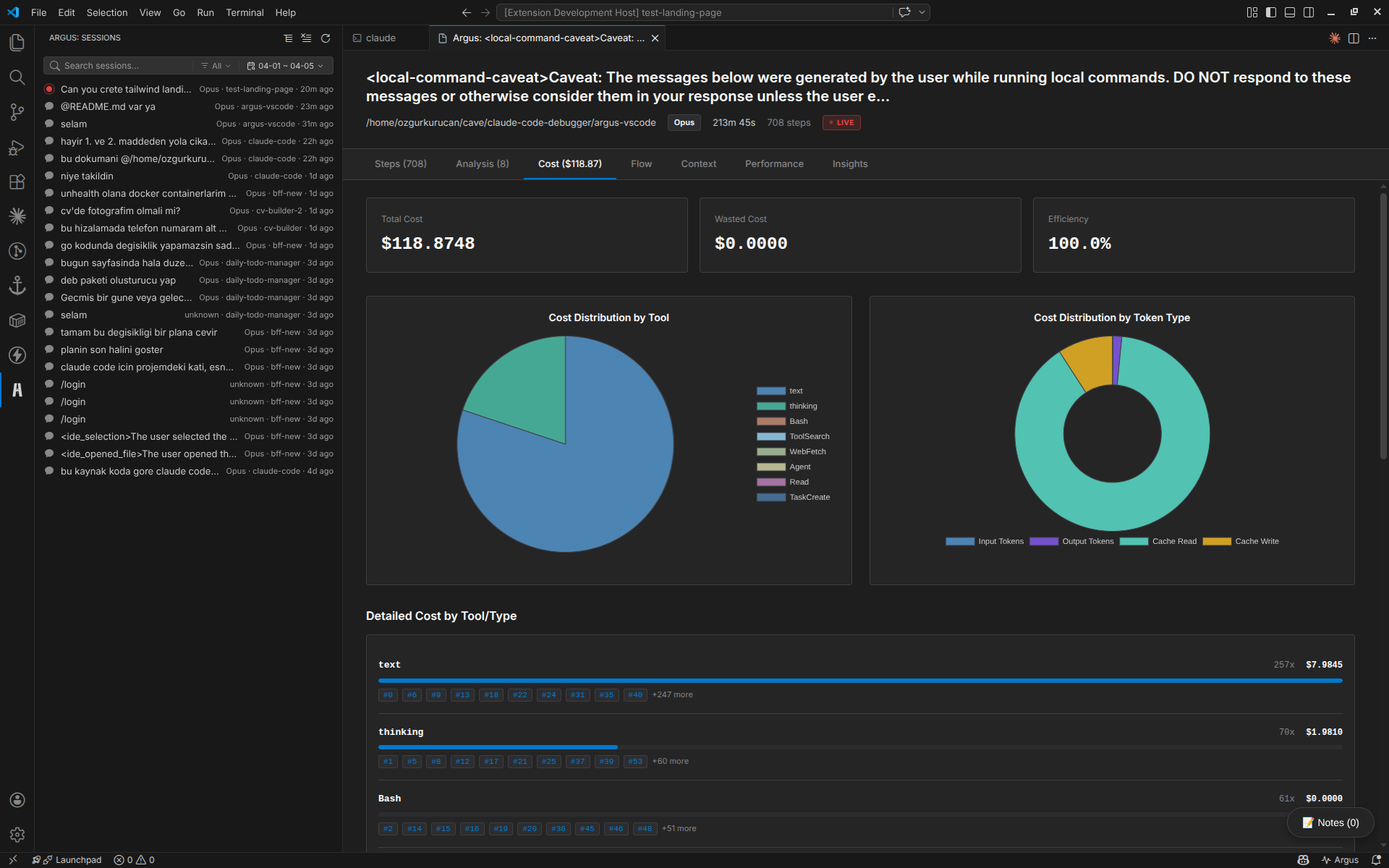
Cost Tab
Detailed breakdown of token usage and API costs per step with interactive charts
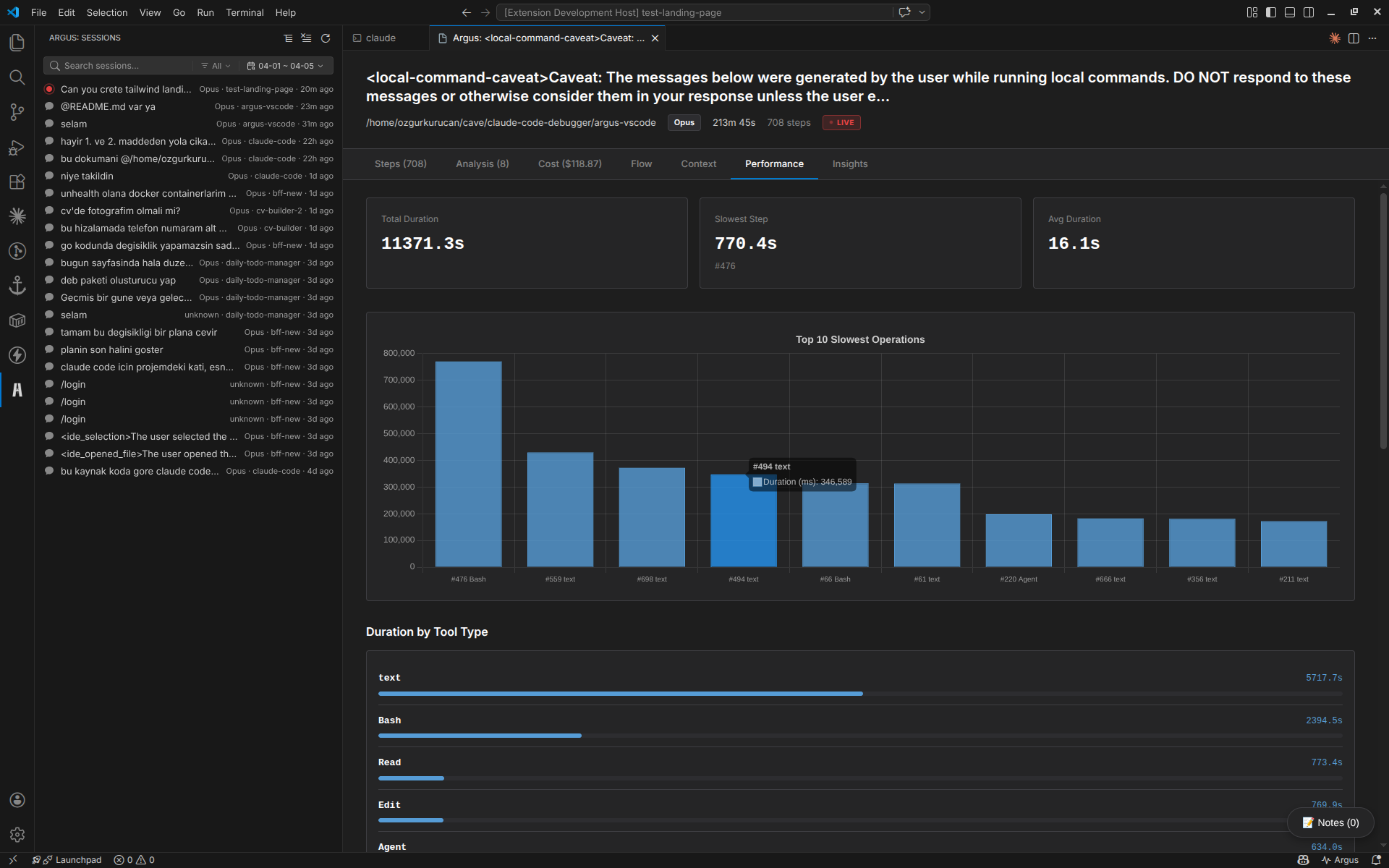
Performance Tab
Session efficiency scores, wasted cost analysis, and performance metrics
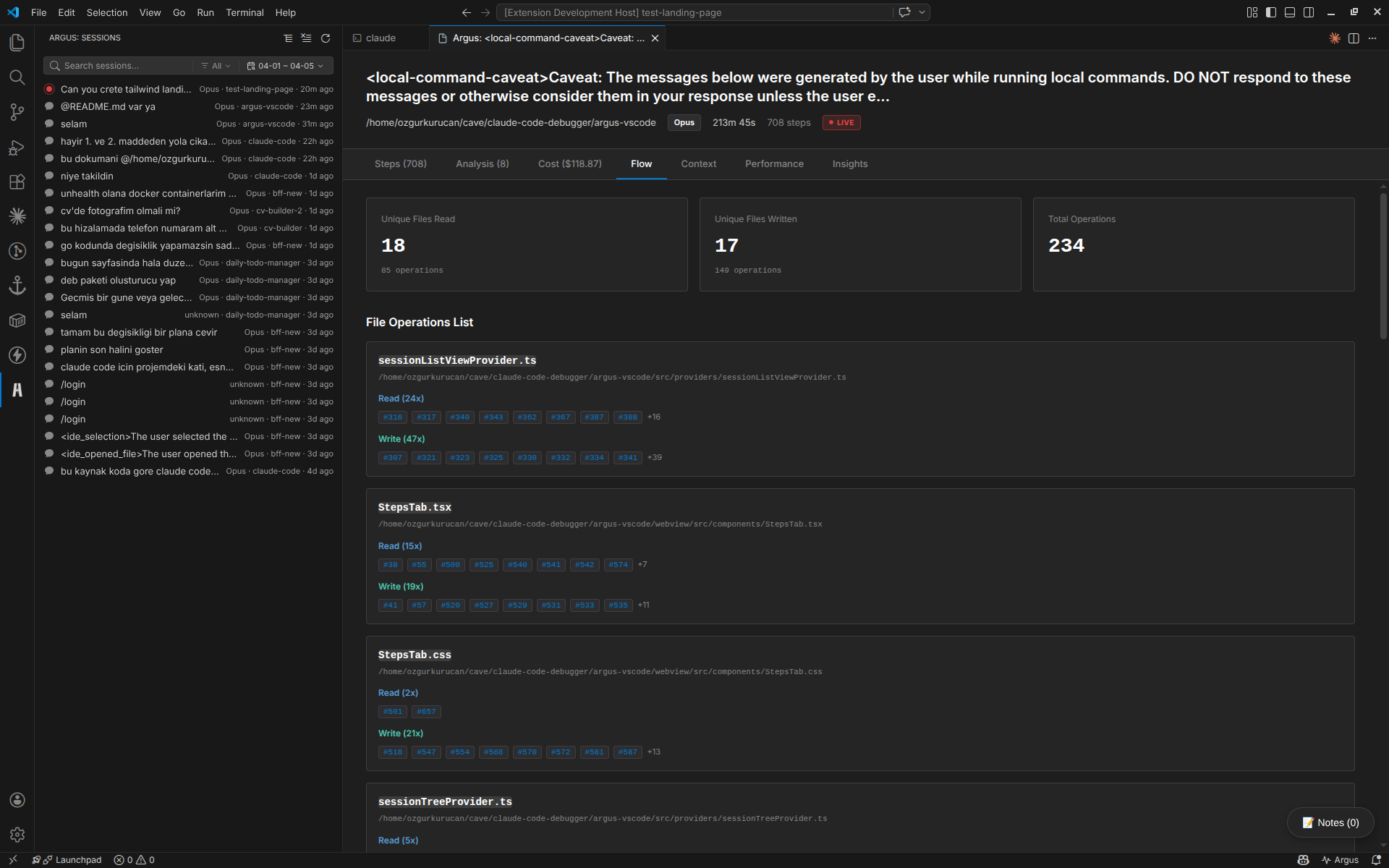
Flow Tab
Interactive dependency graph showing file operations and step relationships
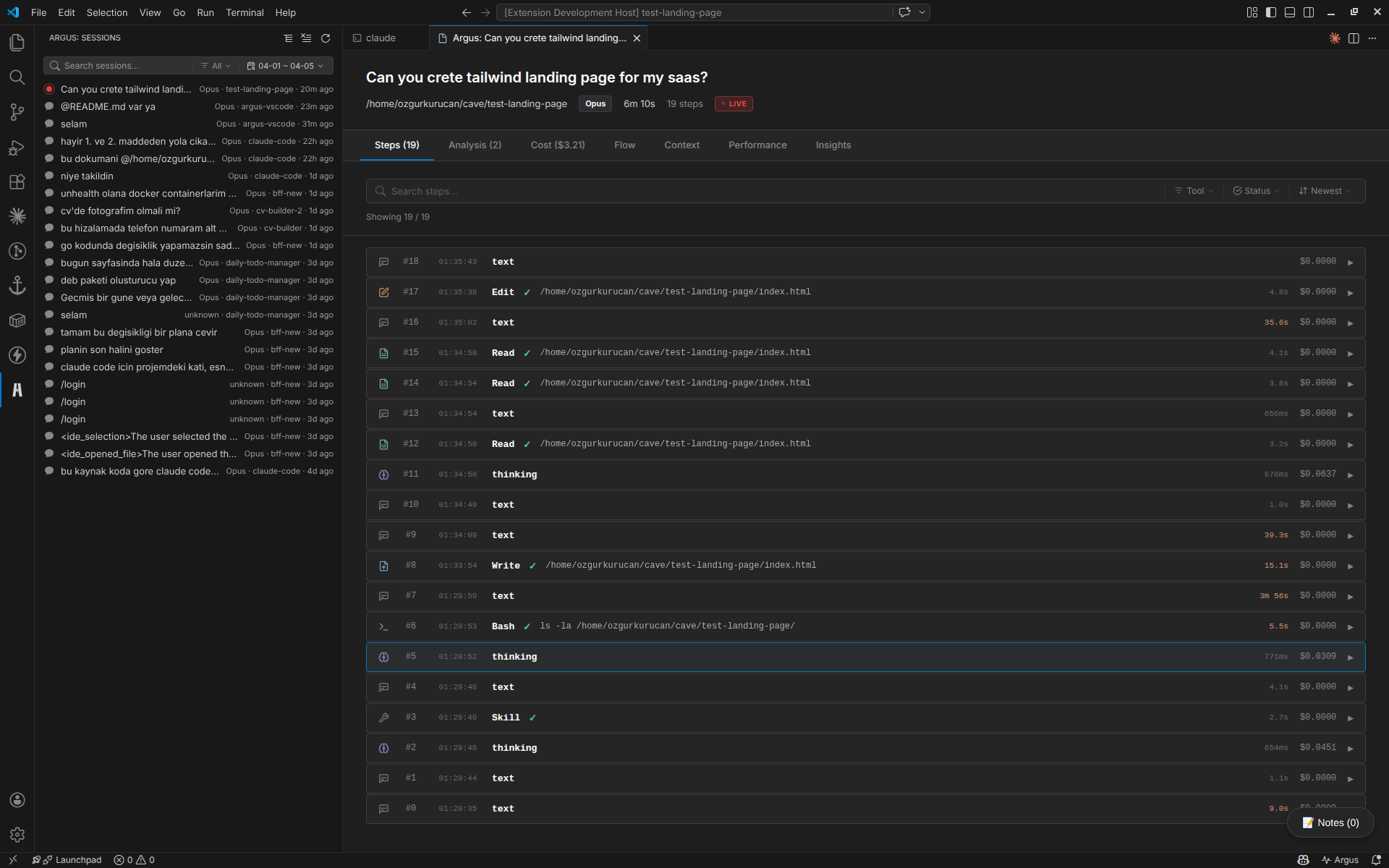
Steps Tab
Step-by-step execution log with detailed tool call inspection and timing
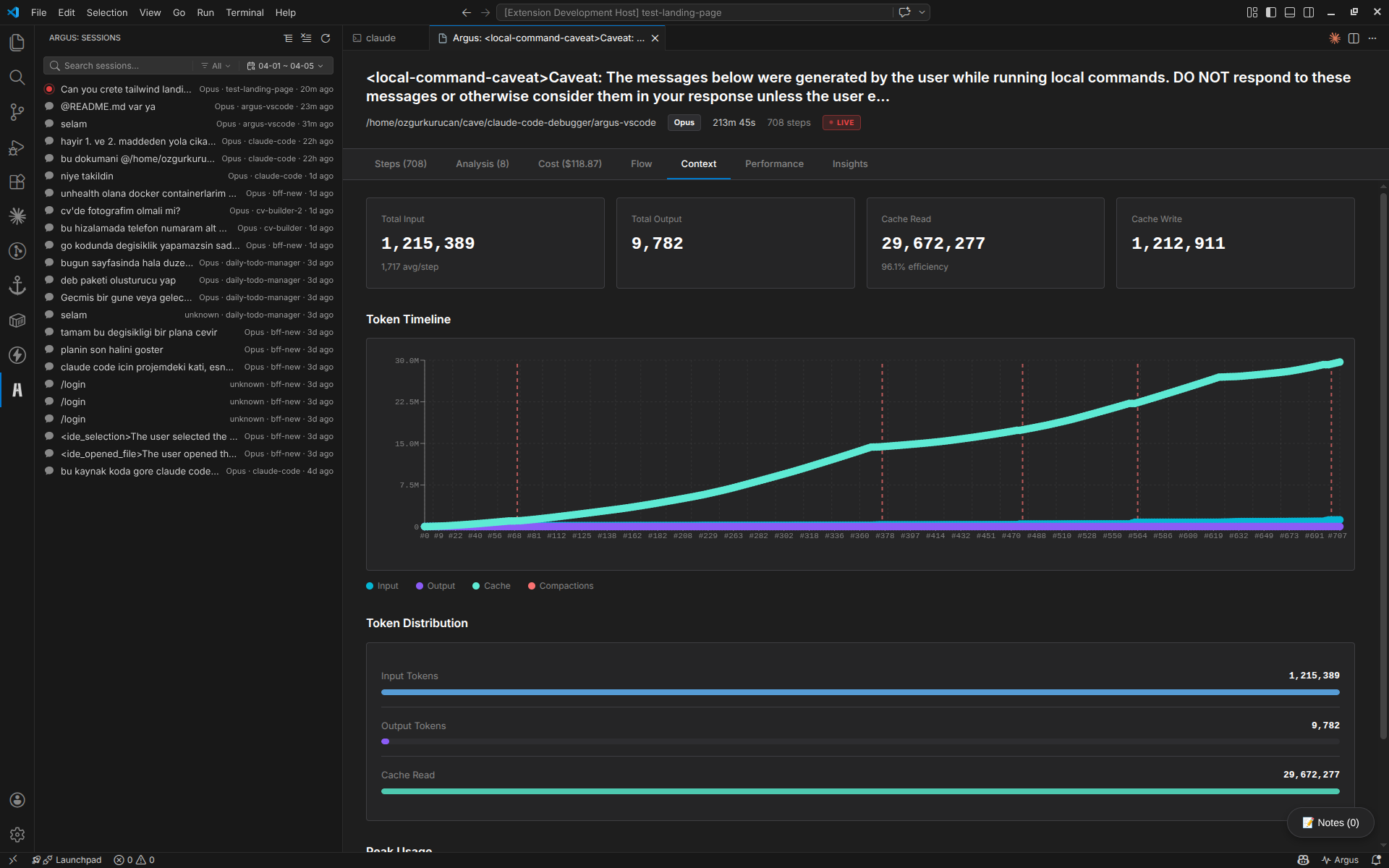
Context Tab
Token usage tracking, cache performance, and context window utilization
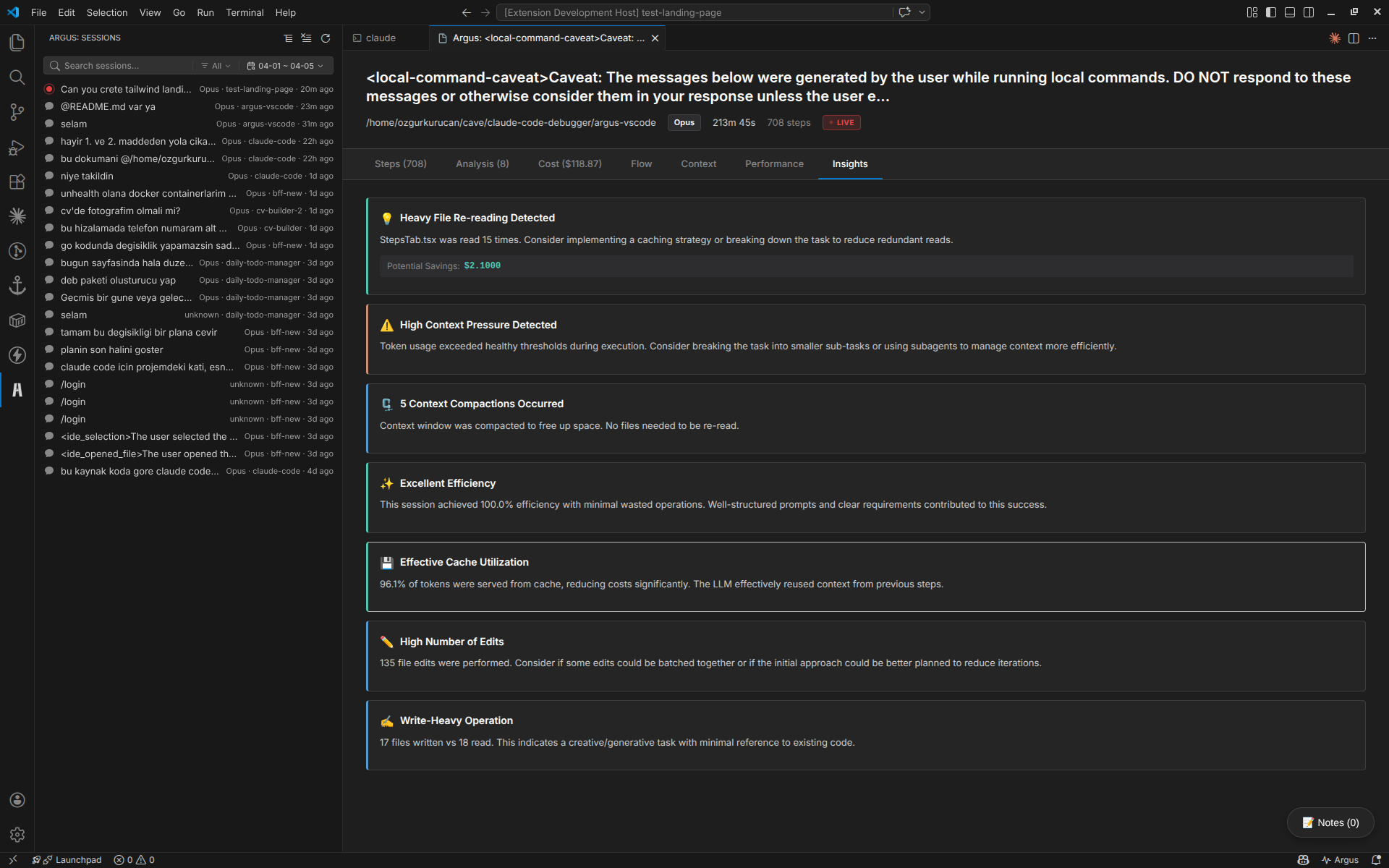
Insights Tab
AI-powered recommendations, pattern recognition, and optimization suggestions
📦 Installation
Option 1: From VSIX (Recommended)
# Download the latest .vsix file from releases
code --install-extension argus-0.1.0.vsix
Option 2: From Source
# Clone the repository
git clone https://github.com/yessGlory17/argus.git
cd argus-vscode

# Install dependencies
npm install

# Compile TypeScript
npm run compile

# Build webview
npm run build:webview

# Package extension
npx vsce package

# Install the packaged extension
code --install-extension argus-0.1.0.vsix
🛠️ Development
Setting Up Development Environment
# Clone and install
git clone https://github.com/yessGlory17/argus.git
cd argus-vscode
npm install
Running in Development Mode
# Terminal 1: Watch TypeScript changes
npm run watch

# Terminal 2: Watch webview changes
npm run dev:webview
Then press F5 in VS Code to launch the Extension Development Host.
Building
# Compile TypeScript
npm run compile

# Build production webview
npm run build:webview

# Run linter
npm run lint

# Package extension
npx vsce package
Contributing
Contributions are welcome! Please:
- 🍴 Fork the repository
- 🌿 Create a feature branch (
git checkout -b feature/amazing-feature) - ✏️ Make your changes
- ✅ Add tests if applicable
- 📝 Commit your changes (
git commit -m 'Add amazing feature') - 🚀 Push to the branch (
git push origin feature/amazing-feature) - 🎉 Open a Pull Request
🚀 Usage
Quick Start
1️⃣Open VS CodeWith the Argus extension installed |
2️⃣Find Argus IconLook for in the Activity Bar (left sidebar) |
3️⃣Explore SessionsSessions appear automatically - just click to analyze! |
Commands
Access via Command Palette (Ctrl/Cmd + Shift + P):
Argus: Refresh Sessions- Manually refresh the session listArgus: Open Session Detail- View specific session analysis
Configuration
Customize Argus in VS Code Settings:
{
  "argus.scanDepth": 5,        // Directory depth for scanning (default: 5)
  "argus.language": "en"       // UI language: "en" or "tr"
}
🏗️ Architecture
Technology Stack
🔧 Backend (Extension Host)
|
🎨 Frontend (Webview)
|





Project Structure
argus-vscode/
├── src/                        # Extension source code
│   ├── extension.ts           # Main entry point
│   ├── types/                 # TypeScript definitions
│   │   ├── models.ts          # Core data models
│   │   └── parser.ts          # JSONL parsing types
│   ├── services/              # Business logic layer
│   │   ├── discoveryService.ts    # Session discovery & scanning
│   │   ├── parserService.ts       # JSONL parser
│   │   └── analyzerService.ts     # Analysis engine with rules
│   └── providers/             # VS Code API providers
│       ├── sessionTreeProvider.ts      # Tree view in sidebar
│       └── sessionWebviewProvider.ts   # React webview host
│
├── webview/                   # React UI
│   ├── src/
│   │   ├── main.tsx          # React entry point
│   │   ├── components/       # UI components
│   │   │   ├── AnalysisTab.tsx
│   │   │   ├── CostTab.tsx
│   │   │   ├── PerformanceTab.tsx
│   │   │   ├── FlowTab.tsx
│   │   │   ├── ContextTab.tsx
│   │   │   ├── StepsTab.tsx
│   │   │   ├── InsightsTab.tsx
│   │   │   ├── DependencyGraph.tsx
│   │   │   ├── LiveMonitor.tsx
│   │   │   ├── SessionNotes.tsx
│   │   │   └── GlobalSearch.tsx
│   │   └── types/            # Frontend types
│   └── index.html            # Webview template
│
├── package.json              # Extension manifest
├── tsconfig.json            # TypeScript config
└── vite.config.js          # Vite bundler config
Analysis Engine
Argus uses a rule-based analysis system:
interface AnalysisRule {
  name: string;
  analyze(steps: Step[]): Finding[];
}

// Built-in Rules:
- DuplicateReadRule       // Detects duplicate file reads
- UnusedReadRule          // Finds unused tool outputs
- RetryLoopRule           // Identifies retry patterns
- FailedToolRule          // Tracks failures
- ContextPressureRule     // Memory pressure detection
- CompactionDetectedRule  // Context compression events
📊 Project Stats
5,649Lines of Code |
25+TypeScript Files |
12+React Components |
6Analysis Rules |
8+Visualization Types |
2Languages (EN/TR) |
12Dependencies |
10Dev Dependencies |
Key Capabilities
- ✅ JSONL Parsing: High-performance streaming parser for large session files
- ✅ Cost Calculation: Accurate token-based cost estimation
- ✅ Dependency Tracking: File operation dependency graph generation
- ✅ Context Metrics: Cache hit ratio and token utilization analysis
- ✅ Real-time Updates: Live session monitoring as Claude Code runs
- ✅ Multi-session Management: Handle dozens of sessions simultaneously
- ✅ Export Capabilities: Save analysis results for sharing
- ✅ Search & Filter: Quick navigation across large sessions
🎨 Design Philosophy
Argus follows the "Ocular Systems" philosophy:
"See everything, understand everything, optimize everything"
- Visibility: Make the invisible visible
- 🎯 Precision: Accurate, actionable insights
- ⚡ Performance: Fast, responsive, non-intrusive
- 🎨 Beauty: Delightful UI that makes analysis enjoyable
- 🔬 Depth: Surface-level overview to deep technical details
🔄 Ported from Wails Desktop App
Argus VS Code extension is a complete rewrite of the original Argus desktop application:
Migration Journey
| Original (Wails) | VS Code Extension |
|---|---|
| Go backend | TypeScript backend |
| React SPA | React Webview |
| Wails bridge | VS Code Extension API |
| Standalone desktop app | Integrated VS Code experience |
| Manual session import | Automatic discovery |
Why VS Code?
- ✅ Native Integration: Works where developers already are
- ✅ Better UX: No app switching, seamless workflow
- ✅ Auto Discovery: No manual session loading
- ✅ Theming: Inherits VS Code theme automatically
- ✅ Commands: Accessible via Command Palette
📚 Use Cases
👨💻 For Developers
|
👥 For Teams
|
🔬 For Researchers
|
📄 License
MIT License - see LICENSE file for details
👁️ Built with Argus, Analyzed by Argus
Made with ❤️ by developers, for developers



⭐ Star us on GitHub if you find Argus useful!
Yorumlar (0)
Yorum birakmak icin giris yap.
Yorum birakSonuc bulunamadi