bosun
Health Pass
- License — License: MIT
- Description — Repository has a description
- Active repo — Last push 0 days ago
- Community trust — 38 GitHub stars
Code Warn
- network request — Outbound network request in .github/workflows/release.yml
Permissions Pass
- Permissions — No dangerous permissions requested
No AI report is available for this listing yet.
Tmux-native orchestrator for AI agent sessions. Rust + ratatui.
Bosun
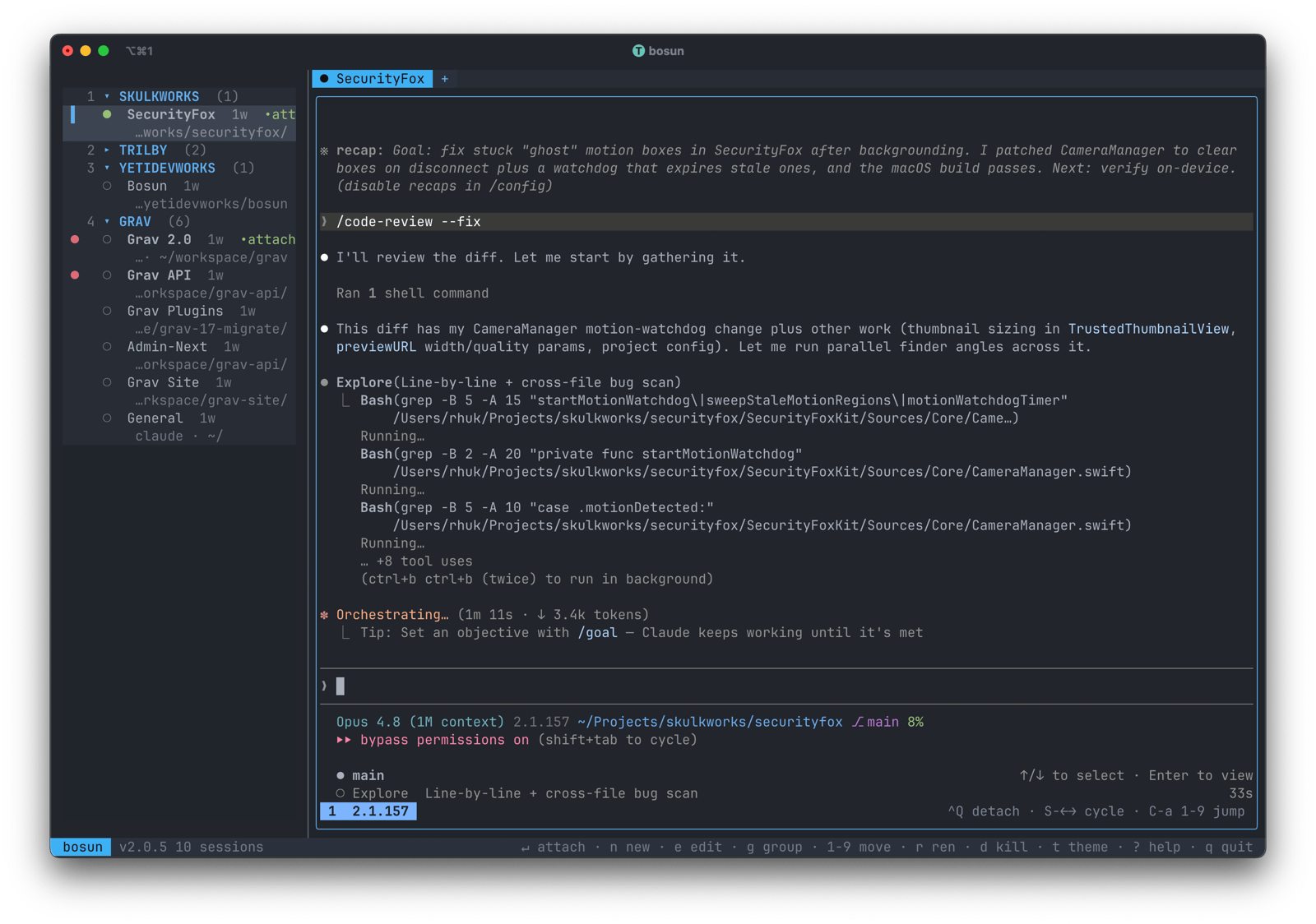
Tmux-native orchestrator for AI agent sessions. Written in Rust with
ratatui.
Bosun lists, previews, creates, and manages tmux sessions running AI coding
agents (Claude Code, Codex, or a plain shell) from a single terminal UI. It
was built as a from-scratch reimagining of
agent-deck — same workflow, new
architecture, designed around a few rules that keep it simple and robust:
- Tmux is the source of truth. Bosun receives push notifications from
tmux via control mode (tmux -C). No shared database state to race on;
multi-instance coexistence is trivial because every bosun reads the same
tmux server. - Actor pattern, single-writer app state. One task owns tmux I/O, one
task ownsAppState. No nested mutexes, noArc<Mutex<...>>scattered
across the render path. - Dedicated tmux socket. Bosun runs its sessions on
tmux -L bosunby
default so it never touches your other tmux state, and so Claude Code's
macOS Keychain auth lineage flows through bosun's process tree correctly. - Per-session status bar. Bosun writes its status line with
set-option -t <session>, never globally, so non-bosun sessions on the
same server are untouched. - Opencode aesthetic. Borderless, subtly shaded panels, bold accents,
modal dialogs with left accent bars and drop shadow. Fifteen built-in
themes — ten dark (opencode, tokyonight, dracula, catppuccin-mocha,
one-dark-pro, ayu-mirage, nord, gruvbox-dark, rose-pine, github-dark)
and five light (github-light, one-light, solarized-light, ayu-light,
quiet-light) — switched live witht.
What's new in 2.0
The 2.0 branch turns bosun from a session picker into a working surface.
The preview pane is no longer a snapshot — it's a real embedded terminal
you can click into and drive without leaving bosun.
- Embedded terminal preview. The selected session renders live from a
real PTY (portable-pty+vt100+tui-term), parser-primed on
switch so there's no scrollback replay animation. No more 1 fps
snapshot polling for the focused row. - Single-window focus mode (
sto toggle). Press Enter on a session
and it opens inside the preview pane instead of going full-screen
tmux. The sidebar stays visible the whole time.Ctrl+Qexits focus,
same chord as the classic detach. A colored focus border marks
whichever pane has the keyboard. - Two-way mouse navigation. Click a session row to jump to it and
exit focus; click inside the embed to enter focus on it. Drag the
divider to resize. Scroll wheel scrolls the sidebar. - Live per-session status. The
●◐○✕glyphs in the sidebar now
update at ~5 Hz across every managed session (not just the focused
one), driven off the fast preview tick. Claude / Codex detectors
recognize the prompt-box UI directly instead of scanning the whole
capture for fragile substrings, which kills the "stale Thinking…
pegs the glyph to Running" failure mode. - Sections. Group sessions into named, optional, collapsible buckets
(gto create, Tab to collapse). Persisted inconfig.toml. Banner
fonts cyclable per-section (fon a header) for visual distinction
in the preview pane. - Editor key (
e). With a session highlighted, presseto open
the session's path in your configured editor (zed,code,subl,nvim, etc.). Set it once withbosun editor <cmd>. - Modify session (
m). Open the new-session modal pre-filled
from the highlighted session's stored spec — change the name,
path, agent, or flags (e.g. add--resumeafter the fact).
Save-only: the running agent keeps its current flags; the nextR(restart) picks up the new spec. - Tabs inside a sidebar entry. Each sidebar row is now a
container that can hold multiple tmux sessions ("tabs"),
surfaced as a browser-style strip above the embed with a+
button on the right. Single-tab containers behave identically
to a session row.Ctrl+T(or click+) opens a slimmed-down
new-session modal with the path locked to the container; the
new session joins the container and survives a tmux server
restart via the@bosun_container_iduser option. Tab status
glyphs render next to each pill so background tabs surface
Running / Waiting state without focus; the sidebar row picks
up a small accent dot when any background tab is busy.Shift+→ / Shift+←cycle tabs,Shift+↓ / Shift+↑cycle
sessions — same chord in both sidebar and focused modes.Shift+Dkills a whole container at once; plaindkills the
active tab (drops the container when the last tab goes). - Sidebar-order session cycle. Shift+↓ / Shift+↑ walk the
next / previous live session in sidebar order (stable, not
MRU-shuffled), in both sidebar and focused modes. Sidebar
selection follows the embed switch automatically. - Input correctness for agents in the embed. DECCKM cursor-key
application mode, bracketed paste forwarding (drag-drop an image →
Claude sees[Image #N]), SGR 1006 mouse forwarding, modifyOtherKeys
for Shift+Enter / Ctrl+Backspace / etc. - Self-update.
bosun updateswaps the binary in place from the
latest GitHub release;bosun update --checkjust reports what would
happen.bosun release-notesopens the changelog for the running
version.
Features
- Live session list with live status detection
(●running ·◐waiting ·○idle ·✕error) refreshed across
every managed session at the fast-preview cadence - Embedded live preview of the selected session — real PTY in the
right pane, focusable in place via single-window mode - Tabs (multi-session containers) per sidebar row with a browser-
style tab strip,Ctrl+T/+to add,Shift+Dto nuke the
whole container, per-tab status glyphs, and survival across tmux
restart via@bosun_container_id - Sections for organizing sessions, collapsible, persisted in
config.toml - Create new bosun-managed sessions from a modal form: name, path, agent
choice, and agent-specific options (Claude--continue/--resume/
skip-permissions, Codex--yolo) - Optional git worktree sessions — create a session in a fresh worktree
on a new branch, then on kill choose to merge, remove, or keep it - Filesystem tab-completion in the path field (shell-style LCP matching
against live directory contents) - Recent sessions picker (
Ctrl+Rfrom the new-session modal) backed by
SQLite, with live substring filter and delete-from-list - Quick-switch (
/) — type-ahead session picker against name / agent /
path - Session lifecycle: attach (
Enter), rename (r), restart (R),
modify (m), kill (d), open in editor (e) - In-progress feedback while a session operation is in flight — the
affected row shows a⟳marker and akilling…/restarting…
label; a create (which has no row yet) shows⟳ creating <name>…in
the status bar. Clears the moment the operation lands - Fifteen built-in themes (10 dark + 5 light) plus user themes from
$XDG_CONFIG_HOME/bosun/themes/*.toml; live preview picker ont - Two-way mouse navigation: click rows to jump, click the embed to focus,
drag the divider to resize - Config file at
$XDG_CONFIG_HOME/bosun/config.tomlwiththeme,session_prefix,tmux_socket,preview_tick_ms,single_window,editor,banner_fontknobs (env vars still override) - One-key detach:
Ctrl+Qinside any attach (full-screen or
single-window focus) returns you to bosun without touching your tmux
prefix or leaving stray bindings behind - Self-update via
bosun update; release notes viabosun release-notes
Requirements
- Rust 1.80 or newer
- tmux 3.x (tested against 3.6)
- macOS or Linux (Windows is not supported)
Installation
Homebrew (recommended)
brew install yetidevworks/bosun/bosun
From crates.io
cargo install bosun-tmux
(The crate is published as bosun-tmux because bosun is reserved on
crates.io; the installed binary is still bosun.)
From source
git clone https://github.com/yetidevworks/bosun
cd bosun
cargo install --path .
Pre-built binaries
Download from GitHub Releases.
CLI subcommands
Bosun runs the TUI when invoked with no arguments. The handful of
subcommands all run synchronously and exit before any TUI / tmux
machinery starts.
| Command | Action |
|---|---|
bosun |
Launch the TUI |
bosun update |
Download and install the latest release in place |
bosun update --check |
Report whether an update is available; don't install |
bosun release-notes |
Open the changelog entry for the running version |
bosun editor |
Print the currently configured editor |
bosun editor <cmd> |
Set the editor used by the e key (e.g. bosun editor zed) |
bosun editor "" |
Clear the configured editor |
bosun help / --help / -h |
Print usage |
bosun --version / -V |
Print version |
Key bindings
The full list is available at any time inside bosun with ? or h.
Main list — navigation
| Key | Action |
|---|---|
↑ / ↓ / k / j |
Move selection |
Enter / → |
Attach (or focus, in single-window mode) |
Tab |
Collapse / expand section (on a section header) |
/ |
Quick-switch — type-ahead session picker |
| Mouse wheel | Scroll session list |
| Click row | Jump selection (and exit focus if currently inside the embed) |
| Drag divider | Resize list / preview split |
Main list — sessions
| Key | Action |
|---|---|
n |
New session |
r |
Rename selected session (on a header: rename the section) |
R |
Restart — kill + recreate with the same spec |
m |
Modify session (name, path, agent, flags) — applies on next R |
d |
Kill active tab (on a header: delete the section; killing the last tab removes the container) |
Shift+D |
Kill the whole container — every tab at once |
e |
Open the session's path in your configured editor |
Ctrl+R |
Force immediate refresh |
Killing a session that lives in a git worktree opens a dialog with three
choices: m merges the branch and removes the worktree, x removes the
worktree but keeps the branch, and Enter (keep) leaves the worktree in
place. A dirty (uncommitted) worktree is never removed.
Main list — tabs
| Key | Action |
|---|---|
Ctrl+T |
Add a tab to the selected container (opens add-tab modal with path locked) |
] / [ |
Cycle next / previous tab within the current container |
Shift+→ / Shift+← |
Same as ] / [ — cycle tab in container |
| Click tab | Switch active tab |
Click + |
Open the add-tab modal |
Main list — navigate
| Key | Action |
|---|---|
Shift+↓ / Shift+↑ |
Cycle next / previous session in sidebar order (skips section headers and dead rows) |
Main list — organize
| Key | Action |
|---|---|
Ctrl+Shift+↑ / Ctrl+Shift+↓ / K / J |
Reorder within section (or move section block) |
Ctrl+Shift+→ |
Move session to the next section |
Ctrl+Shift+← |
Move session to the previous section |
1 … 9 |
Move session to section N |
0 |
Move session to the ungrouped bucket |
g |
New section |
f |
Cycle banner font (on a header: override the section's font) |
Main list — settings
| Key | Action |
|---|---|
s |
Toggle single-window mode (preview pane becomes the workspace) |
t |
Theme picker (↑/↓ live-preview, Enter applies + persists) |
? / h |
Show the help cheat sheet |
q / Ctrl+C |
Quit |
Inside an attached or focused session
| Key | Action |
|---|---|
Ctrl+Q |
Detach back to bosun (same chord in classic full-screen attach and single-window focus) |
Shift+→ / Shift+← |
Cycle next / previous tab within the current container |
Shift+↓ / Shift+↑ |
Cycle next / previous live session in sidebar order. Sidebar selection follows automatically. |
| Click sidebar row | Exit focus and jump to that row |
Preview pane (mouse)
| Action | Effect |
|---|---|
| Click inside the preview while unfocused | Enter focus on the selected session |
| Click on the divider | Start a divider drag |
New-session modal
| Key | Action |
|---|---|
Tab / Shift+Tab |
Next / previous field |
Ctrl+R |
Open recents picker and pre-fill from a past session |
Tab (in path field) |
Filesystem completion — 1 match commits, N matches extend to LCP |
↑ / ↓ (in path field) |
Navigate filesystem dropdown |
Esc (in path field) |
Dismiss dropdown so Tab advances |
Space (on a checkbox) |
Toggle option |
Enter |
Create session |
Esc |
Cancel |
The modal has a Create in git worktree checkbox (Space toggles it).
When on, it reveals an editable branch field (prefilled from the session
name, no / or spaces) and the session is created in a fresh worktree on
that branch instead of the plain path.
Recents picker
| Key | Action |
|---|---|
↑ / ↓ |
Navigate |
| Type | Filter by name / agent / path |
Enter |
Pre-fill the new-session form from the highlighted entry |
Ctrl+D |
Delete the highlighted recent entry |
Esc |
Close |
Quick-switch (/)
| Key | Action |
|---|---|
↑ / ↓ |
Navigate matches |
| Type | Filter |
Enter |
Attach to the highlighted match |
Esc |
Cancel |
Theme picker
| Key | Action |
|---|---|
↑ / ↓ / k / j |
Live-preview next / previous theme |
Home / End |
Jump to first / last theme |
Enter |
Apply + persist to config.toml |
Esc |
Revert |
Help dialog
| Key | Action |
|---|---|
↑ / ↓ / k / j |
Scroll one line |
PgUp / PgDn |
Scroll one page |
Home / End |
Top / bottom |
Esc / Enter / ? / h / q |
Close |
Single-window mode
By default Enter on a session does a full-screen tmux attach — the
sidebar disappears, you drive the session, Ctrl+Q brings the sidebar
back. Familiar from earlier versions and from tmux attach itself.
Single-window mode (toggle with s, persisted to config.toml assingle_window = true) keeps the sidebar visible. Enter switches the
embedded preview into a writable, focused mode on the selected session
and routes your keystrokes to its PTY. Ctrl+Q exits focus back to the
sidebar without losing the view. Click the embed to focus in, click the
sidebar to focus out — works in either direction.
The colored focus border around whichever pane has the keyboard tells
you where typing will land. When you exit focus, the border moves to
the sidebar.
Modifying a session
Press m on a live session to open the new-session modal pre-filled
from its stored spec — name, path, agent, agent flags. Edit any
field, hit Enter to save. Bosun rewrites the per-session @bosun_*
tmux user options so the change persists; the recents picker also
reflects the new spec on the next open.
The save is non-destructive: the running agent process keeps its
existing flags. The next time you press R (restart), the new spec
is what gets recreated — same code path Restart already uses. So the
common "I forgot to launch Claude with --resume" recovery becomesm → cycle the session-mode field to Resume → Enter → R.
Modifying works the same whether you're focused in the embed or
sitting on the row from the sidebar.
Status detection
Bosun classifies each managed session as Running, Waiting, Idle, or
Error and renders the glyph in the sidebar. Detection runs on the fast
preview tick (default 200 ms) for every managed session, not just the
focused one, so a multi-agent dashboard reflects state in near
real-time.
Detectors are stacked by priority (Claude > Codex > generic). Each
looks at the bottom region of the visible pane capture — Claude's
prompt box, Codex's working line — rather than substring-scanning the
whole screen. Older "Thinking…" lines that scrolled past the prompt no
longer pin the glyph to Running.
Transitions are smoothed:
- → Running or → Waiting: instant. High-signal events; the user
wants to see "agent woke up" or "agent wants my input" with no delay. - → Idle: requires two consecutive matching polls. Filters the brief
quiet windows between agent bursts so the Running glyph doesn't
flicker off mid-response.
Mouse interaction
Bosun captures the mouse in the outer terminal (SGR 1006) and routes
events itself. The big interactions:
- Click a session row → jump selection to it. If you were focused
in the embed, the click also exits focus. - Click inside the preview while unfocused → enter focus on the
selected session. The triggering click isn't passed through into the
embed (macOS click-to-focus convention); subsequent clicks under
Focused mode are. - Drag the divider → resize the list / preview split. The position
is persisted toconfig.tomlasdivider_x. - Scroll wheel over the sidebar → scroll the list.
- Inside a focused embed → mouse events are forwarded to the inner
app via SGR 1006 (when the inner app has mouse tracking enabled),
except when you're mid-drag on the divider — that drag completes
even when the cursor crosses into the preview pane.
Themes
Fifteen themes ship built in (ten dark, five light). Press t on the
main list to open the picker — arrow keys live-preview the whole UI
including the modal itself, Enter applies and writes the choice toconfig.toml, Esc reverts.
Dark:
opencode(default)tokyonightdraculacatppuccin-mochaone-dark-proayu-miragenordgruvbox-darkrose-pinegithub-dark
Light:
github-lightone-lightsolarized-lightayu-lightquiet-light
Custom themes
Drop a <name>.toml into $XDG_CONFIG_HOME/bosun/themes/ (on macOS:~/Library/Application Support/dev.yetidevworks.bosun/themes/) and it
shows up in the picker alongside the built-ins. User themes override
built-ins of the same name. A theme is a set of hex colors for 13
semantic slots:
name = "my-theme"

bg             = "#0b0d12"   # deepest background
panel          = "#11141b"   # session list row bg
panel_alt      = "#131722"   # status bar + modal bg
selection_bg   = "#1e2433"   # selected row / focused field
text           = "#e6e9ef"
text_muted     = "#7c8495"
accent         = "#7c5cff"   # primary accent, selection marker, modal bars, focus border
shadow         = "#05070b"   # modal drop shadow
dim_fg         = "#3c4254"   # dim-background foreground behind modals
status_running = "#62d98c"
status_waiting = "#f4c169"
status_idle    = "#7c8495"
status_error   = "#ff5d6b"
See themes/opencode.toml in the repo for the authoritative reference.
Configuration
Bosun reads (in order of precedence):
- Built-in defaults
$XDG_CONFIG_HOME/bosun/config.toml- Environment variables
Example config.toml:
theme             = "tokyonight"
session_prefix    = "bosun-"     # bosun only manages sessions with this prefix
worktree_location = "subdir"     # where "create in worktree" puts new worktrees: "subdir" (<repo>/.worktrees/<branch>) or "sibling" (<repo>-<branch>)
tmux_socket       = "bosun"      # dedicated tmux -L socket; "default" uses your shared socket
divider_x        = 50           # saved automatically when you drag the list/preview divider
preview_tick_ms  = 200          # fast-preview / live-status cadence; 0 disables the fast tick
single_window    = true         # `s` key persists this; Enter focuses in-place instead of full-screen attach
embed_enabled    = true         # set false to fall back to the polled-snapshot preview
show_group_in_title = false      # prefix grouped sessions as "group/session" in tab pills and terminal title
editor           = "zed"        # set via `bosun editor <cmd>`; used by the `e` key
banner_font      = "newsx"      # section banner font; cycled with `f` on a header
Sections, per-section font overrides, sidebar membership, session
history, and recent-sessions metadata are also persisted under[sidebar], [session_history], etc. — bosun writes these
automatically, you don't need to hand-edit them.
Environment overrides:
| Var | Equivalent |
|---|---|
BOSUN_THEME |
theme |
BOSUN_PREFIX |
session_prefix (empty string = show all sessions) |
BOSUN_TMUX_SOCKET |
tmux_socket (empty or default = shared socket) |
BOSUN_PREVIEW_TICK_MS |
preview_tick_ms |
BOSUN_SINGLE_WINDOW |
single_window (1 / true to enable) |
BOSUN_EMBED |
embed_enabled (0 / false to disable) |
BOSUN_SHOW_GROUP_IN_TITLE |
show_group_in_title (1 / true / yes / on to enable) |
BOSUN_LOG |
Tracing filter, e.g. BOSUN_LOG=info |
How Ctrl+Q detach works
For a full-screen tmux attach, bosun installs a temporary root-table
binding just before handing the terminal to tmux:
tmux bind-key -T root C-q detach-client
tmux attach-session -t <name>    # blocks until you detach
tmux unbind-key -T root C-q      # on return
Per-attach install/uninstall (no refcount) keeps the return path under
50 ms. A panic hook ensures the binding is cleaned up even if bosun
dies unexpectedly — that path is exercised by a dedicated integration
test.
In single-window focus mode the chord works the same way from the
user's perspective, but the routing is different: bosun never gives up
the terminal, so Ctrl+Q is intercepted in bosun's own key handler
and triggers exit_focus() directly.
Why a dedicated tmux socket
By default bosun runs on tmux -L bosun, which starts a separate tmux
server owned by the bosun process. Two reasons:
- macOS Keychain lineage. Claude Code stores its auth tokens in
the user's Keychain. macOS gates Keychain access by process tree.
Bosun's tmux server is a child of bosun, which is a child of your
login shell, so Claude sessions started inside bosun see your cached
credentials. Sessions on a random long-lived tmux server started
months ago by some other tool don't have that lineage and fail to
authenticate. - Isolation. Bosun never touches your other tmux sessions,
bindings, or status bar. If you want the opposite — bosun managing
your main tmux server — setBOSUN_TMUX_SOCKET=default.
Development
cargo run
BOSUN_LOG=info cargo run                       # tracing to stderr
cargo test                                     # unit + snapshot tests
cargo clippy --all-targets -- -D warnings
cargo fmt --check
cargo test --features tmux-it                  # integration tests that spawn a real tmux
make install                                   # release build + replace ~/.local/bin/bosun
Snapshot tests use insta. After an intentional
UI change:
cargo install cargo-insta     # once
cargo insta accept            # accept all new snapshots
Layout
src/
  main.rs                    entry point, panic hook, terminal setup, CLI dispatch
  lib.rs                     module root (re-exports for the binary + tests)
  app.rs                     AppState, central event loop, attach + focus orchestration
  config.rs                  config.toml loader + env overlay + writers
  events.rs                  Command / AppMsg types
  sidebar.rs                 sections + ungrouped membership model
  error.rs
  commands/
    update.rs                self-update via GitHub releases
    release_notes.rs         open changelog for the running version
    editor.rs                get/set the editor used by the `e` key
  store/
    mod.rs / recents.rs      SQLite-backed recents
  tmux/
    client.rs                tokio::process wrapper (all tmux I/O lives here)
    control.rs / control_client.rs   tmux -C push notifications
    parse.rs                 pure parsers for tmux CLI output
    attach.rs                Ctrl-Q keytable + panic safety
    status_bar.rs            per-session status line management
    detector/                live status detection
      mod.rs                 registry + ANSI strip helper
      claude.rs              prompt-box-aware Claude Code detector
      codex.rs               Codex CLI detector
      generic.rs             activity-age fallback
    session.rs
  actors/
    tmux_actor.rs            owns TmuxClient, fast-tick status + preview, do_refresh
    input_actor.rs           crossterm event stream -> AppMsg
  ui/
    mod.rs                   draw(frame, state, theme, embed, embed_focused)
    layout.rs                rect math + draggable divider
    theme.rs                 Theme struct + built-in loader + user dir scan
    session_list.rs          2-line rows (name + agent·path), click-to-select
    preview.rs               selected-session preview (embed when live, polled otherwise)
    embed_terminal.rs        portable-pty + vt100 + tui-term embed
    key_encode.rs            key -> bytes (DECCKM, modifyOtherKeys)
    mouse_encode.rs          mouse -> SGR 1006 bytes
    statusbar.rs
    banner.rs                TDF banner font picker
    section_preview.rs       per-section dashboard rendered when a header is selected
    modal/
      mod.rs                 modal stack + ModalResult enum
      new_session.rs / recents.rs / rename.rs / confirm.rs
      section.rs             new/rename section dialog
      quickjump.rs           `/` type-ahead picker
      theme.rs               theme picker with live preview
      help.rs                `?` keyboard cheat sheet
  util/
    hysteresis.rs            status transition smoother
    collision.rs             session-name collision helper
themes/                      15 built-in theme .toml files (embedded via include_str!)
tests/
  snapshot_session_list.rs
  integration_*.rs           real-tmux integration tests (feature = tmux-it)
License
MIT © 2026 Andy Miller
Reviews (0)
Sign in to leave a review.
Leave a reviewNo results found