Construction-Hazard-Detection
Health Pass
- License — License: AGPL-3.0
- Description — Repository has a description
- Active repo — Last push 0 days ago
- Community trust — 342 GitHub stars
Code Fail
- rm -rf — Recursive force deletion command in .github/workflows/ci.yml
- rm -rf — Recursive force deletion command in .github/workflows/python-app.yml
Permissions Pass
- Permissions — No dangerous permissions requested
No AI report is available for this listing yet.
Enhances construction site safety using YOLO for object detection, identifying hazards like workers without helmets or safety vests, and proximity to machinery or vehicles. HDBSCAN clusters safety cone coordinates to create monitored zones. Post-processing algorithms improve detection accuracy.
Construction Hazard Detection











AI-assisted construction-site safety monitoring for live cameras. The current
runtime is centred on main.py, src/stream_processor.py, local YOLO worker
processes, MediaMTX live publishing, PostgreSQL records, Redis coordination,
and FastAPI services for management, notifications, streaming metadata, and
violation records.
What It Detects
- Workers without hard hats.
- Workers without safety vests.
- Workers too close to machinery or vehicles.
- Workers inside cone-derived controlled areas.
- Machinery or vehicles too close to utility poles.
Supported label and notification languages include Traditional Chinese,
Simplified Chinese, English, French, Thai, Vietnamese, Indonesian, and
Japanese.
Hazard Detection Examples
Below are examples of real-time hazard detection by the system.
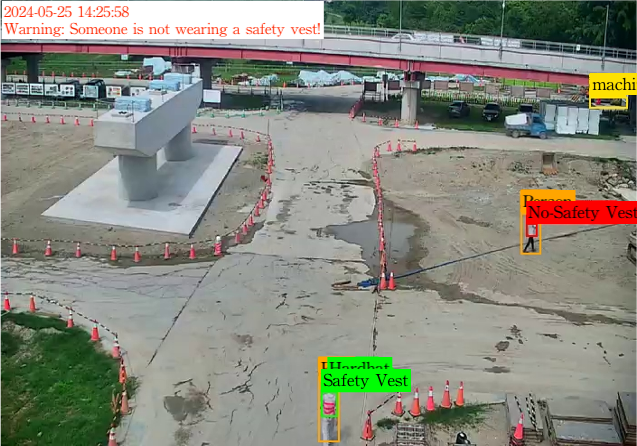
Workers without helmets or safety vests
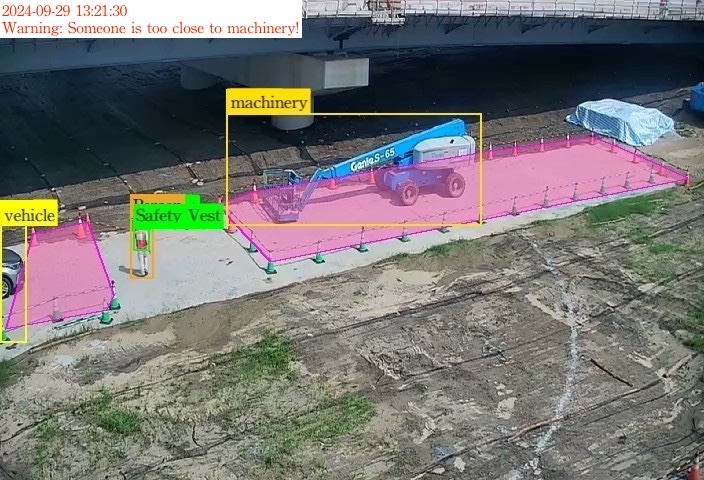
Workers near machinery or vehicles
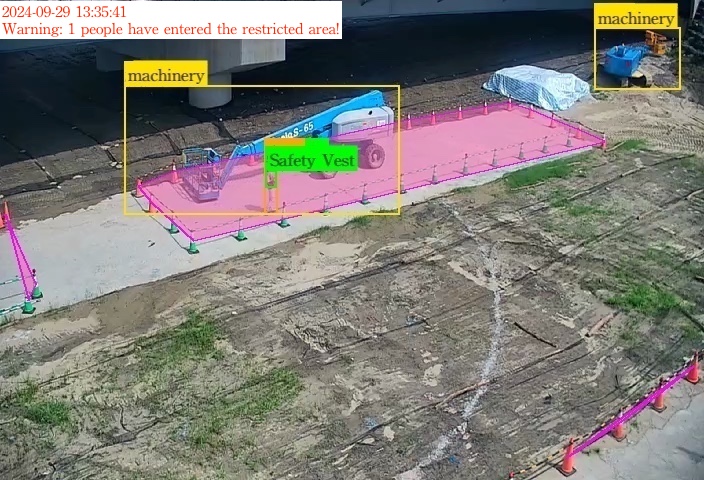
Workers in restricted areas
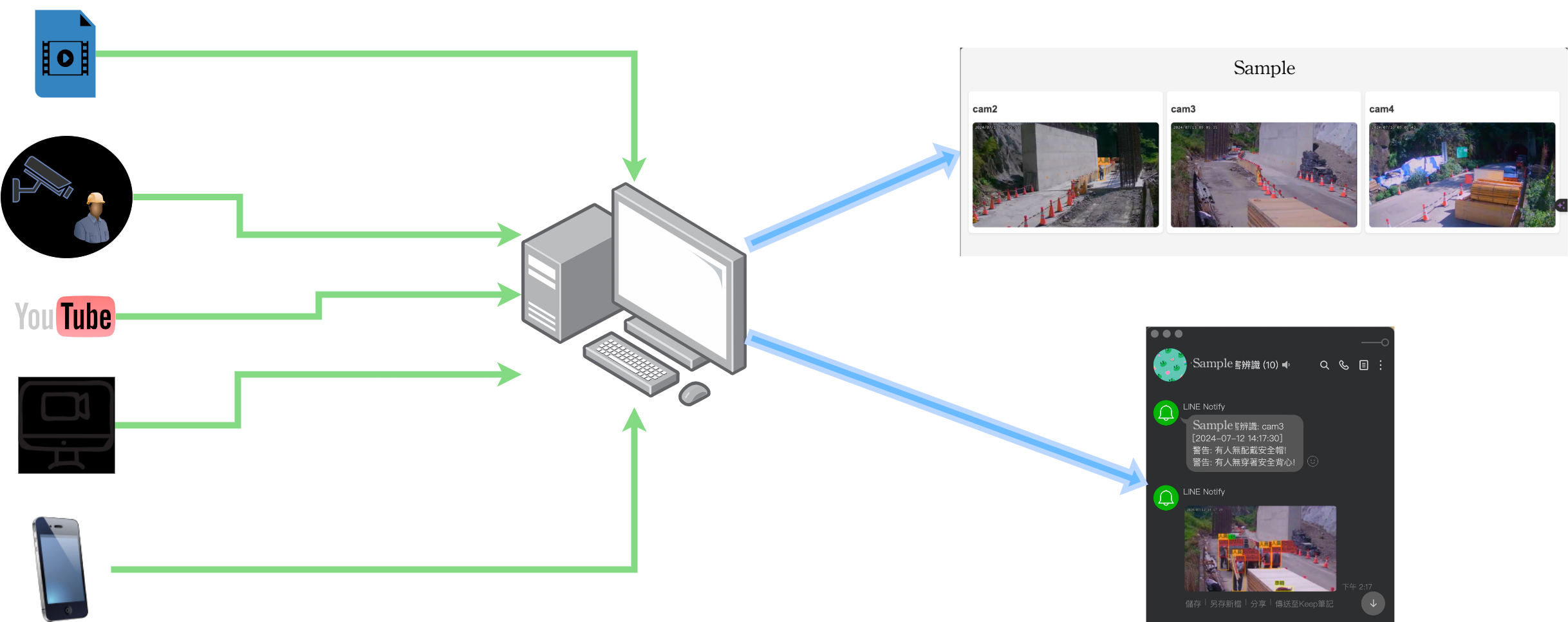
Runtime Architecture
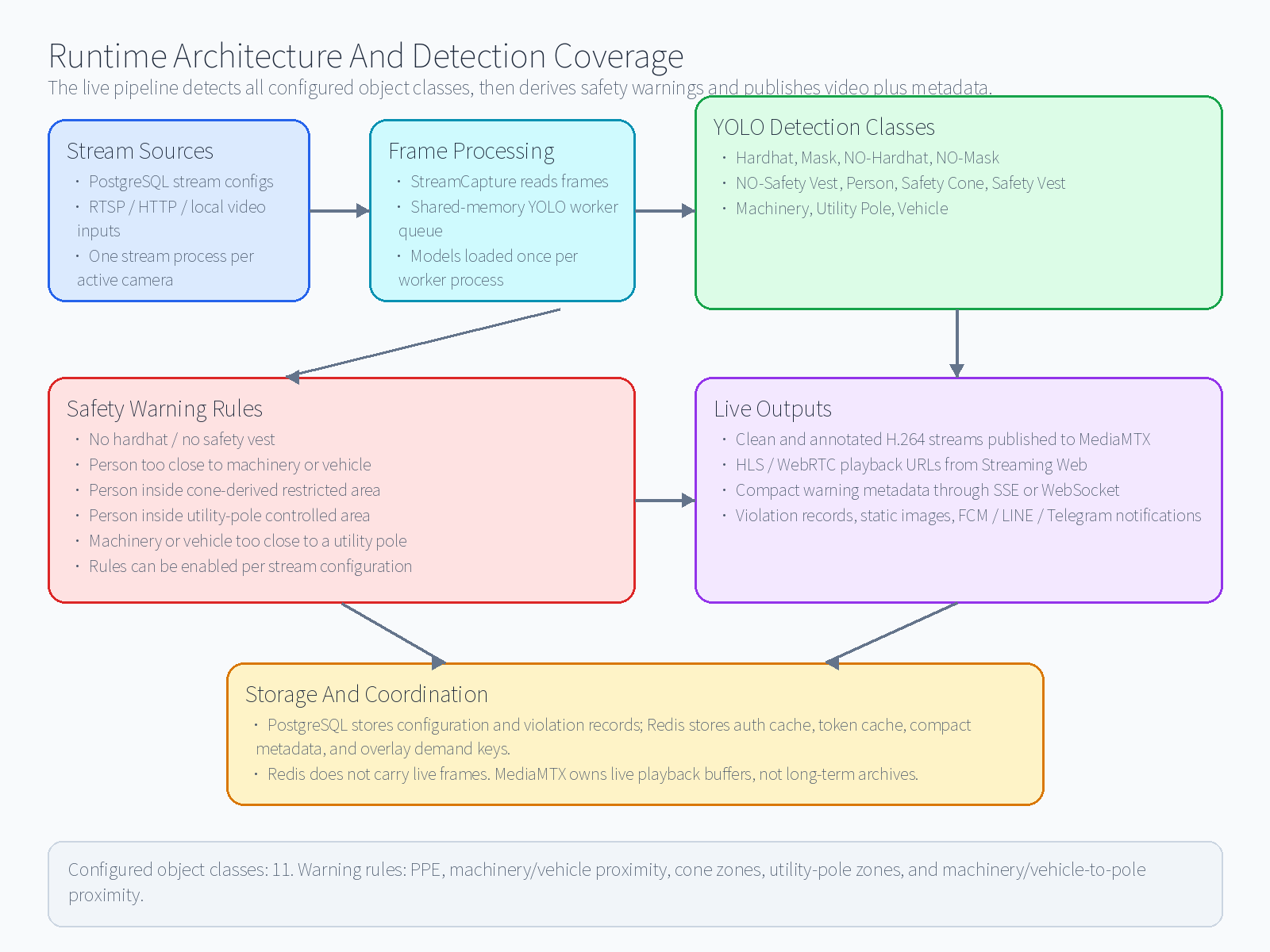
The diagram summarises the live data path, the 11 configured detection classes,
the safety-warning rules, and the video/metadata outputs. Redis is not used to
store live video frames; MediaMTX owns live playback, while Redis keeps only
small coordination state such as authentication cache, FCM token cache, compact
warning metadata, overlay demand keys, and overlay ready keys.
Repository Map
main.py: supervises configured streams and worker processes.src/: production runtime modules.examples/bff/: Web session, CSRF, media capability, and API gateway.examples/db_management/: users, groups, sites, stream configuration API.examples/local_notification_server/: FCM token and site notification API.examples/streaming_web/: labels, playback URLs, metadata channels,
media-session auth, and WebRTC ICE settings.examples/violation_records/: violation record and image API.examples/YOLO_server_api/: optional standalone YOLO API.examples/mcp_server/: FastMCP tools for agents.examples/YOLO_train/,examples/YOLO_evaluation/,examples/YOLO_data_augmentation/: model development utilities.scripts/: database initialisation and TensorRT rebuild helpers.
Recommended Runtime
Use database mode unless you are testing a short-lived local JSON config.
- PostgreSQL stores sites, users, stream configurations, and violations.
- Redis stores auth/session cache, notification token cache, and compact live
coordination keys. - MediaMTX serves RTSP ingest plus HLS/WebRTC playback.
main.pypolls stream configuration and starts one stream process per active
camera.- Local YOLO workers share GPU inference across cameras through shared memory.
The standalone YOLO server remains available for API testing or separate
deployment, but the recommended high-throughput local path is the YOLO worker
mode in src/yolo_worker.py.
Quick Start
1. Prepare Python
The project currently targets Python >=3.12,<3.13.
uv sync
If you use pip instead:
uv export --format=requirements-txt --no-dev -o requirements.lock
pip install -r requirements.lock
2. Download Models
hf download yihong1120/Construction-Hazard-Detection \
  --repo-type model \
  --include "models/pt/*.pt" \
  --local-dir .
Expected worker model filenames are models/pt/best_<model_key>.pt, for
example models/pt/best_yolo26n.pt.
3. Create .env
Start from .env.example, then adjust hostnames and secrets.
Important values:
DATABASE_URL='postgresql+asyncpg://username:[email protected]/construction_hazard_detection'

REDIS_HOST='127.0.0.1'
REDIS_PORT=6379
REDIS_PASSWORD='password'

JWT_SECRET_KEY='replace-with-a-long-random-secret'

DB_MANAGEMENT_API_URL='http://127.0.0.1:8005'
FCM_API_URL='http://127.0.0.1:8003'
VIOLATION_RECORD_API_URL='http://127.0.0.1:8002'
STREAMING_API_URL='http://127.0.0.1:8800'

YOLO_WORKER_ENABLED=true
YOLO_WORKER_COUNT=2
YOLO_WORKER_DEVICES=cuda:0,cuda:0
YOLO_WORKER_QUEUE_SIZE=64
YOLO_WORKER_BATCH_SIZE=8
YOLO_WORKER_BATCH_WAIT_MS=10
YOLO_WORKER_PRECISION=f16
# f32/f16 use models/pt/*.pt; int8 uses models/int8_engine/*.engine.

MEDIA_PUBLISH_RTSP_BASE_URL='rtsp://127.0.0.1:8554'
MEDIA_PUBLIC_HLS_BASE_URL='/hazard/media'
MEDIA_PUBLIC_WEBRTC_BASE_URL='/hazard/media/webrtc'
MEDIA_PUBLISH_CLEAN_STREAM=true
MEDIA_PUBLISH_ANNOTATED_STREAM=true
Use one stable, high-entropy JWT_SECRET_KEY for a deployment. Do not commit
real secrets.
4. Start Infrastructure
Redis, PostgreSQL, and MediaMTX are required for the normal database-backed
runtime:
docker compose up -d redis postgres media-server
Check that the containers are running:
docker compose ps redis postgres media-server
docker compose logs -f redis postgres media-server
When the Python services run on the host, use local addresses in .env:
DATABASE_URL='postgresql+asyncpg://username:[email protected]/construction_hazard_detection'
REDIS_HOST='127.0.0.1'
REDIS_PORT=6379
REDIS_PASSWORD='password'
MEDIA_PUBLISH_RTSP_BASE_URL='rtsp://127.0.0.1:8554'
When main.py or the FastAPI services run inside Docker Compose, use service
names instead:
DATABASE_URL='postgresql+asyncpg://username:password@postgres/construction_hazard_detection'
REDIS_HOST='redis'
MEDIA_PUBLISH_RTSP_BASE_URL='rtsp://media-server:8554'
Infrastructure roles:
- PostgreSQL stores users, sites, stream settings, and violation records.
- Redis stores authentication cache, token cache, compact live metadata, and
overlay demand keys. - MediaMTX receives RTSP streams from
main.pyand exposes HLS/WebRTC
playback.
Redis and MediaMTX do not store violation images or database records.
For a fresh PostgreSQL container, import the schema if it was not mounted at
container creation time:
cat ./scripts/init.postgres.sql | docker exec -i postgres-container \
  psql -U username -d construction_hazard_detection
5. Configure MediaMTX
MediaMTX is the live media server. main.py publishes processed H.264 streams
to MediaMTX over RTSP, and viewers play those streams through HLS or WebRTC.
Redis only stores compact metadata and demand keys; it does not carry video
frames.
The Docker Compose service exposes local-only ports:
127.0.0.1:8554  RTSP ingest from main.py / ffmpeg
127.0.0.1:8890  HLS playback, mapped to MediaMTX port 8888
127.0.0.1:8889  WebRTC/WHEP playback
Use these settings when main.py runs on the host:
MEDIA_PUBLISH_RTSP_BASE_URL='rtsp://127.0.0.1:8554'
MEDIA_PUBLIC_HLS_BASE_URL='/hazard/media'
MEDIA_PUBLIC_WEBRTC_BASE_URL='/hazard/media/webrtc'
Use the Compose service name when main.py runs inside Docker:
MEDIA_PUBLISH_RTSP_BASE_URL='rtsp://media-server:8554'
The streaming backend returns playback URLs shaped like:
/hazard/media/<media-path>/index.m3u8
/hazard/media/webrtc/<media-path>/whep
For public deployments, proxy MediaMTX through Nginx and protect it withexamples.streaming_web media authorisation. Useexamples/streaming_web/nginx.hazard-media.conf as the starting point:
Nginx /hazard/media/*        -> MediaMTX HLS port 8888
Nginx /hazard/media/webrtc/* -> MediaMTX WebRTC port 8889
Nginx /hazard/api/media-auth -> examples.streaming_web /media-auth
Recommended live-buffer defaults are already in docker-compose.yml:
MTX_HLSSEGMENTDURATION=2s
MTX_HLSSEGMENTCOUNT=14
MTX_HLSALWAYSREMUX=yes
MTX_HLSMUXERCLOSEAFTER=60s
Lower MTX_HLSSEGMENTCOUNT reduces disk and memory use. The default 14
segments (about 28 seconds at 2-second segments) gives wall tiles enough room
to recover from a short publisher or network interruption.
6. Start APIs
Run each service from the repository root:
uvicorn examples.db_management.app:app --host 127.0.0.1 --port 8005 --workers 2
uvicorn examples.local_notification_server.app:app --host 127.0.0.1 --port 8003 --workers 2
uvicorn examples.violation_records.app:app --host 127.0.0.1 --port 8002 --workers 2
uvicorn examples.streaming_web.app:app --host 127.0.0.1 --port 8800 --workers 2
Optional standalone detector API:
uvicorn examples.YOLO_server_api.app:app --host 127.0.0.1 --port 8000 --workers 2
7. Start Stream Processing
python main.py
Optional polling interval:
python main.py --poll 5
Optional file-based mode for development:
python main.py --config config/configuration.json
Do not run database mode and JSON mode at the same time for the same cameras.
Live Viewing
Clients should call the streaming web backend:
GET /labelsGET /streams/{label}GET /metadata/stream-id/{label}/{stream_id}for SSE metadataWebSocket /ws/metadata-id/{label}/{stream_id}for metadataGET /webrtc/ice-serverswhen WebRTC needs STUN/TURN settings
Video playback comes from MediaMTX HLS/WebRTC URLs. Warning metadata is compact
and usually contains only current warning state. Detection boxes, polygons, and
labels are rendered into backend-published annotated video streams.
For public deployments, put MediaMTX behind Nginx auth_request and letexamples.streaming_web validate JWT and site access.
Storage Retention
Violation images are stored under each service's configured static/ location.
Without archive/NAS/external disk, a practical default is:
- keep images and DB records for 18 months;
- delete image files and matching database rows together;
- run cleanup during low-traffic hours;
- keep HLS segment retention short because MediaMTX HLS is a live buffer, not
an archive.
Do not delete database records while keeping broken image paths, and do not
delete image files while keeping records that the UI still needs to display.
Development Checks
pre-commit run -a
python -m pytest -q --tb=short
The mypy pre-commit hook checks production code (main.py, src, examples,
and scripts). Tests are still validated by pytest and flake8; many test
files intentionally use dynamic mocks and invalid payloads.
Dataset And Models
The project uses the Construction Hazard Detection model repository:
- Hugging Face: https://huggingface.co/yihong1120/Construction-Hazard-Detection
- Roboflow: https://universe.roboflow.com/side-projects/construction-hazard-detection
Labels:
0 Hardhat
1 Mask
2 NO-Hardhat
3 NO-Mask
4 NO-Safety Vest
5 Person
6 Safety Cone
7 Safety Vest
8 Machinery
9 Utility Pole
10 Vehicle
Licence
This project is licensed under the AGPL-3.0 Licence.
Reviews (0)
Sign in to leave a review.
Leave a reviewNo results found