flow
Health Uyari
- License — License: MIT
- Description — Repository has a description
- Active repo — Last push 0 days ago
- Low visibility — Only 5 GitHub stars
Code Basarisiz
- exec() — Shell command execution in hooks/attachments.ts
- exec() — Shell command execution in hooks/bestof.ts
- exec() — Shell command execution in hooks/checks.ts
- exec() — Shell command execution in hooks/clean.ts
Permissions Gecti
- Permissions — No dangerous permissions requested
Bu listing icin henuz AI raporu yok.
Claude Code plugin that runs a batch of software tasks in parallel: managers plan, workers build in their own git worktrees and open PRs, one reviewer merges, checks, releases and deploys. You only make the decisions.

flow
flow is a Claude Code plugin that works through a batch of software tasks in parallel, inside your
session. Managers plan each task. Workers build it, each in its own git worktree, and open pull
requests. A reviewer merges them, runs your checks, cuts the release and deploys. You only make
the decisions.

you ── main session
         ├── manager: csv-export          one per task: plans, reviews, hands PRs over
         │     ├── worker: csv-endpoint   one per piece of work, in its own worktree
         │     └── worker: csv-button
         ├── manager: login-redirect
         │     └── worker: redirect-fix
         └── reviewer                    merges PRs, runs the full check, deploys
Why use it
- One round of questions up front. Managers look at their tasks first and ask what they need.
After you answer, you can walk away. - Small choices don't block you. Agents decide them, log them, and you can undo any of them.
- Answer a question once. Standing answers handle the ones that keep coming back.
- Every PR shows how it was checked. A PR without a verification section is turned away.
- Risky things wait for you. You can require approval before a merge, and before a deploy to
production. - Checks only a person can do are tracked. After a deploy, anything an agent can't verify goes
on a list instead of getting lost.
How it works at a glance
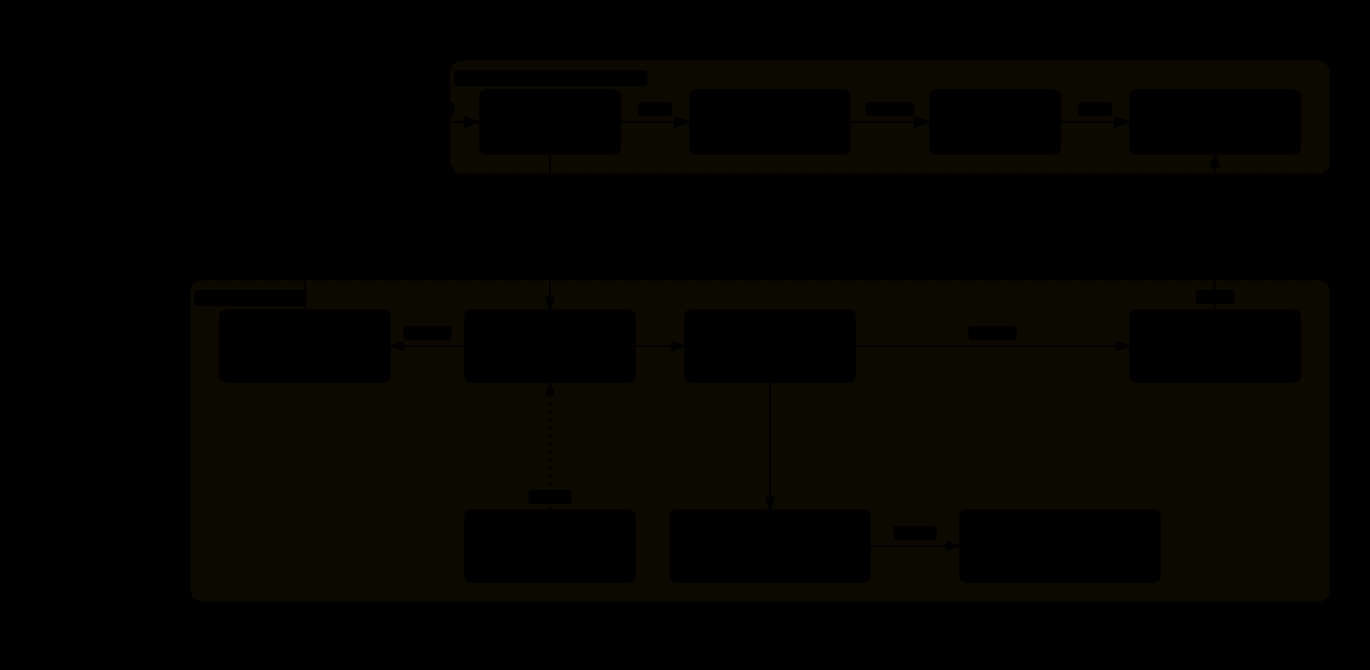
The parts: agents on top, the plugin's hooks and the state it keeps in .git/flow below. Interactive version (open the file in a browser for search, focus and the code links).

One task, from your request to the report, with the inbox on the side. Interactive version; the steps and their code are in Life of a task.
Install
In a Claude Code session:
/plugin marketplace add Ying-Kai-Liao/flow
/plugin install flow@flow
Your first run
Run /flow init. It walks you through how flow works, shows a demo (a free replay in the Flow pane,
or a real run that uses tokens) and sets the few settings that matter, detecting your test command
and base branch for you. Run it again any time to see or change your settings.
Then ask for work in your main session:
Add CSV export to the reports page, and fix the login redirect loop.
Here is what happens next:
- flow starts one manager per task. Each reads the code and may ask you a few questions. You get
them all in one round. - Managers start workers. Each worker builds one piece in its own worktree and opens a PR.
- The manager reviews each PR and hands it to the reviewer.
- The reviewer merges, runs your full check, and deploys if you set that up.
- You see a report for each task.
Type /flow to open a pane that shows who is doing what. For a single change, "start a worker to
fix X" is enough.
A day with flow
| Command | What it does |
|---|---|
/flow init |
A walkthrough, a demo and your settings. /flow init settings and /flow init demo jump to a part (the replay is free; /flow init demo live runs it for real and uses tokens). |
/flow |
Opens the pane: managers, workers, and what needs you first. |
/flow inbox |
Lists what waits for you: a summary line, the questions (blocking first, deploy/push/env marked NEEDS YOU), the decisions agents made as one flat table (newest 15; worker-size / manager-size decisions are filed already kept and only show in the archive, and those of finished agents are folded into one line; /flow inbox decisions lists all, /flow inbox d12 one item in full) and what standing answers did. /flow inbox archive lists the answered questions and kept or undone decisions, newest first (50; /flow inbox archive all lists every one). |
/flow ok [d10 d11 | owner | topic] |
Keeps decisions (no words: every open decision) or takes the default of an ordinary question. Never answers a deploy, push, env or guard item. |
/flow no d12 [what instead] |
Undoes a decision; the agent is told what to do instead. |
/flow answer q3 <choice> |
Answers any question addressed to main (option letter, number, text, or your own words), deploy, push and env items included. |
/flow checks |
Lists the after-deploy checks that only a person can do as one table (id, PR, title, what it needs, age). /flow checks <id> shows one in full; pass, fail and skip <id...> <why> close them. |
/flow approve <n> |
Approves PR n when it is waiting for you. |
/flow reject <n> [reason] |
Turns down PR n while it awaits approval or is pending (alias /flow drop). The manager is told; the GitHub PR and branch are left alone. |
/flow push |
Pushes the batch the reviewer built and checked, when push_mode is confirm. /flow push back <pr> returns one PR, /flow push drop all of them. |
/flow hold <target> / /flow release <target> |
Keeps a deploy target from deploying, or lets it go again. |
/flow lite <task> |
Runs one task in lite mode: just a manager and its workers, no pre-flight and no reviewer agent, to save tokens (see Lite mode in docs/how-it-works.md). |
/flow resume |
Picks up unfinished work after a restart. |
/flow clean |
Lists leftover worktrees and branches. Add --yes to remove them. |
With ask_cards on (the default), the main session is also told to show blocking questions, env changes and deploy approvals as AskUserQuestion cards; set it to off for plain text. Questions, approvals and checks also show up in the pane and as notifications. With anything open, press i in the pane to read and answer the inbox there (j/k move, a digit or letter picks an option, y takes the default or keeps a decision, w keeps all decisions, n undoes, r types an answer); you may answer any question, a manager's too. Pressing a row (or an open question or decision in the pane's tree) opens it as a large card with its full text, why, who asked and for whom, the asking agent's status and every option as a button (digits and letters are hotkeys, y the default or keep, n undoes a decision, the input takes your own words; b goes back, j/k move to the next item). The routine decisions sit in one folded row (y keeps all of them, x or pressing the row lists them) and v opens the archive. The key row sits at the pane's bottom.
The Reviewer section's PR lines are buttons too. Pressing one (or the "N awaiting approval" summary when the section is folded) opens the PR card: title, status, branch, head, who handed it over, why it waits for you, the manager's verified line, pending decisions, the after-deploy check, the stored evidence (Ran, Exercised, Not verified), env changes, and the changed files with +/- counts and the URL (read from gh in the background; "details unavailable" if gh fails). On a PR awaiting approval, a approves, r rejects (the input is an optional reason) and g opens it on GitHub; these run exactly what /flow approve and /flow reject run. Pressing the "ready to push" batch line opens the batch card: its PRs (press one for its card), p pushes, d drops, and send back then y returns one PR, as /flow push, /flow push drop and /flow push back <pr> do. b goes back.
Settings
flow works with no setup. Most people set a few things in .claude/flow.json at the repo root:
{
  "test_command": "pnpm test",
  "full_check_command": "pnpm check",
  "deploy_targets": [{ "name": "staging", "deploy": ["./deploy.sh staging"] }],
  "merge_mode": "confirm",
  "max_workers": 3
}
| Setting | Set it when |
|---|---|
test_command |
your repo has a test command workers should run for the files they change |
full_check_command |
you have a full check (lint, build, the whole suite) the reviewer should run once per batch |
deploy_targets |
you want the reviewer to deploy after merging. For one target, deploy_command is the shortcut |
merge_mode |
you want to approve each handed-over PR yourself (confirm) instead of merging automatically |
push_mode |
you want to approve each batch before it is pushed (confirm) |
release |
you want each merged batch to bump the version and cut a changelog section |
manager_model, worker_model, max_workers |
you want other models for managers or workers, or more or fewer parallel workers |
Anything you leave out is skipped and reported. flow never guesses a command. Everything else,
with defaults, is in the reference.
Learn more
- Life of a task: one task's path from request to cleanup, and the code behind each step.
- Diagrams: the architecture and the life of a task as interactive pages, with their JSON sources.
- How flow works: roles, pre-flight, the inbox and standing answers,
merge modes, releases, deploying, cleanup and the rules the reviewer follows. - Reference: every setting, the tools agents use, and the files flow keeps.
- In
modeorcaortmux, workers can also run in other coding tools, such as Codex. See
Workers in other harnesses. - The whole run can instead run in terminals, with
modeorcaortmux. See
Managers and the reviewer in a terminal. - Workers run as in-session agents by default, so neither Orca nor tmux is needed. See
Without Orca.
What flow does on your machine
flow is a hooks module. It runs inside your Claude Code session and reaches the outside only
through the engine's $ calls. This section lists what it sends, runs, writes and changes.
What it sends, and where
| To | What | When |
|---|---|---|
GitHub, through gh |
reads PRs and their files, labels and diffs; creates the flow:confirm / flow:auto labels and puts them on a PR; creates a GitHub Release |
the pane's PR list, handovers, /flow resume, /flow clean, a release with release_github on |
your origin, through git |
git fetch; pushes a release tag; deletes a merged PR's branch, only once the merge is in origin/<base> |
fetches as it works; the tag with release_github on; the delete when the reviewer reports a PR done |
| an OpenAI-compatible API | the brief or task text (its Size: line removed, at most 8000 characters), a fixed sizing question and its options, sent to openai_base_url (default https://api.openai.com/v1) with your openai_api_key |
only when decision_api is openai, once per manager or worker start |
| TypeSafe's Jev | the same text and question, sent to jev_base_url (default https://api.typesafe.ai) with your typesafe_api_key |
only when decision_api is jev, once per manager or worker start |
| OpenRouter (Jev route) | the same text and question, sent to openrouter_base_url (default https://openrouter.ai/api) with your openrouter_api_key |
only when decision_api is jev, typesafe_api_key is empty and openrouter_api_key is set |
the same provider (jev or openai) |
an inbox decision's text, or a worker's handoff note (at most 8000 characters), with a fixed question and its options | only when decide_inbox / decide_handoff is on and decision_api is jev or openai, once per recorded decision or handoff |
| its own agents in this session | messages, through $.session.send (see below) |
while they run |
The two API calls go through the engine's $.http.fetch. With decision_api at off, the
default, flow makes no HTTP request at all. The keys are /config options marked sensitive, so
they are kept in secure storage; flow never reads them from your environment or a file, and they
never appear in a note, log or prompt.
The hosts flow contacts:
api.openai.com, the defaultopenai_base_url, only withdecision_apiatopenai.api.typesafe.ai, the defaultjev_base_url, only withdecision_apiatjev.openrouter.ai, the defaultopenrouter_base_url, only withdecision_apiatjevand onlyopenrouter_api_keyset.github.com, throughghandgit(or wherever youroriginpoints).
The base URLs can be changed in /config; flow then contacts the host you set instead.
The agents flow starts do their own pushing and merging with git and gh, as their prompts
say: workers push their branch and open a PR, the reviewer merges and pushes <base>.
What it runs
The plugin runs these programs through $.process.run, each with a fixed argument list:
git: branches, worktrees (git worktree add/list/remove),fetch,log,diff,merge-base, a fast-forward of your main checkout after a batch (never a stash, reset or force),
the release tag push and the merged-branch delete.gh: the PR, label and release calls in the table above.sh -cwith a fixed script and the values passed as separate arguments: create or empty its
state directories, append to its log, read$HOMEto expand~in attachment paths, find a
harness program onPATH.mkdir,rm,test,tail,find,ps: its own state files, and to tell a live worktree
from a leftover in/flow clean.tmuxororca: only inmodeorcaortmux, where every manager, worker and the reviewer is
a terminal. They create the terminal, type the brief and messages into it, read its screen, and
close it.- The harness itself, in that terminal:
claude --permission-mode bypassPermissions,codex --dangerously-bypass-approvals-and-sandbox,gemini --yolooropencode, or the
command you put inharnesses. The built-ins start with permission checks turned off. Such
a worker runs unattended in its own worktree, and nobody sits at that terminal to approve agit push. This happens only inmodeorcaortmux. In the defaultagentmode workers are
in-session agents, and they keep the session's normal permission mode. - A harness's
quotacommand from yourharnessessetting, to read how much quota is left. uname -s, once, and thenopen,xdg-openorexplorerwith a PR's URL: only when you press
the PR card's open key in the pane.
Your own commands are run by flow's agents through their Bash tool, under your permission mode,
not by the plugin: test_command by workers, full_check_command and the deploy steps
(deploy_command, deploy_targets, each target's env_command) by the reviewer.
hooks/guards.ts only reads the text of a shell command an agent is about to run, including what
it runs through sh -c or eval, to refuse broad kills, remote-branch deletes and writes to the
main checkout. It never downloads or runs anything.
What it writes
flow writes these files on purpose:
- Its state, in
.git/flow/(shared by all worktrees, never committed): handovers, the inbox,
the log, handoff digests, manager notes, person checks, deploy and push gates, the cost ledger,
test-slot grant files and session worker prompt and report files. The full list is in the
reference. .git/flow/config.json, your personal settings: flow adds to it when you keep a standing
answer (always), accept a seed or accept a suggested guard-test mapping. It removes a standing answer from.claude/flow.jsononly when you ask it to remove that rule. It never writes other settings.- Worktrees under
.claude/worktrees/for session workers. In-session workers and the reviewer
get theirs from Claude Code. - At a release (only with
releaseon, done by the reviewer throughmcp__flow__release): the
changelog (changelog_file, defaultCHANGELOG.md) and the version inrelease_files
(defaultpackage.json). Those are build files; flow changes them because cutting the release
is its job.
What it puts in prompts
$.prompt.submitsends text to the main session as if typed: reports from the reviewer and
managers, pre-flight rounds, new questions, plan and dependency notices, session worker
reports, after-deploy checks for a new version, and what/flow resume,/flow liteand/flow-tasksask the main session to do.$.prompt.fillputs a "Send a message to …" line in your prompt box when you pressmon an
agent in the pane. You send it or not.$.session.sendsends messages to flow's own agents: a worker's questions to its manager,
answers from you or main, decisions you undid, reviewer results, plan notices and the context
wrap-up ("commit, push and hand off").- A tool result of a flow agent past its context warning gets the same wrap-up text added.
What it gives the agents it starts
- The brief from the manager or main, behind the role's rules: the
flow:manager,flow:workerandflow:revieweragent definitions inhooks/prompts.ts, filled with your
settings. A session worker gets the worker rules and the brief in a prompt file. - In lite mode, the lite rules in front of the manager's prompt.
- Attachment paths made absolute, since the worker runs in another worktree.
- A model picked by size routing (the brief's
Size:line, or the decision API).
Its hooks
| Hook | What it does |
|---|---|
session.start |
Loads its state and settings, registers /flow, /flow-tasks, its agent types and its mcp__flow__* tools, starts its timers, then passes the event on. |
command.run (/flow, /flow-tasks) |
Answers its own two commands. |
agent.offer (flow:continue) |
Keeps the continue type offered, so its own rewrite below can start it. |
agent.spawn |
Refuses: a model's own flow:continue spawn; a planned agent whose dependencies are not done; a worker whose manager has not filed its pre-flight; a Fable model; an attachment that does not exist. Changes: the prompt (lite rules, absolute attachment paths), the model (size routing; explore_model for a flow agent's Explore sub-agent with no model), a Continue on branch: worker into flow:continue in the old worktree, and a retry on the plain model when a [1m] model is refused. Then passes the spawn on. |
tool.call (every tool) |
Refuses: pkill, killall and kills of pid -1, 0, 1 or a non-listening lsof lookup; a subagent's git push that deletes a remote branch; Edit and Write by a manager; with main_checkout_guard on, Edit, Write and shell writes aimed at the repo's main checkout (for the main session only while flow has a worktree or live agent in the repo). Answers a reviewer's SendMessage to an ended manager or a repeat to main itself. Otherwise records the call for the pane and passes it on unchanged. |
tool.call (mcp__flow__*) |
Answers flow's own tools. It stands in for no built-in tool. |
turn.step |
Delivers messages held for that agent, then measures its context and cost. |
turn.complete |
Logs the agent's report, relays a reviewer's or manager's report to main, records a worker's handoff and starts a new reviewer when work is left. Passes the event on. |
config.set (theme) |
Redraws the pane after a theme change. The setting itself passes on unchanged. |
ui.focus, ui.render |
Draw the Flow pane and move its focus. |
Limits
- Everything runs inside one session. Close it and the work stops. Your branches and PRs stay,
and/flow resumepicks them up in a new session. - The pane shows tool calls and reports, not full transcripts.
- All agents use the same Claude account's usage, so a big batch uses it quickly.
Develop it
claude --plugin-dir .    # a session with your working copy loaded
npm ci                   # install TypeScript
npm run typecheck        # must report 0 errors
npm run validate         # must pass
npm run check            # typecheck, validate and the plugin tests
Add your changelog lines under ## [Unreleased] in CHANGELOG.md. Don't change the version; the
reviewer does that at merge. More in the reference.
License
MIT. See LICENSE.
Yorumlar (0)
Yorum birakmak icin giris yap.
Yorum birakSonuc bulunamadi