feishu-ppt-skill
Health Gecti
- License — License: MIT
- Description — Repository has a description
- Active repo — Last push 0 days ago
- Community trust — 24 GitHub stars
Code Gecti
- Code scan — Scanned 12 files during light audit, no dangerous patterns found
Permissions Gecti
- Permissions — No dangerous permissions requested
Bu listing icin henuz AI raporu yok.
AI-agent skill for building Lark (Feishu) slides via the lark-cli: 51-page template library, brand design tokens, XML generation workflow, and automated layout review. Built for agents, reusable anywhere.
Feishu PPT Skill
Create and edit native Lark / Feishu slides using 51 reusable XML layouts, explicit content bindings, local previews, and automated checks. Cherry Studio is the bundled default theme; adapt the theme and assets when the user requests another brand.
The skill entry point is SKILL.md. It handles Feishu presentations, not general posters or .pptx export.
Install
Requires Python 3.10+. Install into your agent's skill directory using its normal installation workflow, or clone into a local directory for command-line use:
git clone https://github.com/YinsenWANG/feishu-ppt-skill.git
cd feishu-ppt-skill
python3 -m venv .venv
# macOS/Linux; on Windows use .venv\Scripts\Activate.ps1
. .venv/bin/activate
python3 -m pip install -r requirements.txt
python3 scripts/preflight.py --json
Use the same Python interpreter for all scripts. Resource paths are resolved from the installed skill, not a particular home directory. The skill name is now feishu-ppt-skill; installations using the previous cherry-studio-design-language name should update their invocation/reference to the new name. Cherry templates and assets remain available.
Lark CLI is only needed for actual Feishu operations and official screenshots. Commands below were checked against CLI 1.0.86; check your installed version's capabilities before use:
python3 scripts/preflight.py --check-cli --json
This only probes --version and --help. It does not log in, change profiles, or verify live write behavior. CLI operations and their revision semantics are described in references/cli-workflow.md.
Quick start
Find a suitable layout in templates/INDEX.md. Generate a local draft with explicit unfinished fields:
python3 scripts/template_fields.py prepare --template slide19 --output-dir work/draft --allow-draftFill
work/draft/bindings.draft.json, then generate into a fresh directory:python3 scripts/template_fields.py prepare --template slide19 --bindings work/draft/bindings.draft.json --output-dir work/deckFor multiple pages or repeated templates, pass
--name page01/--name page02; each gets its own XML, bindings and report, while identical assets are reused. Required fields must be supplied. Intentionally retaining a true value from the sample requires explicit confirmation in the binding. See template authoring. Draft output does not mean content is complete.Check and preview:
python3 scripts/validate.py --dir work/deck --json
python3 scripts/xml2svg.py --dir work/deck --output-dir work/preview --assets-dir work/deck
Obtain the official SML schema from the installed CLI and run the full static gate:
lark-cli skills read lark-slides/references/xml/slides_xml_schema_definition.xml > work/slides-schema.xsd
python3 scripts/validate.py --dir work/deck --schema work/slides-schema.xsd --require-schema --json
If this resource is unavailable in your version, inspect
lark-cli skills list lark-slidesfor its current location. The report records schema provenance. A run without schema is explicitly incomplete; local checks are not a replacement for schema validation.Review real screenshots and publish only within the user's requested scope. From
work/deck, for example:lark-cli slides +screenshot --content @./slide19.xml --output-dir ./screenshots --as user lark-cli slides +create --title "Presentation title" --slide @./slide19.xml --as userRead back the created presentation, verify page order and content, and save that readback as the baseline for future edits. The local SVG renderer is approximate; it reports unsupported features and missing assets instead of silently dropping them.
Editing an existing presentation
Use three actual snapshots: the last verified online baseline, the edited working copy, and fresh online remote. Preserve page and block IDs.
python3 scripts/compare_slides.py --baseline baseline.xml --working working.xml --remote remote.xml --output comparison.json
This produces a conservative comparison report, not merged XML. Missing IDs or a baseline require manual review. A conflict-free report provides no server concurrency guarantee. In particular, CLI 1.0.86 warns that an old +update-slide --revision-id rebuilds from that snapshot and can discard newer edits. Follow the update workflow before writing.
Files and responsibilities
| Path | Purpose |
|---|---|
SKILL.md |
Short agent entry point and routing |
references/ |
Theme, authoring, validation and CLI workflows |
tokens.yaml |
One theme configuration; allowed colors are derived from definitions |
templates/INDEX.md |
Human-readable scene selection |
templates/fields.json |
Versioned field mappings with source fingerprints |
templates/slide01.xml … slide51.xml |
Native 960×540 SML layouts |
scripts/template_fields.py |
Create bindings and prepare working copies |
scripts/validate.py |
Unified schema, layout and theme checks |
scripts/review_layout.py, scripts/review_design.py |
Individual checks for diagnosis |
scripts/xml2svg.py |
Approximate text, image, shape, table and basic chart preview |
scripts/compare_slides.py |
Offline three-way change/conflict report |
scripts/preflight.py |
Local dependencies and optional CLI capability checks |
tests/ |
Regression and integration tests |
Template coverage
| Category | Pages |
|---|---|
| Cover / transition / closing | P1–P6, P51 |
| TOC / navigation | P7–P9 |
| Text / argumentation | P10–P17 |
| Data / charts | P18–P25 |
| Flow / architecture | P26–P32 |
| Product / solution | P33–P38 |
| Planning / organization | P39–P44 |
| Ecosystem / community | P45–P50 |
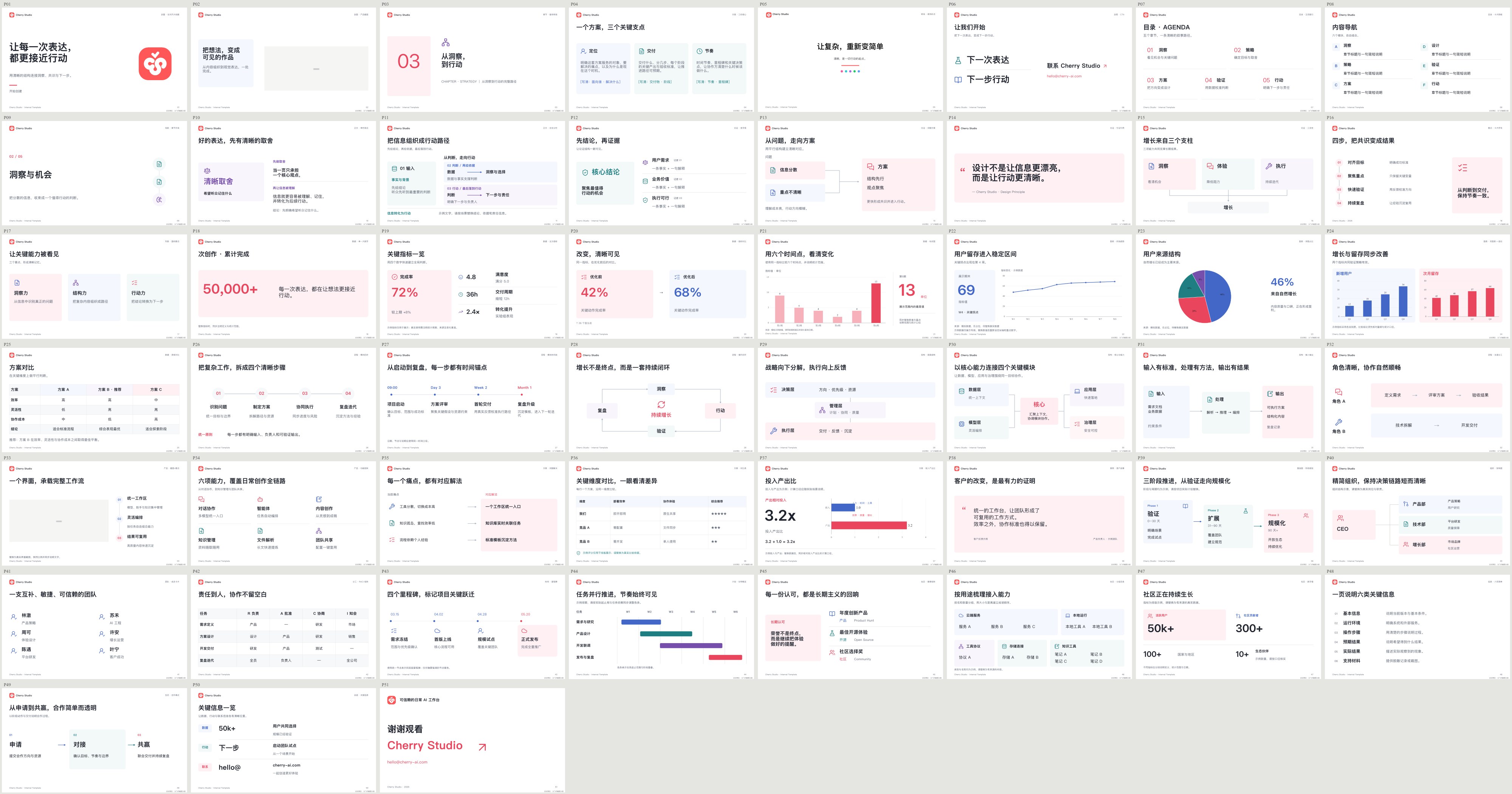
Generated SVG previews aid layout selection. They contain sample content and an approximate-preview label; they are not final presentation assets. Regenerate after template changes with xml2svg.py.
Reports and tests
Errors fail a check. Warnings require review; --strict-warnings makes them fail automation too. JSON mode writes only JSON to stdout. Directory checks select every immediate *.xml; keep schema and snapshot files outside your slide directory.
python3 -m unittest discover -s tests -v
python3 scripts/template_fields.py index --check
python3 scripts/validate.py --dir templates --json
python3 scripts/xml2svg.py --dir templates --output-dir work/preview
When a template changes, rebuild the field index with python3 scripts/template_fields.py index. CI covers offline behavior; schema validation and live screenshot verification remain distinct stages. See validation details for interpreting incomplete stages and measurement warnings.
License
Code, templates and scripts: MIT. Brand/logo assets are owned by their respective owners, are included only as examples, and are not covered by the MIT license. Replace them with appropriate assets for your use.
Yorumlar (0)
Yorum birakmak icin giris yap.
Yorum birakSonuc bulunamadi