SkillDock
Health Uyari
- License — License: NOASSERTION
- Description — Repository has a description
- Active repo — Last push 0 days ago
- Low visibility — Only 6 GitHub stars
Code Basarisiz
- process.env — Environment variable access in playwright.config.ts
- spawnSync — Synchronous process spawning in scripts/install-dev-desktop-entry.mjs
Permissions Gecti
- Permissions — No dangerous permissions requested
Bu listing icin henuz AI raporu yok.
Local-first Git workspace and symlink installer for AI agent skills across Claude Code, Codex, and custom agents.







SkillDock is a desktop manager for people who collect, write, and reuse AI agent skills across Claude Code, Codex, and custom coding agents.
Instead of copying SKILL.md folders into every agent, SkillDock keeps the source repositories in one local Git workspace and installs skills with symlinks. One source of truth, many agents, no duplicated skill folders.
Why SkillDock?
- Import skills from GitHub — clone public, private, personal, or team skill repositories into one workspace.
- Keep upstream history intact — update source repositories with Git instead of losing track of copied files.
- Install without duplication — symlink skills into
~/.claude/skills,~/.codex/skills, or any custom agent directory. - Audit what every agent uses — see source repo, relative path, install target, conflicts, and current status before changing anything.
- Manage local and remote collections together — use the same workflow for popular open skill repos and your own private skill library.
SkillDock is not another cloud skill marketplace. It is a local-first control panel for the Git repositories you already trust.
Common Use Cases
- Keep the same curated skills available in Claude Code, Codex, and a custom agent.
- Put your own skills in a private Git repo, then install them locally without copying folders.
- Try community skill repositories while keeping the source path, update path, and install target traceable.
- Sync the same SkillDock workspace structure across multiple machines through Git.
Screenshot
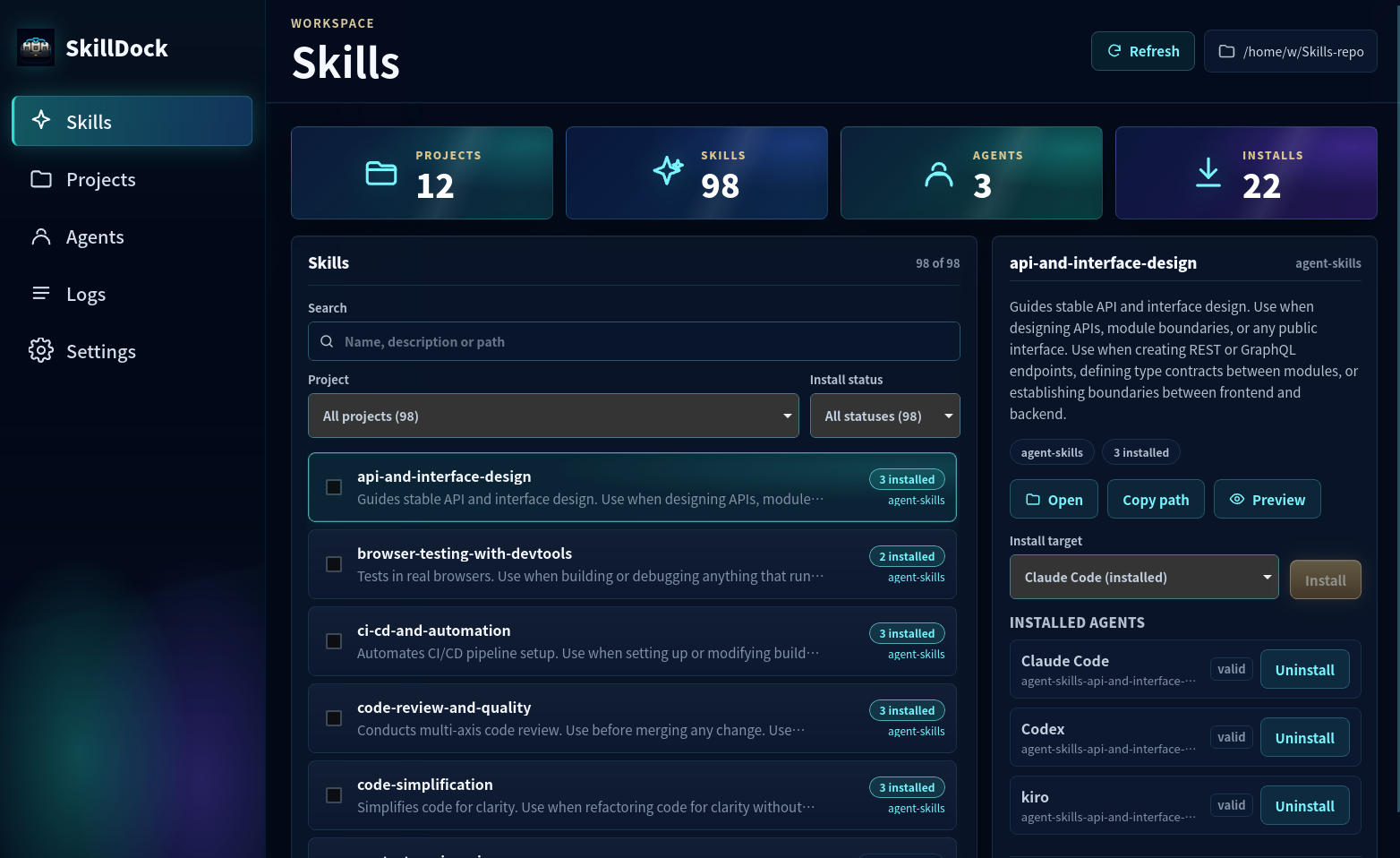
Skills view: left-hand navigation, workspace stats at the top (Projects / Skills / Agents / Installs), a searchable and filterable skill list in the middle, and a right-hand detail panel for installing the selected skill — individually or in batch — into any configured agent.
How It Works
Git repos in one workspace
        |
        | scan SKILL.md folders
        v
SkillDock inventory
        |
        | create / remove safe symlinks
        v
Claude Code, Codex, or custom agent skill directories
Example layout:
~/AgentSkills/
├── awesome-claude-skills/       # git clone
├── personal-agent-skills/       # your own Git repo
└── .skilldock/config.json       # workspace metadata

~/.claude/skills/code-review -> ~/AgentSkills/personal-agent-skills/code-review
~/.codex/skills/code-review  -> ~/AgentSkills/personal-agent-skills/code-review
Core Capabilities
- Workspace management — pick and remember one collection root; scan top-level Git repos and
SKILL.mdfiles at startup. - Git import & update — accept
owner/repo, HTTPS, SSH,git@..., and arbitrary Git URLs; explicit "Check updates" runsgit pull --ff-only --pruneand skips dirty working trees by default. - Skill scanning & preview — parse
SKILL.mdfrontmatter, source project, relative path, assets / scripts / references markers, and current install status. - Agent profiles — ship with Claude Code (
~/.claude/skills) and Codex (~/.codex/skills) built-in; custom agents and one-click creation of missing target directories are supported. - Safe symlink install — default link name
<repo>-<skill>avoids collisions; single and batch installs always generate a conflict preview and never overwrite real files or real directories. - Safe uninstall — removes only symlinks that point into the current workspace; external paths, real files, and source projects are never touched.
- Serial task queue & logs — Git, FS, and agent directories are shared resources, so tasks run serially by default; full stdout / stderr is visible in the Tasks / Logs view.
Deliberate non-goals: GitHub search / recommendation marketplace, skill editor, background daemon, real-time file watcher, deleting local project directories, branch switching, full Markdown renderer. See the design doc for details.
Tech Stack
| Layer | Choice |
|---|---|
| Shell | Tauri 2 |
| Frontend | React 18 + TypeScript + Vite 5 |
| Backend | Rust (Tauri commands) |
| Git | Shells out to the system git, not via libgit2 |
| Testing | Playwright (E2E) + cargo test (Rust) |
Requirements
- Linux or macOS
- Node.js ≥ 18 (nvm recommended)
- Rust stable toolchain (
rustup) gitonPATH- Linux additionally needs WebKitGTK / GTK dependencies — follow the Tauri prerequisites guide.
Quick Start
# Clone
git clone https://github.com/yiwen65/SkillDock.git
cd SkillDock

# Install frontend deps
npm install

# Start the desktop dev mode (Tauri + Vite)
npm run tauri:dev
The first run will compile the full Rust dependency graph (including native deps like webkit2gtk-sys) and takes several minutes. Subsequent incremental builds are fast.
Frontend-only dev (no Tauri shell):
npm run dev # Vite dev server at http://127.0.0.1:1420
Release build:
npm run tauri:build # Artifacts land in src-tauri/target/release/bundle/
Common Scripts
| Command | Purpose |
|---|---|
npm run dev |
Vite only |
npm run build |
tsc + vite build |
npm run tauri:dev |
Full desktop dev mode |
npm run tauri:build |
Build the desktop bundle |
npm run e2e |
Playwright E2E tests |
npm run ui:smoke |
UI smoke script (scripts/ui-smoke.mjs) |
npm run rust:test |
cargo test for the Rust backend |
Directory Layout
SkillDock/
├── src/                    # React frontend
│   ├── App.tsx
│   ├── CoreView.tsx
│   ├── views/              # Skills / Projects / Agents / Tasks / Settings
│   └── lib/                # Tauri commands, types, shared helpers
├── src-tauri/              # Rust backend (Tauri)
│   ├── src/
│   │   ├── workspace.rs    # workspace scanning
│   │   ├── scanner.rs      # SKILL.md parsing
│   │   ├── git_ops.rs      # git fetch / pull / status
│   │   ├── links.rs        # symlink install / uninstall / preview
│   │   ├── agents.rs       # agent profile management
│   │   ├── tasks.rs        # serial task queue
│   │   └── config.rs       # workspace + user config
│   └── tests/              # backend integration tests
├── scripts/                # retained shell fallbacks and utilities
├── tests/e2e/              # Playwright E2E
├── docs/                   # design docs
│   ├── skilldock.md                     # design (product + architecture)
│   ├── skilldock-implementation-plan.md # implementation plan
│   ├── skilldock-tasks.md               # task breakdown
│   └── images/                          # README assets
└── public/                 # frontend static assets (app icon, etc.)
Configuration Model
Two layers, detailed in the design doc:
- Workspace config —
<workspace>/.skilldock/config.json: per-collection metadata such as tags, notes, favorites / hidden flags, and custom display names. - User app config — the recent workspace list, agent profiles, UI preferences, check interval, etc.
Principle: the filesystem and Git are the source of truth. Config only stores user preferences and overrides; agent install status is always recomputed from symlinks in the agent directories.
Safety Principles
- Never overwrite real files or directories
- Never delete project directories
- Never delete real files inside agent directories
- Skip dirty Git repos by default
- Always use
git pull --ff-only --pruneby default - Never go online without an explicit user action
- Symlink sources must live inside the current workspace
- Every batch-mutating operation shows a preview first
Documentation
- Contributing guide — branch workflow, required CI checks, release procedure
- Security policy — safety model and vulnerability reporting
- GitHub discovery plan — description, topics, and launch copy for improving repository visibility
- Release procedure — tagging, macOS codesign / notarize, Tauri updater signing
- Product & architecture design (Chinese)
- Implementation plan (Chinese)
- Task breakdown (Chinese)
- AGENTS collaboration conventions
Status
MVP in progress. See docs/skilldock-tasks.md for the active task list. Issues and PRs are welcome.
License
SkillDock is released under the PolyForm Noncommercial License 1.0.0. In short:
- Permitted: personal use, research, study, hobby projects, and any other noncommercial purpose.
- Permitted: use by charities, schools, universities, public research / health / safety / environmental / government bodies.
- Not permitted: any commercial use. If you want to use SkillDock commercially, please open an issue or contact the authors for a separate commercial arrangement.
This license is source-available, not open source (it intentionally restricts commercial use, which the OSI Open Source Definition does not allow). See the full license text in LICENSE.md.
Yorumlar (0)
Yorum birakmak icin giris yap.
Yorum birakSonuc bulunamadi