neo-switch
Health Uyari
- License — License: MIT
- Description — Repository has a description
- Active repo — Last push 0 days ago
- Low visibility — Only 6 GitHub stars
Code Basarisiz
- rm -rf — Recursive force deletion command in plugin/neoswitch.sh
Permissions Gecti
- Permissions — No dangerous permissions requested
Bu listing icin henuz AI raporu yok.
Keep Claude Code. Switch your models. Use Gemini 4 Neon in Claude Code through a local Anthropic-compatible proxy.
NeoSwitch
English | 简体中文 | 繁體中文 | 日本語 | 한국어 | Español | Français | Deutsch | Português (Brasil) | Русский


NeoSwitch makes Claude Code answer with Google's Gemini 4 Neon model instead of Claude, while everything else in Claude Code stays the same.
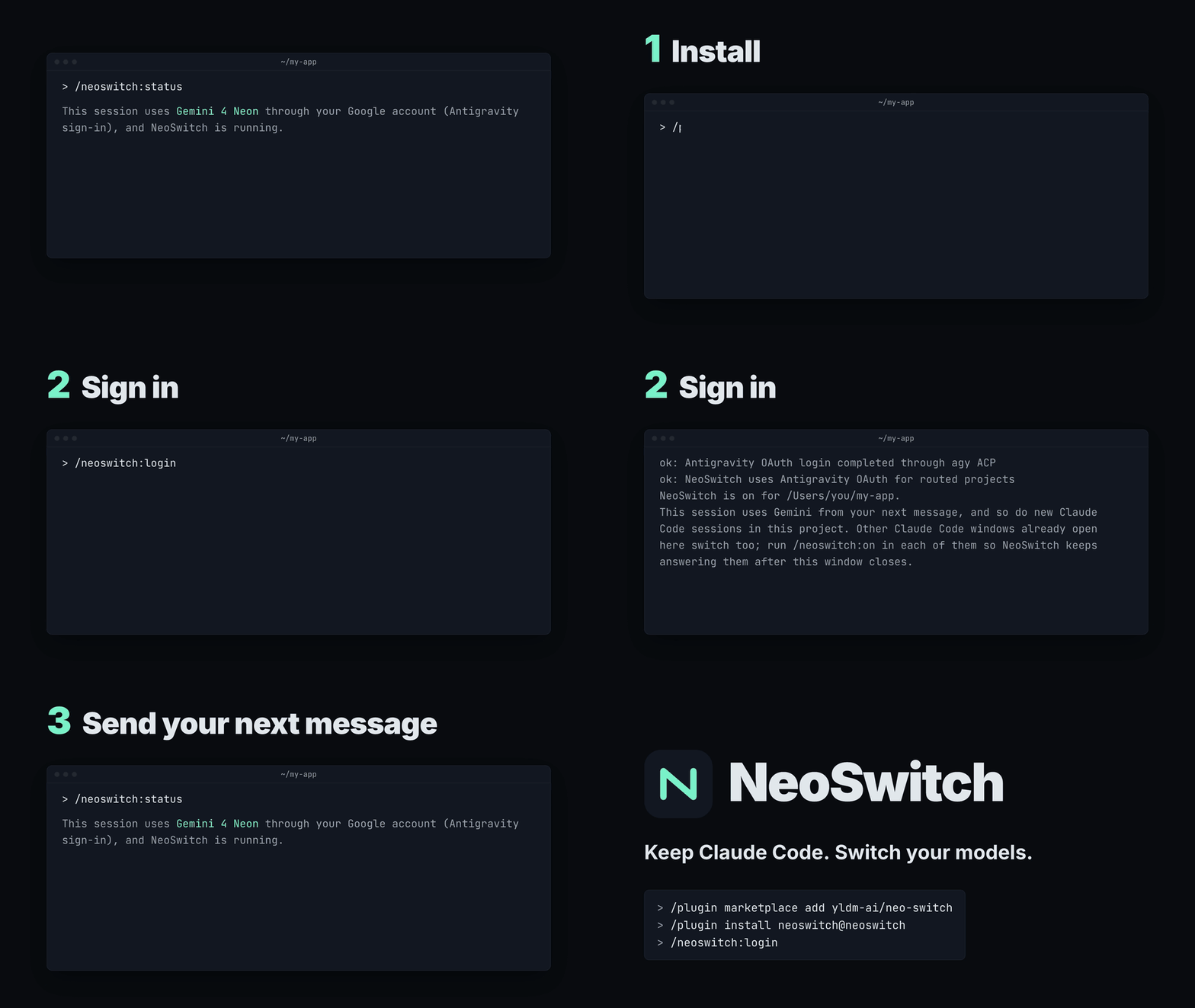
You switch one project at a time; your other projects keep using Claude. The plugin works on macOS and Linux. Windows is not supported yet.
Get started
1. Install the plugin. In Claude Code, run these two lines one at a time. Copy each line whole: the first one says neo-switch, the second one neoswitch.
/plugin marketplace add yldm-ai/neo-switch
/plugin install neoswitch@neoswitch
Then turn on automatic updates, so fixes reach you when Google or Claude Code change something NeoSwitch depends on: run /plugin, open the Marketplaces tab, choose neoswitch and turn on auto-update. Claude Code leaves it off for marketplaces that do not come from Anthropic.
2. Sign in with your Google account. Open Claude Code in the project you want to switch and run:
/neoswitch:login
It shows Google's terms warning, opens Google sign-in in your browser through Google's Antigravity command-line tool (agy), and then switches the project on. If agy is not on this computer yet, the command first installs it into ~/.local/bin with Google's official installer (about 230 MB; the installer also adds that folder to your shell's PATH). If you are comfortable with a terminal, a Gemini API key also works: see docs/cli.md.
[!WARNING]
The Google Antigravity Terms of Service (section 6) forbid using Antigravity through other tools, and NeoSwitch is such a tool. Google may suspend or close the Antigravity accounts of people who do./neoswitch:loginrepeats this warning every time. Do not sign in unless you accept that risk.
3. Send your next message. The window where you ran the command uses Gemini 4 Neon from its next message, and so do new sessions in this project. If the command's reply asks you to restart instead, because Claude Code was started through a gateway or other Claude Code windows still use an earlier NeoSwitch setup, close the windows it names, then start claude again in the same project.
What you will see
- The new session opens with a note such as
NeoSwitch: this session uses Gemini 4 Neon through your Google account (Antigravity sign-in). Ignore the Claude model name in the header. The first reply can take a while. - The header still shows a Claude model name, such as
claude-opus-5-5. It is only a label: Gemini 4 Neon answers. Choosing another model with/modeldoes not change that. - A reply can take 5 to 40 seconds before its first words appear. That is normal. If you signed in with
/neoswitch:login,/effort lowmakes replies start sooner. - The first NeoSwitch command after an install or update can take up to a minute while NeoSwitch gets ready.
/neoswitch:statustells you at any time whether this session uses Claude or Gemini 4 Neon, and what to do next.- When a newer NeoSwitch is available, the session note says so and gives the update commands. With auto-update on, Claude Code installs it by itself, and it applies once every Claude Code window has been closed and opened again.
If something goes wrong
| What you see | What to do |
|---|---|
| The session note says NeoSwitch is not set up yet | Run /neoswitch:login. Your next message uses Gemini 4 Neon. |
A message says agy is not installed |
/neoswitch:login could not install it by itself. Run curl -fsSL https://antigravity.google/cli/install.sh | bash in a terminal, or install it from Google's download page, then run /neoswitch:login again. |
| Every message fails with a connection error, or the session note says this session cannot answer | In this same project, run /neoswitch:off. It switches the project back even if its own reply shows a connection error too. Then type /exit and start claude again: you are back on Claude, and /neoswitch:status tells you what to fix. |
| The note says other Claude Code windows still share the earlier setup | Close every Claude Code window, then open Claude Code again. |
| The note says another program is using the port NeoSwitch needs | Close that program and start Claude Code again, or run /neoswitch:off. |
| The note says NeoSwitch could not download its program | Check your internet connection and start Claude Code again. |
/neoswitch:login is an unknown command |
Update the plugin (see below), restart Claude Code, then run /reload-plugins. |
Turn it off, update or remove
/neoswitch:offswitches this project back to Claude for new sessions; a session that already uses Gemini 4 Neon keeps it until you type/exit./neoswitch:onswitches the project to Gemini 4 Neon again without setting anything up again, starting with your next message.
To update by hand, run these in a terminal, then close all Claude Code windows and open them again:
claude plugin marketplace update neoswitch
claude plugin update neoswitch@neoswitch
If you added the marketplace under its old name yldm-ai/NeoSwitch / yldm-ai/neon-switch, add it again with claude plugin marketplace add yldm-ai/neo-switch first.
To remove NeoSwitch:
- Run
/neoswitch:offin each project you switched on. A project left on keeps pointing at NeoSwitch and stops answering once NeoSwitch is gone. If you already removed the plugin, open.claude/settings.local.jsonin each such project and deleteANTHROPIC_BASE_URL,ANTHROPIC_AUTH_TOKENandCLAUDE_CODE_USE_GATEWAYfrom itsenvobject. - Close the Claude Code windows that use NeoSwitch, then run these in a terminal:
claude plugin uninstall neoswitch@neoswitch
claude plugin marketplace remove neoswitch
- Delete the files NeoSwitch keeps outside your projects:
| What | Where |
|---|---|
| The NeoSwitch program the plugin downloads or builds | $XDG_CACHE_HOME/neoswitch/, or ~/.cache/neoswitch/ when XDG_CACHE_HOME is unset |
Settings and log: proxy.json (address, access key and chosen route) and daemon.log |
NEOSWITCH_STATE_DIR when set; otherwise ~/Library/Application Support/neoswitch/ on macOS and $XDG_CONFIG_HOME/neoswitch/ or ~/.config/neoswitch/ on Linux |
The Google sign-in is kept by agy, not by NeoSwitch, and stays in place; so does agy itself, even when /neoswitch:login installed it.
What NeoSwitch changes
In each project you switch on, NeoSwitch adds three entries to the env object of .claude/settings.local.json, and /neoswitch:off removes them again:
ANTHROPIC_BASE_URLandANTHROPIC_AUTH_TOKENsend the project's new Claude Code sessions to NeoSwitch on this computer. The token only opens NeoSwitch on this computer; it is not a Google or Anthropic credential.CLAUDE_CODE_USE_GATEWAY=0makes those sessions talk to NeoSwitch directly. Some tools that start Claude Code through another gateway turn gateway mode on, and Claude Code would then ignore NeoSwitch.
In a Git project, NeoSwitch also adds .claude/settings.local.json to the clone's own exclude list (.git/info/exclude), so the token stays out of commits; your .gitignore is not touched.
NeoSwitch runs only on this computer and accepts connections only from it. It logs no prompts, replies, keys or sign-in details, and no server of ours is involved. The Google sign-in stays inside agy; NeoSwitch never reads it.
More
What works and what does not, how NeoSwitch works, the standalone command-line tool, environment variables, the roadmap and development: docs/cli.md. Also: Antigravity sign-in details and the protocol contract.
See CONTRIBUTING.md to contribute, SECURITY.md to report a vulnerability privately, and CODE_OF_CONDUCT.md for the code of conduct.
MIT License
Yorumlar (0)
Yorum birakmak icin giris yap.
Yorum birakSonuc bulunamadi