Relay
Health Warn
- License — License: NOASSERTION
- Description — Repository has a description
- Active repo — Last push 0 days ago
- Low visibility — Only 6 GitHub stars
Code Fail
- exec() — Shell command execution in electron/agent/buildContext.ts
- os.homedir — User home directory access in electron/agent/engines/cliEngine.ts
- process.env — Environment variable access in electron/agent/engines/cliEngine.ts
Permissions Pass
- Permissions — No dangerous permissions requested
This application is a desktop wrapper that turns AI coding agents like Claude Code into a visual Kanban board, automating the cycle of planning, task decomposition, code generation, and review.
Security Assessment
Overall risk is rated as Medium. The tool inherently requires sensitive system access to perform its intended job. It executes shell commands directly to run coding agents and interact with your repository. It accesses the user's home directory and reads environment variables, which is typical for retrieving API keys needed to authenticate with AI providers like Anthropic or OpenAI. The application makes external network requests to these AI APIs. No hardcoded secrets were identified. However, users should note that the downloaded Mac application is unsigned, and the README explicitly instructs users to bypass macOS security quarantine (`xattr -cr`), which removes standard OS protections against unverified software.
Quality Assessment
The project is very new and actively maintained, with its last code push occurring today. The repository includes a clear description and uses a GPL-3.0 license. However, it currently suffers from extremely low community visibility. With only 6 GitHub stars and a small user base, the project has not yet undergone broad public security testing, making its long-term reliability uncertain.
Verdict
Use with caution — its core functionality requires executing shell commands and accessing your API keys, so ensure you trust the developer and audit the source code before running it on your machine.
A desktop app that turns Claude Code into a visual Kanban build loop. Describe a feature, review the plan, watch it get built task by task.

Relay
Turn AI coding agents into a visual Kanban build loop.
Describe a feature → generate a specification or brainstorm interactively → decompose into tasks → autonomous agent builds each task → you review via approve/reject gate.





-000?style=for-the-badge&logo=apple&logoColor=white)
macOS note: If you see "app is damaged and should be moved to trash" after installing, run this in Terminal:
xattr -cr /Applications/Relay.appThis removes the macOS quarantine flag. The app is not signed with an Apple Developer certificate yet.
What is Relay?
Relay is a desktop application that wraps AI coding agents into a structured, visual build workflow. Instead of manually prompting an AI and copy-pasting code, Relay automates the full cycle: planning, task decomposition, code generation, and review — all in a Kanban-style interface. Supports Claude Code and OpenAI Codex as execution engines.
How It Works
- Setup — Choose your engine (Claude Code CLI, OpenAI Codex CLI, or Anthropic API key) and open a project folder
- Describe a feature — Write what you want built in plain English, attach screenshots, reference project files with
@filename - Specification or Brainstorm — Generate a spec directly, or brainstorm interactively with structured Q&A, approach proposals, and incremental design approval
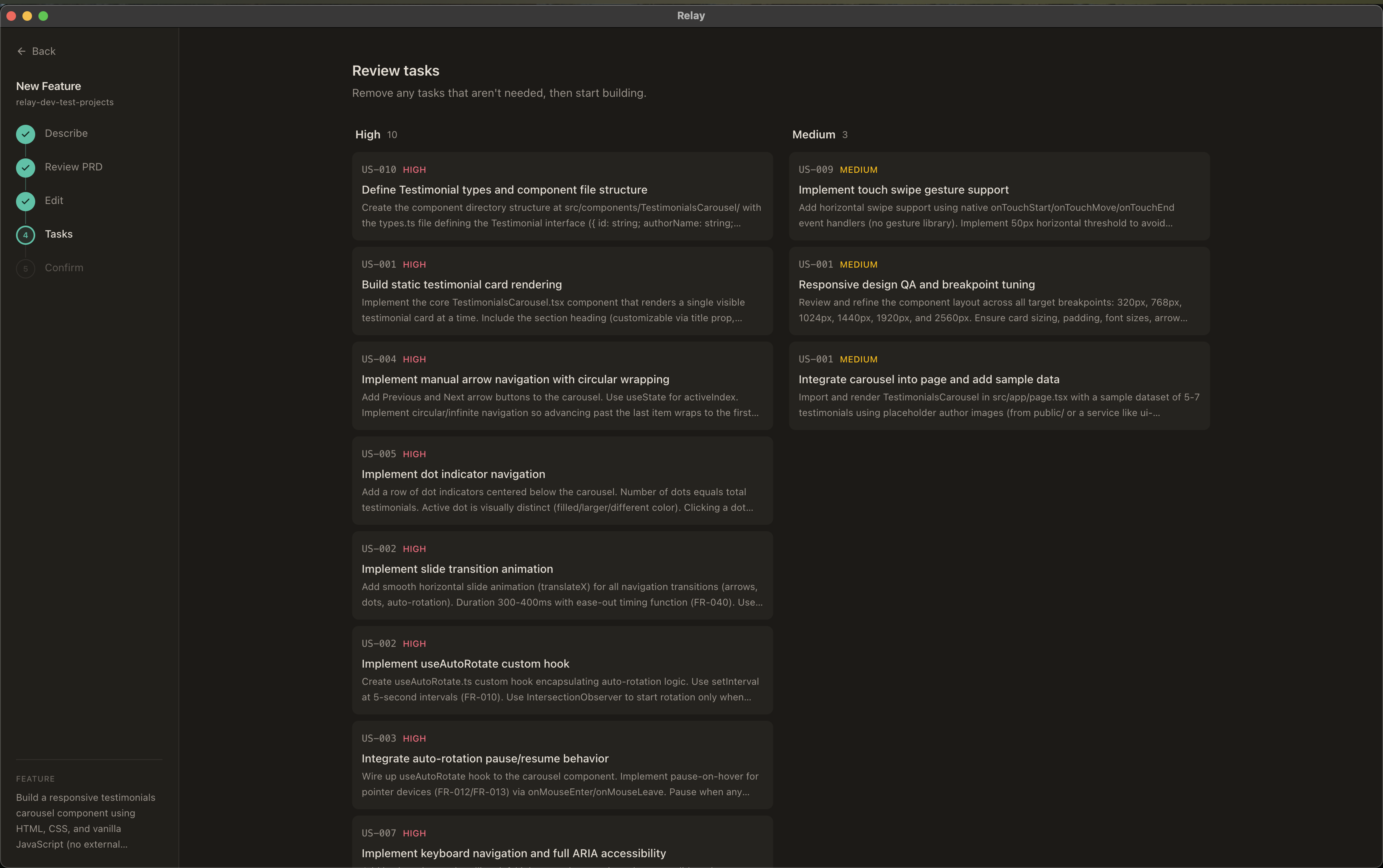
- Task decomposition — The spec or design document is broken into 3-10 structured tasks on a Kanban board
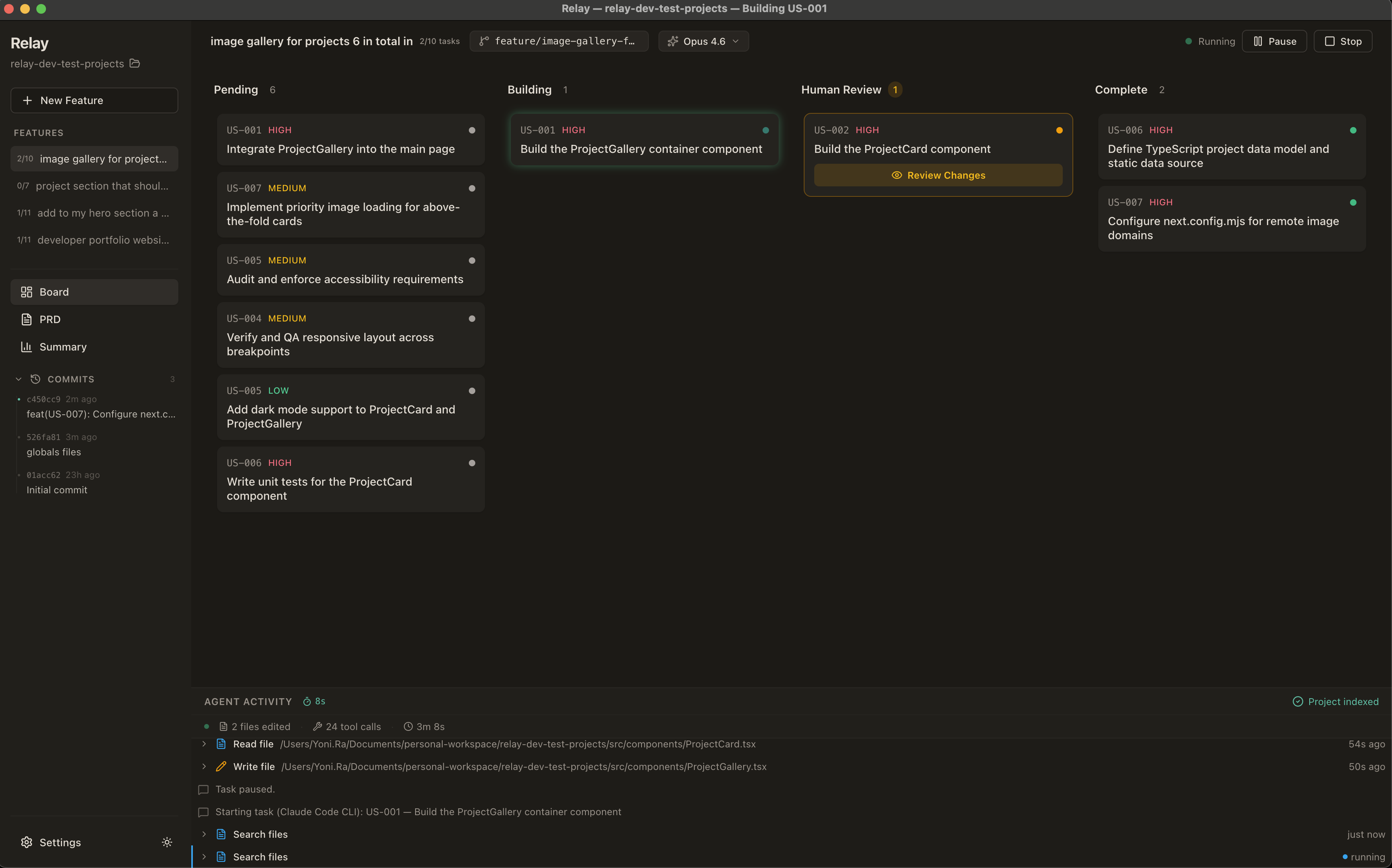
- Build loop — Start the agent and watch it build each task, streaming progress in real time
- Review gate — For each completed task, review the diff — approve to commit, or reject with notes to retry
- Run your project — Click the Run button to preview your app with auto-detected run commands
- Create PR — When all tasks complete, create a pull request directly from the app
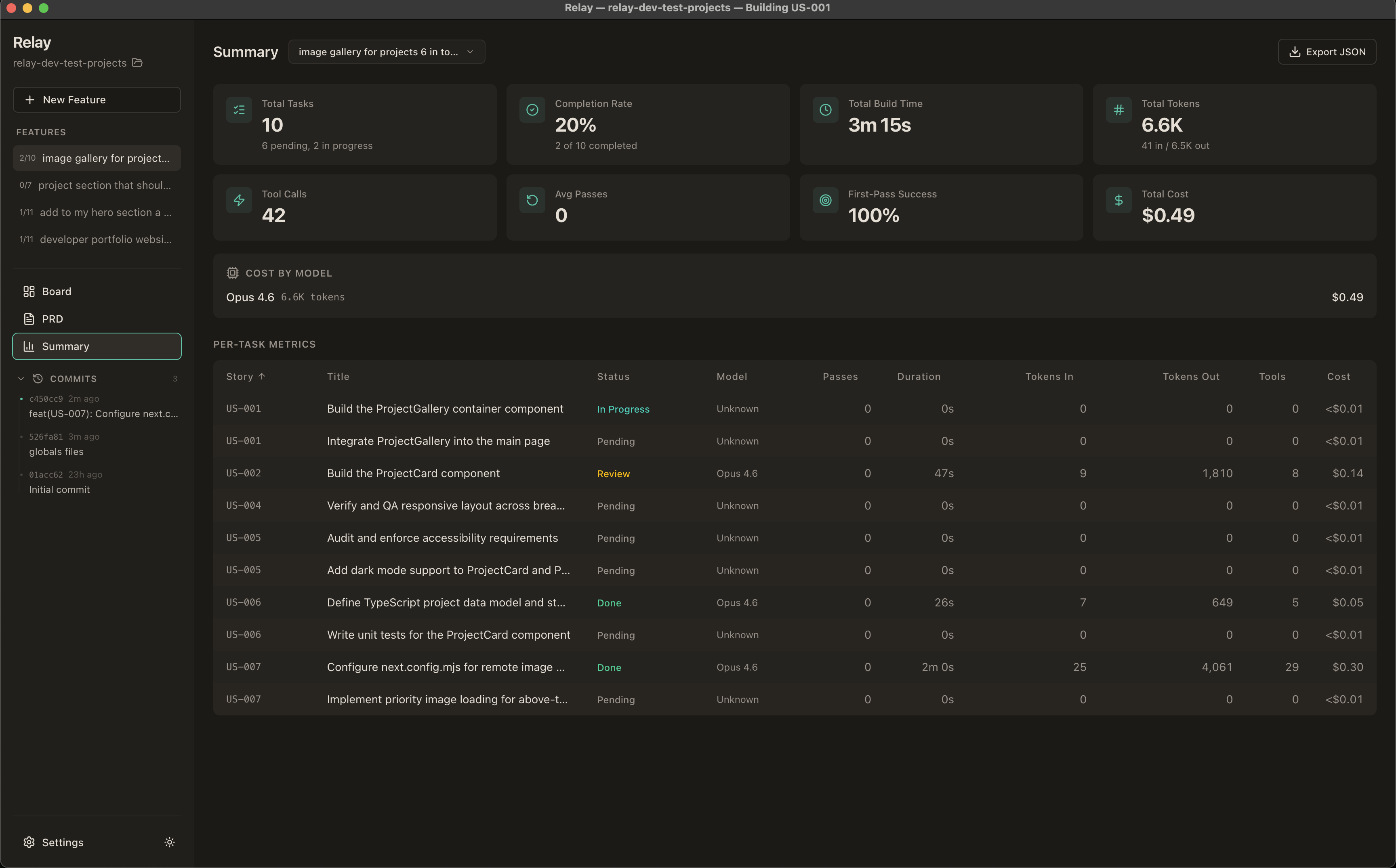
- Track progress — Cost, tokens, build time, and first-pass success rate in the Summary view
Features
Core Build Loop
- Specification Wizard — AI-generated feature specs with streaming preview, clarification questions,
@filetagging, image paste support, and manual editing - Brainstorm Mode — Interactive structured conversation: AI asks focused questions with multiple-choice options, proposes 2-3 approaches with trade-offs, presents design sections for incremental approval, then generates a design document
- Kanban Board — Drag-and-drop task management across Pending, Building, Human Review, and Complete columns
- Agent Loop — Autonomous code generation with play/pause/stop controls and three build modes:
- Pause for Review — Pauses after each task for human approve/reject
- Auto-Pilot — Commits each task automatically and continues
- Continuous — Builds all tasks without pausing; review at your own pace
- Human Review Gate — Syntax-highlighted diff viewer with file tree, approve/reject flow, and git integration
- Smart Review Detection — Tasks with no file changes are auto-approved and skip the review gate
Multi-Engine Support
- Claude Code CLI (default) — Uses your existing Claude Code authentication via
@anthropic-ai/claude-agent-sdk - OpenAI Codex CLI — Uses your existing Codex authentication via
@openai/codex-sdk - Anthropic API Key — Direct SDK calls via
@anthropic-ai/sdkwith built-in file tools - Persistent Sessions — Keep one Claude Code session alive across all tasks for 1M token context (reduces token waste)
@ File Tagging
- Type
@in any text field to reference project files - Autocomplete dropdown with fuzzy search across git-tracked files
- Referenced file contents are injected into the AI prompt
- Available in feature descriptions, task descriptions, and acceptance criteria
Project Runner
- Auto-detection — Detects run command from
package.json,Cargo.toml,pyproject.toml,go.mod,docker-compose.yml,Makefile - Custom override — Define your own command in
.relay/run.json - Live output — Streams stdout/stderr in a tabbed panel with clickable URLs
- Play/Stop toggle — In the board header, right next to model picker
Git & Collaboration
- Automatic branch creation with search/filter for base branch
.gitignoremanagement (auto-adds framework-specific patterns)- Commit on approve, push to remote, PR creation
- Feature rename, archive, and delete
Quality of Life
- Multi-Feature Support — Multiple specs per project with independent task backlogs
- Add Tasks Manually — "+" button in Pending column or 3-priority-column layout in wizard
- Feature Rename — Inline edit in board header
- Feature Archive — Archive completed features to keep workspace focused
- Build Timer — Live elapsed timer while a task is being built
- Persisted Summaries — Task duration, actions, and files changed survive app restart (loaded from DB + git)
- Metrics Dashboard — Per-task and aggregate stats including cost tracking with per-model breakdown
- Dark / Light Mode — Toggle in sidebar, respects system preference
- Keyboard Shortcuts —
Spaceto toggle the agent loop,Escto close panels - Auto-Updates — Built-in update checker for new releases
- Per-Project SQLite — All data stored locally in
.relay/relay.dbinside your project folder - Desktop Notifications — Get notified when tasks need review or the build finishes
Engine Modes
Relay supports three engine modes, selectable in Settings:
| Engine | Auth | Best For |
|---|---|---|
| Claude Code CLI (default) | Uses existing claude login auth |
Claude Code / Max plan users |
| OpenAI Codex CLI | Uses existing codex login auth |
Codex / ChatGPT Pro users |
| Anthropic API Key | Your sk-ant-* key |
Pay-per-token usage |
Tech Stack
| Layer | Technology |
|---|---|
| Desktop shell | Electron 30 |
| Frontend | React 18, TypeScript, Tailwind CSS v4, shadcn/ui |
| State | Zustand |
| AI (Claude) | @anthropic-ai/sdk, @anthropic-ai/claude-agent-sdk |
| AI (Codex) | @openai/codex-sdk |
| Database | better-sqlite3 (per-project) |
| Git | simple-git |
| Build | Vite, electron-builder |
Getting Started
Prerequisites
- Node.js 18+
- npm
- One of: Claude Code CLI, OpenAI Codex CLI, or an Anthropic API key
Install
git clone https://github.com/YoniRaviv/Relay.git
cd Relay
npm install
Development
npm run dev
Opens the app with Vite HMR. The Electron main process and preload script are compiled alongside the renderer.
Dev bypass (no API key needed)
In dev mode, enter dev-bypass as the API key to skip real API validation. You can also seed a demo project with sample data:
npx tsx scripts/seed-demo.ts
Then launch the app, enter dev-bypass as the key, and select the "Demo Project" to explore the UI with pre-populated tasks.
Build
npm run build
Produces a packaged application in release/ (.dmg on macOS, .exe on Windows, .AppImage on Linux).
Lint
npm run lint
Usage Guide
- Launch Relay and choose your engine in the setup screen
- Create or open a project — point to any folder on your machine
- Click "New Feature" — describe what you want built, use
@filenameto reference code - Choose your path — click "Generate Specification" for a direct spec, "Brainstorm" for an interactive design session, or "Skip" to add tasks manually
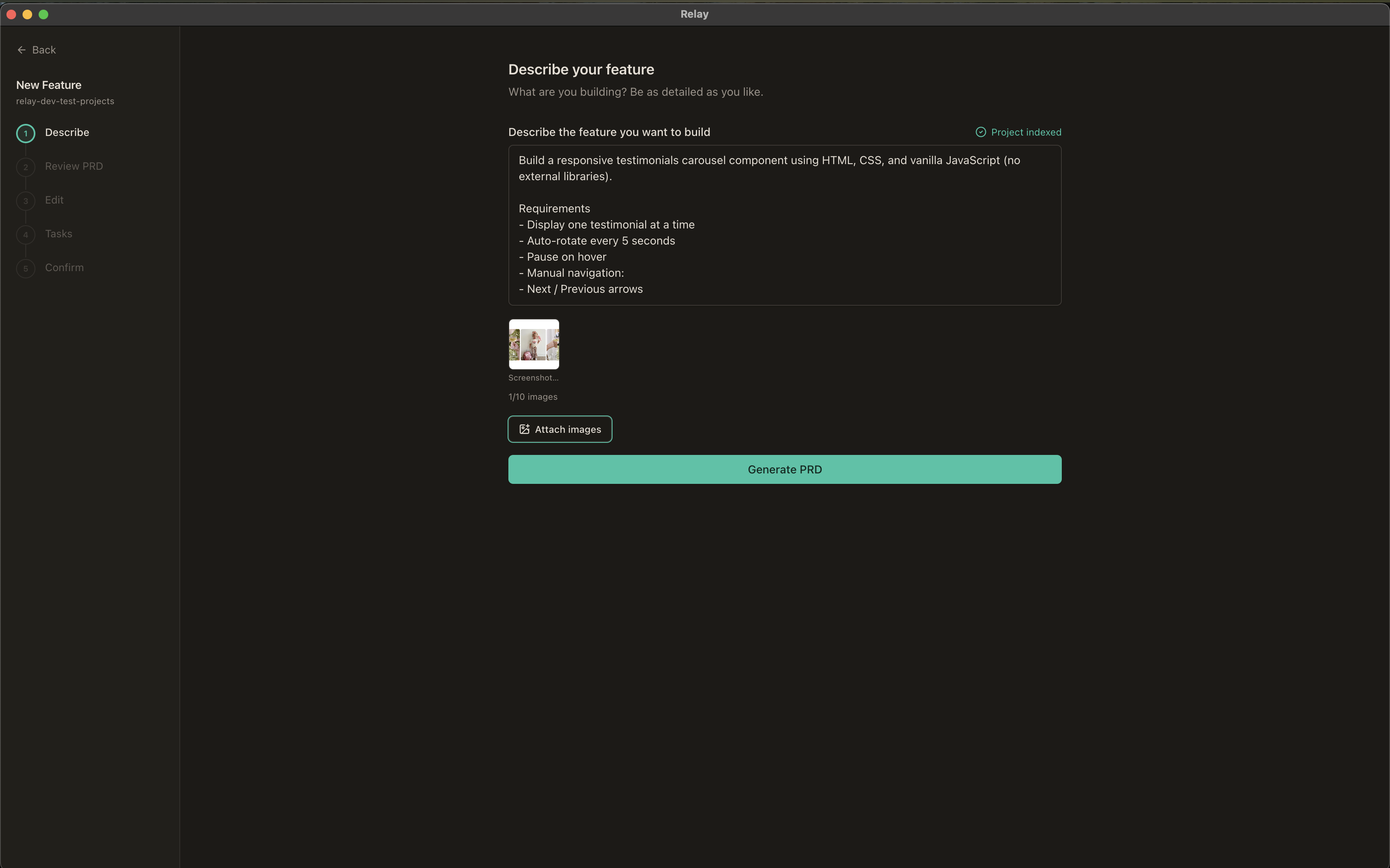
Review the specification — the AI generates a detailed spec (or design document from brainstorming); edit as needed, then approve
Review tasks — the spec is decomposed into ordered tasks grouped by priority
- Select your model and build mode, then click Start
- Watch the agent work — each task streams activity in the feed below the board
- Approve or reject — review diffs, commit approved work, reject with notes to retry
- Run your project — click the Run button to preview your app
- Create a PR — when all tasks are done, use the green button to add a remote or create a PR
- Check the Summary tab for cost and performance metrics
Project Structure
electron/
  main.ts              # Electron main process
  preload.ts           # Context bridge (relayAPI, ~90+ methods)
  agent/               # Agent runner, prompts, loop controller, engines
    engines/           # SDK engine, CLI engine, Codex engine
    openaiRunner.ts    # Codex text generation for PRD/clarify/decompose
  db/                  # SQLite connection and schema (8 migrations)
  git/                 # Git utilities (lock mutex, commit helper)
  runner/              # Project runner (auto-detect, spawn, stop)
  ipc/                 # IPC handlers (settings, project, prd, brainstorm, tasks, agent, git, review, runner, metrics)
shared/
  types.ts             # Shared TypeScript interfaces (EngineMode, SessionMode, etc.)
  pricing.ts           # Model pricing table (Anthropic + OpenAI, engine-tagged)
src/
  pages/               # Board, PRDWizard, Setup, Summary
  modules/             # Feature-based component modules
    board/             # KanbanBoard, TaskCard, TaskDetail, AddTaskButton, ArchiveView
    agent/             # LoopControls, AgentActivityFeed, RunProjectButton, RunOutputPanel
    review/            # ReviewPanel, DiffViewer, PrCreationDialog
    prd/               # PRDPreview, PRDEditor, FeatureInput, BrainstormChat, FileAutocomplete, StreamingProgress
    settings/          # SettingsView (3 engines), ModelPicker (engine-filtered)
    project/           # ProjectSelector, ProjectSidebar, GitHistoryPanel
    metrics/           # TaskMetricsTable, MetricCard
  shared/              # Reusable utilities, hooks, types, and components
  components/ui/       # shadcn/ui primitives
  store/               # Zustand store
  lib/                 # Utilities (theme, keyboard shortcuts)
Keyboard Shortcuts
| Key | Action |
|---|---|
Space |
Play / Pause the agent loop |
Esc |
Close the active panel (review or task detail) |
License
This project is licensed under the GNU General Public License v3.0.
Reviews (0)
Sign in to leave a review.
Leave a reviewNo results found