app-map
Health Warn
- License — License: MIT
- Description — Repository has a description
- Active repo — Last push 0 days ago
- Low visibility — Only 5 GitHub stars
Code Fail
- exec() — Shell command execution in examples/bluesky/code-popup.js
- network request — Outbound network request in examples/bluesky/code/composer.js
Permissions Pass
- Permissions — No dangerous permissions requested
No AI report is available for this listing yet.
AI agent skill for mobile apps — Flutter, native iOS (Swift/Obj-C) and Android (Kotlin/Java). Your coding agent (Claude Code, Cursor, Codex, Gemini CLI, Copilot) maps the app's code into clickable UML: every box opens its real source.
App Map — an AI agent skill for mobile apps


Your AI coding assistant draws a map of your app's code, and keeps it up to date.
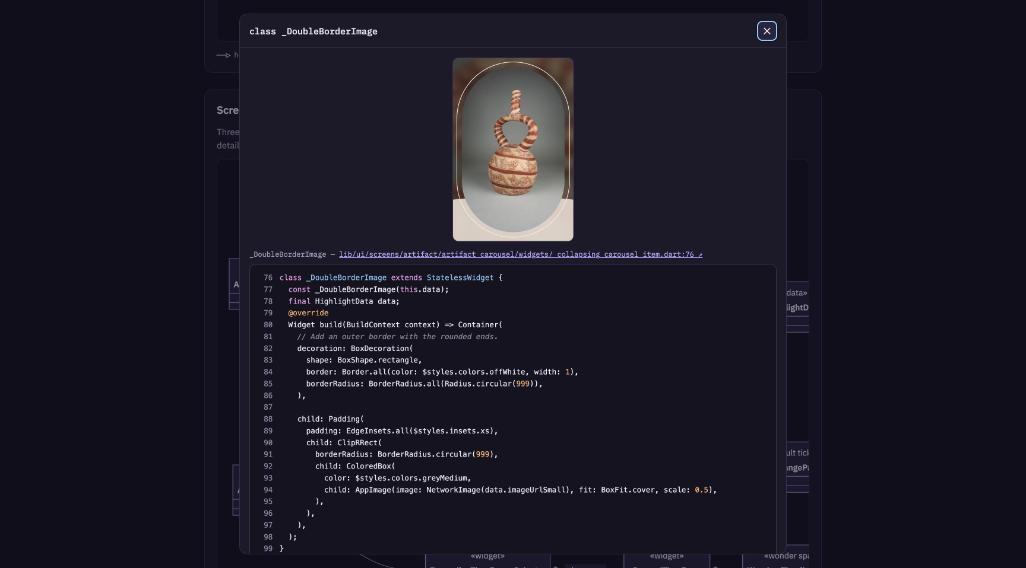
Each part of your app gets a page of diagrams. Click any box or arrow to see the real code behind
it, and a picture of how that screen looks in the app. For Flutter, iOS, Android and React Native apps, with
Claude Code, Cursor, Codex, Gemini CLI or GitHub Copilot.
How to use it
1. Install it once. In Claude Code, one line:
/plugin marketplace add yonivav/app-map. Any other agent, in a terminal inside your app's folder:brew install yonivav/app-map/app-map app-map install --autoWithout Homebrew:
git clone https://github.com/yonivav/app-map ~/.app-map && ~/.app-map/install.sh --auto.2. Ask your AI assistant: "Build an app map of this repo"
3. Open
docs/app-map/index.htmlin your browser.
Make it automatic
Already done by step 1. From now on, whenever your AI assistant changes your code, it
updates the map too. You write code; the map follows.Optional: also on GitHub, for every pull request (even code written by hand). Add one key
to your repository, once:gh secret set ANTHROPIC_API_KEY, or on GitHub: your repository →
Settings → Secrets and variables → Actions → New repository secret.No Claude key? A Gemini key is free: install with
--agent geminiand name the secretGEMINI_API_KEY. Other assistants:
details.
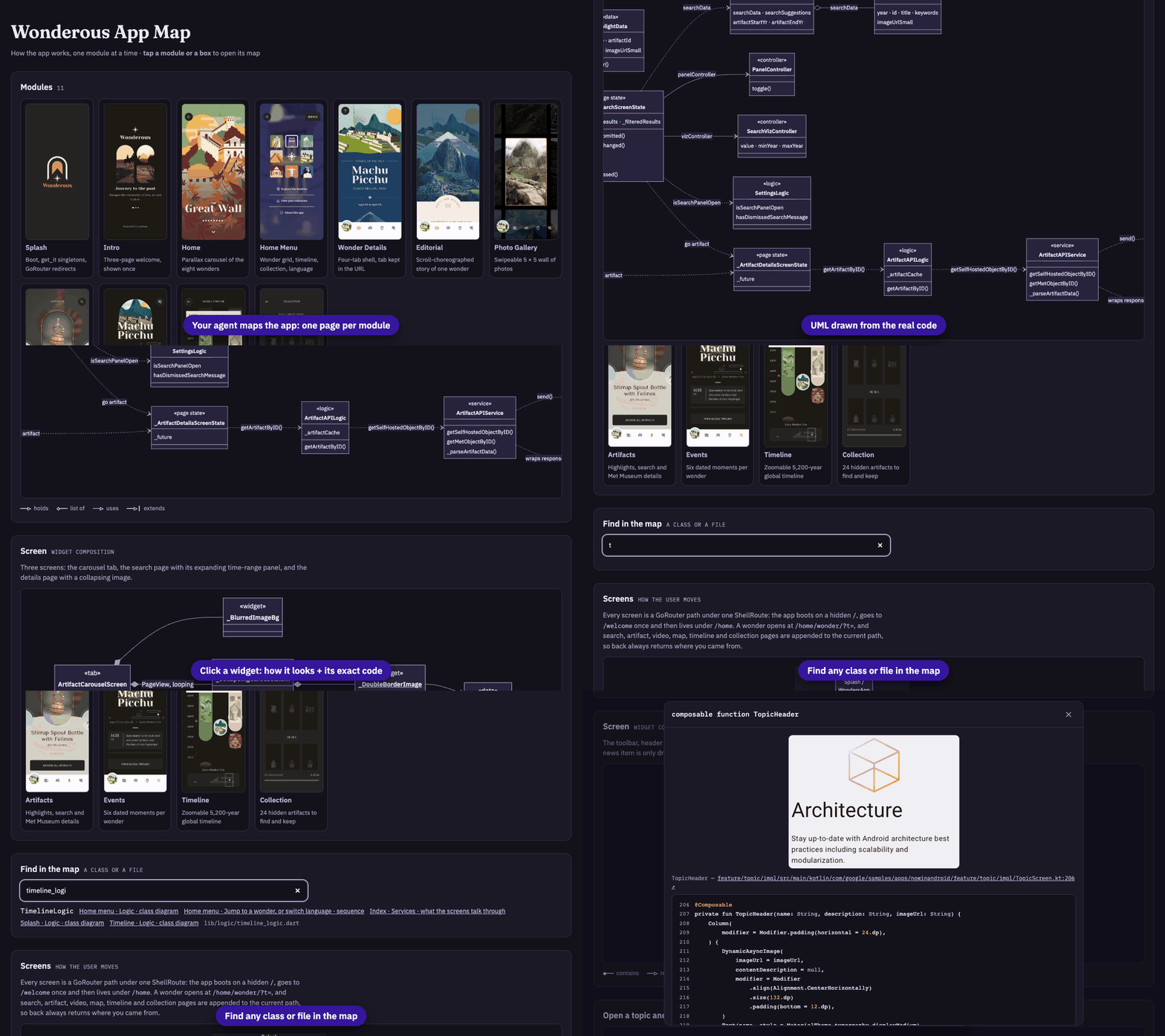
▶ See it work: click a box, land on the real code (39 s)
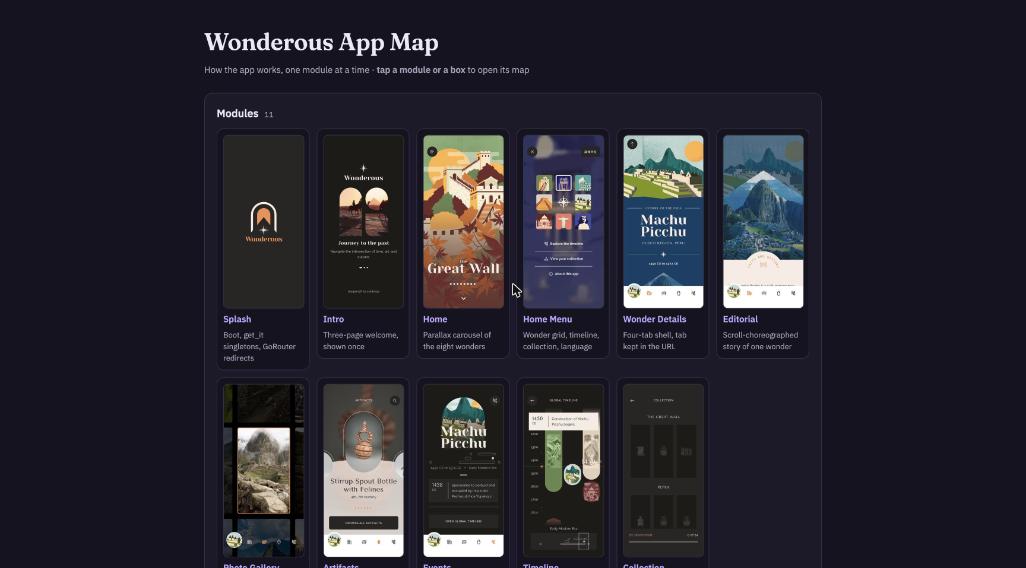
Live examples, each mapped by this skill from a real open-source app (if one saved you time, a ⭐ helps others find the project):
| App | Platform | Open the map |
|---|---|---|
| Wonderous — the Flutter team's showcase app by gskinner (~31k lines, MIT) | Flutter | ▶ Wonderous |
| NetNewsWire — Brent Simmons' RSS reader (~25k lines, MIT) | iOS · Swift, Objective-C | ▶ NetNewsWire |
| Now in Android — Google's Compose showcase app (~29k lines, Apache-2.0) | Android · Kotlin | ▶ Now in Android |
| Wikipedia for iOS — the Wikimedia Foundation's official app (~209k lines, MIT) | iOS · Swift, Objective-C | ▶ Wikipedia iOS |
| Flutter Gallery — the Flutter team's gallery of Material and Cupertino components and six app studies (~32k lines, BSD-3-Clause) | Flutter | ▶ Flutter Gallery |
| Wikipedia for Android — the Wikimedia Foundation's official app (~124k lines, Apache-2.0) | Android · Kotlin | ▶ Wikipedia Android |
| Bluesky — the Bluesky social app, React Native and Expo (~323k lines, MIT) | React Native · TypeScript | ▶ Bluesky |
Automatic updates, in detail
install.sh --auto sets up three layers, so nobody has to remember the map:
| When | What happens | Set up by --auto |
|---|---|---|
| While you code with an agent | Every change the agent makes to a mapped module includes the map update: it runs app-map changes, edits only the affected lines of that module's page, rebuilds and verifies. |
A short rule in AGENTS.md and CLAUDE.md (read by Codex, Cursor, Copilot, Gemini CLI and Claude Code) |
| On every pull request | An AI agent compares the PR's code with the map, updates the pages it affects and commits the map to the PR's branch — also for code written by hand. Reviewers see the map change next to the code change. | .github/workflows/app-map-update.yml — with the agent of your choice (below) |
| On every pull request | The map is rebuilt and checked: the PR fails if a diagram stops rendering or names code that no longer exists, and the PR summary lists what changed since the map was synced. | .github/workflows/app-map-check.yml |
The pull-request agent is yours to pick with --agent (default claude); add its key once
as a repository secret:
--agent |
Runs | Secret |
|---|---|---|
claude |
Claude Code action | gh secret set ANTHROPIC_API_KEY |
codex |
OpenAI Codex action | gh secret set OPENAI_API_KEY |
gemini |
Gemini CLI action | gh secret set GEMINI_API_KEY |
cursor |
Cursor CLI, headless | gh secret set CURSOR_API_KEY |
copilot |
GitHub Copilot CLI, headless | gh secret set COPILOT_GITHUB_TOKEN (a token of a user with Copilot) |
Switch later by editing AGENT: in .github/workflows/app-map-update.yml. --map <folder>
puts the map somewhere other than docs/app-map. Running --auto again updates the rule in
place, never twice.
Still yours to ask for: new screenshots after a screen's look changes (they need a simulator,
so they don't run in CI): "retake the app map screenshots for the settings module".
Install, in detail
App Map is an Agent Skill: a SKILL.md with scripts, in the open
format that most coding agents now read.
brew install yonivav/app-map/app-map          # `app-map install` = install.sh below; other commands = the CLI
cd your-app && app-map install --auto

# or without Homebrew:
git clone https://github.com/yonivav/app-map ~/.app-map
cd your-app && ~/.app-map/install.sh          # into this repo (commit it to share with your team)
~/.app-map/install.sh --auto                  # …and keep the map current by itself (above)
~/.app-map/install.sh --user                  # or once, for every repo on your machine
| Agent | Reads it from |
|---|---|
| OpenAI Codex | .agents/skills/app-map |
| Gemini CLI | .agents/skills/app-map |
| GitHub Copilot (CLI, VS Code, JetBrains, cloud agent) | .agents/skills/app-map |
| Cursor | .cursor/skills/app-map, plus a .cursor/rules/app-map.mdc pointer |
| Claude Code | .claude/skills/app-map (or, inside Claude Code: /plugin marketplace add yonivav/app-map) |
| Anything else | point it at .agents/skills/app-map/SKILL.md (e.g. from AGENTS.md) |
--link symlinks instead of copying, so git -C ~/.app-map pull updates every repo.
What you need
| Maps (diagrams, code popups, updates) | Screenshots | |
|---|---|---|
| Any app | Python 3.9+, git, Chrome (for verify); macOS or Linux (CI builds the examples on Linux) |
— |
| Flutter | the Dart SDK recommended (reads every syntax; works without it) | macOS with Xcode (an iOS simulator) |
| iOS (Swift, Objective-C) | nothing more | macOS with Xcode; the app builds for the simulator |
| Android (Kotlin, Java) | nothing more | the Android SDK with an emulator image; tested on macOS, not yet on Linux |
The map's Python environment sets itself up on first use (~/.cache/app-map/venv).
How long it takes, what it costs
App Map is free and open source. What costs money is the AI usage, paid to your AI provider
through your own agent's plan or API key. Measured with Claude Code (Claude Opus 5.5), each a fresh agent given only the prompt a user
would type, on open-source apps it had never seen:
| Task | App | Time | AI usage cost |
|---|---|---|---|
| "Build an app map of this repo" | Sunflower (Kotlin, ~4.8k lines) | 3.6 min | $1.26 |
| "Build an app map of this repo", with screenshots | Now in Android (Kotlin, ~29k lines) | 12.8 min | $3.26 |
| "Update the app map" after renaming a method | Sunflower | 50 s | $0.30 |
Other agents and models will differ.
Ask your agent
Once installed, talk to your agent in plain words. For example:
| Ask | What happens |
|---|---|
| "Build an app map of this repo" | It proposes the modules, then writes one page each, builds the site and checks every page |
| "Update the app map" | It lists what changed in the code since the map was synced and edits only those pages |
| "Is the app map up to date?" | It reports, per module, the classes that changed, the names that no longer exist, and new classes not on the map |
"Where is WondersLogic on the map?" or "…lib/logic/wonders_logic.dart?" |
It lists every diagram that draws that class, or that file's classes |
| "Add the new Settings screen to the app map" | It adds the screen to the right module (or a new one) and to the overview |
| "Take screenshots for the app map" | It runs the app on a simulator, adds each module's screenshots, and crops every page and widget for the popups |
| "Using the app map, explain how the timeline works" | It reads the module's page and code to answer, with links to the exact lines |
Before you publish a map: the built site includes excerpts of your source code (that's what
the popups show). Keep a private app's map private — commit it to the app's own repo, don't host
it on public GitHub Pages.
The skill's own tools also work on their own:
| Command | What it does |
|---|---|
app-map build <map> |
Markdown → the clickable site: pages, code popups, search |
app-map changes <map> / sync <map> |
what changed in the code since the map was synced, per module; mark it current |
app-map where <map> <Class or file> |
code → map: every diagram that draws it |
app-map facts <map> <Class>… |
what each class builds and uses, by role: the raw material for its diagrams (Dart, with the Dart SDK; role/extends/implements only for Swift, Kotlin, Java, Objective-C, or Dart without an SDK) |
app-map verify <map> |
renders every page in headless Chrome; flags Mermaid pitfalls, leftover placeholders and names that won't click |
app-map shots [ios|android] … |
runs a screenshot scenario on a simulator or emulator of its own (Flutter, iOS or Android) |
app-map crop <shots> <map> |
crops each page/widget from its best shot (nothing covering it) |
Why
Architecture docs go stale the day they're written, and UML tools draw boxes nobody can check.
An App map is different:
- Grounded in the code. Each diagram is drawn from the classes the code actually builds and
calls (app-map facts). Each name is checked against the source (app-map verify). - Clickable down to the line. Class names, members, relation labels and sequence calls open
the exact code in a popup, with an "open in VS Code" link. - Shows the real UI. A simulator run logs where every page and widget sits on screen. Each
popup then shows a crop of that widget from the running app. - Markdown in your repo. Each module is a Markdown file GitHub renders as it is (Mermaid
included);app-map buildmakes the clickable site from it. Map changes are reviewable diffs. - Both directions. From a box to its code, and from code to the map: every popup says where
else the class appears, the overview finds any class or file,app-map wheredoes it in the
terminal. - Stays current. The map remembers the commit it describes;
app-map changeslists, per
module, what changed since. With--auto, your agent and a PR bot update it as the code
changes.
When to use it
- Onboarding — point a new engineer, or an AI agent working on the codebase for the first
time, at the map before the code. It's faster to correct a wrong diagram than to re-derive the
architecture from scratch. - Before a refactor, a platform port or a native rewrite (a Flutter screen going native, or
the reverse) — see what calls what before you change it, across Dart, Swift, Kotlin and Java
alike. - Keeping docs from going stale — with
--auto, the map is updated with every change and
every PR, instead of hoping someone remembers to update a wiki page. - Code review — link a PR to the module it touches instead of re-explaining the architecture
in the description;app-map whereturns a changed file straight into "which diagrams does
this affect." - A codebase that mixes platforms — a Flutter core with a native iOS/Android shim, or a team
that ported Dart screens to Swift and Kotlin, gets one map that reads all of them the same way.
Not a fit for: a single file you're about to edit (just read it — a map is for the shape of a
module, not a line), or a repo that changes faster than anyone reviews PRs for it (the map
reflects the commit it was last synced to; it won't track a branch nobody's merging).
How it works
- Parsing. Dart is read with the official
analyzerwhen a Dart SDK is installed, and with
tree-sitter otherwise; Swift, Kotlin, Java and Objective-C are
read with tree-sitter directly — classes, structs, protocols/interfaces/categories, enums,
SwiftUIViews and@Composablefunctions, all with their members. TypeScript and JavaScript
(React Native) are read with tree-sitter too: function and class components, hooks, stores and
contexts, with what each component renders (its JSX) and the hooks it calls. Declarations are
cached per file, so a rerun only parses what changed. - Diagrams. The diagrams are Mermaid, rendered in the page with the page's own theme (light
and dark). Each source sits in a<script type="text/plain">, so<<stereotypes>>survive. - Screenshots. At each shot a small adapter records where every class of the map sits on
screen, and whether something covers it. Flutter: anintegration_testhelper that also
hit-tests five points per widget and scrolls cut-off widgets into view. iOS: an XCUITest that
drives any installed app by bundle id, while lldb reads each view's class and frame (UIKit, and
the SwiftUI view a hosting controller shows). Android: an instrumented test that reads Views,
Fragments and@Composablefunctions from Compose's own inspector data, the way Android
Studio's Layout Inspector does.
Status
- Phase 1 (done): Flutter/Dart, with screenshots on the iOS simulator.
- Phase 2 (done): native Android (Kotlin/Java) and iOS (Swift/Objective-C): class maps, screen
composition, state machines and screenshots. - Phase 3 (done): React Native (TypeScript/JavaScript, bare or Expo): component and hook maps, with
screenshots from the simulator and the emulator, measured by a dev-only helper inside the app. Plain web
is on hold: the screenshots of real running widgets are what sets this tool apart, and that is a
mobile story. - Want to help? See the good first issues.
Credits
The examples map these open-source apps, none affiliated with or endorsing this project:
- Wonderous by gskinner (MIT). Source
excerpts and screenshots inexamples/wonderous/are © gskinner.com under the MIT license; seeexamples/wonderous/LICENSE-wonderous. - NetNewsWire by Brent Simmons and
contributors (MIT). Source excerpts and screenshots inexamples/netnewswire/are © Brent Simmons under the
MIT license; seeexamples/netnewswire/LICENSE-netnewswire. - Now in Android by Google (Apache-2.0). Source
excerpts and screenshots inexamples/now-in-android/are © The Android Open Source Project under the
Apache-2.0 license; seeexamples/now-in-android/LICENSE-now-in-android. - Wikipedia for iOS by the Wikimedia Foundation and contributors
(MIT). Source excerpts and screenshots inexamples/wikipedia-ios/are © Wikimedia Foundation et al. under
the MIT license; seeexamples/wikipedia-ios/LICENSE-wikipedia-ios. Article text and images in the
screenshots come from Wikipedia under CC BY-SA 4.0 and their own licenses. - Flutter Gallery by the Flutter team (BSD-3-Clause). Source
excerpts and screenshots inexamples/flutter-gallery/are © The Flutter team under the BSD 3-Clause
license; seeexamples/flutter-gallery/LICENSE-flutter-gallery. - Wikipedia for Android by the Wikimedia Foundation and
contributors (Apache-2.0). Source excerpts and screenshots inexamples/wikipedia-android/are © the
Wikimedia Foundation under the Apache-2.0 license; seeexamples/wikipedia-android/LICENSE-wikipedia-android.
Article text and images in the screenshots come from Wikipedia under CC BY-SA 4.0 and their own licenses. - Bluesky by Bluesky Social PBC (MIT). Source excerpts and
screenshots inexamples/bluesky/are © Bluesky Social PBC under the MIT license; seeexamples/bluesky/LICENSE-bluesky.
MIT © 2026 Yoni Vizel
Reviews (0)
Sign in to leave a review.
Leave a reviewNo results found