sync-worktrees
Health Pass
- License — License: MIT
- Description — Repository has a description
- Active repo — Last push 0 days ago
- Community trust — 11 GitHub stars
Code Fail
- execSync — Synchronous shell command execution in src/__tests__/e2e/cli.e2e.test.ts
- process.env — Environment variable access in src/__tests__/e2e/cli.e2e.test.ts
- execSync — Synchronous shell command execution in src/__tests__/e2e/config-file.e2e.test.ts
- process.env — Environment variable access in src/__tests__/e2e/config-file.e2e.test.ts
- execSync — Synchronous shell command execution in src/__tests__/e2e/double-run.test.ts
- execSync — Synchronous shell command execution in src/__tests__/e2e/head-branch-filter.test.ts
Permissions Pass
- Permissions — No dangerous permissions requested
No AI report is available for this listing yet.
Auto-sync Git worktrees with remote branches. Includes an MCP server so Claude Code, Cursor & other AI agents can inspect and manage worktrees.
sync-worktrees
Automatically synchronize Git worktrees with remote branches. Keep your local worktrees in sync with remote repositories - perfect for multi-branch development workflows and automated testing setups.
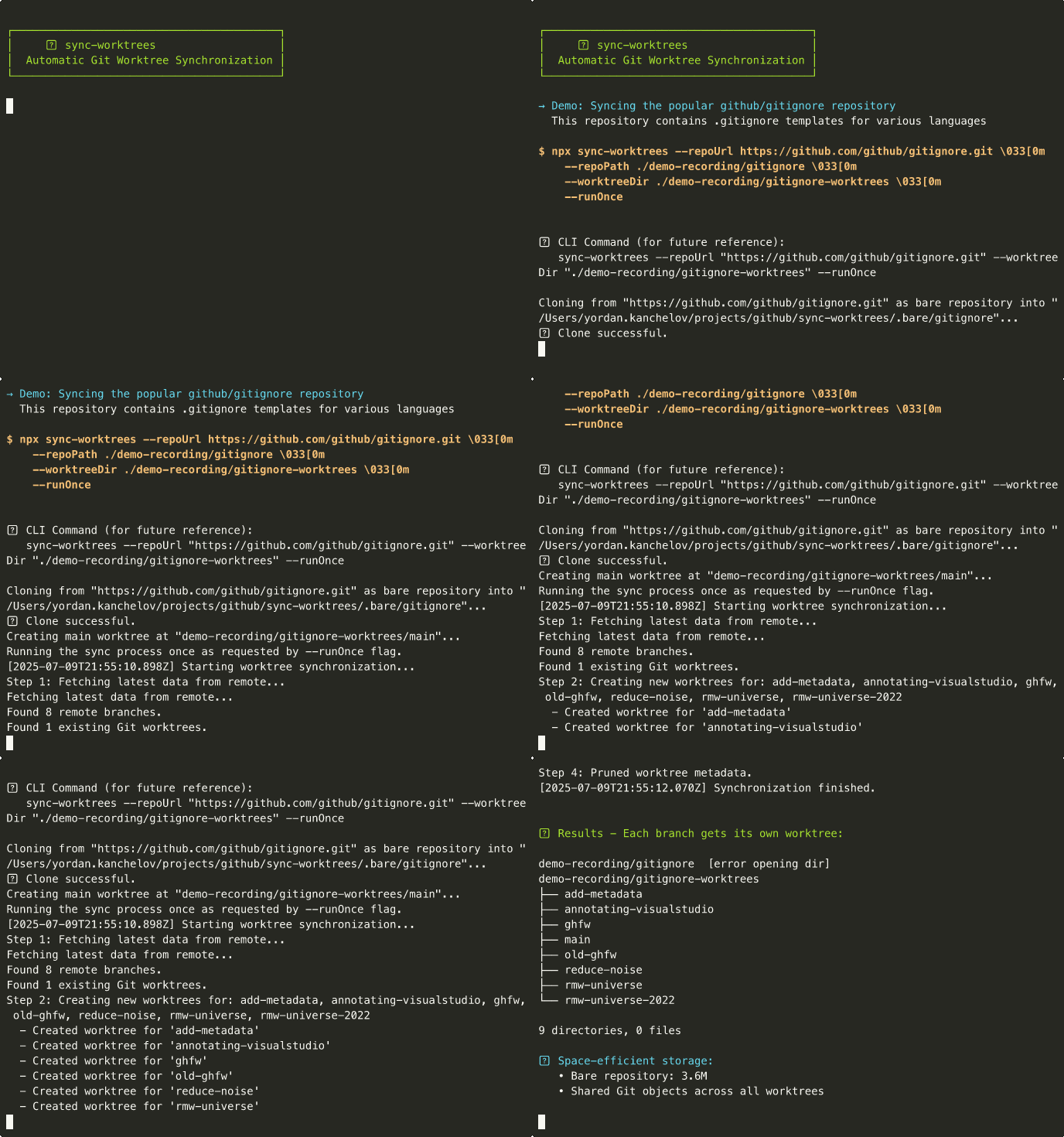
How it works
sync-worktrees maintains a separate working directory for each remote branch, all sharing the same Git repository:
- First run: Clones your repository as a bare repository (no working files, just Git data)
- Automatic sync:
- Creates a dedicated worktree for every remote branch (
main,develop,feature/*, etc.) - Each branch gets its own isolated directory with a full working copy
- Fetches latest changes (doesn't merge - preserves your local work)
- Removes worktrees when remote branches are deleted (preserves local changes)
- Creates a dedicated worktree for every remote branch (
Why this matters: Switch between branches instantly without stashing, run tests on multiple branches simultaneously, or keep your CI and production branches always ready.
Features
- 🔄 Automatically creates worktrees for all remote branches
- 🗑️ Removes worktrees for deleted remote branches (preserves local changes)
- ⏰ Run as a scheduled cron job or one-time execution
- 🛡️ Safe operations - won't delete worktrees with uncommitted changes or unpushed commits
- 📝 Clear logging with timestamps and progress indicators
- 📋 Config file support for managing multiple repositories
- 🔁 Automatic retry with exponential backoff for network and filesystem errors
- 🕐 Branch age filtering - only sync branches active within a specified time period
- 🔀 Smart handling of rebased/force-pushed branches with automatic divergence detection
- 🤖 MCP server for AI assistants - inspect and manage worktrees from Claude Desktop, Claude Code, Cursor, etc.
Installation
npm install -g sync-worktrees
Or with pnpm:
pnpm add -g sync-worktrees
Usage
Run sync-worktrees in any directory:
- First run — no config found → interactive wizard asks for repo URL, worktree directory, and schedule, then saves
sync-worktrees.config.jsin the current directory and starts syncing. - Subsequent runs —
sync-worktreesauto-loadssync-worktrees.config.js(or.mjs/.cjs) from the current directory. No flags needed.
cd ~/projects/my-sync-dir
sync-worktrees           # wizard → saves config → runs
sync-worktrees           # re-uses the saved config
To manage multiple repositories, edit the generated config file and add entries under repositories. See Configuration File.
Explicit config path
Useful when the config lives outside the current directory:
sync-worktrees --config /path/to/sync-worktrees.config.js
sync-worktrees --config ./config.js --filter "frontend-*"
sync-worktrees --config ./config.js --list
Opening a worktree from the TUI
Press o in the interactive TUI to open the selected worktree. The wizard supports two modes, toggled with Tab:
- Terminal (default) — launches a new terminal window with a
tmuxsession attached to the worktree directory. Session name is<repo>-<sanitized-branch>; re-opening the same worktree attaches to the existing session instead of creating a duplicate. - Editor — launches
$EDITOR/$VISUAL(falls back tocode) in the worktree.
Terminal mode requires tmux to be installed.
Environment variables
| Variable | Purpose | Default behavior |
|---|---|---|
SYNC_WORKTREES_TERMINAL |
Override the terminal launcher on any platform. Value is a command string; the tmux invocation is appended via sh -c. Example: SYNC_WORKTREES_TERMINAL="alacritty -e". |
See per-platform defaults below. |
TERMINAL |
Linux-only fallback when SYNC_WORKTREES_TERMINAL is unset. Same format. |
Probes gnome-terminal, konsole, alacritty, kitty, xterm in order. |
EDITOR / VISUAL |
Editor mode launcher. | Falls back to code. |
Per-platform terminal defaults (when no env override is set):
- macOS — Ghostty if
Ghostty.appis installed, otherwise Terminal.app via AppleScript. - Linux —
$TERMINALif set; otherwise the first found among the candidates above.
MCP Server
sync-worktrees ships a Model Context Protocol server so AI assistants (Claude Desktop, Claude Code, Cursor, Windsurf, etc.) can inspect and manage your worktrees directly. Installing the package exposes a second binary, sync-worktrees-mcp, that speaks MCP over stdio.
Setup
Add the server to your MCP client config. Use npx if the package is not installed globally:
{
  "mcpServers": {
    "sync-worktrees": {
      "command": "npx",
      "args": ["-y", "-p", "sync-worktrees", "sync-worktrees-mcp"],
      "env": {
        "SYNC_WORKTREES_CONFIG": "/absolute/path/to/sync-worktrees.config.js"
      }
    }
  }
}
If installed globally, replace command with sync-worktrees-mcp and drop args. SYNC_WORKTREES_CONFIG is optional — without it the server runs in auto-detect mode: when the client's CWD sits inside a worktree managed by sync-worktrees, the server locates the bare repo, enumerates sibling worktrees, and enables per-worktree operations. Sync and initialize require a loaded config (or call load_config at runtime).
Client-specific locations:
| Client | Config file |
|---|---|
| Claude Desktop | ~/Library/Application Support/Claude/claude_desktop_config.json (macOS) |
| Claude Code | claude mcp add sync-worktrees -- npx -y -p sync-worktrees sync-worktrees-mcp |
| Cursor | ~/.cursor/mcp.json (or project-level .cursor/mcp.json) |
Available tools
| Tool | Purpose |
|---|---|
detect_context |
Inspect a path, resolve the bare repo, enumerate sibling worktrees, report capabilities. |
list_worktrees |
List worktrees with status label (clean/dirty/stale/current), divergence, safeToRemove, last sync. |
get_worktree_status |
Detailed status for one worktree (dirty files, unpushed commits, stashes, operation in progress). |
create_worktree |
Create a worktree for a branch; optionally create the branch from baseBranch and push. |
remove_worktree |
Remove a worktree after safety checks; force=true skips validation. |
update_worktree |
Fast-forward one worktree to match upstream. |
sync |
Full sync cycle (fetch, create, prune, update). Requires config. Streams progress notifications. |
initialize |
Clone the bare repo and create the main worktree. Requires config. Streams progress. |
load_config |
Load or reload a config file at runtime. |
set_current_repository |
Select the active repo when multiple are configured. |
All tools that target a single repo accept an optional repoName. When omitted, they use the current repository — set by auto-detect, the first entry in the config, or set_current_repository.
Safety
remove_worktreerefuses to delete worktrees with uncommitted changes, unpushed commits, stashes, or operations in progress (merge/rebase/cherry-pick/revert/bisect). Passforce=trueto override.create_worktreerejects sanitized-path collisions (e.g.feature/foovsfeature-fooboth resolving tofeature-foo/) before touching disk.- Path-targeted tools verify the supplied path is a registered worktree of the selected repository.
Options
| Option | Alias | Description | Default |
|---|---|---|---|
--config |
-c |
Path to JavaScript config file (auto-detected in CWD when omitted) | - |
--filter |
-f |
Filter repositories by name (wildcards supported) | - |
--list |
-l |
List configured repositories and exit | false |
--runOnce |
- | Override config to run once and exit | false |
--no-update-existing |
- | Disable automatic updates of existing worktrees | false |
--debug |
-d |
Show detailed reasons for skipped cleanups | false |
--help |
-h |
Show help | - |
Most sync behavior (repo URL, worktree directory, cron schedule, branch filtering, LFS, retry) is configured in the config file. The CLI flags that only make sense for one-off runs (--repoUrl, --worktreeDir, --cronSchedule, --branchMaxAge, --branchInclude, --branchExclude, --skip-lfs, --bareRepoDir) are still supported — run sync-worktrees --help for the full list.
Configuration File
For managing multiple repositories, create a JavaScript ES module config file:
export default {
  // Optional defaults for all repositories
  defaults: {
    cronSchedule: "0 * * * *",  // Hourly
    runOnce: false,
    branchMaxAge: "30d",  // Only sync branches active in last 30 days
    branchExclude: ["wip-*", "tmp-*"],  // Exclude WIP and temporary branches
    updateExistingWorktrees: true  // Auto-update worktrees that are behind (default: true)
  },

  // Retry configuration (optional - these are the defaults)
  retry: {
    maxAttempts: 'unlimited',  // or a number like 5
    initialDelayMs: 1000,      // Start with 1 second
    maxDelayMs: 600000,        // Max 10 minutes between retries
    backoffMultiplier: 2       // Double the delay each time
  },

  repositories: [
    {
      name: "frontend",  // Unique identifier
      repoUrl: "https://github.com/company/frontend.git",
      worktreeDir: "./worktrees/frontend",  // Relative paths supported
      cronSchedule: "*/30 * * * *"  // Override default
    },
    {
      name: "backend",
      repoUrl: process.env.BACKEND_REPO_URL,  // Environment variables supported
      worktreeDir: "/absolute/path/backend-worktrees",
      branchMaxAge: "6m",  // Override: only sync branches active in last 6 months
      branchInclude: ["feature/*", "release-*", "main"],  // Only sync specific branches
      // Uses default schedule
      retry: { maxAttempts: 10 }  // Override retry for this repo
    }
  ]
};
Notes:
- Relative paths are resolved from the config file location
bareRepoDirdefaults to.bare/<repo-name>if not specified- Repository-specific settings override defaults
Retry Configuration
The tool automatically retries on network errors and filesystem race conditions:
- Default behavior: Unlimited retries with exponential backoff (1s, 2s, 4s... up to 10 minutes)
- Network errors: Connection timeouts, DNS failures, repository access issues
- Filesystem errors: Busy files, permission issues, race conditions
Simple retry examples:
// Global retry configuration
retry: { maxAttempts: 5 }                    // Try 5 times then stop
retry: { maxAttempts: 'unlimited' }          // Keep trying forever (default)
retry: { maxDelayMs: 60000 }                 // Cap retry delay at 1 minute
retry: { initialDelayMs: 5000 }              // Start with 5 second delay

// Per-repository override
repositories: [{
  name: "critical-repo",
  // ... other config ...
  retry: { maxAttempts: 'unlimited', initialDelayMs: 10000 }
}]
Git LFS Support
For repositories with Git LFS issues or when large files aren't needed:
# Skip LFS downloads
sync-worktrees -u https://github.com/user/repo.git -w ./worktrees --skip-lfs

# Or in config file
defaults: {
  skipLfs: true
}
The tool automatically handles LFS errors by retrying with LFS disabled (max 2 retries by default, configurable via retry.maxLfsRetries).
Branch Name Filtering
You can control which branches get synced using include and exclude patterns. This is useful for repositories where you only care about specific branch types (e.g., feature branches) or want to skip certain patterns (e.g., WIP branches).
Pattern syntax: Patterns support * wildcards that match any characters (including / in branch names).
feature/*- matchesfeature/login,feature/auth/oauth, etc.release-*- matchesrelease-1.0,release-2.0-beta, etc.*-hotfix- matchesurgent-hotfix,prod-hotfix, etc.
Filtering semantics:
branchInclude- only branches matching at least one pattern are syncedbranchExclude- branches matching any pattern are skipped- When both are set, include runs first, then exclude removes from the result
- The default branch (e.g.,
main) is always retained regardless of filters
Examples:
# Command line
sync-worktrees -u https://github.com/user/repo.git -w ./worktrees \
  --branchInclude "feature/*,release-*"

sync-worktrees -u https://github.com/user/repo.git -w ./worktrees \
  --branchExclude "wip-*,tmp-*"

# Config file - global default
defaults: {
  branchExclude: ["wip-*", "tmp-*"]
}

# Config file - per repository
repositories: [{
  name: "frontend",
  branchInclude: ["feature/*", "release-*"],
  branchExclude: ["feature/wip-*"],
}]
Combining with age filtering: Branch name filtering runs first, then age filtering (branchMaxAge) is applied to the remaining branches. This lets you narrow down to specific branch types and further filter by activity.
# Only feature branches active in the last 30 days
sync-worktrees -u https://github.com/user/repo.git -w ./worktrees \
  --branchInclude "feature/*" --branchMaxAge 30d
Branch Age Filtering
To reduce clutter and save disk space, you can configure sync-worktrees to only sync branches that have been active within a specified time period. This is particularly useful for repositories with many stale or abandoned branches.
Duration format: <number><unit>
h- hours (e.g.,24h)d- days (e.g.,30d)w- weeks (e.g.,4w)m- months (e.g.,6m)y- years (e.g.,1y)
Examples:
# Command line
sync-worktrees -u https://github.com/user/repo.git -w ./worktrees --branchMaxAge 30d

# Config file - global default
defaults: {
  branchMaxAge: "90d"  // Only sync branches active in last 90 days
}

# Config file - per repository
repositories: [{
  name: "active-project",
  branchMaxAge: "14d",  // Very active project - only last 2 weeks
}, {
  name: "legacy-project",
  branchMaxAge: "1y",   // Legacy project - keep branches from last year
}]
When branch filtering is active, the tool will:
- Fetch commit timestamps for all remote branches
- Filter out branches older than the specified age
- Log how many branches were excluded
- Only create/maintain worktrees for active branches
Handling Rebased and Force-Pushed Branches
sync-worktrees intelligently handles branches that have been rebased or force-pushed to prevent data loss:
Automatic behavior (no configuration needed):
Clean rebases - When a branch is rebased but the file content remains identical:
- Automatically resets the worktree to match the upstream
- No data loss since the content is the same
Diverged branches with NO local changes - When someone force-pushes but you haven't made local commits:
- Automatically resets to the new upstream state
- No move to
.divergedsince you have no work to preserve - Keeps
.divergedclean by only preserving actual user work
Diverged branches WITH local changes - When a branch has different content AND you've made local commits:
- Moves the worktree to
.divergeddirectory within your worktrees folder - Preserves all your local changes and commits
- Creates a fresh worktree from the upstream branch
- Logs clear instructions for reviewing diverged changes
- Moves the worktree to
Example diverged structure:
my-repo-worktrees/
├── main/
├── feature-a/
├── feature-b/
└── .diverged/                      # Hidden diverged directory
    ├── 2024-01-15-feature-x/      # Timestamp + branch name
    │   ├── .diverged-info.json    # Metadata about the divergence
    │   └── [all your local files]
    └── 2024-01-16-feature-y/
        ├── .diverged-info.json
        └── [all your local files]
Reviewing diverged worktrees:
# See what's different
cd my-repo-worktrees/.diverged/2024-01-15-feature-x
git diff origin/feature-x

# If you want to keep your changes
git push --force-with-lease

# If you want to discard and use upstream
cd ../..
rm -rf .diverged/2024-01-15-feature-x
This ensures you never lose work due to force pushes while keeping your worktrees in sync with upstream.
Sparse Checkout
For monorepos where you only need a subset of folders, set sparseCheckout per repository entry. The tool runs git worktree add --no-checkout, configures sparse-checkout, then materializes only the included paths. The same repository can be listed multiple times under different names with different sparse patterns to build domain-grouped layouts.
export default {
  repositories: [
    {
      name: "roulette-game-client",
      repoUrl: "https://github.com/acme/casino-monorepo.git",
      worktreeDir: "/Users/me/game-clients/roulette",
      sparseCheckout: { include: ["game-client"] },
    },
    {
      name: "roulette-autocue",
      repoUrl: "https://github.com/acme/casino-monorepo.git",
      worktreeDir: "/Users/me/autocues/roulette",
      sparseCheckout: { include: ["autocue"] },
      // bareRepoDir: ".bare/roulette-autocue", // pin to make config reorder-proof
    },
  ],
};
Modes:
cone(default): pass folder names ininclude. Fast and recommended.no-cone: pass gitignore-style patterns including!negation. Required forexcludeand any!-prefixed include.
If you set exclude or use !-prefixed patterns while mode: "cone" is explicit, the tool auto-promotes to no-cone and logs a warning.
Duplicate repoUrl handling:
The first entry per repoUrl keeps the URL-derived bare path (.bare/<repo-slug>). Subsequent duplicate entries auto-derive bareRepoDir from name (.bare/<name>) so they do not collide. Pin bareRepoDir explicitly on duplicate entries if you want config order to be irrelevant.
Narrowing safety:
When a sync would narrow an existing worktree's sparse patterns (remove a previously included path), it first checks the worktree is clean. If there are uncommitted changes, unpushed commits, or in-progress operations, the sparse update is skipped with a warning. Clean or stash local changes to apply the narrower patterns.
Requirements
- Node.js >= 22.0.0
- Git
tmux(optional, required only for Terminal mode in the TUI)- An MCP-capable client (optional, only for the
sync-worktrees-mcpserver)
Contributing
Contributions are welcome! Please feel free to submit a Pull Request.
License
MIT © Yordan Kanchelov
Reviews (0)
Sign in to leave a review.
Leave a reviewNo results found