yottacode
Health Uyari
- License — License: MIT
- Description — Repository has a description
- Active repo — Last push 0 days ago
- Low visibility — Only 5 GitHub stars
Code Basarisiz
- rm -rf — Recursive force deletion command in install.sh
- network request — Outbound network request in install.sh
Permissions Gecti
- Permissions — No dangerous permissions requested
Bu listing icin henuz AI raporu yok.
Sovereign AI coding agent for your terminal
yottacode
Sovereign terminal AI coding agent.
Any model. Durable memory. Real GitOps. Your machine, your rules.
Model-agnostic · Agent-managed memory · Typed GitHub workflows · Approval-first by design







Getting Started • Agent Core • Memory • Providers • Models • Workflow • Reference
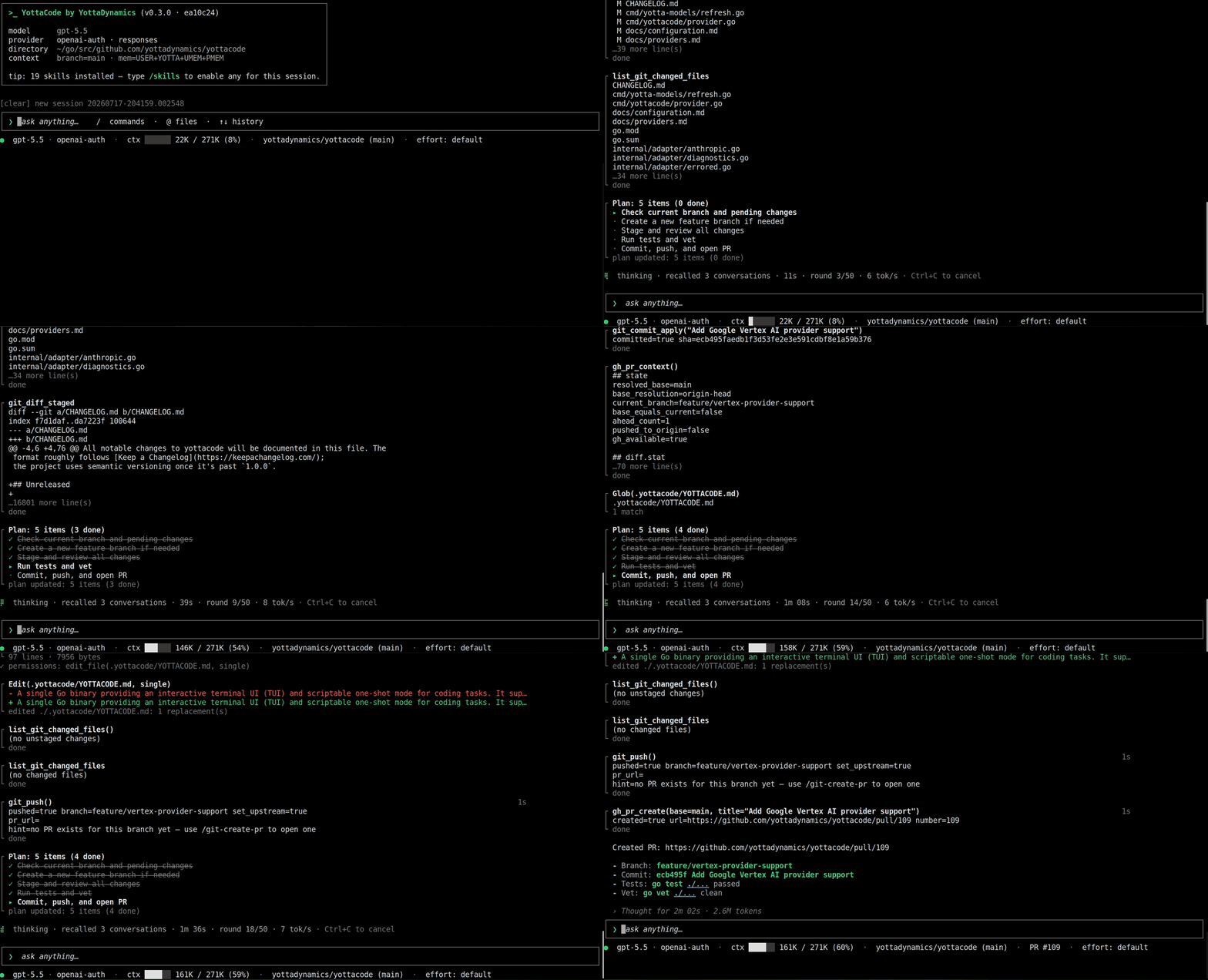
From prompt to pull request, without leaving your terminal
An end-to-end agentic development workflow: plan mode → branch → implement → tests → commit → push → create PR.
What makes yottacode different
For engineers who want terminal-agent agency without vendor lock-in, cloud data leakage, or black-box behavior.
- Any model, zero lock-in. Native adapters for OpenAI, Anthropic, Gemini, Google Vertex AI, xAI, ChatGPT/Copilot OAuth, OpenAI-compatible endpoints, and local Ollama — switch providers or models mid-session with
/model. - Agent-managed memory that compounds. yottacode captures durable user and project context, retrieves only what matters each turn, and helps keep memory clean over time.
- Typed GitHub + worktree workflows. Issues, PR reviews, check status, commits, pushes, PR creation, PR updates, comments, and isolated worktrees are first-class tools instead of fragile shell transcripts.
- GA code intelligence without IDE lock-in. LSP tools are default-on for Go, TypeScript/JavaScript, Python, and Rust; servers run locally, start lazily, and are never installed without approval. Offline, no-server structural edit ranges (
syntax_range) cover the same four languages. - Plan mode as a real permission boundary. yottacode can investigate read-only, produce a plan, and only then move into implementation with approvals, path validation, diffs, and checkpoints.
- Local-first by design. Sessions, memory, checkpoints, and project rules are plain files under
~/.yottacode/; there is no telemetry or analytics, and code only leaves your machine for the model provider you choose. - A growing skills ecosystem. Reusable Agent Skills let teams package repeatable workflows; see
yottacode-skills.
Try it in 60 seconds
Install on Linux or macOS:
curl -fsSL https://raw.githubusercontent.com/yottadynamics/yottacode/main/install.sh | bash
Prefer to read it first? View install.sh.
Run setup once:
yottacode setup
Open a repository and start with a real task:
yottacode
Try prompts like:
Review this repo and suggest the safest first bug to fix.Find why the tests are failing, explain the issue, then propose a fix.Update this GitOps YAML for the new image tag and show me the diff before any commit.
Prefer local models?
Start with Ollama if you want to try yottacode without API keys:
ollama pull <model>   # e.g. qwen2.5-coder, llama3.1, deepseek-coder-v2
yottacode setup
Watch the Ollama setup walkthrough: Get started with yottacode and Ollama.
Manual install (pinned version, no installer script)export VERSION=<latest-release> # for example: 0.3.0
# Swap linux/darwin and amd64/arm64 to match your machine
curl -fsSL https://github.com/yottadynamics/yottacode/releases/download/v${VERSION}/yottacode_${VERSION}_linux_amd64.tar.gz \
| tar -xz
install -m 0755 ./yottacode "$HOME/.yottacode/bin/yottacode"
Available archives: yottacode_${VERSION}_{linux,darwin}_{amd64,arm64}.tar.gz; checksums are published in SHA256SUMS on each release.
Windows users should run yottacode under WSL.
More install options: docs/installation.md.
Best first tasks
- Review before you merge. Ask yottacode to inspect a PR, summarize the risk, check failing CI, and suggest follow-up work.
- Fix a failing test. Let it read the failure, trace the relevant code, propose a fix, edit the repo, and rerun checks with your approval.
- Ship a GitOps change. Update YAML, preserve a reviewable diff, and carry the change through branch → commit → push → PR.
- Learn an unfamiliar repo. Use local session recall and project memory so explanations get sharper as yottacode learns the codebase.
- Package repeatable workflows. Install or write Agent Skills for team-specific reviews, release checklists, migrations, and runbooks.
- Turn an issue into a draft PR. Move from issue context to plan, implementation, tests, commit, push, and PR without leaving the terminal.
See the full command reference in docs/tui-slash-commands.md and docs/cli.md. Browse reusable workflows in yottacode-skills.
Built for control and privacy
Autonomy is useful only when you can trust the loop, and trust starts with knowing where your data lives: no telemetry, no analytics, plain files under ~/.yottacode/, and model traffic only to providers you configure.
- Mutating tools pause for approval with a diff or command preview.
- Path validation confines edits to the working tree and blocks risky targets like secrets and SSH/cloud credentials.
- Project rules can
allow,ask, ordenyspecific tools and paths for team-shared policy. - Checkpoints let you roll back conversation state, file changes, or both.
- Plan mode investigates read-only first, then waits for approval before implementation.
- Data sovereignty by default. Sessions, memory, and checkpoints are plain files on your machine under
~/.yottacode/. Code only leaves the machine to reach the model provider you explicitly configure, and with local Ollama, nothing leaves at all.
Tools run on the host with no in-process sandbox; use a container or devcontainer when you need stronger isolation. See docs/security-and-allow-lists.md.
Documentation
Browse the full documentation online at yottacode.ai/docs. The guides below are the in-repo copies.
| Section | Description |
|---|---|
docs/quickstart.md |
First successful session |
docs/installation.md |
Build and install options |
docs/configuration.md |
Flags, env vars, config file, diagnostics |
docs/providers.md |
Provider setup and switching |
docs/models.md |
Model configuration |
docs/tools.md |
Built-in tools and approval behavior |
docs/lsp.md |
LSP code intelligence for Go, TypeScript/JavaScript, Python, and Rust |
docs/github.md |
GitHub integration: auth, tools, permissions |
docs/security-and-allow-lists.md |
Approvals, permissions, path policy, isolation |
docs/worktrees.md |
Parallel sessions and .worktreeinclude |
docs/memory.md |
Memory and context persistence |
docs/sessions.md |
Session management and recall |
docs/tui-slash-commands.md |
TUI command reference |
docs/cli.md |
CLI command reference |
docs/architecture.md |
Internals |
docs/development.md |
Contribution workflow |
docs/troubleshooting.md |
Common issues |
docs/faq.md |
Frequently asked questions |
Contributing
yottacode is built in the open and contributions are very welcome — from typo fixes to new tools and provider adapters. The full guide lives in CONTRIBUTING.md; here's the short version.
Ways to contribute
- Report a bug or request a feature with the issue templates.
- Improve the docs — the in-repo
docs/guides or the published site at yottacode.ai/docs. - Open a pull request for a fix or feature. Planning something big? File an issue first so we can align on the approach.
Before you open a PR
- Keep it focused — one logical change, with a clear description and the issue it closes (
Closes #123). - Ship code, tests, and docs together: every feature needs tests, every bug fix needs a regression test that fails before and passes after, and behavior changes update the matching
docs/guide. - Make sure
go test ./...andgo vet ./...pass — CI runs build, vet, and tests on every PR and must be green before merge.
Where things plug in — adding a built-in tool, a slash command, or a model adapter is a well-defined seam; see the Development section and docs/development.md for build, test, and extension details.
Security and conduct — please don't file public issues for vulnerabilities. Use GitHub's "Report a vulnerability" button under the repository's Security tab, or follow the private reporting path in SECURITY.md. Community standards are in CODE_OF_CONDUCT.md.
Development
yottacode is a single, pure-Go binary (no CGo) targeting Go 1.26+ on Linux and macOS (amd64/arm64).
Build
go build -o yottacode ./cmd/yottacode
Test
go test ./...                    # unit tests — fast, no network
go vet ./...                     # static checks
go test -race ./...              # race detector
go test -cover ./...             # coverage
go test -tags=integration ./...  # live-provider tests (needs API keys)
Where to extend — most feature work lands on a well-defined seam:
- A built-in tool — implement
agent.Tooland register it ininternal/tui/run.goandinternal/oneshot/oneshot.go. - A slash command — add an entry in
internal/tui/commands.go. - A provider adapter — extend
internal/adapter; the agent loop depends only on the streaming interface.
See docs/development.md for the full guide — project layout, the model-catalog refresh, provider diagnostics, and release versioning.
If yottacode is useful to you, starring the repo is the single highest-leverage thing you can do right now. It directly affects how many other engineers discover it. Found a bug or have an idea? Issues are always welcome.
License
MIT. See LICENSE.
Yorumlar (0)
Yorum birakmak icin giris yap.
Yorum birakSonuc bulunamadi