bigbud
Health Uyari
- License — License: MIT
- No description — Repository has no description
- Active repo — Last push 0 days ago
- Community trust — 22 GitHub stars
Code Uyari
- process.env — Environment variable access in .github/workflows/pr-size.yml
- process.env — Environment variable access in .github/workflows/pr-vouch.yml
Permissions Gecti
- Permissions — No dangerous permissions requested
Bu listing icin henuz AI raporu yok.
bigbud

An AI workspace for everyone. It keeps your research, writing, coding, files, and git workflows in one place so you can stay focused and get more done with less context switching.
About the name: This project was formally known as bigCode (https://github.com/youpele52/bigCode). The rebranding to bigbud reflects our evolved vision: while we excel at coding tasks, we're expanding to help anyone accomplish their goals. Like a good friend, bigbud is here to be useful to everyone — programmers and non-programmers alike.
Note: The original bigCode repository was either hacked or DMCA'd — while the page returns a 404, its Actions and Settings pages are still accessible.
Table of Contents
- Features
- Quick Install
- Provider Setup
- Remote Projects
- Computer Use
- Speech to Text
- Desktop vs Web
- Documentation
- Development
- Status
Features
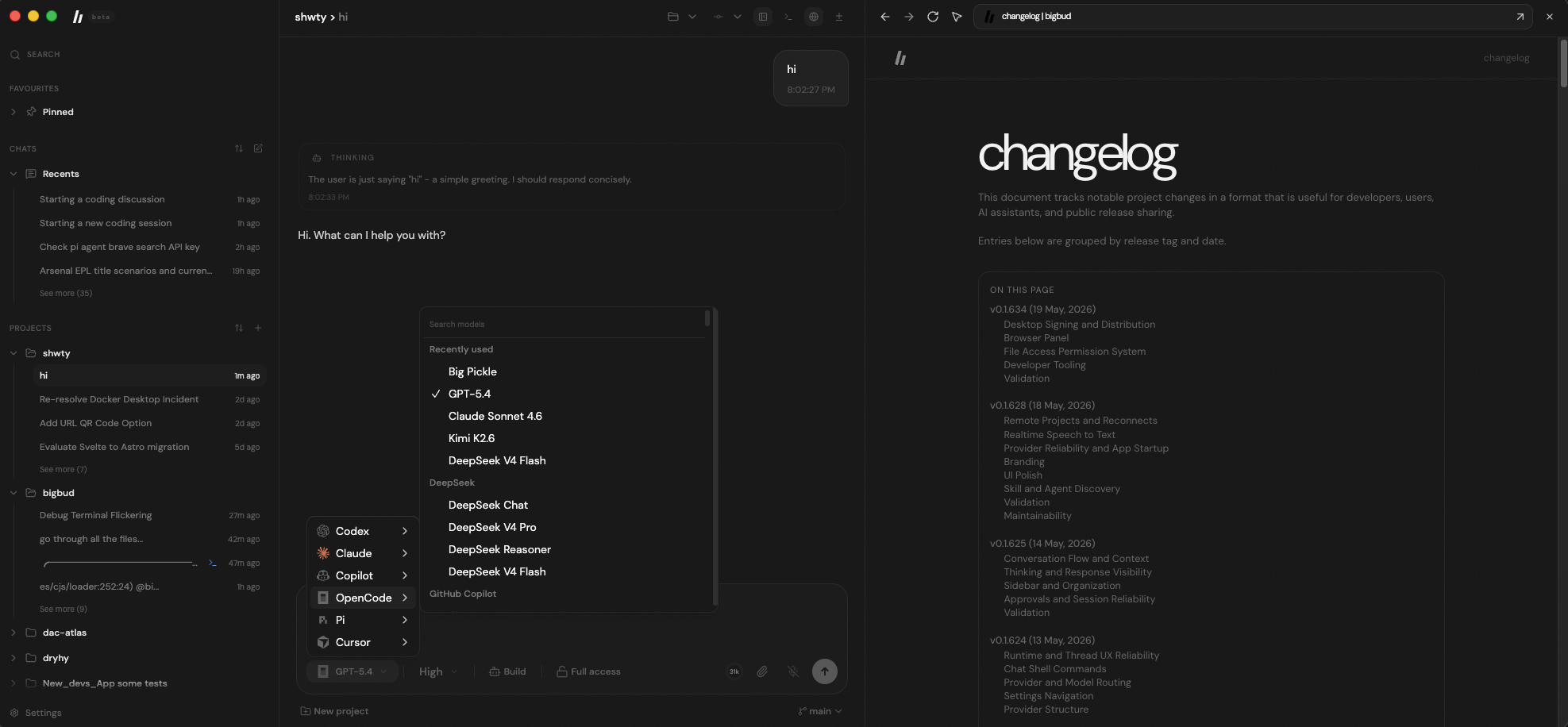
- Multi-provider support — Switch between Codex, Claude, Copilot, OpenCode, Pi, Cursor, and more
- Remote projects over SSH — Work against remote folders without moving the full AI runtime onto the remote machine
- Desktop & Web — Native Electron desktop app or lightweight web UI
- Embedded browser — Open links in-app, keep browser history, and attach annotated page context to chats
- Real-time streaming — Live output with file changes, terminal commands, shell logs, and reasoning updates
- Live speech-to-text — Speak to your agent with real-time transcription powered by OpenAI
- Built-in terminal and chat shell mode — Use the integrated terminal or run quick composer commands like
!ls - Replies, pinning, and thread organization — Reply to any message, pin important chats, and keep context intact across reconnects
- Approvals and full access mode — Review approval requests with better thread context, or auto-approve commands and edits for autonomous runs
- System control — Tell agents to execute commands and perform tasks on your PC/Mac
- Computer Use (Desktop & Browser Automation) — Agents can control the in-app browser and, on desktop, your macOS machine — navigate, click, type, scroll, capture screenshots, launch apps, list windows, and more. Permission-gated with safety guardrails
- Inline video preview — Play video files (.mp4, .webm, .mov, .avi) directly in the Files panel with native controls and HTTP Range streaming
- Right panel tab management — Close the active right-panel tab (browser, diff, files, git, kanban, notes, terminal) with
Cmd+W/Ctrl+W - Thread forking — Branch a conversation from any point to explore alternatives
Quick Install
Desktop App
Download the latest version for your platform at bigbud.app/download.
Alternatively, install via terminal:
macOS / Linux:
curl -fsSL https://raw.githubusercontent.com/youpele52/bigbud/main/apps/marketing/public/install.sh | sh
Windows:
powershell -NoProfile -ExecutionPolicy Bypass -Command "irm https://raw.githubusercontent.com/youpele52/bigbud/main/apps/marketing/public/install.ps1 | iex"
From Source
git clone https://github.com/youpele52/bigbud.git
cd bigbud
bun install
bun dev
Open http://localhost:5733 in your browser.
For desktop development:
bun dev:desktop
Provider Setup
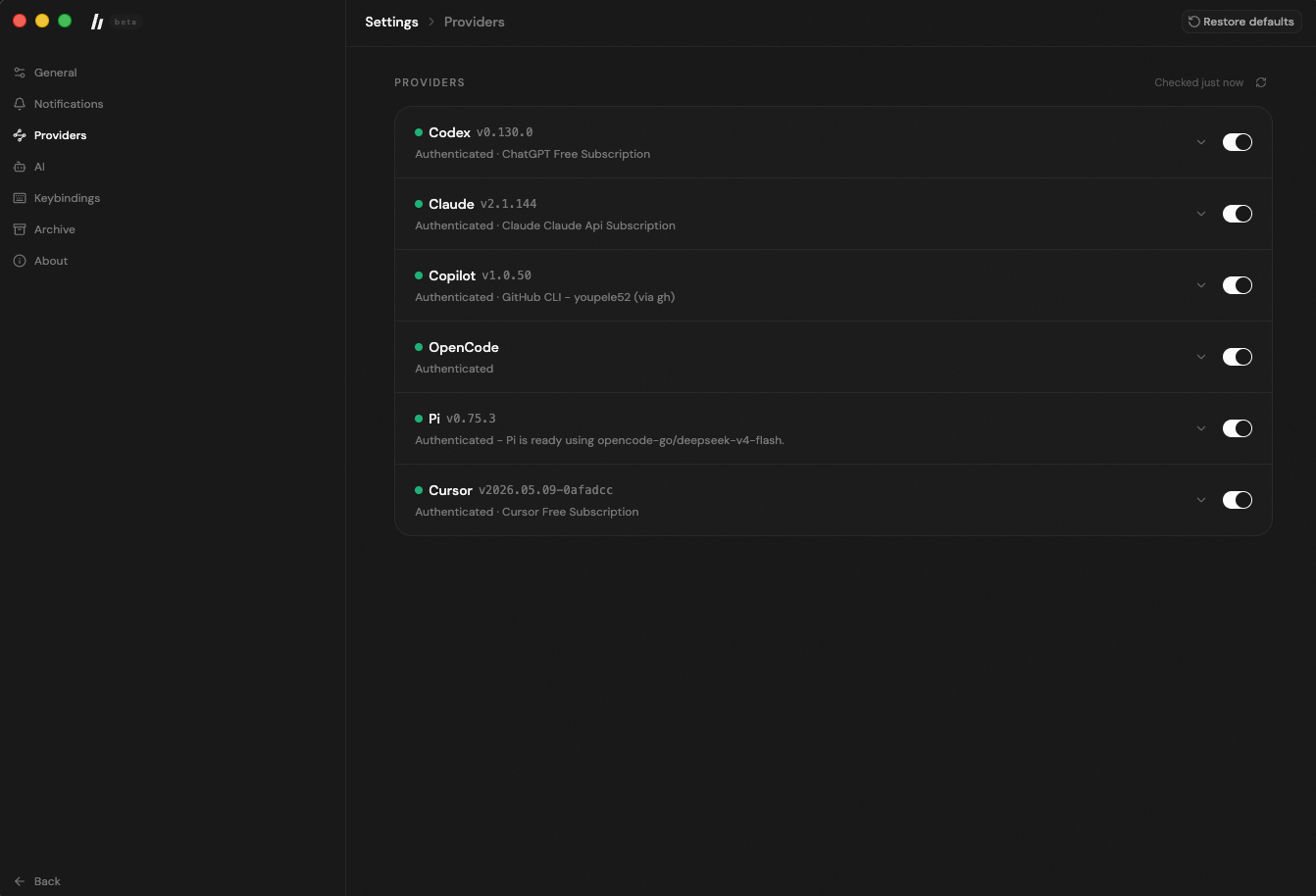
bigbud supports multiple AI coding agents. Configure at least one in Settings → Providers:
| Provider | Setup |
|---|---|
| Claude | Install Claude Code: npm i -g @anthropic-ai/claude-code, then claude auth login |
| Copilot | Authenticate via GitHub CLI: gh auth login |
| Codex | Install Codex CLI and run codex login |
| OpenCode | See OpenCode docs |
| Pi | Bundled — no additional setup needed |
| Cursor | Install Cursor |
Provider status is checked in real-time and displayed in Settings. Each provider can be toggled on or off independently.
Remote Projects
bigbud can connect to remote projects over SSH while keeping the app experience local.
- Remote workspace support — Open and work in remote projects across Codex, Claude, Copilot, OpenCode, and Pi where supported
- Safer reconnects — After restart, saved remote workspaces stay disconnected until SSH access is verified again
- Flexible unlock flow — Reconnect with SSH keys or temporary password-based SSH unlock without saving secrets
Computer Use
bigbud's Computer Use feature lets AI agents control the in-app browser and, on desktop, your macOS machine. This enables agents to navigate web pages, fill forms, take screenshots, open applications, and more — all within your session.
Desktop Automation
Desktop computer use works through the open-source cua-driver MCP backend and requires macOS Accessibility and Screen Recording permissions.
- Permission-gated — Enable in Settings → AI → Computer Use. Mutating actions (click, type, key presses) require
full-accessruntime mode; read-only actions (capture, list windows, diagnostics) work in any mode. - Safety guardrails — Dangerous key combos (Cmd+Q, Alt+F4) and sensitive text (passwords, API keys, credit card numbers) are blocked before reaching the driver.
- First-run setup — On desktop, a setup dialog guides you through enabling the feature, installing the
cua-driverruntime, and granting macOS permissions.
Browser Automation
Browser actions (navigate, click, type, scroll, capture screenshots) work through a built-in Playwright-based BrowserManager. Browser automation does not require permission opt-in and works in both desktop and web modes.
Cross-Provider Support
Computer Use capabilities are injected into all supported providers (Codex, Claude, Copilot, OpenCode, Pi) via per-provider bridges — MCP stdio servers, Copilot SDK tools, and Pi coding agent extensions — set up automatically at session start.
Speech to Text
Voice dictation powered by OpenAI's Realtime Transcription API. Add an API key in Settings → Speech to Text to enable it.
Bring Your Own Key
The feature uses your own OpenAI API key — you must have one configured to use voice input. This keeps costs separate and avoids bigbud needing access to your OpenAI account.
How It Works
- Audio capture: Uses the Web Audio API with an
AudioWorkletNodeto capture microphone input as PCM16 at 24 kHz - Streaming: Audio streams directly from your browser to OpenAI via WebSocket — it never touches the bigbud server
- Turn detection: Manual control — press and hold to record, release to send. Partial transcription appears in real-time as you speak
- Model: Uses OpenAI's realtime transcription session flow with
gpt-realtime-whisper
Usage
- Go to Settings → AI → Speech to Text
- Enter your OpenAI API key (starts with
sk-) - Click Save & Verify to validate the key
- In the composer, click the microphone button and speak.
macOS: The first time you use voice input, macOS will prompt you to grant microphone access. If you previously denied it, go to System Settings → Privacy & Security → Microphone and re-enable it for the app.
Desktop vs Web
| Desktop | Web | |
|---|---|---|
| Installation | Native installer | bun dev or self-hosted |
| Server | Bundled — runs locally | Requires separate server |
| Native features | OS notifications, system tray | Browser-based only |
| Best for | Everyday use | Development, self-hosting |
Documentation
- AGENTS.md — Development guide
- docs/CHANGELOG.md — Recent project changes and grouped release history
- CONTRIBUTING.md — Contribution guidelines
- docs/release.md — Release workflow & signing
- docs/observability.md — Observability setup
Development
# Full dev stack (server + web)
bun dev

# Individual apps
bun dev:server
bun dev:web
bun dev:desktop

# Run checks
bun fmt
bun lint
bun typecheck
bun run test   # Use this, not "bun test"
Desktop Packaging
bun dist:desktop:dmg:arm64   # macOS Apple Silicon
bun dist:desktop:dmg:x64     # macOS Intel
bun dist:desktop:linux       # Linux AppImage
bun dist:desktop:win         # Windows NSIS installer
Status
This is currently in beta. Expect rough edges and some breaking changes.
Bugs are few and fixed quickly because bigbud is actively used and maintained. See the changelog for recent updates.
We're not accepting contributions yet. See CONTRIBUTING.md for details.
Yorumlar (0)
Yorum birakmak icin giris yap.
Yorum birakSonuc bulunamadi