uniterm
Health Warn
- License — License: Apache-2.0
- Description — Repository has a description
- Active repo — Last push 0 days ago
- Low visibility — Only 5 GitHub stars
Code Fail
- rm -rf — Recursive force deletion command in .github/workflows/build.yml
- exec() — Shell command execution in frontend/src/composables/useHighlight.ts
Permissions Pass
- Permissions — No dangerous permissions requested
No AI report is available for this listing yet.
A modern cross-platform terminal emulator with a built-in autonomous AI Agent — capable of independently planning and executing multi-turn shell commands, like Claude Code for your terminal.

uniTerm
A modern cross-platform terminal emulator with a built-in autonomous AI Agent — capable of independently planning and executing multi-turn shell commands, like Claude Code for your terminal.




Table of Contents
- Features
- Screenshots
- Quick Workflows
- Download
- Tech Stack
- Prerequisites
- Getting Started
- Project Structure
- Feedback & Contributing
- License
Features
AI Assistant
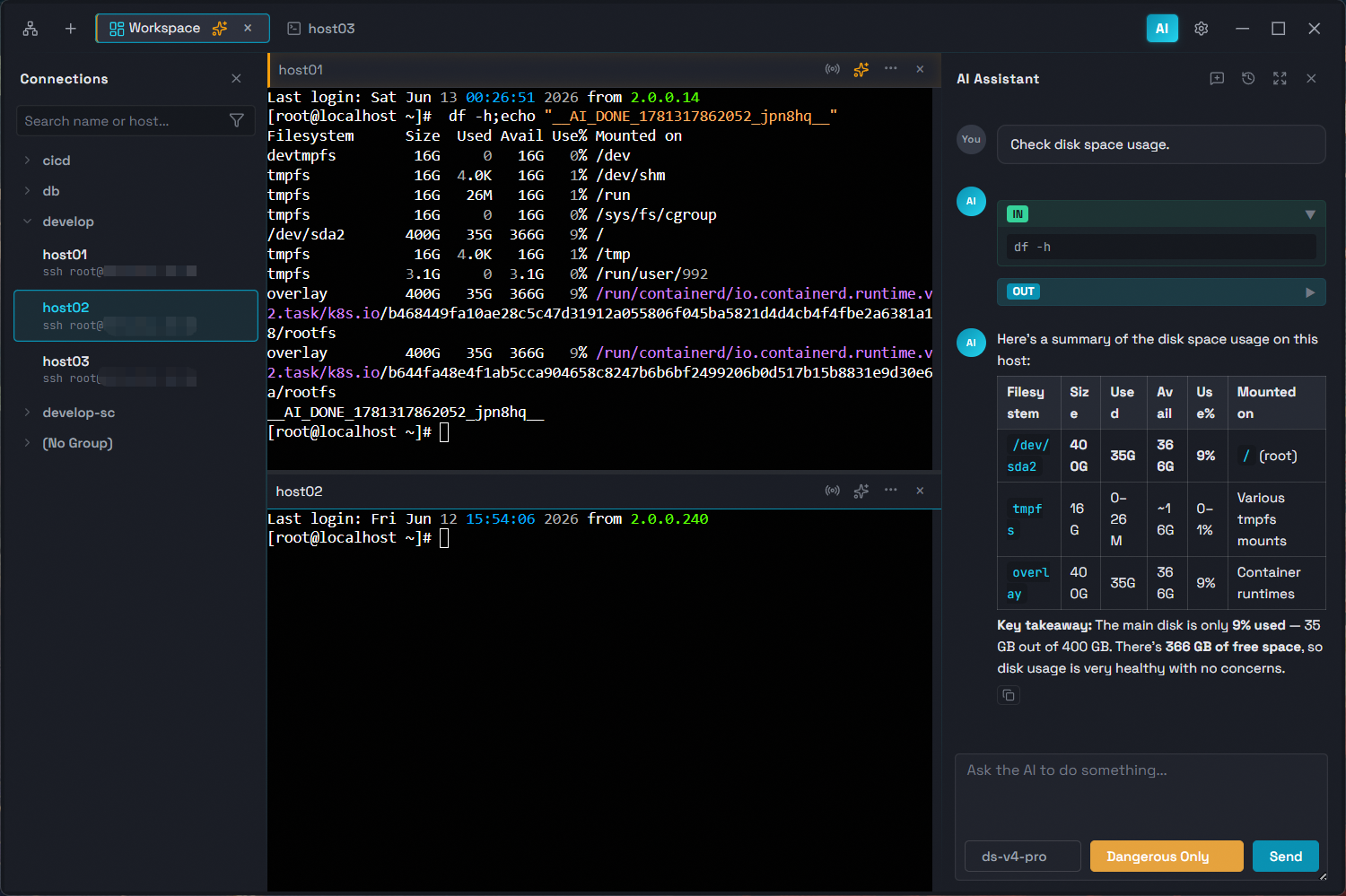
Autonomous AI Agent that works like Claude Code — independently plans and executes multi-turn shell commands directly in your terminal.
- Autonomous Multi-Turn Execution — The AI Agent can plan, execute, observe results, and iterate across multiple rounds of shell commands without manual intervention.
- LLM Integration — Sidebar chat with Anthropic-compatible API, supporting Claude and other compliant models.
- Flexible Execution Modes — Bypass, dangerous only, dangerous + write, or confirm all — you control how much oversight the AI Agent needs.
- Persistent Conversations — Chat history is saved per session, so conversations survive app restarts.
- Terminal Integration — AI commands execute directly in the active terminal tab, with optional pinning to a specific tab or following your active one. Collaborate side-by-side in split panes, each with its own terminal context.
- Smart Completion — While typing in SSH terminals, get real-time suggestions from your command history and AI-powered command rewrites.
Full-Featured Terminal
Local terminal, SSH / Telnet / Mosh, file transfer (SFTP / FTP), RDP / VNC / SPICE, database, SSH tunnel, server monitor — covering all remote access needs.
- SSH / Telnet / Mosh / Local Terminal — Connect via password or private key authentication. Supports SSH, Telnet, and Mosh (low-latency mobile connections). Built-in zmodem file transfer (
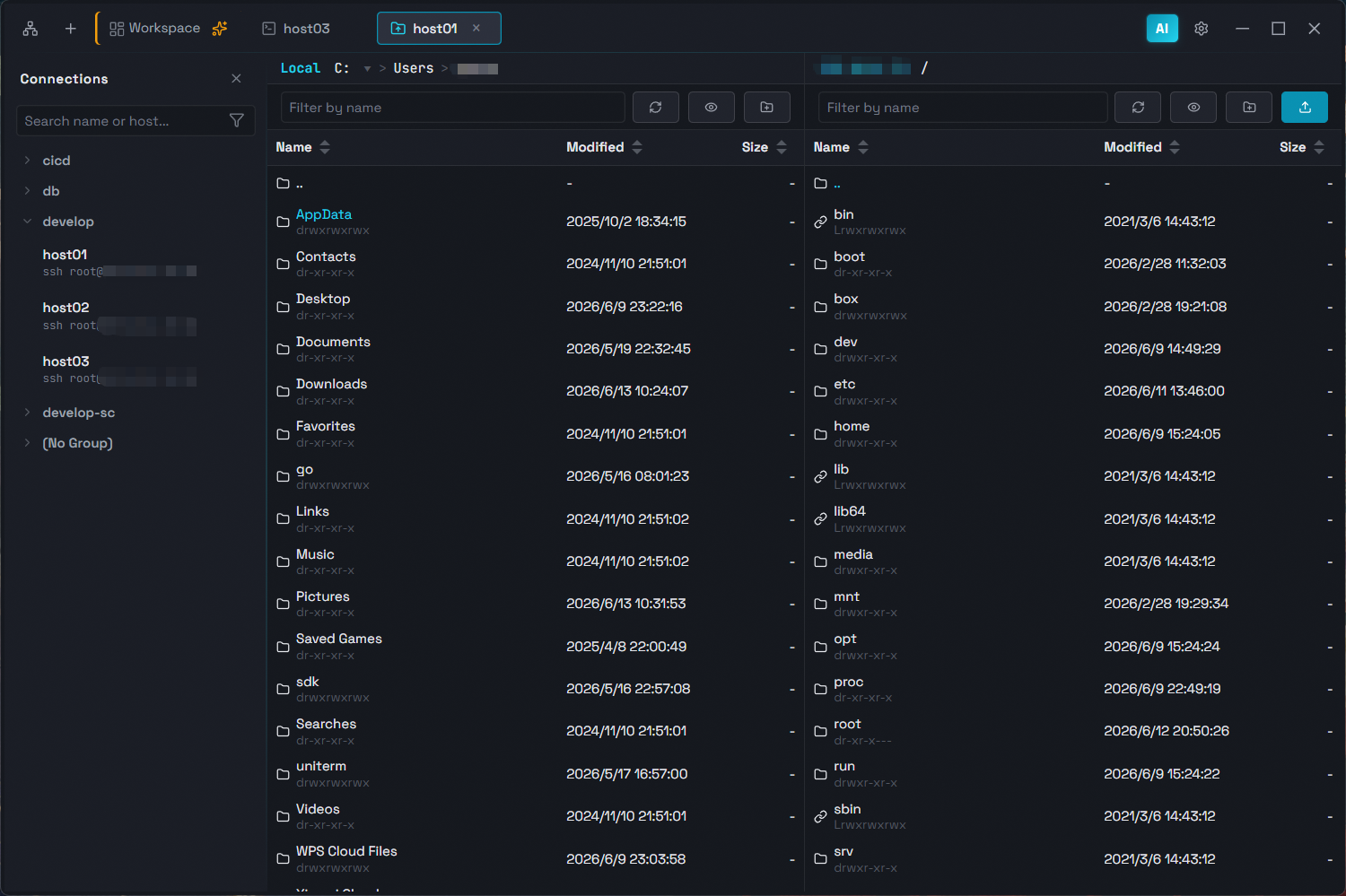
rz -be/sz, drag-and-drop upload). Also supports local terminals (PowerShell, CMD, Git Bash) with the same font, color, and behavior settings as SSH sessions. - File Transfer (SFTP / FTP) — Dual-pane browser for local and remote files. Supports SFTP (over SSH) and FTP/FTPS (explicit TLS) with configurable passive/active mode and character encoding. Upload, download, drag-and-drop, delete, rename, and more. Transfers tracked per tab with pause, resume, and cancel. SFTP supports max concurrent transfer limit.
- RDP / VNC / SPICE — Support Windows Remote Desktop, VNC, and SPICE connections.
- Database Client — Connect to MySQL, PostgreSQL, and rqlite databases. Execute SQL queries, browse table structures, and edit data rows inline — all from a unified interface.
- SSH Tunnel (Port Forwarding) — Any connection can use an existing SSH connection as a jump host. Auto-assigns local port, tunnels TCP through SSH to the target. Supports all TCP protocol connection types.
- Server Monitor — Real-time monitoring for connected servers. View performance metrics (CPU, memory, disk, network), process list with detail panel, listening ports, disk usage with mountpoint info, and network interfaces with bond/bridge detection.
Customization
Connection management, workspace splits, cloud sync, themes — your terminal, your way.
- Connection Manager — Save, search, edit, group, and duplicate server connections. Drag-and-drop organization, multi-select or range-select for batch connect, batch delete, and more.
- Workspace & Split Panes — Merge terminal tabs into a workspace with horizontal or vertical splits. Drag panel edges or title bars to resize and rearrange freely.
- Cloud Sync — Build your own private sync repository via GitHub, GitLab, or Gitee. All configurations (connections, AI model keys, app settings) are encrypted with AES-256-GCM before syncing. Supports automatic sync, conflict resolution, master password changes, and repository management.
- Themes — Dark, Deep Blue, and Light themes with automatic system theme detection.
- Internationalization — 9-language UI: zh-CN, zh-TW, en, ja, ko, de, es, fr, ru.
- Cross-Platform — Built on Wails v2, runs natively on Windows, macOS, and Linux.
Screenshots
Quick Workflows
SSH Connection
- Click New Connection in the Connection Manager
- Fill in host, port, and authentication (password or private key)
- Click Connect to open an SSH terminal session
AI Assistant
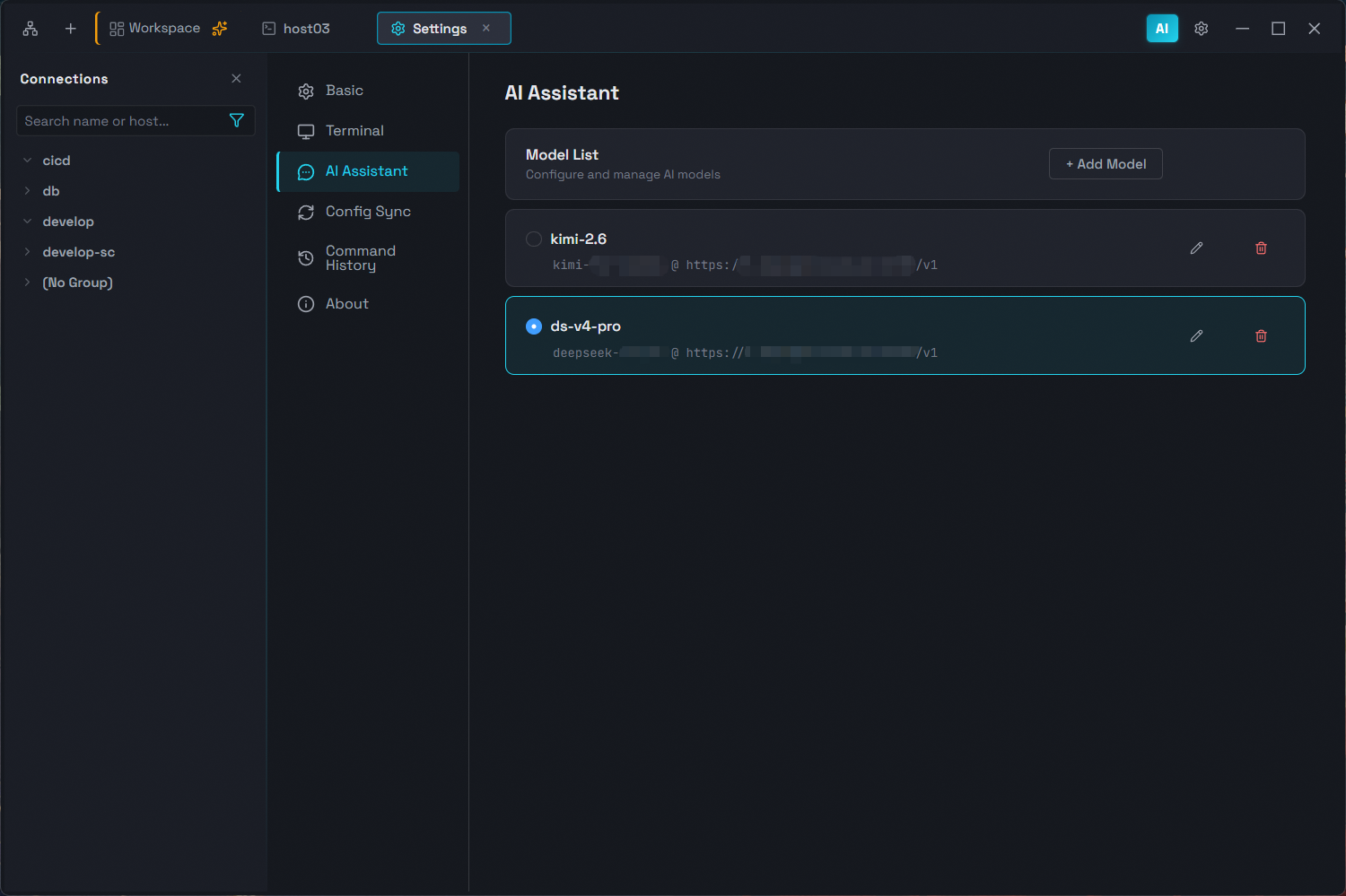
- Go to Settings and configure your AI provider (API endpoint, model, and key)
- Open a terminal tab (SSH or local)
- Open the AI sidebar chat — type your task, and the AI Agent executes commands directly in your terminal
SFTP File Transfer
- In the Connection Manager, right-click an SSH connection
- Select Connect SFTP
- Browse, upload, download, and drag-and-drop files in the dual-pane file manager
Download
Get the latest pre-built binaries from GitHub Releases:
- Windows: Download
uniterm-windows-amd64-installer-*.exeinstaller - macOS: Download
uniterm-darwin-universal-*.dmg - Linux: Download
uniterm-linux-amd64-*.tar.gz
Tech Stack
| Layer | Technology |
|---|---|
| Desktop Framework | Wails v2 |
| Backend | Go |
| Frontend | Vue 3 + Pinia + Element Plus |
| Terminal | xterm.js |
| AI Protocol | Anthropic Messages API |
Prerequisites
Platform-specific
- Windows: WebView2 runtime (included in Windows 10+)
- macOS: Xcode Command Line Tools
- Linux:
libgtk-3-devandlibwebkit2gtk-4.1-dev
Getting Started
git clone https://github.com/ys-ll/uniterm.git
cd uniTerm
cd frontend && npm install && cd ..
wails dev                   # Development
wails build                 # Production build
Project Structure
uniTerm/
├── main.go                       # Entry point
├── app.go                        # Wails bindings, LLM API proxy, SFTP API
├── backend/
│   ├── session/                  # SSH/SFTP/database session management
│   ├── database/                 # SQL execution, schema introspection, DSN builders
│   ├── store/                    # Persistent config (connections, AI, settings)
│   └── log/                      # File-based logging
├── frontend/
│   └── src/
│       ├── components/           # Vue components
│       ├── composables/          # Terminal composables
│       ├── stores/               # Pinia stores
│       ├── services/             # AI agent loop, LLM client
│       ├── i18n/                 # Translations
│       └── types/                # TypeScript type definitions
└── wails.json
Feedback & Contributing
Issues, suggestions, and feedback are welcome at GitHub Issues.
License
Apache 2.0
Reviews (0)
Sign in to leave a review.
Leave a reviewNo results found