xsm
Health Uyari
- License — License: MIT
- Description — Repository has a description
- Active repo — Last push 0 days ago
- Low visibility — Only 6 GitHub stars
Code Gecti
- Code scan — Scanned 12 files during light audit, no dangerous patterns found
Permissions Gecti
- Permissions — No dangerous permissions requested
Bu listing icin henuz AI raporu yok.
xsm (Cross-Session Messaging): let running Claude Code and Codex sessions find each other and exchange messages
xsm (Cross-Session Messaging)
English | 한국어
All you need is a message channel. The rest is done by agents.
xsm lets running Claude Code and Codex sessions find each other and exchange messages.
Philosophy
Multi-agent tools such as Orca, herdr and OpenRig make coordination their product: a dispatcher, a task
graph, a team defined in YAML, terminals the tool owns. xsm builds none of that. It gives the sessions you
already run a way to reach each other, and leaves the rest to them. Agents read and write plain language;
given a channel, they split the work, hand it off, review each other and report back, the way people do in a
chat channel. The better the models get, the less a fixed structure helps and the more it gets in the way.
What xsm does not have:
- no orchestrator, team spec or task graph: who does what is decided in the conversation
- no runtime of its own and no wrapper around
claudeorcodex: you start your sessions as you always do - no daemon: hooks, files and one-shot commands
Because everything else is left to the agents, the channel itself has to be dependable. That is where xsm puts
its effort:
- A message wakes the session. It goes in through each runtime's own path (the Claude inbox socket,
codex queue), not by typing into a terminal, so an idle session picks it up, and the message arrives marked
with its sender instead of looking like something you typed. - The sender knows what happened. Every message ends as
delivered,sent-unconfirmedorheld, and
the sender sees which. - People keep the boundaries. Which sessions can talk is a scope you set, and widening it takes your
approval.
TL;DR
Give this prompt to your coding agent (Claude Code or Codex), and it installs xsm on both runtimes and
checks the result:
Install xsm from https://github.com/ysys143/xsm on both Claude Code and Codex on this machine.
Then verify it with `xsm doctor` and `xsm selftest`, and tell me anything I still have to do myself,
such as trusting the hooks in Codex or starting a new session.
The agent follows this README for both runtimes and reports what it verified. Coding agents often cannot type
slash commands such as /plugin; they can use the direct install (xsm install) described under Quick start.
Once it is installed, open a new session on either side and ask:
How do I use this? Show me with a real demo.
The agent reads the skill's guide and runs xsm itself, so you do not have to learn the commands first.
To install by hand, read on.
Quick start
1. Install manually
xsm runs on macOS and Linux. It needs Unix sockets, ps, /dev/tty and tmux, so native Windows is not
supported. Its only dependency is the Python standard library. Installing means making each session run
xsm's hooks.
Claude Code plugin (recommended). The repository is its own marketplace.
/plugin marketplace add ysys143/xsm
/plugin install xsm@xsm
The plugin bundles the hooks, the skill, the MCP server and bin/. It updates when version inplugin.json goes up, and disabling it also disables the hooks.
Codex plugin (recommended). The same repository is also a Codex marketplace.
codex plugin marketplace add ysys143/xsm
codex plugin add xsm@xsm
The plugin bundles two hooks, the skill and the MCP server. Codex runs a plugin's hooks only after you trust
them: in the first session, choose "Trust all and continue" under /hooks.
- Codex does not put a plugin's
bin/on PATH, so every session start links~/.local/bin/xsmto the
plugin. An existing link or file there that does not point to an xsm plugin folder is left alone. - To update, run
codex plugin marketplace upgrade xsm, thencodex plugin add xsm@xsmagain. - If this home was installed earlier with
xsm install --codex-home, runxsm install --refreshonce after
adding the plugin. It removes the hook groups, MCP entry and skill link that install left behind, which
would otherwise run alongside the plugin's.
xsm install
bin/xsm install --claude-home <my-claude-config-dir>          # install directly instead of the plugin
bin/xsm install --claude-home <dir-A> --claude-home <dir-B>   # several homes in one command
bin/xsm install --codex-home <my-codex-home>                  # Codex hooks, skill and MCP
bin/xsm install --refresh                                     # bring every installed home up to date
bin/xsm doctor                                                # install state, stale copies, what is blocked now
--claude-home takes Claude Code's config directory (CLAUDE_CONFIG_DIR) and --codex-home takes Codex's
(CODEX_HOME). Unless you changed them, these are ~/.claude and ~/.codex. There is no default home, so
except with --refresh you must name at least one. Repeat --claude-home to cover several homes.
A directly installed copy does not follow changes to the repository. When xsm doctor reports it as stale,
update it with xsm install --refresh. After a plugin update, run install --refresh with the new
version's bin/xsm.
What a direct install runs from: xsm install copies the runtime of this checkout (xsm/, hooks/,skills/, bin/, the plugin manifests) to ~/.xsm/runtime/<id>/ and points everything at that copy: the
Claude hook command (the hooks/xsm-hook launcher, which finds a working python itself and turns a script it
cannot open into an error, never a blocked prompt), the MCP server registration (the hooks/xsm-mcp
launcher), and ~/.local/bin/xsm. macOS can deny a session's app the folder a checkout lives in
(~/Documents), and a hook that cannot run must not stop a prompt. The copy before the current one stays
until no live session started before it, and is then pruned when the next xsm install finishes (not before: the pruning reads the process table, which a hook has no time for). xsm doctor's runtime line names the copy and
says when the checkout has moved on; the agent then runs <checkout>/bin/xsm install --refresh. --dev
(or "runtime": "checkout" in config.json) keeps everything pointing at the checkout, for developing xsm; --dev saves that line itself, so a later install --refresh or doctor keeps it (delete the line to go back to a copy).
A Codex direct install keeps the hook command it has, because Codex's trust covers its text; a new one names~/.xsm/runtime/current, which stays the same across refreshes. Only codex plugin add xsm@xsm moves an
existing Codex install off its checkout.
For each Claude home, install also sets crossSessionInbound to "accept" (Claude Code 2.1.224 and later;
a value the home already has stays), so Claude delivers a message from another of your sessions whatever the
two permission modes are, and allows the messaging commands (xsm send, inbox, list, who, held,ledger, status, doctor, --version, by name and by the runtime's absolute path) and MCP tools
(xsm_send, xsm_inbox, xsm_post, xsm_channel) in permissions.allow, so auto and default modes never
stop a message. xsm uninstall takes out the hooks, MCP entry, skill link, statusLine and settings entries install added, and the ~/.local/bin/xsm link when it points into the runtime copy and no other home keeps xsm; the copies under ~/.xsm/runtime stay, and that folder can be deleted once no session runs from it. Each of these defaults is open and can
be closed in ~/.xsm/config.json or by an environment variable (which wins): runtime (snapshot |checkout, XSM_RUNTIME), claude_inbound (accept | leave, XSM_CLAUDE_INBOUND), allow_messaging
(XSM_ALLOW_MESSAGING), and human_send_connects (XSM_HUMAN_SEND_CONNECTS: an out-of-scope xsm send a
person typed themselves connects the folders it needs and delivers). xsm doctor shows any that is not at its
default on one policy line.
- If a home (Claude or Codex) has both the plugin and a direct install, its hooks run twice, which is
dangerous.xsm installrefuses such a home unless you pass--force. xsm installlinks the installed runtime'sbin/xsmat~/.local/bin/xsmfor you (a link to something else
is left alone), so make sure~/.local/binis on your PATH. The Claude plugin sets PATH inside sessions,
and the Codex plugin keeps the link described above.- A session that started before xsm was installed (or before its plugin was enabled) has not run a hook yet.
It registers itself the first time it runs an xsm command or tool, and a sender that names it is told it is
open but unregistered, and how it gets registered. - On Linux, X.Org's session manager is also called
xsm(package x11-session-utils). If it is installed,
runcommand -v xsmto check that this one comes first.
2. Try it
There is no separate registration. A session with the hooks installed registers itself at start and at every
prompt. Registration is consent: a session that has never run the hooks shows up in the list only asunregistered and cannot be addressed (ADR-0001, session registry).
Inside a session, pass commands to the xsm skill as arguments: /xsm in Claude Code, $xsm in Codex.
/xsm list                            # Claude Code: sessions you can talk to in this project
$xsm list                            # Codex
/xsm who                             # how this session appears to others
/xsm send ref:a1b2c3 please take a look   # everything after the target is the message
The same commands work in a terminal as xsm list, xsm who, xsm send .... With no command, the skill
prints a one-line usage. You can also ask in words ("ask the other session"), and the agent reads the skill's
guide and runs xsm itself. If you have a personal skill named xsm, call the plugin's as /xsm:xsm list.
All commands: list, who, log, projects, doctor, send, link, join, leave, reach.
Use cases
1. Naming and finding sessions
Names belong to the runtime, so there is no xsm rename. xsm reads the name from the runtime on every
lookup, and it follows when you rename the session itself.
# in a Claude Code session
/rename my-reviewer                            # rename the session

# then, from another session
xsm list                                       # sessions you can talk to in this project
xsm who                                        # how this session appears
2. Connecting to a session in another repository
/xsm link ~/src/other-repo                     # type it in a session on either side (Codex: $xsm link ...), or just ask the agent to link it
xsm projects                                   # which folders are linked or joined
3. Sending a message and getting a reply
xsm send my-reviewer --text "please take a look"        # just a notice
xsm send my-reviewer --text "fix this test" --kind task --wait 15   # hand off work and wait for the reply
xsm ledger                                     # delivery state
4. Giving work to a worker
xsm spawn codex --task "fix this test"         # start it, instruct it, get the result as a reply
xsm workers                                    # worker state
5. Diagnosing a home that lacks the install
xsm doctor                                     # which homes lack hooks, stale copies, what is blocked now
xsm selftest                                   # whether the hooks actually run
Reference
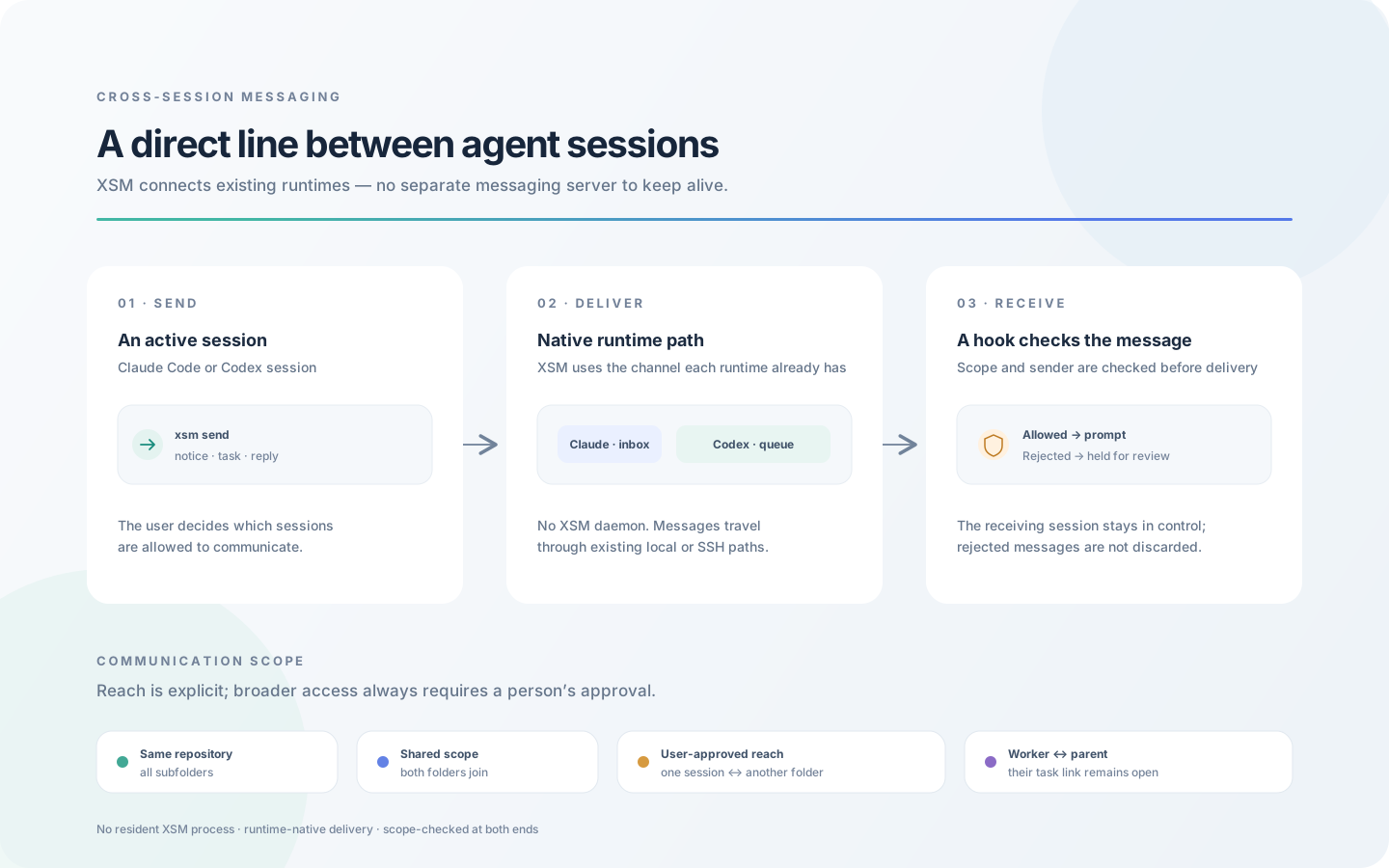
Communication scope
Sessions in the same Git repository can talk to each other, even from different subfolders. Outside a Git
repository, sessions in the same folder can talk. To connect another folder, ask the agent in a session on either
side to link it. The agent asks you in plain words, then runs xsm link <folder> itself; your reply is the consent.
You can also type /xsm link <folder> yourself. One side is enough: the link works both ways and stays until you
remove it.
xsm link ~/src/other-repo            # what the agent runs once you have said yes
/xsm link ~/src/other-repo           # or you type it in a session (Codex: $xsm link ...): that is your consent
xsm unlink ~/src/other-repo          # anyone may remove it
join: to group several folders, ask the agent in a session in each folder to join<name>(typing/xsm join <name>works too).reach: to connect a single session for as long as it runs, ask that session's agent to reach the folder
(typing/xsm reach <folder>works too).
Sending messages
xsm send agent-name --text "please take a look"
xsm send agent-name --text "fix this test" --kind task --wait 15
xsm send ref:a1b2c3 --text "..."     # use a ref when names collide
xsm send agent@hostB --text "..."    # another machine (after xsm remote add)
Receiving messages
The receiving side runs nothing. A hook acts as the gate: it checks the scope and the sender, then puts the
message directly into the session's prompt. A rejected message is held, not dropped. Claude's own
cross-session messages (SendMessage, no xsm header) from a session on this machine arrive untouched, whatever
the scope: Claude's own gate has already decided, and the sender is you on the same machine. Ones from off this
machine (Remote Control, cloud) pass with a note naming where they came from ("remote_native": "hold" holds them, as before). Scope governs xsm's own messages, and xsm send refuses an out-of-scope
target before sending. A linked worktree (Orca, claude --worktree) and its main checkout are one repository. To
connect two folders the agent asks you in plain words and runs xsm link <folder> itself; your reply is kept as
the verdict (or the xsm_link tool asks with a form). Set "strict_peers": true in~/.xsm/config.json to hold every message without an xsm header instead (ADR-0013). Claude's own gate still
decides first: a message it holds for a permission-mode mismatch never reaches xsm.
A conversation you want between your own sessions is never stopped by a hold you cannot see. If the gate
breaks, or cannot check a message (its sender exited, it came from off this machine), the message goes
through with a [xsm] could not check this message note instead of being held; what is still held (a
session you blocked, out of scope) is kept, both sides are told, and your agent delivers it on your yes
(xsm held deliver <id>). Each opened hold can be closed again: fail_open, remote_native,stale_sender, reply_from_request, reply_flag in ~/.xsm/config.json, or XSM_<KEY> in the
environment; xsm doctor shows them on its policy line.
xsm ledger                           # recent messages and their delivery state
xsm status <message-id>              # the state of one message
xsm held                             # what this machine rejected and held
Observability (telemetry)
xsm records its own sends and receives as spans and metrics. It builds the OTLP format itself instead of
installing the OpenTelemetry SDK, so it still depends only on the standard library and works with standard
backends (ADR-0011, telemetry).
xsm metrics                 # call counts, errors and p95 recorded on this machine
xsm metrics --json
Message bodies are never put in spans. To turn telemetry off, set XSM_NO_TELEMETRY=1.
Spans and metrics are kept for 7 days by default (telemetry_retention_days). Cleanup removes only lines
that were already exported, and only from the head of the file, so records not yet sent are kept.
Records are appended to $XSM_HOME/otel-spans.jsonl and otel-metrics.jsonl. They are sent only when you run
a separate command, so nothing on the send or receive path touches the network.
# defaults to http://localhost:4318 if OTEL_EXPORTER_OTLP_ENDPOINT is not set
xsm otlp-export --once
xsm otlp-export --follow --interval 5
This was verified against a real OpenTelemetry Collector (v0.161.0):
docker run --rm -p 4318:4318 otel/opentelemetry-collector:latest
xsm otlp-export --once
A message's whole path (sender, SSH, receiving machine, the target session's hook) forms a single trace, so
Jaeger or Grafana Tempo shows where a message stopped.
Instrumentation costs about 0.175 ms per send
(telemetry-overhead.md).
How it works
xsm puts a message directly into a session's input. There is no server and no resident process.
Claude Code Session A -> xsm -> Claude Code Session B     same machine
Claude Code <-> Codex                                     even across different CONFIG_HOMEs
Local Machine -> SSH -> Remote Server                     xsm installed on both + `xsm remote add`
Each session's hook registers it at start and at every prompt (registration is consent). Sending uses only
what each runtime already has: the Claude inbox socket and codex queue. The receiving hook is the gate: it
checks the scope and the sender, puts the message into the session's prompt, and holds what it rejects.
Principles:
- No wrapper runtime: xsm runs inside ordinary Claude Code and Codex sessions, with no separate runtime
and no process of ours that has to stay running. - Project-scoped trust: each project defines who may talk to whom.
- Session-independent: it works regardless of each session's
CONFIG_HOME(~/.claude,~/.codex, ...). - Async-first: messages are asynchronous, so collaboration never blocks.
- Observable: spans and metrics are recorded in OTLP format, with no SDK dependency.
├── .claude-plugin/               # plugin and marketplace manifests
├── hooks/hooks.json, .mcp.json   # hooks and MCP server the plugin provides
├── .codex-plugin/, .agents/plugins/   # the same for Codex
├── hooks/codex-hooks.json, codex-mcp.json   # hooks and MCP server of the Codex plugin
├── bin/xsm                       # launcher (runs xsm.cli from its own folder, whatever the current directory holds)
├── xsm/                          # the whole implementation (Python, stdlib only)
│   ├── cli.py                   # every subcommand
│   ├── registry.py              # session registry (written by hooks, enriched from the runtime on lookup)
│   ├── send.py / receive.py     # sending, and the receive gate the hooks call
│   ├── envelope.py              # message envelope and headers
│   ├── adapters.py              # the two native delivery paths (UDS socket, codex queue)
│   ├── codex_daemon.py          # asks Codex's app-server daemon to start a queued message (Esc)
│   ├── config.py                # project, scope and block settings
│   ├── remote.py                # other machines (two-way SSH, ADR-0007)
│   ├── workers.py               # spawning, approving and stopping workers (ADR-0010)
│   ├── channel.py / doc.py      # channel log (0005), shared documents (0006)
│   ├── telemetry.py             # span and metric recording (ADR-0011)
│   ├── otlp_export.py           # OTLP/HTTP+JSON export
│   ├── install.py               # hook installation and diagnosis
│   └── mcp.py                   # MCP server
├── hooks/                        # hook entry points the runtimes call
├── skills/xsm/                   # one skill: `/xsm <command>` (Codex `$xsm <command>`) and its guide
├── docs/
│   ├── adr/                     # architecture decision records (0001-0012)
│   ├── xsm/                     # protocol and test plan
│   ├── references/              # research notes, overhead measurements
│   ├── plan/ · spikes/ · reviews/
│   └── list-agents-cross-session-messaging.md
├── tests/                        # unittest, with vectors
└── tools/                        # spike and benchmark scripts
Documents
Most documents under docs/ are written in Korean.
- INTENT.md: project goals and vision
- ADR (Architecture Decision Records): design decisions
- Protocol Spec: message protocol specification
- Test Protocol: hands-on check procedure (developer tests live here)
- Agent Messaging Guide: implementing agent messaging
License
MIT
Feedback
Issues, suggestions and PRs are welcome.
Yorumlar (0)
Yorum birakmak icin giris yap.
Yorum birakSonuc bulunamadi