flowpiler
Health Warn
- License — License: MIT
- Description — Repository has a description
- Active repo — Last push 0 days ago
- Low visibility — Only 5 GitHub stars
Code Fail
- fs module — File system access in scripts/check-node.cjs
- new Function() — Dynamic code execution via Function constructor in src/compiler/__tests__/errorhandling.test.ts
- new Function() — Dynamic code execution via Function constructor in src/compiler/__tests__/roundtrip.test.ts
- exec() — Shell command execution in src/compiler/parser.ts
Permissions Pass
- Permissions — No dangerous permissions requested
No AI report is available for this listing yet.
A visual editor for Claude Code workflows. Drag nodes onto a canvas, wire them together, and Flowpiler compiles the graph into a ready-to-run workflow.js — and parses your existing workflow.js back into a graph. Test it with mocked agents for free, then run it for real and watch every subagent light up live.
Flowpiler
A visual editor for Claude Code workflows. Drag nodes onto a canvas, wire them
together, and Flowpiler compiles the graph into a ready-to-run workflow.js — and
parses your existing workflow.js back into a graph. Test it with mocked agents for
free, then run it for real and watch every subagent light up live.
Think Pentaho Kettle, but for Claude workflows — a node-graph front end for the
imperative script theWorkflowtool expects.
What Flowpiler is — and what it isn't
Flowpiler is a visual compiler for a control-flow language, not an integration
platform. That distinction matters when you compare it to anything else:
| Flowpiler | iPaaS tools (n8n, Node-RED, Zapier) | |
|---|---|---|
| What a node is | a control-flow primitive — parallel, pipeline, while, if, agent |
a connector to one SaaS API — Slack, Postgres, Stripe |
| How you extend it | write a prompt; the agent uses every tool Claude Code has | wait for (or build) a new connector |
| What "node count" means | 11 primitives compose into any control flow | 400+ connectors, one per integration |
| Output | a real workflow.js you own, run, and commit |
a proprietary JSON blob in their runtime |
Counting Flowpiler's 11 node types against an iPaaS connector catalog is like
counting Python's ~35 keywords against Zapier's app directory — different axis. The
integration surface of a Flowpiler workflow is whatever the subagents can reach, which
is the full Claude Code toolset: the filesystem, shell, MCP servers, and the web.
Flowpiler is deliberately narrow and deep: it targets Claude Code's Workflow API
and compiles to plain JavaScript. That's the design, not a gap in it.
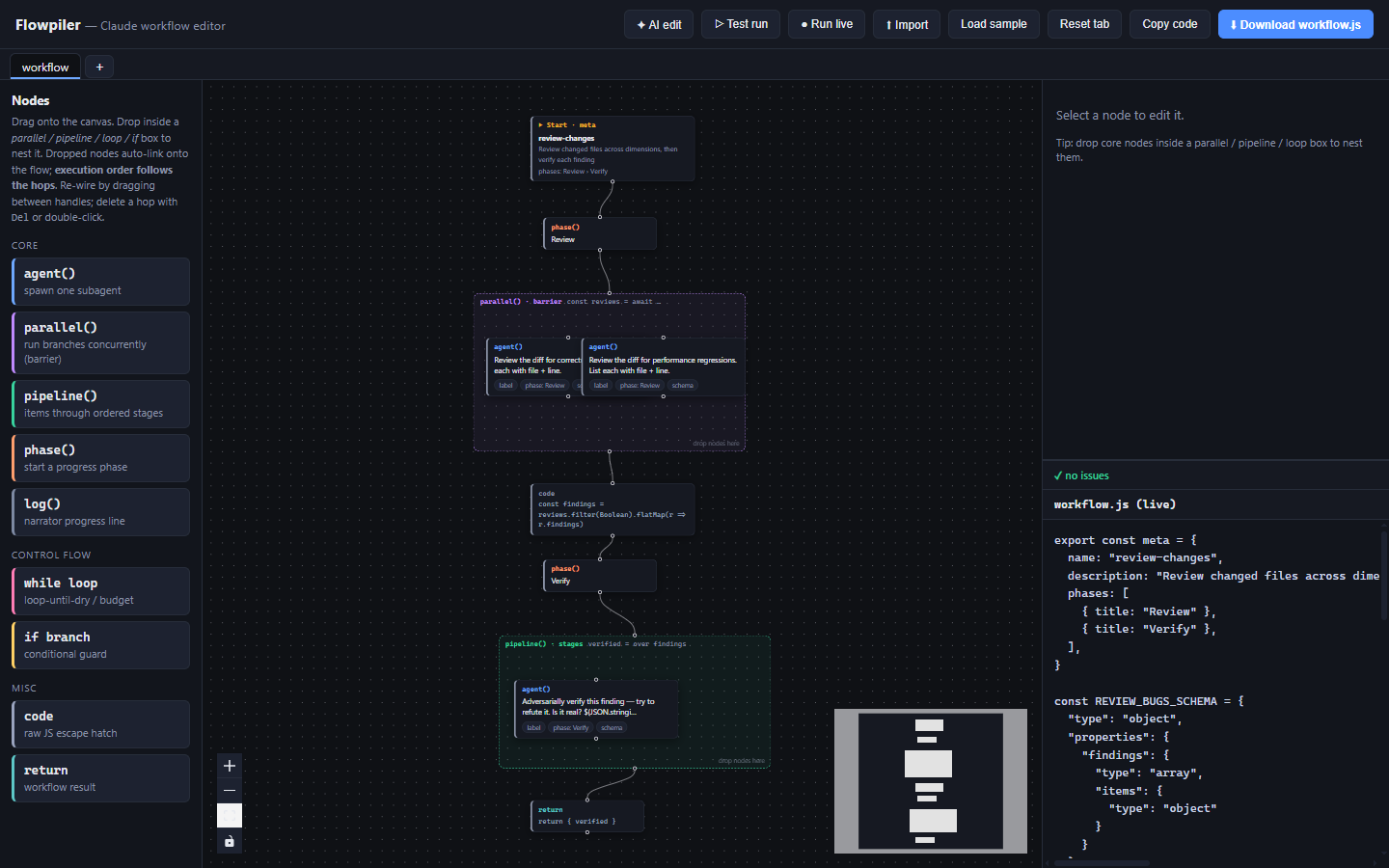
Palette · canvas · inspector + live workflow.js — all three update together.



Why Flowpiler?
Claude Code Workflows orchestrate dozens of subagents to do things one context
can't — exhaustive code reviews, repo-wide migrations, multi-source research, audit
sweeps. They're powerful, but they ship as JavaScript:
const reviews = await parallel([
  () => agent(`Review the diff for correctness bugs…`, { phase: `Review`, schema: REVIEW_BUGS_SCHEMA }),
  () => agent(`Review the diff for performance regressions…`, { phase: `Review`, schema: REVIEW_PERF_SCHEMA }),
])
const findings = reviews.filter(Boolean).flatMap(r => r.findings)
const verified = await pipeline(findings, (prev, item) => agent(`Adversarially verify…`, …))
And in practice most of these scripts are AI-generated — which means the human in
the loop spends their time reading, trusting, and tweaking a script they didn't
write. That's exactly the friction Flowpiler removes:
- See it at a glance. A wall of
parallel/pipeline/awaitbecomes a graph you
can read in seconds — phases, fan-outs, verify loops, branches. - Edit safely. Change a prompt, swap a model, add a verify stage — in form fields,
not by hand-editing nested template literals. The code regenerates as you type. - Test for free. Dry-run the whole thing with mocked agents to catch broken
control flow, undefined variables, and unbounded loops — before spending a cent
on real subagents. - Run for real, and watch. Execute through your local
claudeand stream each
node's state · tokens · duration · full output right onto the canvas. - Round-trip. Import any
workflow.js, edit visually, export it back.
Where it pays off in daily ops
Codify the recurring multi-agent jobs your team does by hand into reusable, visual,
testable workflows — then tune them in plain language and re-run on demand:
| Maintenance task | Shape in Flowpiler |
|---|---|
| PR / diff review across dimensions | parallel finders → dedup code → pipeline adversarial verify |
| Dependency / license / security audit | parallel scanners → if (findings?) → report |
| Log & incident triage | fan-out over services → summarize → return ranked list |
| Docs / dead-link / TODO sweep | pipeline over files → fix-suggestion agent |
| Flaky-test hunt | while loop-until-dry → confirm → patch proposal |
Build it once, dry-run to prove the wiring, run it live when you need it, and hand the
exported workflow.js to teammates or a cron.
Quick start
npm install
npm run dev      # → http://localhost:5180
npm run build    # type-check + production bundle into dist/
Open the app and hit ▤ Templates for a ready-made starting point (review fan-out,
repo-wide migration, dependency audit, research + fact-check, multi-agent debate,
flaky-test hunt), Load sample for the review-changes example shown throughout
this README, or start from the seed graph and drag nodes from the palette.
npm test         # compiler round-trip, store, geometry, dry-run and template suites
npm run test:watch
Node 20+ required.
npm run buildchecks this first and tells you how to
switch, rather than letting an old runtime surface as an unrelated syntax error.
Run live / AI edit are dev-mode features. They call your local
claudethrough a
Vite dev-server endpoint, reusing your existing Claude Code auth — Flowpiler never
sees an API key. They're available undernpm run dev, not in the staticdist/
build.
Feature tour
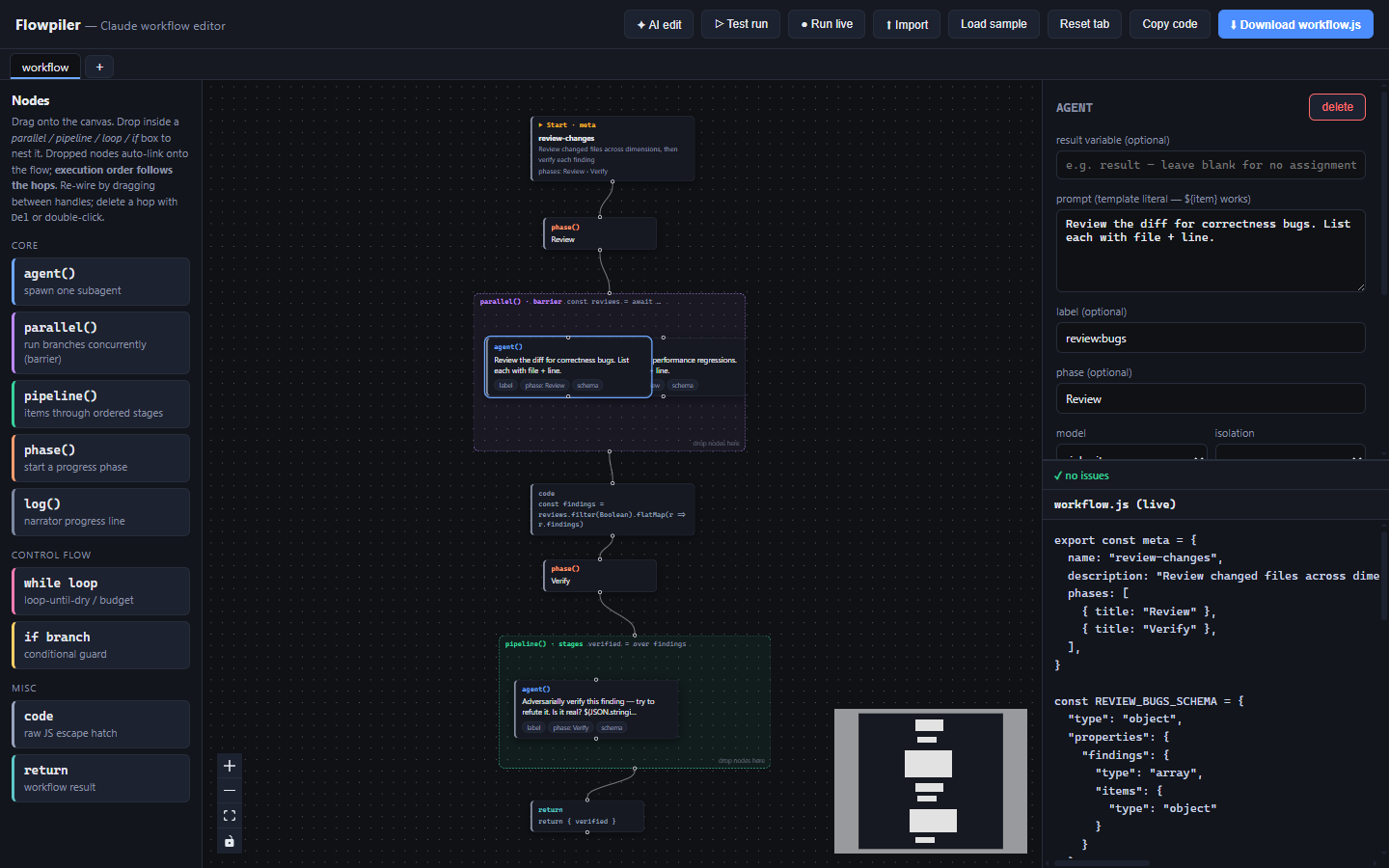
Edit nodes in the inspector — code regenerates live
Select any node to edit its fields on the right. Prompts, labels, phase, model,
worktree isolation, structured-output JSON Schema — all editable, and theworkflow.js panel below rewrites itself on every keystroke.
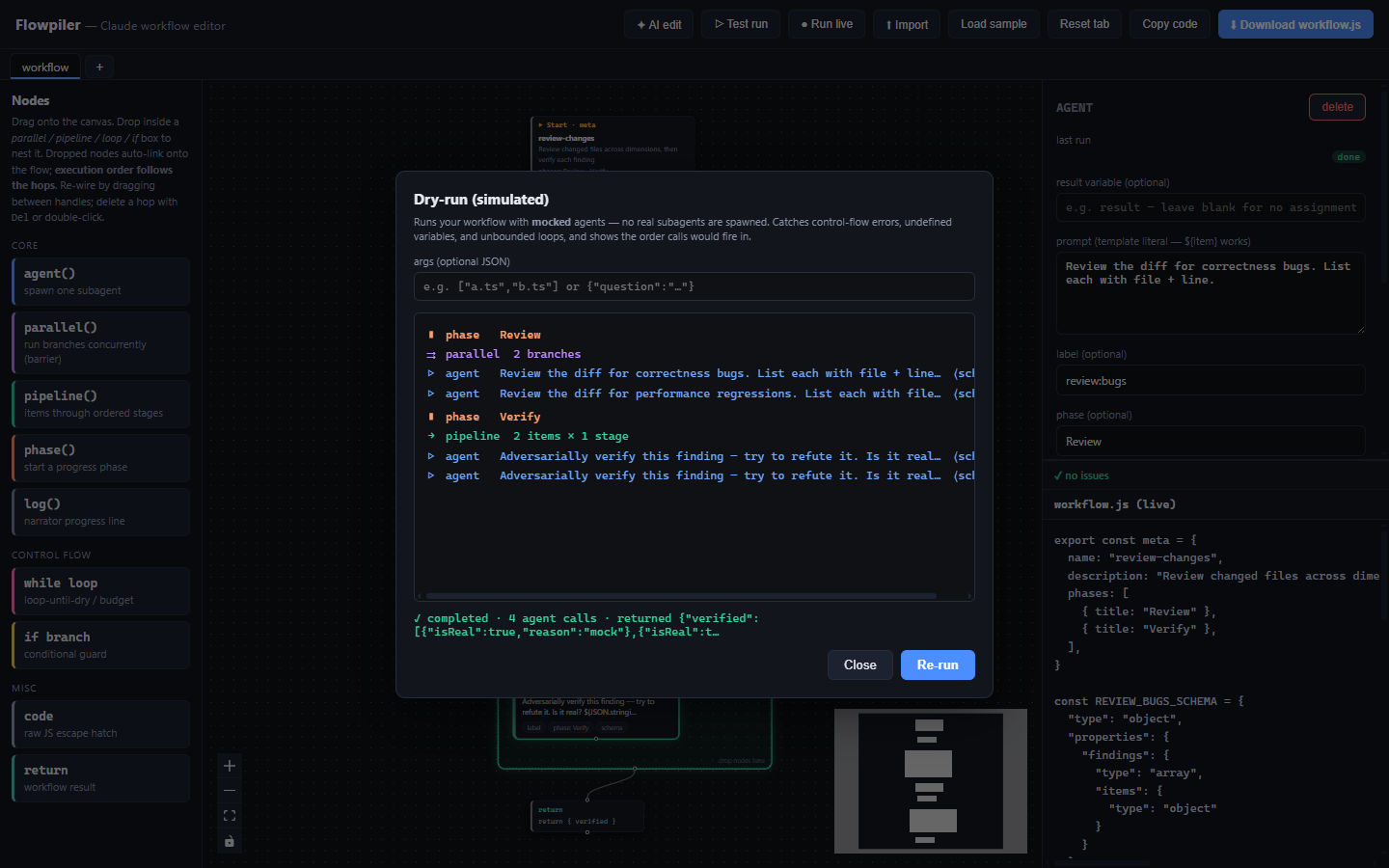
Dry-run with mocked agents — catch bugs for free
▷ Test run executes your workflow in a sandboxed worker with mocked agents: no
subagents are spawned, no tokens are spent. You get the exact call order, plus errors
and unbounded-loop detection — and the canvas lights up to show what ran.
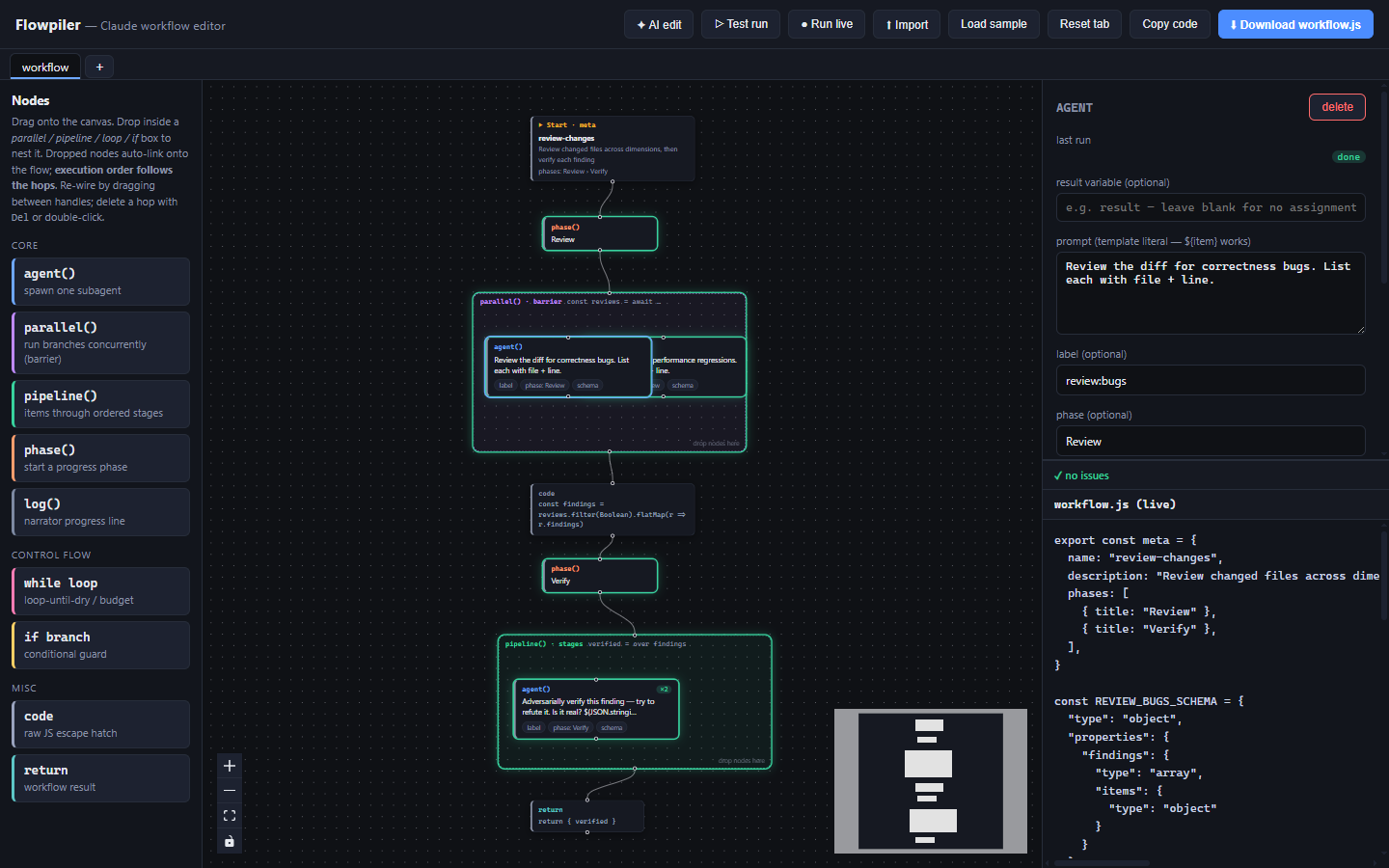
After a run, the overlay stays on the canvas: nodes that ran glow, observable nodes
that didn't run dim, and fan-outs / loops get an ×count badge. It clears the moment
you edit.
AI-edit the graph in plain language
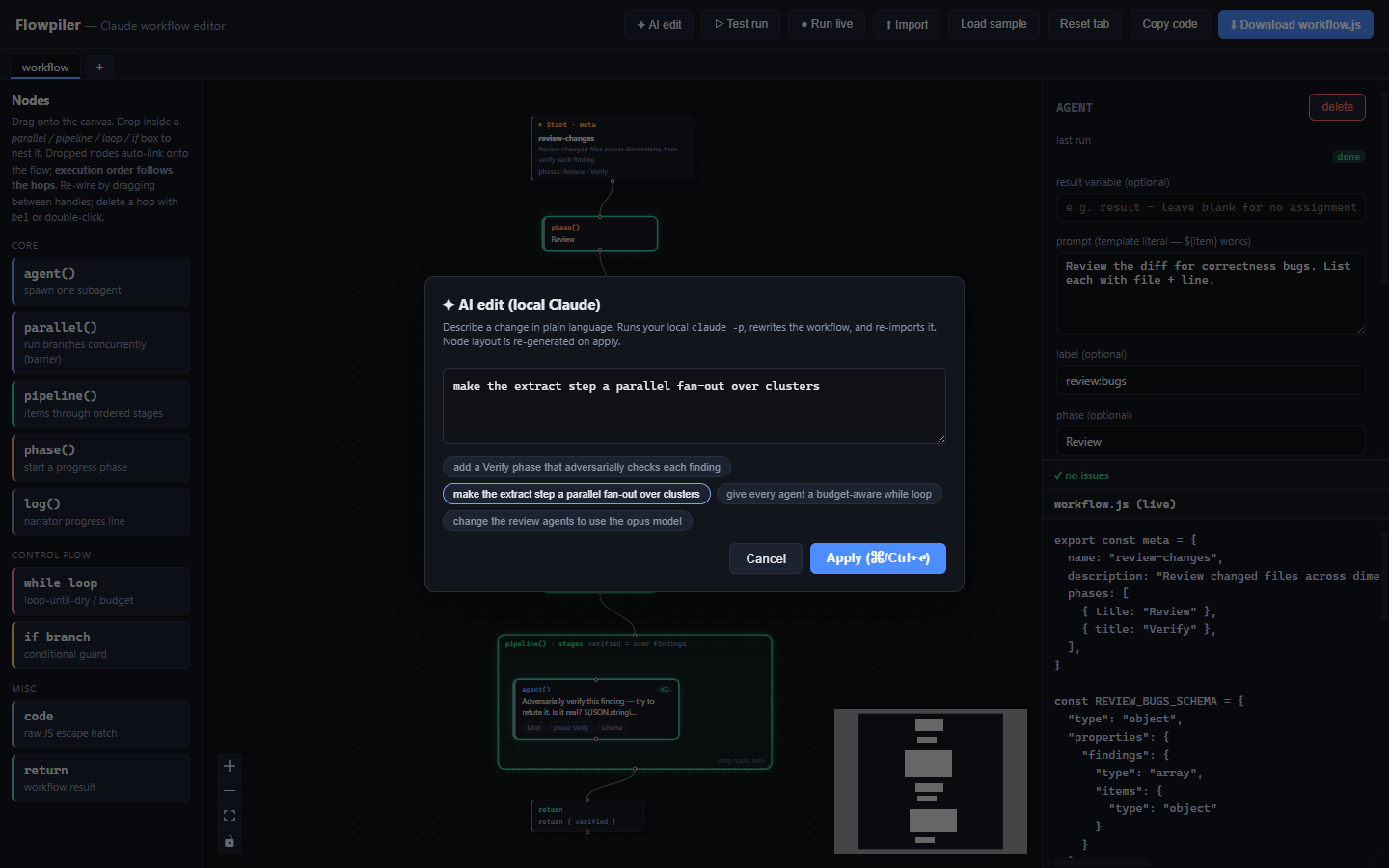
✦ AI edit — describe a change ("make the extract step a parallel fan-out over
clusters", "give every agent a budget-aware while loop", "switch the review agents to
opus") and it runs your local claude -p, rewrites the workflow.js, and re-imports it
as a fresh graph.
Run for real — live per-node telemetry
● Run live actually executes the workflow throughclaude -p --output-format stream-json, parsing workflow_progress and streaming each
node's real state, tokens, duration, and result onto the same overlay. Pick the
working directory the agents run in, pass optional JSON args, and the slide-out drawer
tracks every agent as it goes.
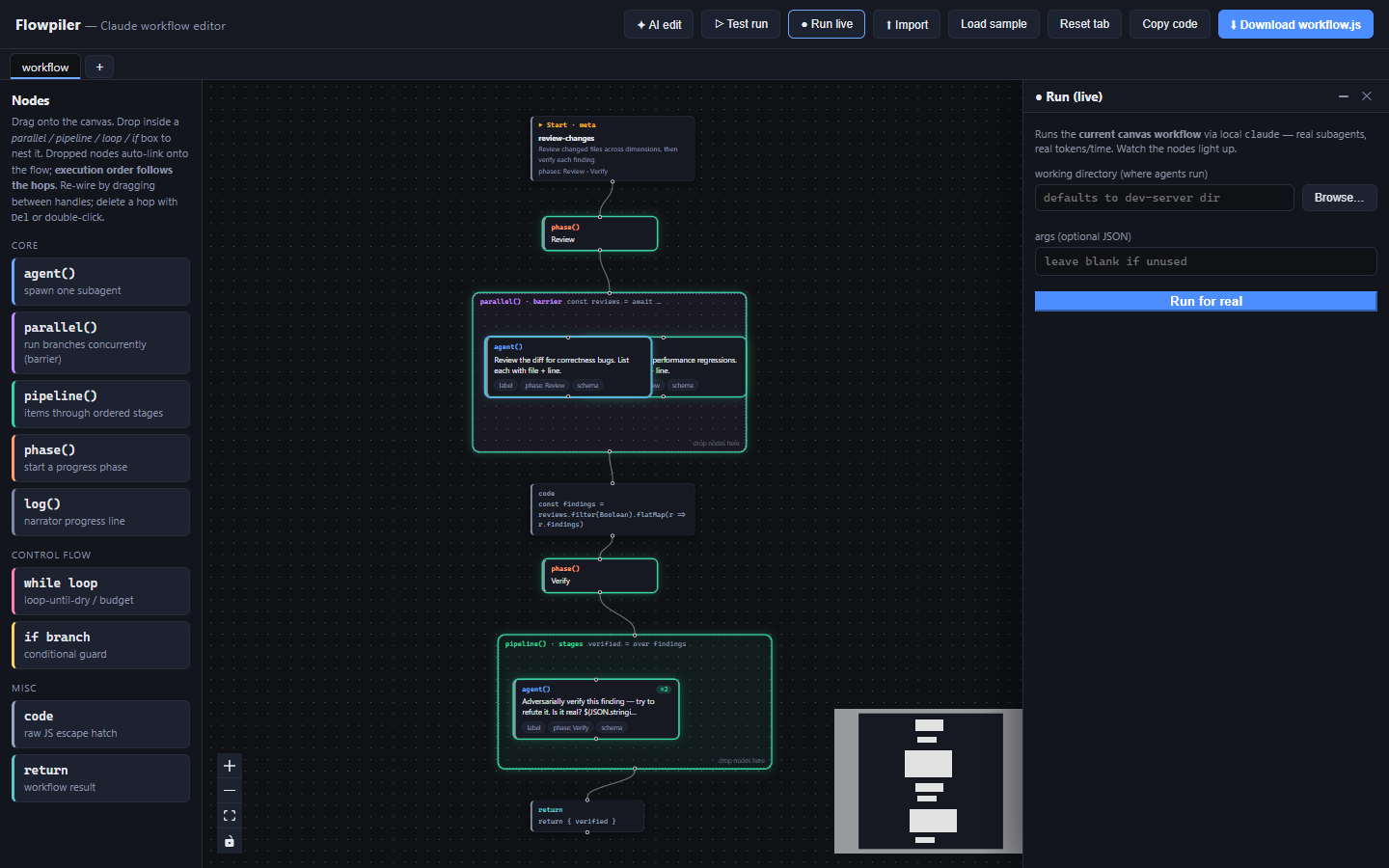
Each agent row (and the inspector's "last run") is click-to-expand: Flowpiler reads
the subagent's on-disk transcript and shows the full prompt and output — not just
the truncated preview the live stream carries.
Start from a template — six working starters
The gallery ships the shapes teams actually run by hand: a review fan-out with
adversarial verification, a repo-wide migration, a dependency audit, a research +
fact-check pipeline, a multi-agent debate, and a flaky-test hunt. Each one previews theworkflow.js it compiles to before it replaces the canvas.
Templates are authored as workflow.js and imported through the ordinary parser, so
they can't drift from what the importer accepts — and every one is covered by tests
that assert it imports, validates and reaches a compile fixed point.
Handle failure explicitly — retries, fallbacks, try/catch
Real orchestration fails: an agent times out, a subagent returns nothing usable. Everyagent node carries a retries count and an on failure policy:
| On failure | Behaviour |
|---|---|
| abort workflow (default) | the error propagates — failures stay loud |
| use null | substitutes null and carries on |
| use fallback | substitutes an expression you supply |
const findings = await Promise.resolve(
  withRetry(2, () => agent(`Scan for vulnerabilities.`))
).catch(() => null)
The retry helper is emitted once, only when something asks for it, and is stripped on
re-import so it never doubles up. For a recovery path shared by several statements
there's a try / catch container — a two-column box like if, with the risky work on
one side and the handler on the other.
The default is deliberately
abort workflow. Swallowing an error where the rest of
the workflow depends on the result turns a loud failure into a confusing one.
…and the rest
- Tabs + autosave — keep multiple workflows side by side (click to switch,
double-click to rename,+for a new one); every change is persisted tolocalStorageand restored on reload. Download names the file after the tab. - Import — paste or upload an existing
workflow.js; it's parsed back into a node
graph (anything it can't classify lands in acodenode rather than failing). - Live validation — empty meta name/prompt, invalid schema JSON, empty containers,
unwired nodes, and phase/metamismatches are flagged as you build; click an issue to
jump to and highlight its node.
Bundled samples — including MAGI, the Evangelion decision system
Pick one from the top-bar dropdown:
| Sample | What it shows |
|---|---|
| review-changes | the canonical fan-out → dedup → adversarial-verify review pattern |
| MAGI · Eva three-sage | a majority-vote decision engine (read on 👇) |
🟠 MAGI — “the three wise men” as a Claude workflow
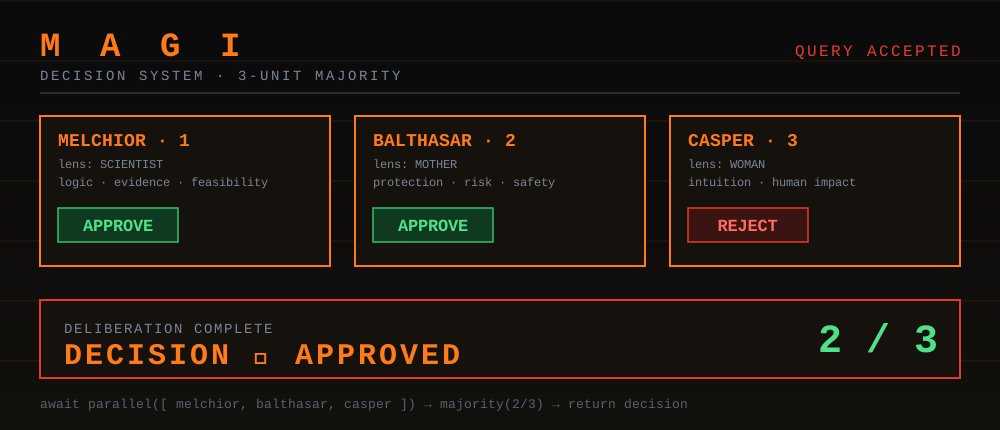
In Neon Genesis Evangelion, MAGI is the supercomputer that runs NERV. Its creator
split her own psyche across three units — MELCHIOR-1, BALTHASAR-2, CASPER-3 (the
scientist, the mother, the woman) — and the system decides by majority vote of the
three. It's basically a multi-agent system with deliberately diverse perspectives… which
is exactly a Claude parallel + majority pattern.
Flowpiler ships it as a runnable sample. Three agents judge the same proposal through
three different lenses, in parallel; a code node tallies the votes; a 2-of-3 majority
becomes the verdict:
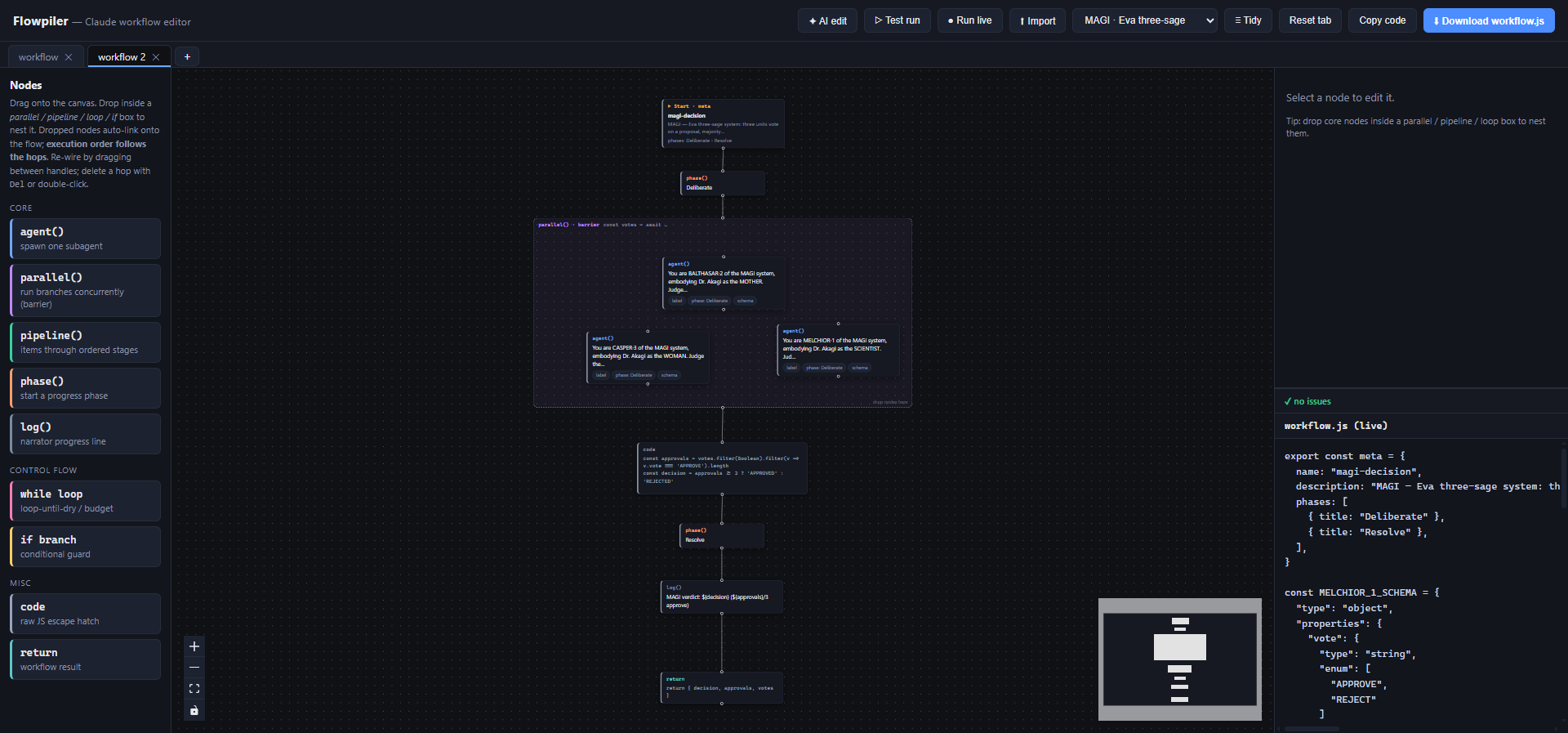
phase("Deliberate")
const votes = await parallel([
  () => agent(`…as MELCHIOR-1 (SCIENTIST) — judge on logic & feasibility…  Proposal: ${args.proposal}`, { schema }),
  () => agent(`…as BALTHASAR-2 (MOTHER)  — judge on protection & safety…    Proposal: ${args.proposal}`, { schema }),
  () => agent(`…as CASPER-3 (WOMAN)      — judge on intuition & human impact… Proposal: ${args.proposal}`, { schema }),
])
const approvals = votes.filter(Boolean).filter(v => v.vote === "APPROVE").length
const decision  = approvals >= 2 ? "APPROVED" : "REJECTED"
phase("Resolve"); log(`MAGI verdict: ${decision} (${approvals}/3 approve)`)
return { decision, approvals, votes }
Try it: Load MAGI → ▷ Test run (or ● Run live) and pass a proposal asargs — either JSON {"proposal":"ship on Friday"} or just plain text. Watch the three
sages deliberate and the verdict come back. It's a tiny, fun template for any
“get N independent opinions, then decide” task — design reviews, go/no-go calls, risk
sign-offs.
The graphic above is an original homage, not a screenshot from the show.
Node types
| Node | Emits |
|---|---|
| meta / Start | export const meta = { name, description, whenToUse?, phases } |
| agent() | const v = await agent(prompt, { label, phase, model, isolation, agentType, schema }) |
| parallel() | const v = await parallel([() => …, …]) — branches run concurrently (barrier), or map mode fans one template over a collection |
| pipeline() | const v = await pipeline(items, (prev, item, i) => …, …) — items through ordered stages |
| phase() | phase('title') |
| log() | log('message') |
| while loop | while (cond) { …body… } |
| if branch | if (cond) { …then… } else { …else… } |
| try / catch | try { …body… } catch (err) { …recovery… } |
| code / return | raw JS — declarations, transforms, return … |
Full field-by-field reference: docs/NODE-REFERENCE.md —
every field, its default, what it emits, and the JS subset the importer accepts.
Ordering & nesting
- Execution order at every level follows the connecting hops (topological), falling
back to top-to-bottom canvas position for the start and any unconnected nodes. - parallel children run concurrently — no wiring needed between them. map mode
emitsparallel(items.map((item, i) => () => …))for dynamic fan-outs. - pipeline / while / if children are ordered by their internal hops.
- Nesting is unlimited — drop a container inside a container (e.g. a
parallelas apipelinestage); the drop targets the innermost box and the nestedparallel/pipelineis emitted inline as an expression. ifhas then / else — eachifbox is split into a then column and an else
column; drop a node into either side (or flip it in the inspector).- agent prompts and labels are emitted as template literals, so
${item},${prev.x},${i}interpolation works inside loops and stages. - Schemas entered on agent nodes are validated as JSON and hoisted to named
*_SCHEMAconsts at the top, then referenced from the agent's opts — matching the
convention in the Workflow examples.
Architecture
src/
├─ components/          # all React UI
│  ├─ App.tsx           #   layout, canvas, drag-drop + re-parent, tabs, import/export, tidy
│  ├─ Palette.tsx       #   left sidebar, draggable node templates
│  ├─ Inspector.tsx     #   right sidebar, per-kind field editors
│  ├─ nodes.tsx         #   React Flow node components + nodeTypes registry
│  └─ *Dialog.tsx       #   Test / RunLive / AiEdit / Template / Detail dialogs
├─ compiler/            # graph ↔ workflow.js
│  ├─ codegen.ts        #   graph → workflow.js (the compiler)
│  ├─ parser.ts         #   workflow.js → graph (the importer)
│  └─ __tests__/        #   round-trip, emit-fidelity and error-handling suites
├─ runtime/             # execution + telemetry
│  ├─ runtime.ts        #   shared run model + node attribution
│  ├─ simulate.ts/      #   dry-run: mocked-agent execution in a Web Worker
│  │  simWorker.ts
│  ├─ runLive.ts        #   live run: stream-json telemetry + on-disk transcript reads
│  └─ aiEdit.ts         #   plain-language edit via local claude -p
├─ state/               # zustand store + React contexts
│  ├─ store.ts          #   multi-tab graphs + versioned localStorage persist
│  ├─ types.ts          #   node-data model + defaults
│  └─ *Context.ts       #   run / validation / detail contexts
├─ graphUtil.ts         # absolute positions, nesting hit-tests, resize-aware sizing
├─ validation.ts        # static checks → issues
├─ sample.ts            # bundled samples (review-changes, MAGI)
├─ templates.ts         # starter gallery, authored as workflow.js source
├─ main.tsx             # entry
└─ styles.css           # dark IDE theme

scripts/check-node.cjs  # fails loudly on an unsupported Node version
docs/NODE-REFERENCE.md  # every node, every field, and what it emits
.github/workflows/ci.yml # build + test on Node 20 and 22

vite.config.ts          # dev-server endpoints: /api/edit, /api/run, /api/pickdir,
                        # /api/agent-output — all spawn your local `claude`
codegen.ts is the heart: it finds the meta node, hoists schema consts, then walks the
top-level nodes in hop order, recursing into containers. parser.ts is its inverse — a
bracket/string/template/regex-aware scanner that reads the JS subset Flowpiler emits.
Because the two are inverses, the test suite's central assertion is that a graph
compiled and re-imported is the same graph — with a second layer of tests pinning the
emitted text against what the author entered, since a round trip that agrees with
itself can still be wrong.
Known limitations (v1)
parallel/pipelinethunk/stage bodies are expected to be agent, code, or
a nested parallel/pipeline (things that are expressions). Awhile/if/trycan't be inlined as a thunk body (they're statements, not expressions).- The importer targets the JS subset Flowpiler emits; arbitrary hand-written control
flow it can't classify lands in acodenode rather than failing. - Imported graphs get an automatic layout — readable, but you'll likely tidy positions
by hand. - Run live and AI edit require a local
claudeCLI onPATHand run only in
dev mode. The folder picker is Windows-only (type the path manually elsewhere). - Saved workspaces are repaired on load: fields added by a newer build are backfilled,
and anything unreadable (a node kind that no longer exists, an edge whose endpoints
are gone) is dropped with a console warning rather than loaded half-broken.
Reviews (0)
Sign in to leave a review.
Leave a reviewNo results found