localant
Health Uyari
- License — License: MIT
- Description — Repository has a description
- Active repo — Last push 0 days ago
- Low visibility — Only 5 GitHub stars
Code Basarisiz
- exec() — Shell command execution in examples/skills/article-publisher/src/index.ts
- network request — Outbound network request in examples/skills/article-publisher/src/index.ts
- fs.rmSync — Destructive file system operation in examples/skills/article-publisher/tests/skill.test.ts
Permissions Gecti
- Permissions — No dangerous permissions requested
Bu listing icin henuz AI raporu yok.
Use ChatGPT as the brain and your local computer as the hands — a safe, permissioned local MCP gateway with default-deny security, local approvals, and full audit logging.

LocalAnt


English · 日本語
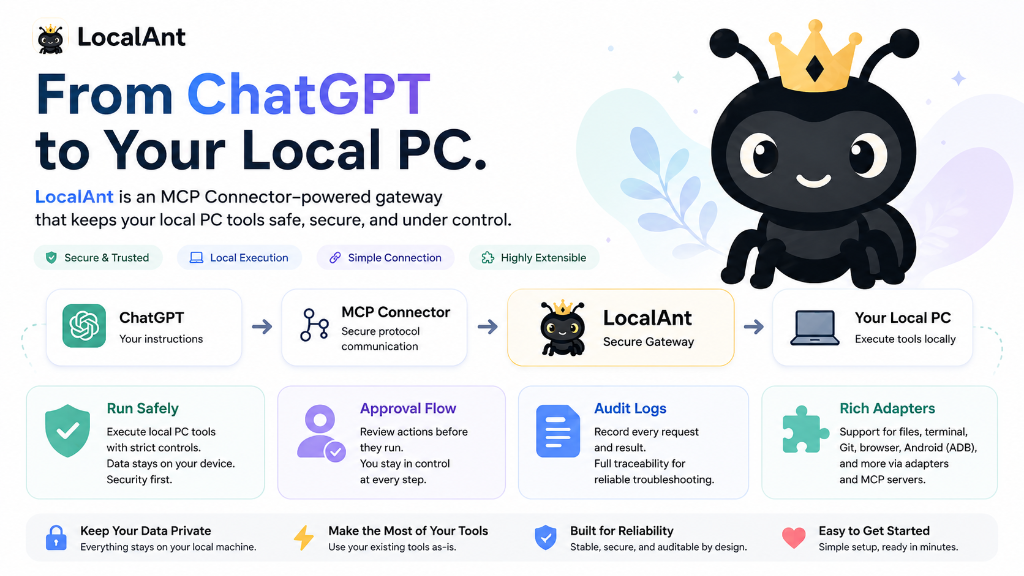
Use ChatGPT as the brain. Use your local computer as the hands.
LocalAnt lets you use ChatGPT as the brain and your local computer as the hands.
Demo
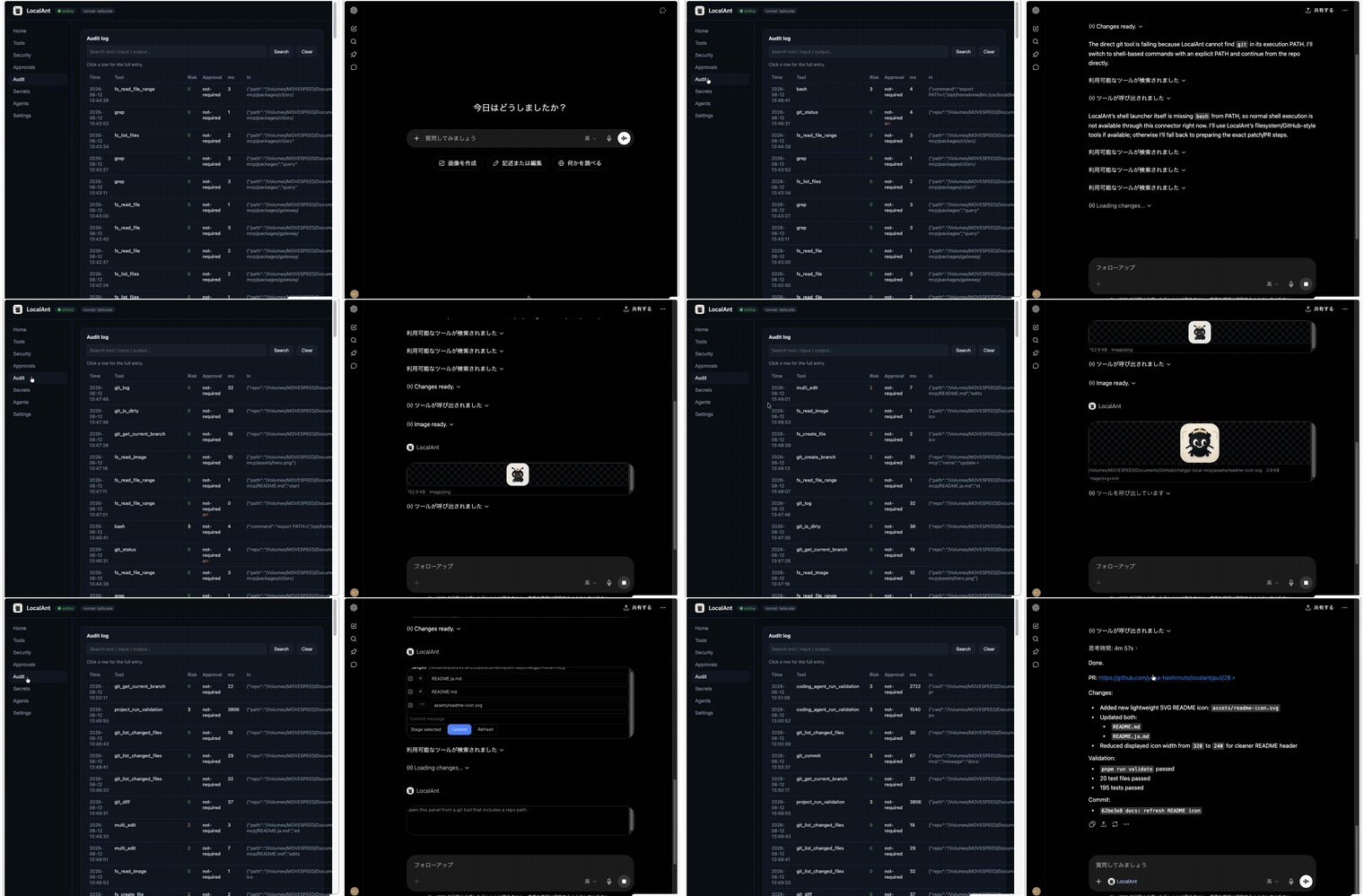
ChatGPT drives a real task on the local machine through LocalAnt. ▶ Full-quality MP4
| Before (Task Start) | After (PR Created & Validated) |
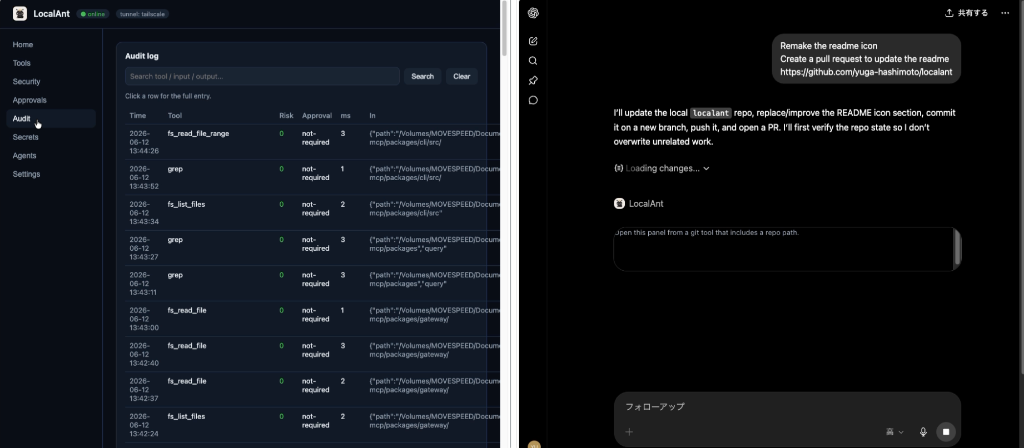 |
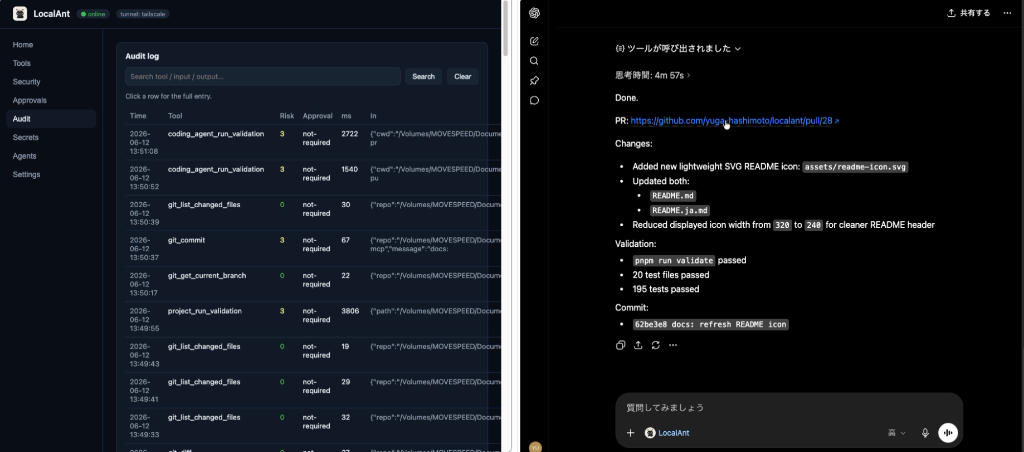 |
It exposes safe, permissioned local skills to ChatGPT through MCP:
run approved commands, inspect projects, manage files, call coding agents like
Claude Code or Codex, control browser/ADB, publish articles, and create your own
local skills — all behind a default-deny security model with local approval and
full audit logging.
ChatGPT
  ↓ Apps SDK / MCP Connector (Streamable HTTP /mcp)
LocalAnt  ── Gateway · Risk engine · Approval queue · Audit log · Dashboard
  ↓ Local PC
  ├─ Shell · Filesystem · Git (deny-list by default · allow-list in strict mode)
  ├─ Claude Code / Codex (plan → approve → execute → validate → diff)
  ├─ Browser (Playwright, isolated profile) · Android (ADB) · Computer Use (macOS desktop)
  ├─ Articles (Zenn / Qiita / note, via skill) · Custom Skills
  └─ Adapters: any downstream MCP server (Desktop Commander, etc.)
What is LocalAnt?
A local-first MCP Gateway for ChatGPT. ChatGPT is the conversational UI and
decision-maker; your PC is the execution environment. The gateway publishes a
catalog of 200+ permissioned tools over the Model Context Protocol, which
ChatGPT's Developer-Mode connectors can call.
The design is inspired by OpenClaw (local gateway + skills + registry),
Desktop Commander (local PC control + audit + hardening), supergateway
(stdio→Streamable-HTTP /mcp), and mcp-proxy (bundling MCP servers) — but the
brain is ChatGPT, and every capability is wrapped in permissions, approval,
and audit.
Why ChatGPT as brain, local PC as hands?
- ChatGPT is great at reasoning, planning, and conversation.
- Your PC is where your code, files, devices, and tools actually live.
- Handing ChatGPT a raw shell is dangerous. Instead, this gateway gives it a
curated, permissioned surface with local approval for anything risky.
Features
- 🔒 Layered security: deny-list by default (sensitive-path blocklist +
always-blocked commands), optionalstrictallow-list mode, path & symlink
traversal prevention, secret vault + redaction. - ✅ Local approval queue: risk-2+ tools require explicit approval in the
dashboard or CLI — ChatGPT's confirmation is never trusted alone. - 🧾 Full audit log: every tool call recorded (with secrets redacted).
- 🧩 Skill system: create, validate, enable, run, install-from-git,
publish, and generate skills from ChatGPT (always saved disabled). - 🤖 Autopilot: one high-level
autopilottool delegates natural-language
tasks (plan / execute / review / fix / pr) to a local automation backend you
pick in the dashboard — Claude Code / Codex / opencode / OpenClaw / Antigravity
/ Hermes — with an ordered fallback chain. ChatGPT never names a backend. - 🩺 Diagnostics:
localant_doctor— a read-only, structured health report. - 🧭 ChatGPT UI widgets:
localant_uiopens a LocalAnt Home panel inside ChatGPT; focused panels render approvals, git, shell processes, browser state, MCP servers, skills, and images. See docs/chatgpt-ui.md. - 🖥️ Local dashboard: status, approvals, audit, skills, secrets, Autopilot.
- 🌐 3-minute setup with Tailscale Funnel by default, plus Cloudflare Tunnel / ngrok fallbacks and clipboard copy.
- 🖱️ Computer Use: screenshot + mouse + keyboard control of the macOS
desktop (screencapture+cliclick). Screenshots come back as inline MCP
images whose pixels map 1:1 to click coordinates; all input actions are
risk 3 and audited. See docs/computer-use.md. - 🔌 Adapters for arbitrary downstream MCP servers (e.g. Desktop Commander).
ChatGPT as a local coding agent
LocalAnt is also a ChatGPT-native local coding-agent runtime. ChatGPT can
read, search, edit, run, test, and diff a project on your machine through MCP —
behind the same approval / audit / security pipeline as everything else.
It exposes the standard Codex / Claude Code / OpenCode-style tool names:
| Category | Tools |
|---|---|
| Read / search | read · read_file_range · grep · glob · list_files · get_file_info |
| Edit | write · edit · multi_edit · apply_patch · move_file · copy_file · create_directory · delete_file |
| Run | bash · shell_run_background · shell_get_output · shell_stop · command_exists |
| Git | git_status · git_diff · git_add · git_commit · git_restore · git_stash · git_reset · git_apply_patch · git_is_dirty |
| Validate | project_run_tests · project_run_lint · project_run_typecheck · project_run_build · project_run_validation · project_get_package_scripts |
| Code intel | lsp_status · lsp_diagnostics · lsp_document_symbols · lsp_go_to_definition · lsp_find_references · lsp_hover · lsp_rename_symbol |
| Approve | approval_request (the human approves in the dashboard / CLI) |
| Delegate | autopilot (high-level; selects an internal provider from the dashboard's Autopilot tab — ChatGPT never names a backend) |
No web search / web fetch / todo / "ask the user" tools — ChatGPT already
does web search, browsing, planning, and asking you directly, so tool-ifying
those would only bloat the surface. LocalAnt exposes only what it uniquely
provides: your local files, shell, git, toolchain, language server, browser,
device, and agents.
bash runs through a real shell (pipelines and && work) but every command
is screened by CommandGuard (blocked tokens, rm -rf, …), the cwd is validated
by PathGuard, and the call is gated by the security mode (approval in strict,
audited-but-ungated in open, ungated in yolo — with CORE_BLOCKED_COMMAND_TOKENS
rejected even in yolo).
Tool profiles keep the advertised surface sharp:
minimal— the small delegation core (shell / agent / skill + read-only fs).coding— the full coding surface above (recommended for ChatGPT-as-coder).full— every tool (browser, adb, skill authoring, destructive git, secrets).
localant tools profile coding   # switch profile
localant tools list             # see what's exposed
Every tool's risk level (0–4) and how each family is gated is documented in
docs/tools.md.
Then just ask ChatGPT:
"Look at this repo, fix the bug, run
pnpm validate, and show me thegit diff."
ChatGPT will check project/git state, grep/glob for the code, edit/apply_patch
the fix, bash the validation, iterate on errors, and return git_diff.
3-minute setup
npx -y localant setup
or:
npm install -g localant
localant setup
setup checks your environment, initializes config, generates an auth token,
enables built-in skills, starts the gateway + dashboard, opens a public tunnel,
copies the MCP URL to your clipboard, and prints the ChatGPT connection steps.
✅ LocalAnt is running

  Local Gateway:  http://127.0.0.1:8787
  Dashboard:      http://127.0.0.1:8788
  MCP Endpoint:   https://your-machine.your-tailnet.ts.net/mcp?key=********

Connect ChatGPT:
  1. Open ChatGPT → Settings → Apps & Connectors
  2. Advanced settings → Developer Mode ON
  3. Connectors → Create
  4. Paste the MCP URL above
  5. Set Authentication to "None"
  6. Name it: LocalAnt
From source (this repo):
pnpm install && pnpm build && node packages/cli/dist/bin.js setup
ChatGPT setup
- ChatGPT → Settings → Apps & Connectors
- Advanced settings → Developer Mode ON
- Connectors → Create
- Paste the MCP URL (
https://…/mcp?key=<token>) - Set Authentication to None
- Name it LocalAnt
- Ask ChatGPT: "Run health check on my local app"
The token is embedded in the URL so the connector authenticates even where
custom headers aren't available. You can also send Authorization: Bearer <token>.
See docs/chatgpt-setup.md.
Tip — Tailscale Funnel is the default tunnel. Configure your stable
Funnel FQDN (machine.tailnet.ts.net) in the dashboard Settings tab or
withlocalant config set tunnel.domain <domain>. The auth token is
persistent, so a stable URL means you connect ChatGPT once. Cloudflared,
ngrok, localtunnel and serveo remain available as fallback providers.
Full instructions: docs/chatgpt-setup.md → Keep a fixed URL.
Security model
LocalAnt has three security modes (set security.mode in config or the
dashboard Settings tab):
| Mode | Filesystem / shell | Approval gates | For |
|---|---|---|---|
open (default) |
deny-list — everything allowed except the sensitive blocklist + core blocked tokens | only risk-4 (destructive/publish) | personal single-user machines |
strict |
allow-list — only allowed directories & commands | per risk level (see below) | shared / multi-user environments |
yolo |
deny-list (same as open) |
none at all | trusted automation only |
The default is open: a deny-list model for personal use. There is no
directory or command allow-list to maintain — ChatGPT can read/write anywhere
and run any command except the always-blocked items below.
Strict-mode approval matrix:
| Risk | Meaning | Approval (strict) | Approval (open) |
|---|---|---|---|
| 0 | read-only | none | none |
| 1 | safe write draft | config (default none) | none |
| 2 | file modification | required | none |
| 3 | shell / agent / network write | required | none |
| 4 | destructive / publish / deploy | double approval | double approval |
Always enforced, in every mode (including open and yolo):
- Sensitive paths (
~/.ssh,~/.aws,~/.gnupg,/etc, Keychains, …) are
never readable or writable; symlink escapes are caught. - Core blocked commands —
sudo,su,dd,mkfs,fdisk,diskutil,shutdown,reboot— andrm -rf/chmod 777are always rejected and
cannot be removed from the blocklist. - Secrets live in an encrypted local vault and are redacted from tool
output and the audit log. - Generated/installed skills are disabled by default until you review them.
Full details: SECURITY.md.
Dashboard
A local-only dashboard (http://127.0.0.1:8788) is a full control panel — every
setting that's available on the CLI is editable from the web, and vice versa.
A live status badge and a pending-approvals counter update automatically.
Tabs: Home · Tools · Security · Approvals · Audit · Secrets · Agents ·
Settings.
- Home — status, MCP endpoint (copy), tunnel start/stop/restart, Test
connection (fetches the public URL to confirm ChatGPT can reach you), health
check. - Tools — browse every exposed tool, with Skills (create, enable/disable,
inspect permissions, uninstall) and MCP (add/test/remove downstream stdio
servers) sub-tabs. - Security — read-only view of the active mode, allowed directories/commands
(strict mode only), always-blocked command tokens, and the risk policy. - Approvals — live pending-approval queue (approve/deny, per-session option).
- Audit — full-text search and click-through to the full input/output of any
entry. - Secrets — add/remove with reveal toggle (names only).
- Agents — enable/disable (e.g. Codex), launch plan/execute tasks against
a working directory and live-tail their logs. - Settings — security mode (open/strict/yolo), risk policy, tool profile,
auth token reveal/rotate (rotation takes effect with no restart), tunnel
provider + fixed-URL config with Save & restart, gateway/dashboard ports,
allowed directories/commands, blocked tokens (core tokens shown but locked),
and a raw JSON editor with validation.
Skills
Skills are the unit of extension. Layout:
skills/<name>/
  skill.json     # manifest: permissions + risk + tool schemas
  README.md  LICENSE  CHANGELOG.md
  src/index.ts   # defineSkill({...})
  tests/index.test.ts
  examples/
Manage them with skill_list/info/enable/disable/run/validate/... tools or the
CLI (localant skills ...). See docs/skills.md.
How to create a skill
import { defineSkill, z } from "@localant/skill-sdk";

export default defineSkill({
  name: "hello-world",
  tools: {
    hello: {
      description: "Say hello",
      riskLevel: 0,
      inputSchema: z.object({ name: z.string() }),
      handler: async ({ name }) => ({ content: `Hello ${name}` }),
    },
  },
});
How to generate a skill from ChatGPT
"Create a skill named
qiita-private-postthat posts private Qiita articles
using a QIITA_TOKEN secret."
ChatGPT calls skill_generate_from_prompt. The gateway scaffolds the manifest,
README, source and tests, infers permissions, sets it disabled, and runs
validation. You review permissions in the dashboard, then skill_enable (which
requires approval). See docs/skills.md.
How to delegate with Autopilot
Pick your automation backend in the dashboard → Autopilot tab (primary +
enabled providers + ordered fallback chain + fallback policy). The page shows
the resolved chain with live availability and lets you run a read-only test to
confirm the configured agent answers. Then ChatGPT delegates with one tool, in
plain language — it never names a backend:
autopilot(task:"Plan SEO improvements",      cwd:"/Users/me/Documents/my-app", mode:"plan")
# review the plan, approve, then:
autopilot(task:"Implement the SEO plan",     cwd:"/Users/me/Documents/my-app", mode:"execute")
# or: mode:"review" (read-only), mode:"fix" (diagnose + repair + validate), mode:"pr"
Execution is risk-3 (approval required), runs on a fresh branch, and falls back
through the chain on failure per your fallback policy. Push / PR / publish stay
behind explicit approval. The low-level bash/git/file/browser/adb tools remain
available. See docs/coding-agents.md.
Codex example
Same flow with agent:"codex" once codingAgents.codex.enabled = true and thecodex CLI is on PATH.
Article publishing
Article publishing is provided by the bundled article-publisher skill
(disabled by default — enable it with skill_enable / localant skills enable article-publisher first):
- Zenn: GitHub-repo method — writes
articles/<slug>.mdwithpublished:false, can open a PR branch. (zenn_*) - Qiita: official API with
QIITA_TOKENfrom the vault; private-first.
(qiita_*) - note: local drafts only (note has no official public write API).
(note_*)
Publish actions are risk 4 (double approval). See docs/articles.md.
Asset bridge (images → repo)
One tool, asset_save_image, lands an image produced or referenced in a ChatGPT
conversation as a real file on disk. source.kind selects how the bytes arrive:
base64— inline data (best for small generated icons/diagrams; base64 is
kept out of the audit log).url— fetch a public http(s) image, SSRF-guarded (no
localhost/private/metadata hosts; redirects re-validated and capped).latest_download— adopt the newest image from your Downloads folder.
All routes share one validation path (magic-byte sniff → MIME allowlist →
SVG-safety scan → sha256 → atomic write with backup). Risk 2 (no approval inopen mode). See docs/asset-bridge.md.
Browser automation
Playwright-based (optional peer dependency), using an isolated profile by
default. browser_open/screenshot/extract_text/click/type/... — all risk 3.
See docs/browser.md.
Computer Use (desktop control)
Screenshot + mouse + keyboard control of the local desktop (macOS, viascreencapture and cliclick). Screenshots are returned to ChatGPT inline as
MCP images, resampled so image pixels map 1:1 to click coordinates.computer_screenshot/left_click/double_click/right_click/drag/type/paste_text/key/scroll/...
— all input actions are risk 3 and audited. See
docs/computer-use.md.
Android ADB
adb_list_devices/screenshot/tap/swipe/input_text/logcat/install_apk/....
Input/installs are risk 3 and audited. See docs/adb.md.
Existing MCP bridge
Register downstream MCP servers (mcp_server_register/list/status/...) to bundle
them behind the gateway's safety pipeline. Desktop Commander and any other MCP
server are driven through this generic bridge — there is no dedicated adapter.mcp_server_list_tools returns an actionable hint when a server is unregistered
or disabled.
CLI
localant setup | start | stop | restart | status | doctor | uninstall
localant deps list | install [browser|desktop]   # optional capability deps (Playwright, cliclick)
localant update [--check] [--pm npm|pnpm|yarn|bun]   # update to the latest published version and restart
localant token rotate | show   # re-issue the auth token (secrets preserved)
localant tunnel status | start | stop
localant config show | set <key> <value>   # e.g. localant config set security.mode open
localant dashboard | logs
localant approvals list | approve <id> [--session] | deny <id>
localant skills list | info <name> | enable <name> | disable <name> | install <git-url> | validate <name> | publish <name>
localant secrets set <name> [value] | list | remove <name>
localant tools list | profile <minimal|coding|full>
localant agents list | detect | run <agent> <cwd> <task> [--execute] | logs <taskId> | stop <taskId>
localant mcp list | test <name> | import-all
Architecture
A pnpm + TypeScript monorepo with project references:
| Package | Responsibility |
|---|---|
shared |
config schema, paths, risk model, redaction, types, logger |
gateway |
stores, security guards, managers, tool registry, execution pipeline |
mcp |
Streamable HTTP /mcp, auth, dashboard API |
dashboard |
self-contained local dashboard |
cli |
setup/start/doctor/… commands |
skill-sdk |
defineSkill for external skill authors |
See docs/architecture.md.
FAQ
- Does ChatGPT get a raw shell? Depends on the mode. In
strictmode only
allow-listed commands run without approval; anything else needs explicit local
approval. In the defaultopenmode (andyolo)bashruns arbitrary
commands — but the always-blocked tokens (sudo,rm -rf,dd, …) are
rejected in every mode and PathGuard still blocks sensitive paths. - Where is my config?
~/.localanton every platform (override with theLOCALANT_HOMEenv var). A pre-1.x install under~/Library/Application Support/LocalAnt/~/.config/LocalAntis migrated automatically on first run. - Do I need Claude Code/Codex/adb/Playwright? Only for those specific tool
families; they degrade gracefully with install guidance. - Is the tunnel safe? A public tunnel exposes the gateway; the auth token is
required, the dashboard warns you, and you should stop the tunnel when idle.
Troubleshooting
localant doctor diagnoses your environment. More in
docs/troubleshooting.md.
How to uninstall
localant uninstall          # prints steps
localant uninstall --purge  # also deletes the config/data directory
npm uninstall -g localant
Contributing
Contributions are welcome — especially tests and security hardening. See
CONTRIBUTING.md for setup, coding standards, and the release
process, and ROADMAP.md for where the project is headed. Please
report vulnerabilities privately per SECURITY.md.
License
MIT — see LICENSE.
Yorumlar (0)
Yorum birakmak icin giris yap.
Yorum birakSonuc bulunamadi