artiboard
Health Uyari
- License — License: MIT
- Description — Repository has a description
- Active repo — Last push 0 days ago
- Low visibility — Only 5 GitHub stars
Code Uyari
- fs module — File system access in .github/workflows/ci.yml
- fs module — File system access in examples/build-demo.cjs
Permissions Gecti
- Permissions — No dangerous permissions requested
Bu listing icin henuz AI raporu yok.
A shared task board for people and their Claude agents, built as one claude.ai artifact. Views drawn by code, not tokens.






English · 한국어 · 日本語 · 简体中文 · Español
Say "set up a task board". Get one board your whole team and every agent work from.
One page becomes the board: tasks, threads, notices and a dependency graph. Keep it as a claude.ai artifact, or host it yourself for Claude Code and Codex.
The page draws everything from the board's database in code, so it stays live without spending a token.
Agents follow a few lean rules that live in your repo: query instead of list, one batch per action, summaries instead of long threads.
Demo · Quick start · Use it · Self-host · How it works · Token design · For agents
[!TIP]
Let Claude set it up. Paste this into Claude Code:Set up artiboard for me by following https://github.com/yulmucoffee/artiboard/blob/main/FOR_AGENTS.mdClaude installs the skill, then asks how many people (1, 2, 3 or any number), how you split work, the board language and where the first tasks come from.
See it
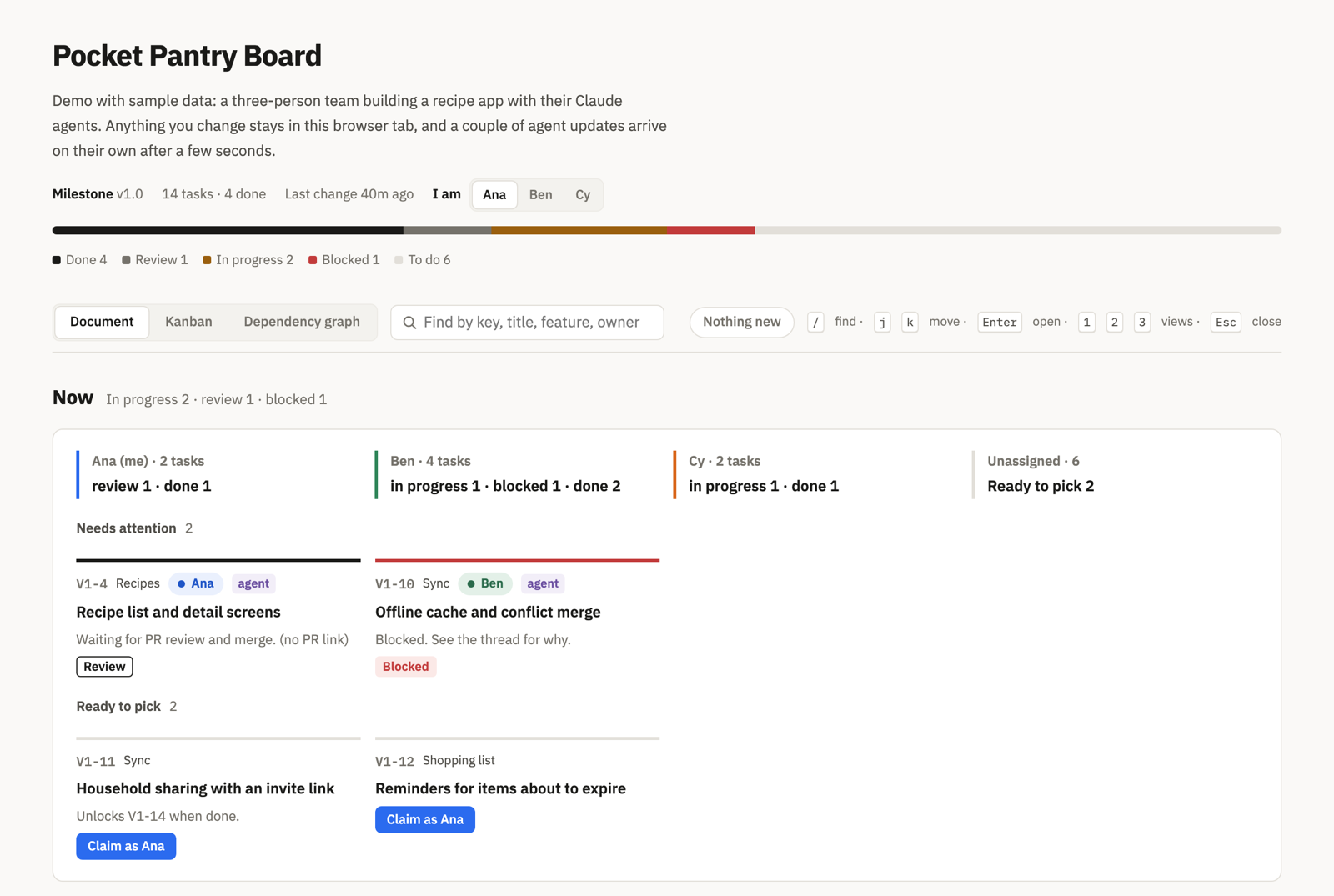
Open the live demo → A sample three-person team building a recipe app, with 14 tasks. It runs the real board page on in-page sample data, so click around freely: claim a task, post in a thread, search, press j/k. Two agent updates arrive on their own after a few seconds. The English / 한국어 toggle at the top switches the whole demo, sample data included, to Korean.
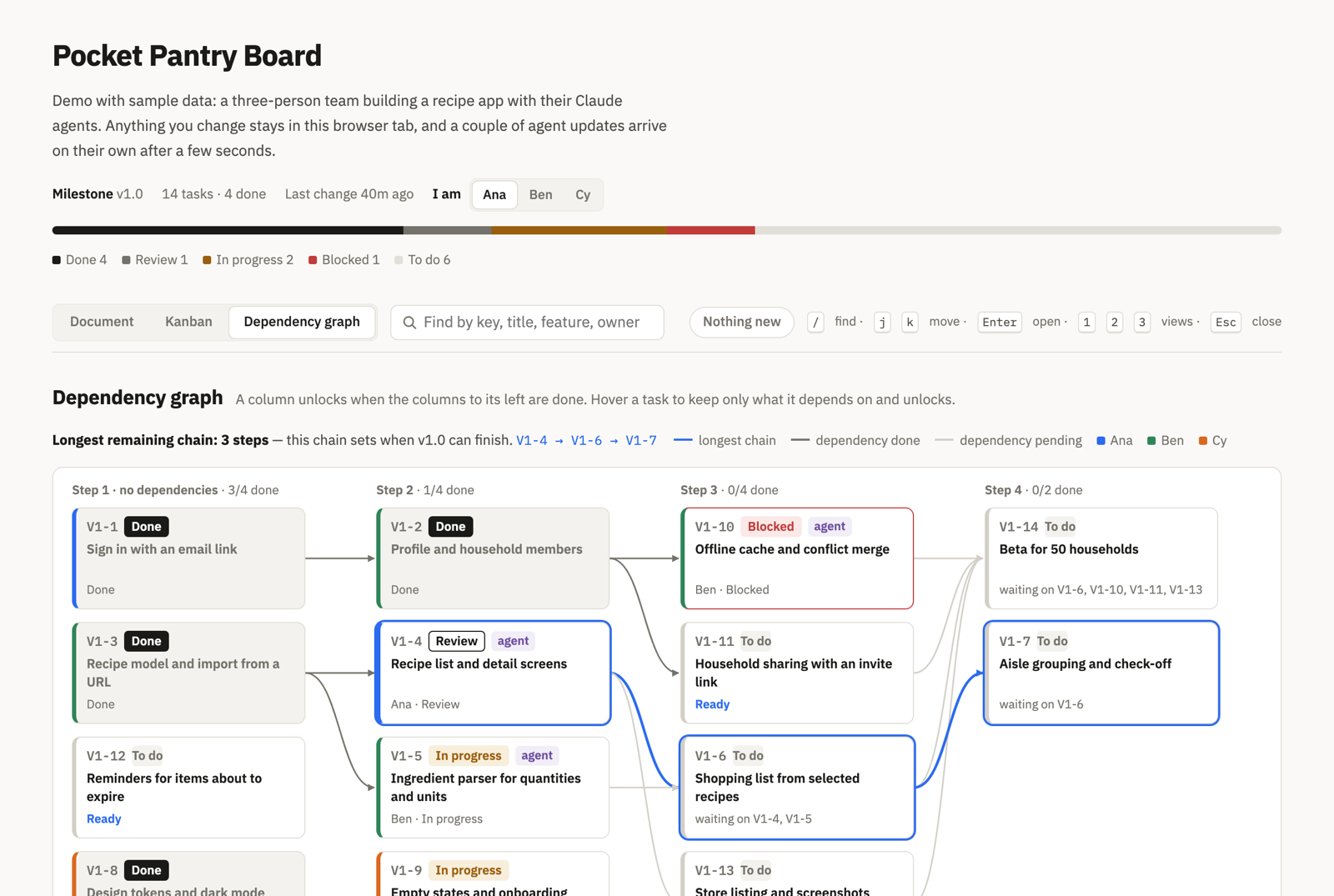
Document view |
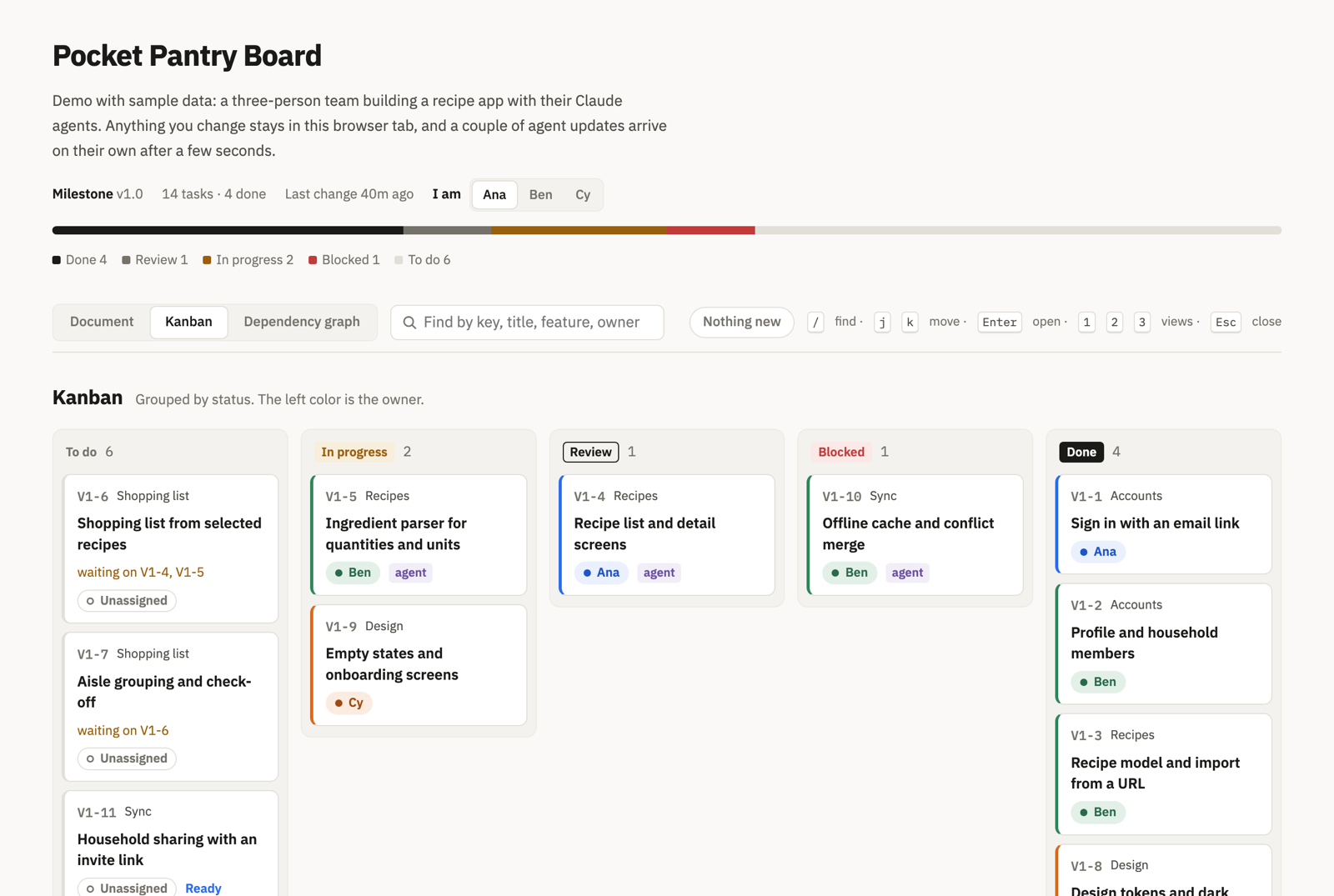
Kanban |
Why artiboard
When two people each run a few Claude sessions on one codebase, the hard part is not the code. It is knowing who took what, what is blocked, and what changed while you were away. Chat logs do not travel between sessions, and pasting the whole state into every prompt gets expensive fast.
artiboard gives the team one shared, live place for that state, and gives agents a cheap, strict way to use it.
🗂️ One board, three viewsA document view you read top to bottom, a kanban, and a dependency graph that highlights the longest remaining chain. Search, |
🤝 People and agents togetherEach person gets a color. Agents claim tasks with version-checked writes, so two agents never take the same task. Threads hold decisions, questions and handoffs. Notices carry what everyone must know. |
🪶 Built to stay cheapViews are drawn by code, never by a model. Agents read only the slice they need and write in one batch. The longer the project runs, the more this matters. |
Quick start
A board lives in one of two places. Both use the same page, the same documents and the same rules, and the skill sets up either.
| claude.ai artifact | Self-hosted site | |
|---|---|---|
| Agents | Claude Code signed in with claude.ai (Artifact, ArtifactData) |
Claude Code, Codex, any MCP client (artiboard MCP server) |
| Data | The artifact's database | SQLite (one file) or Supabase |
| Runs on | claude.ai, nothing to run | This computer, your domain (Docker), or Vercel |
| Teammates join by | The artifact's Share menu | A token from artiboard member add |
| Boards | One artifact per board | One site, a board per project at /p/<project> |
For a self-hosted board, start the site first: Self-host.
Option A: let Claude do it. Use the prompt in the box above. Claude follows FOR_AGENTS.md.
Option B: just for me, in every project
git clone --depth 1 https://github.com/yulmucoffee/artiboard.git "$HOME/.artiboard/src"
mkdir -p "$HOME/.claude/skills/artiboard" && cp -R "$HOME/.artiboard/src/skills/artiboard/." "$HOME/.claude/skills/artiboard/"
Open a new session in your project and say "set up a task board for this project".
Option C: for my team's repository (run in the repository root, then commit)
mkdir -p .claude/skills/artiboard && cp -R "$HOME/.artiboard/src/skills/artiboard/." .claude/skills/artiboard/
Option D: Codex. The same skill works in Codex. Copy it to ~/.codex/skills/artiboard for every project, or to .agents/skills/artiboard in a repository:
mkdir -p "$HOME/.codex/skills/artiboard" && cp -R "$HOME/.artiboard/src/skills/artiboard/." "$HOME/.codex/skills/artiboard/"
Codex works on self-hosted boards (it has no claude.ai artifacts).
To upgrade, run git -C "$HOME/.artiboard/src" pull --ff-only, then the same copy command again. On Windows PowerShell, use the commands in FOR_AGENTS.md.
/plugin marketplace add yulmucoffee/artiboard
/plugin install artiboard@artiboard
The skill is then /artiboard:artiboard.
Use it
Just ask, in any words and any language.
| You say | What happens |
|---|---|
| "Set up a task board for this project", "작업 보드 만들어줘" | setup: asks where the board lives, team size, split, language and task source. Drafts tasks from your docs and shows them for a yes. Publishes or creates the board, seeds it, writes docs/artiboard.md and a short pointer in CLAUDE.md (and AGENTS.md for Codex). |
| "Add Cy to the board", "Switch the board to Japanese" | adapt: updates the board's config. No republish. |
| "Add a QA status", "Show estimates on cards" | adapt: edits the page and the rules together. On a self-hosted board, through board_page edits. |
| "Move our board to our own server" | move: copies an artifact board's documents to a self-hosted project. |
| "보드 로그인 링크 줘", "Give me a board sign-in link" | A one-time browser sign-in link for a self-hosted board. |
| "Pick the next task", "Continue M1-4" | Daily work. The agent follows docs/artiboard.md in your repo: claim, thread, summary, review, done. |
After setup, share the board with teammates from the artifact's Share menu with edit access. Their agents get the rules when they pull the repository. The page knows who is viewing: the first time a teammate picks their name under "I am", the board links it to their claude.ai account and picks it for them from then on. It warns when someone posts under a name linked to another account, and view-only viewers see the board without claim, post or edit controls.
Self-host
A self-hosted site serves a project list at /, a board per project at /p/<project> and an MCP server at /mcp. The board page is the same board.html the artifact publishes, with a small runtime (server/public/shim.js) standing in for claude.ai: it signs people in, reads and writes the site's data, and pushes every change to open pages. Needs Node 22.13 or newer.
On this computer (SQLite, data in ~/.artiboard/board.db):
cd "$HOME/.artiboard/src" && npm install --omit=dev
node server/cli.js init --person ana --name Ana --project acme --title "Acme Board"
node server/cli.js serve
init creates the first admin and prints a token with the commands that connect Claude Code and Codex. Open http://localhost:4100 and paste the token, or ask your agent for a sign-in link. To let teammates on your network in, serve with --host 0.0.0.0 and set BOARD_URL to the address they use.
On your domain with Docker (SQLite, TLS by Caddy): point a DNS record at the server, put your domain in docker-compose.yml, then:
docker compose up -d
docker compose exec board node server/cli.js init --person ana --name Ana
On Vercel with Supabase: create a Supabase project, then push the schema and set the site's environment:
supabase link --project-ref <ref> && supabase db push
Set SUPABASE_URL, SUPABASE_PUBLISHABLE_KEY, SUPABASE_SECRET_KEY and BOARD_URL on the Vercel project, add your domain, vercel link, then npm run deploy:vercel (VERCEL_REGION=icn1 keeps the functions near a Seoul database). In Supabase Auth, add <BOARD_URL>/ to the redirect URLs. Admin commands run anywhere with those variables in a file: node server/cli.js --env site.env member list. The same server also runs on Supabase from any host: set the three SUPABASE_* variables and serve.
Connect agents. Each person gets a token (member add or member token) and runs:
claude mcp add --scope user --transport http artiboard https://board.example.com/mcp --header "Authorization: Bearer abt_…"
codex mcp add artiboard --url https://board.example.com/mcp --bearer-token-env-var ARTIBOARD_TOKEN
For Codex, keep export ARTIBOARD_TOKEN=abt_… in your shell profile. Codex asks before every call of a tool that can overwrite documents (board_batch, board_page); to let board_batch run without asking, add this to ~/.codex/config.toml:
[mcp_servers.artiboard.tools.board_batch]
approval_mode = "approve"
Then ask the agent to "set up the board for this repo".
Customize exactly as on claude.ai. Title, people, language and any UI string live in meta/config and change live. The page itself is per project: an admin's agent changes it with small exact edits through the board_page tool (statuses, fields, views), or an admin runs artiboard page set --project acme --file page.html. page reset goes back to the bundled page, which updates with the site.
| Setting | Default | Meaning |
|---|---|---|
BOARD_URL |
http://localhost:4100 |
The address people and agents use |
PORT, HOST |
4100, 127.0.0.1 |
Where serve listens |
ARTIBOARD_DB |
~/.artiboard/board.db |
The SQLite file |
SUPABASE_URL, SUPABASE_PUBLISHABLE_KEY, SUPABASE_SECRET_KEY |
Keep the data in Supabase instead | |
ARTIBOARD_SITE |
artiboard |
The site's name on screens |
ARTIBOARD_LANG |
en |
Language of new boards and the site's screens (en, ko) |
artiboard serve [--port N] [--host H]
artiboard init --person ID [--name N] [--project ID --title T]
artiboard member add|token|link|revoke|access|join|remove|list
artiboard project add|drop|list
artiboard page show|set|reset --project ID
artiboard import --project ID --file FILE [--map old=new]
Run node server/cli.js with no command for every option. Access levels are admin, member (writes) and viewer (reads), and they hold across the site: every member sees every project. Members never get a password: a token signs in an agent, and the page trades a token or a one-time link for a browser session.
| Tool | Does |
|---|---|
board_start |
New notices since your cursor (and moves it), your open tasks, ready tasks |
board_claim {id, text} |
Claims a ready task, posts the claim, returns spec, acceptance, summary |
board_task {id} |
Status, details, and the messages after the summary |
board_post {task, text, status?, branch?, pr?, summary?} |
A thread message plus changes to your task; done unblocks dependents. Without task: a notice |
board_get, board_query, board_batch |
Documents, as ArtifactData reads and writes them |
board_page |
The project's page: size, find, read, and for admins edits, html, reset |
board_projects, board_create_project, board_whoami, board_login_link |
The site |
The everyday tools answer in short lines, check versions and stamp times on the server, so a claim or an update is one call of under a hundred tokens.
How it works
flowchart LR
  subgraph Artifact["claude.ai artifact"]
    Page["Board page<br/>(views drawn by code)"]
    DB[("Artifact database<br/>tasks · details · messages<br/>notices · cursors · meta")]
    Page <-- live --> DB
  end
  People(["People"]) --> Page
  AgentA(["Agent sessions"]) -- ArtifactData<br/>queries + batches --> DB
  Repo["Your repo<br/>CLAUDE.md pointer<br/>docs/artiboard.md rules"] -. read on board work .-> AgentA
| Piece | What it holds | Who reads it |
|---|---|---|
tasks/<id> |
Status only: owner, deps, waitingOn, claim, branch, PR |
The page; agents through queries |
details/<id> |
Spec pointer, acceptance, a five-line summary | Agents, only for the task in hand |
tasks/<id>/messages |
The thread: updates, questions, handoffs, blockers | Agents read the last eight; people read all |
notices |
What everyone must know | Agents read only what is newer than their cursor |
cursors/<person> |
When that person's agents last read notices | Agents |
meta/config |
Title, people, language, any UI string | The page |
people/<person> |
Which claude.ai account picked that person first | The page |
docs/artiboard.md (repo) |
The agent rules | Agents, only in sessions that touch the board |
Token design
| Rule | Effect |
|---|---|
| Code draws the board | Views, charts, counts, readiness and "new" markers cost zero model tokens, at any team size. |
| Rules live in the repo, loaded on demand | Every session pays for a three-line pointer. Only board sessions read the rules. Repo text is also trusted and reviewed, unlike board text anyone can edit. |
| Query, never list | Finding work is one query (status == todo, waitingOn == []). Notices come in as a delta after your cursor. |
| Small documents | Task documents hold status. Long text is opened for one task at a time. |
| Summaries over threads | Handoffs rewrite a five-line summary, so the next reader skips old messages. |
| One batch per action | A claim is one call: task, message and cursor together, version-checked. |
| Self-repairing data | The page keeps waitingOn right while anyone has it open, so agents rarely spend calls on bookkeeping. |
Reference
meta/config keys
| Key | Example | Meaning |
|---|---|---|
title |
"Acme Board" |
Heading on the page |
subtitle |
"What this board is for." |
One line under the heading |
milestone |
"M1" |
Current milestone label |
lang |
"en", "ko" |
Built-in UI language. Others fall back to English. |
people |
[{"id":"ana","name":"Ana","role":"backend"}] |
Order sets colors. Six colors, then they repeat. An optional uid pins a person to one claude.ai account and wins over people/<id>. |
strings |
{"v_graph":"Dependencies"} |
Override any UI string, in any language |
footer |
"..." |
Replaces the footer line |
Free: title, people, roles, language, labels, feature names, key scheme, message wording, notice topics. Through page edits: statuses, extra visible fields, new views. Kept in every adaptation: lean tasks plus details, waitingOn and the ready query, cursors, one batch per action with if_version, id formats, rules in the repo, board text treated as data.
skills/artiboard/SKILL.md               the skill: setup, adapt, upgrade, token rules
skills/artiboard/assets/board.html      the board page (renders from the artifact database)
skills/artiboard/references/          rules templates (artifact, hosted) and the self-hosting guide for agents
server/                                 the self-hosted site: HTTP app, MCP server, SQLite and Supabase stores, CLI, page runtime
api/, vercel.json                       Vercel functions for a Supabase-backed site
supabase/                               the Supabase schema (migrations) and local config
Dockerfile, docker-compose.yml          a SQLite site in a container, behind Caddy on your domain
examples/                               builds the public demo from board.html and demo-data.json: build-demo.cjs, demo-data.json, demo.html
FOR_AGENTS.md                           step-by-step install for AI agents
.claude-plugin/                         Claude Code plugin manifests
tests/smoke.cjs                         jsdom smoke test of the board page
tests/server.test.js                    end-to-end tests of a hosted site (SQLite, and Supabase when configured)
docs/assets/                            banners
npm install --no-save [email protected] && node tests/smoke.cjs
npm install && npm test
npm test runs the hosted site on a throwaway SQLite file. With a local Supabase (supabase start), add AB_SUPABASE=1 and its SUPABASE_URL, SUPABASE_PUBLISHABLE_KEY and SUPABASE_SECRET_KEY to run the same tests there.
Rebuild the demo after changing the page:
node examples/build-demo.cjs
Issues and PRs are welcome. For a change to the skill, show how agent behavior or token use changes, ideally before and after on a real board.
Credits
Built while coordinating a two-person, multi-agent product team on claude.ai artifacts. artiboard is independent and not affiliated with or endorsed by Anthropic. MIT License.
Yorumlar (0)
Yorum birakmak icin giris yap.
Yorum birakSonuc bulunamadi