smart-drawio-next
Health Gecti
- License — License: MIT
- Description — Repository has a description
- Active repo — Last push 0 days ago
- Community trust — 366 GitHub stars
Code Gecti
- Code scan — Scanned 12 files during light audit, no dangerous patterns found
Permissions Gecti
- Permissions — No dangerous permissions requested
Bu listing icin henuz AI raporu yok.
Editable Draw.io diagrams for research and architecture: Next.js web app, Agent Skill, and local MCP server.
Smart Drawio Next
Create editable Draw.io diagrams from natural language or reference images, for research, documentation, and presentations.
Skill & MCP 0.1.0: GitHub release · MCP on npm · Official MCP Registry
Live Demo
- Demo: https://smart-drawio-next.vercel.app/
- Note: the hosted version requires your own API key
Gallery
| Home | Transformer |
|---|---|
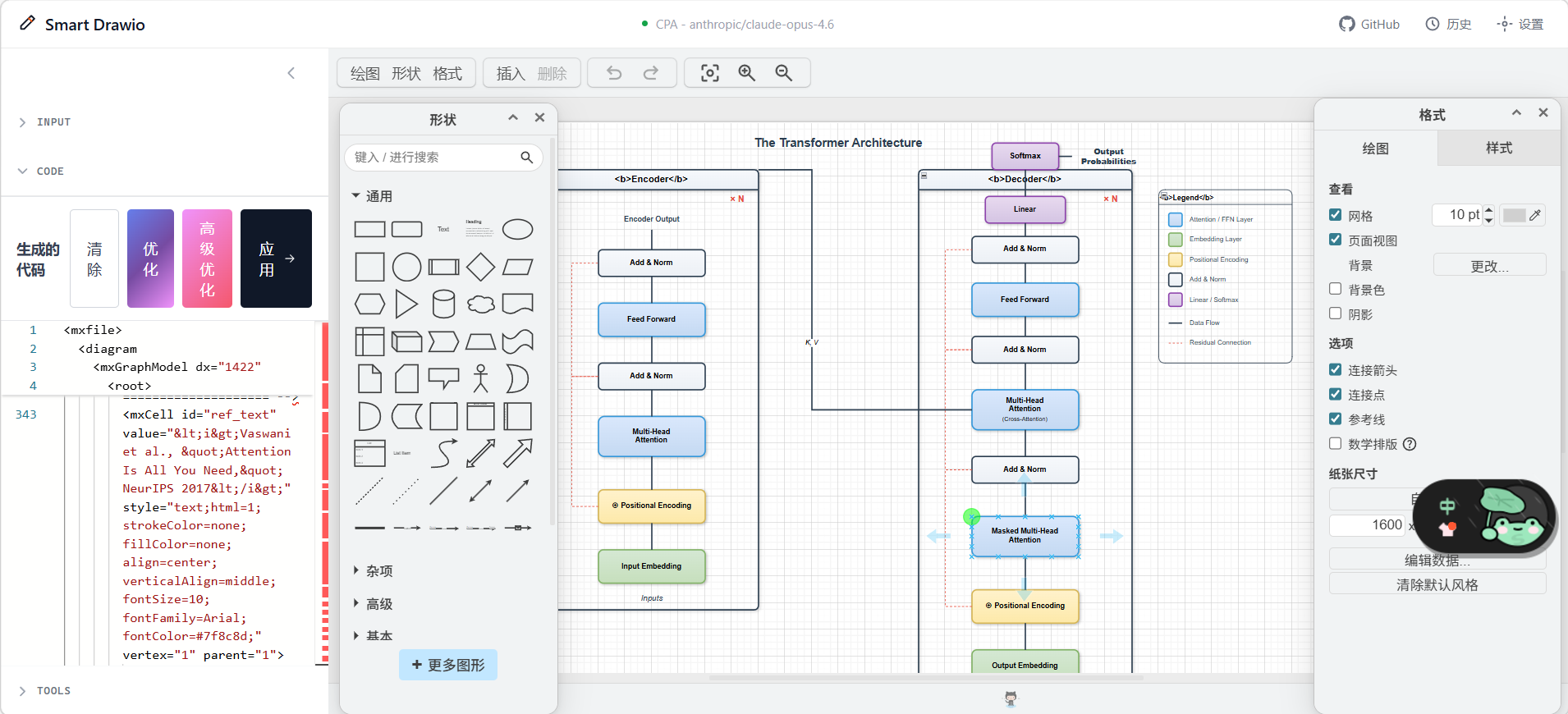 |
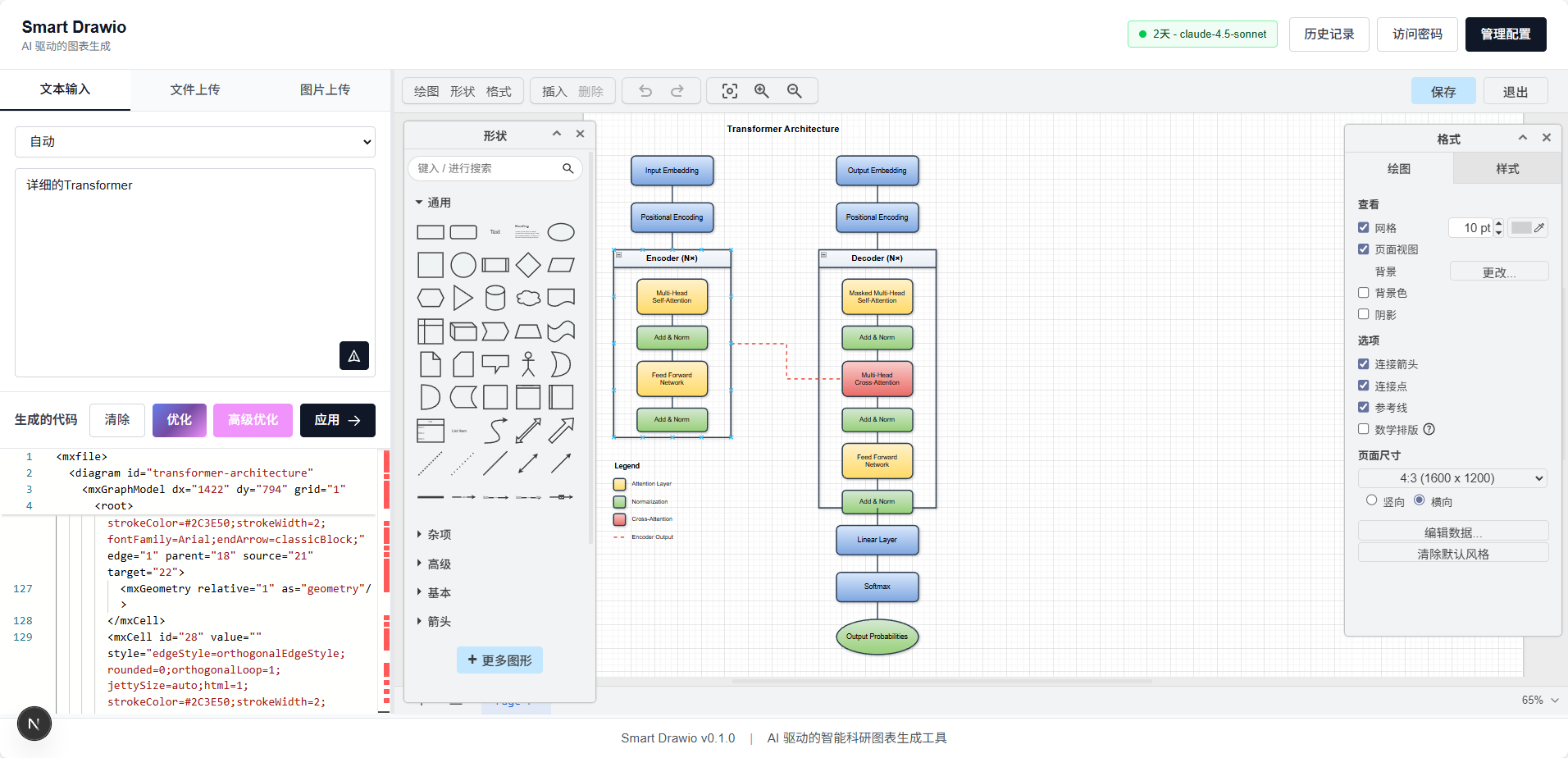 |
| Swin-Transformer | CLIP |
|---|---|
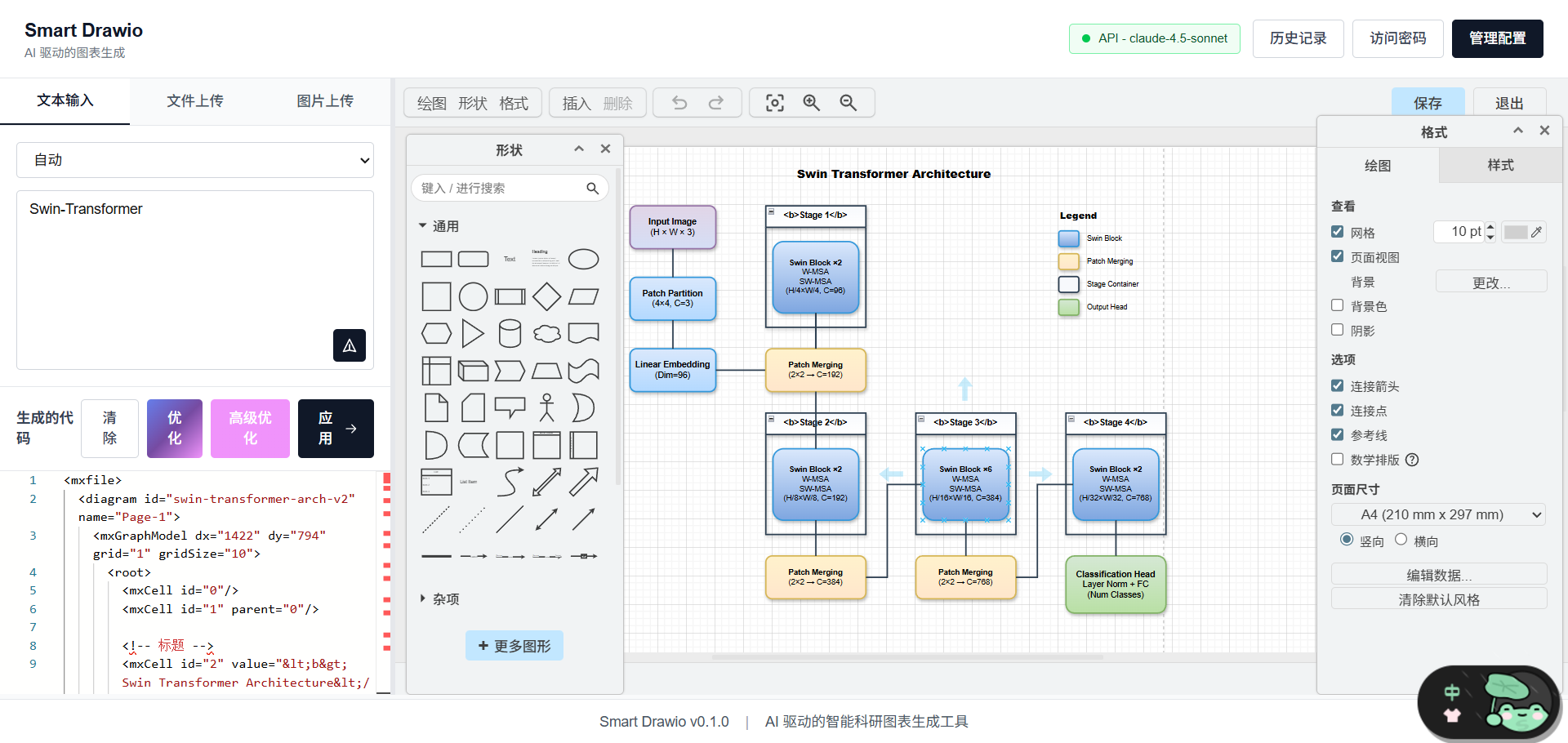 |
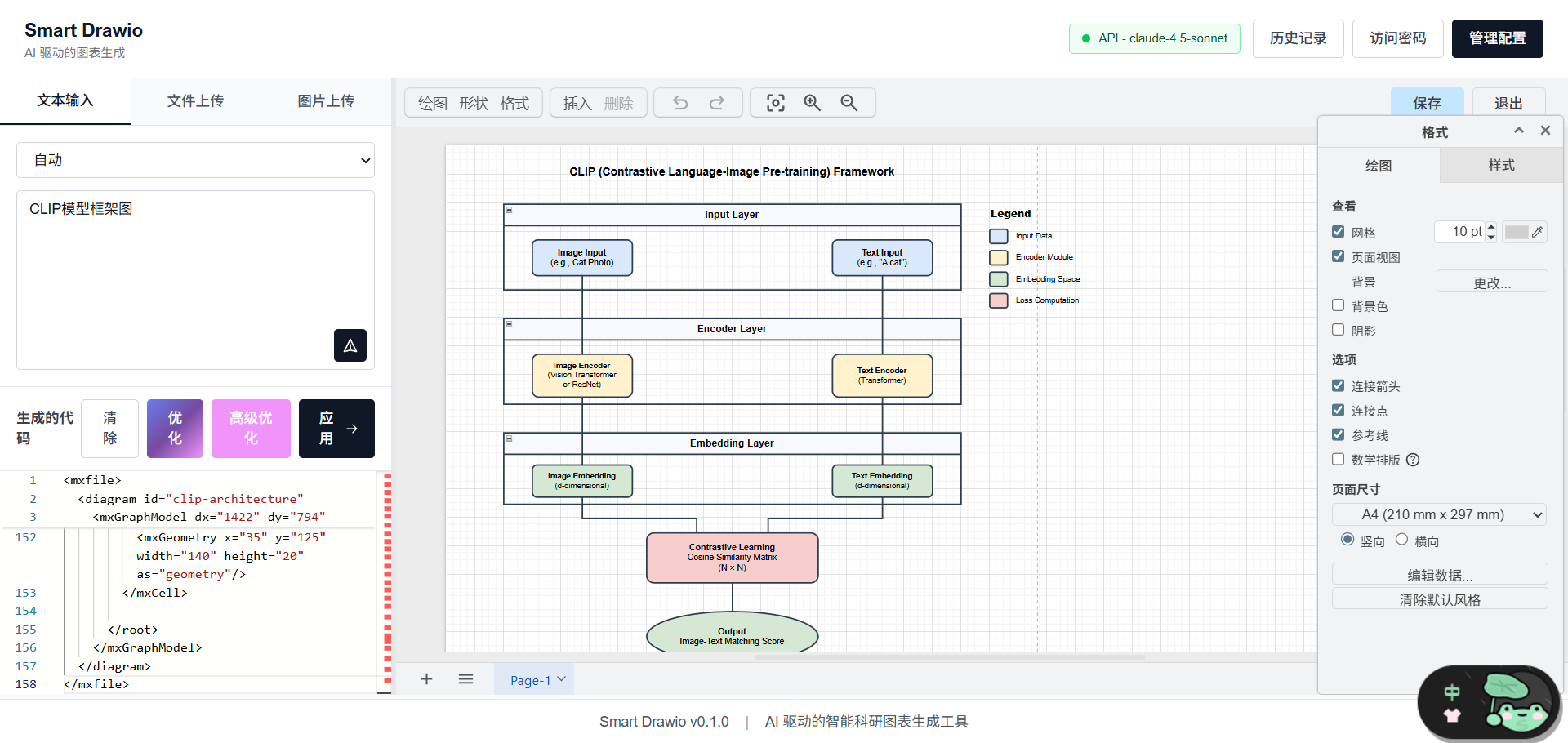 |
ProSST
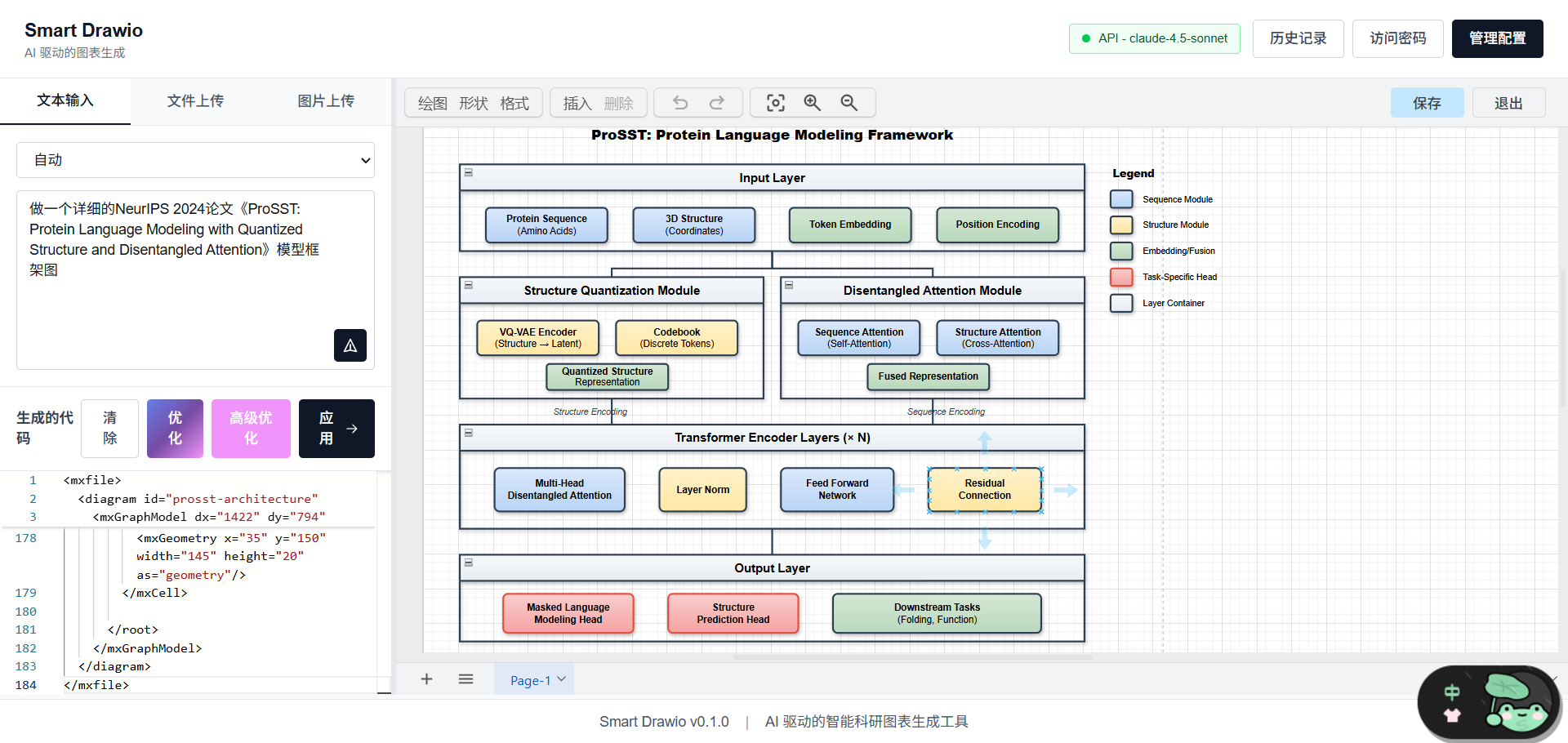
Overview
smart-drawio-next is a diagram generation tool built with Next.js 16, embedded Draw.io, and streaming LLM APIs. It helps you:
- Generate structured diagrams from natural language prompts
- Upload reference images and convert them into editable diagram content
- Fine-tune XML / JSON in Monaco Editor
- Sync output directly into an embedded Draw.io canvas
- Use post-processing tools to improve layout, connectors, styles, and annotations
The project includes multi-model configuration, workspace recovery, generation history, and notifications. It can be deployed as a personal tool or an internal team service.
Core Features
- Streaming generation with support for continuing truncated outputs
- Multimodal input with both text and image-based workflows
- Code + canvas workflow for editing XML and previewing the result side by side
- Post-processing toolchain for structure, text, connector, and style refinement
- Multi-provider config management for OpenAI / Anthropic-compatible APIs
- Local history with replay support for recent generations
Agent Skill and MCP
Version 0.1.0 is published. Choose the entry point that fits your workflow:
| Entry point | What it does | Distribution | Model setup |
|---|---|---|---|
| Website | Generate from text or images, then edit the diagram in the embedded Draw.io canvas | Hosted app or self-hosted Next.js | Configure your provider in the browser |
smart-drawio Skill |
Guide an agent through creating, editing, checking and saving editable diagrams | GitHub Skill and release ZIP | Uses the agent's own model |
| Smart Drawio MCP | Generate, validate, repair and style XML through local stdio tools | npm package and Registry entry | Only generate_drawio needs model API settings |
Install the Skill
Install the fixed release:
npx skills add https://github.com/yunshenwuchuxun/smart-drawio-next/tree/tools-v0.1.0/skills/smart-drawio
The Skill is distributed as GitHub files, with no separate npm package. npx skills runs the general Skills CLI, which downloads the Skill from the repository. Its Python 3 validator works offline without third-party dependencies; MCP is optional.
Example agent request:
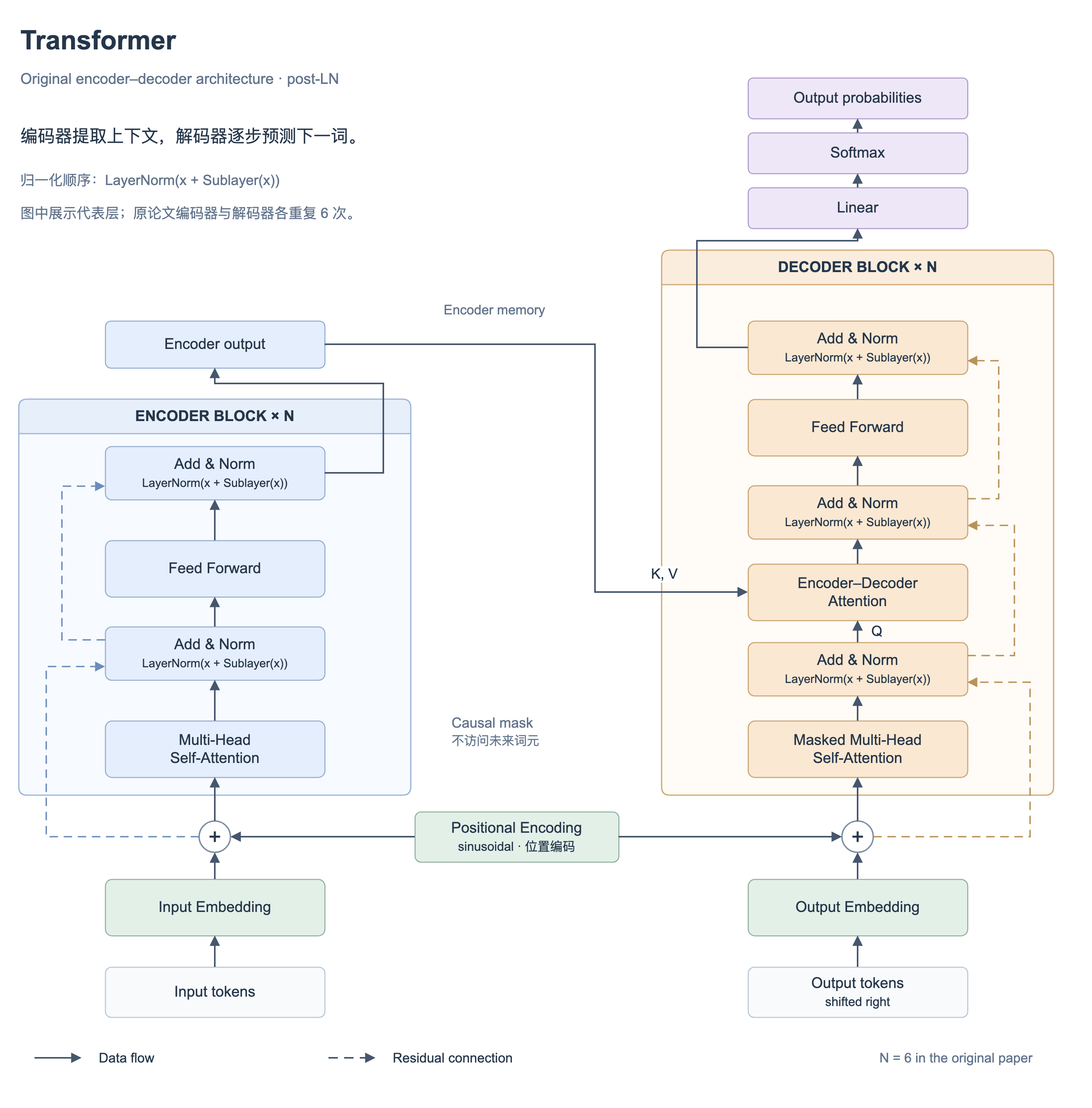
Use
$smart-drawioto create an original encoder–decoder Transformer diagram, save it as transformer.drawio, and check its connectors and labels.
Configure the MCP server
Use Node.js 20.9 or later and a client that supports local stdio MCP. For clients using mcpServers JSON:
{
  "mcpServers": {
    "smart-drawio": {
      "command": "npx",
      "args": ["-y", "@yunshenwuchuxun/[email protected]"]
    }
  }
}
The client starts the server and communicates over stdin/stdout. Configure SMART_DRAWIO_PROVIDER, SMART_DRAWIO_BASE_URL, SMART_DRAWIO_API_KEY and SMART_DRAWIO_MODEL in the MCP process environment to enable generation through your OpenAI/Anthropic-compatible provider.
| Tool | Function | Model API required |
|---|---|---|
generate_drawio |
Create complete, validated XML from a text prompt | Yes |
validate_drawio |
Check XML syntax, IDs, parents and references | No |
repair_drawio |
Conservatively repair supported missing closing tags | No |
style_drawio |
Apply themes, style packs, presets and drawing tricks | No |
list_drawio_options |
List supported types, themes and tool options | No |
The MCP server returns uncompressed XML for the client to save. PNG/SVG/PDF previews and exports need an available Draw.io renderer or editor. Version 0.1.0 provides local stdio tools; the Registry link is installation metadata, and the Vercel URL is the website. This package has no remote HTTP MCP endpoint or live canvas session control.
Generated examples
Both examples below were rendered using the official Draw.io viewer and are available as editable files:
| Skill workflow | MCP generation workflow |
|---|---|
 |
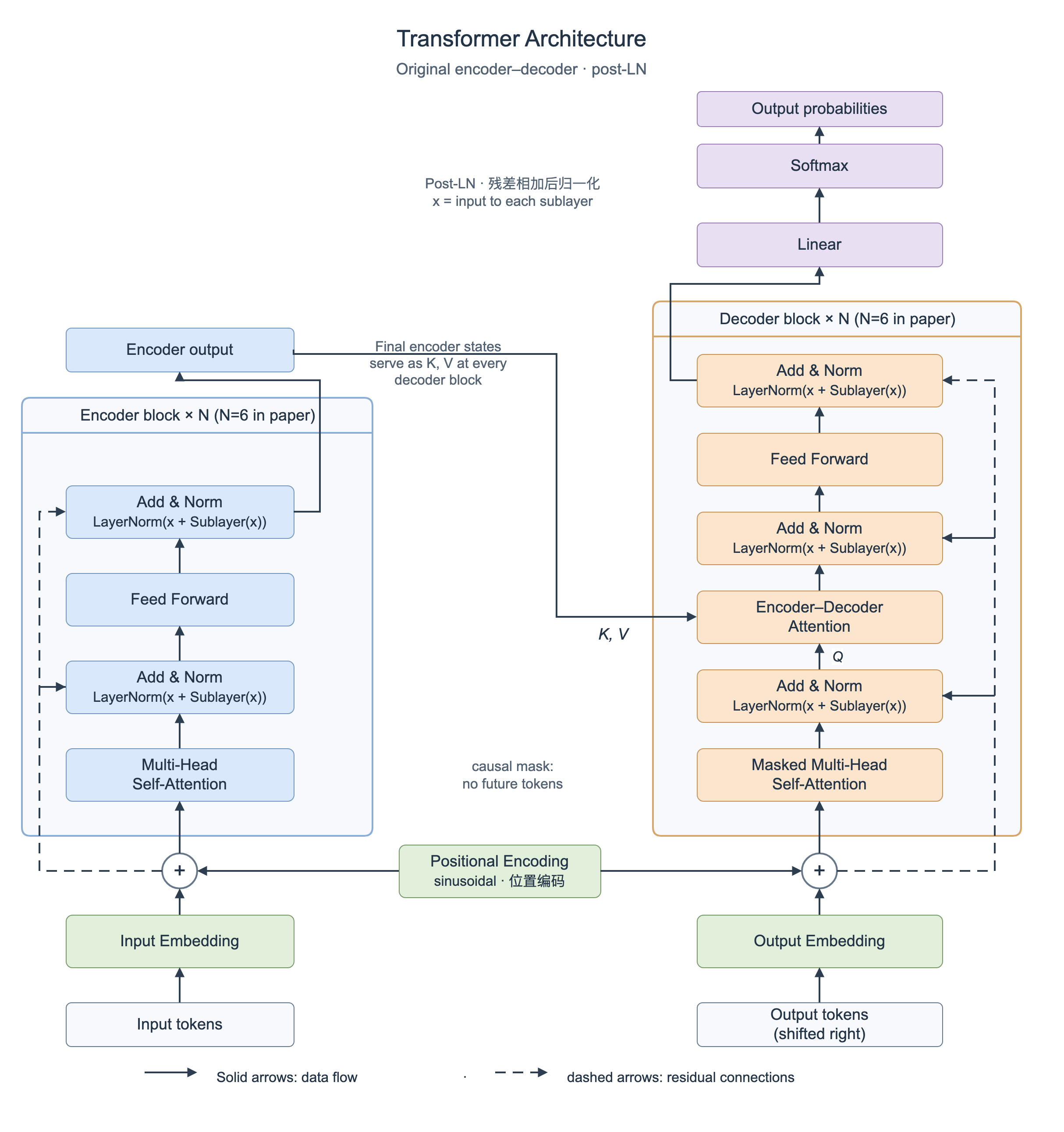 |
| Editable .drawio | Editable .drawio |
The Skill example used the agent's own model. The MCP example used a real OpenAI-compatible API request for codex/gpt-6.1-sol, then MCP validation and Draw.io rendering. The original MCP output includes one annotation crossed by a connector; the examples retain their actual outputs.
Release CI passed 291 JavaScript tests, 11 Python tests and 8 browser tests, plus lint, production build and isolated package installation. Public Skill installation and npm MCP handshake/tool calls were also verified.
See MCP setup, Skill installation, and version downloads. The Next.js application remains independently deployable to Vercel.
Supported Diagram Types
The app supports 20+ diagram types. You can choose one explicitly or let the model decide:
- Flowchart
- Mind Map
- Org Chart
- Sequence Diagram
- UML Class Diagram
- ER Diagram
- Gantt Chart
- Timeline
- Tree
- Network Topology
- Architecture Diagram
- Data Flow Diagram
- State Diagram
- Swimlane Diagram
- Concept Map
- Fishbone Diagram
- SWOT Analysis
- Pyramid Diagram
- Funnel Diagram
- Venn Diagram
- Matrix Diagram
- Infographic
Built-in Themes
10 built-in color themes are available:
- Research
- Business
- Warm
- Cool
- Dark
- Contrast
- Pastel
- Forest
- Violet
- Neutral
Tools System
After generation, you can continue refining the diagram in the sidebar tools panel. All operations are XML-based transforms.
Drawing Tricks
Used for bulk layout and connector refinement:
- Grid Snap
- Orthogonal Routing
- Curved Routing
- Label Background
- Consistent Spacing
- Jump Crossings
- Rounded Edges
- Normalize Arrows
- Remove Waypoints
Style Presets
Used for stackable visual effects:
- Shadow
- Gradient
- Rounded
- Glass
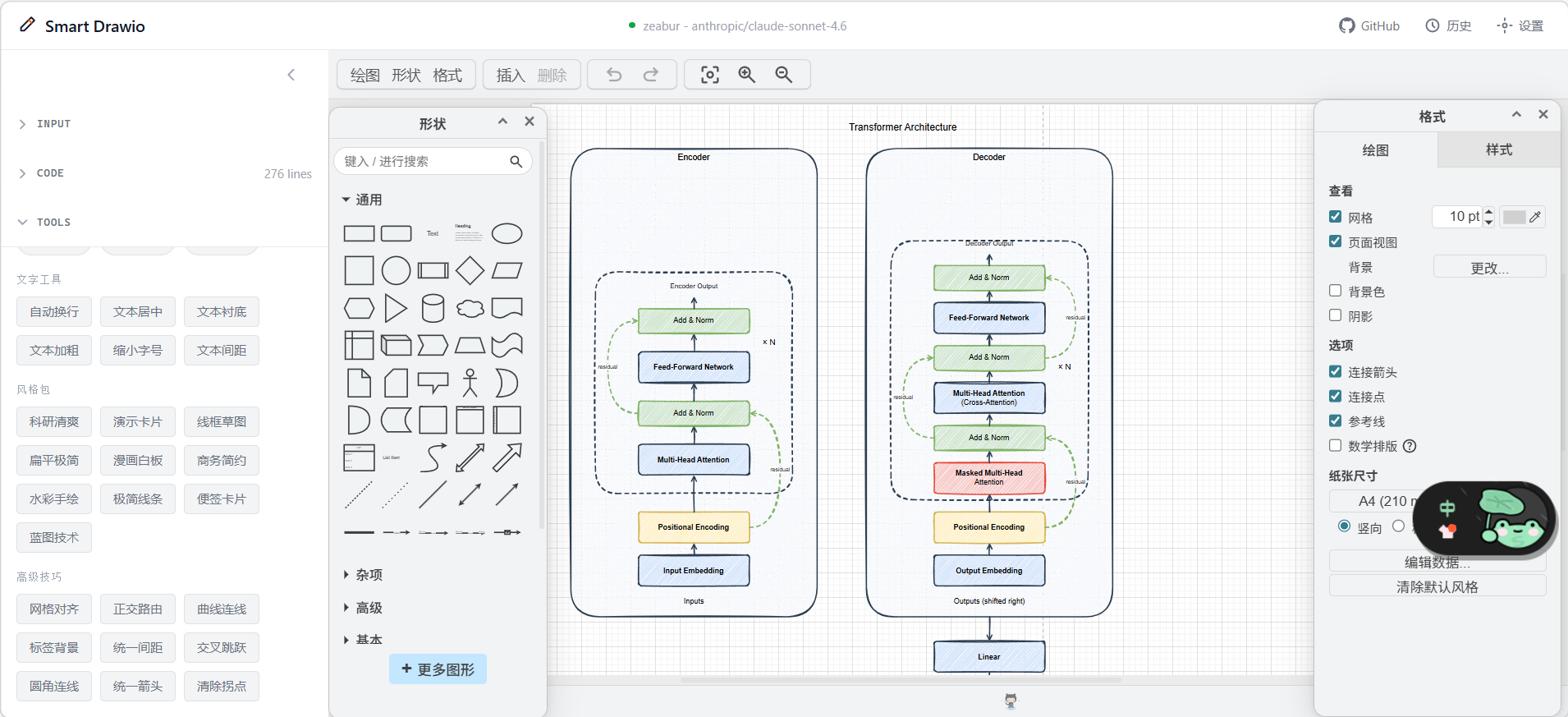
- Sketch
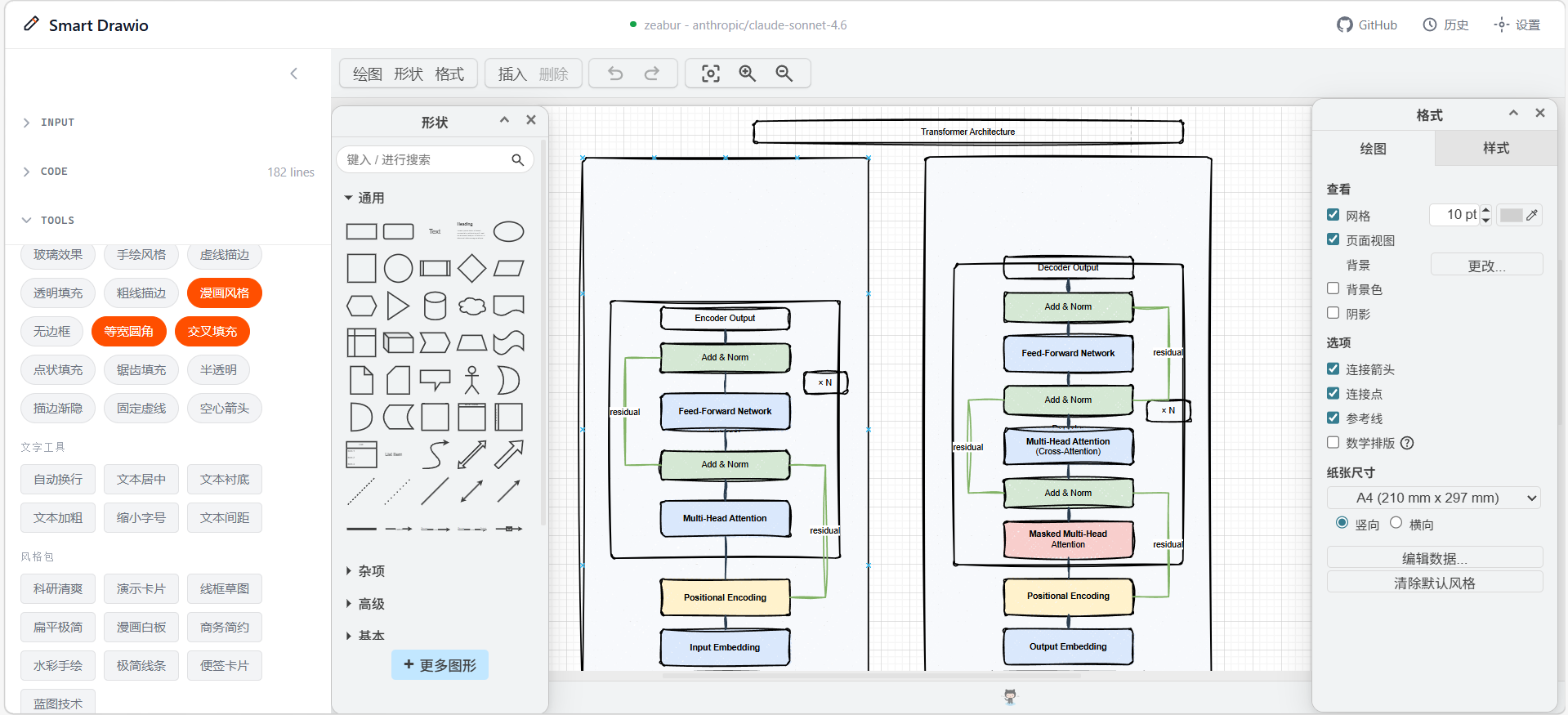
- Comic
- Dashed
- Transparent
- Bold Stroke
- No Stroke
- Absolute Arc
- Cross-Hatch
- Dot Fill
- Zigzag Fill
- Semi-Opaque
- Fade Stroke
- Fixed Dash
- Open Arrow
Style Packs
Used for one-click full visual styles:
- Research Clean
- Presentation Cards
- Business Clean
- Flat Minimal
- Wireframe
- Comic Whiteboard
- Watercolor Sketch
- Minimal Outline
- Sticky Notes
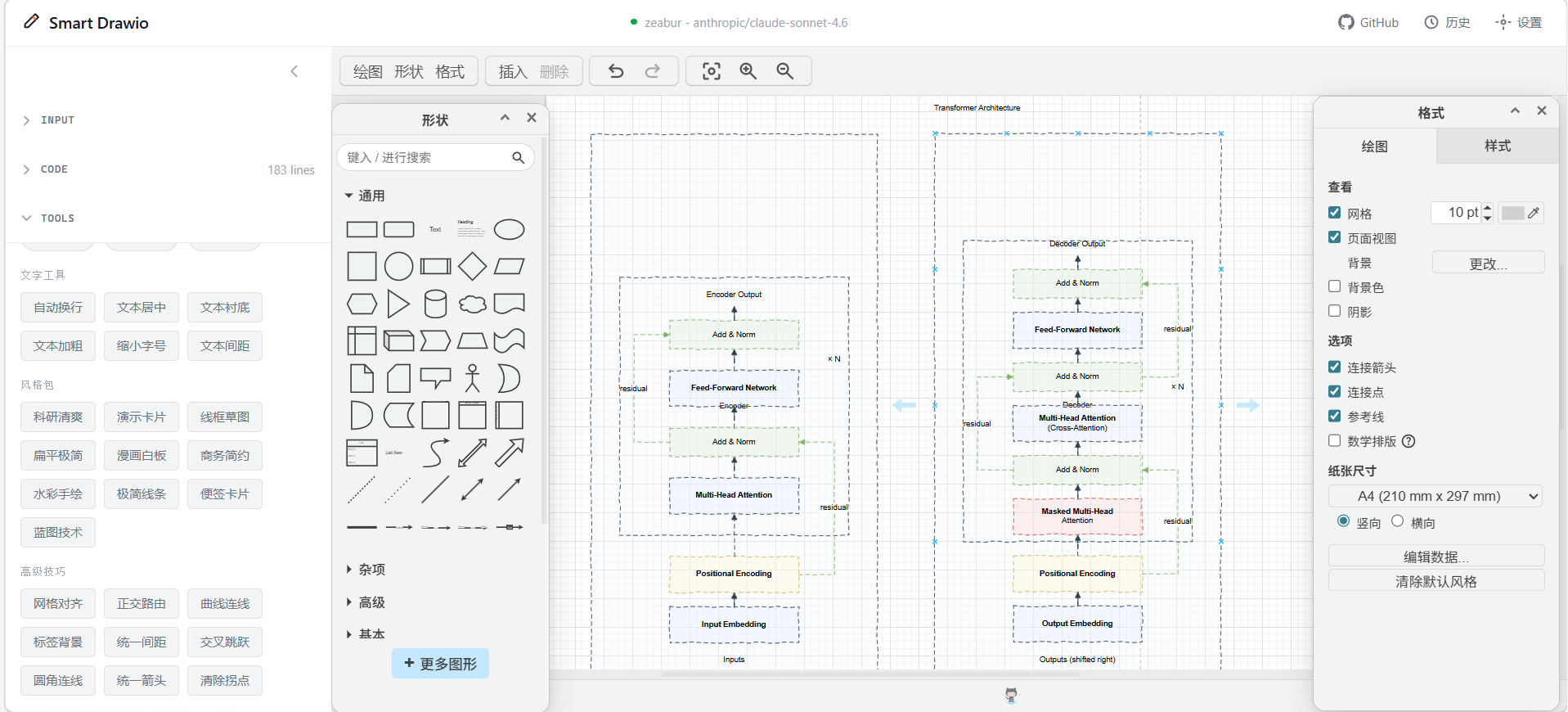
- Blueprint Tech
Text Tools
Used for batch text formatting:
- Wrap Labels
- Center Text
- Text Panels
- Bold Text
- Compact Text
- Text Padding
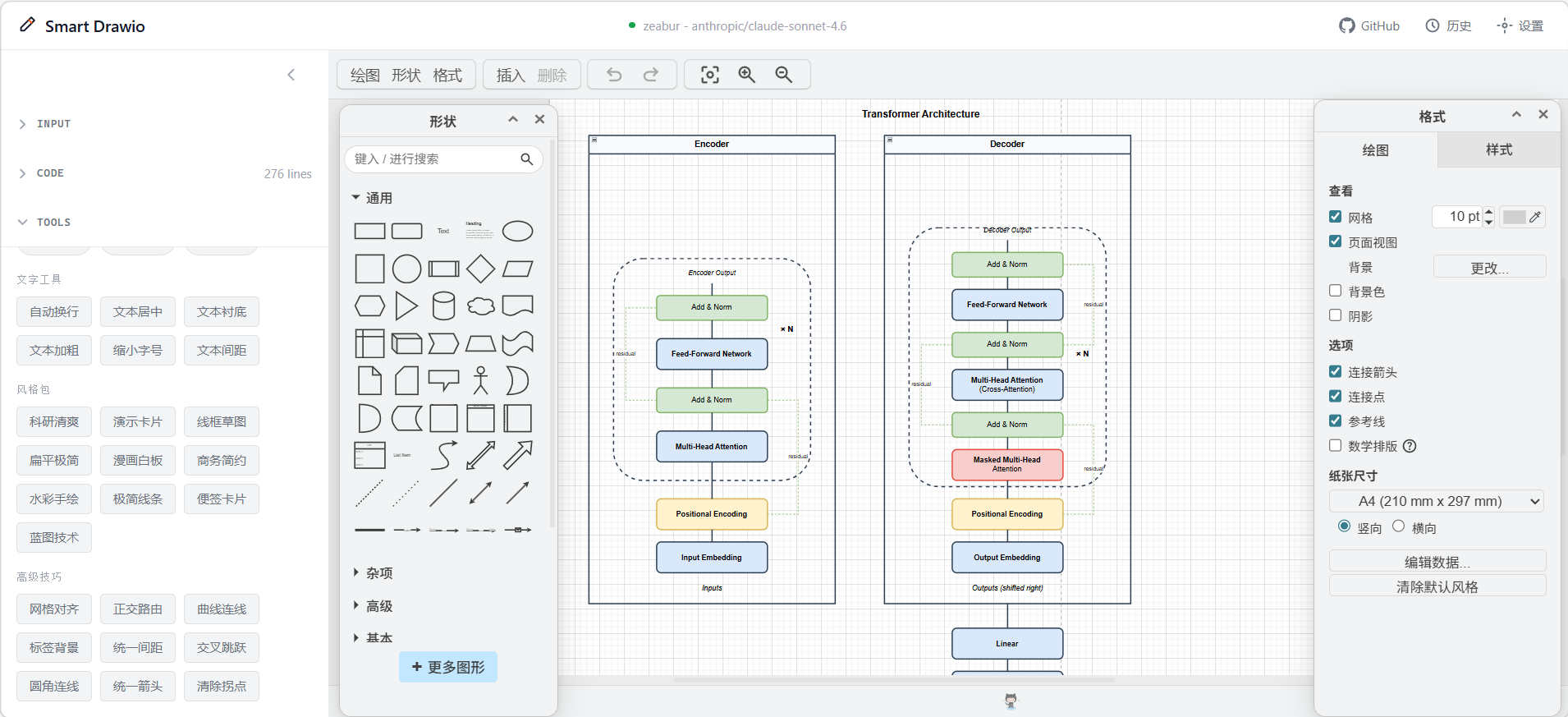
Tools System Examples
| Baseline: no style | Preset: comic + cross-hatch |
|---|---|
 |
 |
| Style pack: blueprint tech | Style pack: business clean |
|---|---|
 |
 |
UI Structure
Input Area (Chat + ImageUpload)
- Enter prompts
- Upload reference images
- Stop or continue generation
Code Editor
- View and edit XML / JSON
- Run clear, optimize, advanced optimize, and apply actions
Canvas
- Render the generated result
- Continue editing visually in Draw.io
Support Modals
ConfigManagerHistoryModalOptimizationPanel- Other supporting panels
Developing the Tools
The website and tools share the drawing core. To build and verify the packages from a source checkout:
pnpm build:mcp
pnpm test:tools
pnpm test:skill
pnpm verify:mcp
pnpm pack:tools
See packaging and publication for release checks. Publish only packages/mcp; the website's root package remains private.
Tech Stack
- Framework: Next.js 16 (App Router) + React 19
- Canvas: Draw.io embed
- Editor:
@monaco-editor/react - Styling: Tailwind CSS v4
- LLM Integration: OpenAI / Anthropic-compatible APIs with SSE streaming
- Persistence: localStorage
Getting Started
Requirements
- Node.js >= 20.9 (Node.js 24 LTS recommended)
- pnpm >= 8
- An available OpenAI / Anthropic-compatible API key
Install and Run
git clone https://github.com/yunshenwuchuxun/smart-drawio-next.git
cd smart-drawio-next
pnpm install
pnpm dev
Then open: http://localhost:3000
Common Commands
| Command | Description |
|---|---|
pnpm dev |
Start development server |
pnpm build |
Build for production |
pnpm start |
Start production server |
pnpm lint |
Run ESLint |
pnpm test -- run |
Run unit tests |
Docker Deployment
Requirements
- Docker >= 20.10
- Docker Compose V2
Quick Start
docker compose up -d --build
Then open: http://localhost:3000
The image uses a multi-stage build and Next.js standalone output for deployment-friendly packaging.
LLM Configuration
Configure the provider, base URL, API key and model in the browser settings.
The current release uses the user's configuration for each generation request.ACCESS_PASSWORD and SERVER_LLM_* are not implemented server-side configuration options.
Proxy and Local Model Setup
If Docker needs a proxy or access to a model running on the host machine:
cp docker-compose.override.example.yml docker-compose.override.yml
Edit it for your environment, then restart:
docker compose up -d --build
Typical use cases:
- Routing traffic through a host proxy
- Accessing host-local Ollama or LM Studio
- Mounting a custom CA certificate for enterprise proxies
Common Docker Commands
docker compose logs -f app
docker compose down
docker compose up -d --build
docker compose ps
LLM Configuration
Client-Side Config Mode
By default, users configure these in the UI:
- Provider
- Base URL
- API Key
- Model
Saved configurations persist in browser localStorage. Generation sends the active model configuration and input to the application's API route, which calls the selected model provider.
Workspace Recovery and Request Limits
The applied diagram, unapplied code draft, text input, theme and presets are saved locally after changes and restored on reload. The header reports whether the draft was saved. Workspace snapshots exclude provider credentials and uploaded image data; images must be uploaded again after a reload.
Generation accepts requests up to 4 MiB and images up to 2 MiB to leave room for base64 encoding on Vercel. Model requests have a 240-second total deadline and a 60-second idle deadline. Stopping generation cancels pending retries and continuation requests as well as the upstream model request.
XML validation runs in browsers and Node.js. Each uncompressed page is checked independently for malformed XML, duplicate IDs, invalid parent chains and missing references. Compressed .drawio pages are not supported in this phase. Truncated output stays in the editor; explicitly applying it can repair missing closing tags and reports any discarded tail.
Legacy JSON input rejects unsupported or invalid elements without replacing the current diagram or draft. Explicitly applying [] creates an empty diagram and can be undone.
FAQ
Where does my API key go?
The saved configuration is stored locally in your browser. Each generation request sends the selected configuration, including the API key, to the application's server; the server uses that key to authenticate with your selected model provider. MCP generation uses the credentials configured in its process environment. The Skill can generate XML with the agent's own model without a separate diagram-generation API configuration.
What if the output is truncated?
The UI provides a continue-generation action automatically when needed.
What if image recognition fails?
Use a vision-capable model and make sure the image format and size are valid.
Will history grow without limit?
No. The app keeps only the most recent 20 entries by default.
Credits and Contributing
- This project is based on smart-excalidraw-next
- If it helps you, consider:
- Giving the repo a star
- Sharing it with others
License
MIT
Yorumlar (0)
Yorum birakmak icin giris yap.
Yorum birakSonuc bulunamadi