opencode-plan-manager
Health Warn
- License — License: MIT
- Description — Repository has a description
- Active repo — Last push 0 days ago
- Low visibility — Only 6 GitHub stars
Code Warn
- process.env — Environment variable access in .husky/install.mjs
Permissions Pass
- Permissions — No dangerous permissions requested
This tool provides a structured, file-based project management system for AI coding agents. It helps track tasks and maintain context across sessions by organizing plans into kanban-style folders within your repository.
Security Assessment
Overall risk: Low. The plugin does not request any dangerous permissions, execute shell commands, or make external network requests. The only flagged item is an environment variable access located in a Husky git-hook script (`.husky/install.mjs`), which is a standard, safe practice for development setup. No hardcoded secrets were detected. The tool operates entirely within a sandboxed `.opencode/plans/` directory, requiring explicit user permission grants to read or write files.
Quality Assessment
The project appears to be very new and niche, reflected by its low community visibility (6 stars). However, it is actively maintained, with repository updates pushed as recently as today. It uses standard, reliable technologies (TypeScript, Bun, Zod) and includes automated testing. It is properly licensed under the permissive MIT license. While community trust is currently minimal due to its small user base, the codebase practices standard open-source hygiene.
Verdict
Safe to use. (This is a transparent, local-only planning tool that poses negligible security risks, though its maturity level is strictly early-stage.)
A simple collection of tools for better plan management by AI agents on OpenCode.
OpenCode Plan Manager




AI-native implementation planning for agentic workflows.
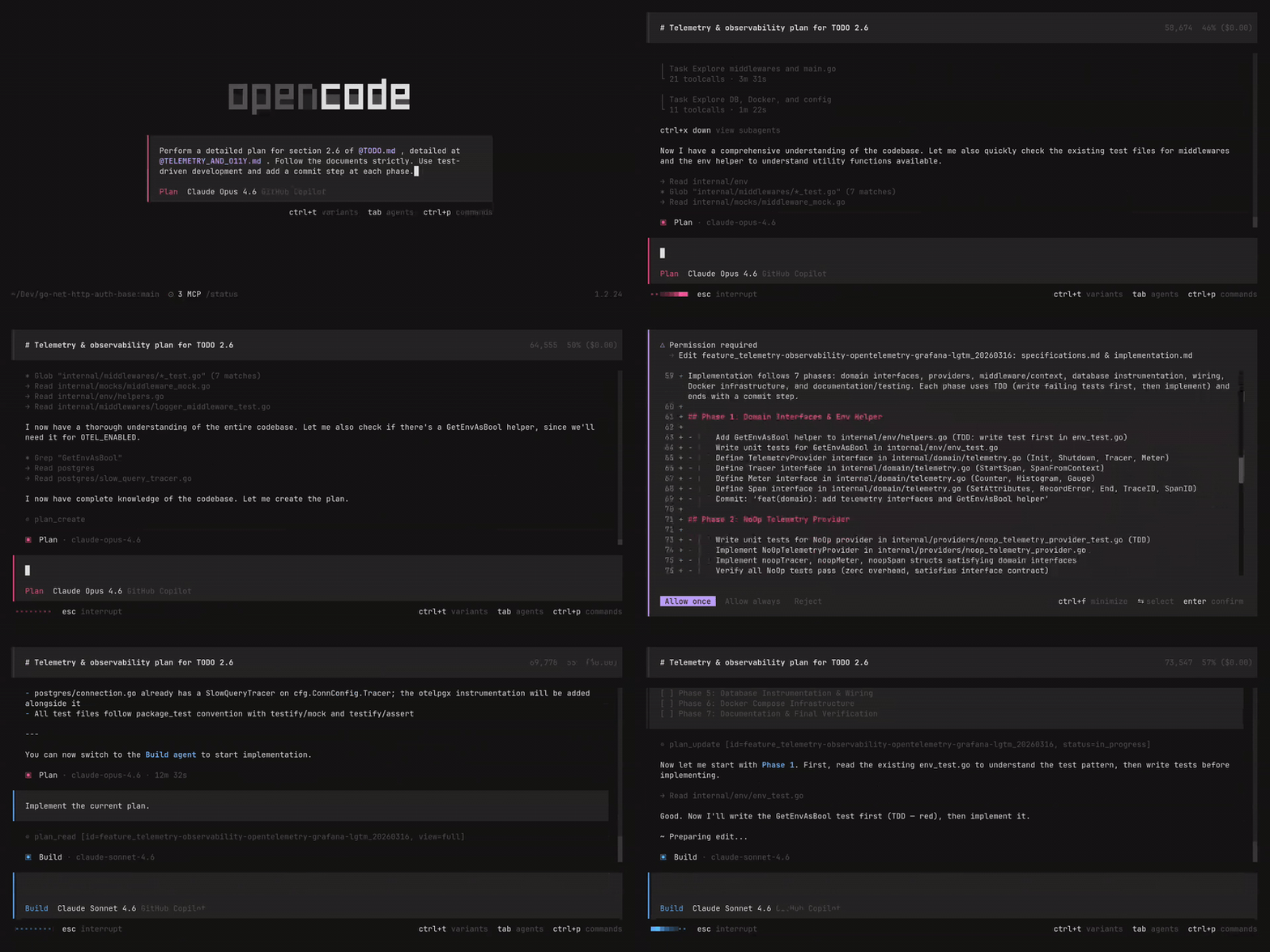
Stop losing context mid-feature or with cross-session work. OpenCode Plan Manager gives your AI agents a structured way to plan, track, and execute complex work — from a single idea to a fully shipped feature.
Why Plan Manager?
Agentic coding workflows break down when context gets too large. Agents start hallucinating, lose track of tasks, and repeat work. Plan Manager solves this with four principles:
- Selective context loading — agents read only what they need:
summary(stats),spec(requirements), orplan(task list). - Zero-hallucination schemas — strict Zod validation prevents malformed plans and invalid state transitions.
- Filesystem Kanban — plan state lives in
pending/,in_progress/, anddone/folders. Atomic, human-readable, no hidden database. - Cross-session continuity — plans are plain files committed to your repo. Pick up exactly where you left off in any new session, on any machine, with any agent — the spec and task progress are always there.
Designed for the Planner → Builder pattern: a Plan Agent architects the spec, a Build Agent executes it with no ambiguity.
Installation
Add the plugin to your OpenCode configuration (~/.config/opencode/opencode.json):
{
	"$schema": "https://opencode.ai/config.json",
	"plugin": ["[email protected]"],
}
Pinning the version improves OpenCode startup time.
Configuration
Config is loaded with the following precedence (highest → lowest):
- Project:
<project-root>/.opencode/plan-manager.json - User:
~/.config/opencode/plan-manager.json - Defaults: built-in fallback
{
	// "markdown" (default), "json", or "toon" (https://github.com/toon-format/toon)
	"outputFormat": "markdown",
}
Plan Manager writes to .opencode/plans/*. For plan_create and plan_update to work, the agents that call them must have ask or allow permission on that path.
Example config for the Plan agent:
{
	"agent": {
		"plan": {
			"permission": {
				"edit": {
					"*": "deny",
					".opencode/plans/*": "ask",
				},
			},
		},
	},
}
See opencode.ai/docs/permissions for details.
Agentic Workflow
Plan Manager is optimized for a two-agent hierarchy, with prompts in src/prompts/:
| Agent | Role |
|---|---|
Plan Agent (plan.txt) |
Architect. Transforms vague requirements into phased, structured plans via a 4-step process: Analysis → Deduplication → Context Decision → Plan Creation. |
Build Agent (build.txt) |
Executor. Follows the plan precisely, managing task state from pending → in_progress → done. Escalates to the Plan Agent when a task needs more design. |
Uses OpenCode's built-in
PlanandBuildagents (docs) with injected system prompts. Your own custom prompts always take priority.
Filesystem Layout
.opencode/plans/
├── pending/
│   └── feature_auth/
│       ├── metadata.json
│       ├── specifications.md
│       └── implementation.md
├── in_progress/
└── done/
Each plan is an isolated folder. Status moves atomically between pending/, in_progress/, and done/ — no database, no sync issues.
API
| Tool | Description | Key behavior |
|---|---|---|
plan_create |
Create a new plan | Validates full structure via Zod |
plan_list |
List plans by status/type | Reads only lightweight metadata.json files |
plan_read |
Read plan content | Supports summary, spec, plan, or full views |
plan_update |
Update status or tasks | Atomic folder moves, batch task updates |
plan_create
plan_create({
	metadata: {
		title: "JWT Authentication",
		type: "feature",
		description: "Secure auth flow with refresh tokens",
	},
	specifications: {
		description: "Implement secure JWT-based authentication",
		functionals: ["User login", "Token refresh"],
		nonFunctionals: ["Passwords hashed with bcrypt"],
		acceptanceCriterias: ["Successful login returns a valid JWT"],
		outOfScope: ["Social OAuth"],
	},
	implementation: {
		description: "Phased rollout",
		phases: [
			{
				name: "Phase 1: Database",
				tasks: [
					{ content: "Create users table", status: "pending" },
					{ content: "Create sessions table", status: "pending" },
				],
			},
		],
	},
});
plan_read — selective views
plan_read({ id: "feature_auth", view: "summary" }); // metadata + progress stats
plan_read({ id: "feature_auth", view: "spec" }); // requirements only
plan_read({ id: "feature_auth", view: "plan" }); // task list only
plan_read({ id: "feature_auth", view: "full" }); // everything
plan_update — batch task updates
plan_update({
	id: "feature_auth",
	status: "in_progress",
	taskUpdates: [
		{ content: "Create users table", status: "done" },
		{ content: "Create sessions table", status: "in_progress" },
	],
});
Development
bun install # Install dependencies
bun test    # Run test suite
bun build   # Build for production
License
MIT © 2026 Yuri Maciel
Reviews (0)
Sign in to leave a review.
Leave a reviewNo results found