manim-skill
Health Gecti
- License — License: MIT
- Description — Repository has a description
- Active repo — Last push 0 days ago
- Community trust — 159 GitHub stars
Code Basarisiz
- exec() — Shell command execution in skills/manim-skill/tools/lint-subtitles.py
Permissions Gecti
- Permissions — No dangerous permissions requested
Bu listing icin henuz AI raporu yok.
SKILL.md for creating animations with Manim. Coding Agent autonomously plans scenes, writes Manim code, renders videos, and refines based on feedback.
Manim Skill
Create videos like you write code, with your coding agent
Works with Claude Code and Codex. Your coding agent autonomously generates
3Blue1Brown-style videos following a structured workflow: Narration → TTS → Code →
Render → Mux → View. Voiceover narration and time-synced subtitles are on by
default.

Installation
git clone https://github.com/Yusuke710/manim-skill
cd manim-skill

# System libraries (macOS)
brew install cairo pkg-config ffmpeg
brew install --cask mactex-no-gui   # LaTeX — required for Tex/MathTex text rendering

# Python packages — Manim + local Kokoro voiceover(no API key needed), from pyproject.toml
uv sync

# Register the skill (symlink it into each agent's skills dir)
ln -s "$PWD/skills/manim-skill" ~/.claude/skills/manim-skill   # Claude Code
ln -s "$PWD/skills/manim-skill" ~/.codex/skills/manim-skill    # Codex
# Alternatively, ask your coding agent to add this skill
How it works
Describe the video to your coding agent. It chooses the scene structure directly
in the animation code, without creating a separate plan document.
Generate - The agent writes spoken lines to
narration.txt, generates
local Kokoro TTS, writes Manim code using measured narration timing, checks
subtitles, renders, and muxes untilvideo.mp4exists. Silent videos skip
narration and go straight to code and rendering.Iterate - Claude opens a video viewer in your browser. Add feedback,
copy it into Claude Code, and Claude refines the video based on your notes.
The same workflow works with Codex.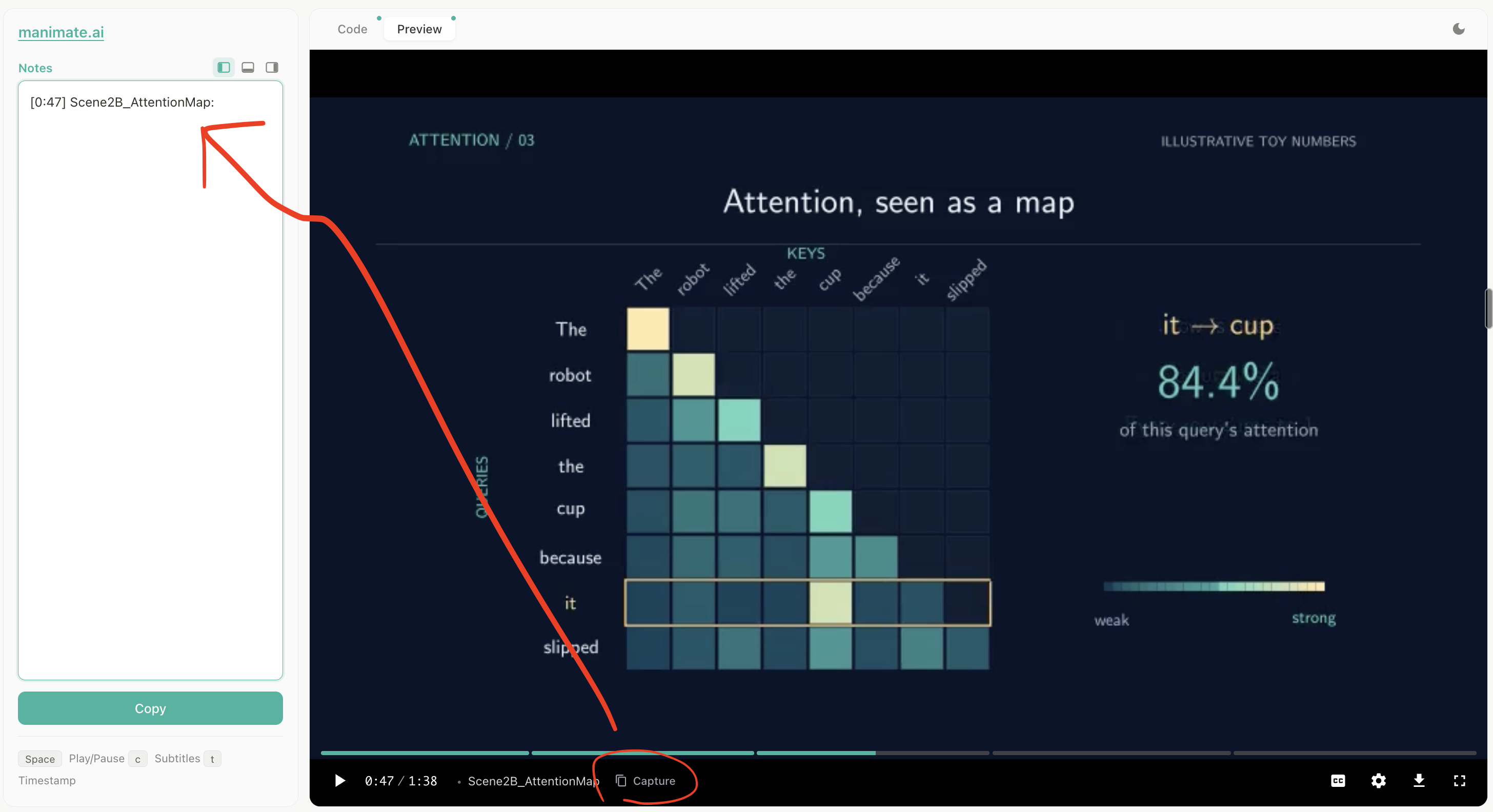
Watch the video and pause at a moment you want to discuss. Click Capture
or press t to add the current timestamp and scene name to Notes.
Describe what to fix in that frame, request a change, or ask a question—for
example, "These labels overlap; move them apart" or "Why does this token
attend most strongly to cup?" Repeat for any other moments.Click Copy, paste the notes into Claude Code (or Codex), and send them.
The agent can inspect the referenced frames, answer your questions, and
update the affected scenes. Reload the viewer to watch the revised video
and repeat as needed.
Local voiceover with Kokoro TTS
Narration uses Kokoro TTS, an open-weight
text-to-speech model that runs locally without an API key. uv sync installs
the Python dependencies.
Where files go
Every video is a flat session folder under one consistent home — never in
your working directory:
~/.manim-skill/<project-slug>/ # narration.txt, script.py, video.mp4, media/, ...
Override the home with MANIM_SKILL_HOME. This means you can point the skill at
your own codebase ("visualize this algorithm") without it leaving artifacts
behind — it reads your files in place and writes only into the session folder.
License
MIT License - see LICENSE file for details.
Yorumlar (0)
Yorum birakmak icin giris yap.
Yorum birakSonuc bulunamadi