wayper
Health Uyari
- License — License: MIT
- Description — Repository has a description
- Active repo — Last push 0 days ago
- Low visibility — Only 5 GitHub stars
Code Gecti
- Code scan — Scanned 12 files during light audit, no dangerous patterns found
Permissions Gecti
- Permissions — No dangerous permissions requested
Bu listing icin henuz AI raporu yok.
Desktop wallpaper manager for Wallhaven — auto-download, rotate, and manage wallpapers with GUI, CLI, and AI control

wayper
The wallpaper manager that learns what you like.
Wallhaven integration · AI-native · keyboard-driven.
Home · Install · GUI · CLI · MCP · Config · 中文

Why wayper?
Most wallpaper tools stop at "set image on desktop." wayper is a full Wallhaven client that auto-downloads, curates, and rotates wallpapers — and gets smarter the more you use it.
What makes it different:
- Learns from you — ban a wallpaper and wayper analyzes the pattern. AI-powered tag analysis suggests what to exclude next, with co-occurrence mining and iterative feedback tracking across sessions.
- AI-native (MCP) — built-in MCP server. Tell Codex or Claude "switch to something with mountains" or "favorite this one" — it just works. First wallpaper manager with native AI assistant integration.
- Keyboard-driven GUI — every single action has a shortcut. Grid navigation, lightbox, favorites, settings — fully operable without a mouse. Built for power users.
And the fundamentals:
- Wallhaven integration — auto-downloads based on your search preferences. Syncs favorites and tag blacklist to your Wallhaven account.
- Smart tag filtering — excluded tags sync to Wallhaven's cloud blacklist for server-side filtering; overflow tags are sent via URL query; the rest are filtered after metadata fetch. Zero wasted downloads.
- Auto orientation — portrait monitors get portrait wallpapers. No sorting needed.
- Three-tier purity — SFW, Sketchy, NSFW — independently toggleable, persistent across sessions.
- Cross-platform — macOS and Linux (Hyprland/Sway). CLI + GUI + MCP.
--jsoneverywhere — every command supports machine-readable output.
Install
Arch Linux (AUR)
paru -S wayper # or: yay -S wayper
From source
git clone https://github.com/yuukidach/wayper.git
cd wayper
uv venv && uv pip install -e .
uv pip install -e ".[browser]"  # optional: browser cookie extraction for Wallhaven sync
GUI
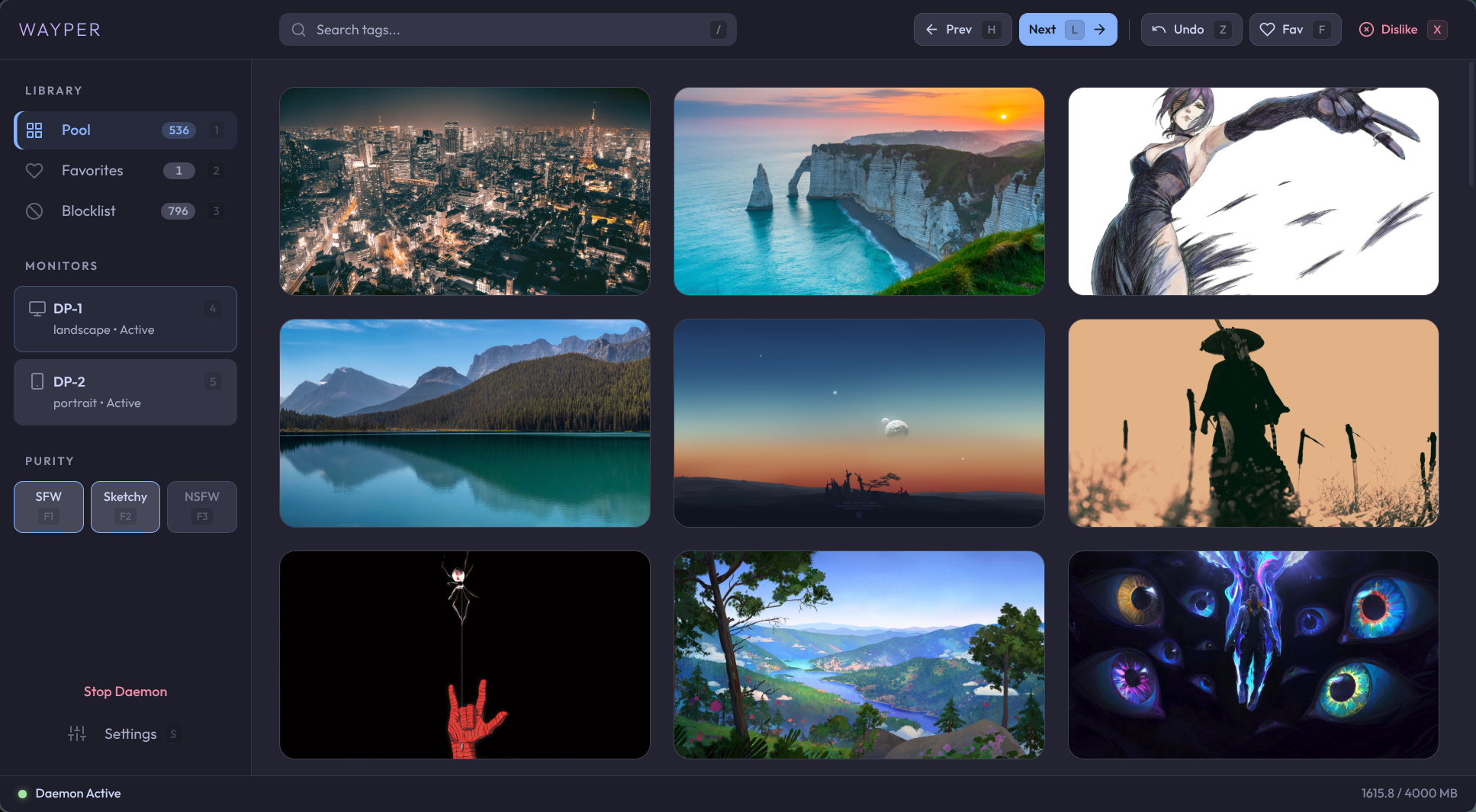
wayper-gui launches a standalone app for browsing, managing, and controlling your wallpaper collection. Fully operable without a mouse.
- Browse & preview — grid view with thumbnail caching, lightbox preview, set wallpaper with Enter
- Tag search — search by Wallhaven tags, category, or filename with autocomplete
- Smart suggestions — analyzes ban patterns to recommend tags to exclude; co-occurrence mining finds common descriptors across excluded individuals; drill into combo exclusions (e.g., "tattoo + nude") for precise filtering
- AI analysis — Claude-powered deep analysis of ban patterns with iterative feedback. Identifies uploader patterns and suggests Wallhaven user blacklist candidates. Click suggested tags to preview matching images
- Settings — configure Wallhaven queries, excluded tags/combos, purity, and monitors from the GUI. Changes apply to the running daemon instantly
- Keyboard-driven — every action has a shortcut: grid navigation, tab switching, lightbox, favorites, ban, undo
Grid view:
| Key | Action | Key | Action |
|---|---|---|---|
1 2 3 |
Pool / Favorites / Blocklist | F1 F2 F3 |
Toggle SFW / Sketchy / NSFW |
h / l |
Prev / Next wallpaper | f |
Favorite (focused card or current) |
x / Del |
Ban / Remove | u |
Undo ban |
o |
Open on Wallhaven | s |
Settings |
/ |
Focus search bar | Esc |
Clear search / Unfocus |
Enter / Space |
Preview (lightbox) | Arrow keys | Navigate grid |
[ / ] |
Blocklist: Recoverable / All | a |
AI analysis (Blocklist) |
g |
Locate current wallpaper | gg / G |
Jump to first / last |
4–9 |
Switch monitor |
Lightbox preview:
| Key | Action | Key | Action |
|---|---|---|---|
← / → |
Previous / Next image (pan when zoomed) | Enter |
Set as wallpaper |
f |
Favorite | x / Del |
Dislike |
o |
Open on Wallhaven | Space / Esc |
Close lightbox |
| Scroll | Zoom at cursor (0.5×–8×) | Drag | Pan when zoomed in |
0 |
Reset to fit | + / - |
Zoom in / out |
| Double-click | Toggle 100% / fit |
CLI

wayper daemon               # start background rotation + downloads
wayper next                 # next wallpaper (forward history or new random)
wayper prev                 # previous wallpaper from history
wayper fav [--open]         # favorite current wallpaper
wayper unfav                # remove from favorites
wayper ban                  # blacklist + switch
wayper unban                # undo last ban
wayper mode                 # toggle sfw↔nsfw (preserves sketchy)
wayper mode sketchy         # toggle sketchy on/off
wayper mode sfw,sketchy     # set exact purity combination
wayper suggest             # frequency-based tag exclusion suggestions
wayper suggest --ai        # AI-powered analysis via Claude CLI
wayper status               # show current state
wayper-gui                  # GUI app (browse, actions, daemon, settings)
wayper setup                # install .desktop entry (Linux)
wayper --json status        # machine-readable output
Keybindings
Hyprland:
bind = $mod, F9,       exec, wayper ban
bind = $mod SHIFT, F9, exec, wayper unban
bind = $mod, F10,      exec, wayper fav
bind = $mod SHIFT, F10,exec, wayper unfav
bind = $mod CTRL, F10, exec, wayper fav --open
bind = $mod, F11,      exec, wayper next
bind = $mod SHIFT, F11,exec, wayper prev
bind = $mod, F12,      exec, wayper mode
bind = $mod SHIFT, F12,exec, wayper mode sketchy
exec-once = wayper daemon
AeroSpace (macOS):
cmd-shift-n = 'exec-and-forget wayper next'
cmd-shift-b = 'exec-and-forget wayper ban'
cmd-shift-f = 'exec-and-forget wayper fav'
MCP
wayper ships an MCP server so AI assistants can control your wallpapers natively.
Use the absolute path to wayper-mcp. After installing from source, that is usually .venv/bin/wayper-mcp.
Codex:
codex mcp add wayper -- /path/to/wayper/.venv/bin/wayper-mcp
Or edit ~/.codex/config.toml:
[mcp_servers.wayper]
command = "/path/to/wayper/.venv/bin/wayper-mcp"
Claude Code:
Add to ~/.claude/.mcp.json:
{
  "mcpServers": {
    "wayper": {
      "command": "/path/to/wayper/.venv/bin/wayper-mcp"
    }
  }
}
Available tools: status · next_wallpaper · prev_wallpaper · fav · unfav · ban · unban · set_mode · delete_wallpaper · wallpaper_info · tag_stats_top · tag_stats_lookup · tag_stats_combo · uploader_stats_lookup
Config
mkdir -p ~/.config/wayper
cp example-config.toml ~/.config/wayper/config.toml
See example-config.toml for all options — API key, proxy, intervals, quota, transitions, etc. Monitors are auto-detected; the [[monitors]] config section is only needed as a fallback when detection fails.
Requirements
- Python 3.12+
- Wallhaven API key
macOS: Python 3.12+, Node.js (for Electron GUI)
License
Yorumlar (0)
Yorum birakmak icin giris yap.
Yorum birakSonuc bulunamadi