emacs-claude-code
Health Pass
- License — License: GPL-3.0
- Description — Repository has a description
- Active repo — Last push 0 days ago
- Community trust — 20 GitHub stars
Code Pass
- Code scan — Scanned 12 files during light audit, no dangerous patterns found
Permissions Pass
- Permissions — No dangerous permissions requested
This tool provides an Emacs interface for interacting with Claude Code and Codex CLIs. It features intelligent auto-response capabilities, terminal (vterm) integration, and session management to streamline AI-assisted coding directly within the Emacs editor.
Security Assessment
The overall risk is rated as Medium. While the automated code scan found no dangerous patterns, hardcoded secrets, or requests for elevated system permissions, the tool's core functionality requires careful consideration. It operates by actively reading terminal buffers and programmatically executing keystrokes (simulating keyboard input) to send commands. Because it is designed to automatically answer permission prompts (such as sending "Y" to proceed with an action), it inherently executes shell commands and interacts with your file system on your behalf. The tool does not appear to make independent external network requests, but it directly passes commands to the connected CLI. Users must ensure they trust the CLI's actions before fully enabling the auto-response feature.
Quality Assessment
The project appears to be actively maintained, with its most recent code push occurring today. It is properly licensed under the standard GPL-3.0, which is a good indicator of open-source compliance and intent. The repository has a clear description, comprehensive documentation, and a moderate level of community engagement with 19 GitHub stars. Overall, it is a healthy, actively developed project.
Verdict
Safe to use, provided you review and configure the auto-response feature to ensure it does not blindly approve sensitive CLI actions.
Emacs interface for Claude Code with auto-response, vterm integration, and session management
Emacs Claude Code
Emacs interface for Claude Code and Codex CLI with intelligent auto-response and enhanced vterm integration.
Supports both Claude Code (❯ prompt) and Codex (› prompt) out of the box.
Key Features
- Auto-Response - Automatically responds to CLI prompts (Y/N, Y/Y/N, Waiting states) for both Claude Code and Codex
- User-Typing Detection - Suppresses all auto-responses while you are actively typing at the prompt
- Accumulation Guard - Prevents duplicate command queuing via buffer-content analysis
- Periodic Auto-Response - Sends periodic commands based on number of interactions
- Buffer Dashboard - Centralized dashboard with timer status, config, state duration, and live debug log
- Audio Notifications - Async beep tones (400Hz heartbeat / 1400Hz sent), pre-recorded TTS, cooldown debounce
- Watchdog - Stuck-state detection with auto re-send; sending guard with timeout; timer lifecycle management
- Speaking Flash - Mode-line flashes green when Claude is speaking via TTS (MCP audio)
- Tab Highlight - Tab-bar tabs pulse red/green/yellow to reflect Claude buffer state
- Yank-as-File - Yank large contents as file for clean terminal, with remote host support
Supported CLIs
| CLI | Prompt | Y/N Pattern | Y/Y/N Pattern |
|---|---|---|---|
| Claude Code | ❯ |
❯ 1. Yes |
2. Yes, and ... |
| Codex | › |
› 1. Yes, proceed (y) |
(2-option only) |
Both are detected automatically. No configuration needed.
State Detection
Auto-response states and detection priority| State | Description | Auto-Response |
|---|---|---|
:y/y/n |
Permission prompt with 3 options (highest priority) | Sends "2" + Return |
:y/n |
Permission prompt with 2 options | Sends "1" + Return |
:suggestion |
Edit suggestion (↵ send) |
Sends configured response |
:running |
Claude is processing | Skipped |
:user-typing |
User is typing at prompt | Skipped (all responses suppressed) |
:waiting |
Claude is waiting for input | Sends /speak + Return |
Detection priority: Y/Y/N > Suggestion > Y/N > Running > User-Typing > Waiting
Examples
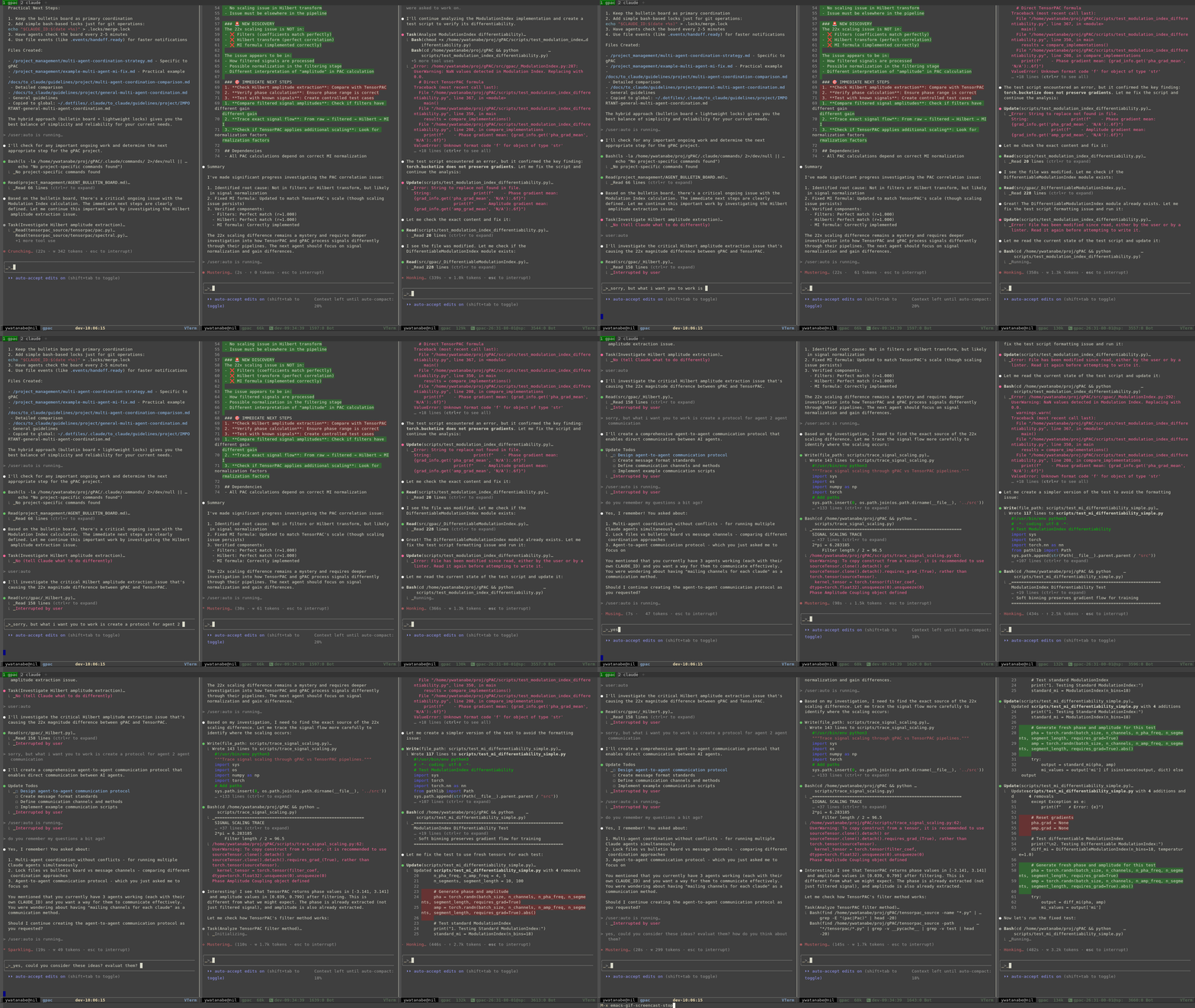
Real-time demonstration of auto-response functionality
Buffer List Dashboard
M-x ecc-list-buffers — centralized dashboard with timer status, config, and live debug log.
ECC Claude Buffer List
=====================

    Buffer Name                    Auto State      Last Sent    Duration
--- -----------------------------  ---- ----------  ------------ --------
    my-awesome-buffer-1            ON   Running     10:22:54     45s
    my-awesome-buffer-2            ON   Y/Y/N       09:18:34     3s
    my-awesome-buffer-3            off  -           -            -

Timers:
  Main:     ACTIVE (2s)
  Periodic: ACTIVE (300s)
  Beep:     ACTIVE (3s)
  Pulse:    ACTIVE  Sending: clear

Config: Beep ON (400Hz/1400Hz)  TTS off  Cooldown 2.0s  Stuck 15s

Recent Events (c=clear):
  10:22:55  Matched state :running with pattern: (esc to interrupt
  10:22:54  Sent response to my-awesome-buffer-1: 2
  10:22:53  Matched state :y/y/n with pattern:  2. Yes, and

Keys: RET=jump o=other a=toggle e=on D=off b=beep c=clear-log g=refresh r=auto q=quit
Auto-refresh: ON (every 2.0s)
Installation
git clone https://github.com/ywatanabe1989/emacs-claude-code.git ~/.emacs.d/lisp/emacs-claude-code
Add to your init.el:
(add-to-list 'load-path "~/.emacs.d/lisp/emacs-claude-code")
(require 'emacs-claude-code)
Quick Start
Essential Commands
| Command | Description |
|---|---|
M-x ecc-list-buffers |
Show buffer dashboard with timers, config, and debug log |
M-x ecc-auto-toggle |
Toggle auto-response for current vterm buffer |
M-x ecc-auto-periodical-toggle |
Toggle periodic auto-response commands |
M-x ecc-auto-response-running-beep-toggle |
Toggle audio heartbeat notifications |
M-x ecc-auto-response-tts-toggle |
Toggle pre-recorded TTS sounds |
M-x ecc-auto-response-cleanup-timers |
Cancel all ECC timers (emergency cleanup) |
M-x ecc-vterm-yank-as-file |
Yank clipboard content as file (supports remote hosts) |
Basic Configuration
Auto-response, periodic commands, yank-as-file, keybindings;; Auto-response mapping (defaults shown)
(setq --ecc-auto-response-responses
'((:y/n . "1") ; Respond "1" to Y/N prompts
(:y/y/n . "2") ; Respond "2" to Y/Y/N prompts
(:waiting . "/speak"))) ; Send /speak when waiting
;;;; Enable yank-as-file for large content
;; (--ecc-vterm-utils-enable-yank-advice)
;;;; Enable periodic auto-response to keep sessions active
;; (ecc-auto-periodical-toggle)
;; Configure periodic commands (optional)
(setq ecc-auto-periodical-commands
'((10 . "/compact") ; Run /compact every 10 interactions
(20 . "/git"))) ; Run /git every 20 interactions
;; Yank-as-file target directory (default: ~/.emacs-claude-code/)
(setq ecc-directory-for-yank-as-file "~/my-custom-yank-dir/")
;; Optional keybindings
(define-key vterm-mode-map (kbd "C-c C-l") 'ecc-list-buffers)
(define-key vterm-mode-map (kbd "C-c C-a") 'ecc-auto-toggle)
(define-key vterm-mode-map (kbd "C-c C-y") 'ecc-vterm-yank-as-file)
Testing
258 tests across 24 test files covering all 23 source modules (100% file coverage).
# Run all tests with report generation
./tests/run_tests.sh

# Run require integrity check only (no Emacs needed)
./tests/check_requires.sh
CI runs a require-integrity pre-check before the test matrix to catch missing files early.
Technical Documentation
See src/README.md for:
- Auto-response throttling configuration
- Timing flow diagrams
- Watchdog and reliability parameters
- Audio notification settings
Appendix: Author's Custom Workflow Reference
Bash Commands (~/.bash.d/all/010_claude/)| Category | Commands | Description |
|---|---|---|
| Session | cld, cc |
Start Claude session with project-specific config and MCP |
| History | cld_forget [n] |
Delete latest n JSONL files from project history |
| Account | cld_logout, cld-switch |
Logout or switch between Claude accounts |
| Usage | cld-usage, cld-usage-today, cld-usage-live |
Track API usage stats |
| Worktree | cldw, cldw-ls, cldw-rm, cldw-cleanup |
Git worktree management for parallel sessions |
| Commands | cldc-ls, cldc-sync, cldc-validate |
Manage .claude/commands/ across projects |
| Skills | clds-ls, clds-create, clds-sync |
Manage .claude/skills/ across projects |
| Agents | clda-ls, clda-validate, clda-fix |
Manage .claude/agents/ definitions |
| Hooks | cldh-ls, cldh-edit, cldh-enable/disable |
Manage Claude Code hooks |
Custom / commands for Claude Code workflow. See Anthropic's documentation for details on custom commands.
| Category | Commands |
|---|---|
| Core Workflow | /auto, /plan, /tests, /git, /workflow |
| Code Quality | /refactor, /cleanup, /factor-out, /rename, /minimize-api |
| Project Mgmt | /progress, /timeline, /finalize, /evaluate-project |
| Issue Tracking | /bug-report, /feature-request-create, /feature-request-check |
| Version Control | /worktree, /rollback, /resolve-conflicts, /version-bump |
| Communication | /speak, /speak-signature, /call, /communicate |
| Audit | /audit, /audit-paper, /critic |
| Deployment | /scitex-deploy-staging, /scitex-deploy-prod |
Project-specific context files automatically synced and made read-only by the cld command:
guidelines/- Project guidelines and coding standardsbin/- Project-specific scripts and utilitiesexamples/- Code examples and templates
Contact
Yusuke Watanabe ([email protected])
Reviews (0)
Sign in to leave a review.
Leave a reviewNo results found