GatedSpace
Health Uyari
- License — License: NOASSERTION
- Description — Repository has a description
- Active repo — Last push 0 days ago
- Low visibility — Only 7 GitHub stars
Code Uyari
- fs module — File system access in .github/workflows/build-desktop.yml
Permissions Gecti
- Permissions — No dangerous permissions requested
Bu listing icin henuz AI raporu yok.
An agentic development environment for Windows. Run Claude Code, Codex, and any CLI coding agent in parallel. Free, local, no account.
GatedSpace
An agentic development environment for Windows
Run Claude Code, Codex, Gemini, and any other CLI coding agent in parallel,
each in its own isolated git worktree, with built-in terminals, diff review,
and workspace management.
Free. No account. No cloud. Everything runs on your machine.




Download •
What it does •
Build from source •
Report an issue
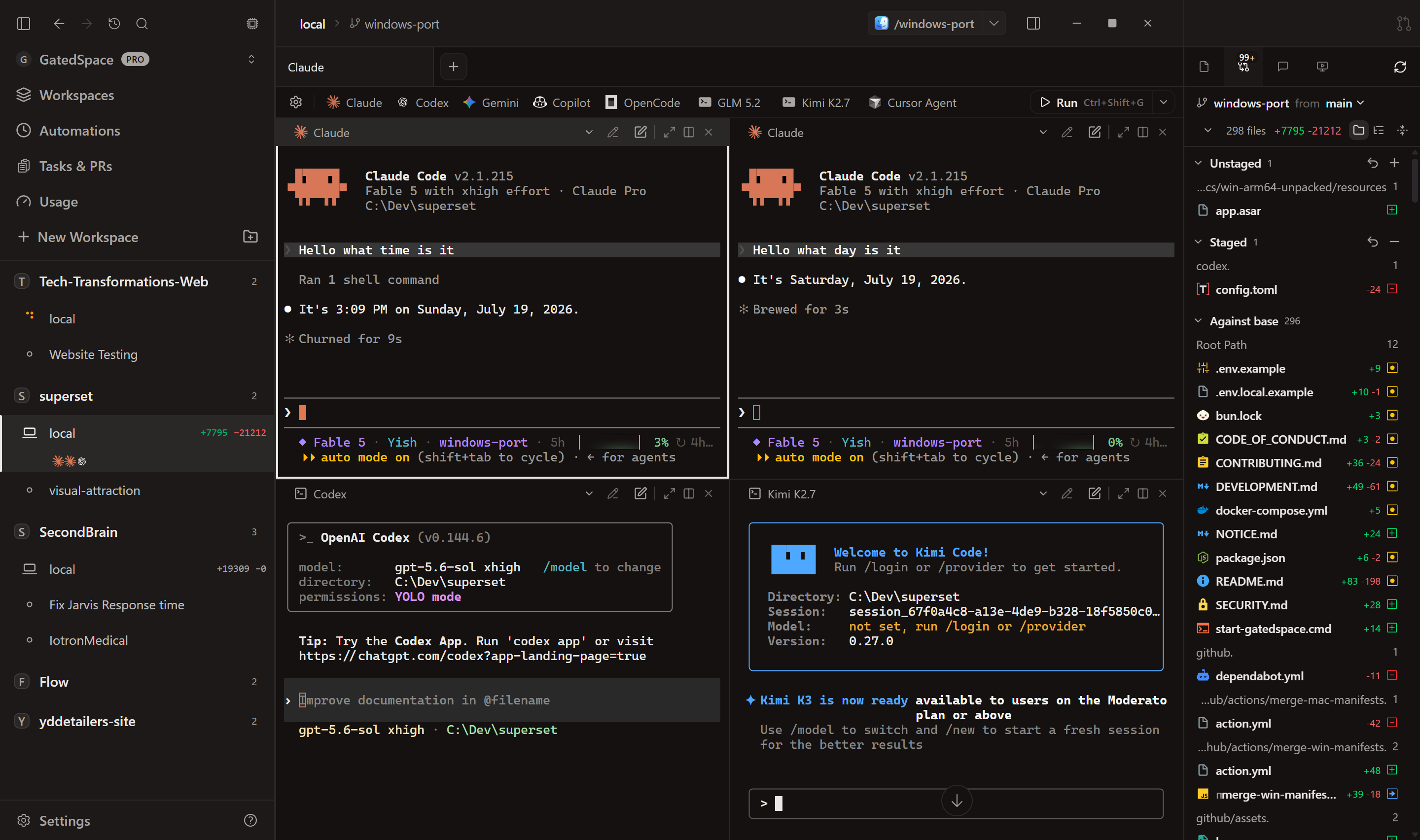
Claude Code, OpenAI Codex, and Kimi Code working the same repo in parallel — each in its own pane, with the built-in diff review on the right.
Download
Grab the installer for your PC from the
latest release:
| Your PC | Installer |
|---|---|
| Most Windows PCs (Intel or AMD) | GatedSpace-x64.exe |
| Windows on ARM (Snapdragon laptops, Surface Pro X, etc.) | GatedSpace-arm64.exe |
Not sure which? Open Settings → System → About and check System type.
The app auto-updates from this repository's releases after install.
"Windows protected your PC"?
The installers are not code-signed yet, so SmartScreen shows a warning on first
run. Click More info, then Run anyway. Every installer is built from
this repository's source by GitHub Actions, and you can audit the exact build in
the Actions tab.
What it does
- Parallel agents. Run several Claude Code / Codex / Gemini / any-CLI-agent
sessions side by side, each in its own git worktree, so agents never step on
each other's changes. - Workspaces. One project, many worktrees. Create, switch, and tear down
branches without touching your main checkout. - Built-in terminals. Persistent PTY sessions that survive app restarts,
and even PC reboots. - Review before you merge. Built-in diff view for each workspace, then
open in your editor of choice. - Claude account profiles. Optionally declare multiple Claude accounts
(~/.superset/claude-profile.json) and GatedSpace routes new agents to
whichever one has usage left. - Usage dashboard. Real token usage and quota tracking for Claude Code and
Codex, read from their local session files. Nothing is polled or uploaded. - Local-only by design. No account, no analytics keys baked into public
builds, all data in local SQLite. Your code never leaves your machine.
How it relates to Superset
GatedSpace is a Windows port of Superset
(see NOTICE.md; this project is not affiliated with Superset, Inc.).
| Superset (upstream) | GatedSpace | |
|---|---|---|
| Platforms | macOS, Linux | Windows 10/11, x64 + ARM64 |
| Account | Sign-in + cloud backend | None. Fully local |
| Price | Free tier + paid plans | Free. Every feature unlocked |
Requirements
GatedSpace drives real command-line tools, so a few things need to be installed
first. On a brand-new PC, none of these are present yet.
Required
- Windows 10/11, x64 or ARM64.
- Git. Every workspace is a git worktree,
so Git must be installed and on your PATH. Install it withwinget install --id Git.Git -e, then set your identity once so commits work:git config --global user.name "Your Name" git config --global user.email "[email protected]" - At least one coding agent, installed and signed in. For
Claude Code:
(If PowerShell says running scripts is disabled, runwinget install OpenJS.NodeJS.LTS npm install -g @anthropic-ai/claude-codeSet-ExecutionPolicy -Scope CurrentUser RemoteSigned, or usenpm.cmd.)
You sign in the first time you launch the agent: GatedSpace opens its browser
login for you. Codex works the same way.
Optional
- GitHub CLI (
gh), only for GitHub features like
opening PRs or cloning private repos. Install withwinget install --id GitHub.cli -e, then rungh auth login. Without it,
GatedSpace may keep prompting to connect GitHub.
After installing any of these, restart GatedSpace so it picks them up on your
PATH.
First run
GatedSpace runs fully local with no account. Just open it, add or clone a
project, and start a workspace. Connect Claude Code or Codex from the model
picker when you start a session.
The "Sign in with an account" option is optional. It switches the app into
cloud mode for syncing across devices and using teams, and it needs a Superset
cloud account. You don't need it for solo use on one machine, and you can switch
back anytime with "Use GatedSpace without an account" on the sign-in screen.
Build from source
git clone https://github.com/yzgershon/GatedSpace.git
cd GatedSpace
bun install
cd apps/desktop
bun run compile:app
bun run package -- --publish never
Requires Bun (see .bun-version), Node.js, and on Windows
the Visual Studio 2022 C++ build tools for native modules. Public builds setNEXT_PUBLIC_LOCAL_ONLY=1 at compile time to bake in local-only mode.
Contributing
Bug reports and pull requests are welcome. Start with
CONTRIBUTING.md for the dev setup and PR process, and
SECURITY.md for reporting vulnerabilities.
Credits & license
GatedSpace is a modified version of Superset
by Superset, Inc. The upstream team deserves the credit for the product
design and the vast majority of the code. This fork adds the Windows port,
the local-only mode, and the rebrand; it is not affiliated with or endorsed
by Superset, Inc.
Licensed under the Elastic License 2.0, same as upstream.
See NOTICE.md for details.
Yorumlar (0)
Yorum birakmak icin giris yap.
Yorum birakSonuc bulunamadi