vcp
Health Warn
- License — License: Apache-2.0
- Description — Repository has a description
- Active repo — Last push 0 days ago
- Low visibility — Only 7 GitHub stars
Code Fail
- os.homedir — User home directory access in plugins/dev-buddy/hooks/ralph-stage-gate.ts
- rm -rf — Recursive force deletion command in plugins/dev-buddy/scripts/__tests__/api-task-runner.test.ts
- fs.rmSync — Destructive file system operation in plugins/dev-buddy/scripts/__tests__/api-task-runner.test.ts
- process.env — Environment variable access in plugins/dev-buddy/scripts/__tests__/api-task-runner.test.ts
- fs.rmSync — Destructive file system operation in plugins/dev-buddy/scripts/__tests__/chatroom-config.test.ts
- rm -rf — Recursive force deletion command in plugins/dev-buddy/scripts/__tests__/one-shot-runner.test.ts
- process.env — Environment variable access in plugins/dev-buddy/scripts/__tests__/one-shot-runner.test.ts
Permissions Pass
- Permissions — No dangerous permissions requested
No AI report is available for this listing yet.
Vibe Coding Protocal - Security-first protocol for AI-generated code, multiple standards with real-time enforcement and multi-AI pipeline orchestration
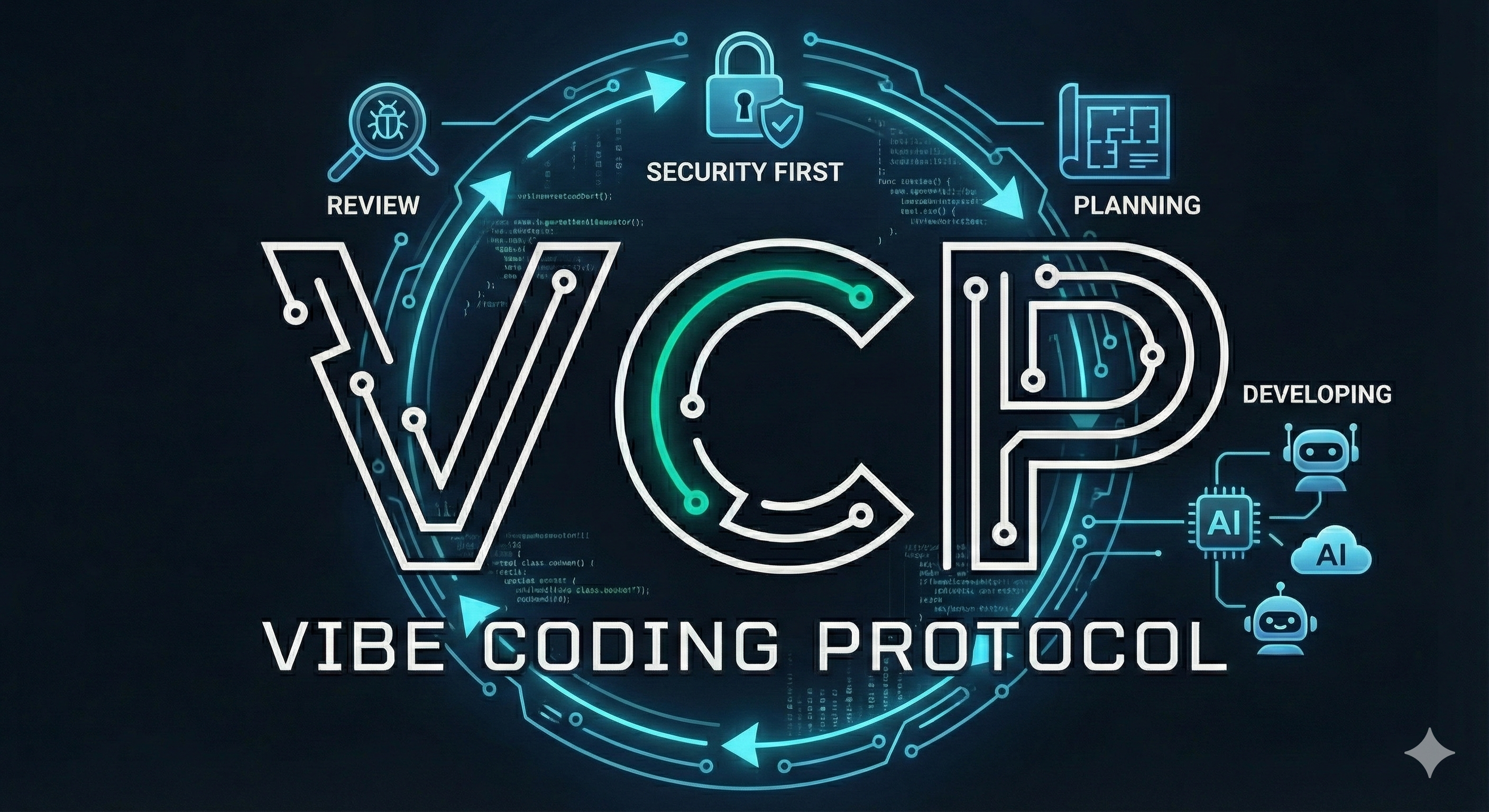
VCP — Vibe Coding Protocol
Multi-AI development pipelines with built-in security enforcement.








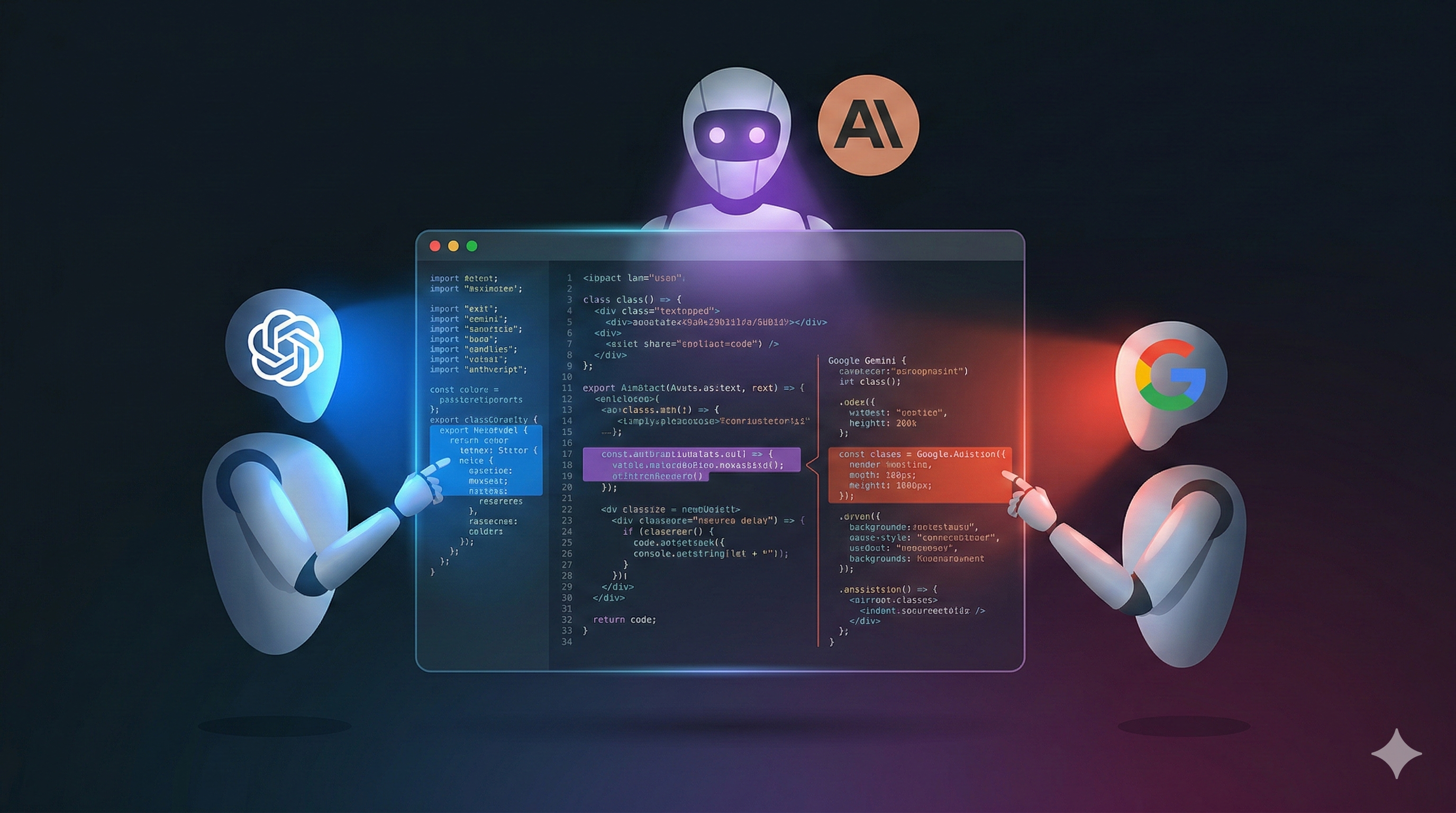
One AI writing and reviewing its own code is like grading your own homework. VCP orchestrates multiple AI models through structured pipelines — then enforces 41 security and quality standards with real-time blocking.
❌ VCP Security Gate — BLOCKED:
   CWE-798: Hardcoded secret detected. Use environment variables or a secret manager.
Table of Contents
- Quick Start
- Three Plugins, One Protocol
- Why This Matters
- The Echo Chamber Problem
- Dev Buddy — Multi-AI Pipeline
- VCP — Three-Layer Enforcement
- Standards Coverage
- Organization-Wide Standards
- Configuration
- Core Philosophy
- Documentation
- How to Contribute
- Repo Structure
- References
- License
Quick Start
Prerequisites: Claude Code and Bun. See the Getting Started guide for full setup.
# Add the VCP marketplace
/plugin marketplace add Z-M-Huang/vcp

# Install the plugin
/plugin install vcp@vcp

# Initialize your project
/vcp-init
That's it. Standards are injected at session start, dangerous patterns are blocked on every write, and 10 scanning skills are available on demand.
Docker
Prefer a containerized environment? VCP provides a ready-to-use Docker image with Claude Code, Codex CLI, Gemini CLI, and all dependencies pre-installed:
cd docker/
cp .env.example .env
# Edit .env with your API keys and host paths
docker compose up -d
docker exec -it vcp-docker bash
See docker/README.md for full setup instructions, volume mounts, and platform-specific configuration.
Three Plugins, One Protocol
VCP ships three complementary plugins:
| Plugin | What It Does | Install |
|---|---|---|
| VCP | Standards enforcement — 41 standards, real-time blocking, 10 skills | /plugin install vcp@vcp |
| Dev Buddy | Multi-AI pipeline — configurable stages with role-based prompts, cross-model review gates, specialist analysis team | /plugin install vcp@dev-buddy |
| mcp-doc | Documentation manifest generator — indexes project docs as MCP resources with search, path-lookup, and tree-view tools | /install vcp@mcp-doc |
Use VCP alone for standards enforcement. Add Dev Buddy when you want structured multi-AI workflows with cross-model review.
Why This Matters
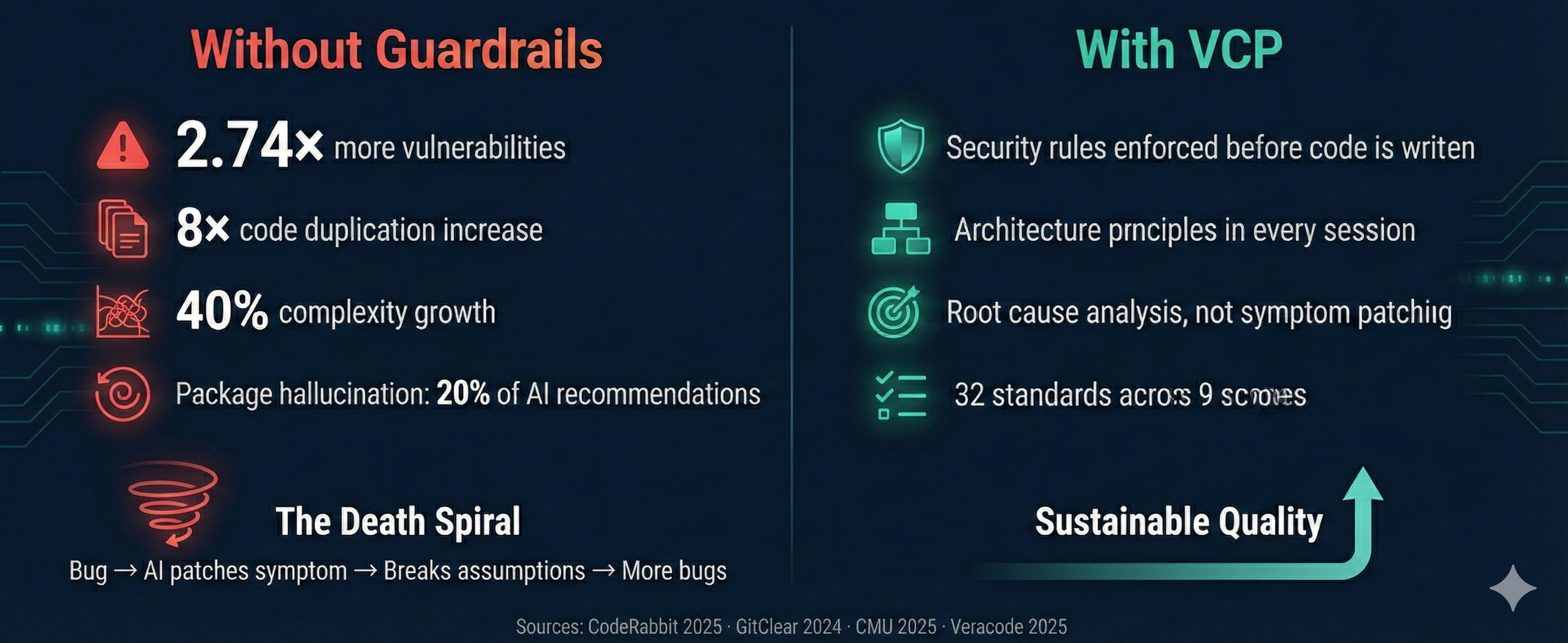
AI coding assistants produce code fast. They also produce code that's 2.74x more likely to contain security vulnerabilities, 40% more complex, and architecturally unsound at scale:
| Problem | Data | Source |
|---|---|---|
| Security vulnerabilities | 2.74x higher rate than human code; 45% of AI code has vulnerabilities | CodeRabbit 2025, Veracode 2025 |
| Code duplication | 8-fold increase across 211M lines analyzed | GitClear 2024 |
| Complexity growth | 40% increase in AI-assisted repositories | CMU 2025 |
| Hallucinated packages | ~20% of recommendations reference non-existent packages | Lasso Security |
| Refactoring collapse | Dropped from 25% to <10% of changed lines | GitClear 2024 |
The death spiral: AI generates working code fast. A bug appears. AI patches the symptom, not the root cause. The patch breaks assumptions elsewhere. Each fix compounds the problem — hack on top of hack. The codebase becomes unmaintainable within months.
VCP breaks this cycle by making the AI aware of engineering principles before it writes code, not after.
The Echo Chamber Problem
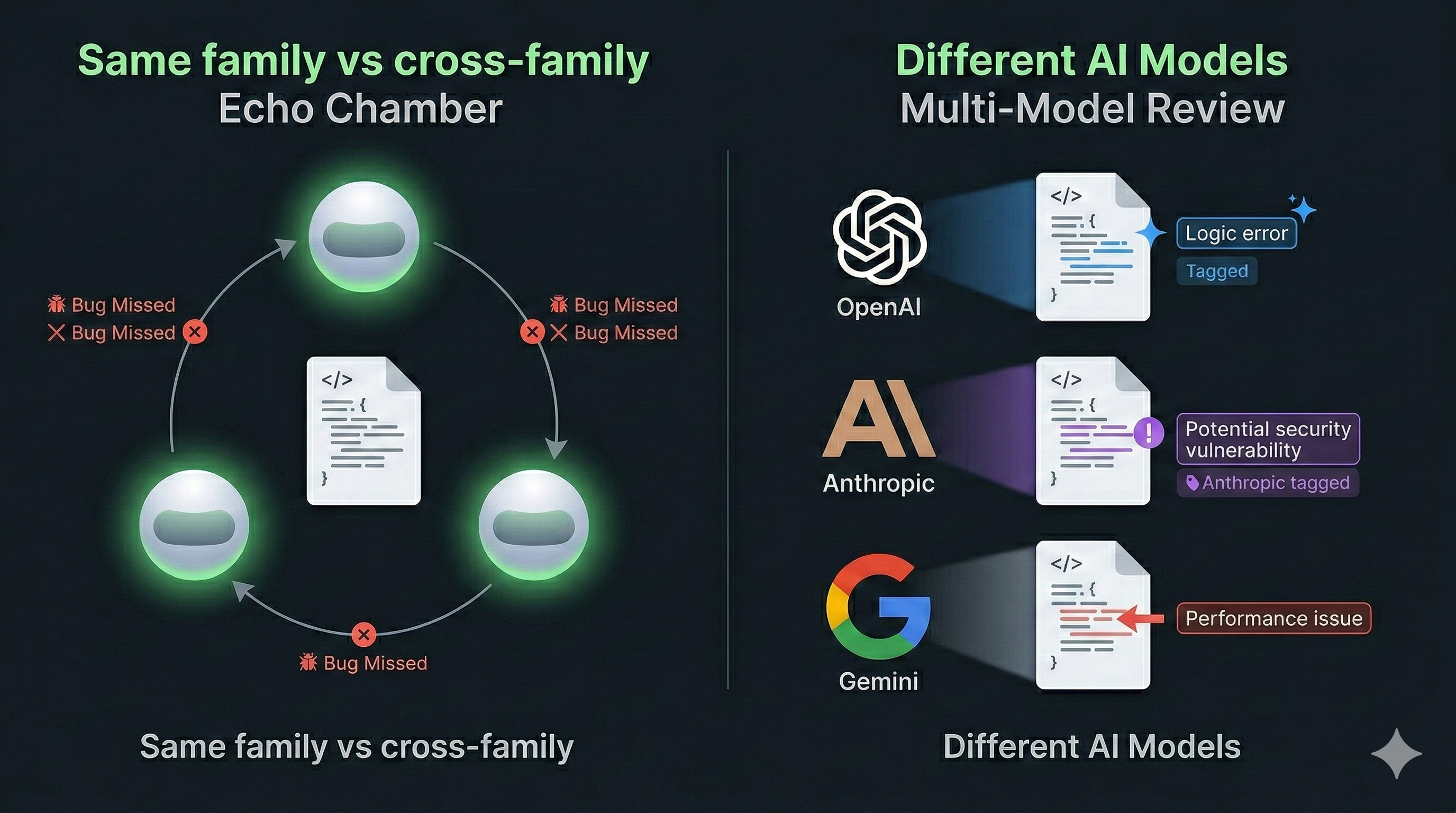
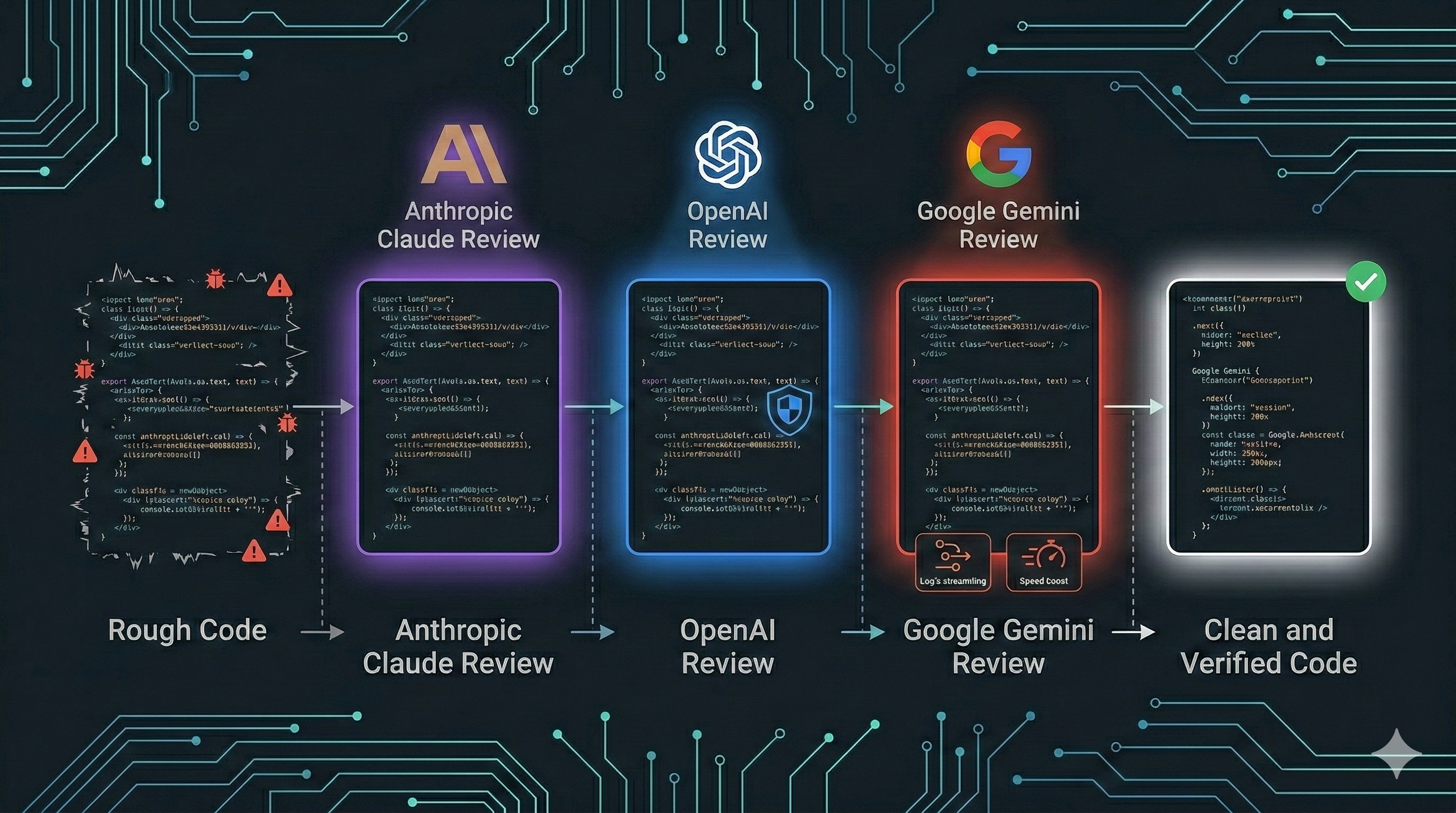
When a single AI family writes and reviews code, it shares the same training biases, the same blind spots, and the same failure modes. A Claude model reviewing Claude-generated code — or GPT reviewing GPT — misses the same classes of bugs because the models share architectural lineage and training distributions. Cross-model review breaks this pattern: routing code through independent models from different providers catches issues that same-family review consistently overlooks. Dev Buddy makes this practical with configurable pipelines that enforce cross-model review at every stage.
Dev Buddy — Multi-AI Pipeline
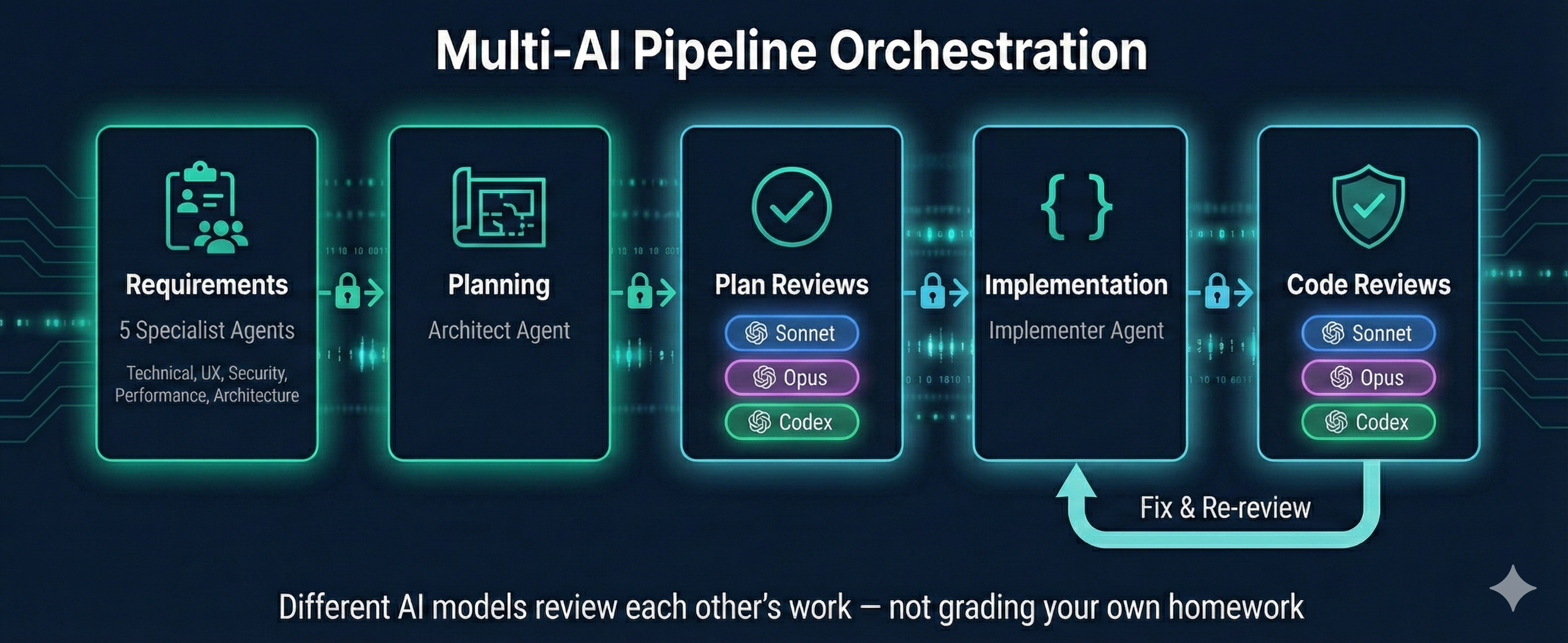
One AI writing and reviewing its own code is like grading your own homework. Dev Buddy orchestrates multiple AI models through structured development pipelines — with task-based dependencies that literally prevent skipping stages.
User-Defined Pipelines
Define any number of pipelines in ~/.vcp/dev-buddy.json under pipelines:
{
  "pipelines": {
    "feature": ["requirements", "planning", "plan-review", "implementation", "code-review"],
    "bug-fix": ["rca", "requirements", "planning", "plan-review", "implementation", "code-review"],
    "quick-fix": ["planning", "implementation", "code-review"]
  }
}
Run any pipeline with /dev-buddy-run <pipeline-name>.
Deprecated:
/dev-buddy-feature-implementand/dev-buddy-bug-fixwill be removed in a future release. Use/dev-buddy-run featureand/dev-buddy-run bug-fixinstead.
Cross-AI Review Gates
Different AI models review each other's work at each phase. A typical pipeline:
Claude Opus plans ──→ Claude Sonnet reviews ──→ Claude Opus reviews ──→ Codex reviews
                                                                            │
                      Claude Sonnet implements ◀────────────────────────────┘
                            │
                      Claude Sonnet reviews ──→ Claude Opus reviews ──→ Codex reviews
Each review is independent — reviewers don't see each other's verdicts. Cross-model review catches issues that single-AI self-review misses.
Data-Driven Enforcement
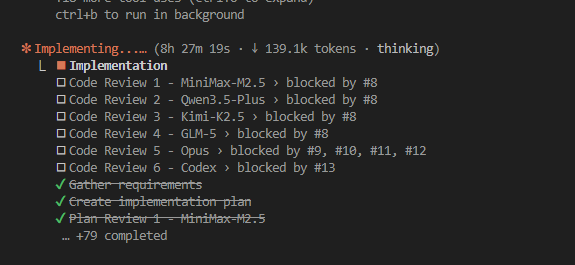
Pipeline stages aren't instructions the AI might skip — they're task dependencies enforced by the system:
| Instruction-Based (fragile) | Task-Based (VCP) |
|---|---|
| "Run Sonnet → Opus → Codex" | blockedBy prevents Codex until Opus completes |
| AI can skip "redundant" steps | TaskList() only shows unblocked tasks |
| No audit trail | Complete task history with metadata |
| Hidden progress | Real-time task progress visible to user |
Team-Based Requirements
The feature pipeline spawns 5 specialist agents that explore your codebase in parallel before a single line of code is planned:
| Specialist | Focus |
|---|---|
| Technical Analyst | Existing codebase, patterns, dependencies, files to modify |
| UX/Domain Analyst | User workflows, edge cases, accessibility |
| Security Analyst | Threat model, OWASP relevance, non-functional security requirements |
| Performance Analyst | Load impact, scalability, bottlenecks, caching |
| Architecture Analyst | Design patterns, SOLID principles, maintainability |
Their findings inform requirements gathering — producing richer, more complete specifications from the start.
Configurable Pipeline
The pipeline is defined in ~/.vcp/dev-buddy.json as ordered arrays of stages. Each stage specifies a type, provider, and model. Add, remove, or reorder stages. Swap AI providers per stage — API presets support both Anthropic-compatible and OpenAI-compatible endpoints via the protocol field. Use the web portal (/dev-buddy-config) or edit JSON directly.
Each executor combines a stage definition (output format, process rules — bound to the stage type) with a role prompt (persona, expertise — swappable). Stage definitions auto-resolve from the stage type, ensuring consistent output schemas regardless of which role prompt is used.
Example: feature pipeline with Codex final gates — click to expand{
"pipelines": {
"feature": ["requirements", "planning", "plan-review", "implementation", "code-review"],
"bug-fix": ["rca", "requirements", "planning", "plan-review", "implementation", "code-review"]
},
"stages": [
{ "type": "requirements", "provider": "anthropic-subscription", "model": "opus" },
{ "type": "planning", "provider": "anthropic-subscription", "model": "opus" },
{ "type": "plan-review", "provider": "anthropic-subscription", "model": "sonnet" },
{ "type": "plan-review", "provider": "anthropic-subscription", "model": "opus" },
{ "type": "plan-review", "provider": "my-codex-preset", "model": "o3" },
{ "type": "implementation", "provider": "anthropic-subscription", "model": "sonnet" },
{ "type": "code-review", "provider": "anthropic-subscription", "model": "sonnet" },
{ "type": "code-review", "provider": "anthropic-subscription", "model": "opus" },
{ "type": "code-review", "provider": "my-codex-preset", "model": "o3" }
]
}
Review Harness
Review stages include a false-positive analysis step: each finding is evaluated for potential misinterpretation before being surfaced. Reviewers populate a misinterpretation field explaining why a finding might be wrong. User confirmation checkpoints pause the pipeline at review boundaries so you can accept, reject, or refine findings before proceeding.
Quick Start
# Install dev-buddy alongside VCP
/plugin install vcp@dev-buddy

# Run any pipeline by name
/dev-buddy-run feature Add user authentication with JWT
/dev-buddy-run bug-fix Login fails when email contains a plus sign

# Configure pipeline stages and providers via web portal
/dev-buddy-config
VCP — Three-Layer Enforcement
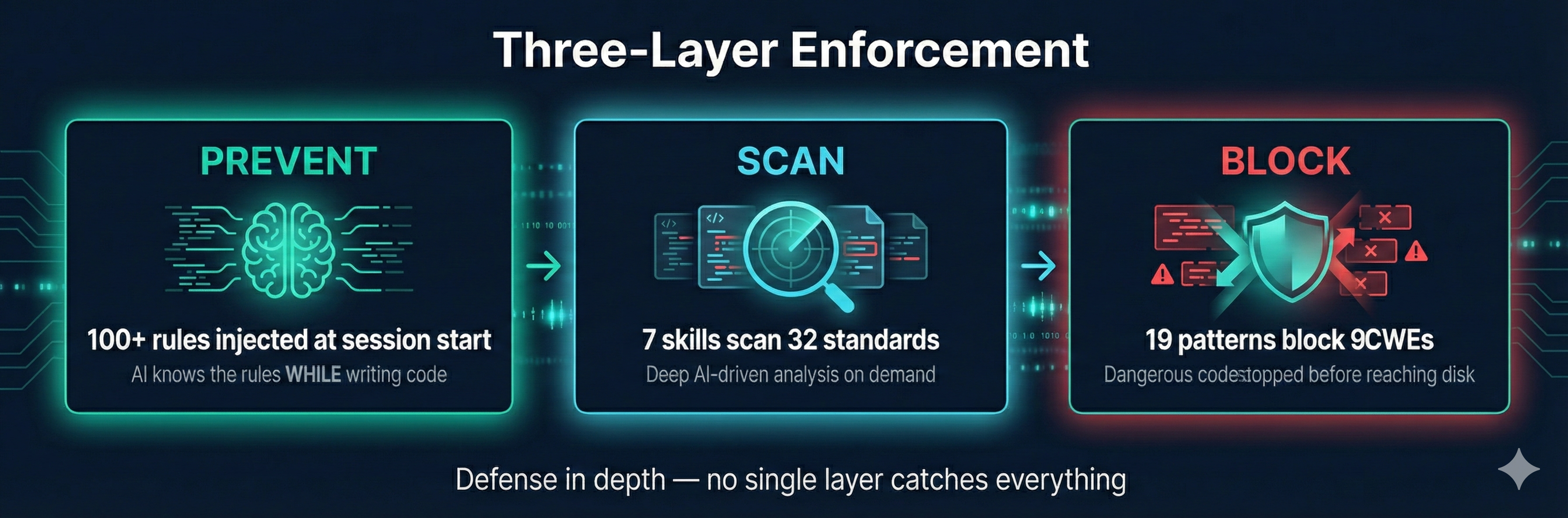
No single layer catches everything. Layer 1 prevents violations at the source. Layer 3 blocks the most dangerous patterns instantly. Layer 2 catches the nuanced issues through deep analysis. Together they provide defense in depth.
Layer 1: Proactive Context — Prevent Before Writing
At session start, VCP injects a compact summary of all applicable rules into the AI's context. The AI internalizes security, architecture, testing, and quality rules while it writes code — preventing violations at the source.
Run /vcp-context to re-inject rules at any time (useful after context compaction in long sessions).
Layer 2: On-Demand Scanning — Deep Analysis
Skills scan code against 41 standards across 12 scopes using AI-driven analysis:
| Skill | What It Does |
|---|---|
/vcp-audit |
Full audit against all applicable standards — security, architecture, quality, compliance |
/vcp-pre-commit-review |
Reviews all changed files before commit, produces PASS/BLOCK verdict |
/vcp-dependency-check |
Lockfile hygiene, version ranges, package existence, typosquatting detection |
/vcp-review-tests |
Test quality: over-mocking, tautological tests, missing edge cases |
/vcp-coverage-gaps |
Maps source to test files, finds untested functions and missing edge cases |
/vcp-test-plan |
Generates test plans with unit/integration tests, edge cases, and mock guidance |
/vcp-root-cause-check |
Analyzes bug fixes for root cause vs. symptom patching |
Layer 3: Real-Time Blocking — Stop Dangerous Code Instantly
A security gate hook runs on every Write, Edit, and Bash call, blocking dangerous patterns before they reach disk:
| CWE | What It Catches |
|---|---|
| CWE-798 | Hardcoded secrets, AWS keys, private keys, JWT tokens, DB connection strings, Bearer tokens, API key prefixes |
| CWE-89 | SQL injection via string concatenation and template literals |
| CWE-95 | Code injection via dangerous dynamic code execution with user input |
| CWE-79 | XSS via innerHTML with variable assignment |
| CWE-502 | Insecure deserialization: unsafe Python object loading, unsafe YAML, node-serialize |
| CWE-643 | XPath injection via string concatenation |
| CWE-1321 | Prototype pollution via __proto__ or constructor.prototype |
| CWE-1336 | Server-side template injection (SSTI): Jinja2, Handlebars with variable input |
| CWE-116 | Encoded data piped to shell execution |
Coverage Backed by Industry Standards
VCP standards are mapped against authoritative security frameworks:
- OWASP Top 10:2025 — All 10 categories covered
- OWASP Agentic AI Security Top 10 (ASI) — All 10 categories covered (ASI01–ASI10)
- CWE Top 25:2024 — 19/25 covered (6 uncovered are memory-safety, out of scope for managed languages)
- OWASP API Security Top 10:2023 — All 10 categories addressed
- OWASP ASVS v5.0 — 15/17 chapters covered
- OWASP Docker Security — 11/13 controls covered
Standards Coverage
41 standards across 12 scopes:
| Scope | Standards | What They Cover |
|---|---|---|
| Core (always active) | 12 | Security, architecture, root cause analysis, code quality, error handling, testing, dependency management, secure defaults, API misuse prevention, attack surface analysis, data flow security, concurrency security |
| Web Frontend | 4 | XSS prevention, CSP, accessibility (WCAG 2.2), performance, component structure |
| Web Backend | 6 | Injection prevention, API design, data access, WebSocket/SSE, caching security, backend structure |
| Database | 2 | Encryption (TDE, column-level, key management), schema security (RLS, masking, audit) |
| Mobile | 2 | Keychain/KeyStore, certificate pinning, deep links, biometrics, attestation, platform configuration |
| Desktop | 1 | Electron context isolation, Tauri capabilities, IPC validation, code signing |
| CLI | 1 | Shell injection, argument injection, exit codes, signal handling |
| DevOps | 4 | Containers, CI/CD, Infrastructure as Code, Kubernetes |
| Agentic AI | 5 | Agent security (prompt injection, code execution, memory poisoning), tool security (MCP vetting, allowlists), permissions (least privilege, rogue detection), supply chain (MCP integrity, model provenance), communication (inter-agent auth, cascading failures) — OWASP ASI Top 10 |
| Compliance — GDPR | 1 | Data deletion, retention, consent, PII handling |
| Compliance — PCI DSS | 1 | Tokenization, card masking, CDE isolation |
| Compliance — HIPAA | 1 | PHI encryption, audit logging, retention, minimum necessary |
| Compliance — Accessibility | 1 | ADA, Section 508/504, EAA, PSBAR, AODA, ACA, EN 301 549, WCAG conformance mapping, accessibility statements, VPAT/ACR |
All standards follow a consistent format: WHY (the principle), WHAT (numbered actionable rules), HOW (code examples and anti-patterns). See standards/README.md for the format specification.
Organization-Wide Standards
VCP's manifest system lets organizations enforce their own rules across all projects and developers — alongside or instead of VCP defaults.
Root Manifest (manifest.json)
├── core scope     → https://your-org.github.io/standards/scopes/core.json
│   ├── core-security.md      (VCP default)
│   ├── core-architecture.md  (VCP default)
│   └── org-coding-style.md   (your custom standard)
├── web-backend    → https://your-org.github.io/standards/scopes/web-backend.json
│   ├── web-backend-security.md   (VCP default)
│   └── org-api-conventions.md    (your custom standard)
└── org-internal   → https://your-org.github.io/standards/scopes/org-internal.json
    ├── org-logging-policy.md     (your custom standard)
    └── org-data-classification.md (your custom standard)
1. Create your standards
Write markdown files following the VCP format spec. Each standard has YAML frontmatter, a principle, numbered rules with code examples, and anti-patterns.
2. Create scope manifests
JSON files listing your standards with severity and tags:
{
  "scope": "org-internal",
  "standards": [
    {
      "id": "org-logging-policy",
      "url": "https://your-org.github.io/standards/org-logging-policy.md",
      "severity": "high",
      "tags": ["logging", "compliance"]
    }
  ]
}
3. Create a root manifest
Point to your scope manifests (include VCP defaults or replace them):
{
  "version": "2.0",
  "repository": "https://github.com/your-org/vcp-standards",
  "scopes": {
    "core": {
      "manifest": "https://your-org.github.io/standards/scopes/core.json",
      "applies": "always"
    },
    "org-internal": {
      "manifest": "https://your-org.github.io/standards/scopes/org-internal.json",
      "applies": "always"
    }
  }
}
4. Point VCP to your manifest
Set the URL globally (applies to all projects) or per-project:
# Global — all projects on this machine use your org's standards
/vcp-config global set standards_url https://your-org.github.io/standards/manifest.json

# Per-project — override for a specific repo
/vcp-config set standards_url https://your-org.github.io/standards/manifest.json
What this enables:
- Consistent enforcement — Every developer using AI coding tools follows the same rules
- Mix and match — Include VCP's default standards alongside your own, or replace them entirely
- Central updates — Update a standard once, every project picks it up on next session
- Schema validation — Manifests are validated against published JSON schemas for correctness
Configuration
VCP uses two config files — click to expand| File | Scope | Purpose |
|---|---|---|
~/.vcp/config.json |
Global (machine-wide) | Standards URL, plugin path, default severity/scopes/compliance/ignore |
.vcp/config.json |
Project | Scopes, compliance frameworks, severity threshold, frameworks, exclude patterns, ignore rules |
Manage via natural language with /vcp-config:
/vcp-config ignore core-architecture          # Suppress a standard
/vcp-config ignore core-security/rule-3       # Suppress a specific rule
/vcp-config ignore CWE-798                    # Suppress a security gate pattern
/vcp-config enable database scope             # Toggle a scope
/vcp-config add gdpr compliance               # Add a compliance framework
/vcp-config set severity to high              # Change severity threshold
/vcp-config global show                       # View global config
Core Philosophy
- Security comes first. No feature is worth a vulnerability.
- Architecture comes second. Every change respects the system's structure.
- Fix the root cause, not the symptom. Trace bugs to where they originate. Break the death spiral.
- Principled, not prescriptive. Explain WHY, not just WHAT. Allow alternatives that satisfy the principle.
- AI-parseable. Standards are structured for machine consumption — consistent format, unambiguous rules.
Documentation
Full documentation is on the VCP Wiki:
- Getting Started — Prerequisites, installation, first scan
- Configuration — Scopes, compliance, severity, ignore rules
- Skills Reference — All 10 skills with usage and examples
- Dev Buddy Quick Start — Multi-AI pipeline setup and first run
- Dev Buddy Configuration — Pipeline stages, providers, models
- FAQ — Common questions and troubleshooting
How to Contribute
- Report a vibe coding problem — Encountered a real issue from AI-generated code? Open a problem report. Your experience directly informs which standards we prioritize.
- Propose a new standard — Have an idea that would prevent a class of AI coding problems? Propose a standard. Review the format spec first.
- Contribute to existing standards — Pick an open issue, read the requirements, and submit a PR.
Repo Structure
Project layout — click to expandvcp/
├── standards/ # 41 AI-optimized principled standards across 12 scopes
│ ├── manifest.json # Root manifest — full HTTPS URLs, org-customizable
│ ├── scopes/ # Per-scope manifest files
│ ├── core-*.md # Universal: security, architecture, testing, etc.
│ ├── web-*.md # Frontend and backend web standards
│ ├── database-*.md # Encryption, schema security
│ ├── mobile-*.md # Credential storage, cert pinning, biometrics
│ ├── desktop-*.md # Electron/Tauri isolation, IPC security
│ ├── cli-*.md # Shell injection, argument injection, exit codes
│ ├── devops-*.md # Containers, CI/CD, IaC, Kubernetes
│ ├── agentic-ai-*.md # Agent security, tool security, permissions, supply chain, communication
│ └── compliance-*.md # GDPR, PCI DSS, HIPAA, Accessibility
├── schemas/ # JSON schemas for config and manifest validation
├── plugins/vcp/ # VCP plugin — standards enforcement (skills, hooks, agents)
├── plugins/dev-buddy/ # Dev Buddy plugin — multi-AI pipeline orchestration
├── plugins/mcp-doc/ # mcp-doc plugin — documentation manifest generator
├── docker/ # Docker image — Claude Code, Codex CLI, Gemini CLI
└── .claude-plugin/ # Marketplace manifest
References
Research
- CodeRabbit — State of AI vs Human Code Generation (Dec 2025) — 2.74x vulnerability rate across 470 PRs
- GitClear — AI Copilot Code Quality 2025 — 211M lines, 4x growth in code clones
- Veracode — 2025 GenAI Code Security — 45% AI code has security vulnerabilities
- CMU — Speed at the Cost of Quality (arXiv 2511.04427) — 40.7% complexity increase
- Spracklen et al. — Package Hallucinations (USENIX Security 2025) — 205,474 hallucinated package names
Frameworks
- OWASP Top 10:2025 — OWASP ASVS v5.0 — OWASP API Security Top 10:2023 — CWE Top 25:2024 — OWASP Agentic AI Security Top 10 (Dec 2025)
License
Reviews (0)
Sign in to leave a review.
Leave a reviewNo results found